
The convenience of a smart garage door opener is undeniable. Imagine pulling into your driveway after a long day, and with a simple voice command or a tap on your smartphone, your garage door glides open, welcoming you home. This isn’t science fiction; it’s the reality offered by modern MyQ technology. But can your MyQ system truly open your garage door automatically, and what does that entail?
MyQ, developed by Chamberlain Group, is a proprietary Wi-Fi-enabled technology that connects your garage door opener to your home network. This connection allows you to monitor and control your garage door from anywhere using a smartphone app. While the core functionality is remote control, the “automatic” aspect involves integrating MyQ with other smart home devices and services to trigger actions based on specific conditions, such as your proximity to your home.
Understanding how these systems work, their capabilities, and their limitations is key to leveraging them for true automatic operation.
Key Takeaways
- MyQ enables remote control and monitoring of garage doors via a smartphone app, allowing users to open, close, and check the status of their garage from anywhere.
- True automatic opening with MyQ typically relies on geofencing technology, where the system detects your smartphone’s proximity to your home and initiates the opening sequence.
- Integration with other smart home platforms like Amazon Alexa, Google Assistant, and IFTTT (If This Then That) expands MyQ’s automation capabilities, allowing for voice control and complex routines.
- Safety features are paramount, and automatic opening systems often incorporate sensors and protocols to prevent accidental closures or opening when obstacles are present.
- Installation and setup can vary, but most modern garage door openers are MyQ compatible or can be retrofitted with a MyQ Smart Garage Hub.
- Potential security considerations exist with any connected device, necessitating strong passwords and regular updates for both the MyQ app and your home Wi-Fi network.
- Troubleshooting common issues like connectivity problems or geofencing inaccuracies is crucial for reliable automatic operation.
Understanding Myq Technology And Its Capabilities
At its heart, MyQ technology is a bridge between your traditional garage door opener and the digital world. It allows for a level of interaction and control that was previously unimaginable. This system typically involves a MyQ-enabled garage door opener or a MyQ Smart Garage Hub that retrofits older openers. The hub or opener connects to your home’s Wi-Fi network, allowing it to communicate with the MyQ app on your smartphone or tablet.
The primary functions of MyQ include:
- Remote Operation: Open, close, or stop your garage door from anywhere in the world with an internet connection. This is invaluable if you’ve forgotten to close the door or need to grant access to a trusted person remotely.
- Real-Time Monitoring: Receive notifications on your smartphone when your garage door opens or closes. You can also check the current status of the door at any time.
- Scheduling: Set schedules for your garage door to open or close automatically at specific times, which can be useful for security or convenience.
- Access Management: Grant temporary or permanent access to family members or service providers via the app, often with activity logs to track who accessed the garage and when.
While these features offer significant convenience, the concept of “automatic” opening goes a step further, integrating MyQ into more sophisticated smart home ecosystems. This is where geofencing and smart assistant integrations come into play, transforming a remote-controlled device into a truly automated one.
The Role Of Geofencing In Automatic Opening
Geofencing is a location-based service that creates a virtual boundary around a specific geographical area. When your smartphone enters or leaves this predefined zone, it triggers an action. For MyQ, this is the primary mechanism for achieving automatic garage door opening as you approach your home.
Here’s how it typically works:
- Setting Up the Geofence: Within the MyQ app, you define a radius around your home. This radius can often be adjusted to optimize performance.
- Location Services: Your smartphone’s GPS and location services must be enabled and granted permission for the MyQ app to use them.
- Proximity Detection: As your smartphone enters the geofenced area, the MyQ app detects your proximity.
- Command Transmission: Upon detecting your arrival within the set parameters, the app sends a command to your MyQ-enabled garage door opener via the internet to initiate the opening sequence.
Example: You’re driving home from work. As you get within a mile of your house (the geofence radius you set), your smartphone signals your arrival. The MyQ system receives this signal and automatically opens your garage door. By the time you pull into the driveway, the door is already open, allowing for a seamless entry.
In my experience, the effectiveness of geofencing can depend on several factors, including smartphone battery life, location services accuracy, and the responsiveness of your internet connection and the MyQ servers. It’s crucial to set realistic expectations and understand that while highly convenient, it’s not always instantaneous.
Integrating Myq With Smart Home Platforms
Beyond geofencing, MyQ’s true automation potential is unlocked through its integration with popular smart home ecosystems and platforms like Amazon Alexa, Google Assistant, and IFTTT (If This Then That).
- Voice Control: Linking your MyQ account to Alexa or Google Assistant allows you to open and close your garage door using voice commands. For example, you could say, “Alexa, open the garage door.” However, for security reasons, many platforms require a voice PIN to open the door, preventing unauthorized voice commands.
- Smart Home Routines: This is where automation truly shines. You can create custom routines that involve your garage door.
- Example Routine 1 (Arrival): Combine geofencing with other smart home actions. When you enter the geofence, not only does the garage door open, but your smart lights turn on, and your thermostat adjusts to your preferred temperature.
- Example Routine 2 (Departure): When you say, “Hey Google, I’m leaving,” the system could close the garage door, turn off all lights, and arm your security system.
- IFTTT Applets: IFTTT allows you to create “applets” that connect different apps and devices. You could set up an applet like: “If my smart watch detects I’ve arrived home, then open the garage door.” This opens up a vast array of conditional automations.
This interconnectedness transforms your garage door from a standalone appliance into an active participant in your smart home, responding to your presence and your commands in sophisticated ways.
Credit: ifttt.com
Setting Up Myq For Automatic Operation
Getting your MyQ system ready for automatic opening involves a few key steps, focusing on both the hardware and software aspects. The process is generally straightforward, but attention to detail ensures reliable performance.
Compatibility And Installation
Before you can automate, you need a MyQ-compatible opener.
- New Openers: Many modern garage door openers from brands like Chamberlain, LiftMaster, and Craftsman come with built-in MyQ technology. Look for the MyQ logo on the product packaging.
- Older Openers: If you have an existing garage door opener that isn’t MyQ enabled, you can often add the functionality using the MyQ Smart Garage Hub. This device acts as a bridge, connecting your existing opener to your Wi-Fi network and the MyQ app. Installation typically involves mounting a sensor on the garage door and plugging in the hub near your router.
The installation of the Smart Garage Hub is generally a DIY project. It involves:
- Mounting the Door Sensor: Affix the sensor to the top of your garage door using the provided adhesive. This sensor tells the hub whether the door is open or closed.
- Placing the Hub: Position the hub within range of your Wi-Fi router and the garage door sensor.
- Connecting to Wi-Fi: Follow the instructions in the MyQ app to connect the hub to your home Wi-Fi network.
- Pairing with the Opener: The app will guide you through pairing the hub with your existing garage door opener, often by pressing a learn button on the opener motor unit.
For those who prefer professional installation, most garage door technicians can install MyQ-compatible openers or hubs. The cost of a MyQ Smart Garage Hub can range from $50 to $100, depending on the retailer and any available promotions.
Configuring The Myq App And Geofencing
Once the hardware is set up, the MyQ app becomes your control center.
- Download and Account Creation: Download the MyQ app from your smartphone’s app store (iOS or Android) and create a MyQ account.
- Device Pairing: Follow the app’s prompts to add your MyQ-enabled opener or Smart Garage Hub to your account.
- Enabling Geofencing:
- Navigate to the Geofencing section within the app settings.
- Ensure Location Services are enabled for the MyQ app on your smartphone (usually found in your phone’s privacy settings).
- Define your Geofence Radius. Start with a larger radius (e.g., 1 mile) and adjust it as needed. A smaller radius might trigger the opening later, while a larger one might open the door too soon.
- Select the Action to be performed, which is typically “Open Garage Door.” You can also configure it to close the door upon departure if desired.
- Crucially, ensure your smartphone’s Wi-Fi and Bluetooth are enabled for optimal geofencing performance, as some systems use a combination of location technologies.
Linking To Smart Assistants And Ifttt
To leverage voice control and advanced routines:
- For Alexa/Google Assistant: Open the respective smart assistant app, search for the “MyQ” skill or service, and link your MyQ account. Follow the prompts to discover your devices and set up voice commands, including any necessary security PINs for opening.
- For IFTTT: Go to the IFTTT website or app, search for “MyQ,” and create new applets by connecting your MyQ account to other services and devices.
A common setup involves creating an “If I arrive home (geofence trigger), then open my garage door” applet. This requires careful configuration of both the geofence settings in the MyQ app and the parameters within IFTTT.
Credit: www.myq.com
Enhancing Automation With Smart Features And Accessories
Beyond the core MyQ functionality, several features and accessories can further enhance the convenience and automation of your garage door system. These often work in conjunction with the MyQ app and smart home integrations.
Smart Lighting And Camera Integration
The MyQ ecosystem can extend beyond just the garage door.
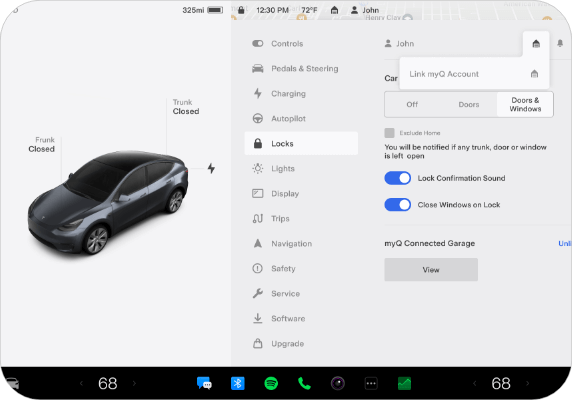
- Smart Lighting: Many smart bulbs and light switches are compatible with platforms like Alexa and Google Assistant. You can integrate these into your arrival and departure routines. For instance, as your garage door opens upon arrival, linked smart lights inside your home can illuminate, and lights near the garage entry can also turn on for added safety.
- Smart Cameras: For added security and peace of mind, consider integrating a compatible smart camera. Some systems allow you to view a live feed of your garage through the MyQ app or trigger recording when the garage door is activated. This provides visual confirmation of who or what is entering or leaving your garage.
Battery Backup And Power Outage Preparedness
A common concern with automated systems is what happens during a power outage.
- Battery Backup: Many modern MyQ-enabled openers come with a battery backup system. This ensures that your garage door opener can still function, including opening and closing, during a power failure. The battery typically provides enough power for around 10-20 open/close cycles, depending on the model and usage.
- App Notifications: The MyQ app can also notify you if the power goes out and if the opener is running on battery backup, keeping you informed even when you’re away from home.
This battery backup is crucial for maintaining the automatic functionality even when the grid is down, ensuring you can still access your home.
Advanced Safety Sensors And Obstruction Detection
While automatic opening is convenient, safety is paramount. MyQ systems are designed with safety features, but understanding them is vital.
- Safety Sensors: All modern garage door openers are equipped with safety sensors located near the bottom of the garage door track. These sensors emit an invisible beam; if the beam is broken by an object (a person, pet, or car) while the door is closing, the opener will immediately reverse direction. This prevents the door from closing on anything in its path.
- Obstruction Detection: The opener’s motor also has force-sensing technology that detects unusual resistance. If the door encounters an unexpected obstruction during opening or closing, it will stop or reverse.
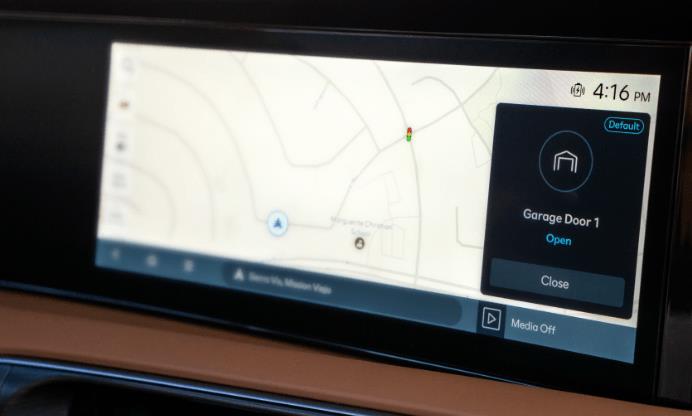
- Automatic Closing: If you enable automatic closing via the MyQ app, it’s critical to ensure these safety sensors are functioning correctly and that the garage door path is clear. The app typically allows you to set a delay before automatic closing occurs, giving you time to exit the garage.
It’s recommended to test your safety sensors monthly to ensure they are working correctly. You can do this by placing an object (like a broom handle) in the path of the closing door to see if it reverses. For more detailed testing procedures, consult your opener’s manual or resources like garage door maintenance guides.
Credit: www.myq.com
Security Considerations For Myq Systems
As with any internet-connected device, smart garage door openers introduce potential security vulnerabilities. However, manufacturers like Chamberlain Group have implemented several measures to mitigate these risks. Understanding these is key to maintaining a secure smart home.
Secure Connectivity And Encryption
- Wi-Fi Security: The MyQ system relies on your home Wi-Fi network for connectivity. Therefore, securing your home Wi-Fi with a strong, unique password (using WPA2 or WPA3 encryption) is the first line of defense. Avoid using default router passwords or easily guessable ones.
- MyQ Cloud Security: Data transmitted between your MyQ device, the MyQ app, and the MyQ cloud servers is typically encrypted. This helps protect your login credentials and commands from interception. Chamberlain states they use industry-standard security protocols.
- Regular Updates: Both the MyQ app and the firmware on your garage door opener or hub should be kept up-to-date. Manufacturers frequently release updates to patch security vulnerabilities. Enable automatic updates whenever possible.
Strong Passwords And Account Security
- MyQ Account Password: Use a strong, unique password for your MyQ account that is different from passwords used for other online services. Consider using a password manager to generate and store complex passwords.
- Two-Factor Authentication (2FA): If MyQ offers two-factor authentication for its accounts, enable it. This adds an extra layer of security by requiring a second form of verification (like a code sent to your phone) when logging in from a new device.
- Voice PIN: As mentioned earlier, for voice commands to smart assistants, always set up and use a voice PIN to prevent unauthorized opening of your garage door via voice.
Physical Security Of The Garage
While the technology is secure, physical security should not be overlooked.
- Secure the Emergency Release: The emergency release cord on your garage door opener allows for manual operation. Ensure this cord is not easily accessible from outside the garage. In my experience, some older models had cords that could be snagged by a coat hanger fed under the door. Newer systems often have more secure release mechanisms.
- Reinforce the Door: A strong garage door is essential. Consider reinforcing older doors or upgrading to a more robust model if security is a major concern.
- Limit Access Information: Be cautious about sharing information about your smart garage system, especially if you have guests or service providers who don’t require permanent access.
By implementing these security best practices, you can significantly reduce the risks associated with a connected garage door opener and enjoy the convenience of MyQ automation with greater peace of mind.
Troubleshooting Common Myq Issues
Even with the best technology, you might encounter occasional glitches with your MyQ system, particularly when it comes to automatic features like geofencing. Here are some common issues and their solutions.
Geofencing Not Triggering
This is perhaps the most frequent complaint with automatic garage door opening.
- Location Services Disabled: Double-check that location services are enabled for the MyQ app on your smartphone. Also, ensure your phone’s overall location services are turned on.
- Incorrect Geofence Radius: The radius might be set too small, meaning you’re already past the trigger point before it activates, or too large, leading to premature opening. Adjust the radius in the MyQ app settings.
- Low Phone Battery: Some phones aggressively manage background processes and location services when the battery is low. Keep your phone charged.
- App Not Running in Background: Ensure the MyQ app is allowed to run in the background on your smartphone. Check your phone’s battery optimization settings.
- Wi-Fi/Bluetooth Off: While primarily GPS-dependent, some systems benefit from or require Wi-Fi and Bluetooth to be enabled for accurate proximity detection.
- Server/App Glitches: Occasionally, the issue might be with the MyQ servers or a temporary bug in the app. Try closing and reopening the app, restarting your phone, or checking the MyQ status page for outages.
Connectivity Problems
If your MyQ device is unresponsive or shows as offline:
- Check Wi-Fi: Ensure your home Wi-Fi network is working correctly. Restart your router if necessary.
- Hub/Opener Placement: The MyQ hub or opener might be too far from the router, or there could be interference. Try moving the hub closer to the router or installing a Wi-Fi extender.
- Re-pair Device: You may need to re-pair the MyQ hub or opener with your Wi-Fi network. Consult the app or manual for instructions.
- Check MyQ Server Status: Visit the Chamberlain Group service status page (or similar official source) to see if there are known outages affecting MyQ services.
Voice Commands Not Working
If Alexa or Google Assistant isn’t controlling your garage door:
- Check Account Linking: Ensure your MyQ account is still correctly linked within the smart assistant app. Try unlinking and relinking the skill/service.
- Voice PIN Required: Remember that opening the garage door via voice typically requires a PIN. Make sure you’re entering it correctly when prompted.
- Device Discovery: Ask your smart assistant to “discover devices” again to ensure it recognizes your garage door opener.
- Opener Status: Verify the opener is online and functional within the MyQ app itself.
Remote Access Issues
If you can’t control the door when away from home:
- Internet Connection: Ensure both your smartphone and your home have a stable internet connection.
- App Updates: Make sure you are using the latest version of the MyQ app.
Regularly checking your system’s status and performing basic troubleshooting can help ensure your MyQ-enabled garage door operates automatically and reliably. If issues persist, contacting MyQ customer support or a qualified garage door technician is advisable.
Alternatives And Complementary Technologies
While MyQ is a leading solution, understanding the broader landscape of smart garage technology can be beneficial. Other manufacturers offer their own smart solutions, and third-party devices can also add intelligence to your existing opener.
Competitor Smart Garage Solutions
Several other companies offer smart garage door openers or add-on kits:
- Gogogate2: This system allows you to control and monitor up to three garage doors from your smartphone. It offers features similar to MyQ, including real-time notifications and remote access.
- Tailwind iQ3: Tailwind offers a smart garage controller that integrates with a variety of garage door openers. It boasts features like geofencing, voice control integration, and customizable alerts.
- Shelly Plus Add-on / Shelly 1: For the more technically inclined, devices like the Shelly Plus Add-on or Shelly 1 can be wired into existing garage door openers to provide Wi-Fi connectivity and control via a mobile app or web interface. This often requires more advanced DIY installation.
When comparing these, consider factors like compatibility with your existing opener, the range of features offered, the cost, and the ease of installation and use. For example, while some systems might offer more advanced customization, MyQ often benefits from wider integration with major smart home platforms.
The Role Of Smart Home Hubs
A central smart home hub, such as those from Samsung SmartThings or Hubitat Elevation, can also play a role in automating your garage door, even if your opener isn’t inherently smart.
- Z-Wave/Zigbee Controllers: These hubs often support protocols like Z-Wave and Zigbee. You can connect a compatible Z-Wave or Zigbee garage door controller to the hub. The hub then allows you to create complex automation routines involving your garage door and other Z-Wave/Zigbee devices (lights, locks, sensors) through its own app or interface.
- Integration with MyQ: Some smart home hubs can integrate with MyQ, allowing you to control your MyQ-enabled garage