
When your LiftMaster garage door opener stops functioning as expected, or if you’re planning an upgrade or routine maintenance, understanding how to remove the cover is a fundamental first step. This seemingly simple task can feel daunting if you’re unfamiliar with garage door opener mechanisms. However, with the right guidance and a few basic tools, you can safely and effectively access the internal components of your LiftMaster opener. This guide will walk you through the entire process, from identifying your opener model to safely reattaching the cover, ensuring you have the knowledge to tackle common issues or perform necessary upkeep.
The ability to remove the cover of your LiftMaster opener is more than just a mechanical step; it’s an empowering skill for any homeowner. It opens the door to troubleshooting, minor repairs, and preventative maintenance that can save you time and money.
Whether you’re dealing with a malfunctioning remote, a noisy motor, or simply want to perform a deeper clean, knowing how to access the opener’s interior is crucial. We’ll cover the necessary tools, safety precautions, and step-by-step instructions tailored for various LiftMaster models, making this process accessible even for those with limited DIY experience.
Key Takeaways
- Safety First: Always disconnect power to the garage door opener before attempting to remove the cover.
- Identify Your Model: LiftMaster openers have different cover designs; consult your manual or look for model-specific instructions.
- Common Fasteners: Covers are typically secured by screws, clips, or a combination of both.
- Tools Needed: A ladder, screwdriver set (Phillips and flathead), and potentially a putty knife or trim removal tool are usually sufficient.
- Gentle Approach: Avoid forcing the cover; if it’s stuck, re-examine for hidden fasteners or clips.
- Internal Components: Once the cover is off, you can access the motor, logic board, gears, and wiring for inspection or repair.
- Reassembly: Ensure all components are correctly aligned before replacing the cover and restoring power.
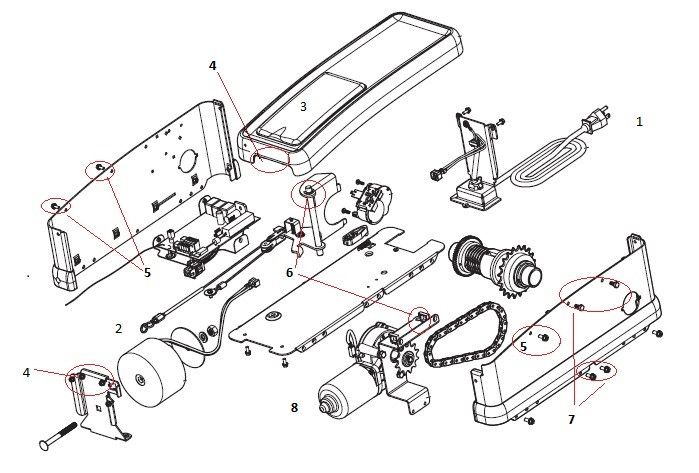
Credit: support.chamberlaingroup.com
Understanding Your Liftmaster Garage Door Opener Model
Before you can remove the cover, it’s essential to understand that LiftMaster, like many manufacturers, produces a range of garage door opener models. Each model might have slight variations in its housing design and the way the cover is attached.
Identifying your specific model will help you find the most accurate instructions and avoid potential pitfalls.
Locating Your Model Number
Your LiftMaster garage door opener’s model number is typically found on a sticker or plate located on the main body of the opener unit itself. This is usually on the side, the back, or sometimes on the bottom of the motor unit that hangs from your garage ceiling. You might need to shine a flashlight to see it clearly. Common locations include:
- The side panel of the motor unit.
- The back of the motor unit, facing the garage wall.
- Sometimes, a label near the power cord.
Once you have the model number (e. g. , LiftMaster 8500, LiftMaster 3230, LiftMaster WLED), you can often find the original owner’s manual online on the LiftMaster website or through a general web search. The manual will provide specific diagrams and instructions for your unit.
Common Liftmaster Opener Series And Their Cover Designs
LiftMaster offers several popular series, each with characteristic cover designs:
- 800 Series (e.g., 8500, 8550W, 8557W): These are often newer, “smart” openers. Their covers tend to be sleek and may use a combination of screws and snap-fit clips. Some might have a primary cover that slides off after removing screws, while others have a main housing that detaches.
- 300 Series (e.g., 3230, 3240, 3265): These are more traditional chain-drive or belt-drive openers. Their covers are usually made of durable plastic and are often secured with screws along the bottom and sometimes the sides.
- Contractor Series (e.g., 1300, 1350): Similar to the 300 series, these typically feature screw-based attachments for the cover.
Example: A LiftMaster 3265, a common chain-drive model, typically has a long plastic cover that is held in place by several screws along its bottom edge. Removing these screws allows the cover to be pulled down and away from the unit. In contrast, a LiftMaster 8500 (Wall Mount) has a more compact housing, and its cover might involve releasing latches or removing fewer, strategically placed screws.
Essential Tools And Safety Precautions
Before you begin, gathering the right tools and prioritizing safety is paramount. Working with garage door openers involves electrical components and heavy moving parts, so taking the necessary precautions will prevent injury and damage.
Tools You’ll Likely Need
Most LiftMaster cover removal tasks require only a few common household tools:
- Ladder: A sturdy stepladder is essential for safely reaching the opener unit mounted on the ceiling. Ensure it’s placed on a stable surface.
- Screwdriver Set: A set containing both Phillips head and flathead screwdrivers in various sizes is usually necessary. The exact size and type of screw head will depend on your specific LiftMaster model.
- Putty Knife or Trim Removal Tool: Sometimes, the cover might be snug or have plastic clips that need gentle persuasion. A non-marring putty knife or a plastic trim removal tool can help pry the cover loose without damaging it.
- Safety Glasses: Protect your eyes from dust or debris that might fall from the unit.
- Work Gloves: Optional, but can provide a better grip and protect your hands.
- Flashlight: To illuminate the screws and the internal components once the cover is removed.
Critical Safety Precautions
Working on a garage door opener carries inherent risks. Adhering to these safety guidelines is non-negotiable:
- Disconnect Power: This is the most crucial step. Locate the power cord for your garage door opener and unplug it from the electrical outlet. If the opener is hardwired, turn off the corresponding circuit breaker in your home’s electrical panel. Never attempt to remove the cover while the unit is powered on.
- Secure the Ladder: Ensure your ladder is stable and on a level surface. Do not overreach; move the ladder as needed.
- Understand Moving Parts: Garage door openers have powerful motors and moving chains or belts. Be aware of these components and avoid touching them while the power is on or when you are manipulating the cover.
- Support the Cover: As you remove the last screw or release the final clip, be prepared to support the weight of the cover. Some covers can be heavy or awkward to handle.
- Keep Children and Pets Away: Ensure that children and pets are kept at a safe distance from the work area while you are performing maintenance.
Pro Tip: Before you start, take a moment to observe how the cover is attached. Look for visible screws, seams, or tabs that indicate how it separates from the main body of the opener. This preliminary assessment can save time and prevent frustration.

Credit: www.youtube.com
Step-by-step Guide To Removing The Liftmaster Opener Cover
This guide provides general steps applicable to most LiftMaster models. Always refer to your specific model’s manual if available, as there might be unique features or fasteners.
Step 1: Preparation And Safety Check
- Confirm Power is Off: Double-check that the opener is unplugged or the circuit breaker is switched off. Test the opener with its remote or wall button to ensure it does not activate.
- Gather Tools: Have your ladder, screwdrivers, and any other necessary tools within reach.
- Position Ladder: Place the ladder securely beneath the opener unit.
Step 2: Locate And Remove Fasteners
LiftMaster covers are typically secured by screws, usually located along the bottom edge of the main housing.
- Identify Screw Locations: Look for screws that appear to hold the cover to the main chassis. These are often recessed and may be Phillips head screws.
- Remove Screws: Using the appropriate screwdriver, carefully remove each screw. Keep the screws in a safe place, such as a small container or magnetic tray, to prevent them from getting lost. Note that some models might have different types of screws or fasteners.
- Check for Hidden Clips: Some models, especially newer ones, might also incorporate plastic clips or tabs that engage with the housing. These are often located along the sides or the front of the cover.
Step 3: Gently Detaching The Cover
Once all visible screws are removed, the cover should be ready to detach.
- Start at the Bottom: For most models, the cover is designed to pivot downwards or slide off from the bottom. Gently pull the bottom edge of the cover away from the opener unit.
- Look for Release Points: If the cover doesn’t budge, re-examine the sides and front for any clips or latches. You might need to use a putty knife or trim removal tool to carefully release these. Insert the tool into the seam between the cover and the housing and gently pry or slide it along the seam to disengage the clips. Avoid excessive force, as this can break the plastic.
- Slide or Lift Off: Depending on the design, the cover may slide downwards, or you might need to lift it upwards and away once it’s detached from the bottom. Some covers might have a hinge mechanism.
Example: For a LiftMaster 3265, you’ll typically find 4-6 Phillips screws along the bottom length of the cover. Once these are removed, the cover usually swings down from the front, held by a lip at the back. You’ll need to pull the front down and then lift it slightly to disengage the rear lip.
Step 4: Inspecting The Internal Components
With the cover removed, you’ll have access to the opener’s internal workings. Take this opportunity to look for any obvious signs of wear, damage, or needed maintenance.
- Motor: Check for any unusual noises or signs of overheating.
- Logic Board: Inspect for any burnt components or loose connections.
- Gears and Chain/Belt: Look for lubrication needs, wear, or damage. If you’re experiencing issues like a noisy operation, this is a good time to check lubrication points and the condition of the chain or belt. You might also need to adjust the chain if it’s too slack.
- Wiring: Ensure all wires are securely connected and not frayed.
Pro Tip: Take pictures of the internal components before you touch anything. This can be helpful if you need to remember how things were arranged, especially if you plan to perform any adjustments or minor repairs.

Credit: www.youtube.com
Troubleshooting Common Issues After Cover Removal
Once the cover is off, you might be looking to diagnose a specific problem. Here are some common issues and how to approach them once you have access to the opener’s internals.
Opener Not Responding To Remote
If your remote isn’t working after removing the cover, the issue might be with the remote itself, the opener’s receiver, or the programming.
- Check the Receiver: The radio receiver is usually located on the logic board. Ensure its antenna wire is intact and properly positioned (usually hanging down).
- Reprogramming: You might need to reprogram the remote to the opener. This process varies by model. For many LiftMaster models, you’ll press the “Learn” button on the motor unit, then press the desired button on your remote. If you’ve recently performed a reset, you might need to reset the opener’s memory and reprogram all remotes and keypads. Refer to your manual for specific instructions on locating the learn button and the programming sequence.
- Battery: While this doesn’t require cover removal, always ensure your remote has a fresh battery.
Opener Making Unusual Noises
Strange noises can indicate mechanical issues.
- Grinding or Squealing: This often points to worn or dry gears within the motor unit, or issues with the trolley mechanism. Lubrication might be needed, or gears may need replacement. Check the lubrication of the garage door rollers as well, as their condition impacts overall system noise.
- Clicking: A clicking sound might be normal as the opener engages, but persistent or loud clicking could indicate a problem with the drive mechanism or limit settings.
- Rattling: This could be a loose part, a screw, or debris inside the housing.
Opener Not Opening Or Closing Fully
If the door stops mid-travel or doesn’t complete its cycle, it could be related to:
- Limit Settings: The opener has settings that tell it when to stop opening or closing. These might need adjustment. Consult your manual for how to adjust these settings, which are typically accessible after the cover is removed.
- Force Settings: Similar to limits, the force settings determine how much power the opener uses. If set too low, it might stop prematurely. Again, adjustment is usually done with the cover off.
- Obstructions: Ensure there’s nothing physically blocking the door’s path or the opener’s chain/belt.
Warning: Adjusting limit and force settings incorrectly can cause the garage door to operate unsafely. If you are unsure, it is best to consult a professional.
Reattaching The Liftmaster Garage Door Opener Cover
Once you have finished your inspection, maintenance, or repair, the next step is to reattach the cover securely. Proper reattachment ensures the internal components are protected and that the opener functions correctly and safely.
Step 1: Aligning The Cover
- Positioning: Carefully lift the cover back into its original position. For models that swing down, you might need to align the top lip or hinge first. For models that slide, ensure the channels or grooves are correctly aligned.
- Check for Obstructions: Make sure no wires or components are pinched between the cover and the main housing. Ensure any internal parts you may have adjusted are now clear of the cover’s path.
Step 2: Securing The Cover
- Engage Clips (if applicable): If your cover uses plastic clips, ensure they snap firmly into place. You might need to apply gentle, even pressure around the edges.
- Replace Screws: Once the cover is properly seated, begin replacing the screws you removed earlier. Start by inserting a few screws loosely to hold the cover in place, then progressively tighten them.
- Tighten Securely but Gently: Tighten all screws until they are snug. Do not overtighten, as this can strip the screw threads or crack the plastic housing. The cover should feel secure and not wobble.
Step 3: Final Checks And Power Restoration
- Double-Check: Ensure the cover is fully secured and all screws are in place.
- Remove Tools: Clear the work area and remove your ladder.
- Restore Power: Plug the opener back into the electrical outlet or turn the circuit breaker back on.
- Test Operation: Test the opener using your remote and the wall button to confirm it is working correctly and safely. Listen for any unusual noises and observe the door’s movement.
Example: If you had to reset your remote, test it now to ensure it pairs correctly with the opener. If you made any adjustments to the chain or belt, ensure the door operates smoothly through its full range of motion.
When To Call A Professional
While removing and replacing the cover of a LiftMaster garage door opener is a manageable DIY task for many, there are situations where it’s best to seek professional assistance. Your safety and the proper functioning of your garage door system are paramount.
Complex Repairs Or Unfamiliarity
If you are uncomfortable working with electrical components, mechanical parts, or simply don’t feel confident performing the task, it’s wise to hire a qualified garage door technician. Attempting repairs beyond your skill level can lead to further damage or safety hazards.
Signs Of Major Component Failure
If, after removing the cover, you observe significant damage to major components such as the motor, gearbox, or logic board (e.g., signs of burning, cracking, or extensive wear), it may be more cost-effective and safer to have a professional assess the situation. Sometimes, replacing the entire opener unit might be a better option than extensive repairs. The average cost for a garage door opener replacement can range from $300 to $700, depending on the model and installation complexity. Understanding these costs can help in decision-making.
Safety Concerns
If you encounter any situation that seems unsafe, such as frayed wiring that looks beyond a simple fix, or if the opener mechanism appears strained or damaged, do not proceed. A professional technician has the expertise and tools to diagnose and repair these issues safely. For instance, if you suspect issues with the garage door springs or cables, these are high-tension components that should only be handled by professionals due to the extreme risk of injury.
Frequently Asked Questions
How Often Should I Remove The Cover To Service My Liftmaster Opener?
You generally don’t need to remove the cover for routine maintenance. Tasks like lubricating rollers and tracks, checking the balance of the door, and testing safety features can be done without accessing the internal components. Removing the cover is typically only necessary for specific troubleshooting, cleaning internal parts, or performing adjustments to limit or force settings.
A visual inspection of the opener’s exterior and a functional test of the door’s operation can be done monthly.
What If I Lose The Screws When Removing The Cover?
It’s important to keep track of the screws. If you lose them, you’ll need to replace them with screws of the exact same size, thread type, and length. Taking one of the screws to a hardware store can help you find a suitable match.
Using screws that are too long can damage internal components, while screws that are too short won’t hold the cover securely. Always use screws designed for garage door opener housings, as they often have specific head types or lengths to prevent damage.
Can I Use A Power Drill To Remove The Cover Screws?
While a power drill with a screwdriver bit can speed up the process, it should be used with extreme caution. Set the drill to its lowest torque setting and use a clutch to prevent overtightening. Power drills can easily strip screw heads or crack plastic housings if used improperly.
For most users, a manual screwdriver provides better control and reduces the risk of damage.
My Liftmaster Cover Seems Stuck. What Else Could Be Holding It?
Besides screws and standard clips, some LiftMaster models might have specific locking mechanisms or tabs integrated into the design. Sometimes, paint or grime can make the cover stick to the housing. Gently try wiggling the cover or using a plastic trim tool to carefully pry along the seams.
Ensure you’ve located *all* screws; sometimes, they are hidden under decorative caps or labels. If you’ve exhausted all options and it still won’t budge, consult your model’s manual or a professional.
Is It Safe To Clean The Internal Components Of My Liftmaster Opener?
Yes, it is generally safe to clean the internal components, provided the power is disconnected. You can use a dry or slightly damp cloth to wipe dust and debris from the motor housing, logic board (carefully! ), and other parts.
A can of compressed air is also excellent for blowing out dust from crevices. Ensure everything is completely dry before restoring power. Avoid using harsh chemicals or excessive moisture, which could damage electronic components.
By following these steps and safety guidelines, you can confidently remove and reattach the cover of your LiftMaster garage door opener. This knowledge empowers you to perform basic checks, troubleshoot common issues, and maintain your opener for reliable performance. Remember, if at any point you feel unsure or encounter a problem beyond your comfort level, don’t hesitate to contact a qualified garage door professional.