
Reprogramming your Wayne Dalton garage door opener remote might seem like a daunting task, but it’s often a straightforward process that can restore functionality and convenience to your daily routine. Whether you’ve lost a remote, purchased a new one, or simply want to reset your existing remotes for security reasons, understanding the correct procedure is key.
This guide will walk you through the common methods for reprogramming Wayne Dalton remotes, covering various models and common scenarios to ensure you can get your garage door operating smoothly again.
A properly functioning garage door opener remote is more than just a convenience; it’s a crucial component of your home’s security and accessibility. When a remote stops working, it can be incredibly frustrating. Fortunately, most issues can be resolved with a simple reprogramming process.
This article aims to demystify the steps involved, providing clear, actionable advice for homeowners. We’ll cover everything from identifying your opener model to the specific button sequences required for successful reprogramming.
Key Takeaways
- Identify Your Model: The reprogramming process for Wayne Dalton remotes varies significantly by model. Identifying your opener’s model number is the first crucial step.
- Locate the “Learn” Button: Most Wayne Dalton openers have a “Learn” or “Program” button on the motor unit itself, typically near the antenna or on the back panel.
- Clear Existing Codes: Before programming a new remote, it’s often necessary to clear all previously learned codes from the opener to ensure security.
- Remote Types Matter: Wayne Dalton uses different remote technologies (e.g., rolling code, DIP switch). Ensure you’re using the correct programming method for your specific remote type.
- Safety First: Always ensure the garage door is in a safe position and disengaged from the opener before beginning any programming, and be mindful of moving parts.
- Consult Manuals: For precise instructions tailored to your exact model, always refer to your Wayne Dalton owner’s manual.

Credit: www.youtube.com
Understanding Your Wayne Dalton Garage Door Opener System
Before you can begin reprogramming your Wayne Dalton garage door opener remote, it’s essential to understand the components involved and how they communicate. Wayne Dalton, a prominent name in garage door systems, utilizes various technologies to ensure secure and reliable operation.
The primary components are the garage door opener motor unit (mounted on the ceiling) and the remote control (handheld transmitter). The motor unit contains the receiver that picks up the signal from the remote.
The communication between the remote and the motor unit relies on radio frequencies. Older systems might use fixed codes, where the remote sends the same signal every time. However, modern Wayne Dalton openers predominantly use rolling code technology, also known as Security+ or similar proprietary systems. This is a significant security feature because the code transmitted by the remote changes with each use, making it much harder for unauthorized individuals to capture and reuse the signal. This rolling code mechanism dictates the programming process, as the opener needs to “learn” the unique rolling code sequence of the new or existing remote.
Another factor influencing the programming process is the type of remote you have. Wayne Dalton offers a range of remotes, from single-button units to multi-button controllers and even keypads. Some older models might still use DIP switches, small physical switches inside the remote that are set to a specific combination. When reprogramming these, you’ll need to match the DIP switch settings on the remote to the settings on the motor unit or a previously programmed remote. Understanding these variations is crucial for selecting the correct reprogramming method.
Identifying Your Wayne Dalton Opener Model
The first and most critical step in successfully reprogramming your Wayne Dalton garage door opener remote is to identify the specific model of your opener unit. This information is vital because the programming procedures can differ significantly between models. Look for a label or sticker on the motor unit itself, usually located on the side, back, or sometimes the bottom casing.
This label typically contains the model number, serial number, and sometimes even the manufacturing date.
Common Wayne Dalton opener series include the Quantum, ProDrive, and Drive series, each with its own variations. If you cannot find a label on the motor unit, check your original owner’s manual, the purchase receipt, or any documentation that came with your garage door system.
In some cases, the model number might be printed on the original remote that came with the opener. Knowing the exact model number will allow you to find the most accurate programming instructions, either in your manual or through online resources specific to Wayne Dalton.
Understanding Remote Types: Rolling Code Vs. Dip Switch
Wayne Dalton utilizes different technologies for their remotes, and the programming method depends heavily on which technology your remote uses.
- Rolling Code Remotes: These are the most common in modern Wayne Dalton systems. They feature advanced security that changes the access code with each use, preventing “code grabbing.” Programming these remotes involves a “learning” process where the motor unit is put into a learn mode, and the remote is activated to transmit its unique code. The motor unit then “learns” and stores this code. You’ll typically find a “Learn” or “Program” button on the motor unit for this purpose. These remotes often have a distinctive color on the learn button or the remote itself (e.g., purple, yellow, green, red) that indicates the frequency and technology.
- DIP Switch Remotes: Found in older Wayne Dalton garage door opener systems, these remotes have a series of small switches (usually 8 to 12) inside them. To program these, you need to set these switches to a specific pattern of ON and OFF positions. This pattern must match the pattern set on the motor unit’s DIP switches or a previously working remote. The motor unit’s DIP switches are usually located behind a removable panel on the back or side of the unit. Reprogramming involves ensuring both sets of DIP switches match.
It’s important to distinguish between these two types as attempting to program a rolling code remote using DIP switch methods, or vice versa, will not work. Always confirm the technology of your remote and opener before proceeding.
General Steps For Reprogramming A Wayne Dalton Remote
While specific instructions vary by model, a general framework applies to most Wayne Dalton remote reprogramming scenarios. This involves preparing the opener, initiating the learning process, and then programming the remote itself.
Preparing The Garage Door Opener
Safety and preparation are paramount. Before you begin any reprogramming, ensure the garage door is in a safe, stationary position. It’s advisable to disconnect the opener from the door itself if you’re concerned about accidental activation during the process. You can typically do this by pulling the emergency release cord, which hangs from the trolley mechanism on the opener’s rail.
This allows you to move the garage door manually.
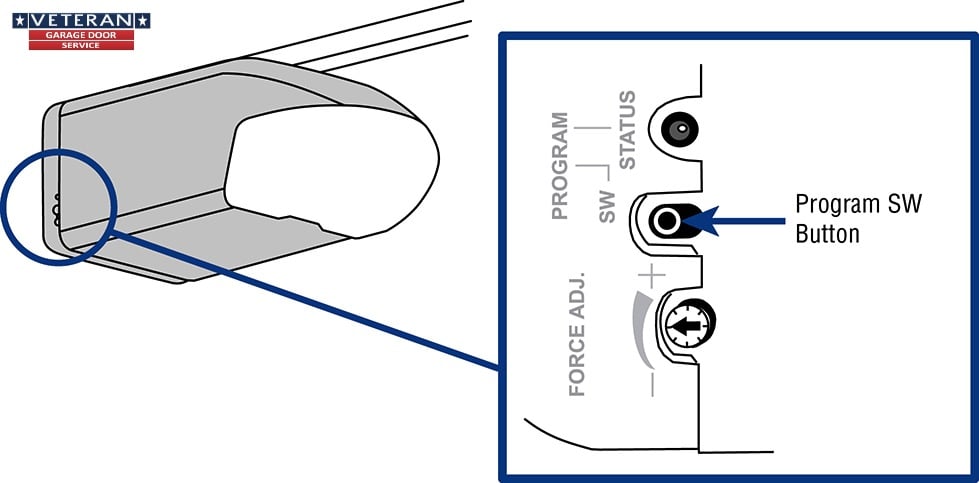
Next, locate the “Learn” or “Program” button on your Wayne Dalton opener motor unit. This button is the gateway to programming new remotes or keypads. It’s usually a small, colored button (often purple, yellow, green, or red, depending on the model) situated near the antenna wire or on the back panel of the motor unit.
Sometimes, it might be labeled “S1” or “Learn. ” Make sure you have a clear line of sight to this button and that you can comfortably reach it.
Initiating The Learn Mode On The Motor Unit
Once you’ve located the “Learn” button, the next step is to activate the opener’s learn mode. The method for doing this varies by model. For most rolling code systems, you will press and release the “Learn” button. When you press it, an LED indicator light next to the button should illuminate, signaling that the opener is in learn mode.
This mode is typically time-sensitive, meaning you have a limited window (often 30 seconds) to program the remote before the opener exits learn mode.
For some older Wayne Dalton models or specific series, the procedure might involve pressing and holding the “Learn” button for a few seconds until the LED lights up. Always refer to your owner’s manual for the precise sequence for your model.
Once the LED is lit, the opener is ready to receive the signal from your remote.
Programming The Remote Transmitter
With the opener in learn mode, you can now program your remote. For rolling code remotes, press and hold the button on the remote that you want to use to operate the garage door. For single-button remotes, simply press the button.
Hold the remote within a few feet of the opener motor unit.
After pressing the remote button, observe the LED indicator light on the motor unit. It should flash or turn off, and you might hear an audible click from the motor unit. This indicates that the opener has successfully received and learned the remote’s code.
If the LED light flashes and then returns to its original state, or if you hear a click, the programming is likely complete for that remote button.
If you are programming a multi-button remote, you may need to repeat this process for each button you wish to assign to the opener. Remember the time limit; if you exceed it, you’ll need to re-initiate the learn mode on the motor unit and try again.
Testing The Programmed Remote
After the programming sequence is complete, it’s crucial to test the remote to ensure it’s working correctly. Step away from the motor unit to a normal operating distance. Press the button on the remote that you just programmed. The garage door should now open or close.
If it doesn’t, don’t worry; it’s common to need a few attempts.
If the remote doesn’t work, there could be several reasons:
- Incorrect Learn Mode Activation: You might not have initiated the learn mode correctly for your specific model.
- Time Limit Exceeded: You may have taken too long between activating learn mode and pressing the remote button.
- Remote Compatibility: The remote might not be compatible with your specific opener model.
- Signal Interference: Other electronic devices could be interfering with the radio signal.
- Faulty Remote or Opener: In rare cases, the remote itself or the opener’s receiver might be malfunctioning.
Try repeating the programming steps, paying close attention to the timing and your model’s specific instructions. If issues persist, consult your manual or Wayne Dalton support.
Reprogramming Specific Wayne Dalton Models
Wayne Dalton has produced numerous opener models over the years, and while the general principles remain, specific button presses and sequences can differ. Here, we’ll look at common scenarios and model types.
Wayne Dalton Quantum Series (e.g., Quantum 3214, 3314)
The Quantum series often uses rolling code technology. The “Learn” button and LED are typically located on the back of the motor unit.
- Locate the Learn Button: Find the square, often purple, “Learn” button on the back of the Quantum opener.
- Press and Release: Press and immediately release the purple “Learn” button. The red LED indicator light next to it should illuminate.
- Program the Remote: Within 30 seconds, press and hold the desired button on your Wayne Dalton remote.
- Confirmation: The red LED will flash, and the opener may click, indicating successful programming. Release the remote button.
- Test: Test the remote to open and close the garage door.
If you are replacing a remote or adding a new one, it’s good practice to clear existing codes first to enhance security. To clear codes on many Quantum models, press and hold the purple “Learn” button for about 10-15 seconds until the red LED light turns off. Then, proceed with programming the new remote as described above. This ensures no old remotes can still operate your door.
Wayne Dalton Prodrive Series (e.g., Prodrive 3220, 3222)
The ProDrive series, like the Quantum, typically employs rolling code technology and shares similar programming steps. The learn button is often green or yellow on these models, located on the motor unit.
- Locate the Learn Button: Find the green or yellow “Learn” button on the motor unit.
- Press and Release: Press and release the green or yellow “Learn” button. The red LED indicator light should illuminate.
- Program the Remote: Within 30 seconds, press and hold the button on your Wayne Dalton remote.
- Confirmation: The red LED will flash, and you should hear a click from the unit. Release the remote button.
- Test: Test the remote.
To clear all codes on ProDrive units, press and hold the green or yellow “Learn” button for about 10-15 seconds until the red LED light turns off. This is a critical security step if a remote has been lost or stolen. After clearing, you will need to reprogram all remotes you wish to use. This process is similar to resetting your garage door opener in general, ensuring a clean slate.
Older Wayne Dalton Models With Dip Switches
For older Wayne Dalton garage door openers that use DIP switches, the process is entirely different and doesn’t involve a “Learn” button on the motor unit.
- Locate DIP Switches:
- On the Remote: Carefully open the casing of your Wayne Dalton remote. You will see a row of small switches, usually labeled 1 through 8, 9, 10, 11, or 12. These are the DIP switches.
- On the Motor Unit: Locate the DIP switches on the garage door opener motor unit. They are typically behind a removable panel on the back or side of the unit.
- Set the Switches: Determine the desired ON/OFF combination for your remote. You can either:
- Match an Existing Remote: If you have another working remote for the same opener, set the DIP switches on the new remote to *exactly* match the pattern on the working remote.
- Set a New Code: If you are setting up a new system or have no working remotes, choose a unique ON/OFF pattern. Ensure this pattern is recorded somewhere safe.
- Ensure Opener is Powered: Make sure the garage door opener is plugged in and has power.
- Test: Once the DIP switches are set on the remote to match the motor unit (or a working remote), try operating the garage door. If the switches match correctly, the remote should function immediately.
Example Scenario: If your motor unit’s DIP switches are set to ON-OFF-ON-OFF-ON-OFF-ON-OFF, and your remote’s switches are set to OFF-ON-OFF-ON-OFF-ON-OFF-ON, they will not communicate. You must ensure both sets are identical. This method, while older, is very direct once the switch pattern is established. For more complex systems, consider resources like Wayne Dalton’s official support for model-specific videos if available.
Credit: veterangaragedoor.com
Common Issues And Troubleshooting
Even with precise instructions, you might encounter problems when trying to reprogram your Wayne Dalton remote. Understanding common issues can help you resolve them quickly.
Remote Not Responding After Programming
If you’ve followed the programming steps and the remote still doesn’t operate the garage door, several factors could be at play.
- Battery Issues: A weak or dead battery in the remote is the most common culprit. Try replacing the battery with a fresh one of the correct type. Ensure it’s inserted with the correct polarity.
- Incorrect Button Press: You might have accidentally released the “Learn” button too early, or not pressed the remote button long enough. Try the sequence again, paying close attention to the timing and holding the remote button until confirmation.
- Range Problems: While less common during initial programming, ensure you are within a reasonable range of the motor unit when testing. Obstructions like metal doors or certain building materials can sometimes weaken the signal.
- Opener Limit Settings: Ensure your garage door opener’s travel limits are set correctly. If the opener doesn’t know how far to travel, it might not respond to the remote. Refer to your manual for adjusting these limits. This is a separate adjustment from remote programming but can affect overall operation.
Opener Responds To Old Remotes After Clearing Codes
If you’ve cleared the codes on your opener, but an old remote still works, it indicates that the clearing process may not have been completed successfully.
- Incomplete Clearing: For most Wayne Dalton models, clearing codes requires holding the “Learn” button for an extended period (often 10-15 seconds) until the indicator light turns off. If you only pressed and released it, you likely just entered learn mode.
- Multiple Learn Buttons: Some systems might have different buttons or sequences for clearing all codes versus just programming a new one. Double-check your manual.
- System Glitch: In rare cases, the opener’s memory might not have fully reset. Try unplugging the opener for a minute, then plugging it back in, and attempt the code clearing process again.
Reprogramming Keypads And Multi-button Remotes
Wayne Dalton keypads and multi-button remotes follow similar programming logic but require attention to detail.
- Keypads: Reprogramming a Wayne Dalton keypad typically involves entering a master code or using the “Learn” button on the motor unit. The keypad itself will have a sequence of buttons to press, often involving a PIN and then a program button. Consult your keypad’s specific manual. If you’ve lost your PIN, you’ll likely need to reset the opener’s memory and reprogram the keypad from scratch. This is similar to how you might reset a garage door keypad from other brands.
- Multi-Button Remotes: If your remote has multiple buttons (e.g., for different doors or a light feature), you usually need to program each button individually. After initiating learn mode on the motor unit, press the first button on the remote. Then, repeat the process for the second button, and so on, ensuring you stay within the time limit for each press. Some advanced systems allow programming different buttons for different functions or doors.
Best Practices For Maintaining Your Remote
Once you’ve successfully reprogrammed your Wayne Dalton remote, adopting some best practices can help ensure its longevity and continued functionality.
Battery Replacement Schedule
Remote batteries don’t last forever. A typical garage door remote battery can last anywhere from 1 to 3 years, depending on usage and battery quality. To avoid unexpected failures, establish a routine for replacing the batteries. A good practice is to replace them every 18 months or so, or if you notice the remote’s range decreasing or requiring multiple button presses to activate the opener.
Always use the specific battery type recommended in your remote’s manual.
Protecting Your Remote
Your garage door remote is often subjected to daily wear and tear. Keep it in a consistent location within your vehicle or home to avoid misplacing it. Avoid exposing it to extreme temperatures, moisture, or direct sunlight for prolonged periods, as these conditions can degrade the electronic components over time.
Some people use small protective cases or keychains to shield their remotes.
Security Considerations
- Regular Code Clearing: If you frequently have visitors, service personnel, or have ever lost a remote, consider clearing and reprogramming all your remotes periodically (e.g., annually). This adds an extra layer of security.
- Use Strong PINs for Keypads: If you use a keypad, ensure you set a strong, non-obvious PIN and change it if you suspect it might have been compromised.
- Disable Lost Remotes: If a remote is lost, immediately clear the codes from your opener. This prevents unauthorized access to your garage. You can then reprogram your remaining remotes.
- Consider Remote Covers: For older DIP switch models, ensure the switch panel cover is securely in place to prevent accidental changes to the code.
When To Seek Professional Help
While most reprogramming tasks are DIY-friendly, there are times when professional assistance is recommended. If you’ve tried all the troubleshooting steps, consulted your manual, and the remote still won’t program, there might be an issue with the opener’s receiver board or the remote itself. In such cases, contacting a qualified garage door technician is the best course of action. They have specialized tools and knowledge to diagnose complex issues and can replace faulty components if necessary. For instance, if your opener is malfunctioning, you might need to consider garage door replacement costs if repairs are extensive.
Frequently Asked Questions
How Do I Know If My Wayne Dalton Remote Is Rolling Code Or Dip Switch?
Most Wayne Dalton remotes manufactured after the early 2000s are rolling code. You can usually identify them by the absence of physical DIP switches inside the remote casing. Rolling code remotes often have a specific colored button on the motor unit (like purple, green, yellow, or red) that corresponds to the remote’s technology.
If your remote has a series of small, slide switches inside that you set to ON/OFF combinations, it’s a DIP switch model. Older manuals or the opener’s label can also provide clues.
Can I Use A Universal Garage Door Remote With My Wayne Dalton Opener?
Yes, in many cases, you can use a universal garage door remote with your Wayne Dalton opener. However, you must ensure the universal remote is compatible with your specific Wayne Dalton model and its technology (