
The convenience of a smart home is no longer a futuristic dream; it’s a present-day reality. Among the most impactful smart home integrations is the ability to control your garage door remotely. The myQ app, developed by Chamberlain, has become a leading platform for this, offering seamless control and enhanced security for your garage. Imagine never having to wonder if you left your garage door open, or being able to grant access to a delivery person without being home. This level of control is now at your fingertips, transforming a traditionally manual operation into a connected experience.
This comprehensive guide will walk you through everything you need to know about using the myQ app to open and close your garage door. We’ll cover the initial setup, the core functionalities, troubleshooting common issues, and best practices to maximize the benefits of this innovative technology.
Whether you’re new to smart home devices or looking to optimize your existing myQ system, this article will provide the detailed, actionable insights you need.
Key Takeaways
- The myQ app allows for remote monitoring and control of compatible garage door openers and gates via a smartphone or tablet.
- Setting up myQ involves connecting a compatible garage door opener or installing a myQ Smart Garage Hub/Control.
- Core features include opening/closing the garage door, receiving real-time alerts, scheduling door operations, and granting guest access.
- Security is a primary focus, with encryption and secure login protocols protecting your account and garage.
- Troubleshooting often involves checking Wi-Fi connectivity, ensuring the opener is compatible, and verifying app permissions.
- Regularly updating the app and opener firmware is crucial for optimal performance and security.
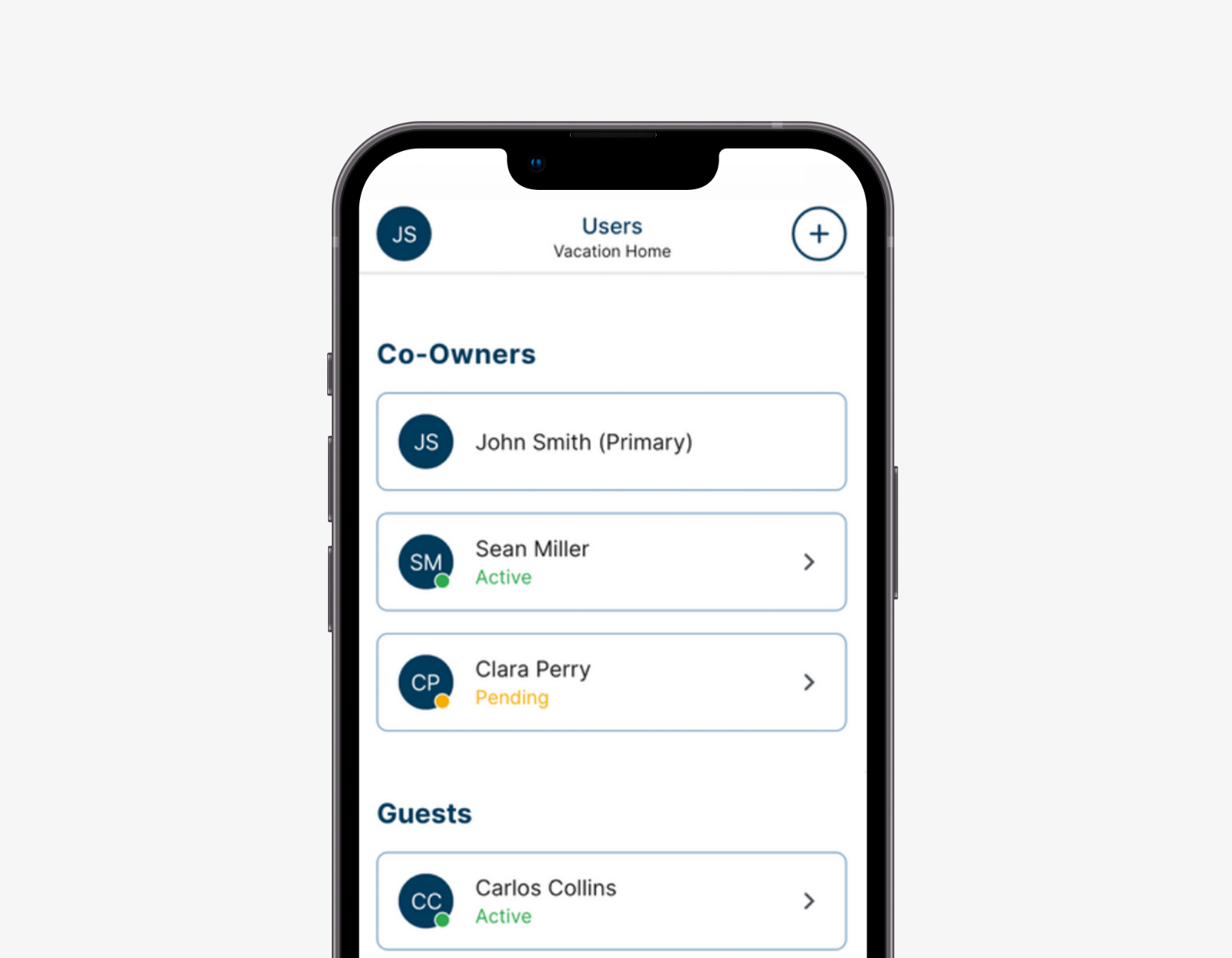
Credit: www.myq.com
Understanding The Myq Ecosystem
The myQ ecosystem is designed to bring your garage door opener into the digital age. At its heart is the myQ app, a mobile application available for both iOS and Android devices. This app acts as your central command center, allowing you to interact with your garage door opener from virtually anywhere with an internet connection. The system relies on a compatible garage door opener manufactured by Chamberlain, LiftMaster, or Craftsman that has built-in myQ technology, or a separate myQ Smart Garage Hub or myQ Smart Garage Control device that can be retrofitted to older openers.
The fundamental principle behind myQ is connectivity. Your garage door opener, or the hub, connects to your home’s Wi-Fi network. This connection then allows the myQ app on your smartphone or tablet to communicate with the opener. When you initiate an action in the app, like pressing the “Open” button, the command is sent via the internet to your myQ device, which then signals your garage door opener to perform the action.
Conversely, the opener can send status updates back to the app, letting you know if the door is open or closed. This two-way communication is what enables features like real-time alerts and remote monitoring.
Compatibility And Connectivity
Before you can start enjoying the benefits of remote garage door control, ensuring compatibility is paramount. Most modern garage door openers from Chamberlain, LiftMaster, and Craftsman are equipped with myQ technology. You can typically identify this by looking for the myQ logo on your opener unit or in its manual. If your opener is older and doesn’t have built-in myQ capabilities, you can still upgrade it using the myQ Smart Garage Hub or the myQ Smart Garage Control. These devices are designed to work with a vast majority of existing garage door openers, regardless of brand, by either plugging into the opener’s logic board or by using a sensor to detect the door’s position.
Connecting your myQ device to your home Wi-Fi network is a critical step. The setup process, guided by the myQ app, typically involves selecting your Wi-Fi network and entering your password. A stable Wi-Fi connection is essential for reliable operation.
If your Wi-Fi signal is weak in the garage, you might experience delays or connection issues. In such cases, consider using a Wi-Fi extender or ensuring your router is centrally located. For security, myQ uses industry-standard encryption protocols to protect your connection, similar to those used by online banking services.
The Myq App Interface
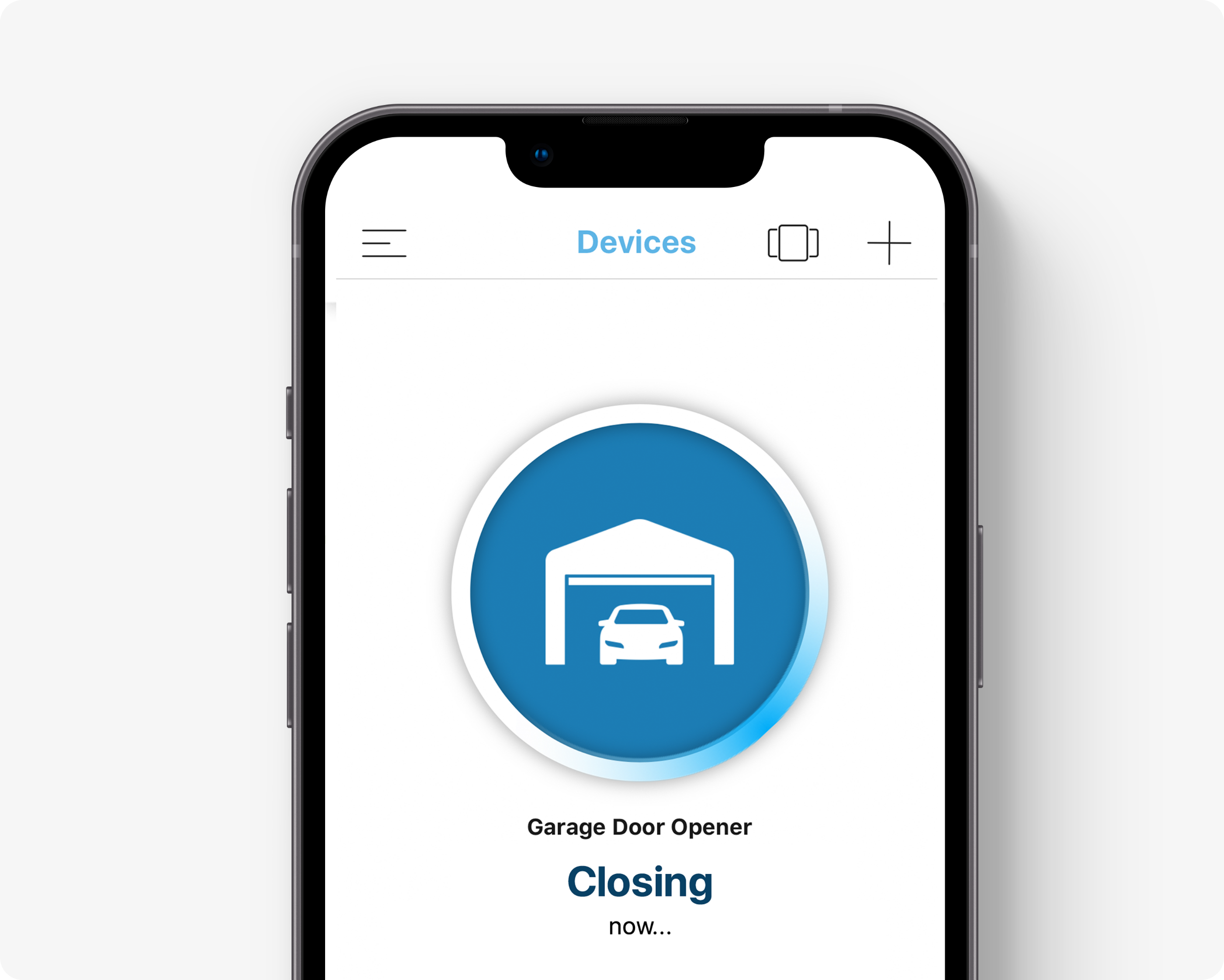
The myQ app is designed with user-friendliness in mind. Once you have successfully connected your garage door opener or hub, the app will display your device(s) on the main dashboard. For a garage door opener, you’ll typically see an icon representing your garage door, along with its current status: either “Open” or “Closed.” Tapping on this icon will usually reveal a larger control interface. This interface will feature prominent buttons to Open and Close the garage door.
Beyond basic operation, the app provides access to a range of other features. You can view a history log of all door activity, showing when the door was opened, closed, and by whom (if multiple users are set up). Notifications are a cornerstone of the myQ experience. You can configure the app to send alerts to your smartphone or tablet under various conditions, such as when the garage door is opened, closed, or left open for a specified period. This proactive communication is invaluable for security and peace of mind.
Credit: www.myq.com
Setting Up Your Myq System
The initial setup of your myQ system is a straightforward process, designed to get you up and running quickly. The exact steps can vary slightly depending on whether you have a myQ-enabled opener or are installing a Smart Garage Hub/Control, but the core principles remain the same.
The myQ app itself guides you through each stage, making it accessible even for those less familiar with smart home technology.
For Myq-enabled Openers
If your garage door opener came with built-in myQ technology, the setup is primarily about connecting the opener to your home Wi-Fi network and then linking it to your myQ account.
- Download the myQ App: First, download the myQ app from the Apple App Store or Google Play Store onto your smartphone or tablet.
- Create an Account: Open the app and follow the prompts to create a new myQ account. This typically involves providing an email address and creating a secure password.
- Add a Device: Within the app, select the option to add a new device. Choose “Garage Door Opener.”
- Connect to Wi-Fi: The app will guide you through connecting your opener to your home Wi-Fi. This usually involves putting the opener into pairing mode (often by pressing a specific button on the opener unit) and then selecting your Wi-Fi network and entering the password within the app.
- Pair the Opener: Once connected to Wi-Fi, the app will search for and pair with your opener. You may be asked to confirm the pairing on the opener unit itself.
- Name Your Device: Assign a recognizable name to your garage door opener (e.g., “Front Garage Door”) for easy identification, especially if you have multiple devices.
For Myq Smart Garage Hub/control
If your existing garage door opener is not myQ-enabled, the myQ Smart Garage Hub or Control provides a way to add smart functionality.
- Install the Hub/Control: Follow the manufacturer’s instructions to physically install the hub or control device. This typically involves mounting it near your garage door opener and connecting it, often via a wire to the opener’s logic board or by attaching a sensor to the garage door itself.
- Download and Create Account: As with the opener setup, download the myQ app and create your account.
- Add the Hub/Control: Select the option to add a new device in the app and choose “Smart Garage Hub” or “Smart Garage Control.”
- Connect to Wi-Fi: Follow the app’s instructions to connect the hub/control device to your home Wi-Fi network. This process is similar to connecting the opener, involving selecting your network and entering the password.
- Pair with Opener: The hub/control will then need to be paired with your existing garage door opener. This often involves pressing a button on the opener to put it in pairing mode. The hub/control will then communicate with the opener to establish control.
- Name Your Device: Give your new smart device a clear name.
Initial Testing And Configuration
After the setup is complete, it’s crucial to test the system thoroughly.
- Remote Operation: Use the myQ app to open and close the garage door several times. Ensure the door responds promptly and fully.
- Status Updates: Verify that the app accurately reflects the door’s current status (open or closed) after each operation.
- Notifications: Configure your notification settings within the app. Test these by opening and closing the door manually (or via the app) and confirming you receive the alerts on your smartphone. You might want to set up alerts for when the door is left open for more than, say, 10 minutes.
- Security Settings: Review your account security, including enabling two-factor authentication if available, and ensure your Wi-Fi password is strong.

Credit: allsecurityequipment.com
Core Features: Opening And Closing Your Garage Door Remotely
The primary function of the myQ app is to provide convenient and secure remote control over your garage door. This capability goes beyond simple convenience; it enhances security, provides peace of mind, and can even streamline daily routines.
Opening And Closing The Door
To open or close your garage door using the myQ app, simply launch the application on your smartphone or tablet. Navigate to the dashboard where your garage door opener is listed. You will see the current status of the door (e.g., “Closed”). To initiate an action, tap the corresponding button: Open or Close. The app sends a secure command to your myQ-enabled opener or hub, which then activates your garage door motor. The app will update the status as the door begins to move and will confirm when the operation is complete.
It’s important to note that for safety reasons, the myQ app typically requires you to re-authenticate (e. g. , with your fingerprint or password) before performing an action that opens or closes the garage door, especially if you have configured specific security settings.
This prevents accidental operations and unauthorized use.
Real-time Status Monitoring
One of the most significant benefits of the myQ system is its ability to provide real-time status updates. You no longer have to guess whether you remembered to close the garage door after leaving home. Simply open the myQ app, and it will show you the current position of your garage door. This information is crucial for security and provides immediate peace of mind. If the door is open when it shouldn’t be, you can close it remotely with a single tap.
Alerts And Notifications
The myQ app’s notification system is a powerful tool for staying informed about your garage’s activity. You can customize alerts to be notified under various circumstances:
- Door Open/Close Alerts: Receive immediate notifications whenever the garage door is opened or closed, regardless of how it was operated (app, remote, manual).
- Left Open Alerts: Configure alerts if the garage door remains open for a predetermined period (e.g., 10, 20, or 30 minutes). This is incredibly useful for preventing unauthorized access and saving energy.
- Close My Door Reminders: Some versions of the app can provide reminders to close your garage door at specific times, such as when you typically leave for work or return home.
These alerts are delivered directly to your smartphone, ensuring you’re always aware of your garage’s status.
Scheduling Door Operations
For added convenience and security, the myQ app allows you to schedule specific actions for your garage door opener. For example, you can set the door to automatically close every night at 10:00 PM. This feature can be particularly useful for ensuring your home is secured each evening without manual intervention. It can also be used to schedule doors to open at certain times if needed, though this is less common for security reasons. Always ensure that no obstructions are present before scheduling any automatic door movement.
Advanced Features And Integrations
Beyond the fundamental ability to open and close your garage door, the myQ app offers a suite of advanced features and integrates with other smart home platforms, further enhancing its utility and convenience. These features aim to provide greater control, security, and seamless integration into your connected lifestyle.
Guest Access And User Management
The myQ system allows you to grant temporary or ongoing access to your garage door to trusted individuals. This is incredibly useful for family members, friends, or service providers.
- Adding Users: You can invite family members to create their own myQ accounts linked to your garage door. They can then use their own myQ app to open, close, and monitor the door.
- Guest Access: For temporary access (e.g., for a contractor or a delivery person), you can often grant guest access through the app. This can be time-limited or event-based, providing a secure way to allow entry without sharing your primary login credentials. For example, you could grant access for a specific 2-hour window.
This granular control over who can access your garage and when significantly bolsters your home’s security and convenience.
Integration With Smart Home Ecosystems
MyQ has made significant strides in integrating with other popular smart home platforms, creating a more unified and automated home experience.
- Amazon Alexa: You can link your myQ account to Amazon Alexa. This allows you to control your garage door using voice commands through an Echo device (e.g., “Alexa, open the garage door”). For security, Alexa requires a voice code to open the garage door, which you set up during the integration process.
- Google Assistant: Similar to Alexa, myQ integrates with Google Assistant. You can use voice commands like “Hey Google, close the garage door.” Google Assistant also employs security measures like requiring a PIN for opening the door.
- IFTTT (If This Then That): For more complex automation scenarios, myQ supports IFTTT applets. This allows you to create custom triggers and actions. For instance, you could set up an applet so that whenever your phone’s GPS detects you are leaving a certain radius from your home, the garage door automatically closes.
These integrations mean your garage door can become an active participant in your smart home routines, responding to voice commands or triggering actions based on other smart device events.
Security Features And Best Practices
Security is a paramount concern for any connected device, and myQ has implemented several measures to protect your account and your home.
- Encryption: All communication between the myQ app, the myQ cloud servers, and your garage door opener/hub is encrypted using industry-standard protocols (like TLS/SSL). This protects your data from interception.
- Secure Login: Your myQ account is protected by a secure password. It is highly recommended to use a strong, unique password and enable two-factor authentication (2FA) if available in the app settings. 2FA adds an extra layer of security by requiring a code from your phone or another trusted device in addition to your password when logging in from a new device.
- Regular Updates: Keep both the myQ app and your garage door opener/hub firmware updated. Manufacturers release updates to patch security vulnerabilities and improve performance. Automatic updates are often enabled by default, but it’s good practice to check periodically.
- Wi-Fi Security: Ensure your home Wi-Fi network is secured with a strong WPA2 or WPA3 password. A compromised Wi-Fi network can provide an entry point for malicious actors to access connected devices.
Pro Tip: Regularly review the activity log in the myQ app to monitor who is accessing your garage and when. This can help you quickly identify any suspicious activity.
Troubleshooting Common Myq Issues
Even with advanced technology, occasional issues can arise. Fortunately, most common problems with the myQ app and garage door opener are resolvable with a few troubleshooting steps. The key is often to isolate whether the problem lies with the app, the internet connection, or the garage door opener itself.
Connectivity Problems
This is perhaps the most frequent issue. If your myQ app shows your garage door as “Offline” or “Not Responding,” the problem is likely related to connectivity.
- Check Wi-Fi: Ensure your home Wi-Fi network is operational. Try accessing other internet services on your phone or other devices. If your Wi-Fi is down, your myQ system won’t be able to connect.
- Router Proximity: If your Wi-Fi is working but the garage door is still offline, the issue might be a weak signal in the garage. Ensure your myQ opener or hub is within a reasonable range of your Wi-Fi router. Consider moving the router closer, or using a Wi-Fi extender.
- Reboot Devices: Try rebooting your Wi-Fi router and modem by unplugging them for 30 seconds and plugging them back in. Also, try restarting the myQ device itself (if it has a power switch) or the garage door opener.
- Re-enter Wi-Fi Credentials: Sometimes, Wi-Fi passwords change, or the connection simply needs to be re-established. Go into the myQ app settings and look for an option to update Wi-Fi credentials or reconnect the device. You may need to put the opener/hub back into pairing mode.
App Not Responding Or Freezing
If the myQ app itself is slow, unresponsive, or freezing, try these steps:
- Close and Reopen: Force close the myQ app on your smartphone and then reopen it.
- Restart Your Phone: A simple restart of your smartphone can often resolve temporary app glitches.
- Check for App Updates: Ensure you have the latest version of the myQ app installed. Go to your phone’s app store and check for updates.
- Clear App Cache (Android): On Android devices, you can try clearing the app’s cache through your phone’s settings. This can resolve issues caused by corrupted temporary data.
Garage Door Not Opening/closing Via App
If the app shows the device as online, but the door doesn’t respond to commands:
- Check Opener Power: Ensure your garage door opener unit has power. Check if the status light on the opener is on.
- Manual Operation: Try operating the garage door using its physical remote or the wall button. If these also fail, the issue is likely with the garage door opener itself, not the myQ system. You may need to consult a professional or refer to your opener’s manual. You can find guides on how to open a Liftmaster garage door opener or similar models.
- Sensor Obstruction: For the myQ Smart Garage Hub/Control, ensure the sensor on the garage door is clean and unobstructed. Also, check that the sensor is properly aligned and securely attached.
- Re-pair Device: In some cases, you might need to un-link and re-link your garage door opener or hub within the myQ app. This process essentially resets the connection between the app and the device. Refer to the app’s help section for specific instructions on un-pairing and re-pairing.
Incorrect Status Reporting
If the app incorrectly reports the garage door’s status (e.g., says it’s closed when it’s open):
- Check Sensor Alignment (Hub/Control): For systems using a door sensor, ensure it’s correctly positioned and aligned with the sensor on the opener unit or hub. Misalignment can lead to inaccurate status reporting.
- Re-sync Status: Sometimes, simply closing and reopening the app or performing a remote operation can force a status resync.
- Re-calibrate Sensor: The myQ app often has a calibration process for the door sensor. Follow the app’s instructions to re-calibrate it. This helps the system accurately learn the fully open and fully closed positions.
Warning: Always ensure the garage door path is clear of people and objects before attempting to operate it, especially during troubleshooting. If you are unsure about any step, consult the myQ support resources or a qualified garage door technician. For more general opener issues, resources like how to reset your garage door opener can be helpful.
Maximizing Your Myq Experience: Tips And Best Practices
To get the most out of your myQ app and ensure its smooth, secure operation, adopting a few best practices can make a significant difference. These tips focus on enhancing convenience, bolstering security, and maintaining the longevity of your smart garage system.
Regular Maintenance
While the myQ system itself requires minimal maintenance, the garage door opener it controls does not. Regular checks and lubrication are essential for overall performance and safety.
- Lubrication: Periodically lubricate the moving parts of your garage door, including rollers, hinges, and the track. This reduces friction, noise, and wear. You can find detailed instructions on how to lubricate garage door rollers.
- Check Balance: Ensure your garage door is properly balanced. A balanced door should stay open partway when you manually lift it. If it slams down or is too heavy to lift, the springs may need adjustment by a professional.
- Inspect Components: Regularly inspect cables, springs, and mounting hardware for signs of wear or damage.
Security Best Practices
Beyond the app’s built-in security features, user practices are vital.