
Every day, millions of people use garage door openers to secure their homes and access their garages. But many homeowners do not realize how important the garage door code is for safety. If you move into a new home, lose a remote, or simply want better security, knowing how to reprogram garage door code can make a big difference. This guide walks you step-by-step through the process, explains the reasons behind it, and shows you how to avoid common mistakes. Even if you are not a technical expert, you’ll find practical advice for every situation.
Why You Should Reprogram Your Garage Door Code
Changing your garage door code is not only about convenience; it’s mainly about security and peace of mind. Let’s look at the key reasons:
1. Prevent Unauthorized Access
If someone finds your old remote or knows your previous code, they could enter your garage. Reprogramming stops this risk.
2. New Homeowners
When you move into a new house, previous residents may still have the code or remote. Changing the code ensures only you control access.
3. Lost Or Stolen Remotes
If your remote is lost or stolen, reprogramming invalidates the old code, so no one can use it.
4. Routine Security Update
Experts suggest updating codes regularly, just like passwords. This keeps your garage door system safe from hacking.
5. Multiple Users
If you shared your code with someone temporarily, like a neighbor or house sitter, you can reset it after their access is no longer needed.
6. Malfunctioning Remotes
Sometimes, remotes stop working due to a code issue. Reprogramming often fixes these problems.
7. Upgrading Garage Door System
When you install a new opener or remote, you must set new codes for everything to work smoothly.
Changing your garage door code is a small action with big impact. It protects your home, family, and belongings.
Understanding Garage Door Codes
Before you start, it helps to know the basics about garage door codes. There are two main types:
- Fixed codes: Older systems use DIP switches inside the remote and opener. You set these manually.
- Rolling codes: Modern systems use technology that changes the code every time you use the remote. This is more secure.
Most garage door openers today use rolling codes because they are harder to hack. Brands like LiftMaster, Chamberlain, and Genie have adopted this method. If your opener is older, it may still use fixed codes. The steps to reprogram are slightly different.
Example: Fixed Vs Rolling Codes
| Feature | Fixed Code | Rolling Code |
|---|---|---|
| Security Level | Lower | Higher |
| Setup | Manual DIP switches | Automatic programming |
| Remote Compatibility | Limited | Broad |
| Ease of Reprogramming | Basic | Simple |
Knowing which type you have is key. Check your owner’s manual or look inside the remote for switches. If there are none, it’s likely rolling code.
Step-by-step Guide: How To Reprogram Garage Door Code
Reprogramming your garage door opener is easier than you may think. Follow these steps carefully. If your system is different, check the manual for details.
1. Gather What You Need
Before starting, prepare:
- The remote control(s)
- Access to the garage door opener (usually mounted on the ceiling)
- Step ladder (if opener is out of reach)
- Owner’s manual (optional, but helpful)
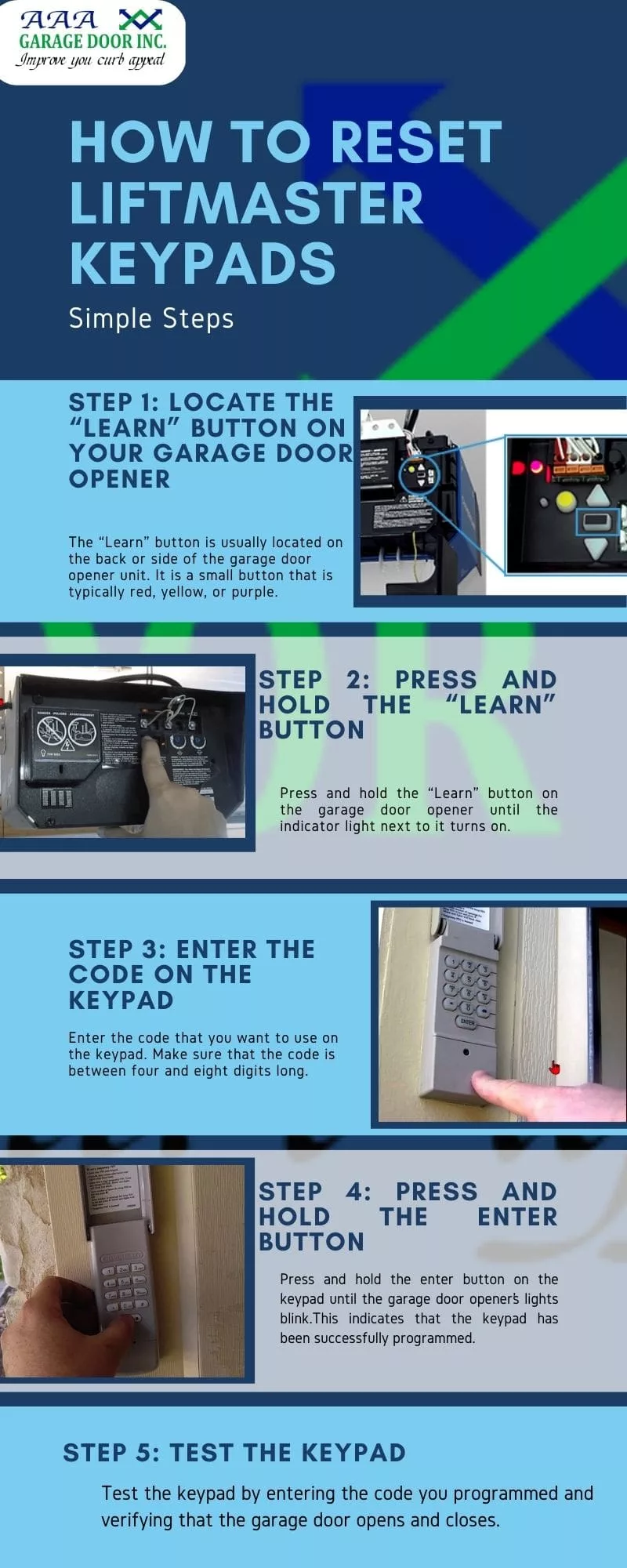
2. Locate The “learn” Or “program” Button
Most openers have a Learn or Program button. This is the key to reprogramming.
- On LiftMaster/Chamberlain: The button is near the antenna wire, often colored (yellow, red, purple).
- On Genie: The button is usually under the light cover.
3. Clear Existing Codes (optional But Recommended)
If you want to erase all previous codes (for security), do this first:
- Press and hold the Learn button for 6–10 seconds.
- The indicator light will turn off or blink.
- This erases all existing remote codes.
Tip: After clearing, none of the old remotes will work. You must reprogram all remotes you wish to use.
4. Program A New Remote
Now, set the new code:
- Press and release the Learn button. The light will turn on or blink.
- Within 30 seconds, press the button on your remote you want to program.
- The opener light will blink or click, confirming success.
Repeat for each remote you want to use.
5. Test The Remote
After programming, test your remote:
- Stand outside your garage.
- Press the remote button.
- The door should open or close.
If it does not work, repeat the programming steps.
6. Change Keypad Code (if You Have One)
Many garages have wall-mounted keypads. To change the code:
- Press the Learn button on the opener.
- Within 30 seconds, enter your new code on the keypad and press “Enter.”
- The opener light should flash.
Try your new code to confirm.
7. Set Up Smart Devices (optional)
Some systems connect to smart apps (MyQ, Genie Aladdin). Check the app instructions for reprogramming codes or adding devices.
Non-obvious Insight: Many people forget to clear old codes before programming. This can leave old remotes active, risking security. Always clear codes first if you want a fresh start.
Reprogramming Fixed Code (dip Switch) Systems
Older garage openers use DIP switches for codes. Here’s how to change them:
1. Open The Remote And Opener
- Use a screwdriver to open the remote control case.
- Locate the row of small switches inside.
2. Set New Switch Pattern
- Choose a new pattern (up/down) for the switches.
- Make sure to write down the pattern for reference.
3. Match The Opener
- Open the opener housing.
- Set the switches inside to match your remote.
4. Test The System
- Press the remote button.
- The door should open or close.
Changing DIP switches is less secure but still important if you have this type.
Example Dip Switch Patterns
| Switch Number | Up Position | Down Position |
|---|---|---|
| 1 | ✓ | |
| 2 | ✓ | |
| 3 | ✓ | |
| 4 | ✓ | |
| 5 | ✓ |
Pick a random pattern for better security.
Reprogramming Garage Door Keypad Code
Many garages have a keypad. You can change the code easily.
Steps To Change Keypad Code
- Find the Learn button on the opener.
- Press and release the button. The indicator light comes on.
- Within 30 seconds, enter your new code on the keypad.
- Press “Enter” or “Send.”
- The opener light will flash, confirming success.
Practical Example:
If your keypad code was 1234, you can change it to 5678. Just enter 5678 during programming.
Non-obvious Insight: Some keypads require you to enter the old code first before changing. Always check your model’s instructions.
Reprogramming Smart Garage Door Openers
Smart garage door openers let you use your phone, tablet, or smart home system. Reprogramming these is different.
Steps For Smart Openers
- Open the app (MyQ, Genie Aladdin, etc. ).
- Go to “Settings” or “Devices.”
- Select “Add New Device” or “Change Code.”
- Follow the on-screen instructions to pair your remote or keypad.
- Test the new setup.
Tip:
Many smart openers allow you to set temporary codes for guests. Remember to delete these after use.
Comparison: Traditional Vs Smart Openers
| Feature | Traditional Opener | Smart Opener |
|---|---|---|
| Programming Method | Manual button | App-based |
| Security Level | Moderate | High |
| Remote Management | Physical remotes | Phones, tablets |
| Temporary Codes | No | Yes |
| Notifications | No | Yes |
Smart systems offer more flexibility and security.
Troubleshooting Common Problems
Sometimes, things don’t go as planned. Here are frequent issues and solutions:
Remote Not Working After Programming
- Check battery in remote.
- Make sure you pressed the Learn button correctly.
- Try programming again.
Keypad Not Responding
- Confirm you entered the code within 30 seconds of pressing Learn.
- Check battery in the keypad.
- Some keypads require the old code first.
Door Opens By Itself
- Nearby radio interference can cause this.
- Clear all codes and reprogram.
Opener Light Doesn’t Flash
- The programming was not successful.
- Repeat the steps.
Non-obvious Insight:
Metal objects, like cars parked under the opener, can block the signal. Try programming with a clear path.
Safety Tips For Garage Door Code Reprogramming
Changing codes is not only about security but also about safety. Follow these tips:
1. Unplug The Opener
If you need to open the housing, unplug the system to avoid electric shock.
2. Use A Stable Ladder
Never stand on a wobbly chair or box.
3. Keep Children Away
Don’t let kids play with remotes during programming.
4. Record New Codes Safely
Write down your new code and keep it in a secure place, not on the keypad.
5. Update Codes Regularly
Change codes every 6–12 months for best security.
When To Call A Professional
Some situations need expert help:
- Your opener is very old or damaged.
- You can’t find the Learn button.
- Programming fails after several tries.
- You want to install advanced smart systems.
Professional technicians can help you avoid mistakes and ensure proper setup. According to HomeAdvisor, the average cost for garage door opener service is $80–$200.
Security Statistics: Garage Door Vulnerabilities
Garage doors are a common entry point for burglars. Here are some facts:
- The FBI reports that over 65% of home burglaries happen through unlocked doors, including garages.
- Older garage door openers with fixed codes are easy to hack. Thieves use “code grabbers” to intercept signals.
- Rolling code systems reduce this risk by changing the code each time.
Upgrading and reprogramming your code protects your home from these threats.
How Often Should You Reprogram Garage Door Code?
Experts suggest changing your code:
- After moving into a new home
- If you lose a remote
- After sharing the code with someone
- Every 6–12 months for regular security
Tip:
Set a reminder on your phone or calendar so you don’t forget.
Mistakes To Avoid When Reprogramming
Even experienced users make mistakes. Here are things to watch for:
1. Forgetting To Clear Old Codes
Always erase all codes before reprogramming. Old remotes can stay active otherwise.
2. Not Testing Remotes
Test every remote after programming to confirm they all work.
3. Ignoring Keypad Programming
If you change remote codes, update the keypad too.
4. Leaving The Manual Unread
Each opener model is different. Read the manual for exact steps.
5. Choosing Simple Codes
Don’t use obvious codes like 1234 or 0000. Pick something unique.
6. Not Replacing Batteries
Weak batteries can cause programming to fail.
7. Programming With Interference
Keep metal objects away from the opener and remote during programming.
How To Choose A New Garage Door Code
Picking a good code is important for security. Here’s how:
- Choose a code with at least 4 digits.
- Avoid repeating numbers (like 1111).
- Don’t use your address, birthday, or simple patterns.
- Mix numbers for unpredictability.
Examples Of Strong Vs Weak Codes
| Code Type | Example | Security Level |
|---|---|---|
| Weak | 1234 | Low |
| Weak | 0000 | Low |
| Strong | 3859 | High |
| Strong | 7294 | High |
The best codes are random and not linked to personal information.
Reprogramming Multiple Garage Door Openers
If you have more than one opener (e.g., two garage doors), here’s what to do:
- Repeat programming steps for each opener.
- Use separate remotes, or program universal remotes for all doors.
- Label remotes if needed.
Tip:
Universal remotes can control multiple openers, but must be programmed for each one.

Reprogramming Universal Remotes
Universal remotes work with many brands. Here’s how to set them up:
- Check compatibility (see manual or website).
- Press the Learn button on your opener.
- Press the remote button within 30 seconds.
- Test to confirm.
Some universal remotes have switches or buttons for different brands. Set these before programming.
Extra Security Measures
Besides changing codes, you can make your garage more secure:
- Install a deadbolt on the garage entry door.
- Add motion sensor lights.
- Use a security camera.
- Keep valuables out of sight.
Non-obvious Insight:
Even with a new code, leaving the garage door open or unlocked can invite trouble. Always close and lock it when not in use.
Environmental Factors Affecting Garage Door Codes
Sometimes weather, temperature, or humidity can affect your garage door opener:
- Extreme cold can cause batteries to fail.
- High humidity can corrode contacts inside remotes.
- Dust and dirt can block signals.
Keep remotes clean and store them in a dry place.
Comparing Popular Garage Door Opener Brands
Different brands have unique programming steps and features. Here’s a quick comparison:
| Brand | Programming Method | Security Level | Smart Features |
|---|---|---|---|
| LiftMaster | Learn button | High | MyQ app |
| Chamberlain | Learn button | High | MyQ app |
| Genie | Learn button | High | Aladdin app |
| Craftsman | Learn button | Moderate | No |
| Stanley | DIP switches | Low | No |
LiftMaster and Chamberlain are the most popular in the US, offering strong security and smart features.
Real-life Example: Reprogramming After Moving In
Sarah moved into a new home and found the garage door remote in a kitchen drawer. She didn’t know who else might have access. She:
- Located the Learn button on her Chamberlain opener.
- Held it for 10 seconds to clear all old codes.
- Programmed her remote and keypad with new codes.
- Tested everything and wrote down her new code.
- Set a reminder to update her code every year.
Sarah’s garage is now secure, and she feels confident knowing no one else can access it.
Garage Door Code Maintenance Checklist
To keep your garage secure, follow this simple checklist:
- Update codes after any security event (move, lost remote).
- Test remotes and keypad monthly.
- Replace batteries every 6–12 months.
- Keep codes private and safe.
- Schedule yearly code changes.
Frequently Asked Questions
How Do I Know If My Garage Door Opener Uses Rolling Code Or Fixed Code?
Check your remote and opener. If you see DIP switches inside, it’s fixed code. If not, it’s likely rolling code. You can also look up your model number online or in the manual.
Can I Reprogram My Garage Door Code Without The Remote?
Yes, if you have a keypad or smart opener, you can change the code from there. If you only have remotes, you need at least one working remote to program.
What If I Lose All My Remotes?
You can buy a new remote compatible with your opener. Use the Learn button to program it. For smart openers, use the app. For older fixed code systems, match the DIP switch pattern.
Is It Safe To Let A Guest Use My Code Temporarily?
It’s safe if you change the code after their access ends. For smart systems, you can set a temporary code and delete it later. Always update your main code for best security.
How Do I Find The “learn” Button On My Opener?
The Learn button is usually near the antenna wire on the back or side of the opener. It may be colored (yellow, red, purple). Check your opener’s manual or look for a labeled button.
Changing your garage door code is one of the best ways to secure your home. With clear steps, regular updates, and strong codes, you can protect your family and property. If you need more details, visit WikiHow for visual guides and extra information. Take action today and make your garage safer than ever.