
Changing the code on your Chamberlain garage door opener is more important than many homeowners realize. Whether you just moved into a new house, lost a remote, or want to improve security, updating your garage door code is a smart move. But for beginners, the process can seem confusing. With so many Chamberlain models and different types of keypads and remotes, it’s easy to get lost in the manuals—or worse, make mistakes that leave your garage door unprotected.
This guide will take you step-by-step through the entire process of changing your code on a Chamberlain garage door opener. You’ll learn how to reset codes on both the wall-mounted keypads and the handheld remotes, plus how to erase all existing codes if you need a clean slate.
Along the way, you’ll discover tips most beginners miss, learn how different models compare, and find out what to do if something goes wrong.
By the end, you’ll not only know how to change the code on your Chamberlain garage door, but you’ll also understand how to keep your garage more secure, avoid common mistakes, and troubleshoot issues confidently.
Understanding Chamberlain Garage Door Codes
Before jumping into the steps, it’s helpful to know what the codes on your Chamberlain garage door opener actually do. Most openers use two main types of codes:
- Keypad access codes: These are 4-digit PINs you enter on an outdoor keypad to open or close the garage door.
- Remote control codes: Every remote uses a unique code to communicate with the opener using rolling code technology, which changes every time you use it for better security.
Changing these codes regularly helps protect your home from unauthorized access. If someone finds or guesses your PIN, or if you lose a remote, resetting your codes ensures only you and trusted people can open the door.
Some Chamberlain models also let you program temporary PINs or set up smart-home integrations. This guide covers the basics every homeowner needs, plus some advanced tips for extra security.
When And Why You Should Change Your Code
Many people only change their garage code when something goes wrong. But updating your code is good practice in several situations:
- After moving into a new home: The old owner or real estate agents may still know the code.
- If you lose a remote: Someone could find it and access your garage.
- After giving out the code to contractors or guests: Always change it after they’re done.
- For better security: Experts recommend updating your code every 6-12 months.
- If your opener acts strangely: This can mean someone else has access.
A 2022 survey by the National Crime Prevention Council showed that over 9% of home break-ins in the US involved an unsecured garage. Changing your code is a simple way to reduce this risk.
Tools And Information You Need
You don’t need special tools to change your Chamberlain code, but having a few items on hand makes the job smoother:
- A sturdy ladder (if your garage opener is ceiling-mounted)
- The model number of your Chamberlain opener (usually found on the motor unit)
- New 4-digit code (choose something not easily guessed)
- The remote or keypad you want to reprogram
- Owner’s manual (optional—this guide covers most models)
Pro tip: Take a photo of your current settings before changing anything. If you run into problems, you can easily restore the previous code.
Identifying Your Chamberlain Model
Chamberlain has released many opener models over the years. The process for changing codes is similar across most, but there are small differences. You can find your model number in these common locations:
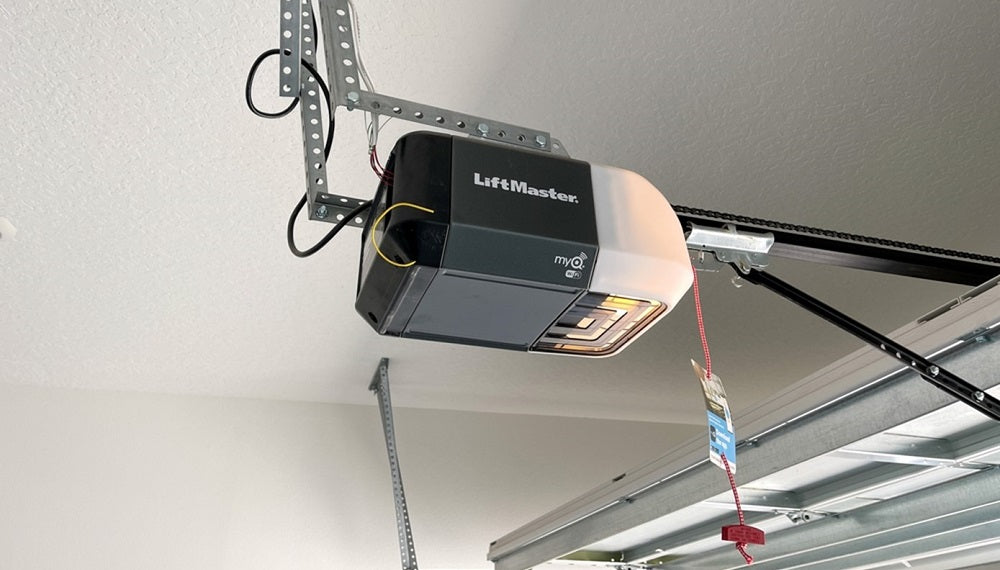
- On the side or bottom of the motor unit (mounted on your garage ceiling)
- Inside the battery compartment of your remote
- On the keypad, sometimes under the flip cover
Some common models include:
- Chamberlain B970, B550, WD1000WF, HD950WF, and older 1/2 HP or 3/4 HP models.
Knowing your model helps you follow the right instructions and solve problems faster.
Changing The Code On A Chamberlain Keypad
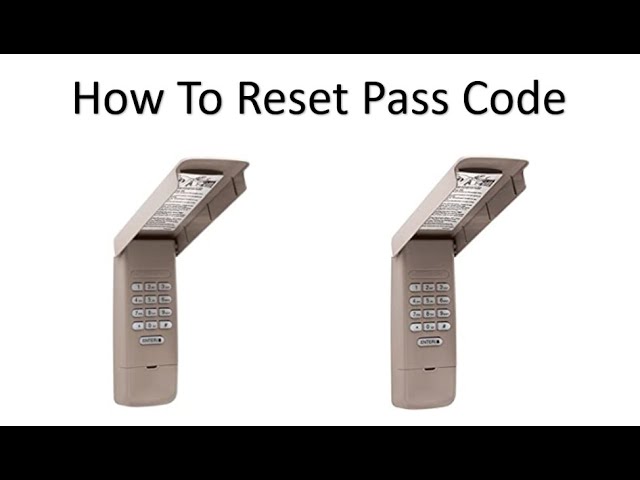
Most outdoor keypads use a simple 4-digit PIN. Changing this code will prevent old users from accessing your garage. Here’s how to update it:
Step-by-step Guide
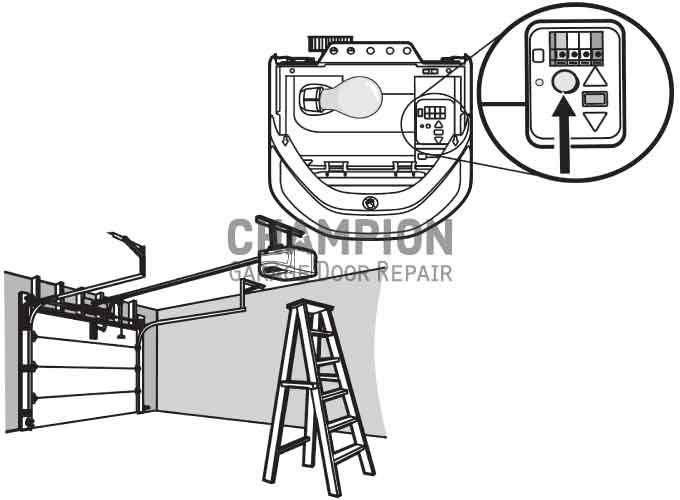
- Locate the Learn button on the garage door opener unit. This is usually on the back or side, and may be under a light cover. It might be red, yellow, purple, or orange, depending on the model.
- Press and release the Learn button. The indicator light will glow for 30 seconds. This means the unit is ready to learn a new code.
- Enter your new 4-digit PIN on the keypad outside the garage. Enter the code slowly and carefully.
- Press and hold the Enter button on the keypad until the motor unit light blinks or you hear a click. This means the new code is stored.
- Test the new code. Close the garage door and try your new PIN. If it doesn’t work, repeat the steps and make sure you pressed each button firmly.
Key Differences By Model
Some Chamberlain keypads require you to enter the old PIN before setting a new one. Others let you reset the code directly from the Learn button. If your keypad has a “Program” button under the cover, use that instead.
Troubleshooting Tips
- If the light doesn’t blink, try holding the Enter button longer.
- If the keypad blinks multiple times, it may mean the code is too simple or already used.
- Make sure you don’t wait too long after pressing the Learn button, or it will time out.
Non-obvious insight: Some homeowners don’t realize that weather, dust, or worn-out buttons can cause keypads to fail. If your keypad doesn’t work after changing the code, check for stuck keys or replace the batteries.
Changing The Code On A Chamberlain Remote
Garage door remotes use a rolling code system for security. If you lose a remote, or want to add a new one, you’ll need to reprogram the code.
Programming A New Remote
- Locate the Learn button on the opener motor.
- Press and release the Learn button. The LED will light up for 30 seconds.
- Press and hold the button on your remote that you want to program.
- Wait for the opener lights to blink or hear a click. This confirms the remote is paired.
- Test the remote to make sure it works.
Erasing All Remotes (for Maximum Security)
If you’re worried someone else has a remote, you can erase all codes from your Chamberlain opener:
- Press and hold the Learn button on the motor unit for about 6-10 seconds. The light will turn off, then turn on again.
- Release the button. All remotes and keypads are now erased.
- Reprogram your remotes and keypads using the steps above.
Non-obvious insight: After erasing all codes, your garage door will not respond to any remote or keypad until you reprogram them. This is the best way to “start fresh” if you move into a new home.
Common Mistakes With Remotes
- Not holding the button long enough during programming.
- Trying to program from too far away (stand within 5 feet of the opener).
- Using old remotes that don’t support rolling code technology (models from the 1990s or earlier).
Changing The Code For Smart Garage Door Openers
Many newer Chamberlain models support MyQ or WiFi features. Changing codes on smart openers adds extra convenience and options.
Using The Myq App
- Open the MyQ app on your phone.
- Go to Device Management and select your garage opener.
- Choose “Change PIN” or “Manage Access.”
- Enter a new code and save. The app will update your keypad and notify you when done.
- Test the new code at your garage door.
Adding Or Removing Access For Others
You can share temporary codes or full access with guests. When they’re done, simply delete their code from the app. This is more secure than giving out your main PIN.
Pro tip: Always update your app and firmware for the best security features.
Comparison Of Chamberlain Garage Door Code Features
Chamberlain openers have evolved over the years. Here’s a quick look at how code features compare across common models:
| Model | Keypad Code Change | Remote Reprogramming | Smart Features | Rolling Code |
|---|---|---|---|---|
| B970 | Yes | Yes | Yes (MyQ) | Yes |
| HD950WF | Yes | Yes | Yes (WiFi) | Yes |
| B550 | Yes | Yes | No | Yes |
| 1/2 HP (Classic) | Yes (Manual) | Yes | No | No |
As you can see, newer models with WiFi offer the most secure and flexible code management.
Security Tips When Changing Codes
Changing your code is just the start. For better protection, follow these tips:
- Choose a hard-to-guess code. Avoid birthdays, simple patterns, or repeating numbers.
- Don’t write your code down near the garage or on the keypad.
- Change codes regularly, at least once a year.
- Erase all codes if you move in or suspect someone else has access.
- Update your remote and keypad batteries yearly to avoid lockouts.
Expert tip: Many break-ins happen when thieves use universal remotes or guess simple codes. Rolling code technology helps, but strong PINs and regular updates are your best defense.
Resetting All Codes On A Chamberlain Opener
Sometimes you need to clear every code—especially when moving into a new house or after a security scare. Here’s how to do a full reset:
- Unplug the opener from the outlet for 60 seconds.
- Press and hold the Learn button for 6-10 seconds until the indicator light turns off.
- Wait until the unit resets (usually a click or light flash).
- Plug the opener back in.
- Reprogram each remote and keypad using the instructions above.
Pro tip: If you have smart home integrations, you’ll need to reconnect them after a reset.
Troubleshooting Code Problems
If your Chamberlain code isn’t working, try these common solutions:
- Keypad won’t program: Check for dead batteries, clean the keypad, and make sure you’re within range.
- Remote doesn’t work: Replace batteries, check for signal interference, or move closer to the opener.
- Code won’t save: Wait for the LED to start blinking before entering your code.
- Light doesn’t blink: Try holding the Learn button longer, or check your opener’s manual for model-specific steps.
- MyQ app won’t update: Make sure your WiFi connection is strong and the app is up to date.
Experience-based tip: If you get stuck, unplug the opener for 30 seconds and try again. Many small issues clear up after a “power cycle.”
How To Add Or Remove Temporary Codes
Some Chamberlain keypads support temporary PINs for guests or contractors. This lets them open your garage for a set time, then disables their code automatically.
Adding A Temporary Pin
- Enter your main PIN on the keypad and press #
- Press and hold the button* until the light blinks.
- Enter the temporary PIN (4 digits), then press Enter.
- Set the number of hours or openings (follow your model’s instructions).
- Test the temporary code.
Removing A Temporary Pin
- Enter your main PIN, press #, then 0. The temporary code will be deleted.
Non-obvious insight: Many homeowners forget to remove temporary codes after guests leave. Always check your keypad’s memory and clear unused codes.
How Weather And Installation Affect Code Reliability
Garage openers are exposed to temperature swings, dust, and moisture. These can affect how well your keypad and remotes work.
Weather Tips
- In cold climates, battery life drops. Change keypad and remote batteries every winter.
- In humid areas, condensation can cause buttons to stick. Clean your keypad with a soft cloth and rubbing alcohol every few months.
- If your keypad is in direct sun, numbers may fade. Replace it if buttons become unreadable.
Expert tip: Install your keypad in a sheltered spot, and check for spider webs or debris that can block signals.
Chamberlain Garage Door Opener Code Vs. Other Brands
Chamberlain isn’t the only brand on the market. Here’s how its code system compares with other top brands:
| Feature | Chamberlain | LiftMaster | Genie | Craftsman |
|---|---|---|---|---|
| Rolling Code | Yes | Yes | Yes (Intellicode) | Yes |
| Smart App | Yes (MyQ) | Yes (MyQ) | Yes (Aladdin Connect) | No |
| Temporary PINs | Yes | Yes | Yes | No |
| Manual Reset | Yes | Yes | Yes | Yes |
Chamberlain and LiftMaster often use the same code technology and are compatible with each other. Genie and Craftsman have their own systems but are similar in terms of security.
Advanced Security: Combining Code Changes With Other Protections
For maximum security, don’t rely only on your garage door code. Combine these steps for a safer home:
- Install a security camera facing your garage.
- Enable alerts in the MyQ app to know when your door opens or closes.
- Use a smart lock on the door between your garage and house.
- Don’t leave remotes in cars parked outside. Thieves often break windows to get remotes.
According to the FBI’s Uniform Crime Reporting Program, homes with visible cameras and smart security systems are 60% less likely to be targeted for break-ins.
What To Do If You’re Locked Out
Mistakes happen, and sometimes you might lock yourself out after changing your code. If this happens:
- Try the old code and the new code. Sometimes there’s a delay in updating.
- Check for a backup remote in your car or with a neighbor.
- Use the manual release cord inside the garage to open the door if you can access it (never share this location publicly).
- Contact Chamberlain support or a local locksmith for help.
Never attempt to force open your garage door—this can damage the opener and void your warranty.
Chamberlain Code Change: Real-world Example
Here’s a practical scenario: Sarah just bought a house. The previous owners left their garage code on a sticky note inside the kitchen. She wants to make sure only her family can access the garage.
- She finds her Chamberlain opener’s model number (B550) on the motor.
- With a ladder, she locates the Learn button on the opener (yellow).
- She presses and releases the Learn button, enters a new 4-digit PIN on the keypad, and presses Enter.
- The opener blinks. She tests the new code—it works!
- She erases all old remotes for safety, then reprograms her family’s remotes.
- Sarah also adds a guest code for her dog walker for the next week, then deletes it when done.
This simple process keeps Sarah’s home safer and gives her peace of mind.
Maintenance Tips For Long-lasting Code Reliability
Keeping your Chamberlain system in good shape means fewer code problems:
- Check batteries in keypads and remotes every 6 months.
- Clean your keypad with a dry cloth to prevent stuck buttons.
- Inspect the opener unit for dust, spider webs, or loose wires.
- Test your code monthly to make sure it works.
- Update MyQ app and firmware regularly for security patches.
A little maintenance goes a long way in preventing lockouts and failed code changes.
When To Call A Professional
If you’ve tried everything and your code still won’t update, it might be time to call a garage door technician. Professional help is best if:
- Your opener is more than 15 years old
- The Learn button won’t respond
- Wires or buttons seem damaged
- You want to upgrade to a smart system
A qualified technician can replace worn parts, upgrade your opener, and make sure your codes are secure.
For more details, you can also visit the official Chamberlain support site.
Frequently Asked Questions
How Often Should I Change My Chamberlain Garage Door Code?
It’s best to change your code every 6-12 months, or whenever you give out your code to someone else. Update it immediately if you lose a remote or move into a new home.
Can I Use The Same Code For Multiple Chamberlain Openers?
Yes, you can program the same PIN or remote to work with multiple Chamberlain openers, as long as they use compatible technology. Just repeat the programming steps for each opener.
What Should I Do If My Remote Won’t Program?
First, check the batteries and make sure you’re within 5 feet of the opener. If it still doesn’t work, erase all codes and try again. Older remotes may not be compatible with newer openers.
Is It Possible To Set A Temporary Code For Guests?
Yes, most Chamberlain keypads let you set a temporary PIN for guests or contractors. Always delete temporary codes when they’re no longer needed.
My Keypad Stopped Working After Changing The Code. What Now?
Check for dead batteries, clean the keypad, and make sure it’s not exposed to extreme weather. If problems continue, try erasing all codes and reprogramming, or consider replacing the keypad.
Changing your Chamberlain garage door code is one of the easiest ways to improve your home’s security. With these steps and tips, you can keep your garage safe, avoid common mistakes, and handle any issues that come up. Stay proactive, update your codes regularly, and your Chamberlain opener will protect your home for years to come.