
Resetting your MyQ garage door opener can seem like a technical task, but it’s a useful skill for any homeowner or renter. Whether you’re troubleshooting, selling your house, or just want a fresh start with your smart device, knowing how to perform a factory reset is essential. This guide will walk you through every step of the process, explain what to expect, and offer expert insights that most manuals leave out. You’ll learn not just how to reset your MyQ device, but also how to prepare, avoid common mistakes, and get your garage system working smoothly again.
Understanding Your Myq Garage Door Opener
Before you begin, it helps to know what you’re working with. The MyQ system is a smart garage opener made by Chamberlain and LiftMaster. It lets you control and monitor your garage door from your phone, tablet, or computer. Over time, you might face issues like lost Wi-Fi connection, device errors, or a need to disconnect from your MyQ account. A factory reset will erase all settings and return the opener to its original state.
Not all MyQ devices look the same. Older models have physical buttons on the unit itself, while newer ones may use a wall panel or even the app. Understanding your model will make the reset process smoother.
Why Perform A Factory Reset?
People choose to reset their MyQ garage door opener for different reasons:
- Connectivity issues: If your device won’t connect to Wi-Fi or the app.
- Selling your home: You need to remove your personal info for the new owner.
- Device errors: The opener acts strangely or won’t respond to commands.
- Start fresh: You want to set up your system from scratch.
- Security reasons: You lost a phone or suspect someone has access.
A reset wipes all programmed remotes, Wi-Fi settings, and MyQ accounts. Be sure you’re ready before starting.
Preparing For The Factory Reset
Jumping into a reset without planning can cause headaches. Here’s what you need to do before you begin:
- Backup your settings: Write down or take screenshots of your device’s current setup if you want to reprogram it later.
- Disconnect vehicles: If your car’s HomeLink or other system is linked to the opener, know you’ll need to reconnect it.
- Inform family members: Anyone else using the app will lose access after the reset.
- Have your tools ready: You’ll need a step ladder, possibly a small screwdriver, and your Wi-Fi password for later.
Many users forget to note their Wi-Fi details or app login info, which leads to delays during setup. Being prepared saves time.
Factory Reset: Step-by-step Instructions
The steps can vary depending on your model. Below you’ll find detailed instructions for the most common types of MyQ garage door openers.
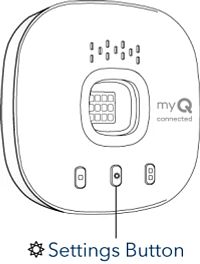
For Chamberlain/liftmaster Myq Smart Garage Hub And Smart Garage Control
These are the small black or white units that stick to your garage ceiling or wall.
- Locate the “Settings” (Gear) Button: On the side or back of the MyQ hub, find the small gear icon button.
- Press and Hold: Use your finger or a small tool to press and hold the button for about 10 seconds.
- Watch for LED Changes: The light on the device will turn blue, then yellow, and finally blink or turn off—this means the reset is complete.
- Release the Button: After the lights change, let go of the button. The device is now reset to factory settings.
For Built-in Myq Garage Door Openers (motor Unit Models)
These units have MyQ technology built into the opener motor itself.
- Find the “Learn” Button: This is usually on the back or side of the opener motor, often colored yellow, red, orange, or purple.
- Press and Hold: Hold the “Learn” button for about 6 seconds until the LED next to it turns off.
- Full Factory Reset: For a complete reset (removing all remote controls and keypads), press and hold again for another 6 seconds. The LED will blink, confirming the reset.
Resetting The Myq Account And App
A factory reset only clears the hardware. To fully remove your device from your MyQ account:
- Open the MyQ App: Log in and select your garage door opener.
- Delete Device: Tap the device, then choose “Delete” or “Remove Device.”
- Confirm Removal: The app will ask you to confirm. Once done, your device is disconnected from your account.
Clearing Remotes And Keypads
After the reset, all remote controls and keypads will be erased from the system. To reprogram, follow your user manual or the instructions in the MyQ app.
What Happens After A Factory Reset?
A successful reset means:
- All Wi-Fi settings are erased.
- The device is no longer linked to the MyQ app or account.
- All remotes and keypads must be reprogrammed.
- Home automation systems (like HomeKit, Alexa, Google Assistant) must be set up again.
Resetting does not physically change your garage door or opener hardware. It only clears software and memory settings.
Reconnecting And Setting Up After Reset
Now that your device is reset, it’s time to set everything up again. This can take 10–30 minutes, depending on your system.
Reconnecting To Wi-fi
- Open the MyQ App: Download or update the app on your phone.
- Add a New Device: Choose “Set Up a New Device” and follow the prompts.
- Connect to Wi-Fi: The app will guide you through connecting the opener to your network. Have your Wi-Fi password ready.
- Test Connection: Once connected, use the app to open and close the garage door.
Re-adding Family Members
Anyone who used the MyQ app before will need to be re-invited:
- Go to “Users” or “Home Access” in the MyQ app.
- Send invitations via email or SMS.
Reprogramming Remotes And Keypads
Follow your opener’s instruction manual or the MyQ app to add remotes and keypads. Usually, you’ll press the “Learn” button, then press the remote button you want to program.
Integrating With Smart Home Systems
If you use Google Assistant, Amazon Alexa, Apple HomeKit, or IFTTT, you’ll need to reconnect these services:
- Open the MyQ app and follow integration instructions.
- Log in to your smart home account and link your MyQ device.
- Test voice commands or automations.
Common Problems And Solutions
Even with careful steps, users sometimes hit snags. Here are the most common problems—and how to solve them.
Device Won’t Reset
- Try again: Hold the reset button longer (at least 10–15 seconds).
- Power cycle: Unplug the opener for 1 minute, then plug it in and try the reset again.
- Check for firmware updates: Outdated firmware can block resets. Update via the app if possible.
Wi-fi Won’t Connect After Reset
- Wrong password: Double-check your Wi-Fi password.
- 2.4 GHz only: MyQ devices only support 2.4 GHz Wi-Fi, not 5 GHz.
- Distance from router: Move the device closer to your router for setup.
- Router settings: Ensure MAC address filtering is off, and SSID is broadcast.
App Still Shows Old Device
- Force close the app: Restart the app and check if the device is gone.
- Uninstall/reinstall: Sometimes the app caches old data—reinstalling can help.
- Contact support: If the device won’t disappear, reach out to MyQ support.
Remote Controls Don’t Work
- Reprogram needed: All remotes must be re-added after a reset.
- Dead batteries: Check and replace remote batteries if needed.
- Interference: Other wireless devices can interfere—try programming at a different time of day.
Tips For A Smooth Factory Reset
Success is in the details. Here are expert tips that beginners often overlook:
- Label your remotes: After resetting, it’s easy to mix up which remote goes with which door. Use stickers or markers.
- Keep your serial number handy: You’ll need it for support or for reconnecting to the MyQ app.
- Photograph your setup: Before you disconnect anything, take photos of wiring and device placement.
- Write down your Wi-Fi name and password: Many people forget these details and get stuck during setup.
Comparing Myq Garage Door Openers: Reset Features
Not all MyQ-enabled openers have the same reset procedures or features. Here’s a quick comparison for clarity:
| Model Type | Reset Button Location | Reset Duration | Remotes Cleared? | Wi-Fi Settings Cleared? |
|---|---|---|---|---|
| MyQ Smart Garage Hub | Side/Back of Hub | ~10 seconds | Yes | Yes |
| Built-in MyQ Opener | Motor Unit (Learn Button) | ~6-12 seconds | Yes | Yes |
| MyQ Smart Garage Control | Side of Device | ~10 seconds | Yes | Yes |
This table helps you quickly identify where to look and what to expect for your model.
When Should You Avoid A Factory Reset?
A factory reset is powerful, but sometimes it’s not the best solution. For example:
- Minor connection drops: Try restarting your router or the device first.
- App glitches: Logging out and back in often fixes issues.
- Adding a new user: You don’t need to reset—just invite them in the app.
A factory reset is best for major problems or when you want a total fresh start.
.jpeg)
Security After Resetting Your Myq Opener
Protecting your home is important. After a factory reset, take these steps:
- Change your MyQ account password if you think it was compromised.
- Update your Wi-Fi password if you suspect unauthorized access.
- Review app permissions: Only invite trusted users.
- Enable two-factor authentication in the MyQ app for extra security.
Many people forget to secure their accounts after resetting, which can leave your garage vulnerable.
Advanced Troubleshooting For Persistent Issues
If a standard reset doesn’t solve your problem, there are advanced steps to try:
- Manual Power Reset: Unplug your opener for 5 minutes, then plug it back in. This can clear stuck memory.
- Firmware Update: Use the MyQ app to check for software updates. Updating can fix bugs or improve Wi-Fi stability.
- Hard Reset (for some models): Some built-in units have a second button or require holding two buttons together—check your manual or the Chamberlain/LiftMaster website.
- Contact Professional Support: If your device still malfunctions, call MyQ support for advanced help. Keep your model and serial number ready.
Myq Garage Door Openers: Features Comparison
To help you understand if your device is up to date, here’s a quick comparison of key features between common MyQ models:
| Feature | MyQ Smart Garage Hub | MyQ Smart Garage Control | Built-in MyQ Opener |
|---|---|---|---|
| Wi-Fi Compatibility | 2.4 GHz only | 2.4 GHz only | 2.4 GHz only |
| Reset Button | Physical | Physical | “Learn” Button |
| Supports Multiple Doors | No | No | Some Models |
| HomeKit Integration | Yes (with adapter) | Yes (with adapter) | Yes |
| Battery Backup | No | No | Some Models |
Knowing your model’s features can help you decide if a reset is needed or if an upgrade might better suit your needs.
Practical Examples: Resetting In Real Life
Let’s look at two real-world scenarios.
Example 1: You’re moving to a new house. You perform a factory reset on your MyQ hub, delete it from your account, and leave the device for the new owner. The new owner sets it up as if it were brand new.
Example 2: Your MyQ opener stops responding to the app. You try rebooting your Wi-Fi router and logging out of the app, but nothing works. You perform a factory reset, reconnect the device to Wi-Fi, and everything works again.
In both cases, a reset solves the main issue and keeps your home secure.
What Most People Miss About Factory Resets
Many users think a factory reset is a cure-all, but it’s just one tool. Here are two key points most people overlook:
- Device removal in the app is just as important as the hardware reset. If you only reset the hardware, the old device can still appear in your app, causing confusion.
- Remotes and keypads are wiped: Every remote and keypad must be reprogrammed after a reset. If you don’t do this, you’ll be locked out when you need them most.
Planning for these steps saves frustration and extra work.
Key Differences: Soft Reset Vs. Factory Reset
Sometimes, a soft reset (restarting the device) can solve simple problems without erasing settings.
| Reset Type | What It Does | When To Use |
|---|---|---|
| Soft Reset | Restarts device, keeps all settings | Minor glitches or connection drops |
| Factory Reset | Erases all settings, returns to default | Major issues, selling, security concerns |
Knowing the difference can help you avoid unnecessary work.
Staying Updated: Why Firmware Matters
Chamberlain and LiftMaster often release firmware updates for MyQ devices. Updated firmware can:
- Fix bugs
- Improve Wi-Fi stability
- Add new features (like smart home compatibility)
Always check for updates before and after a reset. You can do this in the MyQ app under “Device Settings. ”
When To Contact Support
If you’ve tried everything—reset, firmware updates, reinstalling the app—but your MyQ device still won’t work, it’s time to reach out for help. Call Chamberlain support or visit their official help center. Have your model number, serial number, and a summary of steps you’ve already tried. This speeds up the help process.
For detailed official instructions and troubleshooting, you can also visit the Chamberlain Support Center.
Frequently Asked Questions
What Does A Factory Reset Do To My Myq Garage Door Opener?
A factory reset erases all settings, including Wi-Fi info, remote controls, keypads, and account connections. The device returns to the state it was in when you first bought it. You’ll need to set up everything again.
Do I Need To Reset My Myq Opener If I Get A New Phone?
No, you don’t need to reset the opener. Just download the MyQ app on your new phone, log in with your existing account, and your devices should appear automatically.
How Can I Tell If My Reset Worked?
After a successful reset, the opener’s LED indicators will blink or turn off (depending on the model). The device will not respond to old remotes or the app until you set it up again.
Will A Factory Reset Fix All Myq Problems?
A factory reset solves many software-related issues, but not hardware problems. If your opener makes strange noises or won’t physically move, the problem is likely mechanical and needs professional repair.
Can I Undo A Factory Reset?
No, factory resets cannot be undone. All data is permanently erased. If you want to keep settings, back them up or write down important details before resetting.
Getting your MyQ garage door opener back to its original state can feel complicated at first, but with the right steps and a bit of patience, you’ll be up and running in no time. Always back up your setup, stay secure, and don’t hesitate to seek help if you hit a wall. A factory reset is a powerful tool when used wisely—one that keeps your garage smart, safe, and ready for whatever comes next.