
The convenience of a garage door opener is undeniable, especially when you’re driving a premium vehicle like a Lexus RX 350. Imagine pulling into your driveway on a rainy evening or with your arms full, and with the press of a button, your garage door glides open. Integrating your garage door opener with your Lexus RX 350 can significantly enhance this experience, making daily routines smoother and more efficient. This guide will walk you through the various methods to achieve this seamless integration, from traditional remote programming to more advanced smart home solutions.
The process of connecting your garage door opener to your Lexus RX 350 involves understanding the different technologies available and choosing the one that best suits your needs and the capabilities of your vehicle and opener. Whether you’re looking for a simple, built-in solution or a more sophisticated smart home setup, there are several viable options.
We’ll explore how to leverage your car’s existing features, add aftermarket accessories, and even integrate with smart home systems for ultimate convenience.
Key Takeaways
- Universal Remotes: Many modern vehicles, including the Lexus RX 350, can be programmed with universal remotes that can learn the signals from your existing garage door opener.
- HomeLink System: The Lexus RX 350 is often equipped with the HomeLink Connect system, a built-in car-to-home automation system that can be programmed to operate garage doors and other compatible devices.
- Aftermarket Solutions: For older openers or vehicles without integrated systems, aftermarket visor clips or smart garage door opener devices offer reliable alternatives.
- Programming Steps: The programming process typically involves holding the remote and the car’s button simultaneously, followed by pressing the “learn” or “program” button on the garage door opener motor unit.
- Troubleshooting: Common issues include interference, incompatible opener frequencies, and incorrect programming sequences, all of which can usually be resolved with a systematic approach.
- Security Considerations: Always ensure your garage door opener system is up-to-date with rolling codes for enhanced security and regularly check for firmware updates on smart devices.

Credit: www.youtube.com
Understanding Your Lexus Rx 350’s Built-in Capabilities
Modern luxury vehicles like the Lexus RX 350 often come equipped with advanced features designed to simplify your life. One of the most convenient of these is the HomeLink Connect system, a universal transceiver typically located in the overhead console or rearview mirror. This system is designed to learn and replicate the signals from your existing garage door opener remote, eliminating the need for a separate visor clip. Understanding how this system works is the first step to integrating your garage door opener.
The Homelink Connect System Explained
The HomeLink system operates by using radio frequency (RF) signals. Your garage door opener remote transmits a specific code to the opener unit. The HomeLink system in your Lexus RX 350 can learn this code by being placed in proximity to the remote and then mimicking the signal. Most modern HomeLink systems support rolling code technology, which enhances security by changing the code with each use. This is crucial for preventing unauthorized access. Before you begin programming, it’s essential to identify the HomeLink buttons in your vehicle. They are usually found in a cluster of three, often near the sunroof controls or on the rearview mirror.
Identifying Your Garage Door Opener Type
To successfully program your HomeLink system, you need to know the type of garage door opener you have. The programming process can differ slightly depending on whether your opener uses fixed code or rolling code technology. Fixed code openers transmit a single, unchanging signal. Rolling code openers, like those from LiftMaster, Chamberlain, Genie, and Overhead Door, use a more secure system that generates a new code each time the remote is used. Most vehicles manufactured after 2000 come with HomeLink systems compatible with rolling codes, but it’s always good to confirm. You can usually find this information in your garage door opener’s manual or by checking the manufacturer’s website.
Pre-programming Checklist For Homelink
Before you start the programming process, a few preparatory steps will ensure a smoother experience.
- Consult Your Manuals: Have both your Lexus RX 350 owner’s manual and your garage door opener manual readily available. The Lexus manual will detail the specific HomeLink programming steps for your model year, while the opener manual will guide you on locating and activating the “learn” or “program” button on the motor unit.
- Replace Remote Batteries: Ensure the batteries in your existing garage door opener remote are fresh. Weak batteries can interfere with the signal transmission needed for programming.
- Clear Existing HomeLink Codes: If your HomeLink system has been previously programmed, it’s often recommended to clear the existing codes before adding a new one. This prevents conflicts. Your Lexus manual will explain how to do this, usually by pressing and holding the two outer HomeLink buttons for about 10-15 seconds until the indicator light changes.
- Locate the “Learn” Button: On your garage door opener motor unit (the box mounted on the ceiling of your garage), locate the “learn” or “program” button. This button is often red, green, orange, or purple and is typically found near the antenna wire or the light bulb cover. You will need to press this button briefly to initiate the learning process.
- Park Strategically: Park your Lexus RX 350 within range of the garage door opener motor unit, typically within 5-10 feet.

Credit: www.lexusstevenscreek.com
Programming The Homelink System In Your Lexus Rx 350
The process of programming the HomeLink system in your Lexus RX 350 involves a sequential set of steps that synchronize your car’s buttons with your garage door opener. While the exact steps can vary slightly based on your RX 350’s model year and the specific garage door opener, the general procedure is consistent.
Step-by-step Homelink Programming Guide
- Ignition On: Turn the ignition of your Lexus RX 350 to the “ON” or “Accessory” position. The engine does not need to be running.
- Select and Hold: Choose one of the three HomeLink buttons you wish to program. Press and hold the chosen HomeLink button.
- Simulate Remote: Take your existing garage door opener remote and hold it approximately 1-3 inches away from the HomeLink buttons.
- Press Remote Button: Press and hold the desired button on your garage door opener remote.
- Observe Indicator Light: Watch the HomeLink indicator light. It will typically flash rapidly, then turn solid or flash slowly. This indicates that the HomeLink system has learned the remote’s signal. If the light turns solid, release both the HomeLink button and the remote button. If it continues to flash slowly, proceed to the next step for rolling code openers.
- Rolling Code Programming (If Applicable): If your garage door opener uses rolling code technology, you will need to complete the next step. After the HomeLink indicator light shows it has learned the initial signal (from step 5), you have approximately 30 seconds to go to your garage.
- Press the “Learn” Button: Go to your garage and press and release the “learn” or “program” button on your garage door opener motor unit. The opener unit’s indicator light should illuminate.
- Return to Vehicle: Return to your Lexus RX 350.
- Final Button Press: Within 30 seconds of pressing the “learn” button on the opener, press and hold the *same* HomeLink button you programmed in step 3. Release the button when the garage door opener motor unit activates (e.g., the light on the opener flashes or the door begins to move).
- Test: Press the programmed HomeLink button again to test if it operates your garage door.
Pro Tip: If the HomeLink system doesn’t seem to learn the remote’s signal, try moving the remote closer to or further from the HomeLink buttons, or try a different button on the remote. Also, ensure you are using the correct “learn” button on the opener unit.
Troubleshooting Common Homelink Issues
Even with clear instructions, programming can sometimes hit snags. Here are common issues and how to resolve them:
- No Response: If the HomeLink indicator light doesn’t illuminate or flash at all during the initial programming, check that your car’s ignition is in the correct position and that the remote’s batteries are fresh. You might also need to clear previous HomeLink codes.
- Rapid Flashing: If the HomeLink indicator light flashes rapidly and then goes out, it might indicate that the signal from the remote is not being recognized or that the opener is not compatible. Try positioning the remote closer or further away.
- Door Opens Then Closes: This can sometimes happen with older opener models. It might require a specific sequence or a compatibility bridge. Consult your Lexus or garage door opener manual.
- Rolling Code Not Engaging: If the door doesn’t activate after pressing the HomeLink button the second time (step 9), you may not have pressed the “learn” button on the opener correctly or within the 30-second window. You might also need to repeat the entire process.
- Interference: Other RF devices, including wireless doorbells, security systems, or even other remotes, can sometimes interfere with the programming process. Try programming during a time when these devices are less likely to be active.
If you continue to experience issues, consult your Lexus dealer or the garage door opener manufacturer’s support. Many manufacturers provide specific compatibility charts and troubleshooting guides for HomeLink.
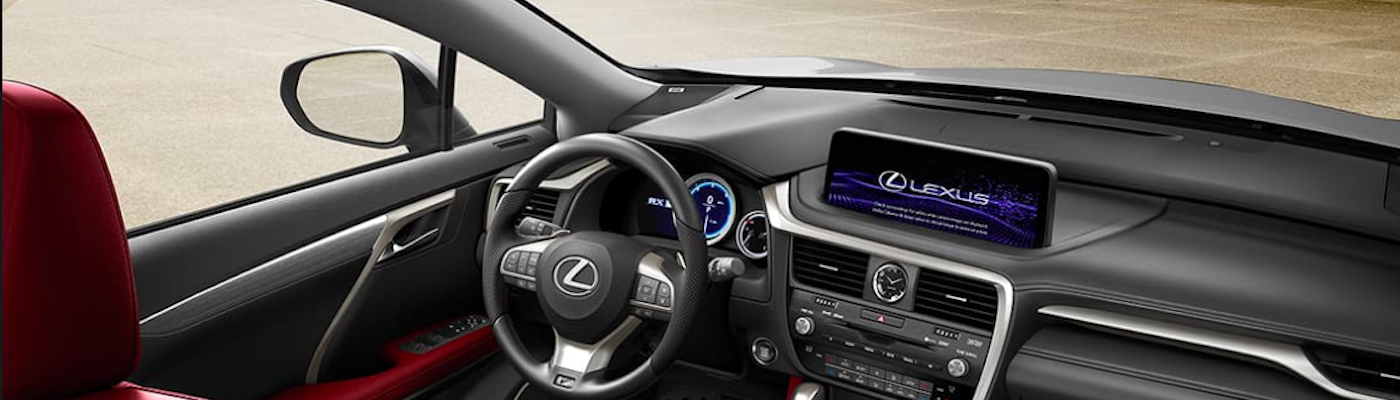
Credit: www.rallyelexus.com
Alternative: Using An Aftermarket Garage Door Remote Visor Clip
If your Lexus RX 350 is an older model that doesn’t come equipped with HomeLink, or if you prefer a dedicated remote, an aftermarket garage door remote is a straightforward solution. These are the traditional remotes you might have received when you purchased your garage door opener. You can purchase a universal remote that is compatible with most garage door opener brands, or a replacement remote specifically for your opener model.
Choosing The Right Aftermarket Remote
When selecting an aftermarket remote, consider the following:
- Compatibility: Ensure the remote is compatible with your specific garage door opener brand and model. Look for options that support rolling code technology if your opener uses it. Universal remotes often list the brands they are compatible with.
- Number of Buttons: Decide how many garage doors or gates you need to control. Most remotes have one to four buttons.
- Size and Design: Consider the physical size of the remote and where you intend to keep it, a visor clip is common for car use, but smaller keychain remotes are also available.
- Battery Life: Check the type of battery used and its expected lifespan.
Programming An Aftermarket Remote
The programming process for an aftermarket remote is very similar to the rolling code programming for HomeLink.
- Locate the “Learn” Button: Find the “learn” or “program” button on your garage door opener motor unit.
- Press and Release “Learn” Button: Press and release the “learn” button. The opener’s indicator light should illuminate. You typically have 30 seconds to complete the next step.
- Press and Hold Remote Button: Take your new aftermarket remote and press and hold the button you wish to program.
- Observe Opener Unit: The garage door opener’s light should blink or the unit may make a clicking sound, indicating it has accepted the remote’s signal.
- Release Remote Button: Release the button on the remote.
- Test: Press the programmed button on the remote again to test if it operates the garage door.
If the first attempt doesn’t work, you may need to repeat the process. Some remotes require you to press and hold the “learn” button for a few seconds before releasing it, while others might require a specific sequence of button presses on the remote itself.
Always refer to the remote’s specific instructions.
Integrating With Smart Home Systems For Enhanced Control
For the ultimate in convenience and connectivity, you can integrate your garage door opener with a smart home system. This goes beyond simple remote operation and allows for features like remote monitoring, status notifications, and control via smartphone apps. This is particularly beneficial if your existing garage door opener is older and doesn’t support rolling codes or if you want to add advanced features.
Smart Garage Door Opener Devices
Several devices on the market can make your existing garage door opener “smart. ” These typically work by either mimicking a remote signal or by physically interacting with your opener’s existing button.
- MyQ Garage Door Hubs: Chamberlain’s MyQ technology is a popular option that connects to your Wi-Fi and allows you to monitor and control your garage door via a smartphone app. It often works with openers from Chamberlain, LiftMaster, and Craftsman.
- Gogogate2: This system allows you to control up to three garage doors and provides real-time video monitoring and alerts.
- Tailwind iQ: Tailwind offers a system that can control up to three garage doors and integrates with various smart home platforms.
How Smart Systems Enhance Convenience
Smart garage door openers offer several advantages:
- Remote Access: Open or close your garage door from anywhere in the world using your smartphone. This is useful if you forget to close the door or need to let someone in remotely.
- Real-Time Notifications: Receive alerts on your phone when the garage door opens or closes, providing peace of mind.
- Integration with Smart Assistants: Many smart systems can be linked to voice assistants like Amazon Alexa or Google Assistant, allowing you to open or close your garage door with a voice command (though security protocols often require a PIN for closing).
- Scheduling and Automation: Set schedules for your garage door to open or close at specific times, or integrate it into broader smart home routines (e.g., “Goodnight” scene closes the garage door).
- Compatibility Checks: Before purchasing, always check the compatibility of the smart device with your specific garage door opener model. Most manufacturers provide online compatibility checkers.
Setting Up A Smart Garage Door System
The setup process for smart garage door systems generally involves:
- Installation: Physically install the smart device according to the manufacturer’s instructions. This usually involves mounting a sensor on the garage door and a hub or gateway near your Wi-Fi router.
- App Download: Download the corresponding smartphone app for the smart device.
- Wi-Fi Connection: Connect the smart hub/gateway to your home Wi-Fi network through the app.
- Pairing: Follow the app’s instructions to pair the smart device with your garage door opener. This might involve pressing buttons on the opener or entering codes.
- Configuration: Set up notifications, user access, and any desired automation rules within the app.
For example, setting up a MyQ system typically involves plugging in the hub, downloading the MyQ app, connecting the hub to your Wi-Fi, and then following the app’s guided process to link it to your opener. This process usually takes less than 30 minutes.
Security Considerations For Connected Garage Doors
Integrating your garage door opener with your Lexus RX 350, whether through HomeLink or a smart system, introduces a need to be mindful of security. While modern systems offer significant advancements, understanding potential vulnerabilities is key to maintaining a secure home.
Rolling Codes Vs. Fixed Codes
As mentioned, rolling codes are a significant security upgrade over older fixed code systems. Fixed code openers transmit the same signal every time, making them susceptible to “code grabbing” devices that can record the signal and replay it later to open your garage. Rolling code technology uses a sophisticated algorithm to generate a new, unique code each time the remote is used, rendering a captured signal useless for subsequent access. Ensure your garage door opener uses rolling codes for optimal security. If your opener is older than 15-20 years, it likely uses fixed codes and may be a security risk.
Smart System Security Best Practices
If you opt for a smart garage door opener or integration system, adhere to these security best practices:
- Strong Passwords: Use strong, unique passwords for your Wi-Fi network and the smart device’s app account. Avoid easily guessable passwords.
- Two-Factor Authentication (2FA): If the smart device app offers 2FA, enable it. This adds an extra layer of security, requiring a second verification step (like a code sent to your phone) when logging in.
- Regular Updates: Keep the smart device’s firmware and the companion app updated. Manufacturers often release updates to patch security vulnerabilities. Your Lexus RX 350’s infotainment system may also receive software updates that could affect HomeLink functionality, so keeping your vehicle’s software current is also advisable.
- Secure Wi-Fi: Ensure your home Wi-Fi network is secured with WPA2 or WPA3 encryption.
- Guest Access: If you grant access to family members or guests via the smart app, ensure you can revoke their access when no longer needed.
- PIN for Voice Commands: If using voice control to open or close the garage, always set up a PIN code requirement within your smart assistant’s settings. This prevents accidental or unauthorized voice activations.
Physical Security Measures
Beyond the electronic aspects, don’t overlook basic physical security:
- Secure the Manual Release: Ensure the manual release cord on your garage door opener is not easily accessible from the outside. If it is, consider installing a manual release lock.
- Garage Door Condition: A well-maintained garage door is harder to force open. Check for worn components and ensure the door is properly sealed. You can find resources on how to keep your garage door in top shape, such as how to lube garage door rollers for smooth operation.
- Regular Maintenance: Periodically check the garage door opener’s chain or belt for proper tension. You can learn more about how to adjust the chain on a garage door opener to ensure smooth, reliable operation.
By combining the convenience of integrated vehicle systems with robust security practices, you can enjoy seamless access to your garage without compromising your home’s safety.
Advanced Integration And Future Possibilities
The integration of vehicles with home automation is a rapidly evolving field. Beyond simply opening and closing the garage door, future possibilities and advanced setups offer even greater convenience and functionality for Lexus RX 350 owners.
Vehicle-to-home (v2h) Automation
While still emerging, Vehicle-to-Home (V2H) technology, which allows electric vehicles to power a home, could eventually extend to controlling home systems directly. Although not yet standard for garage door operation, the underlying concept of seamless vehicle-home communication paves the way for more integrated experiences.
Imagine your car not only opening the garage but also adjusting thermostats, turning on lights, or even disarming your security system as you approach your home.
Geofencing And Proximity Triggers
Many smart garage door systems now support geofencing. This technology uses your smartphone’s GPS location to trigger actions automatically. For example, you can set your garage door to open when your Lexus RX 350 enters a predefined radius around your home and close when it leaves. This eliminates the need to actively press a button.
Voice Control Integration
As mentioned, integrating your smart garage opener with voice assistants like Alexa or Google Assistant allows for hands-free operation. While security precautions are necessary, the ability to say, “Hey Google, open the garage,” while you’re already in the car but haven’t reached the opener button yet, adds another layer of convenience.
Multi-vehicle Households
In households with multiple vehicles, programming HomeLink or aftermarket remotes for each car ensures everyone can access the garage. If you have multiple garage doors or gates, ensure your chosen system (HomeLink, aftermarket remote, or smart device) has enough buttons or capacity to manage them all efficiently.
For instance, if you have a primary opener and a secondary opener for a back gate, you’ll need a remote or HomeLink setup that can handle both.
Frequently Asked Questions
What If My Garage Door Opener Is Very Old?
If your garage door opener is significantly old (e.g., over 15-20 years), it likely uses fixed code technology, which is less secure. While you might still be able to program it to HomeLink or an aftermarket remote, it’s highly recommended to upgrade to a modern opener that supports rolling code technology. Many smart garage door opener devices also offer upgrade kits or compatibility bridges for older openers, but a full replacement is often the most secure and reliable option. You can research the cost of a new garage door opener at How Much for a Garage Door: Costs, Factors, and Savings Tips.
Can I Program Multiple Garage Doors To My Lexus Rx 350?
Yes, absolutely. The HomeLink system in most Lexus RX 350 models has three programmable buttons. This allows you to program up to three different garage doors, gates, or other compatible devices. If you have more than three, you would need to use additional remotes or consider a smart garage door system that can manage multiple openers through a single app.
What Is The Difference Between Homelink And A Standard Remote?
HomeLink is a built-in system in your vehicle that acts as a universal remote. It learns the signals from your existing garage door opener remote and stores them in dedicated buttons within your car, eliminating the need to carry a separate remote. A standard remote is a physical