
Programming your garage door opener for your 2021 Volkswagen Atlas is a straightforward process that can significantly enhance your daily convenience and security. This integrated system, often referred to as the HomeLink® Connect system, allows you to control up to three different garage doors, gates, or other radio-controlled devices directly from your vehicle’s visor or rearview mirror.
No more fumbling for separate remotes; with a few simple steps, you can have your garage door opening as you approach your home.
The process for programming a garage door opener in a 2021 VW Atlas is designed to be user-friendly, but it’s essential to follow the instructions precisely. This guide will walk you through each step, from preparing your existing remote to successfully syncing it with your Atlas’s HomeLink system.
We’ll cover common issues and provide tips to ensure a smooth setup, empowering you to take full advantage of this integrated technology.
Key Takeaways
- The HomeLink Connect system in a 2021 VW Atlas can be programmed to control up to three devices.
- You will need your existing garage door remote and the garage door opener motor unit accessible.
- The programming process involves two main stages: Syncing the remote to the car and syncing the car to the opener unit.
- Ensure your garage door opener has a functional “Learn” or “Program” button.
- If you encounter issues, consult your VW Atlas owner’s manual or the HomeLink website.
- Regularly test your programmed buttons to ensure they are functioning correctly.

Credit: www.vwofdaphne.com
Understanding Your 2021 Vw Atlas Homelink System
The 2021 Volkswagen Atlas is equipped with the HomeLink Connect system, a wireless, programmable remote control system integrated into the vehicle’s interior. This system is designed to replace multiple handheld remote controls with a single, convenient unit located typically on the driver’s side visor or rearview mirror. HomeLink is compatible with a vast majority of garage door openers, gate operators, and radio-controlled lighting or appliance controls. The system works by learning the radio frequency and code of your existing remote control.
The core functionality of HomeLink relies on its ability to replicate the signal from your original remote. When you press a HomeLink button after programming, it transmits a signal that mimics your existing remote. For most modern garage door openers, this process is straightforward. However, some systems, particularly those with rolling code technology (also known as Security+ 2.0 or similar), require an additional step to ensure the vehicle’s signal is recognized and accepted by the opener unit. This often involves pressing the “Learn” or “Program” button on the garage door opener motor itself.
How Homelink Works: The Technology Behind It
HomeLink operates on radio frequencies, typically in the 288-315 MHz range, though newer systems can utilize other frequencies. When you press a button on your HomeLink system, it sends out a radio signal. Your garage door opener, or the receiver unit connected to it, is designed to recognize and respond to this specific signal.
The system uses a learning function that allows it to capture the unique code transmitted by your original remote.
For older garage door openers with fixed codes, the process is generally simpler. The HomeLink system learns the code once, and that’s it. For modern openers with rolling codes, the system learns the initial code, but a subsequent step is required to synchronize the HomeLink system with the opener’s rolling code sequence. This rolling code feature enhances security by changing the transmission code each time the opener is used, preventing unauthorized access. The process of pressing the “Learn” button on the opener unit is crucial for establishing this synchronization.
Benefits Of Integrated Garage Door Control
The primary benefit of the HomeLink Connect system is unparalleled convenience. Instead of searching for a specific remote in your car or pocket, you can simply press a button integrated into your vehicle’s cabin. This is especially useful when arriving home with groceries, on a rainy day, or when juggling children.
Beyond convenience, HomeLink can also contribute to enhanced security. By eliminating the need for a separate, potentially lost or stolen remote, you reduce the risk of unauthorized access. Furthermore, the rolling code technology, when properly programmed, ensures that the codes are constantly changing, making it extremely difficult for signal interception or “code grabbing” to occur. This integrated system also offers a cleaner aesthetic in your car, reducing clutter from multiple remotes.
Credit: www.youtube.com
Preparing For Programming
Before you begin the programming process, a few preparatory steps will ensure a smooth and successful setup. Gathering the necessary items and understanding the requirements beforehand can save you time and frustration.
What You’ll Need
- Your Original Garage Door Remote: This is essential. The HomeLink system needs to “learn” the signal from this remote. Ensure it has fresh batteries.
- Your 2021 VW Atlas: Park your vehicle within range of your garage door opener. The car’s ignition should be in the “ON” or “Accessory” position for the HomeLink buttons to function.
- Access to Your Garage Door Opener Motor Unit: You will likely need to access the motor unit mounted on the ceiling of your garage to press the “Learn” or “Program” button. This button is usually located near the antenna wire or on the back of the unit.
- A Ladder (if necessary): To safely reach the garage door opener motor unit.
- Your VW Atlas Owner’s Manual: This can be a helpful reference, especially for locating the HomeLink buttons in your specific vehicle.
Understanding Garage Door Opener Types
The programming method can vary slightly depending on the type of garage door opener you have, particularly concerning its security features.
- Fixed Code Openers: These older systems transmit a single, unchanging code. Programming is typically a straightforward process of syncing the remote to the car.
- Rolling Code Openers (e.g., Security+ 2.0, Intellicode, Billion Code): These modern systems change their code with each use for enhanced security. Programming these requires an extra step where you press the “Learn” button on the opener motor unit to synchronize it with the HomeLink system. Most openers manufactured after the mid-1990s use rolling codes.
To determine your opener type, check your opener’s manual or look for markings on the unit itself. If you’re unsure, it’s best to assume it’s a rolling code system and prepare for the extra step.
Safety Precautions
Safety is paramount when working with garage door openers and vehicles.
- Park Safely: Ensure your 2021 VW Atlas is parked directly in front of the garage door, not so close that it obstructs the door’s path, but close enough for the remote signal to be effective.
- Stable Ladder Use: If using a ladder to reach the opener unit, ensure it is placed on a stable, level surface and is fully extended. Have someone spot you if possible.
- Disengage Opener (if necessary): For rolling code systems, you will need to press the “Learn” button. Be aware that pressing this button may erase all previously programmed remotes and keypads. It’s wise to have your other remotes ready to be reprogrammed afterward.
- Keep Clear: Ensure children and pets are kept clear of the garage door’s path during the programming and testing phases.

Credit: www.lutherauto.com
Programming The Homelink System: Step-by-step
The programming process for your 2021 VW Atlas HomeLink system is typically divided into two main phases: syncing the vehicle’s HomeLink buttons with your existing remote, and then, if necessary, synchronizing the HomeLink system with the garage door opener’s motor unit.
Phase 1: Training The Homelink Buttons
This phase involves teaching the HomeLink system the signal from your original garage door remote.
- Turn on the Ignition: Start your 2021 VW Atlas or turn the ignition key to the “ON” or “Accessory” position. The engine does not need to be running.
- Locate HomeLink Buttons: Identify the HomeLink buttons. In the 2021 Atlas, they are typically integrated into the overhead console or rearview mirror assembly.
- Clear Existing Codes (Optional but Recommended): To ensure no previous programming interferes, you can clear all HomeLink channels. Press and hold the two outer HomeLink buttons (usually buttons 1 and 3) for about 10 seconds until the indicator light (often a small LED) flashes rapidly, then turns solid. Release the buttons.
- Select a HomeLink Button: Choose one of the three HomeLink buttons you wish to program for your garage door opener.
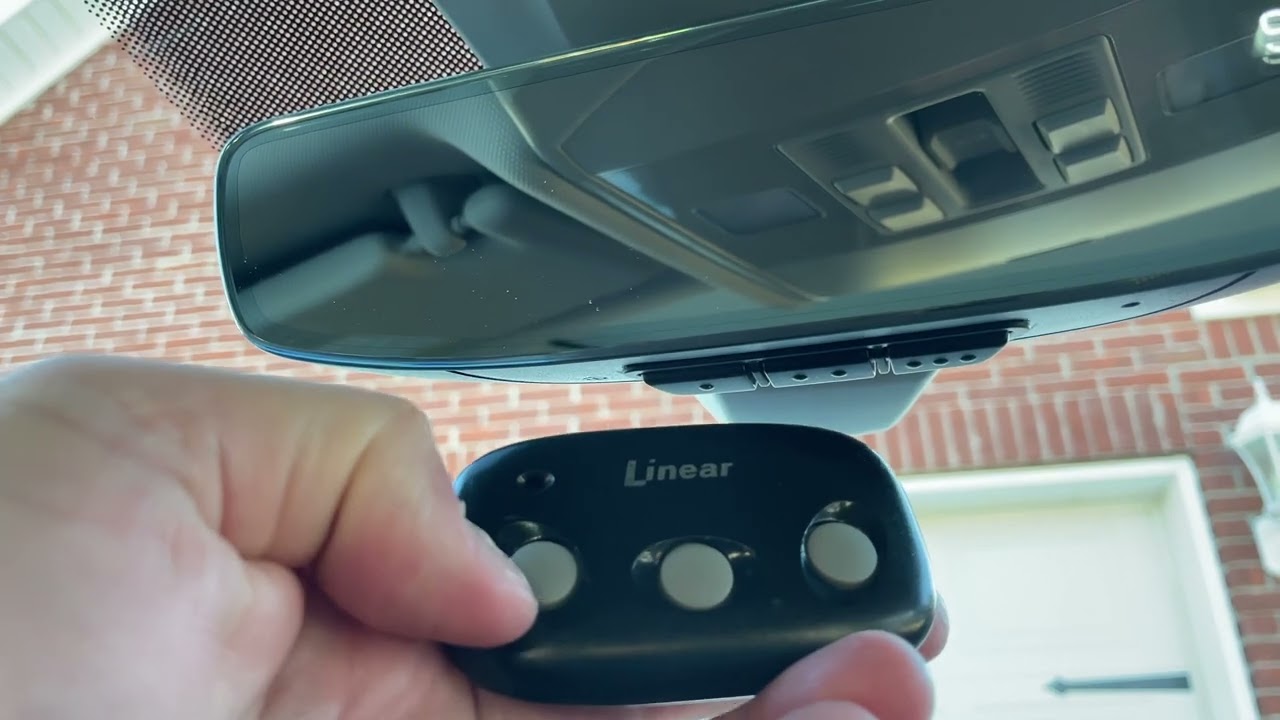
- Position Remotes: Hold your original garage door remote about 1-3 inches away from the HomeLink buttons. The remote should be aimed towards the HomeLink control panel.
- Press and Hold: Press and hold both the chosen HomeLink button and the button on your original remote simultaneously.
- Observe the Indicator Light: Keep both buttons pressed. The HomeLink indicator light will likely flash slowly at first, then change to flash rapidly. This rapid flashing indicates that the HomeLink system has learned the code from your remote.
- Release Buttons: Once the indicator light flashes rapidly, release both the HomeLink button and the remote button.
- Test the Button: Press the programmed HomeLink button once. The indicator light should flash, indicating it’s transmitting a signal. If your garage door opener activates, you have successfully completed Phase 1 for a fixed code system. If it does not, or if you have a rolling code system, proceed to Phase 2.
Phase 2: Synchronizing With Rolling Code Openers
If your garage door opener uses a rolling code system, the previous step will program the signal, but the opener unit itself needs to recognize the HomeLink system as a valid transmitter.
- Locate the “Learn” or “Program” Button: Go to your garage and locate the “Learn” or “Program” button on the garage door opener motor unit. This button is often square or circular and may be located under a light cover or near the antenna. Consult your garage door opener’s manual if you cannot find it.
- Press and Release the “Learn” Button: Press and release the “Learn” or “Program” button on the motor unit. You typically have about 30 seconds to complete the next step. The LED light next to the button may illuminate or flash to indicate it’s in learning mode.
- Return to Your Vehicle: Immediately return to your 2021 VW Atlas.
- Press and Hold the Programmed HomeLink Button: Press and hold the HomeLink button you programmed in Phase 1.
- Observe the Garage Door Opener: Hold the button until you see your garage door opener activate (it might move slightly, or the lights on the unit might flash). This could take a few seconds up to 30 seconds.
- Release the HomeLink Button: Once the opener activates, release the HomeLink button.
- Test the System: Press the HomeLink button again. Your garage door should now open and close.
Pro Tip: If the garage door opener does not activate after holding the HomeLink button for 30 seconds, release the button and repeat steps 4-6. Sometimes it takes a couple of attempts. If it still doesn’t work, consult your owner’s manuals or the HomeLink website for specific instructions related to your garage door opener brand.
Troubleshooting Common Programming Issues
Even with clear instructions, programming issues can arise. Here are some common problems and their solutions for your 2021 VW Atlas HomeLink system.
Opener Not Responding At All
- Cause: The HomeLink system did not learn the remote’s code, or the vehicle’s ignition is not in the correct position.
- Solution:
- Ensure your 2021 VW Atlas ignition is in the “ON” or “Accessory” position.
- Verify your original remote has fresh batteries and is functioning correctly.
- Try positioning the remote closer to or further from the HomeLink buttons (1-3 inches is generally optimal).
- Repeat Phase 1, ensuring you press and hold both the HomeLink and remote buttons simultaneously until the indicator light flashes rapidly.
- Clear existing codes from the HomeLink system before attempting to reprogram.
Opener Responds Initially But Doesn’t Work Consistently
- Cause: This often indicates an issue with rolling code synchronization. The HomeLink system learned the remote’s signal, but the opener unit hasn’t fully accepted the HomeLink transmitter.
- Solution:
- Ensure you are correctly performing Phase 2 for rolling code openers.
- Double-check that you are pressing the correct “Learn” or “Program” button on your garage door opener motor unit. Refer to your opener’s manual.
- Make sure you return to your vehicle and press/hold the programmed HomeLink button within the 30-second window after pressing the “Learn” button on the opener.
- Try a slightly different timing when pressing and holding the HomeLink button in Phase 2.
Only One Homelink Button Works
- Cause: The other HomeLink buttons may have been programmed with different devices, or the programming for those specific buttons failed.
- Solution:
- Clear all HomeLink codes and reprogram each desired button individually, starting with Button 1.
- Ensure you are following the steps precisely for each button.
Garage Door Opener Brand Compatibility Issues
- Cause: While HomeLink is compatible with most openers, some specific brands or older models might require a special procedure or adapter.
- Solution:
- Consult the HomeLink Compatibility website (HomeLink Compatibility) for specific instructions related to your garage door opener brand.
- Check your garage door opener’s manual for any specific HomeLink programming notes.
- Consider purchasing a HomeLink universal transceiver if your opener is not directly compatible.
Intermittent Signal Strength
- Cause: Obstructions, distance, or interference can affect signal strength.
- Solution:
- Ensure the HomeLink buttons and the garage door opener receiver are not obstructed.
- Try to program the HomeLink system with your original remote closer to the opener motor unit (if possible), which can sometimes help establish a stronger initial connection.
- If you have multiple openers programmed, ensure you are pressing the correct button for the desired door.
Advanced Tips And Maintenance
Once your HomeLink system is programmed, a few extra steps and regular maintenance can ensure its continued functionality and security.
Programming Multiple Devices
Your 2021 VW Atlas HomeLink system can store up to three different device codes. To program a second or third device:
- Repeat the entire programming process (Phase 1 and, if necessary, Phase 2) using a different, unassigned HomeLink button.
- For example, if you programmed your garage door opener to Button 1, you can program your gate opener to Button 2 and another device to Button 3, following the same steps for each.
Reprogramming Or Replacing Remotes
If you lose your original garage door remote or purchase a new one, you will need to reprogram your HomeLink system.
- Lost Remote: If a remote is lost, it’s crucial to erase all programmed HomeLink codes immediately by holding the two outer buttons until the indicator light flashes rapidly. This prevents the lost remote from being able to operate your garage door. Then, reprogram the HomeLink system with your remaining functional remotes. For more detailed steps on clearing codes, you can refer to guides on how to reset your garage door opener.
- New Remote: When you get a new remote for your garage door opener, you’ll need to repeat the programming process using the new remote. You do not need to erase previous HomeLink programming unless you wish to change which button controls which device.
Maintaining Your Homelink System
- Test Regularly: Make it a habit to test all programmed HomeLink buttons periodically, perhaps once a month, to ensure they are still functioning correctly.
- Update Vehicle Battery: When your vehicle’s battery is disconnected or replaced, it’s possible that the HomeLink memory may be erased. You may need to reprogram the system after a battery change.
- Keep Manuals Handy: Retain the owner’s manuals for both your 2021 VW Atlas and your garage door opener. They contain specific details that can be invaluable for troubleshooting.
- Consider Opener Maintenance: A well-maintained garage door opener operates more reliably. Ensure your opener’s track and rollers are properly lubricated, which can prevent strain on the system and potentially improve signal reception. You can find guidance on this topic in articles like How to Lube Garage Door Rollers for Smooth, Quiet Operation.
Understanding Signal Interference
Occasionally, you might experience intermittent issues due to signal interference. This can be caused by:
- Other Wireless Devices: Many devices operate on radio frequencies, including wireless doorbells, security systems, and even some electronic gadgets.
- Radio Towers or Broadcast Stations: Proximity to strong radio transmitters can sometimes interfere with signals.
- Metal Objects: Large metal objects, including building materials, can sometimes impede radio signals.
If you suspect interference, try reprogramming the HomeLink button. In rare cases, changing the location of the garage door opener’s antenna (if accessible) might help improve reception.
Frequently Asked Questions
How Do I Know If My Garage Door Opener Is A Rolling Code System?
Most garage door openers manufactured after the mid-1990s utilize rolling code technology for enhanced security. You can usually determine this by checking the motor unit for labels like “Security+,” “Intellicode,” “Rolling Code,” or similar terms. Your garage door opener’s owner’s manual will also specify if it uses a rolling code system and provide instructions for programming external devices like HomeLink.
If you cannot find this information, it’s best to proceed with the rolling code programming steps, as they are also compatible with fixed code systems.
My Homelink Button Flashes Rapidly, But The Garage Door Doesn’t Move. What’s Wrong?
A rapidly flashing indicator light on the HomeLink system means it has successfully learned the code from your original remote. If the garage door doesn’t respond, the issue is likely with the synchronization between the HomeLink system and the garage door opener motor unit, especially if you have a rolling code opener.
This indicates that Phase 2 of the programming process (pressing the “Learn” button on the motor unit) was either not performed correctly, not performed within the time limit, or the opener unit did not recognize the signal from the car.
Ensure you are pressing the correct “Learn” button on the opener and repeat the steps for Phase 2 carefully.
Can I Program My 2021 Vw Atlas Homelink To Operate A Gate?
Yes, the HomeLink Connect system in your 2021 VW Atlas is designed to operate not only garage door openers but also automatic gates, radio-controlled lighting, and other radio-controlled devices. The programming process is the same: you will need the original remote for the gate system and will follow the same steps as programming a garage door opener. Ensure your gate system is compatible with HomeLink technology.
How Many Times Do I Need To Press The Homelink Button After Programming?
After successfully programming a HomeLink button, you typically only need to press it once to activate the associated device (garage door, gate, etc.). The initial rapid flashing of the indicator light during programming signifies the transmission of the signal. Once programmed, a single, brief press sends the learned command. If you find yourself needing to hold the button down for an extended period, it might indicate an incomplete programming sequence or a weak signal.
What Should I Do If I Accidentally Erase My Homelink Programming?
If you accidentally erase your HomeLink programming (e.g., by holding the outer buttons for too long during an attempted clear), or if you need to reprogram due to a new remote or opener, simply follow the step-by-step programming guide provided earlier in this article. You will need your original remotes and access to your garage door opener’s motor unit for rolling code systems. It’s a good practice to clear the HomeLink memory before starting any new programming sequence to avoid conflicts. For more guidance, you can refer to resources on how to reset your garage door remote, which often involves similar clearing procedures.
Programming the HomeLink Connect system in your 2021 Volkswagen Atlas is a valuable upgrade for daily convenience and security. By following these detailed instructions, understanding the nuances of your specific garage door opener, and performing regular checks, you can ensure your integrated system works flawlessly for years to come.
This technology streamlines your routine, making access to your home smoother and more secure.