
The smooth, reliable operation of your garage door is often taken for granted until it malfunctions. A common issue that disrupts this convenience is a garage door that slams shut, closes too slowly, or fails to close completely. For owners of LiftMaster garage door openers, understanding how to adjust the door closing force and travel limits is key to restoring proper functionality and ensuring safety. These adjustments are not overly complex and can often be performed by a homeowner with a few basic tools and a clear understanding of the process.
Properly adjusted door closing settings are crucial for several reasons. Firstly, they ensure the safety of your family and property. A door that closes too forcefully can cause injury or damage, while one that doesn’t close fully leaves your home vulnerable. Secondly, correct settings prevent unnecessary wear and tear on the garage door opener mechanism and the door itself, prolonging their lifespan. Finally, a well-functioning garage door contributes to the overall security and aesthetic appeal of your home. This guide will walk you through the process of adjusting your LiftMaster garage door opener’s closing settings, covering everything from identifying the problem to fine-tuning the controls for optimal performance.
Key Takeaways
- Identify the Problem: Determine if the issue is with closing speed, force, or the door not reaching the fully closed position.
- Safety First: Always disconnect the power and disengage the opener before making manual adjustments.
- Locate Controls: LiftMaster openers typically have adjustment screws or buttons on the motor unit.
- Adjust Closing Force: Modify the force settings to prevent the door from closing too hard or to help it overcome resistance.
- Set Travel Limits: Ensure the door stops at the fully open and fully closed positions.
- Test Thoroughly: After each adjustment, test the door’s operation multiple times.
- Consult Manual: Refer to your specific LiftMaster model’s manual for precise instructions.
- When to Call a Pro: If adjustments don’t resolve the issue or you encounter difficulties, professional help is recommended.

Credit: www.youtube.com
Understanding Liftmaster Garage Door Opener Adjustments
LiftMaster garage door openers are designed with user-friendly adjustments to fine-tune their operation. The two primary settings that affect how the door closes are the closing force and the travel limits. Understanding what each of these controls governs is the first step in making effective adjustments.
Closing Force Vs. Travel Limits
It’s essential to distinguish between these two critical settings. The closing force dictates how much power the opener applies to close the door. If this setting is too high, the door might close with excessive force, posing a safety risk. If it’s too low, the opener might struggle to overcome minor obstructions or even the weight of the door itself, causing it to stop prematurely or reverse.
The travel limits, on the other hand, define the fully open and fully closed positions of the garage door. These limits tell the opener when to stop moving the door in either direction. If the closing travel limit is set incorrectly, the door might stop before it’s fully closed, leaving a gap, or it might try to push past the fully closed position, causing strain on the mechanism.
Locating The Adjustment Controls
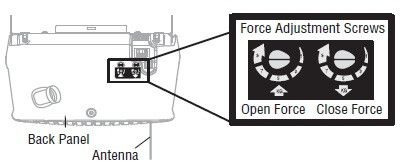
The location of these controls varies slightly depending on the specific LiftMaster model you own. However, most modern LiftMaster openers have their adjustment screws or buttons located on the motor unit, which is typically mounted to the ceiling in your garage.
- Older Models: Many older LiftMaster models utilize adjustment screws directly on the motor unit. These screws are often color-coded (e.g., black for up force/limit, white for down force/limit, red/orange for travel limits). You’ll usually need a flathead screwdriver to turn these screws.
- Newer Models (MyQ Technology): Newer LiftMaster openers, especially those with MyQ technology, often use a control panel or buttons on the motor unit itself to set limits and force. These typically involve pressing and holding specific buttons to enter a programming mode.
It is highly recommended to consult your LiftMaster owner’s manual for the exact location and operation of the adjustment controls for your specific model. You can usually find a PDF version of your manual on the LiftMaster website by entering your model number.
Tools You’ll Need
Before you begin, gather the necessary tools. You’ll likely need:
- A flathead screwdriver (for older models with adjustment screws).
- A ladder to safely reach the motor unit.
- A rag or cloth to wipe down the motor unit.
- Your LiftMaster owner’s manual.
Credit: support.chamberlaingroup.com
Adjusting The Closing Force On Your Liftmaster Opener
The closing force adjustment is critical for safe and efficient garage door operation. It ensures the door stops if it encounters an obstacle, preventing potential injury or damage. If your door slams shut or struggles to close, adjusting the force is often the solution.
Understanding Force Settings
The force setting is essentially a measure of how much resistance the opener will push against before it reverses or stops. Garage door openers have separate force settings for opening and closing. For this guide, we’re focusing on the closing force.
- Too Much Force: Can cause the door to slam shut, damage the door or opener, or pose a safety hazard to people or pets.
- Too Little Force: May prevent the door from closing fully, or it might reverse unexpectedly if it encounters even minor resistance, like a slightly uneven floor.
Step-by-step Force Adjustment (older Models With Screws)
For LiftMaster models with adjustment screws, the process is as follows:
- Disconnect Power: Unplug the garage door opener from the electrical outlet. This is a crucial safety precaution.
- Locate Adjustment Screws: On the motor unit, find the screws labeled for “down force” or “closing force.” There might be separate screws for force and limits.
- Identify the Direction: The manual will indicate which direction to turn the screw to increase or decrease force. Typically, turning a screw clockwise increases force, and counter-clockwise decreases it.
- Make Small Adjustments: Never make large adjustments at once. Turn the screw a quarter turn or half turn at a time.
- Test the Door:
- Plug the opener back in.
- Manually lower the garage door as far as it will go without the opener.
- Press the button to close the door.
- Use a 2×4 piece of wood placed flat on the ground in the path of the door. The door should reverse upon contact with the wood.
- If it doesn’t reverse, decrease the closing force slightly (turn the screw counter-clockwise).
- If it reverses too easily or doesn’t close fully, increase the closing force slightly (turn the screw clockwise).
- Repeat as Necessary: Continue making small adjustments and testing until the door closes firmly but reverses immediately upon encountering the 2×4. The goal is to find the minimum force required for the door to close reliably.
Step-by-step Force Adjustment (newer Models With Buttons)
Newer LiftMaster models often have a force adjustment procedure that involves the control panel or buttons on the motor unit.
- Disconnect Power: Unplug the opener.
- Access Programming Mode: Refer to your manual. This usually involves pressing and holding a specific button (often labeled “Program” or “Learn”) until an LED indicator lights up.
- Initiate Closing Force Adjustment: The manual will guide you on how to enter the force adjustment mode. This might involve pressing another button or a sequence of button presses.
- Initiate Door Closing: Once in force adjustment mode, the opener will typically initiate a full closing cycle.
- Monitor and Adjust: The opener will automatically set the force based on the resistance it encounters during this cycle. Some models allow for further fine-tuning via buttons to increase or decrease the force setting displayed on an LED.
- Save Settings: Once satisfied, you’ll need to exit the programming mode, usually by pressing the “Program” button again or waiting for a timeout.
- Test Thoroughly: Plug the opener back in and perform the 2×4 test as described above. Adjustments are typically saved automatically, but always verify the operation.
Pro Tip: Always test the closing force with the door at its fully closed position. If the door struggles to close completely, it might be an issue with the travel limits rather than the force.
Adjusting The Closing Travel Limits On Your Liftmaster Opener
The travel limits tell your LiftMaster opener precisely where the garage door should stop when it’s fully open and fully closed. If your door doesn’t close all the way, or if it tries to go too far down, you need to adjust the closing travel limit.
Understanding Travel Limits
Travel limits are separate from force settings. They are positional settings that dictate the endpoints of the door’s travel.
- Closing Limit: This setting determines how far down the door will travel before the opener stops it.
- Opening Limit: This setting determines how far up the door will travel before the opener stops it.
We are primarily concerned with the closing limit here.
Step-by-step Travel Limit Adjustment (older Models With Screws)
On older LiftMaster models, travel limits are often adjusted using separate screws from the force settings.
- Disconnect Power: Unplug the opener.
- Locate Adjustment Screws: Find the screws labeled for “down limit” or “closing limit.” These are often distinct from the force adjustment screws.
- Observe Current Position: Manually move the garage door to the fully closed position. Note how far it is from being completely shut.
- Make Small Adjustments:
- If the door does not close completely, you need to adjust the closing limit screw. Consult your manual to determine if you need to turn the screw clockwise or counter-clockwise to make the door travel *further down*. Make a small, incremental adjustment (e.g., quarter turn).
- If the door tries to close too far (e.g., scraping the floor, binding), you need to adjust the closing limit screw to make the door stop *sooner*. Again, consult your manual for the correct direction and make a small adjustment.
- Test the Door:
- Plug the opener back in.
- Press the button to close the door.
- Observe where the door stops.
- Repeat and Refine: Continue making small adjustments and testing until the door stops precisely at the fully closed position without trying to go further.
- Test Opening Limit: Once the closing limit is set, it’s good practice to check the opening limit as well. Manually move the door to the fully open position and adjust the “up limit” screw if necessary. Then, test the full open-close cycle.
Step-by-step Travel Limit Adjustment (newer Models With Buttons)
Newer LiftMaster openers with button controls typically use a programming sequence to set travel limits.
- Disconnect Power: Unplug the opener.
- Access Programming Mode: As with force adjustment, you’ll likely need to press and hold the “Program” or “Learn” button until the indicator light illuminates.
- Initiate Limit Setting Mode: Your manual will detail the specific button presses to enter the limit setting mode. This often involves pressing and holding the “Program” button while simultaneously pressing the “Up” or “Down” button.
- Manually Position the Door: You will likely be prompted to manually move the door to the desired fully closed position. Some systems allow you to use the opener’s remote or buttons to move the door to this position.
- Set the Closing Limit: Once the door is in the fully closed position, you’ll press a specific button (often the “Program” button again, or a dedicated “Set” button) to save this position as the closing limit. An indicator light or beep usually confirms the setting.
- Manually Position for Opening: You may then be prompted to move the door to the fully open position and repeat the process to set the opening limit.
- Exit Programming Mode: Follow the manual’s instructions to exit the programming mode.
- Test Operation: Plug the opener back in. Use the remote or wall button to open and close the door several times. Ensure it stops smoothly and precisely at both the fully open and fully closed positions.
Example: If your door stops an inch above the floor when closing, you’ll need to adjust the closing limit screw (on older models) or follow the programming sequence (on newer models) to tell the opener that the fully closed position is slightly lower.

Credit: www.youtube.com
Troubleshooting Common Closing Problems
Even after adjustments, you might encounter persistent issues with your LiftMaster garage door’s closing operation. Here are some common problems and their potential solutions:
Door Closes Too Slowly
- Problem: The door moves sluggishly during the closing cycle.
- Possible Causes:
- Low Closing Force: The opener isn’t applying enough power. (See Adjusting the Closing Force section).
- Binding or Obstructions: The door tracks might be bent, rollers could be damaged, or there might be something physically blocking the door’s path. Check the tracks for debris and ensure the rollers move freely. You might need to lubricate the rollers and hinges; refer to how to lubricate garage door rollers.
- Worn Motor or Gears: The internal components of the opener might be worn out, reducing its efficiency. This often requires professional diagnosis.
- Temperature Extremes: In very cold weather, lubricants can thicken, making the door harder to move.
Door Reverses Before Fully Closing
- Problem: The door starts to close but then stops and reverses back to the open position.
- Possible Causes:
- Safety Reverse Triggered (Force): The opener’s safety mechanism is detecting too much resistance. This could be due to:
- Incorrect Closing Force Setting: The force is set too low, and the opener interprets normal resistance as an obstruction. (See Adjusting the Closing Force section).
- Actual Obstruction: Something is physically blocking the door (e.g., a misplaced item, debris in the track, a warped door panel).
- Binding Tracks or Rollers: As mentioned above, friction can trigger the safety reverse.
- Safety Reverse Triggered (Photo Eyes): The safety photo eyes (small sensors near the bottom of the tracks) are misaligned or blocked. If the beam between them is interrupted, the opener will reverse the door. Ensure they are clean, aligned, and the indicator lights on both sensors are steadily lit. You might need to adjust their position.
- Incorrect Closing Travel Limit: The limit is set too far down, causing the opener to think it has hit an obstruction when it’s just reached the floor. (See Adjusting the Closing Travel Limits section).
- Worn Logic Board: In rare cases, the opener’s internal circuit board may be malfunctioning.
Door Stops Mid-travel When Closing
- Problem: The door stops somewhere between the fully open and fully closed positions.
- Possible Causes:
- Intermittent Obstruction: Something is temporarily blocking the door’s path that might not be present during a full cycle test.
- Binding Issues: Friction in the tracks or rollers that is worse at certain points in the travel.
- Opener Overheating: Some openers have thermal protection that will temporarily shut them down if they overheat. Let it cool down and try again.
- Loose Chain or Belt: If you have a chain or belt drive opener, a loose or damaged chain/belt can cause inconsistent operation. You may need to adjust the chain on your garage door opener.
- Faulty Remote or Wall Button: Less likely, but the signal to close might be interrupted or weak. Try a different remote or the wall button. You might need to reset your LiftMaster garage door opener remote.
Door Doesn’t Seal Properly (gap At The Bottom)
- Problem: The door closes but leaves a gap at the bottom, compromising security.
- Possible Causes:
- Incorrect Closing Travel Limit: The limit is set too high, telling the opener to stop before the door is fully down. (See Adjusting the Closing Travel Limits section).
- Uneven Floor or Threshold: The floor might not be perfectly level, or the threshold is worn. Adjusting the limit might help, but you might also need a new bottom seal or threshold adjustment.
- Bent or Damaged Bottom Seal: The rubber seal at the bottom of the door may be damaged or not seated correctly.
- Door Not Hanging Level: The garage door itself might be off-balance due to damaged springs or cables. This is a serious safety issue and requires professional attention.
Safety Considerations And Best Practices
Working with garage door openers involves mechanical forces and electricity, so safety must be your top priority. Adhering to best practices will prevent injuries and further damage.
Always Prioritize Safety
- Disconnect Power: Before making any manual adjustments to screws or components, always unplug the garage door opener. This prevents accidental activation while you’re working on it.
- Use a Stable Ladder: Ensure your ladder is securely placed and stable. Do not overreach.
- Keep Clear of Moving Parts: Never place your hands or body in the path of the moving garage door. Be aware of pinch points.
- Engage the Emergency Release: If you need to manually move the door (e.g., to test limits or for manual operation during power outages), use the emergency release cord. This cord, usually red, disconnects the opener trolley from the door. Refer to how to open a LiftMaster garage door opener manually for detailed steps.
- Wear Safety Glasses: Protect your eyes from falling debris or accidental slips.
When To Call A Professional
While many adjustments are DIY-friendly, there are situations where professional help is necessary:
- Damaged Springs or Cables: These components are under extreme tension and can cause severe injury if mishandled. If you suspect a problem with springs or cables (e.g., the door is very heavy or light, hangs unevenly), call a qualified garage door technician immediately.
- Opener Not Responding After Adjustments: If you’ve followed the instructions carefully and the door still operates incorrectly, there might be a more complex issue with the opener’s motor, logic board, or internal components.
- Persistent Binding or Noise: Unusual noises or significant binding that cannot be resolved by lubrication or track cleaning may indicate a need for professional repair.
- Uncertainty or Discomfort: If you are uncomfortable performing any of these adjustments or are unsure about any step, it’s always best to err on the side of caution and hire a professional. The cost of a service call is far less than the potential cost of an injury or further damage.
Liftmaster Adjustment Comparison: Older Vs. Newer Models
The method for adjusting closing force and travel limits on LiftMaster openers has evolved with technology. Understanding these differences can help you identify the correct procedure for your specific unit.
| Feature | Older LiftMaster Models (Screw Adjustments) | Newer LiftMaster Models (Button/Panel Adjustments) |
|---|---|---|
| **Adjustment Method** | Physical screws on the motor unit, typically requiring a flathead screwdriver. | Buttons on the motor unit or a dedicated control panel, often with LED indicators. |
| **Force Adjustment** | Turn labeled screws clockwise (increase) or counter-clockwise (decrease). | Enter programming mode, initiate closing cycle, opener auto-sets force, or fine-tune via buttons. |
| **Travel Limit Adjustment** | Turn separate labeled screws for up/down limits. Requires manual positioning and testing. | Enter programming mode, manually position door (or use opener), press button to save limits. |
| **Ease of Adjustment** | Can be finicky; requires trial and error. Easy to overtighten or undertighten. | Generally more intuitive and precise due to digital feedback and auto-setting features. |
| **Troubleshooting** | Often involves diagnosing worn screws or internal mechanisms. | May involve resetting the unit or checking programming sequences. |
| **Typical Tools** | Flathead screwdriver, ladder. | Ladder, possibly a small tool for accessing buttons. |
Example: If your older LiftMaster’s door slams shut