
The modern garage door opener has evolved far beyond a simple remote control. With the rise of smart home technology, the convenience of managing your home’s access points directly from your smartphone is no longer a futuristic dream. For Android users, this means that with the right setup, your garage door can become an integrated part of your digital life, controllable with a few taps on your device.
This capability offers enhanced security, convenience, and peace of mind, allowing you to check your garage door’s status, open or close it remotely, and even grant temporary access to trusted individuals, all without needing to be physically present.
This article will explore the various ways you can achieve this functionality, from dedicated smart garage door openers to add-on devices that can modernize your existing system. We’ll break down the technologies involved, discuss the security considerations, and provide practical steps to help you achieve seamless Android phone control over your garage door.
Whether you’re looking to upgrade your entire system or find a cost-effective solution for your current setup, understanding the options available is the first step towards a smarter, more connected garage.
Key Takeaways
- Smart Garage Door Openers: Many new garage door openers come with built-in Wi-Fi and smartphone app integration.
- Add-On Smart Controllers: Devices like MyQ, Tailwind, and Garadget can be retrofitted to most existing garage door openers.
- App Functionality: Apps typically allow remote open/close, status monitoring, activity logs, and user management.
- Security Considerations: Robust Wi-Fi security, strong passwords, and app-specific security features are crucial.
- Installation: Most add-on controllers are DIY-friendly, while integrated systems may require professional installation.
- Compatibility: Always check device compatibility with your specific garage door opener model before purchasing.
- Voice Control: Integration with Google Assistant allows for voice commands to operate your garage door.
Understanding Smart Garage Technology For Android Users
The ability to open and close your garage door using an Android phone hinges on connecting your existing garage door opener to your home’s Wi-Fi network and then accessing it via a dedicated mobile application. This connection is typically facilitated through one of two primary methods: purchasing a new garage door opener with integrated smart capabilities or retrofitting an existing opener with a smart controller device. Both approaches aim to bridge the gap between your physical garage door and your digital devices, offering a range of features designed for modern convenience and security.
The underlying principle for most smart garage solutions involves a small device that communicates with your home’s Wi-Fi. This device is either built into the new opener’s logic board or connected to your existing opener’s terminal. Once connected to your network, it communicates with a cloud-based server, which in turn communicates with the mobile app on your Android phone.
This allows for remote control and monitoring from virtually anywhere with an internet connection. The process transforms a traditional, single-point-of-access system into a multi-point, remotely accessible one, offering significant advantages for homeowners.
How Smart Garage Door Openers Work
Newer garage door openers often come equipped with built-in Wi-Fi connectivity. These “smart” openers are designed from the ground up to integrate with smart home ecosystems. They typically connect directly to your home’s Wi-Fi network during the setup process. Once connected, they can be controlled via a manufacturer-specific mobile app, which is available for Android devices. These apps provide a user interface to:
- Open and Close: Initiate the garage door’s movement remotely.
- Monitor Status: Check whether the garage door is open or closed, even when you’re away from home.
- Receive Alerts: Get notifications when the door is opened or closed, or if it’s left open for an extended period.
- Activity Logs: Review a history of when the garage door was operated and by whom (if multiple users are set up).
The convenience of integrated smart openers lies in their seamless design and often simpler setup compared to add-on devices. However, they represent a significant investment as it requires replacing your entire opener unit.
Retrofitting Your Existing Garage Door Opener
For homeowners with an existing, functional garage door opener, the more cost-effective and often simpler solution is to use a smart controller add-on device. These devices are designed to work with a wide range of existing garage door openers, effectively “smartifying” them without requiring a full replacement.
These add-on controllers typically consist of a main unit that connects to your Wi-Fi and a sensor that attaches to your garage door. The main unit wires into the existing opener’s terminals, mimicking the signal sent by a traditional remote or wall button.
The sensor is crucial for providing real-time status feedback, it detects whether the door is open or closed and sends this information back to the main unit and subsequently to the app.
Popular examples of these add-on devices include:
- Chamberlain MyQ Smart Garage Hub: A widely compatible device that connects to your existing opener and uses a small sensor on the door. It integrates with the MyQ app.
- Garadget: Similar to MyQ, Garadget uses a Wi-Fi connected hub and a visual sensor (a small camera) to monitor door position.
- Tailwind: This system also offers Wi-Fi connectivity and works with a wide array of openers. It often boasts features like automatic opening as you approach your home.
Installation for these devices is generally designed for DIY enthusiasts, often involving simple wiring and app-guided setup. Compatibility is key, and manufacturers usually provide detailed compatibility checkers on their websites.

Credit: www.reddit.com
Popular Smart Garage Solutions For Android
Choosing the right smart garage solution involves understanding the various products available and how they integrate with your Android device. The market offers both integrated systems and add-on modules, each with its own set of features, installation requirements, and compatibility considerations.
For Android users, the primary interface will be a dedicated mobile app that provides control and monitoring capabilities.
The core of any smart garage system is its ability to communicate wirelessly. This is achieved through Wi-Fi, allowing the device to connect to your home network. This connection then enables communication with a cloud server, which acts as an intermediary between your smartphone app and the garage door opener itself.
This architecture allows for remote operation from anywhere you have an internet connection.
Integrated Smart Garage Door Openers
Several manufacturers offer complete garage door opener systems with built-in smart technology. These are often the most streamlined solutions, as the smart features are part of the original design.
- LiftMaster: Many LiftMaster openers, particularly those in their residential lines, come with MyQ technology integrated. This means they can be controlled directly through the MyQ app without any additional hardware. LiftMaster openers are known for their robust build quality and reliable performance. For example, the LiftMaster 8550W is a popular model that includes Wi-Fi connectivity and battery backup.
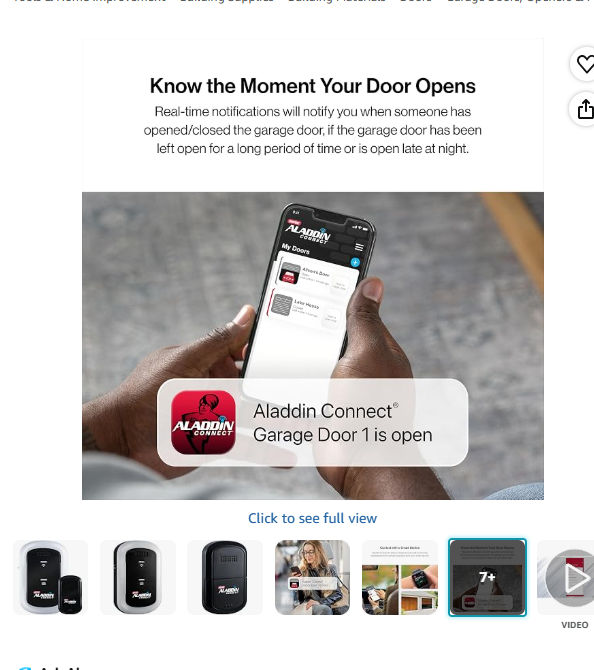
- Genie: Genie offers smart openers, often with Wi-Fi capabilities that allow for app control. Some Genie models also feature Aladdin Connect, a system that allows for monitoring and control of up to three doors via a smartphone app. This system provides granular control and alerts.
- Chamberlain: Chamberlain is another major player, with many of its openers featuring MyQ technology. This makes them compatible with the same app used for their MyQ Smart Garage Hub, offering a consistent user experience across their product lines.
When purchasing an integrated smart opener, it’s essential to verify its specific smart features and app compatibility with Android. The installation of a full opener unit is typically more involved than adding a smart module and may require professional assistance, especially if you’re not experienced with electrical wiring and mechanical systems.
Add-on Smart Garage Controllers
For those who want to add smart capabilities to an existing garage door opener, add-on controllers are an excellent option. These devices are designed to be compatible with a vast majority of older and newer garage door openers.
- Chamberlain MyQ Smart Garage Hub: This is one of the most popular add-on devices. It consists of a hub that connects to your Wi-Fi and a small sensor that you mount on your garage door. The hub then connects to your existing opener’s terminals. The MyQ app allows you to monitor and control your garage door, and it also integrates with some smart home platforms. The installation is generally straightforward, often taking less than an hour for a DIYer. It’s a great solution if you’re happy with your current opener but want smartphone control.
- Garadget: Garadget offers a unique approach with its visual sensor, which is essentially a small camera that watches the garage door. This visual confirmation provides a high degree of certainty about the door’s status. It connects to your Wi-Fi and works with most openers. The app provides similar features to MyQ, including remote control, status monitoring, and alerts. Garadget often appeals to users who prefer a visual confirmation method or who have openers that might be less compatible with simple contact sensors.
- Tailwind: Tailwind is another strong contender in the add-on market. It connects to your Wi-Fi and your opener’s terminals. A key feature of Tailwind is its “Approach Detection,” which uses your phone’s GPS to automatically open the garage door as you get close to home and close it as you leave. This can be a significant convenience factor. The app also provides all the standard features like remote control, status monitoring, and activity logs.
The primary advantage of add-on controllers is their affordability and ease of installation compared to replacing an entire opener. They also offer a way to upgrade older, non-smart openers without requiring extensive modifications. Always check the manufacturer’s compatibility list to ensure the add-on will work with your specific garage door opener model.

Credit: www.amazon.com
Setting Up Your Android Device For Garage Control
Once you’ve chosen and installed your smart garage door opener or add-on controller, the next crucial step is configuring your Android device to control it. This involves downloading the appropriate app, connecting it to your smart device, and setting up user accounts and security preferences.
This process is typically designed to be user-friendly, guiding you through each step.
The mobile app serves as your primary interface for interacting with the garage door system. It’s where you’ll initiate commands, view status updates, and manage settings. Ensuring a stable connection between your phone, your home Wi-Fi, and the smart garage device is paramount for reliable operation.
Downloading And Installing The App
The first step is to locate and download the official mobile application for your chosen smart garage system.
- Identify the App: This will be specific to the brand of your smart opener or add-on controller. For example, LiftMaster, Genie, and Chamberlain products often use the MyQ app, while Garadget has its own dedicated app.
- Visit the Google Play Store: Open the Google Play Store on your Android phone.
- Search for the App: Type the name of the app (e.g., “MyQ Garage & Access”) into the search bar.
- Download and Install: Find the official app from the developer and tap “Install.”
Once the app is installed, you’ll need to open it to begin the setup process.
Connecting The App To Your Smart Device
This is where you link your mobile device to your smart garage hardware.
- Create an Account: Most apps require you to create a user account. This is typically done using your email address and a secure password.
- Add Your Device: Within the app, there will be an option to “Add Device,” “Link Device,” or similar. Follow the on-screen prompts.
- Wi-Fi Connection: You will likely be prompted to connect your smart garage device to your home’s Wi-Fi network. This usually involves selecting your network name (SSID) and entering your Wi-Fi password. Some devices may use Bluetooth or a temporary Wi-Fi network for the initial setup.
- Pairing: The app will then attempt to find and pair with your smart garage device. This might involve pressing a button on the device itself or scanning a QR code.
- Garage Door Configuration: The app will guide you through identifying which garage door opener you have and configuring the sensors. For add-on devices, this is where you’ll connect the wires to your existing opener’s terminals according to the app’s instructions.
Pro Tip: Ensure your smartphone is connected to your home’s 2.4 GHz Wi-Fi network during the initial setup, as many smart home devices do not support 5 GHz networks.
Configuring Settings And User Access
Once your device is successfully connected, you can customize its settings and manage access.
- Door Status Alerts: Configure notifications for when the garage door opens, closes, or is left open. You can often set custom delays for these alerts.
- User Management: If you want to grant access to family members or trusted individuals, most apps allow you to invite them to your account. You can often set specific times or durations for their access, adding an extra layer of security.
- Security Settings: Review and strengthen your account password. Enable any two-factor authentication (2FA) options the app provides.
- Voice Assistant Integration: If your smart opener or controller supports it, you can link it to Google Assistant for voice control. This typically involves enabling the relevant “skill” or “action” within the Google Home app and linking your smart garage account.
Proper setup ensures that your Android phone can reliably control your garage door while maintaining robust security.
Credit: store.geniecompany.com
Security Considerations For Smartphone Garage Control
While the convenience of controlling your garage door with an Android phone is undeniable, security must be a top priority. The connection between your phone, your home network, and your garage door opener creates potential vulnerabilities that need to be addressed.
Fortunately, most smart garage systems are designed with security in mind, but user vigilance is crucial.
The primary concern is unauthorized access. If a hacker gains control of your smart garage system, they could potentially open your garage door, compromising the security of your home. This could be achieved through various means, including exploiting weak Wi-Fi passwords, compromised app accounts, or vulnerabilities in the smart device’s firmware.
Securing Your Home Wi-fi Network
Your home Wi-Fi network is the first line of defense. A compromised network can easily lead to other connected devices, including your smart garage opener, being compromised.
- Strong, Unique Password: Use a strong, complex password for your Wi-Fi network, combining uppercase and lowercase letters, numbers, and symbols. Avoid easily guessable information like birthdays or common words.
- WPA3 Encryption: If your router supports it, enable WPA3 encryption, which is the latest and most secure standard. If not, use WPA2. Avoid older, insecure protocols like WEP or WPA.
- Change Default Router Credentials: Always change the default username and password for your router’s administration interface. These are often easily found online and can be a backdoor for attackers.
- Guest Network: Consider setting up a separate guest network for visitors and non-essential smart devices. This isolates them from your main network, where your sensitive devices like the garage door opener reside.
- Regular Updates: Keep your router’s firmware updated. Manufacturers release updates to patch security vulnerabilities.
Protecting Your Smart Garage Account And App
The mobile app and the account you create to control your garage door are also critical security points.
- Strong App Password: Use a strong, unique password for your smart garage app account. Do not reuse passwords from other online services.
- Two-Factor Authentication (2FA): If the app offers 2FA, enable it immediately. This adds an extra layer of security by requiring a second form of verification (like a code sent to your phone) when logging in.
- App Permissions: Be mindful of the permissions the app requests. While some permissions are necessary for functionality (like network access), be wary of excessive or unnecessary requests.
- Keep App Updated: Ensure the smart garage app on your Android phone is always updated to the latest version. Updates often include security patches.
- Device Security: Keep your Android phone itself secure. Use a strong screen lock (PIN, pattern, or biometric). Be cautious about installing apps from unknown sources.
Physical Security And Device Placement
While less common, consider the physical security of the smart device itself.
- Secure Installation: Ensure the smart controller or opener is securely installed and not easily accessible to someone who might try to tamper with it physically.
- Sensor Integrity: For add-on devices, ensure the door sensor is securely attached and functioning correctly. Tampering with the sensor could potentially disrupt its ability to report the door’s status accurately.
By implementing these security measures, you can significantly reduce the risk of unauthorized access and enjoy the convenience of smartphone-controlled garage access with greater peace of mind.
Voice Control Integration With Google Assistant
One of the most exciting advancements in smart home technology is the integration of voice control. For Android users, this means you can often operate your garage door using simple voice commands through Google Assistant. This feature adds another layer of convenience, allowing you to open or close your garage without even reaching for your phone.
The ability to use voice commands for something as critical as your garage door is designed with security in mind. Most systems require a voice PIN or confirmation to prevent accidental or unauthorized openings. This ensures that only you, or someone who knows your specific PIN, can operate the door via voice.
Enabling Google Assistant Integration
The process of enabling Google Assistant control usually involves linking your smart garage account to your Google Home or Google Assistant app.
- Prerequisites: Ensure your smart garage door opener or add-on controller is already set up and controllable via its dedicated mobile app on your Android phone. Also, ensure you have the Google Home app installed and configured with your Google account.
- Open Google Home App: Launch the Google Home app on your Android device.
- Add Device/Service: Tap the “+” icon, usually located in the top left corner. Select “Set up device,” then choose “Works with Google.”
- Find Your Service: Search for the brand or service associated with your smart garage opener (e.g., “MyQ,” “Garadget,” “Tailwind”).
- Link Account: Select the service and you will be prompted to log in with the username and password for your smart garage account. Authorize Google to access your garage door controller.
- Assign to Room: Once linked, you can assign the garage door opener to a specific room in your home within the Google Home app for better organization.
Setting Up Voice Commands And Security Pins
After linking the service, you’ll need to configure how you interact with it using your voice.
- Discover Devices: Google Assistant should automatically discover your garage door opener device. You can then assign it a name, such as “Garage Door” or “My Garage.”
- Set a Voice PIN: For security reasons, Google Assistant typically requires a voice PIN to operate garage doors or other security-sensitive devices. To set this up:
- Open the Google Assistant settings on your Android phone.
- Navigate to “Security” or “Assistant voice commands.”
- Find the option to set up a “Voice PIN” for garage doors.
- Create a 4-digit PIN. You will need to say this PIN aloud when prompted by Google Assistant to open the garage door. Closing the garage door usually does not require a PIN for security reasons, as it’s a closing action.
- Practice Commands: Once set up, test the commands. You can say things like:
- “Hey Google, open the garage door.” (Requires voice PIN)
- “Hey Google, close the garage door.” (Usually no PIN required)
- “Hey Google, is the garage door open?”
Example: If your voice PIN is 1234, when you say “Hey Google, open the garage door,” it will respond, “Okay, what’s your voice PIN?” You then say, “1234.” The door will then proceed to open.
Warning: Always choose a voice PIN that is difficult to guess and that you can easily remember. Avoid simple sequences like 0000 or 1111.
Integration with Google Assistant transforms your Android phone into a voice-activated remote, offering unparalleled convenience when your hands are full or when you simply want a hands-free solution.
Maintenance And Troubleshooting Common Issues
Even with the most advanced smart garage systems, occasional maintenance and troubleshooting are necessary to ensure smooth operation. Like any electromechanical device, garage door openers and their smart components can develop issues over time. Understanding common problems and their solutions can save you time and money.
Regular maintenance not only keeps the system running efficiently but can also prevent more serious issues from arising. This includes both the physical components of the garage door and opener, as well as the digital aspects of the smart connectivity.
Routine Maintenance For Smart Garage Systems
Maintaining your smart garage system involves a combination of physical checks and digital upkeep.
- Lubrication: Regularly lubricate the moving parts of your garage door, including rollers, hinges, and springs. This reduces friction, noise, and wear and tear. Use a silicone-based lubricant or a specialized garage door lubricant. For detailed guidance, refer to resources on how to lube garage door rollers.
- Check Sensors: Ensure the safety sensors at the bottom of the garage door tracks are clean and unobstructed. Wipe them with a soft cloth. If using a smart controller with a door position sensor, ensure it’s securely attached and functioning.
- Inspect Tracks and Rollers: Check the garage door tracks for any debris or obstructions. Ensure the rollers are spinning freely and are not damaged.
- Balance Test: Perform a balance test on your garage door. Disengage the opener and manually