
Understanding how to wire a Genie garage door opener diagram is crucial for any homeowner looking to install a new opener, troubleshoot an existing one, or perform essential maintenance. A correctly wired system ensures reliable operation, safety, and longevity for your garage door opener.
While modern garage door openers often come with simplified plug-and-play components, understanding the underlying wiring principles can save you time and money. This guide will break down the common wiring aspects of Genie garage door openers, focusing on the essential connections for power, safety sensors, and wall controls, all while keeping safety and clarity at the forefront.
Key Takeaways
- Power Connection: The primary wiring involves connecting the garage door opener motor unit to a reliable power source, typically a grounded electrical outlet.
- Safety Sensors: Photo-eye sensors are critical for preventing the door from closing on obstructions. Their wiring involves connecting a transmitter and receiver to specific terminals on the opener motor unit.
- Wall Control/Remote Receiver: The wired wall button and the internal receiver for remote controls connect to distinct terminals on the motor unit, allowing for manual operation and remote access.
- Wiring Best Practices: Always disconnect power before working on any wiring, use appropriate gauge wire, secure connections, and follow local electrical codes.
- Troubleshooting: Common wiring issues often stem from loose connections, incorrect sensor alignment, or power supply problems. Consulting the specific Genie model’s manual is paramount for accurate diagrams and troubleshooting.
- Professional Help: For complex installations or if you’re unsure about electrical work, hiring a qualified electrician or garage door technician is always recommended.

Credit: store.geniecompany.com
Understanding Genie Garage Door Opener Wiring Basics
Before diving into specific diagrams, it’s essential to grasp the fundamental components and principles of garage door opener wiring. Most Genie garage door openers operate on standard household voltage, typically 120V AC. The wiring system is designed to be relatively straightforward, connecting the main motor unit to power, safety mechanisms, and control interfaces.
The motor unit itself houses the logic board that interprets signals from various inputs and controls the motor’s operation.
The primary wiring tasks usually involve:
- Power Supply: Connecting the opener to an electrical outlet.
- Safety Sensors: Installing and connecting the infrared photo-eye sensors.
- Wall Button/Control Panel: Connecting the wired push-button or multi-function wall control.
- External Accessories: Sometimes, wiring for keypads or other accessories might be involved, though many modern Genie systems use wireless technology for these.
It’s crucial to remember that working with electricity can be dangerous. Always ensure the power to the opener is disconnected at the breaker before attempting any wiring. Referencing the specific owner’s manual for your Genie model is the most reliable way to obtain an accurate wiring diagram, as components and terminal locations can vary.
Powering Your Genie Opener
The most direct wiring task for any Genie garage door opener is connecting it to a power source. Most Genie openers are designed to plug into a standard 120V AC grounded electrical outlet. This outlet should be located within reach of the opener’s power cord.
- Dedicated Circuit: For optimal performance and safety, it’s recommended that the garage door opener be on a dedicated electrical circuit. This prevents other appliances from overloading the circuit and causing interruptions.
- Grounding: Ensure the outlet is properly grounded. A grounded outlet has three prongs: hot, neutral, and ground. The ground connection is vital for safety, providing a path for electricity to flow safely in case of a fault.
- Outlet Type: Use a grounded, three-prong outlet. Avoid using extension cords for permanent installations, as they can be a fire hazard and may not provide a consistent power supply. If an extension cord is absolutely necessary for a temporary situation, use a heavy-duty cord rated for outdoor use and the opener’s power requirements.
In some installations, the opener might be hardwired directly into the home’s electrical system, bypassing the plug and outlet. This is a more complex task typically performed by a qualified electrician and requires specific wiring practices, including using appropriate gauge wiring and junction boxes, all in compliance with local building codes.
Safety Sensor Wiring: The Crucial Eyes Of Your Opener
The safety sensors, often referred to as photo-eyes, are a critical safety feature designed to prevent the garage door from closing if an object is in its path. These sensors consist of a transmitter (which emits an infrared beam) and a receiver (which detects the beam).
If the beam is broken, the opener will stop the door’s descent and often reverse it.
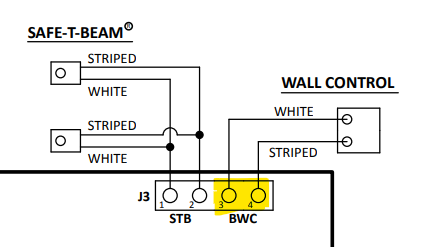
Genie openers typically use two-wire systems for these sensors. The wiring involves connecting these sensors to specific terminals on the garage door opener motor unit.
Common Wiring Steps for Safety Sensors:
- Mounting: Install the sensors on opposite sides of the garage door tracks, typically 4-6 inches above the floor. They should be aligned so the infrared beam travels directly from the transmitter to the receiver.
- Wire Routing: Run low-voltage wire (usually 22-24 gauge, often provided with the opener or sold separately) from the motor unit to each sensor. Secure the wires along the garage door tracks using staples or wire clips, ensuring they don’t interfere with the door’s movement.
- Connecting to Motor Unit: Identify the “SAR” (Safety-Sensing Accessories) or “SENSORS” terminals on the Genie motor unit’s logic board. There will usually be two sets of terminals for the two sensors.
- Polarity: For most Genie systems, the polarity of the wires matters. Typically, one wire from each sensor connects to the common terminal (often labeled “C” or “COM”), and the other wire connects to the sensor terminal (often labeled “1” or “2” for each respective sensor).
- Wire Identification: It’s common to use different colored wires for each sensor or to mark the wires clearly to avoid confusion. For instance, one set of wires might be white and black, and the other red and white.
- Connection: Connect the wires to the appropriate screw terminals on the motor unit. Ensure the bare wire makes good contact with the metal terminal.
- Connecting to Sensors: Connect the wires to the terminals on the sensors themselves. Again, polarity is usually important. The receiver sensor often has an indicator light that illuminates when it receives the beam.
Example Wiring Configuration (General Genie):
- Sensor 1 (Transmitter):
- One wire to “C” (Common) terminal on motor unit.
- Other wire to “1” (or similar) terminal on motor unit.
- Sensor 2 (Receiver):
- One wire to “C” (Common) terminal on motor unit.
- Other wire to “2” (or similar) terminal on motor unit.
Troubleshooting Sensor Issues:
- No Indicator Light: If the receiver sensor’s indicator light doesn’t come on, check the power connection to the motor unit and ensure the wires are securely connected to both the motor unit and the sensor. Verify polarity.
- Beam Not Aligned: If the light is on but the opener still won’t close, the beam might be misaligned. Gently adjust the sensors until the light on the receiver is solid.
- Obstructions: Ensure nothing is blocking the infrared beam.
- Wire Damage: Inspect the wires for any cuts or breaks.
Wiring The Wall Control And Remote Receiver
The wired wall button provides a convenient way to operate the garage door from inside the garage. It’s connected to the motor unit via low-voltage wires, similar to the safety sensors. The motor unit also contains an internal receiver board that picks up signals from your Genie remote control.
While the receiver itself doesn’t require wiring in the traditional sense (it’s integrated into the motor unit), its operation is linked to the system’s overall wiring.
Wall Control Wiring:
- Button Type: Genie openers typically use a simple momentary contact push-button. When pressed, it momentarily connects two terminals on the motor unit, signaling the opener to activate.
- Wire Routing: Run low-voltage wire from the motor unit to the location of the wall button. You’ll typically need two conductors for this connection.
- Connecting to Motor Unit: Identify the “WALL BUTTON” or “PUSH BUTTON” terminals on the motor unit’s logic board. These are usually marked with symbols like a button or a bell.
- Connecting to Button: Connect the two wires to the terminals on the back of the wall button. Polarity usually doesn’t matter for a simple push-button.
- Operation: When the button is pressed, it completes a circuit, activating the opener.
Remote Control Receiver:
The receiver is an internal component of the motor unit. It’s pre-wired within the opener and doesn’t require external wiring connections from the user. However, its functionality relies on the overall electrical integrity of the motor unit. If you’re experiencing issues with your remote control, the problem is more likely to be with the remote itself, the opener’s programming, or the receiver’s antenna, rather than its wiring.
Integrating Multiple Controls:
Many Genie openers allow for multiple control devices. For instance, you might have a wired wall button and also want to add a wireless keypad. The wiring for the wall button remains the same, while the keypad would typically be programmed wirelessly to the opener’s receiver.
If you are installing a wired keypad, its wiring would follow similar principles to the wall button, connecting to designated terminals on the motor unit.
Wiring Diagrams: What To Expect And How To Read Them
A wiring diagram is an essential blueprint for understanding how to connect your Genie garage door opener. These diagrams are typically found in the owner’s manual that comes with your specific Genie model. While they can look complex, they follow standardized conventions.
Key Elements in a Genie Wiring Diagram:
- Motor Unit: The central component, showing the location of terminal blocks for power, sensors, and controls.
- Terminal Designations: Labels like “AC IN,” “COM,” “SAR,” “SENSOR 1,” “SENSOR 2,” “PUSH BUTTON,” etc., indicate where specific wires should connect.
- Wire Colors: Diagrams often suggest or require specific wire colors for clarity, though the function is determined by the terminal connection, not just the color.
- Power Source: Depicts the connection to the 120V AC power outlet or hardwired connection.
- Safety Sensors: Illustrates the path of the low-voltage wires from the motor unit to the transmitter and receiver sensors.
- Wall Control: Shows the wiring from the motor unit to the wired wall button.
- Antenna: Indicates the location of the radio receiver antenna, which picks up signals from your remote.
Reading the Diagram:
- Identify Your Model: Ensure you are using the diagram for your exact Genie opener model. Slight variations exist between models.
- Locate Terminals: Find the terminal blocks on the diagram that correspond to the physical terminals on your motor unit.
- Trace Connections: Follow the lines representing wires from the component (e.g., safety sensor) to the terminal on the motor unit. Pay close attention to which wire connects to which terminal.
- Understand Symbols: Familiarize yourself with any symbols used to represent components or connections.
Example of a Simplified Diagram Interpretation:
Imagine a diagram showing a line from the “SAR” terminal on the motor unit going to one terminal on the safety sensor, and another line from the “C” terminal going to the other terminal on the sensor. This tells you that one wire from the sensor needs to connect to “SAR” on the motor unit, and the other wire needs to connect to “C.
“
Pro Tip: Take clear photos of the terminal block on your Genie opener before disconnecting any wires, especially if you are troubleshooting or replacing components. This can serve as a visual reference for reassembly.
Common Wiring Issues And Troubleshooting Steps
Wiring problems are among the most frequent causes of garage door opener malfunctions. Fortunately, many of these issues can be diagnosed and resolved with a systematic approach.
Issue 1: Opener Not Receiving Power
- Symptoms: No lights on the motor unit, opener does not respond to remote or wall button.
- Troubleshooting:
- Check Power Cord: Ensure the opener’s power cord is securely plugged into a working outlet.
- Test Outlet: Plug in a known working appliance (like a lamp) to verify the outlet has power.
- Check Circuit Breaker: Inspect your home’s electrical panel for a tripped breaker and reset it if necessary.
- Internal Fuse: Some Genie openers have an internal fuse. Consult your manual to locate and check it. If blown, it might indicate a more significant electrical issue within the opener.
Issue 2: Safety Sensors Not Working (Door Won’t Close)
- Symptoms: The garage door closes partially and then reverses, or it won’t close at all. The indicator light on the receiver sensor may be off or blinking.
- Troubleshooting:
- Alignment: This is the most common cause. Ensure the transmitter and receiver sensors are perfectly aligned. Look for the indicator light on the receiver; it should be solid when the beam is unobstructed. Gently adjust the sensors.
- Obstructions: Check for any objects, debris, or even spiderwebs blocking the infrared beam.
- Wiring Connections: Verify that the low-voltage wires are securely connected to the correct terminals on both the motor unit and the sensors. Check for loose connections or frayed wires. Polarity is crucial here.
- Sensor Damage: Inspect the sensors for physical damage. If a sensor is cracked or damaged, it may need replacement.
- Weather: Extreme weather conditions like heavy rain, snow, or direct sunlight can sometimes interfere with the sensors.
Issue 3: Wall Button Not Responding
- Symptoms: Pressing the wired wall button does nothing, but the remote control works.
- Troubleshooting:
- Wiring: Check the low-voltage wires connecting the wall button to the motor unit. Ensure they are securely attached to the correct terminals on both ends.
- Button Functionality: The button itself might be faulty. You can test this by momentarily touching the two wires that connect to the button together. If this activates the opener, the button is likely the issue.
- Short Circuit: A short in the wiring could also cause this. Inspect the wires for damage or pinching.
Issue 4: Opener Runs Continuously or Erratically
- Symptoms: The door opens or closes without a command, or it behaves unpredictably.
- Troubleshooting:
- Stuck Button: The wired wall button might be stuck in the “pressed” position.
- Logic Board Issue: This can indicate a problem with the opener’s logic board, which may require professional diagnosis or replacement.
- Interference: While less common for wired components, strong radio frequency interference can sometimes affect opener operation, especially if the antenna is damaged or poorly positioned.
When troubleshooting, always follow a logical process, starting with the simplest potential causes. Consulting the specific troubleshooting section of your Genie owner’s manual is highly recommended, as it will provide model-specific guidance. If you’re uncomfortable with electrical diagnostics or repairs, it’s always best to contact a qualified garage door technician.
Safety Precautions And Best Practices For Wiring
Working with electrical wiring, even low-voltage wiring for garage door openers, requires adherence to strict safety protocols. Improper wiring can lead to electrical shock, fire hazards, or damage to the opener unit.
Essential Safety Measures:
- Disconnect Power: ALWAYS disconnect power to the garage door opener before beginning any wiring work. This means unplugging the unit or, if hardwired, turning off the corresponding circuit breaker at your main electrical panel. Verify that the power is off using a voltage tester if possible.
- Use Correct Wire Gauge: For low-voltage connections (safety sensors, wall buttons), use the gauge of wire recommended in your Genie manual, typically 22-24 AWG. Using wire that is too thin can lead to poor performance or overheating.
- Secure Connections: Ensure all wire connections are tight and secure. Loose connections can cause intermittent operation or complete failure. Use screw terminals appropriately, and ensure the bare wire makes solid contact.
- Protect Wiring: Route wires carefully to prevent them from being pinched, cut, or damaged by moving parts of the garage door or opener mechanism. Use wire staples or clips to secure them neatly along tracks or walls. Avoid running wires across high-traffic areas where they could be tripped over.
- Follow Electrical Codes: If you are hardwiring the opener or performing any work on the main power supply, ensure you comply with all local electrical codes and regulations. In many areas, this type of work must be performed by a licensed electrician.
- Weather Protection: If any wiring is exposed to the elements, ensure it is rated for outdoor use and properly protected from moisture and UV degradation.
- Understand Polarity: For safety sensors and some other accessories, the polarity of the wires matters. Ensure you connect them according to the diagram to avoid malfunction.
Best Practices for Installation:
- Read the Manual: Thoroughly read and understand the installation and wiring instructions in your Genie opener’s owner’s manual before you begin.
- Organize Components: Lay out all the components and wiring needed before starting. This helps ensure you have everything and can follow the steps logically.
- Test Before Finalizing: After making connections, and before restoring power, double-check all your wiring against the diagram. Once power is restored, test the functionality of each component (opener, sensors, wall button) before fully securing all wiring and covers.
- Professional Consultation: If you are unsure about any aspect of the wiring process, or if your installation is complex, do not hesitate to consult a professional garage door technician or electrician. The cost of professional help is often less than the cost of repairing damage caused by incorrect wiring.
By following these safety precautions and best practices, you can ensure a safe and successful wiring installation for your Genie garage door opener.
Comparing Genie Wiring Systems Across Models
While the core principles of wiring a Genie garage door opener remain consistent, there can be variations between different models, particularly concerning their age and feature set. Newer models often incorporate more advanced technology, such as rolling codes for remotes and enhanced diagnostic features, which might slightly alter the terminal designations or wiring requirements.
Older Genie Models (e.g., ChainLift, ScrewDrive):
- Simpler Logic: Older models often have more basic logic boards with fewer features.
- Terminal Layout: Terminal blocks might be more physically spread out or labeled with slightly different abbreviations.
- Sensor Technology: Safety sensors might use older infrared beam technology, sometimes requiring more precise alignment or being more susceptible to interference.
- Remote Compatibility: May use fixed code or earlier rolling code technology, potentially affecting how remotes are programmed.
Newer Genie Models (e.g., StealthDrive, PowerMax):
- Integrated Boards: Modern openers often feature more integrated circuit boards with compact terminal layouts.
- Enhanced Diagnostics: Some models have diagnostic LEDs or even audible beeps that can help troubleshoot wiring or sensor issues.
- Smart Technology: Newer openers might support smart home integration, though the primary wiring for sensors and power remains similar.
- Wireless Capabilities: Increased reliance on wireless technology for keypads and even some sensors can simplify wiring for those specific components.
Table: Common Terminal Designations and Functions
| Terminal Designation (Common) | Function | Type of Connection |
|---|---|---|
| AC IN / L / N | Main Power Input (Live and Neutral) | 120V AC |
| GND / Ground | Power Ground | Safety Ground |
| C / COM | Common for Low-Voltage Accessories | Low-Voltage DC |
| SAR / SENS / Sensor 1 | Safety Sensor 1 Input | Low-Voltage DC |
| SENS / Sensor 2 | Safety Sensor 2 Input | Low-Voltage DC |
| PUSH BUTTON / PB / BELL | Wired Wall Button Input | Low-Voltage DC |
| ANTENNA | Radio Receiver Antenna Connection | N/A (Integrated) |
| DOOR / OPEN | Used for specific external control interfaces | Low-Voltage DC |
Example Scenario: Upgrading an Older Opener
If you are replacing an older Genie opener with a newer model, you might find that the terminal designations have changed. For instance, where older models had separate terminals for “Sensor 1” and “Sensor 2,” newer models might have a single “SAR” terminal and rely on wire color or a specific sequence to differentiate the sensors.
Always refer to the new opener’s manual.
Understanding these variations is key, especially when troubleshooting or performing upgrades. The fundamental principle remains connecting the right wires to the correct terminals to ensure the opener receives power, can detect obstacles, and responds to commands.
Credit: community.garadget.com
Frequently Asked Questions
How Do I Find The Specific Wiring Diagram For My Genie Garage Door Opener Model?
The most reliable place to find the specific wiring diagram for your Genie garage door opener is within the owner’s manual that came with your unit. If you no longer have the physical manual, you can usually download a PDF version from the official Genie website by searching for your model number. Look for sections titled “Installation,” “Wiring,” or “Diagrams.”