
If you ever find yourself locked out of your garage, or if your Genie garage door keypad just stops working with your regular code, you’re not alone. Many homeowners face this problem, especially after moving into a new home or after a power outage.
Reprogramming a Genie garage door keypad may sound complicated, but with some guidance, you can do it yourself in less than 15 minutes. Understanding the process not only saves you money from service calls, but also gives you peace of mind.
This guide will walk you through everything you need to know, including step-by-step instructions, troubleshooting tips, security advice, and what to do if things go wrong.
How Genie Garage Door Keypads Work
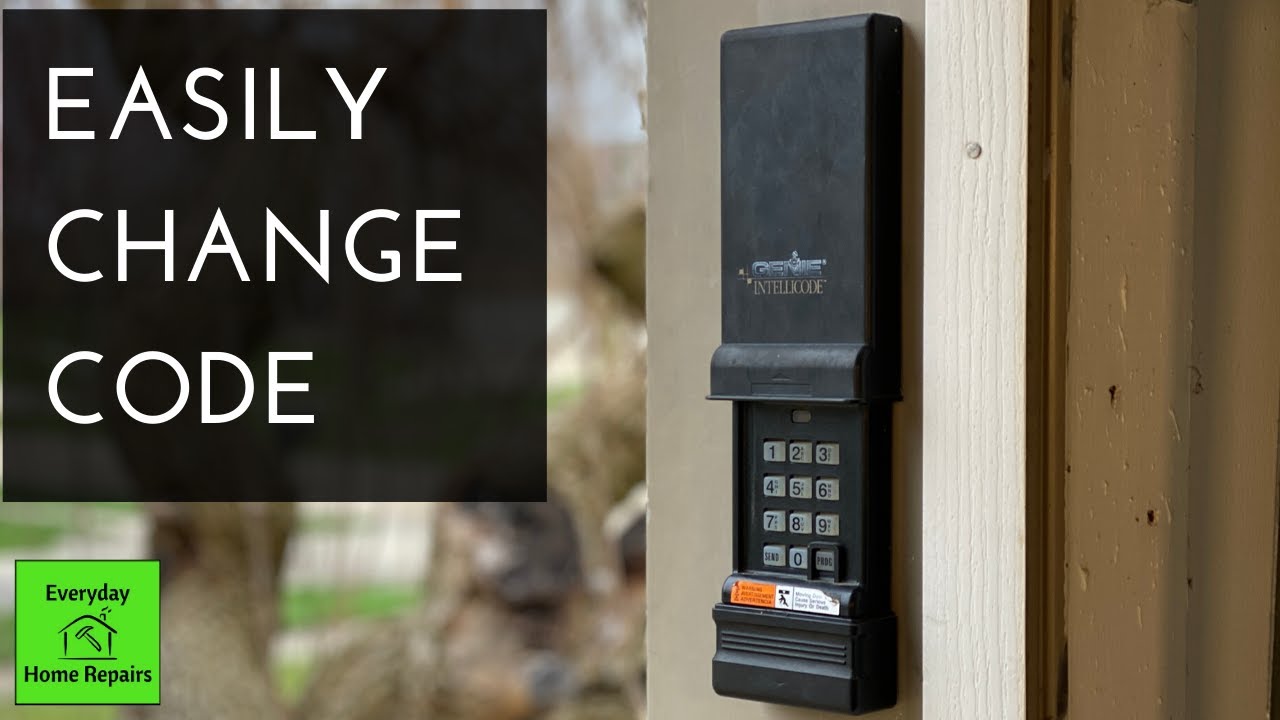
A Genie garage door keypad is a small device mounted outside your garage. It lets you open and close the garage door by entering a code, usually 3 to 8 digits. The keypad communicates wirelessly with your Genie garage door opener, which is installed on the ceiling inside the garage.
When you enter the correct code, the keypad sends a signal to the opener to activate the door.
There are two main types of Genie keypads:
- Intellicode models: These use rolling code technology, which changes the code every time you use it. This makes it harder for thieves to hack your garage.
- Fixed code models: These use the same code every time. They’re older and less secure, but still common.
Knowing which type you have is helpful, but the reprogramming steps are similar for both.
Reasons To Reprogram Your Genie Garage Door Keypad
There are several situations when you should reprogram your keypad:
- You forgot your code.
- You just moved in and want to change the previous owner’s code.
- Your keypad stopped working after a power outage or battery change.
- Security reasons: If someone else may know your code, changing it is wise.
- You want to add or remove access for family or guests.
Some homeowners reprogram their keypad every year as a security habit, just as you’d change passwords on online accounts.
What You Need Before You Start
Before you begin, gather these items:
- A sturdy ladder (if the garage opener is mounted high).
- Your Genie keypad (already installed outside your garage).
- Access to the Genie opener unit (inside the garage).
- The owner’s manual (optional, but helpful for your specific model).
- A new 9V battery (if your keypad is unresponsive).
You don’t need special tools. Make sure your garage is well-lit and the door is closed for safety.
Key Terms To Know
Understanding these terms will make the instructions easier to follow:
- Learn button: A small, often colored button on the garage door opener motor unit. Pressing this puts the opener in programming mode.
- PIN: Personal Identification Number, your 3-8 digit entry code.
- Opener unit: The main device, usually mounted on the garage ceiling, that moves the door.
- Intellicode: Genie’s rolling code technology.
Step-by-step: How To Reprogram A Genie Garage Door Keypad
Let’s go through the process step by step. These steps cover most Genie wireless keypads made since the 1990s, including Intellicode and fixed code models.
1. Prepare For Programming
First, clear the area around the garage door opener. Make sure kids and pets are away from the door.
Check the battery in your keypad. If your keypad lights up when you press a button, the battery is fine. If not, replace it with a fresh 9V battery.
2. Locate The Learn Button
The Learn button is usually found on the back or side of your Genie garage door opener unit. You’ll need to climb a ladder to see it. The button is often colored red, purple, or black, and may be labeled “Learn Code” or just “Learn.”
Example:
- On many Genie models, you’ll see the Learn button next to a small LED light. When you press the button, the LED will blink or light up.
3. Clear Old Codes (if Needed)
If you want to erase all codes (for example, after moving into a new house), you can reset the opener.
To clear all codes:
- Press and hold the Learn button for about 10 seconds.
- Release when the indicator light turns off.
Now, all remotes and keypads are erased. You’ll need to reprogram them.
4. Enter Programming Mode
Press and release the Learn button once. The indicator light will turn on (sometimes it blinks, sometimes it stays steady). You now have 30 seconds to complete the next steps.
5. Set Your New Pin On The Keypad
Go to the keypad outside the garage. Quickly (within 30 seconds of pressing Learn):
- Enter your chosen PIN (3-8 digits).
- Press the “Up/Down” or “#” key (look for a key with either a symbol or says “Enter”).
- Some models require you to press the “Program” or “Learn” key after entering the PIN.
You should see the keypad light blink or hear a click from the opener unit, meaning the code was accepted.
6. Test The Keypad
Wait a few seconds, then enter your new PIN and press the Up/Down or “Enter” key. The garage door should open or close.
If it does not work, repeat the steps. Make sure you are within the 30-second window after pressing the Learn button.
Programming Different Genie Keypad Models
Not all Genie keypads are the same. Here’s how to handle some common models:
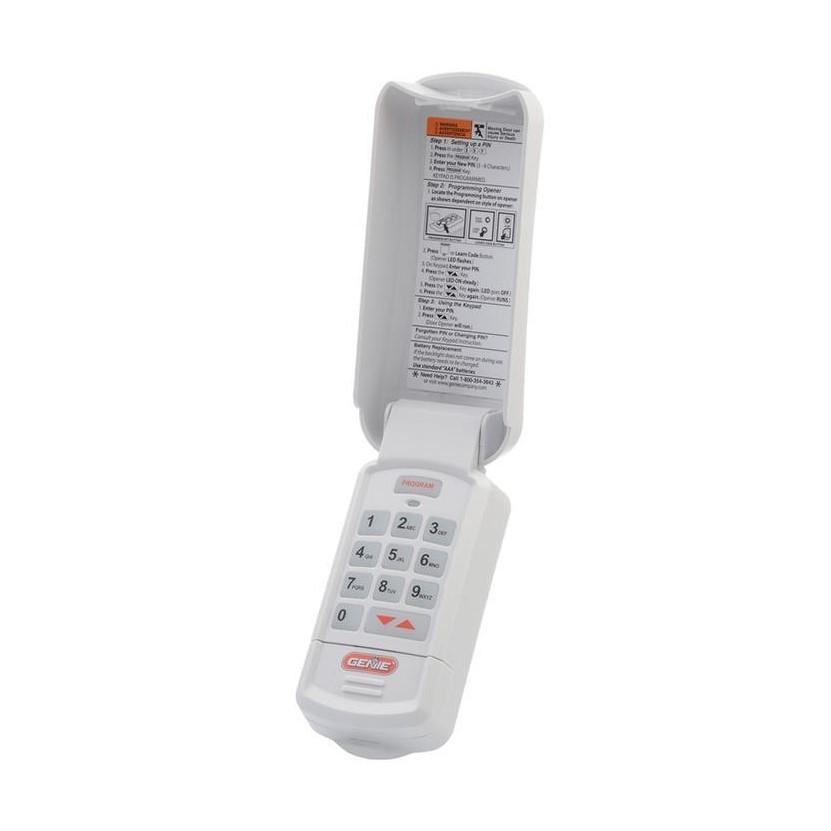
Genie Wireless Keypad (gk-r And Gwkp Models)
- Press and hold the “Program” button until the LED blinks.
- Enter your PIN, then press the “Up/Down” button three times.
- The keypad light will blink rapidly.
- Go to the opener unit, press and release the Learn button.
- Within 30 seconds, return to the keypad, enter your PIN, and press the Up/Down button.
Genie Universal Wireless Keypad (gwk)
- Slide the battery cover down to expose the program button.
- Press the program button until the LED blinks.
- Enter your PIN, then the Up/Down button.
- Press the Learn button on the opener.
- Enter your PIN again, then the Up/Down button.
Older Genie Keypads
Some older models use “dip switches” inside the keypad and the opener. For these, match the switch positions in both devices. Then, set your PIN and test.
Common Programming Mistakes To Avoid
Many people run into simple problems when reprogramming their Genie keypad. Here are some common mistakes:
- Taking too long: You must complete the keypad steps within 30 seconds of pressing the Learn button.
- Weak or dead battery: If the keypad does not light up, replace the battery.
- Wrong button sequence: Some keypads use “#” or “*” instead of “Enter.” Check your keypad’s buttons.
- Not clearing old codes: If you want to erase old users, always clear codes first.
- PIN too short or long: Most Genie keypads require 3–8 digit codes.
Practical Tips For Choosing A Secure Pin
When setting your new PIN, don’t choose something obvious like “1234” or your house number. A good PIN is easy for you to remember but hard for others to guess.
Here are some tips:
- Avoid birthdays, simple sequences, or repeating numbers.
- Use a mix of numbers you can recall but others can’t guess.
- Change your PIN every year for better security.
Troubleshooting: If Your Keypad Still Doesn’t Work
Sometimes, reprogramming doesn’t fix the problem. Here’s what to check:
1. Keypad Not Lighting Up
- Replace the 9V battery.
- Clean the battery contacts if corroded.
- Check for stuck keys or visible damage.
2. Garage Door Doesn’t Respond
- Make sure the opener unit has power (check the wall outlet).
- Check for radio interference from nearby electronics.
- Reposition the keypad if it’s too far from the opener.
3. Old Code Still Works
- Repeat the erase process on the opener (hold Learn button 10 seconds).
- Program again from the start.
4. Weather-related Issues
Extreme cold, heat, or rain can affect wireless keypads. If your keypad is exposed, consider a weather cover. Moisture inside the keypad can cause malfunction.
Advanced Features: Temporary Pins And Multiple Users
Many Genie keypads let you program a temporary PIN for guests, deliveries, or service workers.
How To Add A Temporary Pin
- Enter your current PIN.
- Press the Program button.
- Enter the temporary PIN (3–8 digits).
- Some models let you set how many hours or uses the temporary PIN will work.
After the set time or uses, the temporary PIN automatically expires. Check your manual for model-specific instructions.
Multiple Keypads Or Remotes
Genie openers can usually support multiple keypads and remotes. You can program a second keypad for a side door, or multiple remotes for different vehicles. Each one must be programmed using the Learn button.
Security Advice For Genie Garage Keypads
Your garage door is a main entry to your home. Securing your keypad is important.
Best practices:
- Never share your PIN with anyone you don’t trust.
- Change your code if you suspect someone else knows it.
- If you lose your remote, clear all codes and reprogram.
- Consider upgrading to an Intellicode keypad if you have an old fixed code model.
Non-obvious tip: If your keypad is in a visible location, shield it from view when entering your code. Some thieves use binoculars or cameras to watch people enter codes.
When To Call A Professional
If you’ve followed all the steps and your keypad still won’t program, it might be time to call a garage door technician. Some issues require special tools or replacement parts, such as:
- Damaged wiring inside the opener unit
- Keypad with water damage or broken buttons
- Radio interference from nearby devices
A professional can also check the balance and safety of your garage door.
Comparing Genie Keypad Models
If you’re not sure which Genie keypad you have, or if you’re thinking of upgrading, here’s a comparison of popular models:
| Model | Year Released | Technology | Max PIN Length | Weather Resistance |
|---|---|---|---|---|
| GK-R | 2010 | Intellicode | 8 digits | Good |
| GWK | 2015 | Universal | 8 digits | Very Good |
| GWKP | 2020 | Intellicode | 8 digits | Excellent |
| Fixed Code | 2000 | Fixed Code | 6 digits | Moderate |
Genie Keypad Vs. Remote Controls
Is a keypad better than a remote? Here’s how they compare:
| Feature | Genie Keypad | Remote Control |
|---|---|---|
| Access for multiple users | Yes (share PINs) | No (one per remote) |
| Lost device risk | Low | High |
| Programming difficulty | Medium | Easy |
| Weather resistance | High (outdoor) | Low (indoor/vehicle only) |
| Cost | Moderate | Low |
Upgrading To A Smart Garage Door Keypad
Smart home technology is changing how garages work. Genie now offers keypads that connect to Wi-Fi and work with smartphone apps. These let you:
- Open or close your garage from your phone
- Get alerts if the door is left open
- Assign temporary codes remotely
Upgrading is simple if your opener is compatible. Check the Genie website or your opener’s manual for details.
Reprogramming For Safety: Why It Matters
Statistics show that garage doors are the second most common way burglars enter homes. Many break-ins happen because old codes are never changed, or because previous owners’ codes are still active. Reprogramming your Genie keypad at least once a year is a smart way to protect your home and family.
Another often-missed tip: If you use your garage as a main entry, consider a keypad with backlit buttons. This makes it easier to enter codes at night, and reduces mistakes.
Genie Keypad Maintenance Tips
Proper care keeps your keypad working for years.
- Clean the keypad: Wipe with a dry cloth every few months. Dirt can cause sticky keys.
- Protect from weather: Use a cover if your keypad is in direct rain or sun.
- Check battery yearly: A weak battery can cause programming problems.
- Inspect for insects: Spiders or ants sometimes get inside outdoor keypads and cause problems.
Real-life Example: Successful Reprogramming
Let’s look at an example. Mark, a homeowner in Ohio, bought a house with a Genie garage door opener. The keypad used a 4-digit code, but the previous owner didn’t remember it. Mark followed these steps:
- He unplugged the opener for 30 seconds, then plugged it back in.
- He found the Learn button on the opener unit.
- He pressed and held it for 10 seconds to erase old codes.
- He pressed Learn again, entered his new code on the keypad, and pressed “Enter.”
- The door worked on the first try.
His advice: “Have your code ready before you press the Learn button. Don’t rush, but don’t wait too long either.”
How To Find Your Genie Keypad Model
If you’re not sure which model you have, check:
- The back of the keypad (model number is often on a sticker).
- The owner’s manual.
- The Genie website, which has pictures of every model.
If you can’t find the model, try programming as if it’s a newer Intellicode model. Most keypads made after 1995 use similar steps.
Genie Keypad Battery Life And Replacement
A Genie keypad battery usually lasts 1–2 years, depending on use and climate. If your keypad stops responding, always try a new battery first.
How to replace the battery:
- Slide the keypad cover down or open the back.
- Remove the old 9V battery.
- Clean contacts if needed.
- Insert the new battery and close the cover.
If the keypad still does not work after battery replacement and reprogramming, the device may need replacement.
Safety Reminder: Test The Door’s Auto-reverse
After reprogramming, always test the garage door’s safety features. Place a roll of paper towels under the door and close it. The door should reverse when it touches the object. If it doesn’t, contact a garage door professional. Safety sensors are critical for homes with children or pets.
Genie Keypad Programming: Quick Reference
For experienced users, here’s a concise summary:
- Press and release Learn button on opener.
- Within 30 seconds, enter new PIN on keypad and press Up/Down or Enter.
- Wait for confirmation light or sound.
- Test the keypad.
This works for most Genie Intellicode models.
Genie Keypads And Home Automation
Some newer Genie keypads work with smart home systems like Alexa and Google Assistant. This lets you open or close your garage using voice commands or your phone. For more details, visit the official Genie Company website.
Frequently Asked Questions
What If I Forgot My Genie Keypad Pin?
If you forgot your PIN, you’ll need to reset the keypad. Press and hold the Learn button on your opener for 10 seconds to erase all codes. Then, follow the reprogramming steps to set a new PIN.
Can I Program Multiple Pins On One Genie Keypad?
Some Genie keypads allow a main PIN and a temporary PIN for guests. Check your model’s manual to see if this feature is supported.
Why Does My Genie Keypad Only Work Sometimes?
This may be due to a weak battery, radio interference, or distance from the opener. Try moving closer, replacing the battery, or relocating the keypad.
How Can I Improve My Garage Keypad’s Security?
Choose a unique PIN, change it regularly, and never share it with anyone you don’t trust. Also, always erase old codes when moving into a new home.
Do I Need To Reprogram Remotes After Changing The Keypad Code?
If you pressed and held the Learn button (to erase all codes), you’ll need to reprogram all remotes and keypads. If you only changed the keypad code, remotes will usually still work.
Reprogramming your Genie garage door keypad is a simple, effective way to keep your home secure and convenient. With the steps and tips above, you can handle most problems yourself—no professional needed. Make keypad maintenance and code changes a regular part of your home safety routine, and your garage will stay easy to use and safe for everyone.