
Installing a battery backup on your Genie garage door opener is a smart move, offering peace of mind and continued functionality even when the power goes out. Whether it’s a sudden storm, a planned outage, or just a tripped breaker, a battery backup ensures your garage door remains operational, preventing you from being locked out or unable to secure your home.
This guide will walk you through the process, from understanding the benefits and choosing the right battery to the step-by-step installation and essential maintenance.
Key Takeaways
- A battery backup for your Genie garage door opener provides essential functionality during power outages.
- Genie offers specific battery backup solutions designed for their openers, often integrating seamlessly with existing models.
- Installation typically involves connecting the battery to the opener’s power system and ensuring proper charging.
- Regular testing and maintenance are crucial to ensure the battery backup is ready when needed.
- Understanding your specific Genie opener model is key to selecting the correct battery backup and following accurate installation steps.
Credit: www.geniecompany.com
Understanding The Importance Of Battery Backup For Genie Openers
In an era where convenience and security are paramount, the reliability of your garage door opener is often taken for granted. However, power outages are an inevitable part of life, and when they strike, your automated garage door can become inoperable. This is where a battery backup system becomes invaluable. For Genie garage door openers, which are known for their durability and advanced features, a battery backup is not just a luxury; it’s a significant enhancement to your home’s security and your daily convenience.
Imagine returning home during a severe thunderstorm, only to find the power is out. Without a battery backup, your remote or keypad becomes useless, leaving you stranded outside. Similarly, if an outage occurs while your car is inside, you might be unable to leave.
Beyond personal inconvenience, a non-functional garage door can also compromise your home’s security, leaving it vulnerable. Genie’s battery backup solutions are designed to mitigate these risks, ensuring that your garage door can still be opened and closed a limited number of times during an outage, providing a crucial lifeline.
This capability is especially important for those who rely on their garage as a primary point of entry or for storing valuable items.
Benefits Of A Genie Battery Backup System
The advantages of equipping your Genie garage door opener with a battery backup extend beyond mere convenience. They touch upon security, accessibility, and even the longevity of your opener system.
- Uninterrupted Operation: The primary benefit is the ability to operate your garage door during power outages. Genie battery backups typically allow for several open/close cycles, ensuring you can get in or out of your garage.
- Enhanced Security: A non-functional garage door can be a security risk. A battery backup ensures you can close and secure your garage, even when the main power is down.
- Peace of Mind: Knowing that your garage door will work regardless of power fluctuations or outages provides significant peace of mind, especially during emergencies or severe weather events.
- Compliance with Regulations: In some areas, building codes or homeowner association rules may require battery backup systems for garage door openers, particularly for new installations.
- Protection Against Power Surges: Some battery backup units also offer surge protection, helping to safeguard the delicate electronics of your garage door opener from voltage spikes.
Genie Battery Backup Models And Compatibility
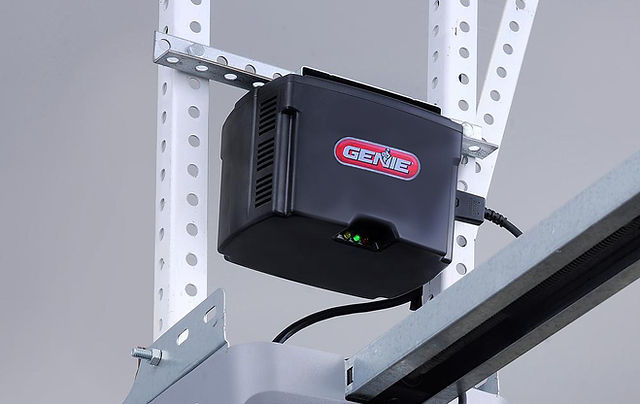
Genie offers a range of battery backup solutions, but it’s crucial to ensure compatibility with your specific garage door opener model. The most common Genie battery backup is the Genie Battery Backup Unit (BBU), often designed as an add-on to existing Genie openers. These units typically house rechargeable batteries that are automatically charged by the opener when the main power is on.
Before purchasing, always check the compatibility list provided by Genie or consult your opener’s manual. Key factors to consider include:
- Opener Model Number: Ensure the battery backup is designed for your specific Genie opener series (e.g., Genie Stealth, Genie Pro, Genie IntelliG).
- Opener Age: Older models might not have the necessary ports or internal compatibility for newer battery backup units.
- Battery Unit Type: Genie offers integrated battery backups for newer models and add-on units for older ones. For instance, the Genie GBBG model is a popular add-on.
A quick search on the official Genie Company website or consulting their customer support can help you identify the correct battery backup for your opener.

Credit: store.geniecompany.com
Preparing For Installation: Tools And Safety Precautions
Before you begin the installation process for your Genie garage door opener battery backup, thorough preparation is key to a smooth and safe experience. This involves gathering the necessary tools and understanding critical safety precautions. Rushing into the installation without proper preparation can lead to errors, damage to the opener, or even personal injury.
Essential Tools And Materials
Most Genie battery backup installations are designed for DIY enthusiasts, but having the right tools readily available will make the process much more efficient.
- Genie Battery Backup Unit: Ensure you have the correct, compatible unit for your Genie opener.
- Screwdriver Set: You’ll likely need a Phillips head and possibly a flathead screwdriver for removing access panels and securing connections.
- Wrench or Socket Set: Some mounting bolts or connections might require a wrench.
- Wire Strippers/Crimpers: If you need to make any minor wire adjustments or secure connections, these might be necessary.
- Drill and Drill Bits: For mounting the battery backup unit if it requires a separate bracket or enclosure.
- Ladder: To safely reach the garage door opener unit mounted on the ceiling. Ensure it’s stable and on a level surface.
- Safety Glasses: To protect your eyes from dust or debris.
- Work Gloves: To protect your hands.
- Owner’s Manuals: Keep both your garage door opener manual and the battery backup unit manual handy.
Safety First: Critical Precautions
Working with electrical components and heavy garage doors requires a strict adherence to safety protocols.
- Disconnect Power: ALWAYS unplug the garage door opener from the electrical outlet before beginning any installation or maintenance. This is the most critical step to prevent electrical shock.
- Disengage Opener: If your opener has a manual release cord, pull it to disengage the opener from the door. This prevents the door from unexpectedly moving while you’re working on the opener mechanism. You can find instructions on how to do this in guides like How Can I Open My Garage Door Manually: Step-by-Step Guide.
- Secure the Door: Ensure the garage door is in a stable position. If it’s a heavy door, consider using clamps or props to prevent it from accidentally falling.
- Read Instructions Carefully: Thoroughly read the installation manual for your specific Genie battery backup unit. Instructions can vary between models.
- Avoid Over-Tightening: When fastening screws or bolts, avoid over-tightening, which can strip threads or crack plastic components.
- Proper Ventilation: If working in an enclosed space, ensure adequate ventilation.
- Battery Handling: Handle batteries with care. Avoid short-circuiting the terminals. Dispose of old batteries according to local regulations.
Credit: www.youtube.com
Step-by-step Installation Guide For Genie Battery Backup
Installing a Genie battery backup unit is typically a straightforward process. While specific steps may vary slightly depending on your Genie opener model and the battery backup unit you’ve purchased, the general procedure involves mounting the unit and connecting it to the opener’s power system.
Mounting The Battery Backup Unit
The battery backup unit is often designed to attach directly to the garage door opener motor unit itself, or it might require a small mounting bracket.
- Locate Mounting Points: Examine your Genie garage door opener motor unit. There are usually designated screw holes or mounting brackets where the battery backup unit can be affixed. Refer to your opener’s manual and the battery backup’s manual to identify the correct locations.
- Secure the Unit: Align the battery backup unit with the designated mounting points. Use the screws provided with the battery backup kit or appropriate hardware. If a separate bracket is needed, install that first according to the instructions.
- Ensure Stability: Once mounted, gently try to wiggle the unit to ensure it is securely fastened and will not vibrate loose over time.
Connecting The Battery Backup To The Opener
This is the core of the installation, where the battery unit is integrated into the opener’s power supply.
- Access the Power Connections: Open the access panel on your Genie garage door opener motor unit. This panel usually reveals the wiring terminals and power supply connections.
- Disconnect Main Power (If Not Already Done): Double-check that the opener is unplugged from the wall outlet.
- Identify Connection Points: Your Genie battery backup unit will have a cable or set of wires designed to connect to specific terminals on the opener. These are typically labeled (e.g., “Battery,” “DC Input,” or similar). Your opener’s manual will show where these connections should be made.
- Make the Connections:
- Integrated Units: For models where the battery is built into the opener, this step might involve simply inserting a battery pack into a designated slot.
- Add-on Units: For add-on units, you will likely connect a cable from the battery backup unit to the opener’s power input terminals. This might involve plugging in a connector or, in some cases, wiring directly to terminals. Follow the diagrams in your manual precisely. Ensure connections are firm and secure.
- Route Wiring: If there’s excess wiring, neatly secure it using zip ties or existing cable management features to prevent it from dangling or getting caught.
- Replace Access Panel: Once all connections are made and verified, replace the access panel on the opener motor unit.
Initial Power-up And Charging
After the physical installation and wiring are complete, it’s time to power up the system and allow the battery to charge.
- Plug In the Opener: Plug the garage door opener’s power cord back into the electrical outlet.
- Observe Indicator Lights: The opener and the battery backup unit should have indicator lights. Typically, a light will illuminate to show that the opener is receiving main power and that the battery is charging. Refer to your battery backup manual for the specific meaning of these lights.
- Allow for Full Charge: It’s essential to allow the battery backup unit to charge fully before relying on it. This can take several hours, often up to 24 hours, depending on the battery size and its initial state. The opener’s manual or the battery backup’s manual will usually specify the charging time.
Testing The Battery Backup System
Once the battery has had ample time to charge, you must test its functionality to ensure it’s working correctly.
- Simulate a Power Outage: Unplug the garage door opener from the electrical outlet.
- Test Opener Functionality: Using your remote control or the wall-mounted button, attempt to open and close the garage door. The opener should operate using power from the battery backup. Note that battery power might be slightly less robust than main power, so the motor might sound a bit different or operate at a slightly reduced speed.
- Test Multiple Cycles: Try operating the door a few times to ensure the battery can sustain multiple cycles. This will give you an idea of its capacity during an actual outage.
- Restore Main Power: Plug the garage door opener back into the electrical outlet. Verify that the charging indicator light on the battery backup unit illuminates again, showing it’s recharging.
Advanced Considerations And Troubleshooting
Even with careful installation, you might encounter issues or want to optimize your Genie battery backup system. Understanding common problems and their solutions, as well as maintenance best practices, will ensure its long-term reliability.
Common Issues And Troubleshooting
When your Genie battery backup system doesn’t behave as expected, a systematic approach to troubleshooting can help identify and resolve the problem.
- Opener Not Working on Battery Power:
- Check Power Connection: Ensure the opener is unplugged from the wall outlet.
- Verify Battery Charge: Confirm the battery has had sufficient time to charge (up to 24 hours). Check the charging indicator light.
- Inspect Wiring: Double-check all connections between the battery backup unit and the opener for looseness or corrosion.
- Battery Health: If the battery is old or has been deeply discharged multiple times, it may have reached the end of its lifespan and needs replacement.
- Reset Opener: Sometimes, a simple reset of the opener system can resolve communication issues. You might need to refer to guides like How Do I Reset My Garage Door Opener: Step-by-Step Guide.
- Battery Not Charging:
- Check Main Power: Ensure the opener is plugged into a working electrical outlet. Test the outlet with another device.
- Inspect Power Cord: Look for any damage to the opener’s power cord.
- Battery Backup Connections: Verify the connections from the opener to the battery backup unit are secure.
- Internal Opener Issue: The charging circuit within the opener itself might be faulty. This often requires professional diagnosis.
- Faulty Battery Unit: The battery backup unit itself might be defective.
- Opener Operates Slowly or Weakly on Battery:
- Low Battery Charge: The battery may not be fully charged. Allow more charging time.
- Aging Battery: As batteries age, their capacity diminishes. If the unit is several years old, the battery may need replacement.
- Excessive Load: If you’re trying to lift a very heavy or poorly balanced garage door on battery power, it might struggle. Ensure your garage door is properly maintained; for example, check How to Lube Garage Door Rollers for Smooth, Quiet Operation for maintenance tips.
Battery Maintenance And Replacement
Proper maintenance extends the life of your battery backup and ensures it’s ready when you need it.
- Regular Testing: Test the battery backup function at least every 6 months. This simple test ensures the battery is functional and the connections are good.
- Keep Connections Clean: Periodically inspect the electrical connections for any signs of corrosion. Clean them gently with a soft brush or contact cleaner if necessary.
- Monitor Charging Indicator: Pay attention to the charging indicator light. If it consistently shows an error or remains off when it should be charging, investigate the cause.
- Battery Lifespan: Genie battery backup units typically use sealed lead-acid (SLA) batteries, similar to those in emergency lights or UPS systems. These batteries have a finite lifespan, often ranging from 3 to 5 years, depending on usage and environmental conditions.
- Replacement Procedure: When it’s time to replace the battery, follow the same safety precautions as installation: disconnect main power, disengage the opener, and carefully remove the old battery. Install the new, compatible battery, ensuring correct polarity, and reconnect everything. Dispose of the old battery responsibly.
Understanding Battery Backup Capacity
It’s important to manage expectations regarding battery backup capacity. These systems are designed to provide a limited number of open/close cycles. Genie battery backup units typically provide enough power for around 20-50 open/close cycles, depending on the model and the weight of the garage door.
This is usually sufficient for a few days of moderate use during an outage. However, they are not intended to replace the main power supply indefinitely.
Comparing Battery Backup Options
While this guide focuses on Genie battery backups, it’s useful to understand how they compare to other potential solutions or features.
Genie Battery Backup Vs. Other Brands
Genie’s integrated battery backup solutions are designed specifically for their openers, ensuring seamless compatibility and often a cleaner installation. If you have a Genie opener, sticking with a Genie battery backup is generally the most straightforward and reliable option. Attempting to use a third-party battery backup designed for a different brand could lead to compatibility issues, improper charging, or even damage to your opener.
Battery Backup Vs. Manual Operation
In the event of a power outage, manual operation is always an option. However, it requires physically disengaging the opener and lifting the heavy garage door by hand. This can be difficult, especially for individuals with limited strength, or if the door is particularly heavy or encounters resistance. The battery backup provides a much more convenient and accessible alternative. For instructions on manual operation, refer to guides like How Do You Manually Open a Garage Door: Step-by-Step Guide.
Features To Look For In A Battery Backup
When choosing a Genie battery backup, consider these features:
- Number of Cycles: How many open/close cycles does it provide on a full charge?
- Recharge Time: How long does it take to recharge fully?
- Indicator Lights: Clear indicators for power, charging, and battery status.
- Compact Design: How well does it integrate with the opener unit?
- Durability: What is the expected lifespan of the battery?
Here’s a brief comparison of common battery backup scenarios:
| Feature | Genie Integrated Battery Backup | Genie Add-On Battery Backup (e.g., GBBG) | No Battery Backup (Manual Operation Only) |
|---|---|---|---|
| Power Outage Functionality | Yes, multiple cycles | Yes, multiple cycles | No (manual release required) |
| Ease of Use During Outage | High (uses remote/button) | High (uses remote/button) | Low (requires physical effort) |
| Installation Complexity | Very Low (often built-in) | Moderate (requires connection) | N/A |
| Cost | Included in opener price or higher initial cost | Moderate one-time purchase | N/A |
| Security During Outage | Maintained | Maintained | Depends on ability to manually close |
Real-world Examples And Scenarios
To illustrate the value of a battery backup, consider these common situations where it proves its worth:
Scenario 1: The Unexpected Storm
A family is enjoying a quiet evening when a severe thunderstorm hits, causing a widespread power outage. The garage door opener, which was in use moments before, stops working. Without a battery backup, they would be unable to open the garage door to retrieve their car for an urgent appointment.
With the Genie battery backup, they can still operate the door, allowing them to leave as planned. The system provides enough cycles to get them through the immediate need, and the battery automatically recharges once the main power is restored.
Scenario 2: The Vacationer’s Return
A homeowner returns from a week-long vacation to find their neighborhood is experiencing a rolling blackout. They pull into their driveway, and just as the garage door is about to close, the power flickers off. If they didn’t have a battery backup, the door would remain stuck open, leaving their home and belongings vulnerable.
The battery backup kicks in, allowing the door to close completely, securing their property until the main power is stable again. This provides crucial security and prevents potential theft.
Scenario 3: The Busy Parent
A parent is rushing to get their children to school. As they back out of the garage, the power suddenly goes out. The garage door stops halfway. Without a battery backup, they’d have to manually force the heavy door down, potentially struggling with it while trying to manage children and a tight schedule.
The battery backup allows them to simply press the remote, close the door safely, and continue with their day without significant disruption. This highlights how battery backups contribute to daily convenience and stress reduction.
Frequently Asked Questions
How Long Does A Genie Battery Backup Last On A Single Charge?
The number of cycles a Genie battery backup can provide on a single charge varies depending on the specific model, the weight of your garage door, and how well-maintained the door and opener system is. Generally, most Genie battery backup units are designed to provide between 20 to 50 open and close cycles.
This is typically sufficient for several days of normal use during a power outage.
How Often Should I Test My Genie Battery Backup?
It is highly recommended to test your Genie battery backup system at least twice a year. This ensures that the battery is holding a charge and that the connections are still secure. A simple test involves unplugging the opener from the main power source and attempting to operate the garage door using your remote or wall button.