
Programming your Genie garage door opener model 1024 might seem like a technical challenge, but it’s a straightforward process designed for homeowners. Whether you’re adding a new remote, replacing an old one, or setting up a keypad, understanding the steps involved ensures your garage door operates smoothly and securely.
This guide will walk you through the entire programming process for your Genie 1024, covering common scenarios and offering solutions for potential issues.
Key Takeaways
- Locate the Smart Button: The programming process for Genie 1024 openers centers around the “Smart Button” or “Learn Button” on the motor unit.
- Remote Control Programming: This involves pressing the Smart Button, then pressing the desired button on your remote within a specific timeframe.
- Keypad Programming: Similar to remotes, keypads require pressing the Smart Button followed by entering a PIN and pressing the Enter button.
- Troubleshooting Common Issues: Understand potential problems like signal interference, battery issues, or incorrect button presses and how to resolve them.
- Safety First: Always follow safety precautions, such as keeping the garage door opener’s manual handy and ensuring the door is clear of obstructions.
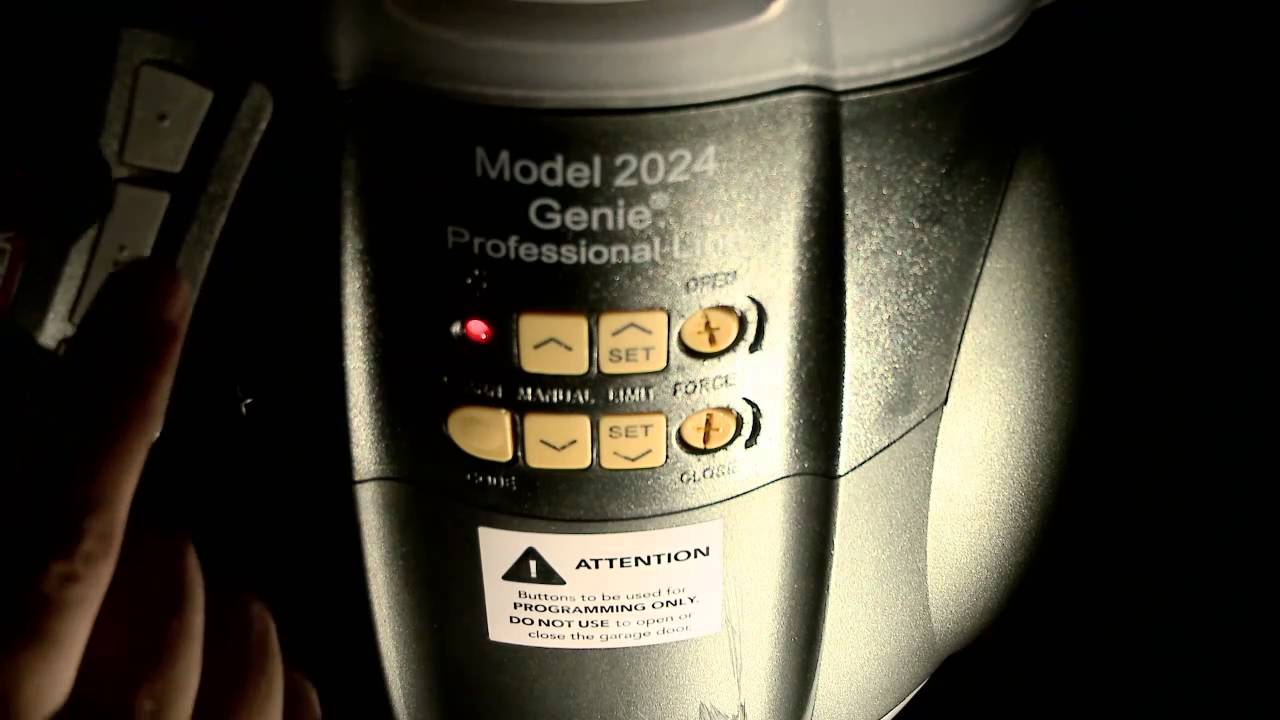
Credit: www.youtube.com
Understanding Your Genie 1024 Garage Door Opener
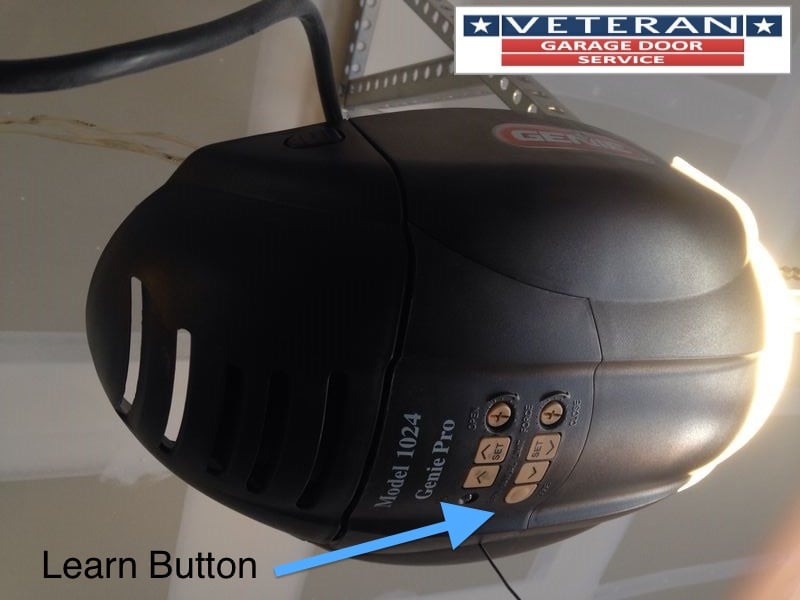
The Genie 1024 is a popular model known for its reliability and user-friendly design. At its core, the programming functionality relies on the Smart Button, often referred to as the Learn Button, located on the motor unit itself. This button is the gateway to syncing your remote controls and keypads with the opener. Understanding its location and function is the first crucial step.
The motor unit typically houses the main logic board for your garage door opener. On this board, you’ll find the Smart Button, usually a colored button (often red, green, or yellow, depending on the specific Genie sub-model), and an LED indicator light.
This LED will blink or stay lit during the programming sequence, providing visual feedback.
Before you begin any programming, it’s essential to have your Genie 1024’s owner’s manual readily available. While this guide covers the general steps, specific nuances might exist for your exact unit. Additionally, ensure you have fresh batteries for any remote or keypad you intend to program.
Low battery power is a common culprit for programming failures.
Locating The Smart Button And Led Indicator
The Smart Button on your Genie 1024 opener is typically found on the back or side of the motor unit, which is usually mounted on the ceiling of your garage. It’s often accompanied by a small LED light. The color of the Smart Button can vary, but common colors include:
- Red
- Green
- Yellow
- Purple
- Orange
The LED indicator light next to the Smart Button is crucial for confirming successful programming steps. It will illuminate or blink in specific patterns to guide you through the process.
Pre-programming Checklist
To ensure a smooth programming experience, complete the following checks:
- Identify Your Opener Model: Confirm you have the Genie 1024 model. This is usually printed on a label on the motor unit.
- Locate the Smart Button: As described above, find the Smart Button and its associated LED on the motor unit.
- Gather Remotes/Keypads: Have the remote control or keypad you wish to program ready.
- Check Remote/Keypad Batteries: Ensure batteries are new and correctly installed.
- Consult Your Manual: Keep your Genie 1024 owner’s manual handy for specific instructions.
- Clear the Area: Make sure the garage door path is clear of any obstructions.
- Safety First: Understand how to disengage and re-engage the garage door opener’s emergency release cord in case of issues. You can learn more about this in guides like How Can I Open My Garage Door Manually: Step-by-Step Guide.
Programming A Genie 1024 Remote Control
Programming a remote control to your Genie 1024 opener is one of the most common tasks. This process involves teaching the opener to recognize the unique signal transmitted by your remote. Genie remotes typically use a rolling code technology for enhanced security, meaning the code changes with each use.
Step-by-step Remote Programming
Follow these steps to program a Genie Intellicode remote to your 1024 opener:
- Access the Smart Button: Go to your garage ceiling and locate the Smart Button on the Genie 1024 motor unit.
- Press and Release the Smart Button: Press and immediately release the Smart Button. The LED indicator light next to it should illuminate or begin blinking, signifying it’s in programming mode. You typically have about 30 seconds to complete the next step.
- Press and Hold the Remote Button: On your remote control, press and hold the button you wish to use to operate the garage door.
- Observe the Opener’s Response: Continue holding the remote button. After a few seconds, the garage door opener’s motor unit will make a clicking sound, or the LED light on the motor unit will flash. This indicates it has received and learned the remote’s signal.
- Release the Remote Button: Once you hear the click or see the light flash, release the button on your remote.
- Test the Remote: Press the programmed button on your remote again. The garage door should now open or close.
If the door does not respond, repeat the process. Ensure you are pressing the Smart Button and then the remote button within the 30-second window.
Programming Multiple Remote Buttons
If your remote has multiple buttons, you can program each one to control different functions (e. g. , open/close, vacation lock). Simply repeat the process above for each button you wish to program, using the same Smart Button press sequence but then pressing a different button on the remote in step 3.
Programming A Genie 1024 Keypad
Genie keypads offer a convenient way to open your garage door without a remote, using a personal identification number (PIN). The programming process for a keypad is similar to that of a remote but involves entering a PIN.
Step-by-step Keypad Programming
- Access the Smart Button: Locate the Smart Button on your Genie 1024 motor unit.
- Press and Release the Smart Button: Press and release the Smart Button. The LED indicator light should illuminate.
- Enter Your Desired PIN: On the keypad, enter a 4-digit PIN that you will use for future access.
- Press and Hold the Enter Button: Press and hold the ENTER button on the keypad.
- Observe the Opener’s Response: Similar to remote programming, the motor unit will click or its LED light will flash, indicating it has learned the keypad code.
- Release the Enter Button: Release the ENTER button on the keypad.
- Test the Keypad: Enter your 4-digit PIN on the keypad and press ENTER. The garage door should operate.
Pro Tip: Choose a PIN that is easy for you to remember but difficult for others to guess. Avoid simple sequences like “1234” or “0000.”
Programming A Universal Garage Door Remote
If you are using a universal remote, the programming steps might differ slightly. Always refer to the manual that came with your universal remote for specific instructions. Generally, universal remotes require you to first put the remote in programming mode, then use the Genie 1024 opener’s Smart Button to transmit the signal.
You might need to “copy” the signal from an existing Genie remote or directly program the opener.
For an existing Genie remote, you might place the universal remote close to it and follow specific button sequences on the universal remote to capture the Genie signal. If programming directly to the opener, the process often involves pressing the Smart Button on the opener and then a specific button combination on the universal remote.
Credit: veterangaragedoor.com
Understanding Genie’s Intellicode Technology
Genie’s Intellicode system is a security feature designed to prevent unauthorized access to your garage. Unlike older systems that used fixed codes, Intellicode utilizes a rolling code. Each time you press your garage door remote, it sends a new, unique code to the opener. The opener has a sophisticated algorithm that knows this sequence of codes. This means that even if someone were to capture the code being sent, it would be useless for opening your garage door the next time because the code would have changed.
The Genie 1024 opener is equipped with Intellicode, typically Intellicode 1 or Intellicode 2, depending on the manufacturing date. This technology enhances your home security significantly.
Intellicode 1 Vs. Intellicode 2
- Intellicode 1: This was the earlier version. Remotes programmed for Intellicode 1 will generally work with Intellicode 2 openers, but not vice-versa.
- Intellicode 2: This is the newer, more secure version. It offers enhanced encryption and a wider range of compatible remotes.
When purchasing new remotes or keypads, ensure they are compatible with your specific Intellicode version. Most modern Genie remotes and keypads are backward compatible with Intellicode 1 openers, but it’s always best to check the product specifications.

Credit: www.youtube.com
Troubleshooting Common Genie 1024 Programming Issues
Even with clear instructions, programming issues can arise. Here are some common problems and their solutions for your Genie 1024 opener.
Remote Not Responding After Programming
- Incorrect Button Press Sequence: Ensure you pressed the Smart Button on the motor unit *first*, then the remote button. The timing is critical; you usually have about 30 seconds between pressing the Smart Button and the remote button.
- Low Battery: Replace the battery in the remote control. Even if the remote’s light turns on, the signal strength might be too weak for the opener to register.
- Distance: Ensure you are within a reasonable range of the garage door opener when programming. Stand near the motor unit.
- Interference: Other wireless devices (like wireless doorbells, security systems, or even some lighting) can sometimes interfere with the signal. Try programming when these devices are off or at a distance.
- Opener Not in Programming Mode: Double-check that the LED on the motor unit illuminated after you pressed the Smart Button. If it didn’t, the opener might not be ready to receive the signal.
- Wrong Remote Type: Ensure the remote is compatible with the Genie 1024 and its Intellicode version.
Keypad Not Working
- Incorrect PIN Entry: Ensure you are entering the exact PIN you programmed.
- PIN Entry Speed: Enter the PIN and press ENTER within a reasonable timeframe. Some systems can time out.
- Low Battery: Keypads also rely on batteries. Replace them if they are old.
- Lockout Mode: Some Genie systems have a lockout feature that can be activated via a switch on the motor unit or through programming. Check your manual for details on disabling lockout mode.
- Keypad Malfunction: In rare cases, the keypad itself might be faulty.
Opener Not Responding To Any Remotes
- Power Issue: Check if the garage door opener is plugged in and receiving power. Test it with a known working device.
- Smart Button Issue: If the LED doesn’t light up when you press the Smart Button, there might be an issue with the motor unit’s circuit board.
- All Remotes Lost Signal: If multiple remotes stop working simultaneously, it might indicate a problem with the opener’s receiver or a complete system reset is needed. You might need to reprogram all remotes. For guidance on resetting, see How Do I Reset My Garage Door Opener: Step-by-Step Guide.
Opener Works Intermittently
- Antenna Issue: Ensure the antenna wire hanging from the motor unit is not damaged and is hanging freely, not coiled up or obstructed.
- Signal Interference: As mentioned before, external signals can cause intermittent operation.
- Mechanical Issues: While not directly related to programming, intermittent operation can also be caused by worn-out gears, a loose chain, or binding in the door mechanism. Consider checking How to Adjust Chain on Garage Door Opener for Smooth Operation or lubricating rollers as per How Do You Lubricate Garage Door Rollers for Smooth Operation?.
Advanced Genie 1024 Programming And Features
Beyond basic remote and keypad programming, Genie openers offer other features and considerations.
Clearing All Programmed Remotes
If you need to erase all previously programmed remotes and keypads (e. g. , if a remote is lost or stolen), you can reset the opener’s memory.
- Locate the Smart Button: Find the Smart Button on the motor unit.
- Press and HOLD the Smart Button: Press and *hold* the Smart Button for approximately 10-15 seconds.
- Observe the LED: The LED indicator light next to the Smart Button will blink rapidly and then go out, or the unit might make a clicking sound. This signifies that all codes have been cleared.
- Release the Button: Release the Smart Button.
After clearing the memory, you will need to reprogram all your remotes and keypads using the steps outlined earlier. This is a crucial security measure if you suspect unauthorized access. For more general reset information, consult How to Reset Garage Door Remote Easily in Minutes.
Understanding The Vacation Lock Feature
Many Genie openers, including potentially your 1024 model, feature a Vacation Lock or Lock button. When activated, this button disables all remote controls and keypads, preventing the garage door from being opened. This is useful when you are away for an extended period and want to ensure maximum security.
- Activation: Typically, you press and hold the LOCK button on an existing Genie remote for a few seconds until the opener’s LED flashes.
- Deactivation: To disable the vacation lock, press and hold the LOCK button again until the opener’s LED flashes. You might also need to press the programmed “open/close” button on the remote to fully restore functionality.
Consult your Genie 1024 manual to confirm if your specific model has this feature and the exact procedure for activation and deactivation.
Genie Garage Door Opener Compatibility
When choosing new accessories like remotes or keypads, compatibility is key. Genie uses different technologies across its product lines. For the Genie 1024, you’ll generally be looking for remotes and keypads compatible with Intellicode technology.
Comparison of Genie Remote Compatibility:
| Remote Model Series | Technology | Compatible with Genie 1024 (Intellicode) | Notes |
|---|---|---|---|
| Genie G3T-BX | Intellicode 1 | Yes | Older model, widely available. |
| Genie GITR-3 | Intellicode 1 | Yes | Common 3-button remote. |
| Genie G3TR | Intellicode 2 | Yes | Newer, backward compatible with Intellicode 1. |
| Genie GWB | Intellicode 2 | Yes | Wall-mount button, often hardwired or wireless. |
| Genie GKS | Intellicode 1 & 2 | Yes | Keypad models, ensure it specifies Intellicode compatibility. |
| Genie GIFC | Intellicode 1 | Yes | Keypad, often for older systems. |
*Note: Always verify compatibility with the specific product listing or your opener’s manual.*
Power Outage Considerations
In the event of a power outage, your Genie 1024 opener will not function. To open or close your garage door manually, you’ll need to use the emergency release cord. This is a red cord hanging from the opener’s trolley mechanism.
- Pull the Cord: Pull the red cord downwards. This disengages the trolley from the opener’s drive mechanism, allowing you to lift the door manually.
- Lift the Door: Carefully lift the garage door by hand.
- Re-engage: Once power is restored, you can re-engage the opener by pulling the red cord again, or by using the remote/wall button once power is back. The trolley should re-attach to the drive. For more details, see How Do You Manually Open a Garage Door: Step-by-Step Guide.
Maintaining Your Genie 1024 Opener
Proper maintenance ensures the longevity and reliable operation of your Genie 1024 opener and its programming.
Regular Inspections
- Visual Check: Periodically inspect the motor unit, wiring, and the trolley mechanism for any signs of damage or wear.
- Antenna: Ensure the antenna wire is intact and hanging freely.
- Emergency Release: Test the emergency release cord occasionally to make sure it’s functioning correctly.
Lubrication
While the Genie 1024 is a chain-driven opener, the garage door itself requires lubrication. Moving parts like rollers, hinges, and springs (excluding torsion springs, which require professional service) benefit from lubrication. Use a silicone-based spray lubricant designed for garage doors. This helps ensure smooth operation, which can indirectly affect how the opener performs. For detailed guidance, refer to How to Lube Garage Door Rollers for Smooth, Quiet Operation.
Battery Replacement Schedule
- Remotes and Keypads: Replace batteries in your remotes and keypads at least once a year, or when you notice a decrease in range or responsiveness. Low batteries are a frequent cause of programming and operational issues.
Professional Servicing
For any mechanical issues, unusual noises, or if you are uncomfortable performing maintenance, it’s always best to contact a qualified garage door technician. Issues with the drive mechanism, torsion springs, or the main logic board often require professional expertise. The cost of professional servicing is often less than the cost of extensive repairs or replacement. You can find general cost information at How Much for a Garage Door: Costs, Factors, and Savings Tips.
Frequently Asked Questions
How Do I Know If My Genie 1024 Opener Is Intellicode 1 Or Intellicode 2?
Generally, Genie openers manufactured before 2011 are Intellicode 1, while those manufactured from 2011 onwards are Intellicode 2. The easiest way to be sure is to check the label on your motor unit, which often specifies the Intellicode version. If unsure, assume it’s Intellicode 2, as it’s backward compatible with Intellicode 1 remotes.
Can I Program A Non-genie Remote To My Genie 1024 Opener?
While some universal remotes are designed to be programmed to various brands, including Genie, you cannot typically program a remote from another brand (like LiftMaster or Chamberlain) directly to a Genie opener. You would need a universal remote specifically advertised as compatible with Genie Intellicode openers.
What Is The Range Of My Genie Garage Door Remote?
The range of a Genie garage door remote can vary significantly due to factors like battery strength, potential interference, and the specific remote model. Typically, you can expect a range of 50 to 150 feet. If your range has decreased, check the remote’s battery or look for sources of interference.
How Many Remotes Can I Program To A Genie 1024 Opener?
Most Genie garage door openers, including the 1024 model, can be programmed to accept a certain number of unique remote codes. While the exact number can vary, it’s typically between 3 to 5 remotes. If you need to program more, you might need to clear existing codes first.
Always refer to your owner’s manual for the specific limit.