
Garage doors are an indispensable part of modern homes, offering security, convenience, and protection from the elements. At the heart of this functionality is the garage door opener, and Genie is a widely recognized and trusted brand in this space.
Like any electronic device, there are times when a Genie garage door opener may need a reset. This could be due to a malfunctioning remote, a need to clear old codes for security reasons, or after a power outage or system update.
Resetting your Genie garage door opener is a straightforward process, but it requires understanding the specific model you have and following the correct steps.
This comprehensive guide will walk you through the various methods for resetting your Genie garage door opener, covering different scenarios and common issues. We’ll explore why you might need to reset your opener, differentiate between resetting the remote, the opener itself, and the keypad, and provide step-by-step instructions to ensure a successful reset.
By the end, you’ll be equipped to handle most reset procedures for your Genie garage door system, restoring its proper function and ensuring your peace of mind.
Key Takeaways
- Reasons for Resetting: Resetting a Genie garage door opener is often necessary due to lost remotes, security concerns, programming issues, or after power interruptions.
- Types of Resets: Understand the difference between resetting a remote, the garage door opener motor unit, and the wireless keypad. Each requires a distinct procedure.
- Locating the Learn Button: The “Learn” or “Program” button on the motor unit is crucial for most reset and programming tasks. Its location varies by Genie model.
- Remote Reset: Typically involves pressing and holding the Learn button on the motor unit, then pressing the desired button on the remote.
- Keypad Reset: Usually requires entering a new code on the keypad and pressing the Enter or Program button, followed by pressing the Learn button on the motor unit.
- Full System Reset: This often involves disconnecting power and pressing buttons on the motor unit to clear all existing codes.
- Model Specificity: Always consult your Genie opener’s manual for precise instructions, as procedures can differ significantly between models.
- Safety First: Always ensure the garage door is in a safe position, and be aware of moving parts during any reset or programming process.

Credit: www.wikihow.com
Understanding Why You Might Need To Reset Your Genie Garage Door Opener
Resetting your Genie garage door opener isn’t just a technical step; it’s often a solution to a range of common problems, a security measure, or a necessary part of a system upgrade. Understanding the underlying reasons can help you pinpoint the correct reset procedure and prevent future issues.
In my experience, users often face situations that necessitate this action, from simple convenience to critical security needs.
Security Concerns And Lost Remotes
The most common reason for resetting your Genie garage door opener is a security concern. If a garage door remote is lost or stolen, it poses a significant security risk. Anyone finding the remote could potentially gain access to your garage and home. In such cases, immediately resetting the opener’s memory to erase the lost remote’s code is paramount. This ensures that the lost device can no longer operate your garage door. Similarly, if you suspect unauthorized access or simply want to refresh your system’s security, a full reset can clear all previously programmed remotes and keypads, forcing you to re-enter only the devices you currently possess and trust.
Troubleshooting Malfunctions And Glitches
Electronic devices, including garage door openers, can sometimes experience glitches or malfunctions. These might manifest as the remote not responding, the opener behaving erratically, or the system failing to respond to commands. Often, a simple power cycle (unplugging the unit for a minute) can resolve minor software hiccups. However, for more persistent issues, a full reset of the opener’s memory can act as a “hard reboot,” clearing any corrupted data or settings that might be causing the problem. This is similar to restarting your computer when it freezes; it forces the system to return to its default state and re-establish connections.
After Battery Replacements Or Power Outages
While modern garage door openers are generally robust, significant power interruptions or frequent battery changes in the opener’s backup system can sometimes cause the unit to lose its programmed settings or require a re-synchronization. If your opener is acting strangely after a storm or a prolonged power outage, a reset might be necessary to restore its normal operation. For openers with battery backup, replacing the backup battery may also prompt the need for a quick re-sync or a full reset in rare instances, especially if the unit was left without power for an extended period.
Adding New Remotes Or Keypads
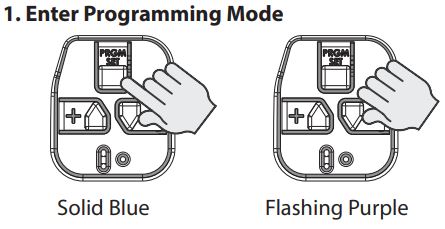
When you purchase a new Genie garage door remote or keypad, you’ll need to program it to your opener. This process inherently involves the opener’s memory. While not strictly a “reset” in the sense of clearing existing codes, the programming procedure often involves pressing the “Learn” button on the motor unit, which temporarily puts the opener into a state where it’s ready to accept new codes. In some cases, if you’re replacing all existing remotes, you might choose to perform a full system reset first to ensure a clean slate before programming the new devices. This prevents any potential conflicts with old, unregistered codes.
Credit: store.geniecompany.com
Identifying Your Genie Garage Door Opener Model
Before you can successfully reset your Genie garage door opener, it’s crucial to identify the specific model you have. Genie has produced a vast array of openers over the years, and the reset procedures can vary significantly from one model to another.
Knowing your model number allows you to consult the correct manual or find model-specific instructions online, greatly increasing your chances of a successful reset without causing further issues.
Locating The Model Number
The model number for your Genie garage door opener is typically found on the motor unit itself, which is usually mounted on the ceiling in your garage. Look for a sticker or plate on the side or back of the unit. It might be labeled as “Model,” “Product Number,” or “Serial Number.” Sometimes, the model number is integrated with the serial number, so you may need to look carefully. Common Genie opener series include the IntelliG series (e.g., GCG350L, GCG350ML), PowerLift series (e.g., 1022, 1024), and older models like the ChainMax or ScrewDrive series.
Understanding Different Genie Opener Technologies
Genie openers have evolved over time, incorporating different radio frequency (RF) technologies for their remotes and keypads. This is a critical factor in determining the reset method.
- Fixed Code: Older Genie openers often used fixed code technology. These are less secure and generally only have one code. Resetting these is usually straightforward, often involving a simple button press.
- CodeDodger® (Rolling Code): Most modern Genie openers utilize CodeDodger® technology. This system generates a new, unique code each time the remote is used, enhancing security. Resetting CodeDodger® systems typically involves interacting with the “Learn” button on the motor unit.
- Frequency: Genie openers operate on specific frequencies, most commonly 315 MHz or 390 MHz. While not directly impacting the reset procedure itself, knowing the frequency can be helpful when purchasing replacement remotes or keypads.
Consulting Your Owner’s Manual
The owner’s manual for your specific Genie garage door opener is the definitive guide for all operations, including resets and programming. If you no longer have the physical manual, you can usually find a digital version on the official Genie website by searching for your model number. The manual will provide detailed, step-by-step instructions tailored to your opener, including diagrams and specific button sequences. This is the most reliable resource to ensure you are performing the correct reset for your particular unit.
Credit: www.youtube.com
Resetting The Genie Garage Door Opener Motor Unit
Resetting the motor unit is often the most comprehensive reset, as it typically clears all programmed remotes, keypads, and safety settings, returning the opener to its factory default state. This is the most common procedure when you need to erase lost remotes or troubleshoot persistent electronic issues.
The Role Of The “learn” Or “program” Button
The “Learn” button (sometimes labeled “Program” or “Set”) on the Genie garage door opener motor unit is the central point for most programming and reset functions. This button is usually located near the antenna wire or on the back panel of the unit. It’s typically a colored button, often red, orange, green, or purple, depending on the model and its frequency. Pressing and holding this button for a specific duration is the key to initiating most reset sequences.
Method 1: The “learn” Button Hold (clears All Remotes)
This method effectively erases all previously programmed remotes and keypads, requiring you to re-program them afterward.
- Locate the Learn Button: Find the Learn button on your Genie garage door opener motor unit.
- Press and Hold: Press and hold the Learn button for approximately 10-30 seconds. The duration can vary by model, so check your manual. You might see an LED indicator light on or near the button.
- Observe the LED: Watch the LED indicator. It will typically blink or change color after a certain amount of time, indicating that it has entered programming mode or that the memory has been cleared. For many Genie models, holding the button until the LED turns off after blinking signifies that the memory has been wiped.
- Release the Button: Release the Learn button once you see the indicator change or after the specified time.
- Test: Attempt to use a programmed remote. It should no longer operate the garage door.
- Reprogram: You will now need to reprogram all your remotes and keypads. Refer to your manual for the specific programming instructions for your model. This usually involves pressing the Learn button again and then pressing the button on the remote you wish to pair.
Example: For many Genie ChainMax models, holding the Learn button for about 30 seconds until the LED turns off will clear all codes.
Method 2: Power Cycle And Button Press (for Specific Models)
Some Genie models might respond to a combination of power interruption and button presses to clear codes or reset the unit. This is less common for a full memory wipe but can be useful for troubleshooting.
- Disconnect Power: Unplug the garage door opener motor unit from the electrical outlet.
- Press and Hold Buttons: Press and hold both the up and down arrow buttons (if your unit has them) or a specific combination of buttons indicated in your manual on the motor unit itself.
- Reconnect Power: While still holding the buttons, plug the motor unit back into the electrical outlet.
- Release Buttons: Release the buttons once the unit powers up or after a few seconds.
- Check Functionality: Test the opener to see if the issue is resolved or if codes have been cleared.
Pro Tip: Always ensure the garage door is in a safe, neutral position before attempting any manual button presses on the motor unit. If you are unsure, disconnect the opener from the door using the emergency release cord first. You can learn more about this in our guide on how to open your garage door manually.
Method 3: Resetting After A Soft Reset (if Applicable)
Some Genie openers might have a “soft reset” function, often accessible through a programming menu if your unit has a wall console with buttons or a digital display. This type of reset might clear specific settings without erasing all programmed remotes.
Consult your manual to see if your model offers such a feature.
Resetting Your Genie Garage Door Remote
Resetting a Genie garage door remote is usually about un-pairing it from the opener, not resetting the remote’s internal programming itself (unless the remote has specific battery compartment reset switches, which is rare). The primary goal is to remove the remote’s unique code from the opener’s memory.
Un-pairing A Lost Or Unwanted Remote
When a remote is lost or you no longer wish to use it, you need to remove its code from the opener’s memory. This is typically achieved through the motor unit’s Learn button.
- Locate the Learn Button: Find the Learn button on your Genie opener motor unit.
- Press and Release (Quick Press): For many Genie models, a quick press and release of the Learn button will cause the LED indicator to blink or light up, signifying it’s in programming mode for a short period (usually 30 seconds).
- Press Remote Button: Within that 30-second window, press and hold the button on the remote you wish to un-pair.
- Observe Indicator: The garage door opener light bulb may flash, or the opener might make a clicking sound, indicating that the remote’s code has been accepted and registered (or, in this case, effectively overwritten or marked for deletion depending on the model’s specific logic).
- Exit Programming Mode: The opener will typically exit programming mode automatically after 30 seconds of inactivity.
- Test: Try using the remote. It should no longer operate the door.
Important Note: This method *un-pairs* the specific remote. If you want to erase *all* remotes, you should use the “Learn” Button Hold method described in the previous section. This quick press method is more for replacing one remote or adding a new one. If you are trying to reset multiple remotes, consider a full system reset. For broader guidance, our article on how to reset garage door remotes offers general principles.
Resetting The Remote Itself (rare Cases)
Some very old or specific Genie remote models might have a small reset button located inside the battery compartment. If your remote has stopped working and you’ve replaced the battery without success, check the battery compartment for a small, recessed button.
- Remove Battery: Open the remote and remove the battery.
- Locate Reset Button: Look for a tiny button within the compartment.
- Press and Hold: Use a paperclip or similar thin object to press and hold this button for about 10-15 seconds.
- Reinsert Battery: Reinsert the battery.
- Reprogram: You will likely need to reprogram this remote to your Genie opener using the Learn button method.
Warning: This type of reset is not standard for most modern Genie remotes. Always prioritize un-pairing through the motor unit’s Learn button for security and functionality.
Resetting The Genie Garage Door Keypad
Genie wireless keypads offer convenient entry without a remote. Resetting a keypad typically involves changing or clearing its access code. The procedure varies slightly depending on whether it’s a basic keypad or a more advanced model with multiple user codes.
Resetting The Access Code On A Standard Genie Keypad
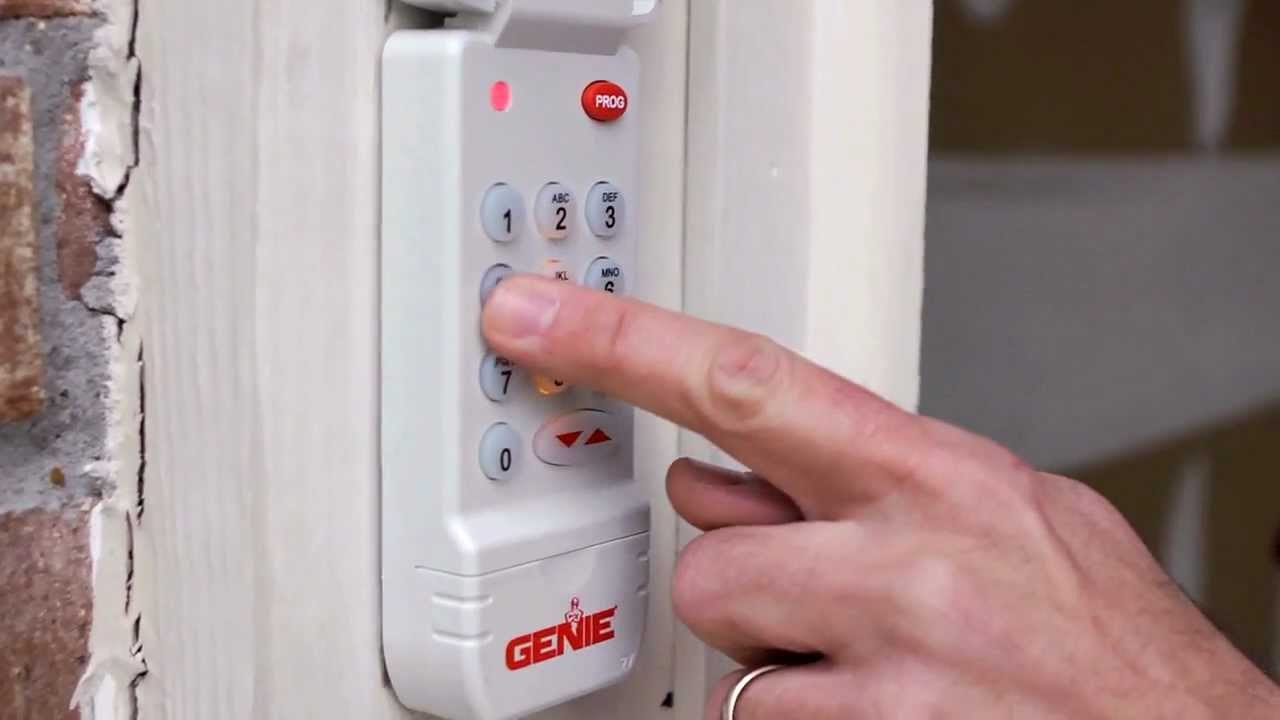
Most Genie keypads allow you to set a personal 4-digit access code. To “reset” this, you simply program a new code.
- Locate the Learn Button: Go to your Genie garage door opener motor unit and press and release the Learn button. The LED indicator should light up or blink.
- Enter Desired Code: Go back to your keypad and enter your new 4-digit code (e.g., 1234).
- Press the Program/Enter Button: Press and hold the “Program” or “Enter” button on the keypad until the garage door opener’s light flashes or the opener clicks. This confirms the new code has been accepted.
- Test: Try entering your new code on the keypad to ensure it opens the garage door.
Note: If you forget your current code, you cannot “reset” it directly from the keypad. You will need to perform a full system reset on the motor unit (erasing all codes) and then reprogram the keypad with a new code. This is similar to how you would reprogram a Genie garage door keypad.
Resetting To Factory Default (if Applicable)
Some Genie keypads, particularly older models or those with more advanced features, might have a specific procedure to revert to their factory default code (often 0000 or a similar default).
- Check the Manual: Consult your keypad’s specific user manual. It will detail if a factory reset is possible and the exact steps.
- Common Method: Often, this involves removing the battery, pressing and holding a specific button (like the Program button) while reinserting the battery, and then releasing the button.
- Reprogram: After resetting to the factory default, you will need to program your desired new code as described above.
Example: An older Genie GKB keypad might require removing the battery, pressing and holding the ‘8’ key, reinserting the battery, and then releasing the ‘8’ key. The keypad would then revert to a default code, requiring reprogramming.
Clearing All Codes From The Keypad (requires Motor Unit Access)
If you want to clear all codes associated with the keypad (or the entire system), you must perform a reset on the motor unit. There isn’t a way to clear the keypad’s memory independently without interacting with the opener itself. The motor unit’s memory holds the codes for all paired devices.
Comparing Reset Methods: When To Use Which
Choosing the correct reset method is crucial for efficiency and effectiveness. Each method serves a different purpose, and using the wrong one can lead to unnecessary steps or incomplete results.
Scenario-based Reset Selection
Here’s a breakdown of common scenarios and the recommended reset approach:
| Scenario | Recommended Reset Method | Key Steps |
|---|---|---|
| Lost or stolen remote | Motor Unit Full Reset (Clear All Codes) | Press and hold Learn button on motor unit until LED changes/turns off. Reprogram remaining remotes. |
| Suspected unauthorized access | Motor Unit Full Reset (Clear All Codes) | Press and hold Learn button on motor unit until LED changes/turns off. Reprogram all remotes and keypads. |
| Remote not working (after battery change) | Reprogram Remote | Press Learn button on motor unit, then press remote button. Test. (If still not working, try un-pairing/re-pairing or remote reset.) |
| Keypad not working / Forgot code | Motor Unit Full Reset + Reprogram Keypad | Perform Motor Unit Full Reset. Then, reprogram keypad with a new code via Learn button on motor unit. |
| General troubleshooting / Opener glitches | Try Power Cycle first, then Motor Unit Full Reset if needed | Unplug opener for 1 minute. If issues persist, perform Motor Unit Full Reset and reprogram all devices. |
| Adding new remotes/keypads | Reprogram Each Device Individually | Press Learn button on motor unit, then program each new remote/keypad. (Optional: Full reset first for a clean slate.) |
| After a significant power surge/outage | Motor Unit Full Reset (if settings are lost) | Check if opener functions normally. If not, perform Motor Unit Full Reset and reprogram devices. |
| Replacing all existing remotes | Motor Unit Full Reset + Reprogram New Devices | Perform Motor Unit Full Reset. Then, program all new remotes. |
Understanding The Scope Of Each Reset
It’s important to differentiate between the types of resets:
- Remote Reset: Primarily un-pairing a specific remote from the opener.
- Keypad Reset: Changing or resetting the access code for the keypad.
- Motor Unit Reset (Full System): Wipes the memory of the motor unit, clearing *all* paired remotes, keypads, and sometimes even travel limits or force settings. This is the most drastic but often most effective reset for security and troubleshooting.
Safety Precautions During Genie Opener Resets
Working with garage door openers involves electrical components and powerful moving parts. Safety must be your top priority during any reset procedure. Failure to follow safety guidelines can lead to injury or damage to the equipment.
Disconnecting Power Safely
Before performing any internal checks or manual button presses on the motor unit that aren’t explicitly part of the documented reset procedure, it’s wise to disconnect the power.
- Unplug the Opener: The simplest method is to unplug the opener’s power cord from the electrical outlet.
- Circuit Breaker: Alternatively, you can turn off the corresponding circuit breaker in your home’s electrical panel.
Pro Tip: Always ensure the garage door is fully closed and locked before disconnecting power, unless the reset procedure requires the door to be in a specific position.
Using The Emergency Release Cord
The emergency release cord is a red handle that hangs from the opener’s trolley mechanism. Pulling this cord disconnects the trolley from the drive mechanism, allowing you to move the garage door manually.
- When to Use: If you need to move the door manually during or after a reset, or if the opener is malfunctioning and the door is stuck open or partially closed.