
When you look at your LiftMaster garage door opener, you might notice a button, often labeled with a lock symbol or simply “Lock.” This button, particularly prevalent on newer models and their accompanying remotes, serves a specific and important function: security. Understanding what the lock button does on your LiftMaster garage door opener is crucial for maintaining the safety and integrity of your home. It’s not just another button to press; it’s a feature designed to prevent unauthorized access and accidental operation.
The primary role of the lock button is to disable the remote control access to your garage door. This means that even if someone has a remote that previously worked with your opener, pressing the button on that remote will not open or close the garage door while the lock feature is engaged.
This is an invaluable tool for homeowners seeking to enhance their security, especially when they are away from home or want to ensure the garage door remains shut and inaccessible. It provides an extra layer of control over who can operate your garage door, offering peace of mind.
Key Takeaways
- The Lock button on a LiftMaster garage door opener primarily functions to disable remote control access, preventing unauthorized opening or closing of the garage door.
- This feature is often activated via the wall control panel or a dedicated button on the remote control itself.
- Engaging the lock mode enhances security, particularly when the home is unoccupied or when additional safety measures are desired.
- The lock feature does not physically lock the garage door; it only prevents electronic operation via remotes and keypads.
- Understanding how to activate and deactivate the lock mode is essential for both security and convenience.
- The lock function is typically indicated by a steady or flashing LED light on the wall control panel.
- In some cases, the lock button on a remote might have a secondary function, such as controlling a secondary garage door or gate.

Credit: www.youtube.com
Understanding The Liftmaster Lock Button: A Security Essential
The LiftMaster brand is synonymous with reliability and advanced features in garage door operation. Among these features, the lock button stands out as a critical security element. While its appearance and exact operation can vary slightly between different LiftMaster models, its core purpose remains consistent: to grant homeowners an elevated level of control over their garage access. This feature is particularly useful in today’s world where home security is a paramount concern.
What Does “lock” Mean In This Context?
When you engage the lock button on your LiftMaster system, you are not physically barring the garage door from opening. Instead, you are electronically disabling the opener’s ability to respond to signals from remote controls and, in some cases, wireless keypads. Think of it as putting your garage door opener into a “do not disturb” mode for remote access. This is a software-based command that overrides the normal operation initiated by your remotes. This distinction is important; the lock button ensures that only manual operation or direct interaction with the opener unit itself can change the door’s position.
Why Would You Use The Lock Button?
Several scenarios make the LiftMaster lock button an indispensable tool:
- Vacation Mode: When you’re away on vacation, engaging the lock button provides an extra layer of security. It ensures that even if a remote is accidentally triggered or if someone were to somehow gain access to a remote, they couldn’t open your garage door. This prevents opportunistic theft or unauthorized entry into your home.
- Enhanced Home Security: For homeowners who are particularly security-conscious, the lock button can be used periodically to ensure the garage door remains secured against remote access, even when you are home. This is especially relevant if you live in an area with a higher crime rate or if you have specific security concerns.
- Preventing Accidental Operation: Children or pets might inadvertently press buttons on a remote control. Engaging the lock feature prevents such accidental openings, which could lead to the garage door operating when it’s not intended to, potentially causing damage or posing a safety risk.
- Working on the Garage Door: If you are performing maintenance or repairs on the garage door itself, locking the opener can prevent it from moving unexpectedly. This ensures your safety during these tasks. For instance, when working on the track system or replacing components, you want to be certain the door won’t suddenly open or close.
Location Of The Lock Button
The lock button’s location depends on the specific LiftMaster model and the component you are using:
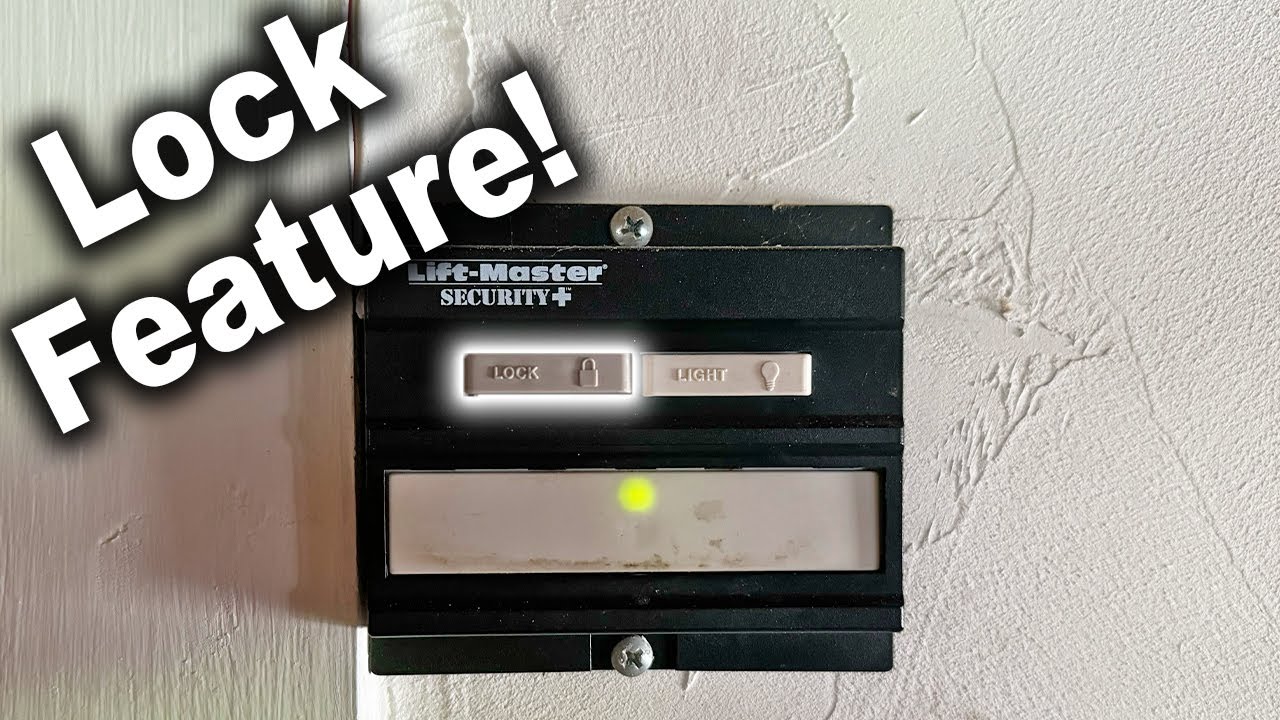
- Wall Control Panel: Most modern LiftMaster garage door openers come with a wall-mounted control panel inside the garage. This panel often features a dedicated “Lock” button, sometimes accompanied by an LED indicator. Pressing this button is the most common way to engage the lock feature.
- Remote Control: Some LiftMaster remotes are designed with a specific “Lock” button. This allows you to activate or deactivate the lock feature directly from your car or without entering the garage. These remotes typically have multiple buttons, and one is designated for locking.
- MyQ App: For LiftMaster openers equipped with MyQ technology, the lock feature can often be controlled remotely via the MyQ smartphone application. This offers the ultimate convenience, allowing you to secure your garage from anywhere with an internet connection.

Credit: garagedoorchamp.com
How To Activate And Deactivate The Lock Feature
The process for activating and deactivating the lock feature on your LiftMaster garage door opener is generally straightforward but can vary slightly by model. It’s essential to consult your owner’s manual for the precise instructions for your specific opener.
Activating The Lock Feature
Via the Wall Control Panel:
- Locate the Lock Button: Find the button labeled “Lock” or displaying a lock icon on your LiftMaster wall control panel.
- Press and Hold: Typically, you will need to press and hold the Lock button for a few seconds (often 2-5 seconds) until an indicator light on the panel changes.
- Observe the Indicator Light: A steady or flashing LED light on the wall control panel usually signifies that the lock feature has been successfully engaged. This light might be red or amber, depending on the model.
Via the Remote Control:
- Identify the Lock Button: Look for a button on your LiftMaster remote that is specifically designated as the “Lock” button. It might be separate from the main open/close button.
- Press and Hold: Similar to the wall control, you will likely need to press and hold this specific button for a set duration (e.g., 2-5 seconds).
- Confirm Activation: The remote might provide a visual cue, such as a flashing LED, or you may need to observe the indicator light on the wall control panel to confirm that the lock mode is active.
Via the MyQ App:
- Open the MyQ App: Ensure your LiftMaster opener is connected to your MyQ account and the app is open on your smartphone or tablet.
- Navigate to Device Settings: Select your garage door opener within the app.
- Find the Lock/Security Feature: Look for an option related to “Lock,” “Security,” or “Vacation Mode.”
- Activate the Feature: Tap the appropriate button or toggle to engage the lock function. The app will usually provide a confirmation message.
Deactivating The Lock Feature
To regain normal remote operation, you must deactivate the lock feature. The process mirrors activation:
Via the Wall Control Panel:
- Locate the Lock Button: Find the “Lock” button on your LiftMaster wall control panel.
- Press and Hold: Press and hold the Lock button again for a few seconds (typically the same duration as activation).
- Observe the Indicator Light: The indicator light on the wall control panel should change state, often turning off or switching to a different color, indicating that the lock feature is now disengaged.
Via the Remote Control:
- Identify the Lock Button: Use the designated “Lock” button on your LiftMaster remote.
- Press and Hold: Press and hold the Lock button for the required duration.
- Confirm Deactivation: Check the indicator light on the wall control panel or the remote’s LED to confirm that remote access is restored.
Via the MyQ App:
- Open the MyQ App: Access your MyQ application.
- Select Your Garage Door Opener: Navigate to the device settings.
- Deactivate the Lock Feature: Tap the button or toggle to disengage the lock function.
Pro Tip: Always test your remote control after deactivating the lock feature to ensure it is working correctly. If it still doesn’t operate the door, you may need to perform a remote reset or check other potential issues. Refer to guides on how to reset Liftmaster garage door opener remote for troubleshooting.
How The Lock Feature Differs Across Liftmaster Models
While the core function of the lock button is consistent, LiftMaster has implemented variations across its extensive product lines to cater to different user needs and technological advancements. Understanding these differences can help you better utilize the security features of your specific opener.
Older Liftmaster Models
Older LiftMaster models might not feature a dedicated “Lock” button on the wall control or remote. In these systems, the “lock” functionality might have been achieved through a different mechanism, often involving a “Vacation” or “Lock” switch located on the back or side of the powerhead unit itself.
- Manual Switch: This switch would need to be physically flipped to engage the lock mode. To disengage it, the switch would need to be flipped back.
- Limited Remote Functionality: These older systems might not have had the sophisticated encryption found in newer models, making the lock feature less about disabling remotes and more about preventing manual operation in some contexts.
Newer Liftmaster Models With Myq Technology
LiftMaster’s integration of MyQ technology has significantly enhanced the capabilities of the lock feature.
- Remote Access Control: With MyQ, the lock feature can be controlled via the smartphone app, allowing users to secure their garage from anywhere. This is ideal for those who travel frequently or want to ensure their garage is locked after leaving home.
- Status Notifications: The MyQ app can provide real-time notifications about the status of the garage door, including whether it is locked or unlocked.
- Integration with Smart Home Systems: MyQ-enabled openers can often integrate with other smart home platforms, allowing for voice commands or automated routines that include locking the garage door.
Liftmaster Remotes With Multiple Buttons
Many modern LiftMaster remotes feature multiple buttons. It’s crucial to identify which button serves the lock function.
- Dedicated Lock Button: Some remotes have a clearly marked button with a lock icon.
- Secondary Functions: On other remotes, one of the buttons might have a dual purpose. For example, a button might open the main garage door and, when pressed and held, engage the lock feature. Always refer to your remote’s manual.
- Controlling Multiple Doors: If you have multiple garage doors or gates, one button on the remote might be programmed to operate a secondary opener or gate. This functionality is distinct from the lock feature.
Wall Control Panels With Advanced Features
Modern wall control panels often go beyond a simple lock button. They may include:
- Illuminated Buttons: The lock button might be illuminated when engaged.
- Diagnostic Lights: Indicator lights can provide more detailed information about the opener’s status, including error codes.
- Timer-to-Close Features: While not directly related to the lock button, these advanced panels often include other convenience features that work in conjunction with the opener’s core functions.
Example: A homeowner using a LiftMaster 8500W (Wall Mount) with MyQ technology can activate the lock feature directly from the opener’s control panel, via the remote, or remotely through the MyQ app. This flexibility ensures security can be managed regardless of the user’s location or immediate access to the garage.
Credit: www.youtube.com
The Lock Button Vs. Physical Locking Mechanisms
It is essential to understand that the LiftMaster lock button is an electronic security feature, not a physical locking mechanism. It prevents remote operation but does not physically secure the garage door against forced entry.
What The Lock Button Does Not Do:
- Physically Bar the Door: It does not engage deadbolts or other physical restraints that would prevent the door from being pried open.
- Prevent Manual Operation: If the opener is disengaged from the door (e.g., via the red emergency release cord), the door can still be opened and closed manually, regardless of the lock setting. This is crucial for understanding how to open your garage door manually in emergencies.
- Block All Entry: While it disables remotes and keypads, it does not prevent someone from entering through a pedestrian door within the garage or breaking a window.
Physical Locking Options:
For enhanced security beyond the electronic lock, consider these physical measures:
- Slide Locks/Bolts: Many garage doors can be fitted with manual slide locks or bolts that physically secure the door to the track. These are often installed on the inside of the door.
- Garage Door Defender: This is a portable device that can be placed on the bottom of the garage door track to prevent it from being lifted. It’s a good option for temporary security.
- Automatic Deadbolts: Some advanced garage door openers or security systems can incorporate automatic deadbolts that engage when the door is closed and locked electronically.
Comparison Table: Electronic Lock vs. Physical Lock
| Feature | LiftMaster Lock Button (Electronic) | Physical Lock (e.g., Slide Bolt) |
|---|---|---|
| **Primary Function** | Disables remote and keypad operation. | Physically prevents the door from being opened or lifted. |
| **Method of Action** | Electronic signal overrides opener’s response to remotes. | Mechanical engagement of a bolt or bar. |
| **Security Level** | Prevents unauthorized electronic access. | Provides a strong physical barrier against forced entry. |
| **Convenience** | High; easily activated/deactivated via panel, remote, or app. | Lower; requires manual engagement and disengagement. |
| **Vulnerability** | Can be bypassed if the opener is manually disengaged. | Can be physically forced or bypassed with tools. |
| **Installation** | Built into the garage door opener system. | May require installation on the door or track. |
| **Use Case** | Vacation, enhanced security, preventing accidental operation. | Long-term security, deterring break-ins, added peace of mind. |
In my experience, homeowners often overlook the distinction between electronic and physical locks. While the LiftMaster lock button is an excellent tool for controlling electronic access, it should be considered a supplement to, rather than a replacement for, robust physical security measures if your primary concern is deterring determined intruders.
Troubleshooting Common Lock Button Issues
While the lock button feature is generally reliable, you might encounter situations where it doesn’t function as expected. Here are some common issues and their solutions:
Issue 1: Lock Button Not Engaging/disengaging
- Possible Cause: Incorrect button press duration.
- Solution: Ensure you are pressing and holding the Lock button for the full duration specified in your owner’s manual (typically 2-5 seconds). A quick press is usually insufficient.
- Possible Cause: Indicator light malfunctioning.
- Solution: Even if the light doesn’t change, the command might have registered. Try operating the remote. If it works, the lock wasn’t engaged. If it doesn’t, the lock might be engaged, but the light is faulty.
- Possible Cause: System error or programming issue.
- Solution: Try resetting the garage door opener. This often involves unplugging the unit for a minute and plugging it back in, or performing a more comprehensive reset as outlined in your manual. For LiftMaster, you might need to refer to guides on how to reset your garage door opener.
Issue 2: Remote Not Working After Disengaging Lock
- Possible Cause: Lock feature was not fully disengaged.
- Solution: Repeat the deactivation process, ensuring you hold the button for the correct duration and observe the indicator light.
- Possible Cause: Remote control battery is low.
- Solution: Replace the battery in your remote control. Low batteries can cause intermittent functionality.
- Possible Cause: Remote control needs to be reprogrammed.
- Solution: The lock/unlock cycle can sometimes disrupt the remote’s connection. You may need to reprogram the remote to the opener. This process varies by model, but you can find guidance on how to reset garage door remote easily.
- Possible Cause: Interference or range issues.
- Solution: Ensure there are no sources of radio frequency interference near the opener or remote. Try operating the remote closer to the garage door opener.
Issue 3: Myq App Not Controlling Lock Feature
- Possible Cause: Internet connectivity issues.
- Solution: Check your home Wi-Fi network and ensure the MyQ hub or opener is connected to the internet.
- Possible Cause: MyQ account or app issue.
- Solution: Log out of the MyQ app and log back in. Ensure the app is updated to the latest version. Check LiftMaster’s MyQ service status for any known outages.
- Possible Cause: Opener not properly linked to MyQ account.
- Solution: You may need to re-link your garage door opener to your MyQ account. Follow the setup instructions provided by LiftMaster.
Warning: If you are experiencing persistent issues or are uncomfortable performing troubleshooting steps, it is always best to contact a qualified garage door technician or LiftMaster customer support. Improper handling of garage door opener components can lead to damage or safety hazards.
Enhancing Garage Security With Liftmaster Features
The lock button is just one aspect of LiftMaster’s commitment to home security. Their openers often come equipped with a suite of features designed to protect your home and family.
Security+ 2.0 Rolling Code Technology
Virtually all modern LiftMaster openers utilize Security+ 2.0 technology. This system employs a new code with every use of the remote, making it virtually impossible for “code grabbers” to intercept and reuse your signal.
- How it Works: Each time you press your remote, it sends a unique code to the opener. The opener and remote are synchronized, so the opener recognizes the valid code. This constant change prevents unauthorized access even if a code is captured.
- Benefit: Provides robust protection against remote signal interception, a common vulnerability in older garage door systems.
The Protector System (safety Sensors)
Standard on most LiftMaster openers, The Protector System consists of safety sensors located near the bottom of the garage door tracks.
- How it Works: These sensors emit an invisible infrared beam across the garage door opening. If the beam is broken by an object, person, or pet while the door is closing, the opener will immediately stop and reverse the door’s direction.
- Benefit: This is a critical safety feature that prevents the garage door from crushing anything in its path. It works independently of the lock button but contributes significantly to overall safety and security. Ensure these sensors are properly aligned; misaligned sensors are a common reason for the door not closing properly. If you notice issues with your sensors, consider guides on how to lube garage door rollers, as smooth operation can sometimes indirectly affect sensor alignment over time.
Opener Strength And Durability
LiftMaster openers are known for their robust construction. Features like chain drive, belt drive, and jackshaft drive systems are designed for durability and reliable operation.
- Chain Drive: Offers strong lifting power and is a cost-effective option.
- Belt Drive: Provides quieter operation, ideal for homes with living spaces above the garage.
- Jackshaft Drive: Mounts on the wall next to the garage door, saving overhead space and offering powerful, quiet operation.
Myq Technology For Remote Monitoring And Control
As previously mentioned, MyQ technology extends the functionality of your garage door opener beyond the physical location of your home.
- Remote Monitoring: Check the status of your garage door (open or closed) from anywhere using your smartphone.
- Remote Control: Open or close your garage door remotely via the MyQ app.
- Alerts and Notifications: Receive alerts when the garage door is opened, closed, or if the lock feature is activated or deactivated.
- Integration: Connect with other smart home devices and services like Amazon Key for in-garage delivery.
Example: A family preparing for a road trip can use the MyQ app to verify their garage door is closed and then engage the lock feature remotely before even leaving their driveway, adding a significant layer of security for their unoccupied home.