
A malfunctioning garage door can be a significant inconvenience, turning a quick trip out of the house into a frustrating ordeal. When your Chamberlain garage door opener refuses to close, it’s natural to feel a sense of urgency and perhaps a bit of panic.
This common issue can stem from a variety of sources, ranging from simple, easily fixable problems to more complex mechanical or electrical failures. Understanding the potential causes is the first step toward a swift resolution, ensuring your home and vehicle remain secure and accessible.
This comprehensive guide will walk you through the most common reasons why your Chamberlain garage door might not be closing. We’ll cover everything from sensor alignment and remote control issues to motor problems and safety feature malfunctions. By systematically troubleshooting these potential culprits, you can often identify and resolve the problem yourself, saving time and money on professional service calls.
Key Takeaways
- Safety Sensors: Misaligned or obstructed safety sensors are the most frequent cause of a garage door refusing to close.
- Remote Control Issues: Dead batteries, programming glitches, or range problems with your remote can prevent operation.
- Travel Limit Settings: Incorrectly set travel limits can cause the door to stop prematurely or reverse.
- Force Settings: If the opener detects too much resistance, it will reverse to prevent damage or injury.
- Obstructions: Physical blockages in the door’s path, however small, will trigger the safety reversal system.
- Mechanical Problems: Issues with the springs, cables, tracks, or rollers can impede smooth operation.
- Logic Board or Motor Issues: While less common, a faulty logic board or motor can prevent the door from closing.

Credit: www.youtube.com
Troubleshooting Common Chamberlain Garage Door Closing Issues
When your Chamberlain garage door opener struggles to close, it’s often a sign that one of its safety mechanisms or operational settings has been disrupted. Chamberlain, a leading manufacturer of garage door openers, incorporates various features designed for convenience and security.
However, like any electromechanical system, they can encounter problems. This section will systematically explore the most common culprits.
Safety Sensor Malfunctions
The photo-eye safety sensors are arguably the most common reason a garage door will not close. These small devices are mounted near the bottom of the garage door tracks, typically about six inches off the ground. They work by emitting an invisible infrared beam across the garage door opening. If this beam is broken by an object, person, or pet, the opener will immediately stop the door’s descent and reverse it to the open position. This is a critical safety feature designed to prevent accidents.
Reasons For Sensor Issues
- Misalignment: The most frequent cause is misalignment. If either sensor is knocked out of position, even slightly, the beam will not connect properly. This can happen due to accidental bumps, vibrations from the opener, or improper initial installation.
- Obstructions: Debris, dust, cobwebs, or even a stray gardening tool can block the beam.
- Damaged Sensors: The sensors themselves can become damaged from impacts or wear and tear.
- Wiring Problems: Loose or damaged wires connecting the sensors to the opener unit can interrupt the signal.
- Indicator Lights: Most Chamberlain sensors have indicator lights. Typically, one light will be solid, indicating it’s receiving power, and the other will blink or be solid, indicating it’s receiving the beam from the other sensor. If both lights are off, or if one is blinking erratically when it shouldn’t be, it signals a problem.
How To Troubleshoot Safety Sensors
- Inspect the Sensors: Visually check both sensors for any physical obstructions or visible damage. Clean them with a soft, dry cloth.
- Check Indicator Lights: Observe the LED lights on the sensors. Refer to your Chamberlain opener’s manual for the specific meaning of the light patterns for your model. Generally, a steady light on one and a steady light on the other (or a blinking light indicating a valid beam) means they are aligned. If one is off or blinking when it should be solid, they are likely misaligned.
- Realignment: Gently adjust the position of the sensors. Loosen the mounting bracket slightly, move the sensor until the indicator light on the other sensor becomes steady, and then retighten the bracket. You might need to try this a few times to get it right.
- Clear the Path: Ensure nothing is blocking the path between the sensors.
- Check Wiring: Inspect the wires leading to the sensors for any cuts, kinks, or loose connections.
Remote Control And Wall Button Problems
If your Chamberlain remote control or the wall-mounted button isn’t working correctly, it can prevent the door from closing. These are the primary ways you interact with your garage door opener.
Remote Control Issues
- Dead Batteries: The simplest explanation is often the correct one. Remote control batteries do die over time. Replacing them with fresh ones is a quick fix.
- Range Problems: Sometimes, the remote works when you’re close to the opener but not from further away. This can be due to interference from other electronic devices or a weak remote signal.
- Lost Programming: In rare cases, the remote might lose its programming with the opener unit. Reprogramming the remote is usually a straightforward process. You can find instructions for how to reprogram your Chamberlain garage door keypad or remote in your owner’s manual, or often online.
- Damaged Remote: Physical damage to the remote can render it inoperable.
Wall Button Issues
- Loose Wiring: The wires connecting the wall button to the opener unit can become loose over time, especially if the wiring isn’t secured properly.
- Faulty Button: The button itself might be worn out or damaged, preventing it from sending the signal to the opener.
- Interference: While less common for wired buttons, sometimes electrical interference can cause issues.
Troubleshooting Remote And Wall Button Problems
- Test the Remote: Try using the remote from different distances. If it only works up close, consider battery replacement or potential interference.
- Replace Batteries: Always start by replacing the batteries in your remote.
- Reprogram Remote/Keypad: If battery replacement doesn’t work, try reprogramming the remote or keypad. For Chamberlain openers, you can often find specific instructions for your model on their support website or in your manual. For example, you might need to reset your garage door remote before reprogramming.
- Test the Wall Button: Try operating the door using the wall button. If this works but the remote doesn’t, the issue is likely with the remote or its programming. If neither works, the problem might be with the opener unit itself or the main power supply.
- Inspect Wall Button Wiring: Check the connections at the wall button and at the opener unit for looseness or damage.
Travel Limit Settings
Garage door openers have travel limit settings that tell the opener when the door has reached the fully closed or fully open position. If these limits are set incorrectly, the opener might stop the door before it’s fully closed or cause it to reverse.
Understanding Travel Limits
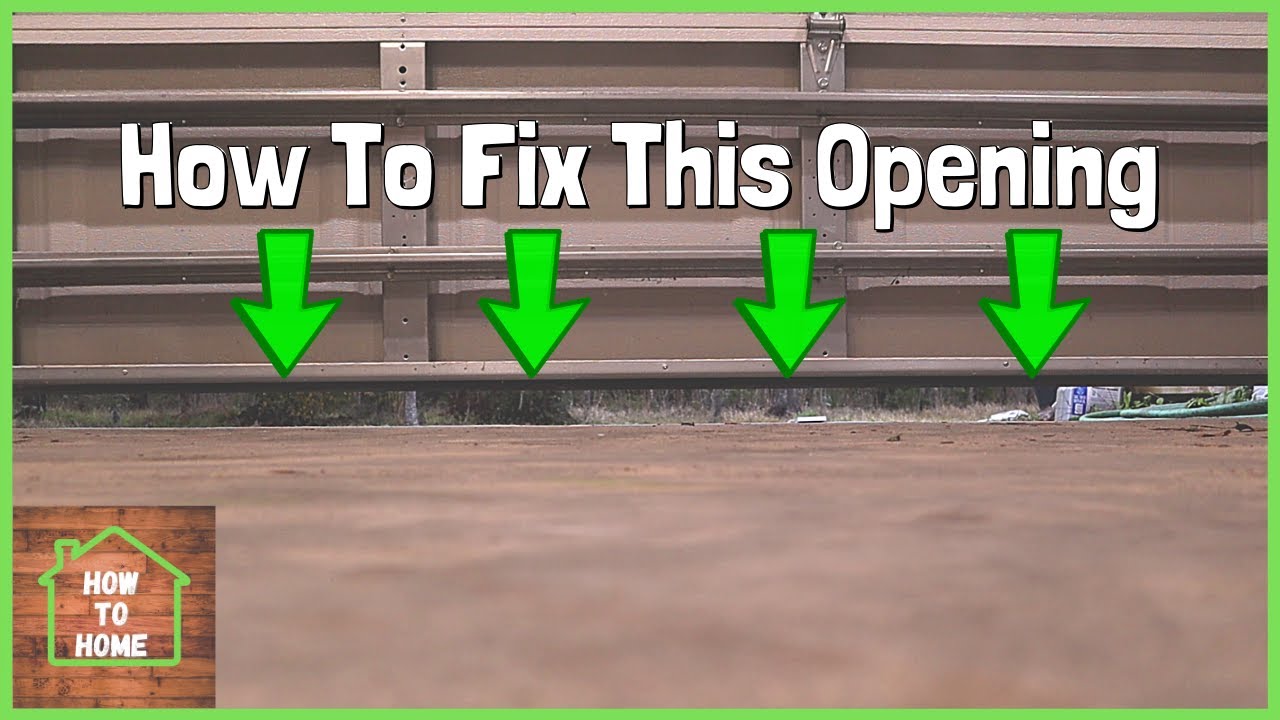
- Closed Limit: This setting determines how far down the door travels before the opener stops. If it’s set too high, the door will stop before it’s fully closed. If it’s set too low, it might not reach the floor, and the opener might trigger the safety reversal if it encounters resistance.
- Open Limit: This setting determines how far up the door travels before stopping. While less common for closing issues, an incorrect open limit can sometimes affect the overall door operation.
Adjusting Travel Limits On Chamberlain Openers
Chamberlain openers typically have adjustment screws or buttons on the motor unit to set these limits. The exact procedure varies by model.
- Locate Adjustment Mechanism: Consult your Chamberlain opener’s manual to find the travel limit adjustment screws or buttons. They are usually located on the side or back of the motor unit.
- Enter Limit Adjustment Mode: Follow the manual’s instructions to put the opener into limit adjustment mode. This often involves pressing and holding specific buttons.
- Adjust Closed Limit: Use the remote to send the door down. Once it stops (or reverses), use the adjustment mechanism (often up/down buttons or screws) to fine-tune the position. You want the door to be fully closed and resting firmly on the floor.
- Set the Limit: Once the door is in the desired closed position, confirm the setting according to your manual’s instructions.
- Test: Operate the door up and down several times to ensure the limits are set correctly and the door stops and reverses appropriately.
Pro Tip: It’s crucial to set the travel limits precisely. A door that is too tight against the floor can put undue stress on the opener and the door itself, potentially leading to premature wear or damage. Conversely, a gap under the door compromises security and insulation. For detailed guidance, refer to the specific instructions for adjusting your Chamberlain garage door opener.
Force Settings
Similar to travel limits, force settings tell the opener how much force it should exert to move the door. If the opener encounters resistance that exceeds this set force, it will stop and reverse the door. This is another critical safety feature.
Why Force Settings Matter
- Obstructions: As mentioned, physical obstructions will trigger the safety reversal. The force setting acts as a secondary check. If the door hits something, the resistance increases, and the opener’s force-sensing mechanism detects this.
- Binding Door: If the garage door itself is binding or sticking due to issues with the tracks, rollers, or springs, the opener might struggle to move it. The increased resistance can trigger the force limit.
- Incorrect Setting: If the force setting is too low, even minor resistance (like a slightly uneven floor or a small pebble) can cause the door to reverse.
Adjusting Force Settings On Chamberlain Openers
Like travel limits, force settings are adjusted on the motor unit.
- Locate Adjustment Mechanism: Consult your manual for the location of the force adjustment controls. These are often dials or buttons.
- Adjust Upward and Downward Force: Most openers allow for separate adjustment of upward and downward force. You’ll be primarily concerned with the downward force for closing issues.
- Incremental Adjustments: Make small, incremental adjustments. Increasing the force too much can be dangerous if the safety reversal fails.
- Testing: After each adjustment, test the door’s operation. Try closing it with a small, soft object (like a piece of cardboard) placed in its path to see if it reverses. Then, run it through a full open/close cycle.
Warning: Adjusting force settings should be done cautiously. The force required to operate the door should be the minimum necessary for reliable opening and closing. Excessive force can be a safety hazard. If you are unsure, consult a professional.
Obstructions In The Doorway Or Tracks
It might seem obvious, but physical obstructions are a frequent cause of a garage door not closing. These can range from large items to small debris.
Common Obstructions
- Parked Vehicles: Cars or other items left in the path of the closing door.
- Storage Items: Boxes, tools, or equipment stored too close to the tracks or in the door’s path.
- Debris: Small rocks, leaves, snow, or ice accumulating at the bottom of the door track or threshold.
- Bent Tracks: Damaged or bent tracks can cause the door to snag or bind, triggering the safety reversal.
- Foreign Objects: Anything that falls into the tracks or the door’s path.
How To Check For Obstructions
- Visual Inspection: Walk the path of the garage door, both inside the tracks and across the floor.
- Clear the Area: Remove any vehicles, equipment, or stored items that are too close to the door’s operational path.
- Clean Tracks and Threshold: Ensure the tracks are free of debris and the threshold is clear.
- Inspect Tracks: Look for any signs of damage, bending, or misalignment in the vertical and horizontal tracks.
Drive Chain Or Belt Issues
The drive chain or belt connects the motor to the garage door, pulling it open and lowering it closed. Problems with this component can prevent the door from operating correctly.
Potential Chain/belt Problems
- Slack Chain/Belt: Over time, the chain or belt can become slack, especially if it’s not properly tensioned. A slack chain/belt might slip on the sprocket or not have enough grip to move the door effectively.
- Damaged Chain/Belt: The chain can become worn, links can break, or the belt can fray or snap.
- Loose Sprocket: The sprocket attached to the motor unit can become loose, preventing it from engaging the chain properly.
Troubleshooting Drive Chain/belt Issues
- Inspect the Chain/Belt: Visually inspect the chain or belt for any signs of damage, wear, or breakage.
- Check Tension: Gently push on the chain/belt. It should have a slight amount of slack, but not be excessively loose. Refer to your manual for the correct tension. Improper tension can be a cause for the door not closing smoothly or at all. You might need to adjust the chain on your garage door opener if it’s too loose.
- Check Sprocket: Ensure the sprocket on the motor unit is securely attached and not slipping.
Motor Unit Or Logic Board Failure
While less common than the issues above, the motor unit itself or its logic board could be the source of the problem.
Signs Of Motor/logic Board Issues
- No Power: The opener unit shows no signs of life, no lights, no sound. This could indicate a power supply issue or a failed motor/logic board.
- Humming Sound: The motor hums but doesn’t move the door. This can indicate a seized motor or a problem with the internal gearing.
- Intermittent Operation: The opener works sometimes but not others, without a clear pattern. This might point to an overheating motor or a failing logic board.
- Error Codes: Some Chamberlain openers display error codes via blinking lights on the motor unit. Consult your manual to interpret these codes, which can pinpoint specific internal failures.
Addressing Motor/logic Board Problems
If you suspect a motor or logic board issue, it’s often best to contact a qualified garage door technician. These components are complex and can be dangerous to repair without proper expertise. Replacing the entire opener unit might be more cost-effective than repairing a major internal component.

Credit: garagedoorchamp.com
Mechanical Issues With The Garage Door Itself
Sometimes, the problem isn’t with the opener, but with the garage door’s mechanical components. The opener might be trying to close the door, but the door’s own mechanics are preventing it.
Torsion Springs And Extension Springs
Garage doors use springs to counterbalance the weight of the door, making it easier for the opener to lift and lower. If a spring breaks or becomes damaged, the door will become extremely heavy and difficult to move.
Spring Problems
- Broken Spring: A broken spring is a serious issue. The door will feel very heavy, and the opener will struggle immensely or be unable to move it. You might hear a loud snapping sound when a spring breaks.
- Worn Springs: Over time, springs can lose their tension and effectiveness.
Warning: Garage door springs are under extreme tension and can be very dangerous to handle. Never attempt to repair or replace garage door springs yourself. Always call a professional for spring-related issues.
Rollers And Tracks
The rollers allow the door to move smoothly within the tracks. If rollers are damaged, worn out, or off-track, the door can bind.
Roller And Track Issues
- Worn Rollers: Plastic rollers can crack, and metal rollers can wear down or seize up.
- Off-Track Rollers: A roller can pop out of its track, causing the door to jam.
- Bent or Damaged Tracks: As mentioned earlier, bent or misaligned tracks prevent smooth movement.
Cables
Cables work in conjunction with the springs to lift and lower the door. If a cable breaks or becomes frayed, it can cause the door to hang unevenly or become inoperable.
Cable Problems
- Broken Cable: Similar to a broken spring, a broken cable makes the door extremely heavy and dangerous to operate.
- Frayed Cable: A frayed cable is a safety hazard and can lead to a complete break.
Lubrication And Maintenance
Lack of proper lubrication can cause components to stick and move inefficiently, leading to increased resistance. This can affect the smooth operation of rollers, hinges, and tracks. Regularly lubricating these parts, as outlined in guides on how to lubricate garage door rollers, is essential for preventing many mechanical issues.
Power And Electrical Issues
Sometimes, the simplest explanation for a Chamberlain garage door not closing is a problem with its power supply or internal electrical components.
Power Source Problems
- Tripped Circuit Breaker: The opener unit might have tripped the circuit breaker in your home’s electrical panel. Check the panel and reset the breaker if necessary. If it trips again immediately, there might be a short circuit in the opener’s wiring.
- GFCI Outlet: If your opener is plugged into a Ground Fault Circuit Interrupter (GFCI) outlet, this outlet might have tripped. Resetting a GFCI outlet is usually done by pressing a “reset” button on the outlet itself.
- Power Cord: Ensure the power cord is securely plugged into the outlet and that the cord itself isn’t damaged.
Logic Board And Internal Wiring
The logic board is the “brain” of the garage door opener. It controls all its functions. If the logic board is damaged or has faulty wiring, it can prevent the door from closing.
Signs Of Electrical Issues
- No Lights on Opener: If the opener unit has no lights on at all, it could be a power supply issue or a dead logic board.
- Error Codes: As mentioned, many Chamberlain openers use blinking LEDs to signal error codes. These codes can point to specific electrical faults within the unit.
- Burnt Smell: A burning smell emanating from the motor unit could indicate a serious electrical short or motor failure.
Weather-related Issues
Extreme weather conditions can sometimes affect garage door opener performance.
- Extreme Cold: In very cold temperatures, lubricants can thicken, and metal components can contract, potentially causing the door to operate more sluggishly or bind.
- Moisture/Water Damage: Water ingress into the motor unit or wiring can cause short circuits and corrosion.
Credit: www.youtube.com
When To Call A Professional
While many garage door problems can be diagnosed and fixed with a bit of DIY effort, some issues require the expertise of a qualified garage door technician.
Situations Requiring Professional Help
- Broken Springs or Cables: These components are under extreme tension and are incredibly dangerous to handle without specialized knowledge and equipment.
- Suspected Motor or Logic Board Failure: Repairing or replacing these internal components requires technical expertise and specific diagnostic tools.
- Damaged Tracks or Door Panels: Significant damage to the door itself or its track system often requires professional assessment and repair.
- Persistent Issues: If you’ve gone through the troubleshooting steps and the door still won’t close, it’s time to call in an expert.
- Safety Concerns: If you are uncomfortable performing any troubleshooting step or suspect a safety hazard, do not hesitate to call a professional.
A professional technician can quickly diagnose the problem, perform necessary repairs safely, and ensure your garage door operates reliably and securely. The cost of professional service is often well worth the peace of mind and prevention of further damage. For context on costs, you can research how much a garage door repair might cost.
Frequently Asked Questions
Why Does My Chamberlain Garage Door Opener Reverse After Closing A Few Inches?
This is almost always due to the safety sensors. Either something is blocking the beam between them, or they are misaligned. Even a small obstruction like a fallen leaf or a spiderweb can trigger the reversal. Check the indicator lights on the sensors; if one is blinking or off, they are not communicating properly.
My Chamberlain Remote Doesn’t Work, But The Wall Button Does. What’s Wrong?
This indicates the problem is likely with the remote or its connection to the opener. The most common cause is dead batteries in the remote. Try replacing them. If that doesn’t work, the remote may have lost its programming with the opener.
You