
Getting a new garage door opener might sound simple, but there are many things to consider. Maybe you lost your remote, moved into a new house, or need an extra opener for a family member. Garage door openers are not just about convenience—they also add security and peace of mind.
But if you choose the wrong type or fail to program it properly, you could face frustrating issues, wasted money, or even security risks. In this article, you’ll learn everything you need to know about getting another garage door opener, from understanding your current system to buying, programming, and troubleshooting.
Even if you’re not a technical person, you’ll find clear steps, practical advice, and common mistakes to avoid.
Understanding Your Garage Door Opener System
Before buying a new opener, it’s important to know what kind of garage door system you have. Garage door openers are not universal. If you buy the wrong type, it won’t work, and you’ll waste time and money.
Types Of Garage Door Openers
There are several types of openers. The most common are:
- Chain drive: Uses a metal chain to lift and lower the door. Noisy but affordable and strong.
- Belt drive: Uses a rubber belt. Quieter than chain drive, often a bit more expensive.
- Screw drive: Uses a threaded steel rod. Less maintenance, moderate noise.
- Direct drive: Motor moves along a track. Very quiet and smooth, but usually pricier.
Each type can use different remotes and wall controls, so matching is key.
Frequency And Security Code
Openers use radio frequencies (measured in MHz) to communicate with remotes. The frequency is often printed on the motor or the old remote. Common frequencies include 315 MHz and 390 MHz. Some older models use fixed codes, while newer ones use rolling codes (which change every use for security).
Pro tip: If your system is older than 1993, it may not have modern safety features. Consider upgrading for both convenience and safety.
Identifying Your Opener Brand And Model
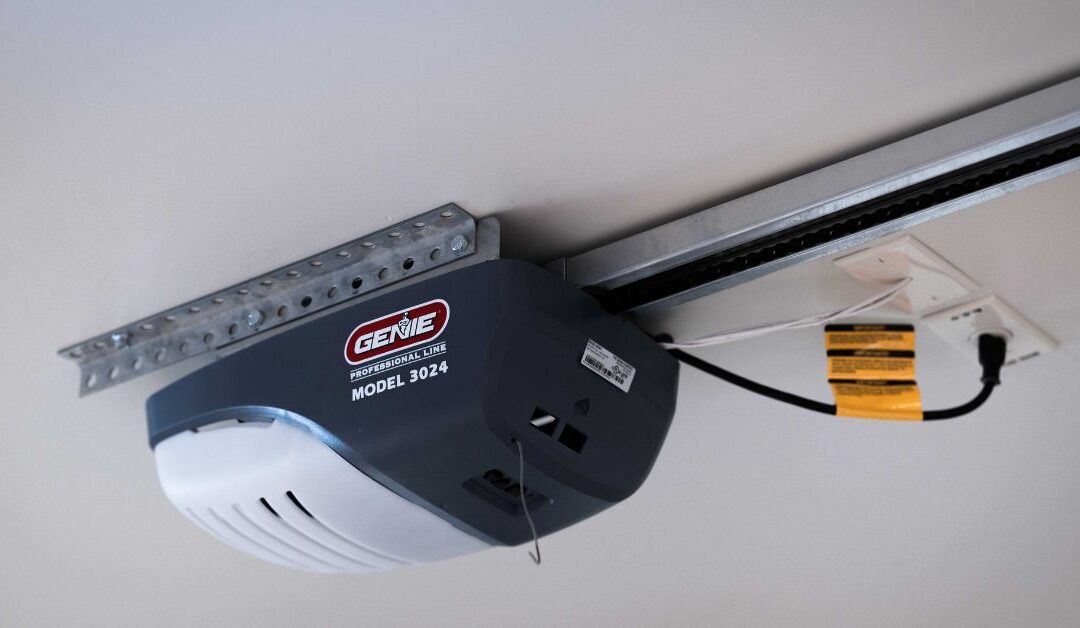
Check the motor unit (usually on the ceiling). Look for a label with the brand (like LiftMaster, Chamberlain, Genie, etc.) and the model number. This helps you find compatible remotes or keypads.
Beginner insight: Many brands are made by the same parent company. For example, LiftMaster, Chamberlain, and Craftsman often share similar remotes.
Reasons For Getting Another Garage Door Opener
You might need a new opener for several reasons, and each situation affects the best solution.
- Lost, stolen, or broken remote: Common and urgent. You’ll need to erase old codes for security.
- Additional users: Family, roommates, or tenants may need their own remote.
- New smartphone control: Some want to add smart features, like opening the garage with an app.
- Rental or shared property: Landlords or property managers often provide extra remotes.
- Backup device: Having a spare avoids lockouts.
Knowing your reason will help you pick the right option.
Options For Getting Another Garage Door Opener
There are several ways to get a new opener. Let’s compare the main choices:
| Option | Cost | Ease of Use | Compatibility | Security |
|---|---|---|---|---|
| Buy OEM remote | $$ | Easy | High | High |
| Buy universal remote | $ | Medium | Varies | Medium |
| Get a smart controller | $$$ | Medium | High (modern units) | High |
| Install a keypad | $$ | Easy | High | High |
| Use car’s built-in control | Free | Medium | High (if supported) | High |
OEM means “original equipment manufacturer”—the brand that made your opener.
Buying An Original Garage Door Remote
If possible, buy a remote made by your opener’s brand. This reduces the chance of problems.
Where To Buy
- Home improvement stores: Home Depot, Lowe’s, Menards, etc.
- Online retailers: Amazon, manufacturer’s website, eBay.
- Garage door dealers: Local professionals often stock remotes.
Always check the model number and frequency before buying.
How To Match The Right Remote
- Find your opener’s brand and model.
- Search for remotes compatible with that model.
- Confirm the frequency matches.
- If buying online, read reviews to avoid cheap knock-offs.
Beginner insight: Remotes that look similar may not be compatible. Always double-check.
Buying A Universal Garage Door Remote
Universal remotes can work with many brands. They’re cheaper and easy to find, but not all models support every opener.
How To Choose A Universal Remote
- Check the packaging or online listing for supported brands and years.
- Make sure your opener’s frequency is listed.
- Look for remotes with “rolling code” support if your opener uses it.
Universal remotes usually have 2-4 buttons, so you can control more than one door.
Programming A Universal Remote
Programming steps vary, but here’s the most common process:
- Press and hold the “program” button on the remote.
- Press the “learn” button on the garage opener motor.
- Press the desired button on the remote.
- Test the remote to see if it works.
Common mistake: Not pressing the “learn” button on the motor unit. This step is essential for most rolling code systems.
Adding A Keypad Or Wall Control
Some people prefer a keypad outside the garage, so they don’t need a remote. Others want a wall button inside.
Keypad Benefits
- No remote to lose
- Easy for guests or family to use
- Often supports temporary codes (for deliveries, etc.)
Choosing A Keypad
- Match the brand and model or buy a universal keypad.
- Check for weather resistance if mounting outside.
- Look for backlit buttons for night use.
Programming A Keypad
- Usually involves entering a programming mode on both the keypad and opener.
- Some require you to enter a PIN then press the “learn” button on the opener.
- Always follow the manufacturer’s instructions.
Non-obvious tip: Keypads are more secure than hiding a key outside your house.
Using Your Car’s Built-in Garage Opener (homelink)
Many vehicles made after 2007 have a built-in garage door opener system, often called HomeLink.
Setting Up Homelink
- Hold your remote close to your car’s HomeLink buttons.
- Press and hold the desired button on your car and the remote simultaneously.
- Press the “learn” button on the garage opener (if required).
- Test the system.
Some cars need extra steps if your garage opener uses rolling codes.
Advantages
- No need for separate remotes
- Always powered by your car
- Often supports multiple doors
Beginner insight: Some older openers may need an adapter to work with HomeLink.
Adding Smart Features With Wifi Controllers
Smart garage door controllers let you open or close your garage from your phone, even when you’re not home.
Popular Smart Controllers
- Chamberlain MyQ
- Nexx Garage
- ISmartGate
These devices connect to your WiFi and work with most modern openers.
How To Add A Smart Controller
- Buy a controller compatible with your opener (check the product website).
- Install the device near your garage motor.
- Connect to your WiFi and follow the app instructions.
- Test opening and closing from your phone.
| Controller | Works With | App Features | Price Range |
|---|---|---|---|
| Chamberlain MyQ | Most brands | Remote open/close, alerts, scheduling | $30-$60 |
| Nexx Garage | Most brands | Voice control, history log | $70-$100 |
| iSmartGate | Most brands | Video, integrations, alerts | $100-$150 |
Non-obvious tip: Some smart controllers can alert you if you forget to close your garage.
Programming Your New Opener: Step-by-step Guide
Programming your new remote or keypad is usually quick if you follow the steps carefully. Here’s a general guide:
- Get ready: Make sure you can reach the garage door motor (use a ladder if needed).
- Locate the “learn” button: Usually on the back or side of the opener motor. It may be under a light cover.
- Press “learn” button: A light will blink to show it’s ready.
- Press the remote button: Within 30 seconds, press the button on your new remote.
- Test: Try opening and closing the garage door.
Troubleshooting Programming Problems
If the remote doesn’t work:
- Make sure the battery is fresh.
- Check you’re using the right frequency.
- Try clearing old remotes (hold “learn” for 6-10 seconds to erase all codes, then reprogram).
- Some systems limit the number of remotes (often 5). If full, erase and re-add.
Pro tip: Always erase lost or stolen remotes for security.
Security Considerations When Adding Another Opener
Your garage is a major entry to your home, so don’t overlook security.
Rolling Code Vs Fixed Code
- Rolling code: Changes every time you use the remote. Very secure.
- Fixed code: Uses the same code every time. Easier to hack.
Most openers after 1996 use rolling codes. If yours is older, think about upgrading.
Removing Lost Or Stolen Remotes
If you lose a remote, clear all codes from your opener’s memory, then reprogram only the remotes you still own.
Sharing Access Safely
- For guests, use a temporary keypad code.
- For deliveries, some smart controllers let you open the garage remotely and monitor activity.
Non-obvious tip: Some smart controllers send you alerts if the door is opened unexpectedly.
When To Call A Professional
Sometimes, getting another garage door opener isn’t as easy as buying and programming. Call a professional if:
- You’re not comfortable with ladders or electrical parts.
- The opener is more than 15 years old or missing safety sensors.
- The system won’t enter programming mode.
- You need to add smart features to an old or unusual system.
Most garage door companies offer quick service for adding or programming remotes.
Common Mistakes To Avoid
Many people make the same errors when adding a new opener. Here’s what to watch out for:
- Buying the wrong remote: Don’t guess—check the brand, model, and frequency.
- Forgetting to erase old remotes: Especially if you lost one.
- Not checking battery or range: Weak batteries or interference can cause problems.
- Programming too slowly: Some systems time out if you wait too long.
- Ignoring security: Don’t share your code widely or leave remotes in unlocked cars.
Cost Breakdown: What To Expect
Getting another garage door opener is usually affordable, but prices vary.
| Item | Typical Cost | Notes |
|---|---|---|
| OEM remote | $25-$50 | Brand-specific, most reliable |
| Universal remote | $15-$30 | Works with many brands |
| Keypad | $30-$60 | Mounts outside garage |
| Smart controller | $30-$150 | Adds phone control |
| Professional programming | $50-$100 | Labor only |
Non-obvious tip: Some home insurance policies may cover lost or stolen remotes—ask your agent.
Recycling Or Disposing Of Old Remotes
If you no longer need your old remote, don’t just throw it in the trash.
- Remove the battery (recycle if possible).
- Check if your city has electronics recycling.
- Don’t give away programmed remotes with your old code still active.
Real-world Example: Adding A Remote For A Family Member
Imagine you want to get a new remote for your teenager who just started driving. Here’s what you’d do:
- Check your garage door opener brand and model.
- Buy a compatible OEM or universal remote.
- Program the remote using the “learn” button.
- Test that it works.
- If your child loses the remote, erase and reprogram all remotes for safety.
Pro tip: Teach your family never to leave remotes in unlocked cars.
Advanced: Integrating With Home Automation
Some people want their garage door to work with Amazon Alexa, Google Assistant, or other smart home systems. This usually means:
- Adding a compatible smart controller (like Chamberlain MyQ).
- Connecting to your home’s WiFi.
- Linking the controller with your smart home app.
This lets you open/close the garage with your voice or set rules (like auto-close at night).
Beginner insight: Some smart features may require a small subscription fee for advanced integrations.
Summing Up Your Options
Getting another garage door opener is usually simple if you check your system first and follow the right steps. Here’s a recap:
- Identify your opener’s brand, model, and frequency.
- Decide if you want an OEM remote, universal remote, keypad, smart controller, or car integration.
- Buy from a reliable source, matching compatibility.
- Follow programming steps closely.
- Secure your system by erasing old remotes and using rolling codes.
- Seek help if you hit problems or have an old system.
Adding another opener makes life easier, but don’t cut corners with security. Take a few extra minutes to do it right, and you’ll enjoy safe, reliable access for years.
For more technical details on how garage door openers work, see the Wikipedia page on garage door openers.
Frequently Asked Questions
How Do I Know If A Universal Remote Will Work With My Garage Door Opener?
Check the universal remote packaging or the manufacturer’s website for a compatibility chart. Match your opener’s brand, model, and frequency. Most universal remotes support common brands, but not all, especially very old or very new models.
What Should I Do If I Lost My Only Garage Door Remote?
First, erase all codes from your opener to prevent unauthorized access. Then buy a new remote (OEM or universal) and program it following your opener’s instructions. You can also consider adding a keypad for backup access.
Can I Program Multiple Remotes To The Same Garage Door Opener?
Yes. Most garage openers support 3-5 remotes (including keypads or car systems). Use the “learn” button to add each remote. If you reach the maximum, you may need to erase all remotes and reprogram them.
Is It Safe To Buy Garage Door Remotes Online?
Yes, as long as you buy from reputable sellers. Avoid very cheap knock-offs—they may not work or could have poor security. Always match the brand, model, and frequency before buying.
Will A Smart Garage Door Controller Work With My Older Opener?
It depends. Many smart controllers work with openers made after 1993. Check the controller manufacturer’s compatibility list. For very old openers, you might need an adapter or even a new opener for full compatibility.