
If your garage door remote has stopped working or you’ve bought a new one, knowing how to reprogram your Clicker garage door opener can save you time and money. Many homeowners worry this process is too technical, but with careful steps, anyone can do it. This article will guide you through every detail, using simple words and examples so you feel confident. Whether you’ve lost your old remote, want to add a new one, or need to reset your system for security, this step-by-step guide will help you succeed.
Understanding The Clicker Garage Door Opener
Before you start, it’s important to know what a Clicker garage door opener is. Clicker is a popular brand of universal garage door remotes that work with most garage door openers. These remotes can control different brands, like Chamberlain, LiftMaster, Craftsman, Genie, and others. They are especially useful if you have more than one garage door or need a replacement for a lost or broken remote.
Some people confuse the garage door opener (the motor unit on the ceiling) with the remote (the handheld device). For reprogramming, you will need both the Clicker remote and access to the garage door opener unit.
Why You Might Need To Reprogram
There are several situations when you should reprogram your Clicker garage door opener:
- Lost or stolen remote – Prevent unauthorized access by resetting codes.
- New remote – Add a Clicker remote to your system.
- Multiple users – Give access to family, friends, or tenants.
- Security concerns – Update codes if you suspect someone else knows your code.
- Replacing batteries – Sometimes, remotes lose their memory after battery change.
- Malfunctioning remote – Fix errors by resetting and reprogramming.
What You Need Before You Start
To avoid frustration, gather these items first:
- Your Clicker universal remote
- A ladder (if your garage door opener is mounted high)
- A small screwdriver (for battery compartment, if needed)
- The garage door opener manual (optional but helpful)
- Fresh batteries for the remote
If you don’t have the manual, you can usually find it on the manufacturer’s website or search for the model number printed on your opener unit.
How Garage Door Remotes Work: A Quick Explanation
Garage door remotes use radio frequency (RF) signals to communicate with the opener. Most modern systems use a “rolling code” for better security. That means the code changes every time you use the remote, so it’s harder for someone to copy.
When you reprogram the remote, you are teaching the opener to recognize a new signal from your Clicker device.
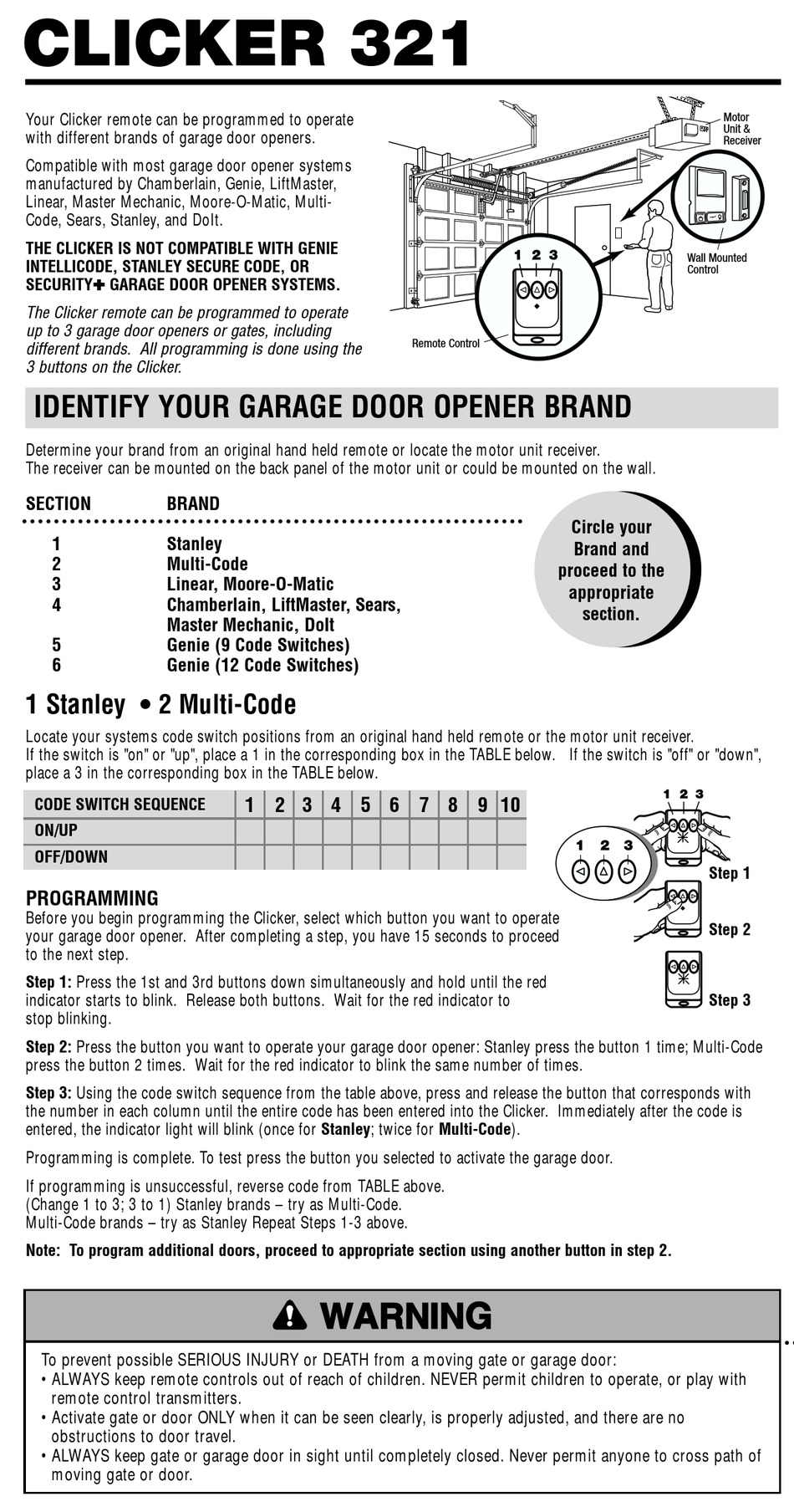
Credit: www.manualslib.com
Step-by-step: Reprogramming A Clicker Garage Door Opener
Reprogramming might sound complicated, but it usually takes less than 10 minutes. The process may be slightly different for each brand or opener model, but these steps cover most situations.
1. Locate The Learn Button
The Learn button is the key to reprogramming. It’s usually found on the back or side of your garage door opener unit (the box on the ceiling). You may need to remove a light cover to see it.
- The button is often yellow, red, orange, green, or purple.
- Next to the button, you might see a small LED light.
Tip: Write down the color of your Learn button. It helps match programming steps to your specific model.
2. Clear The Opener’s Memory (optional But Recommended)
If you lost a remote or want to remove all old remotes from the system, you should erase all previous codes.
- Press and hold the Learn button for about 6-10 seconds.
- Watch the LED light next to the button. It will turn off or blink to show the memory is cleared.
- Release the button.
Now, no old remotes will work. This step improves security.
3. Program The Clicker Remote
Now you’re ready to add your new or existing Clicker remote.
- Press and release the Learn button on the opener. The LED next to it will turn on or start blinking.
- Within 30 seconds, stand near the opener and press the button on your Clicker remote you want to use (for example, Button 1).
- Hold the remote button until the garage door opener light blinks or you hear a click. This means the system accepted the new code.
- Release the button and test your remote.
Note: If you wait too long (more than 30 seconds), you may need to repeat the steps.
4. Test Your Remote
Stand a few feet away from the garage door. Press the programmed button on your Clicker remote.
- If the door opens or closes, you programmed it correctly.
- If nothing happens, repeat the programming steps.
5. Program A Second Door Or Button (optional)
If your Clicker remote has two buttons, you can program the second button for a different door or even a gate.
- Repeat the same process, but use Button 2 for the second door.
- Be sure to press the Learn button on the correct opener.
6. Change Batteries If Needed
If your remote doesn’t work after programming, try new batteries. Weak batteries can prevent the remote from sending a strong signal.
How Programming Differs By Garage Door Brand
Not all garage door openers are exactly the same. Here’s a comparison of programming steps for some popular brands.
| Brand | Learn Button Color | Key Programming Step | Rolling Code? |
|---|---|---|---|
| Chamberlain/LiftMaster | Yellow, Purple, Red, Green, Orange | Press Learn, then remote within 30 sec | Yes |
| Genie | Black, Purple, Red | Press Learn, remote, sometimes twice | Yes |
| Craftsman | Yellow, Orange, Purple | Same as Chamberlain | Yes |
| Overhead Door | Red, Green | Learn button, sometimes DIP switches | Varies |
| Older Models (Pre-1995) | N/A | DIP switches inside remote and opener | No |
Most Clicker remotes support all major brands, but always check your opener’s manual if you run into problems.
Credit: heritagedoor.com
Using Dip Switches In Older Openers
If your garage door opener is from before 1995, it may use DIP switches instead of a Learn button. DIP switches are a row of tiny switches inside the remote and the opener. To program:
- Open the battery cover on your Clicker remote.
- Find the DIP switches in the remote.
- Match the on/off positions with the DIP switches in your opener unit.
- Close the cover and test the remote.
This method is less secure than rolling code openers, but still common in older garages.
Troubleshooting Common Programming Problems
Sometimes the programming process doesn’t work as expected. Here are common issues and solutions:
The Remote Does Not Work After Programming
- Battery issue: Install new batteries.
- Out of range: Try standing closer to the opener.
- Did not press remote button soon enough: Repeat and press within 30 seconds.
- Wrong Learn button: Make sure you used the correct button on the opener.
- Memory full: Most openers can store 5-7 remotes. If you’ve reached the limit, clear memory and reprogram.
The Door Opens On Its Own
- Duplicate code: Rare, but possible with older systems. Try clearing all codes and reprogramming.
- Neighbor’s remote interference: Change the DIP switch positions if possible.
Remote Only Works Sometimes
- Weak battery: Replace with fresh batteries.
- Obstruction or interference: Move closer, avoid metal barriers, or change remote angle.
- Antenna issue: Make sure the opener’s antenna is hanging down and not damaged.
The Learn Button Doesn’t Work
- Power issue: Unplug the opener for 1 minute, then plug back in.
- Faulty button: If the button feels stuck or broken, contact a professional.
Security Tips When Reprogramming
Keeping your garage secure is just as important as your front door. Here’s how to make sure your system stays safe:
- Erase old codes: Always clear memory if you move into a new home or lose a remote.
- Never share your remote: Only give remotes to trusted people.
- Use rolling code technology: Most modern Clicker remotes support this.
- Lock your car: If you keep a remote in your car, lock the doors.
- Upgrade old openers: If your system uses fixed codes or DIP switches, consider upgrading for better security.
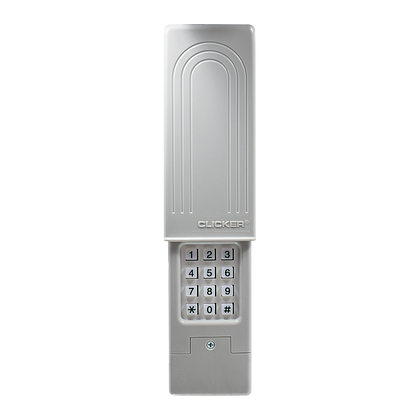
How To Reset Clicker Garage Door Keypad
Some homes also have a wireless keypad to open the garage. If you need to reset or reprogram it, the process is similar:
- Press and hold the Learn button on the opener until the LED lights up.
- Within 30 seconds, enter a new 4-digit PIN on the keypad.
- Press and hold the “Enter” button.
- When the garage opener light blinks, the keypad is programmed.
If your keypad does not work, check the battery, and make sure you’re entering the correct code.

Credit: www.youtube.com
Adding Multiple Remotes Or Users
You can add several remotes to one opener. For families, tenants, or house guests, this is very useful.
- Repeat the programming steps for each new Clicker remote.
- Most openers can remember 5-7 remotes.
- If you reach the limit, clear the memory and reprogram only the remotes you want active.
This prevents old or lost remotes from working.
Removing A Remote From Your Opener
You cannot remove just one remote from most openers. You must clear all remotes from memory:
- Press and hold the Learn button for 6-10 seconds until the LED goes out.
- Reprogram only the remotes you want to keep.
This is important if you lose a remote or want to restrict access.
Maintenance Tips For Clicker Remotes
To keep your remote working well:
- Replace batteries every 1-2 years.
- Clean the remote with a dry cloth. Avoid getting it wet.
- Keep the remote away from extreme temperatures.
- Check for physical damage. If buttons stick, consider a replacement.
What To Do If Your Clicker Remote Is Not Compatible
Some very old or rare garage door openers may not work with universal Clicker remotes. In this case:
- Check your opener’s frequency (usually 300, 310, 315, or 390 MHz). The remote and opener must match.
- Some remotes only support certain brands or years.
- If you’re not sure, look for your opener’s model number and check the Clicker compatibility chart online.
If your opener is not compatible, you may need to buy a new opener or use the original brand’s remote.
Comparing Clicker To Other Universal Remotes
You might wonder if Clicker is the best universal remote for your needs. Here’s a quick comparison with similar products.
| Brand | Supports Rolling Code | Number of Buttons | Works with Keypad? | Price Range (USD) |
|---|---|---|---|---|
| Clicker | Yes | 2 | Yes | 20–35 |
| Genie Universal | Yes | 3 | Yes | 25–40 |
| Chamberlain Universal | Yes | 2 | Yes | 25–40 |
| Overhead Door Universal | Varies | 3 | Yes | 20–35 |
Clicker remotes are popular because they’re easy to use, affordable, and work with most openers.
Two Non-obvious Insights For Beginners
- Not all Learn buttons are easy to reach. Some garage door openers are mounted high or in tight corners. Always turn off the opener’s power before moving a ladder, and ask for help if needed. Safety first.
- The opener’s antenna matters. If your remote works poorly, check the thin wire hanging from the opener. This is the antenna. If it’s tucked inside or damaged, the remote signal will be weak. Gently pull it down so it hangs freely.
When To Call A Professional
Most people can reprogram a Clicker garage door opener themselves. But call a professional if:
- You cannot find the Learn button or your opener is very old.
- The opener does not respond after several tries.
- There is visible damage to the opener or wires.
- You feel unsafe climbing a ladder or working near electricity.
A garage door expert can quickly solve these problems and check your system for safety.
Helpful Resources
For more details and diagrams, the manufacturer’s website or user manual is your best resource. If you need a video guide, YouTube has many step-by-step tutorials for specific models.
You can also check the official Chamberlain support page for troubleshooting: Chamberlain Support.
Frequently Asked Questions
What If My Clicker Remote Still Does Not Work After Reprogramming?
First, check the batteries and make sure you followed all programming steps. Try standing closer to the opener. If it still does not work, clear the opener’s memory and reprogram again. In rare cases, your opener may not be compatible with universal remotes.
Can I Program My Clicker Remote Without A Learn Button?
If your opener does not have a Learn button, it may use DIP switches. Match the DIP switch positions in the remote and opener. If there are no DIP switches or Learn button, your opener is likely too old for universal remotes, and you may need a new opener.
How Many Remotes Can I Add To My Garage Door Opener?
Most modern openers can store 5-7 remotes. If you add more than the limit, the oldest code will be erased. Always clear memory before adding many remotes to keep your system organized.
Is It Safe To Reprogram My Own Garage Door Remote?
Yes, as long as you follow safety tips. Turn off the power if you need to move a ladder. Do not touch exposed wires. If you feel unsure or your opener is damaged, call a professional for help.
Will Reprogramming Erase My Wireless Keypad Code?
If you clear all remotes from memory, you will also erase the keypad code. You will need to reprogram the keypad after reprogramming your remotes.
—
Reprogramming your Clicker garage door opener is a simple way to improve your home’s security and make life easier. With just a few steps, you can add new remotes, remove lost ones, or reset your system for peace of mind. Always follow safety tips and don’t hesitate to ask for help if you need it. With this guide, you’re ready to tackle the job and enjoy a safe, smoothly working garage door.