
Resetting your garage door keypad might seem confusing, especially if you’ve never done it before. Maybe you forgot your code, moved into a new home, or want to boost security. The good news is, you don’t have to be an expert to handle this job. With some patience and the right steps, you can reset almost any keypad on your own. This guide walks you through the process, helping you understand what’s happening, what to look out for, and what to do if things get tricky. Let’s make sure your garage is secure and convenient again, one clear step at a time.
Why Reset A Garage Door Keypad?
People reset garage door keypads for several reasons. You might have forgotten the code, or maybe you want to prevent someone else from using an old code. Sometimes, you move into a new house and need to set your own code for safety. Other times, the keypad simply stops working after years of use.
Resetting the keypad can also fix glitches or random errors. If you notice the keypad responds slowly or the door opens by itself, a reset can solve the problem. Regular resets, especially after changing batteries, keep your system running smoothly.
Understanding Garage Door Keypads
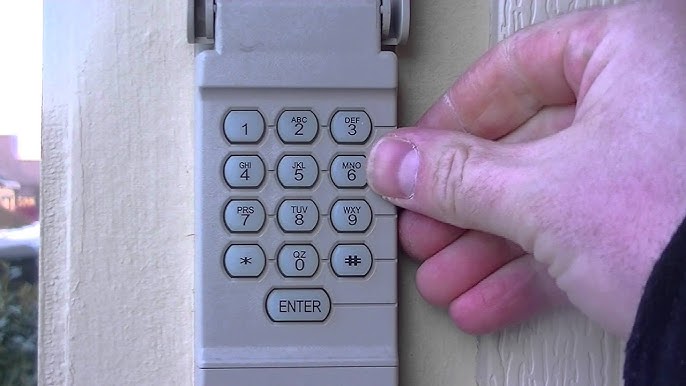
A garage door keypad is a small device mounted outside your garage. It lets you open the door by entering a code. This code is sent wirelessly to the opener inside your garage. Most keypads use rolling codes, which change each time you use them, making them more secure.
Many garage door openers and keypads are made by big brands like LiftMaster, Chamberlain, Genie, and Craftsman. Each brand has its own reset method, but the general idea is always similar: clear the old code, then set a new one.
There are two main types of garage door keypads:
- Wired keypads – Connected directly to your garage door opener.
- Wireless keypads – Use radio signals and usually need batteries.
Most modern homes use wireless models because they’re easy to install and don’t need extra wiring.
Safety First: Before You Start
Before you reset the keypad, there are some safety steps you should follow:
- Check the door is closed. You don’t want the door moving unexpectedly.
- Keep a ladder stable. If your opener is mounted high, use a sturdy ladder.
- Have the manual nearby. Sometimes, the steps are brand-specific.
- Know your backup entry. If your garage is the only way into your home, make sure you can get back in if something goes wrong.
A common mistake is forgetting you’ll need access to the garage after the reset. If you lock yourself out and the keypad isn’t working, you may need a locksmith.
Identifying Your Garage Door Keypad Model
Not every keypad resets the same way. First, find out what brand and model you have. Look for a label on the keypad or the opener box inside your garage. It usually lists the manufacturer and model number.
Common brands and where to find information:
- LiftMaster/Chamberlain/Craftsman: Label is often behind the light cover on the opener.
- Genie: Model info is usually on the back or side of the keypad.
- Overhead Door: Check the battery compartment or back panel.
If you can’t find the model, search for images online or compare your keypad to photos from the brand’s website.
Credit: www.youtube.com
Resetting A Garage Door Keypad: General Steps
While different brands have their own details, most follow a similar pattern. Here’s a step-by-step process that fits most models:
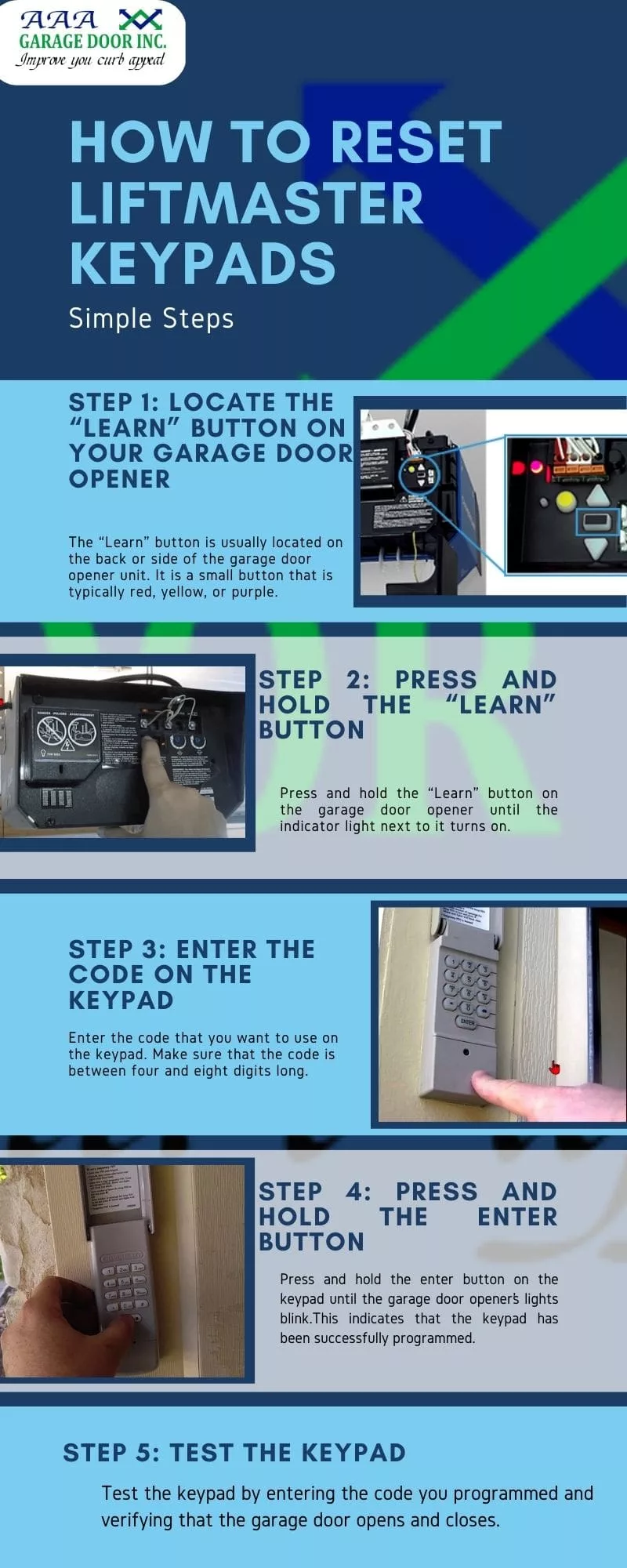
1. Locate The “learn” Or “program” Button
Inside your garage, look for the learn button on the opener unit (usually mounted to the ceiling). It is often a colored button—yellow, purple, red, or orange—near the wiring or under a light cover.
Why is this button important? Pressing it puts your opener into programming mode, allowing you to reset the keypad or add a new code.
2. Clear The Old Code
Hold the learn button for about 6-10 seconds (check your manual for the exact time). When the indicator light turns off, you’ve erased all remote controls and keypad codes from the opener’s memory.
Warning: This removes access for all remotes and keypads. You’ll need to reprogram each one.
3. Set A New Keypad Code
Go to your keypad and enter your new code (usually 4 digits). Then, press the enter or program button on the keypad. Within 30 seconds, go back to your opener and press the learn button again (just a quick press, not a long hold).
The garage door opener light will blink or you’ll hear a click. This means your new code is accepted.
4. Test The Keypad
Enter the new code on the keypad. The garage door should open or close. If not, repeat the steps, making sure you enter the code within 30 seconds of pressing the learn button.
5. Reprogram Remote Controls
If you erased all codes, you must also reprogram your remote controls. Press the learn button, then press the button on your remote.
Brand-specific Reset Instructions
Different brands have unique features. Let’s look at the most common ones and how their reset steps may differ.
Liftmaster, Chamberlain, And Craftsman
These brands use similar technology. Here’s how to reset their keypads:
- Find the learn button (usually purple, orange, red, or yellow) on the opener.
- Press and release the learn button. The indicator light will glow for 30 seconds.
- On the keypad, enter your new 4-digit code, then press and hold the enter button until the opener light blinks.
- Test the code.
Tip: If your keypad is older, you may need to press the “Enter” button twice.
Genie
Genie keypads often use a different sequence:
- Slide open the battery cover. Press and hold the program button until the indicator light blinks.
- Enter your new code, then press the program button again.
- Go to the opener, press the learn button once.
- Enter your code on the keypad and press the up/down button. The opener should respond.
Insight: Genie keypads sometimes need a double-entry sequence. If the door doesn’t respond, repeat the process.
Overhead Door
Most Overhead Door keypads reset like Genie (they’re often the same company):
- Open the keypad cover.
- Press and hold the program button until the indicator blinks.
- Enter your new code, then press the program button again.
- Press the learn button on the opener.
- Test the code.
Linear And Other Brands
Some brands, like Linear, use DIP switches for coding. These are small toggles inside the keypad or opener. To reset:
- Match the switch positions inside the keypad and opener.
- Set your desired code.
- Test the system.
Note: Fewer homes use DIP switch systems today, but they still exist in older models.
Common Problems And Solutions
Resetting isn’t always smooth. Here are some issues and how to solve them:
- Keypad won’t program: Check the batteries. Weak batteries often cause keypads to fail.
- The opener doesn’t respond: Make sure you’re pressing the learn button for the right amount of time. Also, check if you’re entering the code within 30 seconds.
- Keypad buttons stick: Clean the keypad with a soft cloth. Dirt can block signals.
- Code works sometimes: Interference from nearby devices can cause problems. Try changing the code.
- All remotes stopped working: You may have erased all codes by holding the learn button too long. Reprogram each remote.
Real-world Example
Imagine you move into a house and don’t know the garage code. The opener is a LiftMaster. Here’s what you do:
- Find the purple learn button.
- Press and hold for 6 seconds to erase old codes.
- Press and release the learn button.
- Enter a new code on the keypad, then press enter.
- The garage light blinks. Test the new code.
You just secured your garage in minutes.
When Should You Replace The Keypad?
Sometimes resetting isn’t enough. Replace your garage door keypad if:
- Buttons don’t work, even after changing batteries.
- The keypad is cracked or water-damaged.
- The light on the keypad doesn’t come on.
- The system is older than 15 years and parts are no longer available.
New keypads are more secure and easier to use. Many even have features like temporary codes for guests.
How To Choose A New Garage Door Keypad
If you decide to replace your keypad, keep these points in mind:
- Compatibility: Not all keypads work with all openers. Check the brand and model.
- Weather resistance: Outdoor keypads should handle rain and sun.
- Backlit keys: Makes it easy to use at night.
- Number of codes: Some allow only one code, others support multiple.
- Wireless or wired: Wireless is easier for most people.
Mistake to avoid: Buying a universal keypad without checking if your opener is supported.
Here’s a simple comparison of three popular keypads:
| Model | Compatibility | Weatherproof | Backlit Keys | Multiple Codes |
|---|---|---|---|---|
| LiftMaster 877MAX | Most LiftMaster/Chamberlain/Craftsman | Yes | Yes | Yes |
| Genie GK-R | All Genie Intellicode | Yes | Yes | No |
| Linear MDTK | Linear openers | Yes | No | No |
How To Maintain Your Garage Door Keypad
To keep your keypad working smoothly:
- Replace batteries once a year. Weak batteries cause most problems.
- Clean the keypad regularly. Use a soft brush or cloth.
- Check for water damage. Seal cracks or replace the cover if needed.
- Update codes. Change the code every 6-12 months for better security.
Non-obvious tip: If you live in a very cold climate, keep spare batteries inside your house. Cold weather can drain the keypad battery quickly.
Advanced Features In Modern Keypads
Today’s keypads offer more than just basic entry. Some let you set temporary codes for visitors or service people. Others connect to smart home systems, letting you control the garage from your phone.
Features you might find:
- Temporary codes that expire after a set time.
- One-touch close – just press a button to close without a code.
- Smartphone integration with apps like myQ.
- Keypad lockout after too many wrong entries.
Here’s a quick comparison of basic vs advanced keypads:
| Feature | Basic Keypad | Advanced Keypad |
|---|---|---|
| Single code | Yes | Yes |
| Multiple codes | No | Yes |
| Temporary access | No | Yes |
| Smartphone app | No | Yes |
| Weatherproof | Yes | Yes |
Security Tips For Garage Door Keypads
A keypad is only as secure as you make it. Here’s how to keep your garage safe:
- Change your code regularly. Don’t use birthdays or easy-to-guess numbers.
- Don’t share your code. Give temporary codes to guests if possible.
- Check for tampering. Look for scratches or signs of forced entry.
- Install the keypad out of sight. Place it where people passing by can’t see your code.
- Use rolling code technology. Older keypads can be hacked with code grabbers.
Insight: Many people forget to reset keypads after moving into a new home. Always do this to prevent previous owners from entering.
What To Do If The Keypad Still Won’t Work
If you follow all the steps and the keypad still doesn’t work, try these:
- Double-check battery orientation. Even new batteries won’t work if installed backward.
- Reset the opener itself. Power cycle by unplugging for 30 seconds, then plug back in.
- Look for broken wires. Especially if you have a wired keypad.
- Check the user manual. Some models have unique reset steps.
- Contact support. The manufacturer’s support line can help with tricky problems.
In rare cases, interference from strong Wi-Fi, metal siding, or neighbor’s devices can block signals. Try moving the keypad or opener antenna.

Credit: cheneydoor.com
The Importance Of Regular Code Updates
Many people set a code once and never change it. But just like your email password, your garage code should be updated regularly. It’s a simple way to block old guests, service people, or anyone who may know your code.
Best practice: Change your code every 6 months. Mark it on your calendar.
Troubleshooting: When You’re Locked Out
If you get locked out:
- Try the old code first. Sometimes, the reset didn’t complete.
- Check the keypad batteries. Replace if unsure.
- See if a remote still works. If yes, the keypad is the issue.
- Access the garage another way. Through a side door, if available.
- Contact a professional. Locksmiths can open most garages without damage.
Tip: Some keypads have a physical key backup—check your model.
How Long Does It Take To Reset A Keypad?
In most cases, you can reset a garage door keypad in 10-15 minutes. If you have multiple remotes, add a few more minutes to reprogram each one.
Pro insight: The biggest time-waster is hunting for the “learn” button. Check your manual or look for online guides with photos if you get stuck.
How Much Does It Cost To Replace Or Reset A Keypad?
- DIY reset: Usually free, just your time.
- Professional service: $50-$100 depending on location.
- New keypad: $30-$60 for most models.
Most homeowners can do the reset on their own, saving money and learning about their system.
For more on garage door security and technology, check out this Wikipedia page about garage door openers.
Credit: aaagds.com
Frequently Asked Questions
How Do I Know If My Garage Door Keypad Needs New Batteries?
If the keypad doesn’t light up, or you have to press buttons very hard, it’s time for new batteries. Most models use a standard 9V or AA battery. Replace them yearly to avoid getting locked out.
Can I Use The Same Code On Multiple Garage Door Keypads?
Yes, you can set the same code on different keypads if they control the same opener. However, each keypad must be programmed separately using the learn button.
What Should I Do If My Garage Door Keypad Is Exposed To Heavy Rain?
Most modern keypads are weatherproof, but water can still get inside over time. Dry the keypad, check for damage, and replace the cover if needed. If the keypad stops working, replace it to keep your garage secure.
Is It Possible To Reset The Keypad Without Erasing Remote Controls?
On most openers, you can add or change codes without erasing remotes. But if you hold the learn button too long, all devices are erased. Check your manual for your opener’s rules.
How Often Should I Change My Garage Door Keypad Code?
Change your code every 6-12 months, or any time you think someone else may know it. Regular updates prevent unauthorized entry and keep your garage secure.
Securing your garage with a properly programmed keypad is simple, but it’s easy to overlook small details. By following the steps above and staying aware of your model’s needs, you’ll keep your home safe and convenient for years to come.