
If you’ve ever wondered how to change the code on your garage door keypad, you’re not alone. Many homeowners find themselves needing to update their keypad code, whether for added security, after moving into a new house, or just to keep up with best practices.
While it can seem technical or confusing at first, changing the code is actually a straightforward process—if you know the right steps. This guide will walk you through everything you need to know, from why you should change your code, to detailed instructions for different brands, and troubleshooting tips that will help even if you’ve never done it before.
Understanding why and how to change your garage door keypad code can give you peace of mind, help protect your belongings, and make daily life just a bit more convenient. Let’s explore what you need to know, step by step.
Why Change Your Garage Door Keypad Code?
Security is the main reason most people want to change their garage door code. If someone knows your code, they can enter your garage—even if they’re not supposed to. Here are a few common reasons to update your code:
- Moving into a new home: Previous owners, tenants, or service people may still know the old code.
- After sharing the code: If you gave your code to someone (like a neighbor, house cleaner, or repair person) and no longer want them to have access, it’s time to change it.
- Regular security updates: Just like you update passwords, updating your garage code every 6-12 months keeps your security strong.
- Lost or stolen remote/keypad: If a remote or keypad is lost or stolen, changing the code prevents unauthorized entry.
Changing your code is a simple, proactive step that can help keep your family and property safe.
How Garage Door Keypads Work
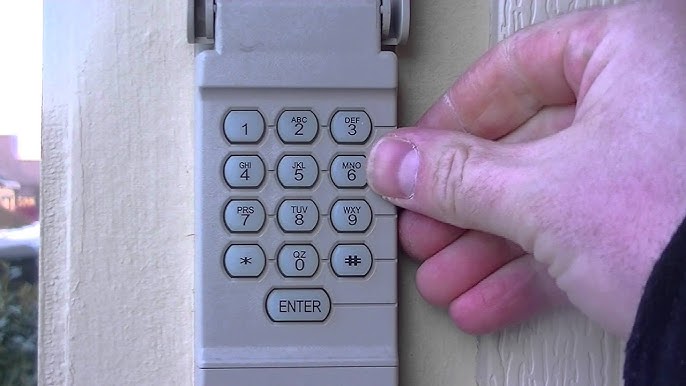
Before you start, it’s helpful to understand the basics of how a garage door keypad operates. The keypad is a wireless device, usually mounted outside your garage door. When you enter the correct code, it sends a signal to your garage door opener (the motor unit inside your garage), telling it to open or close the door.
Most keypads use a simple sequence:
- Enter code
- Press a button (usually “Enter” or “Send”)
- Keypad sends a radio signal to the opener
The code is stored in the opener unit, not inside the keypad. Changing the code usually means reprogramming both the keypad and the opener so they match.
What You Need Before You Start
Changing your garage door keypad code is easier if you have a few things ready:
- Step ladder: Most opener units are mounted on the garage ceiling.
- Keypad user manual: If you have it, this can help with brand-specific steps.
- Pen and paper: To write down your new code so you don’t forget it.
- A flashlight: Garages aren’t always well-lit.
If you don’t have your keypad’s manual, don’t worry. Most brands use similar steps, and this guide covers the most common types.
General Steps: How To Change Code On Garage Door Keypad
While each brand is a little different, most modern keypads follow similar basic steps. Here’s a general overview:
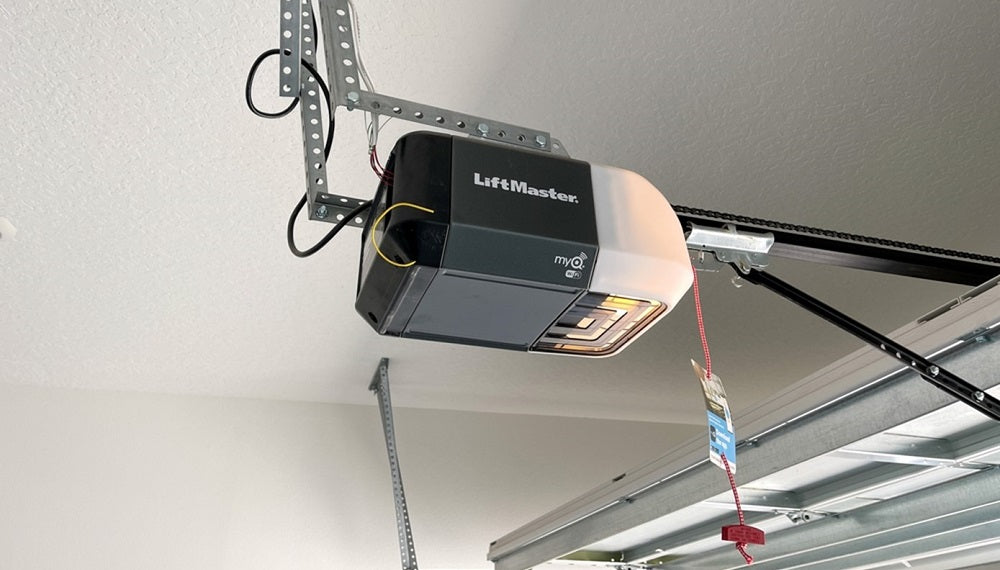
- Locate the “Learn” or “Program” Button: This button is usually on the opener unit (not the keypad) and may be behind a light cover.
- Press and Release the Button: This puts the opener in programming mode.
- Enter New Code on the Keypad: Within 30 seconds, enter your new code and press the “Enter” or “Send” button.
- Test the New Code: Wait a few seconds, then use the new code to open the door.
These are general steps—let’s look at specific brands and models for more detailed guidance.
Step-by-step Instructions By Brand
Changing the code can be a bit different depending on your garage door opener’s brand and model. Below are detailed steps for the most common manufacturers.
1. Changing Code On Liftmaster, Chamberlain, And Craftsman Keypads
These brands use similar technology, so the process is almost identical.
- Climb your ladder and find the Learn button on your opener unit. It’s usually near the light bulb, and might be colored red, orange, yellow, or purple.
- Press and release the Learn button. An indicator light will glow or blink.
- Within 30 seconds, go to your keypad. Enter your new 4-digit code, then press and hold the Enter button until the opener’s light blinks or you hear a click.
- Test the new code. Enter it on the keypad and press Enter. The door should open or close.
Tip: If your keypad is old and the steps don’t work, try removing the battery and repeating the process.
2. Changing Code On Genie Keypads
Genie keypads have a slightly different method.
- Open the keypad cover. Make sure the garage door is closed.
- Press and hold the Program button until the LED blinks twice.
- Enter your new PIN (3–8 digits), then press the Program button again. The LED should blink once.
- Go to the opener unit and press the Learn Code button. The LED will blink red.
- Within 30 seconds, enter your new PIN on the keypad and press Send or Enter.
Note: Genie often uses a longer PIN (up to 8 digits) for extra security.
3. Changing Code On Overhead Door Keypads
Overhead Door is closely related to Genie, so the process is similar.
- Open the keypad and press the Program button.
- Enter your current PIN, then press the Up/Down button.
- Enter your new PIN, then press the Up/Down button again.
- The keypad will blink to confirm. Test your new code.
4. Changing Code On Linear Or Multicode Keypads
These keypads are less common, but here’s how to reset them.
- Remove the cover from the keypad.
- Find the row of switches (DIP switches) inside.
- Move the switches to a new pattern (write it down).
- Match the same pattern on the receiver inside the opener unit.
Important: This is an older technology. Modern keypads use digital programming instead of switches.
5. Changing Code On Wireless Universal Keypads
Universal keypads can work with many brands. The steps vary, but usually:
- Press the Program or Reset button on the keypad (sometimes you need a paperclip to press a hidden button).
- Enter your chosen new code.
- Press the Learn button on your opener.
- Enter the new code on the keypad and press Enter.
Always check your model’s manual if you have it, as universal keypads can be tricky.
Common Problems And Solutions
Changing your garage door keypad code usually goes smoothly, but sometimes things don’t work as expected. Here are some common issues and how to fix them:
Keypad Not Responding
- Check the batteries first. Weak batteries are the most common reason for keypad failure.
- Clean the keypad buttons. Dirt or moisture can cause keys to stick or not register.
- If you get no response, the keypad may be damaged and need replacement.
New Code Doesn’t Work
- Make sure you entered the code within the programming window (usually 30 seconds after pressing “Learn”).
- Double-check the number sequence you entered. It must match exactly.
- Some openers need a specific number of digits (usually 4). If you enter more or fewer, it may not accept the code.
Keypad Blinks Or Beeps But Door Doesn’t Move
- The keypad may have paired, but the opener didn’t accept the code.
- Try repeating the process, making sure to press the Enter button firmly.
- If possible, clear all old codes from the opener and start fresh. Look for a “Reset” or “Erase” procedure in your manual.
Multiple Keypads Or Remotes
If you have more than one keypad or remote, changing the code usually does not affect them. However, if you erase all codes from your opener, you’ll need to reprogram all devices.
Old Openers With Dip Switches
If your opener uses DIP switches (tiny toggles inside both the keypad and opener), you must match the pattern in both places. This is less secure than modern systems, so consider upgrading for better protection.
Safety And Security Tips
A strong garage door code is important for your home’s safety. Here’s how to keep your system secure:
- Choose a Non-Obvious Code: Avoid codes like 1234, your address number, or birthdays.
- Change Codes Regularly: Update your code at least once a year, or after giving it to anyone outside your family.
- Don’t Share Widely: Only give the code to people you trust.
- Check for Tampering: If you notice the keypad cover is loose or the numbers look worn, someone may have tried to guess your code.
Data Table: Common Garage Door Keypad Brands And Features
To help you compare, here’s a quick overview of popular brands, keypad types, and features.
| Brand | Programming Method | Code Length | Reset Option | Wireless Range |
|---|---|---|---|---|
| LiftMaster/Chamberlain | Learn Button | 4 digits | Yes | 100-150 ft |
| Genie | Program Button + Learn Code | 3-8 digits | Yes | 150 ft |
| Overhead Door | Program Button | 3-8 digits | Yes | 150 ft |
| Linear | DIP Switches | 8-12 bits | No | 100 ft |
| Universal | Program or Reset Button | 4 digits | Yes | 100 ft |
When And How Often Should You Change The Code?
Many people never change their garage code, but experts recommend updating it regularly—just like you would change a password. Here are some guidelines:
- After moving into a new house: First thing you should do.
- After a break-in or attempted break-in: Even if nothing was stolen, change it immediately.
- If you lend out the code: Any time a non-family member knows your code, update it.
- Every 6-12 months: Even if nothing happens, regular updates make your home more secure.
Non-obvious tip: Write your new code in a safe place, but don’t label it as “garage code.” Use a hint only you understand.
Programming Multiple Keypads Or Remotes
Some homes have more than one keypad (for a side garage door, for example) or several remotes. Here’s what to know:
- Programming a new keypad does not erase old ones. Each device is programmed separately.
- Erasing all codes from the opener removes all paired keypads/remotes. You’ll need to reprogram each one.
- Remote controls usually have their own programming button. Check your opener’s manual for steps.
Advanced Features: Temporary Codes And Smart Keypads
Many newer garage door keypads offer extra features that can be very useful.
Temporary Pins
Some keypads let you set a temporary code for guests, deliveries, or service people. This code works for a set time or number of uses, then expires.
- How to program: Usually, you enter your main code, press a special button (like “*” or “#”), then set a temporary code and duration.
- Why use it: Keeps your main code private and lets you grant access without risk.
Smart Keypads
Some modern systems connect to Wi-Fi or smart home apps. You can change codes from your phone, monitor activity, or get alerts when the door is used.
- Example: LiftMaster’s MyQ system or Genie’s Aladdin Connect allow remote management and code changes.
Practical tip: If you upgrade to a smart keypad, always change the default code during setup.
What To Do If You Forget Your Code
It happens to everyone—sometimes you forget the code you set. Here’s what to do:
- Check your manual: Some brands have a master reset.
- Use the opener’s Learn button: Press and hold it for 6-10 seconds. This erases all codes, so you can start over.
- Factory reset: Some keypads have a hidden reset button inside the battery compartment. Use a paperclip to press it.
If all else fails, contact the manufacturer or a professional installer.
Table: Keypad Troubleshooting Steps
Here’s a quick troubleshooting chart for common keypad problems.
| Problem | Likely Cause | Solution |
|---|---|---|
| Keypad not lighting up | Dead batteries | Replace batteries |
| Code not accepted | Wrong code length or timing | Re-enter with correct digits and within 30 seconds of Learn button |
| Keypad works but door doesn’t move | Signal not paired | Repeat programming steps; check opener antenna |
| Keypad buttons stick | Dirt or moisture | Clean keypad with dry cloth |
| Multiple failed attempts | Lockout mode | Wait 1-5 minutes, then try again |
Upgrading Old Garage Door Keypads
If your keypad is older than 10 years, you might want to consider an upgrade. Here’s why:
- Security: Newer models use rolling codes, which change the signal every use. Old ones with DIP switches are much easier to hack.
- Convenience: Modern keypads have backlit buttons, temporary PINs, and better weather protection.
- Compatibility: Universal keypads can work with almost any opener made after 1993.
If you’re not sure how old your keypad is, check for a manufacture date or model number inside the battery compartment.
Real-world Example: Changing A Code After Moving
Let’s say you just bought a house and want to be sure you’re the only one with access. Here’s how a homeowner might change the code:
- Locate the opener unit on the garage ceiling. Find the Learn button.
- Press and release the Learn button. The light should come on.
- Go to the outside keypad and enter a new 4-digit code. Press Enter and wait for the opener to click or flash.
- Test the new code immediately. If it works, you’re done.
This simple process takes less than five minutes, but gives you complete control over who can open your garage.
Table: Security Features Comparison
For those thinking of upgrading, here’s a comparison of basic vs. advanced keypad security.
| Feature | Basic Keypad | Advanced Keypad |
|---|---|---|
| Rolling Code Technology | No | Yes |
| Temporary PIN | No | Yes |
| Backlit Buttons | No | Yes |
| Mobile App Integration | No | Yes |
| Weather Resistant | Some | Most |
Insight: Upgrading to an advanced keypad can make changing codes even easier, especially if you want to control things from your smartphone.

Mistakes To Avoid When Changing Your Garage Door Keypad Code
Many people make small errors that can cause frustration or reduce security. Avoid these common mistakes:
- Forgetting to test the new code: Always test before finishing.
- Choosing an easy-to-guess code: Use something unique, not your address or 1234.
- Not updating all devices: If you erase all codes, reprogram every keypad and remote.
- Not writing down the new code: Store it in a password manager or a safe place.
- Not checking battery health: Weak batteries can cause programming to fail.
- Ignoring the manual: Each brand is different—always check the steps for your model.
Non-obvious tip: If your keypad blinks but doesn’t program, try clearing any existing codes by holding the Learn button for 10 seconds before starting.
Additional Resources
For more information on specific keypad models or troubleshooting, check out the manufacturer’s website or trusted sources like the Wikipedia Garage Door Opener page. These sources can provide wiring diagrams, advanced programming instructions, and compatibility lists.
Frequently Asked Questions
How Do I Know What Brand Of Garage Door Keypad I Have?
Check the keypad itself for a brand name or model number. If it’s not visible, open the battery compartment—many manufacturers print the name or model inside. You can also check the opener unit (the box on your garage ceiling), as most keypads are made by the same company as the opener.
What Should I Do If My Garage Keypad Stops Working After Changing The Code?
First, replace the batteries and try again. If it still doesn’t work, repeat the programming steps slowly, making sure you press the Learn or Program button as required. If you keep having issues, check the manual or contact the manufacturer for support.
Can Someone Hack My Garage Door Keypad?
Older keypads using fixed codes or DIP switches are more vulnerable to hacking. Modern systems with rolling codes are much safer. To reduce risk, update your code regularly and upgrade to a rolling code system if your opener is over 10 years old.
How Many Digits Can My Garage Door Code Be?
Most keypads use 4-digit codes, but some brands (like Genie and Overhead Door) allow 3–8 digits. Check your manual for exact requirements. Using a longer code is more secure.
Is It Possible To Reset My Keypad Without The Old Code?
Yes, most keypads let you reset without the old code by using the opener’s Learn or Program button. If you’ve lost the manual, look for a reset button in the battery compartment, or follow the Learn button procedure described earlier.
Changing your garage door keypad code is a simple but powerful way to keep your home safe. By following these steps and tips, you’ll make sure only the people you trust have access to your garage. Take a few minutes today to check your code—it’s one of the easiest ways to protect your home.