
Resetting a code on your garage door keypad might sound technical, but it’s actually a straightforward task once you know the steps. Whether you just moved into a new home, forgot your old code, or want extra security, knowing how to reset your garage door keypad is essential.
Many people are surprised to find out how often keypad codes are set once and forgotten, leaving homes vulnerable or causing frustration when codes stop working.
Homeowners often overlook this small device until they’re locked out or worried someone else knows their code. In fact, according to a 2023 survey by the National Association of Home Builders, over 40% of homeowners have never changed their garage door keypad code after moving in.
This means many garages are less secure than people think.
Resetting your garage door keypad not only protects your home but can also solve common problems like forgotten codes, stuck buttons, or syncing issues with new remote controls. Let’s look at the full process, from understanding how your keypad works to troubleshooting tricky situations.
By the end, you’ll have the confidence to reset your keypad, avoid common mistakes, and keep your garage secure.
How Garage Door Keypads Work
Garage door keypads are small, weather-resistant devices usually mounted outside your garage door. They let you open and close the garage by entering a personal identification number (PIN) on a number pad. Most keypads use wireless technology, sending a coded signal to your garage door opener’s receiver.
There are two main types:
- Fixed code keypads – Use a simple code, often set by switches inside the unit.
- Rolling code keypads – Use a changing code for better security; common in modern systems.
Knowing which type you have is important. Fixed code systems are simpler but less secure. Rolling code systems, used by brands like LiftMaster, Chamberlain, and Genie, are safer and often require an extra step when resetting codes.
Why Resetting The Keypad Matters
Many people think their garage keypad is secure forever, but codes can be leaked, guessed, or forgotten. If you’ve given your code to a neighbor, house-sitter, or contractor, it’s smart to reset it regularly. Also, if your keypad starts acting up (like not responding or opening the garage randomly), a reset can often fix the problem.
When Should You Reset Your Garage Door Keypad?
There are several situations when resetting your keypad is wise:
- Moving into a new home: Old owners or realtors may know the code.
- After sharing your code: If you’ve given your code to workers, friends, or deliveries.
- Code stops working: Sometimes, keypads glitch and need a reset.
- Security concerns: If you think someone knows your code without permission.
- Upgrading your garage system: New remotes or openers often require a fresh keypad code.
Resetting your keypad is a fast, free way to boost your home’s security and solve many access problems.
Tools And Preparation
Before starting, gather these items:
- A step ladder (if your garage opener is mounted on the ceiling)
- The owner’s manual for your garage door opener (if available)
- A small screwdriver (for keypads with covers or batteries)
- Fresh batteries (if your keypad is battery-operated)
- A pen and paper (to write your new code before entering)
Safety tip: Always ensure your garage door is closed before working on the keypad or opener, to avoid accidents.
Step-by-step Guide: How To Reset Code On Garage Door Keypad
Let’s go through the process for most keypads. If your keypad looks different or these steps don’t work, check the owner’s manual or the manufacturer’s website.
1. Locate The Garage Door Opener Learn Button
Most modern systems have a “Learn” button on the garage door opener unit (the motor box on your ceiling). This button is usually behind a light cover or near the antenna wire.
- LiftMaster/Chamberlain: The button may be yellow, red/orange, green, or purple.
- Genie: Often labeled “Learn Code.”
- Older models: May use dip switches instead.
Tip: The color of the Learn button may affect programming steps. Write down the color if you’re unsure.
2. Clear The Old Keypad Code (if Required)
Some systems require you to clear the old code before entering a new one. To do this:
- Press and hold the Learn button on the opener for 6-10 seconds until the indicator light turns off. This erases all codes, including remote controls.
- Release the button.
Warning: This will disconnect all remotes and keypads, so you’ll need to reprogram them.
3. Enter Programming Mode On The Keypad
Most keypads have a program or reset button, or require a special key sequence.
- On some, press and hold the “” and “#” keys together until the keypad lights up.
- Others have a “Program” button on the back or inside.
- For Genie keypads, press the “Program” button once.
Non-obvious insight: Many people forget to check for a stuck button or debris under the keypad, which can block programming. Clean the keypad before starting.
4. Press The Learn Button On The Opener
While the keypad is in programming mode, press the Learn button on the opener. You usually have 30 seconds to complete the next step.
- The opener’s light may blink, or you’ll hear a click.
Example: On a LiftMaster opener, the light next to the Learn button will glow for 30 seconds.
5. Enter Your New Code
Type your chosen 4-digit PIN on the keypad, then press the Enter or Send button.
- Some systems require entering the code twice.
- For rolling code keypads, you might need to press a specific key sequence (like “Enter,” then “0”).
- Wait for the opener light to blink or hear a click.
Practical tip: Choose a code that’s easy for you to remember but hard for others to guess (avoid “1234,” birthdates, or house numbers).
6. Test The New Code
Wait a few seconds, then enter your new code on the keypad and press Enter.
- The garage door should open or close.
- If nothing happens, repeat the steps; sometimes the code doesn’t save the first time.
If your keypad flashes or beeps, check the manual for error codes.
7. Reconnect Remote Controls (if Needed)
If you cleared all codes, you’ll need to reprogram your hand-held remotes. Usually, you do this by pressing the Learn button and then pressing the remote button.
Non-obvious insight: If you have more than one remote, program them immediately, as some openers only stay in programming mode for a short time.
Example: Resetting A Liftmaster Garage Door Keypad
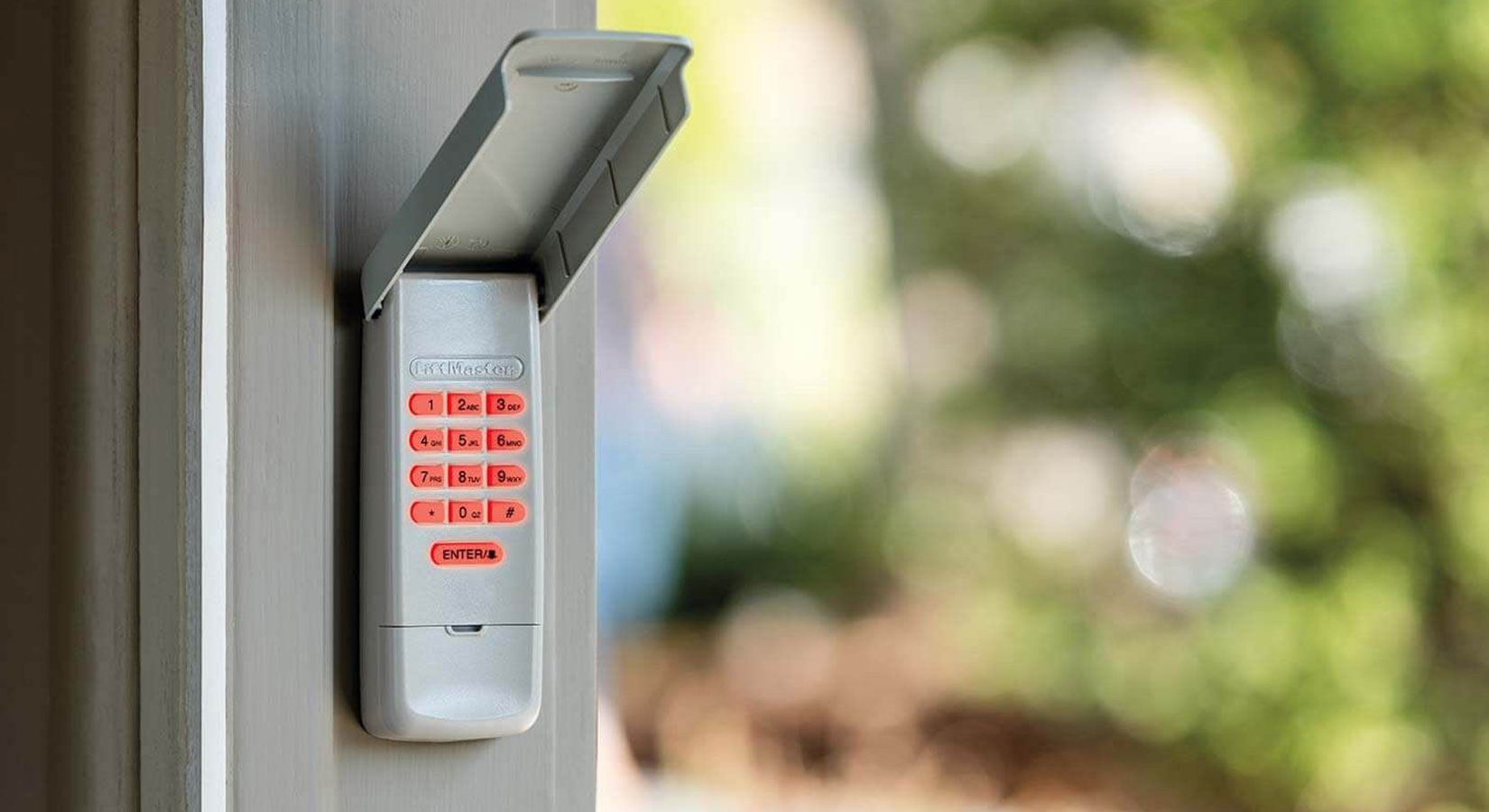
LiftMaster is one of the most popular brands in the U.S. Here’s how you reset their wireless keypad:
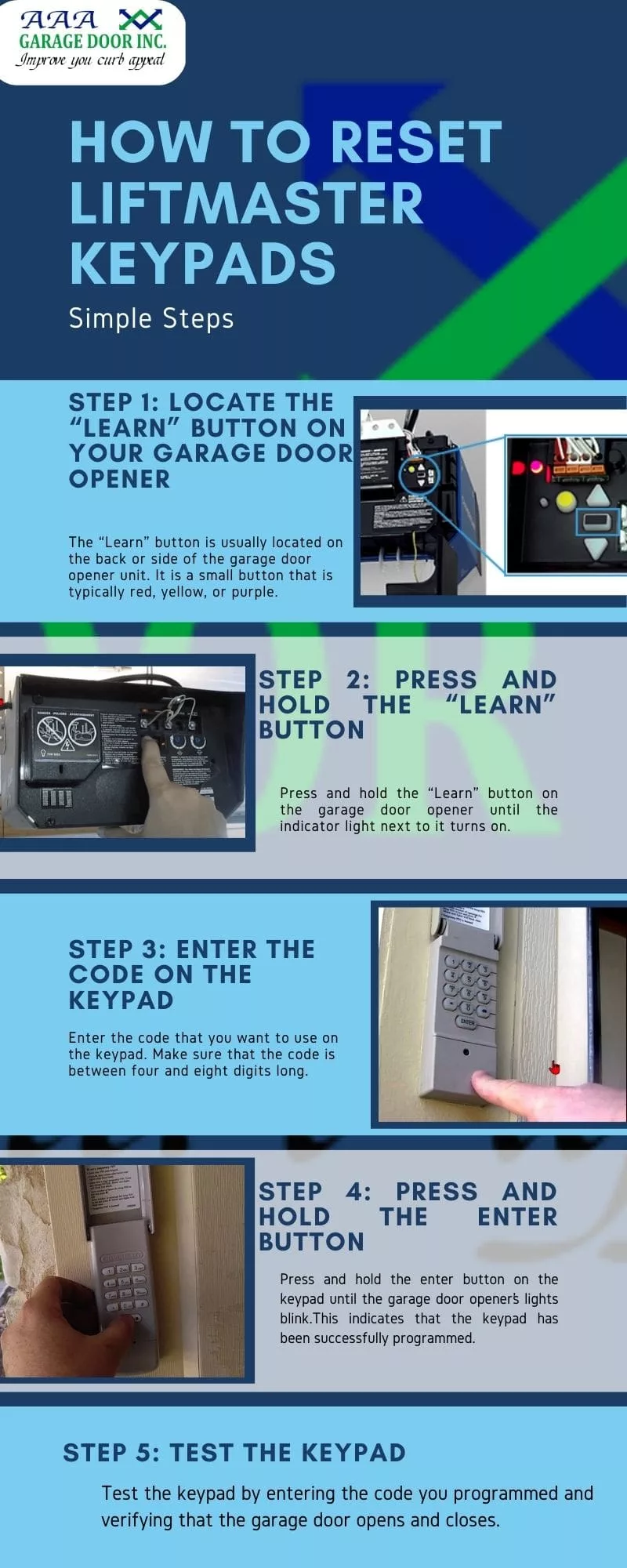
- Find the Learn button on the opener (often yellow, under the light cover).
- Press and release the Learn button.
- Within 30 seconds, enter your new 4-digit code on the keypad.
- Press and hold the Enter button until the opener’s light blinks.
- Test the code.
If it doesn’t work, try repeating the steps or check for battery issues.
Example: Resetting A Genie Garage Door Keypad
Genie keypads are also common. The process is similar but has some small differences:
- Open the keypad cover and press the Program button.
- Enter your new PIN, then press Program again.
- Go to the opener and press the Learn Code button.
- Enter your new PIN on the keypad and press Up/Down three times.
- The opener should respond.
If it doesn’t work, repeat the process, making sure each step is done within 30 seconds.
Differences Between Major Brands
Here is a quick comparison of how resetting works for different brands:
| Brand | Learn Button Location | Keypad Programming Steps | Special Notes |
|---|---|---|---|
| LiftMaster / Chamberlain | Back or side of opener, under light cover | Press Learn, enter code on keypad, press Enter | Color of Learn button affects steps |
| Genie | Side of opener, labeled “Learn Code” | Press Program on keypad, enter code, sync with opener | Some models need Up/Down pressed 3 times |
| Craftsman | Same as LiftMaster | Same as LiftMaster | Often shares parts with Chamberlain |
| Linear | On the opener unit | Press Learn, enter code on keypad | Some older models use dip switches |
Troubleshooting Common Problems
Even if you follow the steps carefully, issues can happen. Here are the most common problems and how to fix them:
The Keypad Doesn’t Respond
- Check the batteries. Most wireless keypads use one or two AA or 9V batteries. Replace them if you’re unsure.
- Clean the keypad. Dirt, spider webs, or stuck buttons can block signals.
- Distance issues. Keypads work best when close to the opener. If mounted far away, the signal might not reach.
The Code Doesn’t Work
- Double-check your steps. Did you press the right buttons, in the right order?
- Try a different code. Some systems don’t accept repeating numbers or certain combinations.
- Wait and retry. Some openers have a short lockout time if you enter the wrong code several times.
The Keypad Works, But The Remote Doesn’t
- Reprogram the remote. If you erased all codes, remotes must be reset too.
- Check for interference. Wi-Fi routers, LED bulbs, or other electronics can block signals.
The Keypad Flashes Or Beeps
- Low battery. Most keypads flash or beep when batteries are low.
- Error code. Check your manual for what the pattern means.
The Keypad Is Old Or Damaged
- Replace the keypad. If it’s more than 10 years old or the buttons stick, consider a new one.
- Upgrade to a rolling code system for better security.
Safety And Security Tips
Resetting your keypad is just the first step. Here are more tips to keep your garage and home safer:
- Change your code regularly – every 6-12 months.
- Don’t use simple codes like “0000” or “1234.”
- Don’t share your code widely – only with trusted people.
- Check the keypad for wear – worn-out numbers are easy to guess.
- Keep the opener manual for reference and troubleshooting.
- Update your opener if it’s over 20 years old; older models are easy to hack.
- Install motion lights near the keypad to scare off intruders.
Key Features Of Modern Garage Door Keypads
Today’s keypads offer more features than ever. Here’s a look at what’s available:
| Feature | Benefits | Brands |
|---|---|---|
| Backlit keys | Easier to use at night | LiftMaster, Genie, Chamberlain |
| Rolling code technology | Improved security | Most modern brands |
| Multiple PINs | Temporary codes for guests | LiftMaster, Genie |
| Weather resistance | Longer life outdoors | All reputable brands |
| Smartphone integration | Control from anywhere | MyQ, Aladdin Connect |
How To Choose A Secure Keypad Code
Picking a strong code is as important as resetting it. Here’s how to choose a good one:
- Use a mix of numbers, avoiding patterns.
- Don’t use house numbers, birthdays, or phone numbers.
- Change the code if you suspect it’s been seen.
- Write down your code and store it safely (not on the garage wall! ).
Non-obvious insight: Some keypads allow for longer PINs (up to 6 digits). Longer codes are much harder to guess.
Advanced: Setting Temporary Or Guest Codes
Many modern keypads let you set temporary PINs. These codes work for a few hours or days and then expire automatically. This is perfect for guests, cleaners, or deliveries.
To set a temporary code:
- Enter your main PIN.
- Press the Program or Learn key.
- Enter a new PIN and set a time limit (see manual for details).
- Test the temporary code.
Pro tip: Always erase temporary codes after use.
What To Do If You Forgot Your Old Code
If you can’t remember the old code, don’t worry. Most systems let you reset the keypad without it:
- Use the Learn button on the opener to clear all codes.
- Follow the steps above to set a new code.
- If the keypad requires the old code, check the manual or manufacturer’s website for a reset process.
Note: If you’re stuck, write down your opener’s model number and search online or call customer support.
How To Reset Keypads With Dip Switches
Some older keypads use dip switches inside the unit or opener. Here’s how to reset them:
- Remove the keypad from the wall (if possible).
- Open the back cover and find the dip switches.
- Set a new pattern, matching the switches on the opener.
- Reinstall the keypad.
- Test the code.
Non-obvious insight: Dip switch systems are not very secure. Anyone with access can copy your code. Upgrade if you can.
Maintaining Your Garage Door Keypad
A well-maintained keypad lasts longer and works better. Here’s what to do:
- Clean the keypad monthly with a soft cloth.
- Change the batteries every 6-12 months.
- Check for cracks or water damage.
- Lubricate the keypad cover if it sticks.
If your keypad is acting up after rain, let it dry fully before trying to reset it.
Professional Help: When To Call An Expert
Most people can reset their own keypad, but sometimes it’s best to call a pro:
- If the keypad is damaged or the opener is very old.
- If you tried all steps and nothing works.
- If you see frayed wires or sparks.
Tip: Choose a licensed garage door technician with good reviews. Avoid anyone who suggests replacing the whole system for a small keypad issue.
Real-life Example: Homeowner’s Reset Experience
Maria, a homeowner in Dallas, forgot her garage keypad code after a power outage. She tried the usual steps, but the keypad wouldn’t respond. After replacing the battery and cleaning the buttons, she followed her opener’s manual for the reset process.
It worked—but she realized her remotes stopped working too. By reading the manual, she learned she had erased all codes. She spent an extra 10 minutes reprogramming her remotes and learned to always keep her manual handy.
Lesson: Resetting the keypad can affect other devices. Be ready to reprogram everything if needed.
Common Mistakes To Avoid
- Rushing through steps. Wait for lights to blink or clicks before moving on.
- Choosing an easy code. This makes your garage less secure.
- Forgetting to test. Always test the keypad before closing up.
- Not replacing batteries first. Many keypads act faulty with low battery.
- Losing your manual. Keep it for future resets.
Keypad Reset Data And Security Statistics
- Over 50% of break-ins to garages happen because of weak or unchanged codes.
- Modern rolling code systems reduce “code grabbing” attacks by over 90%.
- Keypads older than 15 years are 3x more likely to fail or be hacked.
When To Replace Vs. Reset
Sometimes, resetting isn’t enough. Replace your keypad if:
- Buttons stick or don’t light up.
- It’s older than 10-15 years.
- You see cracks, water damage, or missing pieces.
- It can’t hold a code after a reset.
Upgrading to a newer model is an investment in security and convenience.
Where To Find More Help
For detailed guides, visit your brand’s official website or search for video tutorials. The Garage Door Opener Wikipedia page gives a good overview: Wikipedia.
Frequently Asked Questions
How Often Should I Reset My Garage Door Keypad Code?
It’s smart to reset your code every 6-12 months, or anytime you give it out to someone new. This keeps your garage secure and prevents old codes from being used without your knowledge.
What If My Garage Keypad Doesn’t Have A Learn Button?
Some older keypads use dip switches or a special programming button instead. Check inside the keypad or your opener unit. If you can’t find one, look up your model’s manual online for specific instructions.
Can I Use The Same Code For Multiple Garage Doors?
Yes, if both doors use the same brand and technology, you can program one keypad to open multiple doors. Most keypads let you set separate codes for each door. Follow your manual for multi-door setup.
What Should I Do If I Lose My Garage Door Opener Manual?
Most manufacturers post manuals online. Search for your opener’s brand and model number plus “manual. ” If you can’t find it, call customer support for help.
Is It Possible For Someone To Hack My Garage Door Keypad?
Modern rolling code keypads are very secure, but older fixed code or dip switch keypads can be hacked with simple devices. Upgrade to a rolling code system if your keypad is over 15 years old for the best protection.
Resetting your garage door keypad is a simple but powerful way to keep your home safe, avoid lockouts, and make life easier. With the steps and tips above, you’ll be ready to handle any keypad issue—no locksmith required.