
The humble garage door opener remote, often a small, unassuming device clipped to a sun visor or tucked away in a console, is a marvel of modern convenience. Yet, for many, the buttons adorning these remotes remain a mystery. What does each symbol or color signify?
Why do some remotes have more buttons than others? Understanding these seemingly simple controls can demystify your garage door operation, enhance security, and help you troubleshoot common issues more effectively. This guide will break down the typical buttons found on garage door opener remotes, explain their functions, and touch upon why variations exist, empowering you with the knowledge to operate your garage door system with confidence.
Key Takeaways
- Basic Functionality: Most remotes have a primary button for opening/closing, and often a separate button for lighting.
- Advanced Features: Additional buttons can control vacation modes, lockouts, or even multiple garage doors.
- Color Coding: Button colors can indicate different functions or security protocols, especially in older systems.
- Manufacturer Variations: Button layouts and functions differ significantly between brands like Chamberlain, LiftMaster, Genie, and Craftsman.
- Troubleshooting: Understanding button functions is crucial for diagnosing issues, such as a remote not working or needing a reset.
- Security: Newer remotes use rolling codes for enhanced security, rendering older fixed-code remotes obsolete.

Credit: support.chamberlaingroup.com
Understanding Common Garage Door Opener Remote Buttons
The primary purpose of a garage door opener remote is to wirelessly activate the opener motor, thereby opening or closing your garage door. However, modern remotes often incorporate additional features, leading to a variety of button configurations. The most common buttons are dedicated to the core functions of opening/closing and controlling the opener’s light.
The Primary Open/close Button
This is almost universally the main button on any garage door opener remote. It’s the button you’ll press most often. When you press it, it sends a signal to the garage door opener motor unit in your garage. The opener then initiates its programmed sequence: if the door is closed, it opens; if it’s open, it closes. This simple, single-button operation is what made garage door openers so popular, offering a significant upgrade in convenience and security over manual garage doors.
- Functionality: Initiates the open or close cycle of the garage door.
- Indicator: Often the largest button or centrally located.
- Signal Type: Sends a specific radio frequency signal to the opener.
The Light Button
Many garage door opener remotes include a separate button specifically for controlling the overhead light in your garage. This is a secondary convenience feature. Pressing this button will turn the garage light on or off, independently of the door’s movement. This is particularly useful when arriving home at night; you can illuminate the garage before the door fully opens, or turn off the light after parking without needing to manually flip a switch inside the garage.
- Functionality: Turns the garage door opener’s built-in light on or off.
- Indicator: Typically smaller than the main button and may have a light bulb icon.
- Operation: Works as a toggle; one press turns it on, another press turns it off.
Multi-door Control Buttons
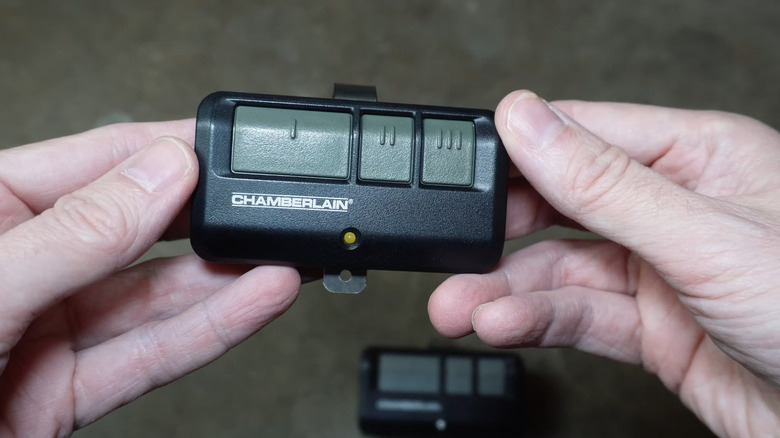
If you have more than one garage door opener, you’ll likely encounter remotes with multiple buttons. These are designed to control different doors. Each button is typically programmed to a specific opener unit. For instance, a three-button remote might have:
- Button 1: Opens/closes Garage Door A.
- Button 2: Opens/closes Garage Door B.
- Button 3: Controls the light for Garage Door A, or perhaps a third door if applicable.
This feature is incredibly convenient for households with multiple vehicles or attached garages. It eliminates the need to carry multiple remotes.
- Functionality: Each button is assigned to a specific garage door opener or function.
- Indicator: Clearly labeled or arranged sequentially.
- Programming: Requires individual programming for each opener.
Advanced Feature Buttons
Beyond the basic open/close and light functions, some remotes offer buttons for more advanced features, often found on higher-end or professional-grade openers.
- Vacation Mode/Lockout Button: This button is designed to disable the remote opener temporarily, usually for security when you are away on vacation. When activated, the opener will not respond to remote signals, preventing unauthorized access. It typically needs to be deactivated manually or through a specific sequence. Some systems might refer to this as a “lock” or “security” feature.
- Personal/Programmable Button: Some remotes include a button that can be programmed to perform a specific function based on your needs. This could be anything from activating a smart home device to opening a gate, or even calling a pre-programmed number in some advanced systems.
- MyQ Technology Button: For openers equipped with MyQ technology, there might be a dedicated button or a combination of buttons that interact with the MyQ app or smart home services. This allows for remote monitoring and control via a smartphone.

Credit: www.wikihow.com
Button Colors And Their Significance
While the shape and placement of buttons are primary indicators, the color of the buttons on a garage door opener remote can also provide valuable information, particularly regarding the opener’s security protocol and programming method. This is especially true for older models.
Understanding Dip Switches And Color Codes
In the early days of garage door openers, DIP switches were a common security feature. These were small switches inside the remote and the opener unit that you would set in a specific pattern (up or down). Matching these patterns allowed the remote to communicate with the opener. The color of the buttons on the remote often corresponded to the color of the DIP switch panel on the opener unit itself, or indicated the specific frequency and code type.
Comparison of Older DIP Switch Color Codes:
| Button/Switch Color | Frequency | Typical Code Type | Notes |
|---|---|---|---|
| Red | 390 MHz | Fixed Code | Very common in older systems. |
| Purple | 315 MHz | Fixed Code | Another common frequency for older systems. |
| Yellow/Gold | 315 MHz | Security+ (Rolling Code) | Indicates a more advanced, secure system. |
| Green | 370 MHz | Fixed Code | Less common than red or purple. |
| Blue | 300 MHz | Fixed Code | Used by some manufacturers. |
| Orange | 318 MHz | Fixed Code | Another frequency variation. |
| Black/White | Varies | Fixed Code | Often associated with specific manufacturer lines. |
*Please note: These color codes are general guidelines and can vary significantly between manufacturers and even within product lines of the same manufacturer. Always consult your owner’s manual for precise information.*
The Shift To Rolling Codes
The advent of rolling code technology, also known as Security+ (LiftMaster/Chamberlain) or G-Link (Genie), significantly enhanced garage door security. Unlike fixed codes, where the same signal is sent every time, rolling codes generate a new, unique code each time the remote is used. This makes it virtually impossible for unauthorized individuals to “capture” your signal and gain access.
With rolling code systems, the color of the buttons on the remote is less about the frequency and more about the specific generation of the rolling code technology or a particular function. For instance, newer LiftMaster remotes might use a yellow button to indicate a Security+ 2.0 opener, which operates on a different frequency band for increased security and reduced interference.
Key characteristics of rolling code remotes:
- Enhanced Security: Prevents code grabbing.
- Automatic Updates: The opener and remote “learn” the new code sequence.
- Compatibility: Often requires specific opener models that support rolling codes.
If you have an older remote with fixed code technology and are concerned about security, it’s highly recommended to upgrade to a newer system with rolling codes. Replacing an old opener unit and remotes can be a worthwhile investment in home security. For context on costs, you can explore garage door costs and savings tips.
Button Layouts Across Major Brands
Garage door opener manufacturers have distinct design philosophies, which often translate into different button layouts and functionalities on their remotes. Understanding these differences can help you quickly identify the purpose of buttons on your specific remote.
Chamberlain And Liftmaster Remotes
Chamberlain and LiftMaster are sister companies, and their remotes often share similar designs and functionalities, particularly concerning their Security+ and Security+ 2.0 technologies.
- Common Buttons:
- Large Central Button: Typically for opening and closing the primary garage door.
- Smaller Buttons: Often used for controlling the opener’s light or a secondary garage door/gate.
- Yellow Button (on some models): May indicate a Security+ 2.0 system, often with a specific color associated with the opener’s learn button.
- Example: A common LiftMaster 3-button remote might have a large central button for the main door, and two smaller buttons above or below it for a second door and the light.
Genie Remotes
Genie offers a wide range of remotes, from basic single-button units to multi-door remotes with advanced features.
- Common Buttons:
- Single or Dual Button Remotes: For basic open/close functions.
- Multi-Button Remotes: Designed to control multiple doors or gates.
- “Auto-Seek Dual Frequency” (G-Link): Newer Genie remotes utilize dual frequencies (315 MHz and 390 MHz) to ensure reliable operation and enhanced security, often without a specific button color denoting this.
- Example: A Genie Intellicode remote might have two buttons, one for the primary door and another for a secondary function.
Craftsman Remotes
Craftsman garage door openers have historically used a variety of technologies, including DIP switches and rolling codes. Their remotes often reflect this diversity.
- Common Buttons:
- Single Button: For basic operation.
- Three-Button Remotes: Common for controlling multiple doors or functions.
- Color-Coded Learn Buttons on Opener: Craftsman often uses colored learn buttons on the motor unit (e.g., red, green, yellow, black) that correspond to the remote’s programming and frequency. The remote’s buttons themselves may not have explicit color coding for function but are linked to the opener’s color code.
- Example: A Craftsman 3-button remote might have buttons for Door 1, Door 2, and Light. The programming process often involves matching the remote’s learn button color to the opener’s learn button color.
Overhead Door Remotes
Overhead Door is another major player, often sharing technology with Genie. Their remotes are typically user-friendly.
- Common Buttons:
- Single/Dual Button: For primary door operation.
- Multi-Button Remotes: For controlling multiple garage doors or gates.
- Rolling Code Technology: Modern remotes use rolling codes for security.
- Example: An Overhead Door remote might have a simple two-button design, one for opening/closing and another for a secondary function.
Comparison of Remote Button Functions by Brand (General)
| Brand | Typical Primary Button | Secondary Button(s) Use | Advanced Features | Color Significance |
|---|---|---|---|---|
| Chamberlain | Open/Close Door | Light control, Second Door/Gate | MyQ connectivity, Vacation Lockout | Yellow button often indicates Security+ 2.0; older models may have color-coded DIP switches. |
| LiftMaster | Open/Close Door | Light control, Second Door/Gate | MyQ connectivity, Vacation Lockout | Yellow button often indicates Security+ 2.0; older models may have color-coded DIP switches. |
| Genie | Open/Close Door | Second Door/Gate, Light (less common) | Intellicode (rolling code), Auto-Seek Dual Frequency | Less emphasis on remote button color; focus on Intellicode technology. |
| Craftsman | Open/Close Door | Second Door/Gate, Light | Compatibility with various rolling code and DIP switch systems | Remote buttons themselves usually not color-coded for function; programming linked to opener’s colored learn button. |
| Overhead Door | Open/Close Door | Second Door/Gate, Light (less common) | Rolling Code Technology | Similar to Genie, less emphasis on remote button color for function. |
Credit: www.slashgear.com
Button Icons And Symbols
Beyond simple labels like “Open” or “Light,” some remotes use universal icons or symbols to denote button functions. Recognizing these can be helpful, especially if the remote is worn or if you’re using a remote from a different brand.
Common Icons And Their Meanings
- Door Icon: A simple silhouette of a garage door. This almost always signifies the primary open/close function.
- Light Bulb Icon: A stylized light bulb. This indicates the button controls the garage door opener’s overhead light.
- Lock Icon: A padlock symbol. This button is typically for activating a vacation mode or lockout feature, preventing the opener from responding to remote signals.
- Plus/Minus or Up/Down Arrows: Sometimes used on multi-button remotes to indicate sequential programming or control of different doors.
- “P” or “Prog” Icon: May indicate a programmable or personal function button.
Understanding Button Combinations
Occasionally, you might need to press two buttons simultaneously on your remote to activate a specific function. This is common for:
- Programming or Resetting: Many manufacturers require a specific button combination to enter programming mode or reset the remote. For example, holding down the Lock and Door buttons might initiate a reset sequence.
- Activating Advanced Features: Some advanced features, like confirming a vacation mode setting, might require a dual-button press.
Always refer to your garage door opener’s owner’s manual for the exact button combinations and their specific meanings for your model. If you’ve lost your manual, you can usually find a digital copy on the manufacturer’s website by searching for your opener’s model number.
Troubleshooting Common Button Issues
When your garage door opener remote isn’t working as expected, understanding the buttons and their functions is the first step in troubleshooting. Many common problems can be resolved by understanding how the buttons are supposed to work and what might be interfering with their operation.
Remote Not Responding
If pressing a button on your remote does nothing, several issues could be at play:
- Dead Battery: This is the most frequent cause. Remote batteries typically last 1-2 years. Replacing the battery with the correct type (often a coin cell like CR2032 or CR2016) is the first thing to try.
- Signal Interference: Other electronic devices operating on similar frequencies can interfere. Try operating the remote away from other gadgets.
- Opener Lockout Engaged: If the opener’s “lock” or “vacation” mode is active (often controlled by a dedicated button on the wall control panel or sometimes the remote), the remote signals will be ignored. Check your wall-mounted control panel for a lock button or indicator light.
- Remote Not Programmed: If you’ve recently replaced the remote or the opener, it needs to be programmed. This involves pressing a “learn” button on the motor unit and then pressing the remote button. The process varies by brand; for example, you might need to reset a LiftMaster garage door opener remote or reprogram a Genie keypad.
- Opener Power Issue: Ensure the garage door opener unit itself is receiving power. Check the power cord and the circuit breaker.
- Damaged Remote: The remote itself might be physically damaged or have internal connection issues.
Multiple Buttons Not Working
If only one button on a multi-button remote isn’t working, it’s likely that specific button’s circuitry or programming. If all buttons on a multi-button remote fail, it points towards a more general issue like a dead battery or a programming problem.
Light Button Not Working
If the light button on your remote doesn’t activate the garage light, but the open/close button works, the issue is specific to the light function.
- Light Bulb: The bulb in the opener unit might be burned out.
- Opener Settings: Some openers have settings to disable the light function or have it operate only during door travel. Check your opener’s manual.
- Programming: In some rare cases, the light function might need specific programming.
Accidental Activation
Sometimes, a button can be accidentally pressed in a pocket or bag, causing the garage door to open or close unexpectedly. This is more common with older, single-button remotes or if the buttons are very sensitive. Newer remotes often have recessed buttons or require a slightly longer press to prevent accidental activation. Some advanced systems allow you to lock out specific buttons or require a multi-button press for operation.
Pro Tip: Always keep a copy of your garage door opener’s manual handy. It’s the definitive guide for understanding your specific remote’s buttons and troubleshooting any issues. If you can’t find the physical copy, search online using your opener’s model number.
Maintaining Your Garage Door Opener Remote
Proper maintenance of your garage door opener remote ensures its longevity and reliable performance. While remotes are relatively simple devices, a few practices can prevent issues and keep them functioning optimally.
Battery Replacement
As mentioned, dead batteries are the most common cause of remote malfunction.
- Frequency: Plan to replace batteries at least once a year, or as soon as you notice diminished range or intermittent operation.
- Battery Type: Always use the correct battery type specified by the manufacturer. Using the wrong type can damage the remote or lead to poor performance.
- Disposal: Dispose of old batteries responsibly according to local regulations.
Cleaning
The buttons and casing of your remote can accumulate dirt, dust, and grime from frequent handling.
- Method: Use a slightly damp cloth (water or mild soap solution) to wipe down the remote. Avoid spraying liquids directly onto the remote.
- Drying: Ensure the remote is completely dry before use.
- Button Contacts: If buttons become sticky, a cotton swab with a small amount of isopropyl alcohol can help clean the edges and contacts, but use sparingly and ensure it dries completely.
Range Optimization
The range of your remote can be affected by several factors:
- Antenna: The antenna on the garage door opener motor unit in your garage is crucial. Ensure it’s hanging down freely and not obstructed. If it’s damaged, it may need replacement.
- Interference: Keep the remote away from other electronic devices that might cause interference.
- Remote Placement: In your vehicle, the sun visor is often the ideal location for mounting the remote, as it provides a clear line of sight to the garage door. Avoid placing it in metal compartments or near other electronic modules in the car.
- Battery Strength: A weak battery can significantly reduce the remote’s range.
Reprogramming And Resetting
Over time, or after power outages or battery replacements, you might need to reprogram or reset your remote.
- When to Reset: If the remote is behaving erratically, or if you suspect a programming glitch, resetting it is often the first step. This process varies by brand. For example, you might need to reset your garage door opener entirely, or just the remote itself.
- Keypad Reset: If you have a wireless keypad, the process for resetting or reprogramming it is also specific to the brand (e.g., reprogram a Genie keypad or reprogram a Chamberlain keypad).
Manual Operation
In the event of a power outage or a malfunctioning opener, knowing how to manually operate your garage door is essential. Most openers have a release cord (usually red) hanging from the motor unit. Pulling this cord disengages the trolley from the opener’s chain or belt, allowing you to lift the door by hand. Always ensure the door is closed before pulling the release cord if you intend to close it manually. Refer to