
The humble garage door opener remote is a marvel of convenience, a small device that allows us to command a large, heavy door with the simple press of a button. But what happens when that button is a little different? You might have noticed a particular button on your garage door opener remote that looks distinct, perhaps labeled with a lock icon, or simply set apart from the others. This isn’t just decorative; it’s a security feature designed to enhance the safety and control of your garage access. Understanding the function of this lock button is crucial for homeowners looking to maximize their garage security and prevent unauthorized access.
Many modern garage door openers come equipped with a “lock” or “vacation” mode button. This feature, often found on the motor unit itself or sometimes accessible via a remote, serves a specific purpose: to temporarily disable the opener’s ability to respond to remote commands. This is particularly useful when you’re away from home for an extended period, such as on vacation, and want to ensure that no one can accidentally or intentionally open your garage door using a stolen or duplicated remote. It’s a proactive step in safeguarding your property and its contents.
Key Takeaways
- The lock button on a garage door opener remote or motor unit typically activates a vacation mode, disabling remote operation for enhanced security.
- This feature is invaluable when traveling or when concerned about unauthorized access.
- Activating the lock mode prevents the opener from responding to any remote signals, including those from your primary remote.
- You will likely need to use the manual release or a hardwired wall button to operate the door when the lock mode is engaged.
- Always disengage the lock mode upon your return to restore normal remote functionality.
- Consult your garage door opener’s manual for specific instructions on using the lock feature for your model.

Credit: www.youtube.com
Understanding The Lock Button’s Primary Function: Vacation Mode
The most common and significant function of a lock button on a garage door opener is to engage what is often referred to as vacation mode. This mode is designed with security in mind, particularly for homeowners who will be away from their residences for an extended period. When vacation mode is activated, the garage door opener system is essentially put into a state where it will not respond to any radio frequency (RF) signals from your remote controls. This is a critical distinction from simply locking the garage door manually, as it prevents the electronic opening mechanism itself from being activated.
Think of it as a digital deadbolt for your garage door opener’s control system. While the physical door might still be closed and locked by its internal mechanism, the vacation mode ensures that the electronic “brain” of the opener is unresponsive to the signals it usually listens for.
This is a powerful deterrent against opportunistic thieves who might have obtained a copy of your remote or are attempting to use universal remotes to gain access. By disabling the opener’s ability to receive commands, you significantly reduce the risk of your garage being unexpectedly opened while you’re away.
How Vacation Mode Enhances Security
The enhanced security provided by vacation mode stems from its complete disabling of remote access. In a typical scenario, a garage door opener system is always “listening” for the specific radio signals emitted by its paired remotes. If the correct code is received, the opener activates.
However, when vacation mode is engaged, this listening function is effectively turned off for all remotes. This means that even if a thief has a sophisticated device capable of capturing and replaying your remote’s signal, or if they have managed to obtain a duplicate remote, their efforts will be futile.
The opener simply won’t react.
This feature is particularly relevant in an era where remote cloning technology is becoming more accessible. While garage door opener manufacturers have implemented rolling codes to mitigate this risk, vacation mode offers an additional, simpler layer of protection. It’s a manual override that ensures absolute control over when your garage door can be electronically opened. For homeowners who travel frequently or live in areas with higher crime rates, this feature provides significant peace of mind.
Identifying The Lock Button On Your Opener
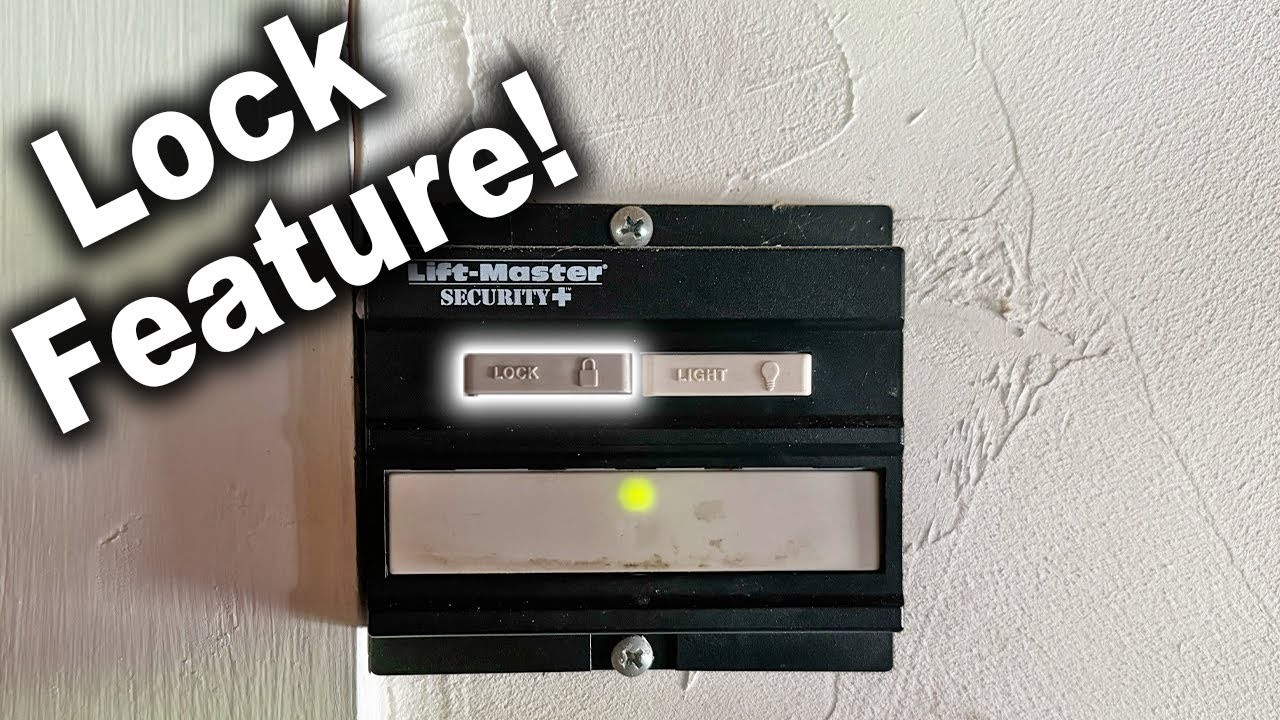
The appearance and location of the lock button can vary significantly depending on the brand and model of your garage door opener. On some motor units, the lock button might be a small, recessed button located on the main housing, often near the antenna or the programming buttons. It may be labeled with a padlock icon or simply the word “LOCK.” On other systems, particularly those with more advanced wall consoles, the lock function might be integrated into the console itself, possibly as a dedicated button or a setting accessible through a menu.
Some remote controls also feature a lock button. This is less common for the primary function of activating vacation mode on the opener itself, but it can sometimes be used to lock the remote’s buttons, preventing accidental activation. It’s crucial to consult your specific garage door opener’s manual to accurately identify the lock button and understand its precise function for your model. Without the manual, a visual inspection of the motor unit and any associated wall consoles is the best first step.
How To Activate And Deactivate The Lock Feature
The process of activating and deactivating the lock feature is generally straightforward but requires careful attention to your opener’s specific instructions. The primary goal is to ensure you don’t inadvertently lock yourself out of your garage or forget to disengage the mode upon your return.
Activating Vacation Mode
To activate vacation mode, you will typically need to access the lock button on either the motor unit or the wall console.
- Locate the Button: As mentioned, find the lock button. It’s often a physical button, sometimes requiring a paperclip or a pointed object to press if it’s recessed.
- Press and Hold (or Press Once): The activation method can vary. Some require a short press, while others might need you to press and hold the button for a few seconds. The opener might provide an audible beep or a visual indicator (like a flashing light) to confirm activation.
- Verify Activation: After pressing the button, test your remote control. If vacation mode is active, the garage door should not respond. Try pressing the button on your wall-mounted console. If it’s a wired button, it often bypasses the lock mode.
Pro Tip: Always activate vacation mode after your garage door is fully closed. Activating it while the door is opening or closing can lead to unpredictable behavior or system errors.
Deactivating Vacation Mode
Deactivating vacation mode is just as important as activating it. Failure to do so means your remote will remain non-functional even after you’ve returned home.
- Locate the Button Again: Find the same lock button used for activation.
- Press and Hold (or Press Once): Similar to activation, the deactivation process usually involves pressing and holding the button or pressing it once. The opener should provide confirmation, such as a different beep pattern or a steady light.
- Test Your Remote: Once deactivated, test your remote control again. The garage door should now respond normally to remote commands.
Warning: Forgetting to deactivate vacation mode is a common oversight. Make a note on your calendar or set a reminder for when you return home to disengage this feature. This prevents frustration and ensures your daily routine isn’t disrupted.
Credit: www.youtube.com
Variations In Lock Button Functionality Across Brands
While the core concept of a lock button is consistent, its implementation and specific capabilities can differ significantly between garage door opener brands. Understanding these variations is key to correctly using the feature.
Liftmaster And Chamberlain
LiftMaster and Chamberlain, often sharing technology due to being under the same parent company (Chamberlain Group), typically implement the lock feature on their wall consoles. This button is usually labeled “LOCK” or has a padlock icon. When pressed, it disables the remote control functionality. However, the wired door control button (the button you press to open or close the door from inside the garage) usually remains operational, allowing you to use the door even when in vacation mode. To reset or clear the lock, you typically press and hold the LOCK button again. For specific models, you might need to consult resources on how to reset Liftmaster garage door opener remote or similar guides for Chamberlain.
Genie
Genie garage door openers often have a similar lock feature, sometimes referred to as “Vacation Lock” or “Lockout”. This is usually found on the wall console. When activated, it prevents remote operation. Some Genie models might also incorporate a similar function directly on the motor unit, though this is less common. The key takeaway for Genie users is that the wired wall button typically overrides the lockout. Resetting it involves pressing and holding the lock button on the console. If you encounter issues, looking into how to reprogram Genie garage door keypad can sometimes help resolve related programming glitches.
Craftsman
Craftsman openers, many of which are manufactured by Chamberlain, often mirror the functionality of LiftMaster and Chamberlain units. The LOCK button on the wall console is the primary interface for this feature. It disables remote control access but usually allows the wired wall button to function. The process for activation and deactivation is typically pressing and holding the LOCK button. If you’re troubleshooting connectivity or functionality, guides on how to reset garage door remote Craftsman can be useful for general remote issues.
Other Brands
Other brands like Overhead Door, Sommer, and Marantec may have their own unique implementations. Some might use a dip switch on the motor unit, while others might have a specific sequence of button presses. It is always paramount to refer to the manufacturer’s instruction manual for your specific model. The core principle remains the same: a temporary disabling of remote control functionality for enhanced security when away.

Credit: www.youtube.com
When To Use The Lock Button: Practical Scenarios
The lock button, or vacation mode, isn’t just for extended vacations. There are several other practical scenarios where engaging this feature can provide added security and peace of mind.
Extended Absences (vacations, Business Trips)
This is the most obvious use case. If you’re planning to be away for more than a few days, activating vacation mode is a highly recommended security measure. It significantly reduces the risk of your home being targeted while you’re gone.
Concerns About Remote Security
- Lost or Stolen Remote: If you misplace your garage door remote or suspect it might have been stolen, engaging the lock mode immediately is a wise precaution. This prevents anyone who finds or takes the remote from opening your garage. You can then proceed to reset your opener’s codes to pair new remotes.
- Loaned Remote: If you lend your car, which contains a garage door remote, to someone else for an extended period, you might consider activating vacation mode if you don’t want them to have access to your garage.
High-crime Areas Or Increased Security Needs
In neighborhoods with a higher incidence of property crime, homeowners may opt to use vacation mode more frequently, even for shorter absences, as an added layer of security. It’s a simple step that can make your home a less attractive target.
Temporary Guest Access Issues
If you have guests staying with you and you want to control when they can access the garage remotely, vacation mode can be used in conjunction with other access methods. For instance, you could disable remote access and only allow entry via the manual release or a hardwired button, granting access only when you are present.
Troubleshooting Remote Issues
While not its primary purpose, sometimes engaging and then disengaging the lock mode can act as a soft reset for the opener’s remote receiver. If your remotes are acting erratically, this is a simple step to try before more complex troubleshooting. However, for persistent issues, you might need to look into guides on how to reset my garage door opener.
What Happens When The Lock Button Is Activated?
When you activate the lock button, several things happen within the garage door opener system to ensure that remote commands are ignored. Understanding these internal changes can help you better appreciate the feature’s effectiveness.
Disabling The Radio Receiver
The core function of the lock mode is to disable the radio frequency receiver within the garage door opener’s motor unit. This receiver is what normally picks up the signals from your remote controls. When vacation mode is on, the receiver essentially goes dormant, meaning it will not process any incoming RF signals, regardless of their origin or code.
Maintaining Power To Other Functions
It’s important to note that activating vacation mode does not cut power to the entire garage door opener system. The motor, lights (if applicable), and safety sensors typically remain powered. Crucially, any wired connections, such as the wall-mounted control button or any external keypads, usually continue to function. This ensures you can still operate the door manually from inside your garage.
Preventing Rolling Code Synchronization
Modern garage door openers use rolling codes (also known as hopping codes) to enhance security. Each time you press the remote, a new code is sent, and the opener synchronizes with this sequence. Vacation mode effectively halts this synchronization process for all remotes. Even if a remote’s code were somehow captured, it would be out of sync with the opener’s expected sequence once vacation mode is deactivated, rendering it useless until reprogrammed.
Impact On Keypads And Smart Home Devices
- Keypads: External keypads, whether hardwired or wireless, may or may not function when vacation mode is active. This depends on the specific model and how it communicates with the opener. Some keypads might use a separate communication channel that bypasses the main RF receiver. Again, checking your manual is essential. If you’re having trouble with a keypad, guides like how to reprogram Chamberlain garage door keypad can be helpful.
- Smart Home Integration: If your garage door opener is connected to a smart home system (e.g., via MyQ technology), activating vacation mode on the opener itself might disable remote control through the smart home app as well. This is because the smart home system relies on the opener’s receiver to send commands.
Operating Your Garage Door When Locked
When vacation mode is activated, your garage door opener will not respond to remote commands. This means you’ll need alternative methods to open and close your garage door.
Using The Manual Release Cord
Almost all garage door openers have a manual release cord, usually a red rope hanging from the trolley mechanism on the opener’s rail.
- Access the Opener: You’ll need to be able to reach the opener mechanism, which is typically mounted on the ceiling.
- Pull the Cord: Gently pull the red cord downwards. This disengages the trolley from the opener’s drive chain or screw.
- Lift the Door Manually: Once disengaged, you can lift the garage door by hand. Be prepared, as garage doors are heavy and counterbalanced. Lift slowly and steadily.
- Lowering the Door: To lower the door, simply pull it down by hand.
- Re-engaging the Opener: To restore automatic operation, you’ll need to re-engage the trolley. This usually involves pulling the red cord again, or in some models, operating the wall button or remote once the door is in the closed position. Consult your manual for the exact procedure. This process is detailed in guides like how can I open my garage door manually.
Using The Wired Wall Button
In most cases, the wired wall button (the button inside your garage that you use for everyday operation) will continue to work even when vacation mode is activated. This is the easiest way to operate the door when the lock feature is engaged, as it bypasses the receiver that the lock mode disables. If your wall button isn’t working, it might indicate a wiring issue or a different lock mechanism for your specific model.
Using A Hardwired Keypad
If you have a hardwired keypad installed near your garage door, this will likely continue to function. Similar to the wall button, it communicates directly with the opener’s circuitry without relying on the RF receiver that vacation mode disables.
Troubleshooting Common Lock Button Issues
While the lock button is generally reliable, users sometimes encounter issues. Here are a few common problems and their potential solutions.
Remote Still Works After Activating Lock Mode
This is a common point of confusion. If your remote still opens the garage door after you’ve pressed the lock button, double-check:
- Correct Button: Ensure you are pressing the actual LOCK button on the wall console or motor unit, not another programming button.
- Activation Method: Verify you’re using the correct method (press and hold vs. single press) as per your manual.
- Wired Button Functionality: Confirm that the wired wall button *does not* work. If the wired button also fails, there might be a more significant issue with the opener’s logic board.
- Model Specifics: Some models might have different “lock” functionalities. For example, a remote button might lock the remote itself, not the opener.
Cannot Deactivate Lock Mode
If you’re unable to disengage vacation mode:
- Power Cycle: Try unplugging the garage door opener from the power outlet for about 30 seconds, then plugging it back in. This can sometimes reset the logic board.
- Check Manual: Re-read the section in your manual regarding deactivation. There might be a specific sequence or requirement you’re missing.
- Reset Opener: As a last resort, you may need to perform a full system reset. This will erase all paired remotes and keypads, requiring you to reprogram them. Refer to guides like how do you adjust a Chamberlain garage door opener for general reset procedures, as many lock issues can stem from programming glitches.
Opener Behaving Erratically After Using Lock Mode
If your opener starts acting strangely after engaging or disengaging the lock feature:
- Reprogramming: It’s possible the lock mode activation/deactivation process has caused a minor desynchronization with your remotes. Try reprogramming your remotes. Guides such as how to reset garage door remote easily are a good starting point.
- Check Sensors: Ensure the safety sensors at the bottom of the garage door tracks are clean, aligned, and not obstructed. A malfunctioning sensor can cause erratic behavior.
- Lubrication: While seemingly unrelated, proper maintenance can prevent many issues. Ensure your garage door mechanism is well-lubricated. Refer to resources on how to lube garage door rollers.
Frequently Asked Questions
What Is The Primary Purpose Of The Lock Button On My Garage Door Opener?
The primary purpose of the lock button is to activate vacation mode, which disables the garage door opener’s response to remote control signals. This enhances security when you are away from home for extended periods, preventing unauthorized access via remote.
Does The Lock Button Disable The Wired Wall Button?
Typically, no. The lock button usually disables remote control operation but allows the wired wall button inside the garage to continue functioning. This ensures you can still operate the door manually from within your home.
How Do I Know If My Garage Door Opener Has A Lock Button?
You can identify a lock button by looking for a padlock icon or the word “LOCK” on your garage door opener’s motor unit or wall console. Always refer to your specific model’s owner’s manual for confirmation and instructions.
What Should I Do If I Forget To Disengage The Lock Mode Upon Returning Home?
If you forget to disengage the lock mode, your remote will not work. You will need to manually deactivate the lock mode by pressing the designated button again (usually on the wall console or motor unit). Once deactivated, test your remote.
If it still doesn’t work, you may need to reprogram your remote.
Can Using The Lock Button Damage My Garage Door Opener?
No, using the lock button as intended by the manufacturer will not damage your garage door opener. It is a designed security feature. However, improper activation or deactivation, or forgetting to disengage it, can lead to inconvenience or temporary loss of remote functionality.
The lock button on your garage door opener is a valuable, albeit sometimes overlooked, security feature. By understanding its function, primarily to engage vacation mode and disable remote operation, you can significantly enhance the safety of your home when you’re