
When your garage door opener remote suddenly stops responding, it can be a significant inconvenience. Whether it’s a Genie Excelerator model or another Genie system, the most common and effective solution is often to reprogram the remote. This process, while sounding technical, is generally straightforward and can save you the cost of a service call.
Genie has designed their systems with user-friendliness in mind, and understanding the basic principles of how these remotes communicate with the opener unit is key to successful reprogramming.
This guide will walk you through the entire process of programming your Genie Excelerator garage door opener remote. We’ll cover identifying your specific Genie model, locating the necessary buttons on your opener unit, and the step-by-step procedures for various Genie remote types, including those with Intellicode technology. By the end, you’ll be equipped to handle most common remote programming issues and get your garage door operating smoothly again.
Key Takeaways
- Identify Your Genie Model: Different Genie Excelerator models may have slightly different programming procedures.
- Locate the PROGRAM Button: This is the crucial button on your garage door opener motor unit that initiates the programming sequence.
- Understand Intellicode Technology: Most modern Genie openers use Intellicode, which requires a specific learning process for each remote.
- Clear Existing Remotes: Before adding new remotes, it’s often best to clear all previously programmed remotes to ensure security.
- Follow Step-by-Step Instructions: Precision is key during the programming sequence; follow each step carefully.
- Test Thoroughly: After programming, test the remote multiple times to confirm it’s working correctly.
Understanding Your Genie Excelerator Garage Door Opener
Genie is a well-respected name in the garage door opener industry, known for its reliability and innovation. The Genie Excelerator line, in particular, is recognized for its quiet operation and advanced features. Before diving into the programming process, it’s helpful to understand a few key aspects of your Genie system.
Most Genie Excelerator openers, especially those manufactured in the last couple of decades, utilize Intellicode technology. This is a rolling code security system designed to enhance safety and prevent unauthorized access. Unlike older fixed-code systems, Intellicode changes the access code each time the opener is used. This means that simply pressing a button on the remote won’t suffice; the opener unit needs to “learn” the new code being transmitted by the remote. This security feature is a significant upgrade from older systems and is a primary reason why remotes might stop working if not properly reprogrammed after a power outage or other system reset.
Identifying Your Genie Opener Model
The exact procedure for programming your Genie Excelerator remote can vary slightly depending on the specific model. Fortunately, identifying your model is usually straightforward. Look for a label on the motor unit, typically located on the ceiling of your garage. This label will contain important information, including the model number and sometimes the manufacturing date. Common Genie Excelerator models include the GXL series (e.g., GXL-950, GXL-1000) and others that may simply have “Excelerator” in their name.
If you can’t find a visible label, you might be able to find the model number in your owner’s manual. If you no longer have the manual, a quick search online using distinctive features of your opener (like its appearance or any unique sounds it makes) might help you identify it.
Knowing your model number can be beneficial if you need to consult Genie’s official support resources or a more specific programming guide.
Common Genie Remote Types
Genie offers a variety of remote controls, and while the programming principle remains similar, the physical design might differ. Most Genie Excelerator remotes will have one or more buttons to operate the garage door. Some common types include:
- Single-Button Remotes: Designed for a single garage door.
- Multi-Button Remotes: Capable of controlling multiple garage doors or other compatible devices.
- Keypad Remotes: Wireless entry systems that use a numerical code.
The primary focus of this guide is on the handheld remotes that communicate directly with the motor unit. For programming a Genie keypad, the process is similar but involves entering a PIN code. If you’re looking to reprogram a Genie keypad, you can find detailed steps on how to reprogram Genie garage door keypad in minutes.

Credit: www.youtube.com
Preparing For The Programming Process
Before you begin programming your Genie Excelerator remote, there are a few preparatory steps that will ensure a smooth and successful experience. Gathering the necessary tools and understanding the prerequisites will save you time and potential frustration.
What You’ll Need
- Your Genie Excelerator Remote: Ensure it has a working battery. If you suspect the battery is weak, replace it before starting.
- Access to the Garage Door Opener Motor Unit: You’ll need to be able to reach the motor unit mounted on your garage ceiling.
- A Ladder: A sturdy ladder is essential to safely reach the motor unit.
- A Small Screwdriver or Pin: Some Genie openers have a recessed “PROGRAM” button that may require a small tool to press.
- Your Owner’s Manual (Optional but Recommended): While this guide provides comprehensive steps, your manual offers model-specific details.
Safety Precautions
Working with electrical equipment and ladders requires caution. Always prioritize safety:
- Ensure the ladder is stable and placed on a level surface.
- Do not stand on the top step of the ladder.
- Keep the area around the motor unit clear of obstructions.
- Avoid touching any wiring inside the motor unit casing.
- If you are uncomfortable with any part of this process, it’s best to contact a qualified garage door technician.
Understanding The “learn” Or “program” Button
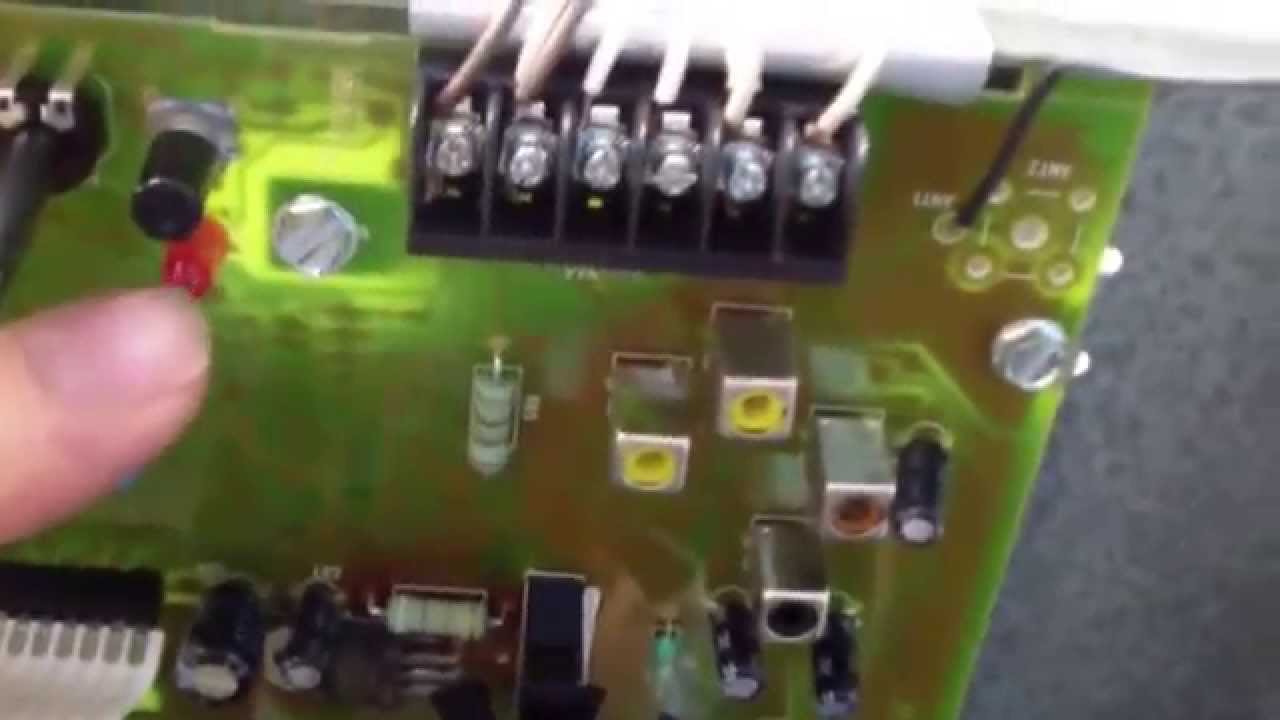
The most critical component for programming your Genie Excelerator remote is the “PROGRAM” button (sometimes labeled “LEARN” or “SQR” for square wave) on the garage door opener motor unit. This button is the gateway to establishing communication between the remote and the opener.
- Location: This button is typically found on the back or side panel of the motor unit, often near the indicator lights or the antenna. It might be a small, colored button (often red, orange, or purple, depending on the model) or a recessed button that requires a tool to press.
- Function: When pressed and held for a specific duration, this button puts the opener into “learn mode,” ready to receive the signal from a new remote.

Credit: store.geniecompany.com
Programming Genie Excelerator Remotes With Intellicode
Genie’s Intellicode technology is designed for enhanced security. This means the programming process involves not just pressing buttons but also ensuring the opener registers the unique, rolling code transmitted by the remote.
Step-by-step Programming Guide
Follow these steps carefully to program your Genie Excelerator remote:
- Locate the PROGRAM Button: As mentioned, find the PROGRAM button on your Genie Excelerator motor unit.
- Press and Release the PROGRAM Button: Press the PROGRAM button once and immediately release it.
- Important: Do not hold it down for more than a few seconds, as this can trigger a system reset.
- Observe the Indicator Light: After releasing the PROGRAM button, you should see an indicator light on the motor unit illuminate or blink. This signifies that the opener is in learn mode. You typically have about 30 seconds to complete the next step before the opener exits learn mode.
- Press and Hold the Remote Button: Immediately after the light appears, press and hold the button on your Genie remote that you wish to use to operate the garage door.
- Observe the Opener’s Response:
- The garage door opener’s light bulb should flash, or you may hear an audible click. This indicates that the opener has successfully received and learned the remote’s code.
- If the light bulb flashes or you hear a click, the remote is programmed. Release the button on your remote.
- Test the Remote: Press the programmed button on your remote again. The garage door should now operate.
- If It Doesn’t Work: If the door does not operate, repeat the steps. Ensure you are pressing the PROGRAM button on the motor unit correctly and then promptly pressing and holding the remote button. If it still fails, you may need to clear existing remotes (see next section) or consult your manual.
Clearing All Existing Remotes (intellicode)
For security reasons, or if you’ve lost a remote, you might want to clear all previously programmed remotes from your Genie Excelerator opener. This process effectively resets the opener’s memory, requiring you to reprogram all remotes and keypads that you wish to use.
- Locate the PROGRAM Button: Find the PROGRAM button on your Genie Excelerator motor unit.
- Press and Hold the PROGRAM Button: Press and hold the PROGRAM button for approximately 10-15 seconds.
- Observe the Indicator Light: The indicator light on the motor unit will blink several times and then go out, or the opener’s light bulb will flash to confirm that all previously learned codes have been erased.
- Release the PROGRAM Button: Once you see the confirmation (light blinking or going out), release the PROGRAM button.
- Reprogram Your Remotes: After clearing the codes, you will need to reprogram each of your Genie remotes and keypads individually using the steps outlined above or in your owner’s manual. For guidance on resetting other opener types, you can refer to a general how to reset garage door opener remote easily in minutes guide.
Credit: www.youtube.com
Programming Older Genie Openers (dip Switch Models)
Some older Genie Excelerator models, or Genie openers from earlier eras, might use a dip switch system instead of Intellicode. These systems are less common on newer Excelerator models but are important to recognize if you have an older unit. Dip switches are small switches inside the motor unit and on the remote that you set to a specific pattern of ON and OFF positions.
Identifying Dip Switch Systems
- Look for Dip Switches: Open the motor unit casing (usually by removing a cover screw) and look for a row of small switches, often numbered 1 through 9 or 1 through 12. Your remote will have a similar set of switches.
- Fixed Codes: These systems use a fixed code. The pattern you set on the remote must exactly match the pattern set on the motor unit for them to communicate.
Programming Steps For Dip Switch Remotes
- Locate Dip Switches:
- On the motor unit: Open the motor unit casing and find the dip switches.
- On the remote: Locate the dip switches on your remote. This often requires removing a battery cover or a small separate cover.
- Set the Pattern:
- Decide on a pattern of ON (up) and OFF (down) for your desired code. You can choose any combination, but it’s crucial that it matches.
- Set the dip switches on the remote to your chosen pattern.
- Set the dip switches on the motor unit to exactly the same pattern.
- Test the Remote: Once the patterns match, press the button on your remote. The garage door should operate.
- Troubleshooting Dip Switches: If the remote doesn’t work, double-check that every single switch is in the identical position on both the remote and the motor unit. Even one misplaced switch will prevent operation.
- Clearing Codes (Dip Switches): There is no specific “clear” button for dip switch systems. To “clear” them, you simply change the dip switch pattern on the motor unit to a new, different pattern. Then, you would need to reprogram your remote to match this new pattern.
Example of Dip Switch Setting:
| Switch | Remote Position | Motor Unit Position |
|---|---|---|
| 1 | ON | ON |
| 2 | OFF | OFF |
| 3 | ON | ON |
| 4 | ON | ON |
| 5 | OFF | OFF |
| 6 | ON | ON |
| 7 | OFF | OFF |
| 8 | OFF | OFF |
| 9 | ON | ON |
In this example, the remote and motor unit are set to the same pattern, allowing them to communicate.
Troubleshooting Common Genie Remote Issues
Even with careful programming, you might encounter issues. Here are some common problems and their solutions:
Remote Not Responding After Programming
- Battery: The most frequent culprit is a dead or weak battery in the remote. Replace it with a fresh coin cell battery (e.g., CR2032).
- Programming Sequence: You might not have completed the programming sequence correctly or within the allotted time. Try the programming steps again, paying close attention to the timing after pressing the PROGRAM button on the motor unit.
- Interference: Other wireless devices operating on similar frequencies (like wireless doorbells, some security systems, or even neighboring garage door openers) can sometimes cause interference. Try programming the remote when these devices are off or further away.
- Distance: Ensure you are close enough to the motor unit during the programming process.
- Opener Power: Check if the garage door opener motor unit is receiving power. Is the status light on the unit illuminated? If not, check your circuit breaker.
Opener Light Bulb Not Flashing During Programming
This usually indicates that the opener did not register the remote’s signal.
- Incorrect Button Press: Ensure you are pressing the PROGRAM button on the motor unit correctly (press and release, don’t hold) and then promptly pressing and holding the remote button.
- Remote Compatibility: While unlikely with a Genie remote and a Genie opener, ensure the remote is compatible with your specific Genie model.
- Faulty Opener or Remote: In rare cases, either the opener’s receiver or the remote itself might be faulty.
Opener Operates Once, Then Stops Responding
This can sometimes happen with Intellicode systems if the initial programming didn’t fully synchronize the rolling codes.
- Reprogram: Try reprogramming the remote again, ensuring you follow the steps precisely.
- Clear and Reprogram: If a single reprogram doesn’t work, try clearing all existing remotes and then reprogramming your specific remote. This ensures a fresh start for the Intellicode sequence. You can learn more about how to reset garage door remote easily in minutes for general guidance.
Remote Works Intermittently
- Battery: Again, a weak battery can cause intermittent operation.
- Antenna: Check the antenna wire hanging from the motor unit. Ensure it’s not damaged, cut, or obstructed. An intact antenna is crucial for signal reception.
- Range: If the remote only works when you’re very close to the opener, it might indicate a weak transmitter in the remote or a problem with the opener’s receiver.
Advanced Considerations And Maintenance
Beyond basic programming, a few advanced considerations and regular maintenance practices can keep your Genie Excelerator opener and remotes in optimal working condition.
Replacing Your Genie Remote
If your remote is old, damaged, or you simply want a newer model, you’ll need to purchase a compatible replacement. Always ensure the new remote is designed for Genie Intellicode openers. You can typically find compatible remotes by searching for your specific Genie opener model number.
The programming process for a new remote will be the same as described above.
Checking Opener Performance
While focusing on the remote, it’s a good idea to periodically check the overall performance of your garage door opener.
- Smooth Operation: Does the door open and close smoothly without excessive noise or strain? If not, it might be time for maintenance. Check out our guide on how to lube garage door rollers for smooth, quiet operation for essential lubrication tips.
- Chain Tension: For chain-driven openers, ensure the chain has the correct tension. An improperly adjusted chain can affect performance. You can learn how to adjust chain on garage door opener for smooth operation.
- Door Balance: A well-balanced door should stay partially open when you lift it manually. If it slams down or springs up, the springs may need adjustment by a professional. You can learn how can I open my garage door manually: step-by-step guide for emergency access.
When To Call A Professional
While most programming tasks are DIY-friendly, there are times when professional help is needed:
- Persistent Issues: If you’ve tried all troubleshooting steps and the remote still doesn’t work.
- Damaged Components: If the motor unit, wiring, or the door mechanism itself appears damaged.
- Complex Systems: For very old or unusually configured systems.
- Safety Concerns: If you’re uncomfortable performing any part of the maintenance or repair.
The cost of a professional service call can range from $100 to $300 or more, depending on your location and the complexity of the issue. Understanding how much for a garage door can help budget for potential repairs or upgrades.
Genie Remote Compatibility Table
Choosing the right remote for your Genie Excelerator opener is crucial. While most Genie remotes use Intellicode, older models might differ. Here’s a general guide, but always confirm compatibility with your specific opener model.
| Genie Remote Model | Compatible Opener Technology | Common Features | Notes |
|---|---|---|---|
| GITR-3V (3-button) | Intellicode (1997-Present) | Controls up to 3 doors, LED indicator | Very common replacement/upgrade |
| G3T-BX (3-button) | Intellicode (1997-Present) | Controls up to 3 doors, compact design | Often bundled with new openers |
| GIC-2T (2-button) | Intellicode (1997-Present) | Controls up to 2 doors | Good for single-family homes |
| GM3T-BX (3-button) | Intellicode 1 & 2 (Dual Frequency) | Controls up to 3 doors, backward compatible | Excellent for mixed Genie systems |
| ACSCTG Type 1 (Keypad) | Intellicode (Various years) | Wireless entry, programmable PIN | Requires programming via opener unit |
| Older Fixed Code Remotes (e.g., 9/12 Dip Switches) | Fixed Code (Pre-1997 approx.) | Matches dip switch patterns | Rarely used with Excelerator models but possible |
Remember, the color of the learn button on your Genie Excelerator motor unit can sometimes indicate the frequency or Intellicode version. Red/Orange/Purple buttons often signify Intellicode 1, while Yellow buttons typically indicate Intellicode 2. Green buttons might be for older fixed code or early Intellicode systems. Always check your opener’s manual for precise compatibility.
Frequently Asked Questions
My Genie Excelerator Remote Worked Yesterday But Not Today. What’s The First Thing I Should Check?
The most common reason for a remote to suddenly stop working is a dead or weak battery. Before attempting any reprogramming, open the remote and replace the battery with a fresh one of the correct type (usually a CR2032 coin cell). If that doesn’t solve the issue, then proceed with checking other potential causes like interference or the need for reprogramming.
How Many Remotes Can I Program To My Genie Excelerator Opener?
Most Genie Excelerator garage door opener units can store a significant number of remote codes, often between 50 and 100 different remote codes. However, the exact capacity can vary by model. If you’re concerned about reaching the limit, clearing existing remotes (as described in the guide) is a good way to free up space and ensure only your current remotes are active.