
The convenience of a garage door opener is undeniable. With the simple push of a button, your garage door glides open, offering seamless access to your home and protecting your vehicle from the elements. But what happens when that convenience extends beyond the physical remote control?
Many drivers today want to integrate their garage door opener into their vehicle, eliminating the need to search for a separate remote or fumble with keys. Setting up your garage door opener to work from inside your car is a common desire, and thankfully, it’s often a straightforward process.
This guide will walk you through the various methods and considerations for achieving this, from traditional remote programming to modern smart home integrations.
Key Takeaways
- Universal Remotes: Many vehicles come equipped with built-in universal remotes designed to be programmed to your garage door opener.
- Remote Cloning: You can often program a new, smaller remote to mimic your existing one, which can then be mounted in your car.
- Smart Home Integration: Advanced systems allow you to control your garage door via smartphone apps, often integrating with in-car technology.
- Safety First: Always prioritize safety during the programming process, ensuring the garage door is clear of obstructions.
- Compatibility is Key: Verify that your garage door opener and the chosen in-car system are compatible before starting.
- Troubleshooting: Be prepared to consult your opener’s manual or the vehicle manufacturer’s guide if issues arise.
Understanding Your Garage Door Opener System
Before you can integrate your garage door opener into your car, it’s crucial to understand the components and technology involved. Garage door opener systems typically consist of a motor unit (mounted in the garage), a drive mechanism (chain, belt, or screw), safety sensors, and a remote control or keypad.
The remote control transmits a radio frequency signal to a receiver in the motor unit, which then activates the door. The specific technology used by your opener will influence the programming method.
Types Of Garage Door Openers
The vast majority of modern garage door openers use rolling codes (also known as security+ or code-dodging technology). This means the code transmitted by your remote changes with each use, significantly enhancing security. Older systems might use fixed codes, where the same code is transmitted every time. This distinction is important because programming methods can differ.
- Rolling Code Systems: These are more secure and require a specific programming sequence to pair the remote with the opener’s motor unit. Manufacturers like LiftMaster, Chamberlain, and Genie widely use rolling code technology.
- Fixed Code Systems: These are less common now due to security vulnerabilities. They are generally easier to program but offer less protection against unauthorized access.
Identifying Your Opener’s Manufacturer And Model
Knowing the brand and model of your garage door opener is essential for finding the correct programming instructions. This information is usually found on a label on the motor unit itself. Common manufacturers include:
- LiftMaster
- Chamberlain
- Genie
- Craftsman
- Overhead Door
- Linear
Once you have this information, you can consult your owner’s manual or search online for specific programming guides. For instance, if you have a LiftMaster, you might look for instructions on how to reset a LiftMaster garage door opener remote if you encounter issues or need to re-pair it.
Safety Features To Be Aware Of
Modern garage door openers are equipped with safety features designed to prevent accidents.
- Safety Sensors: These are small sensors located near the bottom of the garage door tracks. They emit an infrared beam; if this beam is broken while the door is closing, the door will reverse. It’s vital that these sensors are properly aligned and unobstructed for safe operation.
- Force Adjustment: Openers have settings to control the amount of force needed to open and close the door. If the door encounters an obstruction, it should stop or reverse.
- Manual Release: In case of power outages or malfunctions, all openers have a manual release cord (usually red) that allows you to operate the door by hand. You can learn more about this by reading how to manually open a garage door.
Understanding these features ensures you can program your opener safely and effectively.
Credit: store.geniecompany.com
Programming Your Vehicle’s Built-in Universal Remote
Many newer vehicles come with integrated universal garage door opener systems, often referred to as HomeLink or similar proprietary systems. This is arguably the most convenient method as it eliminates the need for an additional remote.
How Homelink (and Similar Systems) Works
HomeLink is a technology found in millions of vehicles that allows drivers to program their car’s built-in buttons to operate garage doors, gates, security lights, and other radio-controlled devices. Most systems have three or four programmable buttons located on the rearview mirror, sun visor, or dashboard.
The system works by “learning” the signal from your existing garage door remote. It does this through a two-step process: first, it captures the signal from your remote, and second, it communicates with the garage door opener’s motor unit to synchronize.
Step-by-step Programming Guide
While the exact steps can vary slightly depending on your vehicle’s make and model, the general process for programming a HomeLink system is as follows:
- Locate the HomeLink Buttons: Find the programmable buttons in your vehicle.
- Clear Existing Codes (If Necessary): To ensure a clean slate, it’s often recommended to clear any previously programmed codes. For HomeLink, this typically involves pressing and holding the two outer HomeLink buttons simultaneously for about 10 seconds until the indicator light changes from a slow blink to a rapid blink. Consult your vehicle’s owner’s manual for the specific procedure.
- Position the Remote: Hold your existing garage door remote about 1-3 inches away from the HomeLink buttons in your car.
- Program the HomeLink Button:
- Press and hold the desired HomeLink button in your car.
- Simultaneously, press and hold the button on your existing garage door remote that you use to operate the door.
- Continue holding both buttons. The HomeLink indicator light will typically blink slowly at first and then change to a rapid blink. This indicates that the HomeLink system has learned the remote’s signal.
- Release both buttons.
- Synchronize with the Garage Door Opener: If your garage door opener uses a rolling code system, you’ll need to synchronize the HomeLink system with the opener’s motor unit.
- Locate the “Learn” or “Program” button on your garage door opener’s motor unit (usually on the back or side).
- Press and release this button. The indicator light on the motor unit should illuminate.
- You will then have 30 seconds to return to your car.
- Once in your car, press and hold the already programmed HomeLink button for about 2 seconds. Repeat this press-and-hold action two or three times.
- The garage door should activate (move). If it doesn’t, repeat the synchronization step.
Pro Tip: If you’re having trouble, refer to your vehicle’s owner’s manual for precise instructions for your make and model, as well as the garage door opener’s manual. Sometimes, the distance between the remote and HomeLink buttons, or the order of operations, can be critical.
Troubleshooting Vehicle-integrated Remotes
- No Response: If the HomeLink button doesn’t do anything, ensure the vehicle’s ignition is on (accessory mode is usually sufficient). Also, re-verify that you followed the programming steps correctly, especially the synchronization for rolling code openers.
- Slow Blink Only: If the HomeLink indicator light only blinks slowly and never goes to a rapid blink, it might mean the system couldn’t learn the signal. Try moving the remote closer or further away, or try a different button on the remote.
- Rolling Code Issues: The synchronization step is the most common point of failure for rolling code systems. Make sure you press the “Learn” button on the motor unit and then return to your car within the 30-second window. Repeatedly pressing the HomeLink button is crucial for the opener to “learn” the new signal. If you have a LiftMaster or Chamberlain opener, you might need to consult specific guides on how to reset Craftsman garage door opener remote if you suspect a programming conflict.

Credit: www.wikihow.com
Programming A Standalone Remote Into Your Car
If your vehicle doesn’t have a built-in universal remote system, or if you prefer to use your existing opener’s remote, you can program a compatible standalone remote to your car. This typically involves mounting a small remote inside your vehicle.
Choosing The Right Remote
When selecting a remote, ensure it’s compatible with your garage door opener’s frequency and code type (rolling or fixed). Many manufacturers offer compact key-chain remotes. Some universal remotes are designed to be programmed to multiple devices, which can be useful if you have more than one garage door or gate.
Mounting The Remote In Your Vehicle
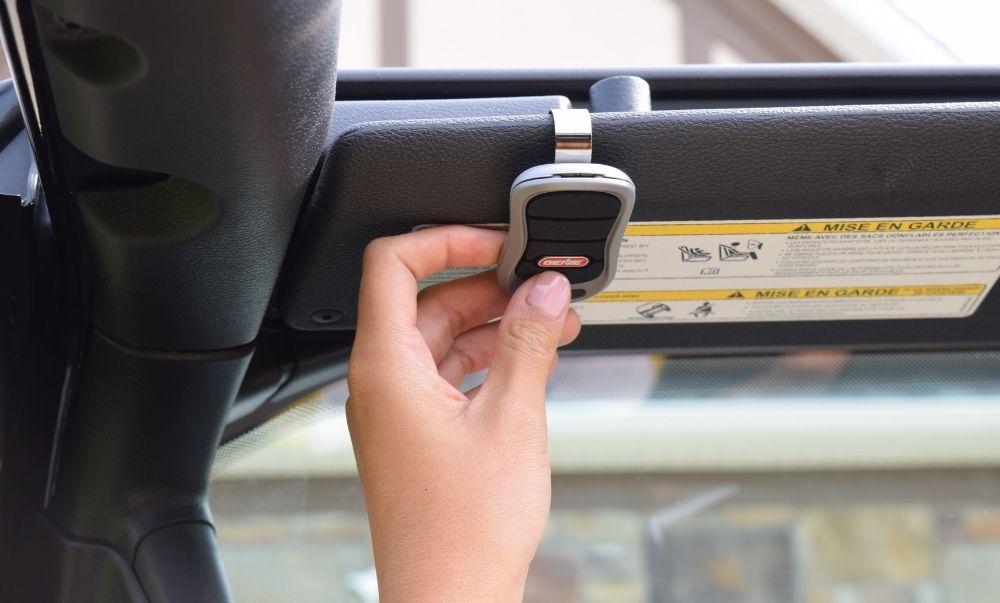
- Key Fob Style: Many modern remotes are designed as small key fobs that can attach to your keychain or be placed in a convenient spot.
- Visor Clip/Adhesive Mount: Some remotes come with accessories to mount them securely to your car’s sun visor or dashboard.
- Consider Accessibility: Place the remote where it’s easily accessible without being a distraction while driving. Avoid placing it where it could be accidentally pressed.
Programming The Standalone Remote
The process for programming a standalone remote is very similar to programming a vehicle’s built-in system, as you’re essentially teaching the new remote to mimic your original one and then synchronizing it with the opener.
- Locate the “Learn” Button: Find the “Learn” or “Program” button on your garage door opener’s motor unit.
- Enter Programming Mode: Press and release the “Learn” button. The indicator light will illuminate.
- Program the New Remote:
- Immediately (within 30 seconds), press and hold the button on your new standalone remote that you want to use for your garage door.
- Hold the button until the garage door opener’s lights flash or you hear two clicks. This indicates the remote has been programmed.
- Test the Remote: Press the programmed button on the new remote to ensure it opens and closes the garage door.
Note: If your opener uses a rolling code system, you might still need to perform a synchronization step similar to the HomeLink process, depending on the remote’s capabilities. Always refer to the remote’s and opener’s manuals. If you need to reset your Genie opener, you might find instructions on how to reprogram a Genie garage door keypad helpful, as many Genie systems have similar programming logic.

Credit: www.youtube.com
Smart Home Integration: The Modern Approach
For those seeking advanced control and connectivity, smart home integration offers a sophisticated solution for managing your garage door from your vehicle. This usually involves a smart garage door opener or a smart add-on device.
Smart Garage Door Openers
These are openers that are Wi-Fi enabled and can be controlled via a smartphone app. They offer features like remote access, activity logs, and integration with other smart home devices.
Smart Garage Door Controllers (add-on Devices)
If you have an existing garage door opener, you can often add a smart controller. These devices typically connect to your opener’s existing wiring and your home’s Wi-Fi network. They work by mimicking the signal of your existing remote or by physically activating the opener’s button.
Popular brands include MyQ (by Chamberlain/LiftMaster), Garadget, and Tailwind.
Connecting To Your Vehicle Via Smart Systems
- Smartphone Apps: The primary method is through the manufacturer’s smartphone app. Many apps allow you to create shortcuts or widgets for quick access.
- In-Car Infotainment Systems: Some advanced vehicles with integrated infotainment systems can connect to smart home platforms (like Apple CarPlay, Android Auto, or proprietary systems). This allows you to control your garage door directly from your car’s touchscreen.
- Voice Control: If your smart system integrates with voice assistants like Amazon Alexa or Google Assistant, you might be able to open or close your garage door using voice commands, provided your vehicle supports these assistants.
Benefits Of Smart Integration
- Remote Access: Open or close your garage door from anywhere with an internet connection.
- Activity Monitoring: Receive notifications when your garage door opens or closes, and check its status.
- Scheduling: Set schedules for your garage door to open or close at specific times.
- Integration: Connect with other smart home devices for automated routines (e.g., turn on garage lights when the door opens).
- Enhanced Security: Many smart systems offer advanced encryption and user management features.
Example: A driver approaching home could have their smart garage door opener automatically open as they get within a certain geofence, or they could manually open it via their car’s dashboard interface connected to their home Wi-Fi.
Considerations For Different Opener Brands
While the general principles of programming remain the same, specific steps can vary between manufacturers.
Liftmaster And Chamberlain
These brands, often sharing technology, commonly use the MyQ system for smart integration and have various rolling code protocols (Security+ 2.0). Programming often involves the “Learn” button on the motor unit. If you’re troubleshooting, looking up guides on how to adjust a Chamberlain garage door opener can sometimes reveal underlying mechanical issues that might affect remote functionality.
Genie
Genie openers often use Intellicode technology, another form of rolling code. Their programming typically involves the “Smart” or “Learn” button on the motor unit. If you need to reset a Genie remote, you might need to follow specific sequences.
Craftsman
Craftsman openers are often compatible with LiftMaster and Chamberlain systems, especially older models. Newer Craftsman openers may use their own proprietary rolling code technology. The programming process usually involves the red “Learn” button on the motor unit.
Example: Programming A Craftsman Remote
For a Craftsman opener with a red “Learn” button:
- Press and release the Learn button on the motor unit. The red LED will illuminate.
- Press and hold the desired button on your new remote.
- Release the remote button once the opener’s LED stops flashing or you hear two clicks.
- If it’s a rolling code system, you may need to press the programmed button on the remote again within 30 seconds to activate the door.
Safety And Security Best Practices
Integrating your garage door opener into your vehicle introduces convenience but also necessitates attention to safety and security.
Maintaining Security
- Use Rolling Codes: Always prioritize openers and remotes that use rolling code technology. Fixed codes are easily compromised.
- Secure Your Remote: Don’t leave your programmed remote visible in your car. If your car is stolen, your garage is immediately vulnerable. Consider using a remote that can be deactivated or reprogrammed easily.
- Regularly Reprogram: If you sell your vehicle or if you suspect your remote has been lost or stolen, reprogram your garage door opener immediately. Refer to guides on how to reset your garage door opener.
- Utilize Smart Features: If using a smart system, enable features like activity alerts and strong passwords.
Ensuring Safe Operation
- Clearance: Always ensure the path of the garage door is clear before operating it, whether from your car or with a traditional remote.
- Test Safety Sensors: Periodically test your safety sensors by placing an object (like a broom handle) in the path of the closing door. The door should immediately reverse.
- Do Not Rely Solely on In-Car Systems: In case of system failure or power outages, know how to operate your garage door manually. Familiarize yourself with how to open your garage door manually.
- Avoid Distracted Driving: Program your remote before you start driving, or have a passenger assist you. Never attempt to program while the vehicle is in motion.
Comparison Of In-car Garage Door Opener Methods
Choosing the right method depends on your vehicle, your existing opener, and your preference for convenience and technology.
| Feature | Built-in Vehicle Remote (e.g., HomeLink) | Standalone Car Remote | Smart Garage Controller/Opener |
|---|---|---|---|
| **Convenience** | High (integrated) | Medium (separate device) | Very High (app/infotainment) |
| **Cost** | Included with vehicle | $20 – $50+ | $100 – $300+ |
| **Setup Complexity** | Medium (requires programming) | Medium (requires programming) | Medium to High |
| **Security** | Depends on opener (rolling code recommended) | Depends on opener (rolling code recommended) | High (advanced encryption) |
| **Remote Access** | No (vehicle must be nearby) | No (vehicle must be nearby) | Yes (from anywhere) |
| **Notifications** | No | No | Yes |
| **Compatibility** | Wide, but check specific vehicle/opener | Generally good, check freq/code | High, check compatibility list |
| **Additional Parts** | None | One remote | Controller/new opener |
Pro Tip: If your vehicle is older and doesn’t have a built-in system, a good quality standalone remote is often the most cost-effective and straightforward solution. For those invested in smart home technology or seeking advanced features, a smart controller is the way to go.
Frequently Asked Questions
How Do I Know If My Car Has A Built-in Garage Door Opener?
Look for buttons on your rearview mirror, sun visor, or dashboard that might have icons resembling radio waves or garage doors. Many vehicles also mention “HomeLink” or a similar system in their owner’s manual.
Can I Program My Garage Door Opener To Multiple Cars?
Yes, you can typically program your garage door opener remote to multiple vehicles. Ensure each vehicle’s built-in system or standalone remote is programmed correctly according to the instructions.
What If My Garage Door Opener Uses A Different Frequency Than My Car’s Remote?
Vehicle-integrated systems like HomeLink are designed to learn a wide range of frequencies. If you’re using a standalone remote, ensure it’s specifically designed for your opener’s frequency. Most modern openers operate on 315 MHz or 390 MHz.
How Long Does It Take To Program A Garage Door Opener Into A Car?
The actual programming process usually takes between 5 to 15 minutes, depending on the system and whether synchronization is required. The most time-consuming part can be locating the necessary buttons and consulting manuals.
Is It Safe To Open My Garage Door From My Car Using A Smart System?
Yes, when set up correctly with secure protocols and updated software, smart garage door systems are generally safe. However, always ensure your vehicle is parked securely and that you’re aware of your surroundings when operating the door remotely. It’s also wise to keep your opener’s safety sensors in good working order, similar to how you’d maintain garage door rollers by ensuring they are properly lubricated, as detailed in how to lubricate garage door rollers.
Setting up your garage door opener to work with your car offers a significant boost in daily convenience. Whether you utilize your vehicle’s built-in system, a compact standalone remote, or a sophisticated smart home integration, the process is generally accessible for most homeowners.
Always prioritize safety by ensuring clear pathways and functional safety sensors, and maintain security by using rolling code technology and keeping your systems updated. With the right approach, you can enjoy effortless access to your garage every time you pull into your driveway.