
Ensuring your garage door operates smoothly and securely is paramount, and sometimes this involves a simple yet crucial maintenance step: clearing the memory of your Genie garage door opener. Whether you’re troubleshooting unusual behavior, preparing to sell your home, or simply want to start fresh with your remotes and keypads, understanding how to perform this reset is an essential skill for any homeowner with a Genie system. This process can resolve issues where remotes are no longer recognized, keypads are unresponsive, or even when the opener is acting erratically due to conflicting signals.
Key Takeaways
- Why Clear Memory: Resetting your Genie garage door opener’s memory is essential for troubleshooting, security, and preparing for new remotes or keypads.
- Locate the Learn Button: The “Learn” or “Program” button on the motor unit is central to the reset process. Its location and color can vary by model.
- Safety First: Always disconnect the garage door opener from its power source before attempting any internal adjustments or resets.
- Remote/Keypad Reset: Clearing the opener’s memory erases all paired devices, requiring them to be reprogrammed.
- Model Specifics: While the general process is similar, minor variations exist between Genie opener models, so consulting your owner’s manual is advised.
- Troubleshooting Tool: A memory reset can often fix issues like remotes not working, keypads failing, or erratic opener behavior.
- Security Enhancement: Regularly clearing and re-pairing devices can enhance your garage’s security by removing access for old or lost remotes.
Understanding Genie Garage Door Opener Memory
Every Genie garage door opener system relies on a memory to store the unique codes of the remote controls and keypads that are authorized to operate it. This memory is essentially a digital registry, allowing the opener to recognize and respond to the signals sent by your valid remotes and keypads.
When you “pair” a new remote or keypad, you’re instructing the opener to add that device’s unique code to its memory. This process ensures that only your programmed devices can open and close your garage door, providing a crucial layer of security.
However, like any electronic system, this memory can sometimes encounter issues. It might become overloaded if too many devices have been programmed over time, or it could develop glitches that prevent it from communicating properly with paired devices. In some cases, if a remote is lost or stolen, clearing the entire memory is the most secure way to ensure that unauthorized access is prevented.
Understanding the function of this memory is the first step in knowing why and when you might need to clear it.
The Role Of The “learn” Button
The “Learn” button, often also labeled as “Program” or a similar term, is the primary interface for managing your Genie garage door opener’s memory. This button is typically located on the back or side panel of the garage door opener’s motor unit, the main box that hangs from your garage ceiling. Its appearance and color can vary significantly depending on the specific Genie model you own. For instance, older models might feature a red or orange button, while newer ones could have a blue, green, or purple button.
This button serves a dual purpose: it’s used for both programming new remotes and keypads, and for initiating a memory reset. When you press and release the Learn button, the opener enters programming mode, indicated by a flashing LED light next to it. If you press and hold the Learn button for a longer duration, it triggers the memory erasure process. The exact timing for holding the button can vary slightly by model, but it generally involves holding it down until the LED light turns off or a specific indicator signal is given by the opener. Always refer to your Genie model’s manual for precise instructions.
Why Clearing The Memory Becomes Necessary
There are several common scenarios where clearing the memory of your Genie garage door opener is the most effective solution.
- Lost or Stolen Remotes/Keypads: This is perhaps the most critical reason. If a remote or keypad is lost or suspected to be stolen, clearing the opener’s memory immediately revokes its access. This prevents anyone who might find or have taken the device from opening your garage door. After clearing, you’ll need to reprogram all your *existing* remotes and keypads.
- Troubleshooting Unresponsive Devices: If your remotes or keypads suddenly stop working, and you’ve ruled out battery issues, a memory reset can often resolve the problem. This can happen if the opener’s memory has become corrupted or if there’s an internal glitch preventing it from recognizing programmed devices.
- Adding New Devices: While not strictly a “reset,” if you’ve reached the maximum number of devices your opener can store (typically 3-4 for older models, more for newer ones), you’ll need to clear the memory to make space for new remotes or keypads.
- Preparing to Sell Your Home: For security and privacy, it’s good practice to clear the opener’s memory before handing over the property to new owners. This ensures no old remotes or keypads are still linked to the system.
- System Glitches or Erratic Behavior: Occasionally, a garage door opener might exhibit unusual behavior, such as opening or closing randomly, or not responding consistently. A full memory reset can act as a “factory reset” for the opener’s programming, clearing out any potential software conflicts or glitches.

Credit: store.geniecompany.com
How To Clear The Memory On Your Genie Garage Door Opener
Clearing the memory on a Genie garage door opener is a straightforward process, but it requires careful attention to detail. The exact steps can vary slightly depending on your specific Genie model, but the general principle involves accessing the “Learn” button on the motor unit and holding it down for a predetermined amount of time.
Before you begin, ensure you have the following:
- Your Genie garage door opener’s user manual (highly recommended for model-specific instructions).
- A sturdy ladder to safely reach the motor unit.
- All your existing remotes and keypads that you wish to continue using.
Step-by-step Guide To Clearing Genie Opener Memory
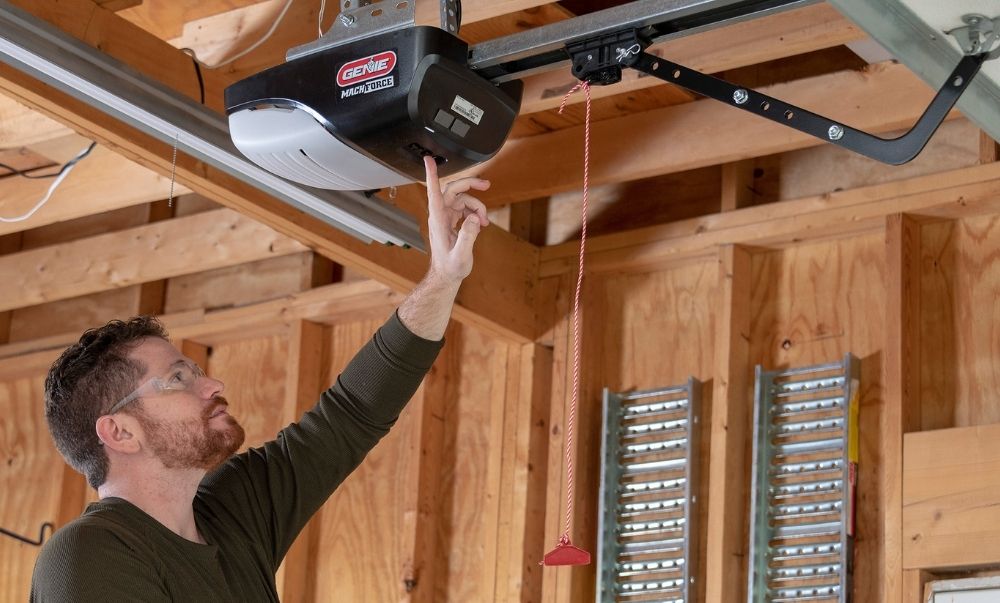
- Locate the Motor Unit: The motor unit is typically mounted on the ceiling in your garage, directly above where the garage door closes.
- Identify the “Learn” Button: On the motor unit’s housing, look for a small button. It’s often labeled “Learn,” “Program,” or might have an icon indicating programming. Its color can vary (e.g., red, orange, green, blue, purple). The LED light indicator is usually located near this button.
- Disconnect Power (Crucial Safety Step): For most Genie models, it is highly recommended to disconnect the power to the garage door opener before proceeding. This can be done by unplugging the unit from the ceiling outlet or by flipping the corresponding circuit breaker in your home’s electrical panel. Always prioritize safety when working with electrical devices.
- Press and Hold the “Learn” Button: Once you’ve located the button and, if applicable, disconnected power, press and hold down the “Learn” button.
- Observe the Indicator Light: While holding the button, watch the LED indicator light next to the “Learn” button. The exact duration you need to hold the button can vary, but typically it’s for about 10 to 30 seconds.
- Release the Button: Release the “Learn” button when the LED indicator light:
- Turns off.
- Starts flashing rapidly.
- Or after a specific time indicated in your manual.
- For many Genie models, holding the button until the LED light goes out signifies that the memory has been cleared.
- Reconnect Power: If you disconnected the power, plug the opener back in or restore power at the circuit breaker.
- Test the System (Optional but Recommended): Try operating your garage door with one of your remotes. It should not work at this point, as its code has been erased from the opener’s memory. This confirms the reset was successful.
Important Note: Some Genie models might have a slightly different procedure. For example, on certain Intellicode® models, you might need to press and release the Learn button, and then immediately press and hold it again for a few seconds. Always consult your specific Genie model’s owner’s manual for the most accurate instructions.
Understanding Model Variations
While the core principle of using the “Learn” button remains consistent across most Genie garage door openers, there are nuances based on the model series and its technology.
- Intellicode® Technology: Genie’s Intellicode® system uses rolling codes for enhanced security. When you clear the memory on an Intellicode® opener, it effectively resets the system’s security handshake, requiring all devices to be re-paired. The process generally involves pressing and holding the “Learn” button on the motor unit until the LED goes out.
- Older Fixed Code Systems: If your Genie opener uses an older, fixed code system (less common now), the process is similar, but the security implications are lower. Clearing the memory still removes all programmed remotes.
- Specific Model Differences:
- Genie ProMax / ChainMax / ScrewDrive: Many of these series follow the standard “press and hold Learn button until LED goes out” procedure.
- Genie PowerLift®: Similar procedures apply.
- Genie G-Series: These often have the Learn button and LED on the back panel.
A quick search on the Genie Company support website for your specific model number will usually provide a downloadable PDF of the owner’s manual, which will detail the exact reset procedure.
Credit: store.geniecompany.com
Reprogramming Remotes And Keypads After A Reset
Once you have successfully cleared the memory of your Genie garage door opener, it’s essential to understand that all previously programmed remotes and keypads will no longer work. You will need to reprogram each device individually. This is a crucial step for restoring functionality to your garage door access.
Reprogramming Genie Remotes
The process of reprogramming a Genie remote is similar to the initial programming, but it’s done after the opener’s memory has been cleared.
- Access the Motor Unit: Go back to your garage door opener’s motor unit.
- Press and Release the “Learn” Button: This time, you will press and release the “Learn” button. The LED indicator light next to it should illuminate and stay lit. This indicates the opener is in programming mode. You typically have about 30 seconds to complete the next step before the opener exits programming mode.
- Press the Remote Button: Immediately press and hold the button on your garage door remote that you want to use to control the door.
- Observe the Opener’s Response: After a few seconds, the LED indicator light on the motor unit may blink, or the garage door opener light bulb might flash. This signals that the remote has been successfully paired and its code added to the opener’s memory.
- Test the Remote: Release the remote button. Press the remote button again to test it. The garage door should now operate.
- Repeat for Other Remotes: If you have multiple remotes, repeat steps 2-5 for each one, ensuring you use a different button on the remote if you want to control multiple doors, or the same button if it’s the same door.
Reprogramming Genie Keypads
Reprogramming a Genie wireless keypad follows a similar logic but involves a different sequence specific to the keypad itself.
- Access the Motor Unit: As with remotes, you’ll need to interact with the motor unit first.
- Press and Release the “Learn” Button: Press and release the “Learn” button on the motor unit. The LED indicator light will illuminate.
- Enter Your PIN on the Keypad: Within the 30-second window, go to your Genie wireless keypad. Enter your 4-digit Personal Identification Number (PIN).
- Press the Keypad’s Program Button: Immediately after entering your PIN, press and hold the “Program” or “Enter” button on the keypad itself.
- Observe the Opener’s Response: Watch the LED indicator light on the motor unit. It should blink, or the opener’s light bulb should flash, indicating successful pairing.
- Test the Keypad: Release the keypad’s program button. You can then test the keypad by entering your PIN and pressing the enter button. The garage door should operate.
- Repeat for Other Keypads: If you have multiple keypads, repeat steps 2-6 for each one.
Pro Tip: It’s highly recommended to choose a new, unique PIN for your keypad after a memory reset, especially if security is a concern or if you suspect the old PIN might have been compromised.

Credit: farnsworthgarage.com
Troubleshooting Common Issues After Resetting Memory
While clearing the memory and reprogramming your devices is usually a smooth process, you might encounter a few hiccups. Here’s how to troubleshoot common problems:
Remote Or Keypad Still Not Working
- Check Batteries: Always start with the simplest solution. Ensure the batteries in your remote or keypad are fresh and correctly installed.
- Incorrect Programming Sequence: Double-check that you followed the programming steps precisely for your specific Genie model. Pay close attention to the timing, you usually have about 30 seconds after pressing the Learn button to complete the next step.
- Distance: For initial programming, try to be closer to the motor unit. Sometimes, a weak signal can cause issues.
- Interference: Other wireless devices operating on similar frequencies can sometimes interfere with the programming process. Try to minimize potential sources of interference during programming.
- Defective Remote/Keypad: In rare cases, the remote or keypad itself might be faulty. If possible, try programming a different, known-working remote or keypad to see if it connects.
- Opener Model Compatibility: Ensure the remote or keypad you are using is compatible with your Genie opener model. Intellicode® remotes, for example, will not work with older fixed-code openers.
Opener Not Responding To Any Input
- Power Issue: Verify that the garage door opener is receiving power. Check the plug, outlet, and circuit breaker.
- Learn Button Stuck: Ensure the “Learn” button isn’t physically stuck in a depressed position.
- Internal Opener Fault: If none of your remotes or keypads work after reprogramming, and you’ve confirmed power and correct programming steps, there might be an internal issue with the opener’s receiver board. This may require professional diagnosis.
Led Light Not Illuminating Or Flashing Correctly
- Press and Hold Duration: For the memory clear function, ensure you are holding the “Learn” button down long enough. For programming, ensure you are only pressing and releasing it.
- Faulty LED: The LED indicator itself might be malfunctioning. However, if the opener is still functioning, this is usually a minor cosmetic issue.
- Motor Unit Issue: If the LED is not functioning as expected during programming or clearing, it could indicate a problem with the motor unit’s logic board.
Opener Exits Programming Mode Too Quickly
- Timing: The 30-second window for programming is strict. If you take too long to press the remote button or keypad PIN and program button after activating the Learn button, the opener will time out. Try to perform the steps more rapidly.
- Interrupted Signal: Ensure there are no obstructions or strong wireless interference between the motor unit and the remote/keypad during the programming sequence.
Example: I recently helped a neighbor reset their Genie opener. They had lost one remote and wanted to add a new one. After clearing the memory, their existing remote wouldn’t program. We discovered they were holding the remote button down too long during the programming step. Releasing it as soon as the opener’s light flashed solved the issue instantly. This highlights the importance of precise timing.
When To Seek Professional Help
While clearing the memory and reprogramming Genie devices is a DIY-friendly task for most homeowners, there are situations where calling a professional garage door technician is the best course of action.
- Uncertainty About Model: If you cannot identify your Genie opener model or find its specific manual, attempting a reset without proper guidance could lead to further issues.
- Persistent Malfunctions: If, after clearing the memory and attempting to reprogram, your garage door opener still behaves erratically, fails to respond, or exhibits other complex problems, it might indicate a deeper mechanical or electrical fault within the opener unit itself.
- Safety Concerns: If you are uncomfortable working on a ladder, dealing with electrical components, or simply feel unsure about any step in the process, it’s always safer to hire a professional. Garage door openers involve heavy moving parts and electricity, and safety should always be the top priority.
- Damaged Components: If you notice any physical damage to the motor unit, wiring, or other components of the garage door system, do not attempt repairs yourself. Professional assessment is required.
A professional technician has the expertise and tools to diagnose complex issues accurately, perform repairs safely, and ensure your garage door system operates reliably and securely. The cost of a service call can often prevent more expensive repairs down the line.
Frequently Asked Questions
Why Is My Genie Garage Door Opener Not Responding To My Remote After I Cleared The Memory?
This is expected behavior after clearing the memory. The opener’s memory has been wiped clean, meaning it no longer recognizes any previously programmed devices. You must reprogram each remote and keypad individually using the steps outlined in the “Reprogramming Remotes and Keypads After a Reset” section of this guide.
Always ensure you are following the correct sequence for your specific Genie model.
How Do I Know If My Genie Garage Door Opener Memory Has Been Successfully Cleared?
The most common indicator is that your previously programmed remotes and keypads will no longer operate the garage door. Additionally, when you press and hold the “Learn” button on the motor unit, the LED indicator light should turn off or flash rapidly after a specific duration (typically 10-30 seconds), signifying that the memory has been erased.
After clearing, attempting to program a remote should result in the opener’s light flashing or an audible click, confirming it’s ready to receive a new code.
Can Clearing The Memory Damage My Genie Garage Door Opener?
Generally, no. The process of clearing the memory on a Genie garage door opener by pressing and holding the “Learn” button is a standard function designed for user maintenance. It does not typically cause damage to the opener’s internal components, provided you follow the correct procedure for your model and disconnect power when recommended for safety.
Issues arise more often from incorrect programming sequences or if the opener has pre-existing faults.
How Often Should I Clear The Memory On My Genie Garage Door Opener?
There is no set schedule for clearing your Genie garage door opener’s memory. You should only clear it when necessary. Common reasons include losing a remote, installing new remotes after clearing out old ones, troubleshooting unresponsive devices, or preparing to sell your home.
It’s not a routine maintenance task like lubricating hinges or checking springs. Performing a reset too frequently without need is unnecessary.
What Is The Difference Between Clearing Memory And Just Reprogramming A Remote?
Clearing the memory performs a full system reset of the opener’s learned codes. It erases *all* previously programmed remotes, keypads, and any other accessories from its registry. After clearing, you must reprogram *every* device you wish to use. Simply reprogramming a single remote without clearing the memory adds that remote’s code to the existing list. If your opener has reached its limit for programmed devices, or if you’ve lost a remote, clearing the entire memory is often the most effective approach before adding new devices.
Clearing the memory on your Genie garage door opener is a valuable troubleshooting step and a crucial security measure. By understanding the function of the opener’s memory and the role of the “Learn” button, you can confidently perform this reset when needed.
Remember to prioritize safety, consult your owner’s manual for model-specific instructions, and be prepared to reprogram all your access devices afterward. This simple procedure can save you time, enhance your security, and keep your garage door operating smoothly.