
The 2022 Toyota Camry is more than just a reliable mode of transportation; it’s a sophisticated vehicle equipped with advanced technology designed to enhance your daily convenience. One of the most sought-after features is the integrated HomeLink system, a universal transceiver that can be programmed to operate most garage door openers and other radio-frequency devices.
This seamless integration means you can ditch the bulky remotes and control your garage door directly from your car’s visor, streamlining your arrival and departure. Programming your Camry’s HomeLink system is a straightforward process, but it requires a methodical approach to ensure it connects correctly with your garage door opener.
This guide will walk you through the essential steps to program your 2022 Toyota Camry’s HomeLink system to your garage door opener. We’ll cover everything from identifying the correct buttons on your visor and opener to troubleshooting common issues. By the end of this article, you’ll be able to confidently set up this convenient feature, making your daily routine a little bit easier and your garage door operation more integrated with your vehicle.
Key Takeaways
- The 2022 Toyota Camry features an integrated HomeLink system for controlling garage doors and other RF devices.
- Programming involves syncing the vehicle’s visor buttons with the existing garage door opener remote.
- You’ll need your existing garage door remote and clear access to both the vehicle and the garage door opener’s motor unit.
- The process typically involves pressing and holding buttons on the visor and the remote simultaneously, followed by a potential “learn” or “program” button press on the opener’s motor unit.
- Ensure your garage door opener is compatible with HomeLink; most modern openers are, but older models might require a compatibility bridge.
- Troubleshooting often involves ensuring fresh batteries in the remote, checking for signal interference, or repeating the programming steps.
Credit: www.autonationtoyotairvine.com
Understanding The Homelink System In Your 2022 Toyota Camry
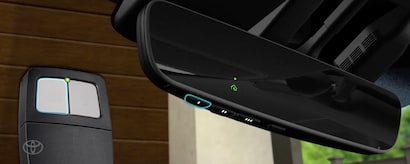
The HomeLink system, a product of Johnson Controls, is a standard feature in many vehicles, including the 2022 Toyota Camry. It’s typically located on the driver’s side visor, consisting of three or four programmable buttons. These buttons are designed to replicate the functions of your existing garage door opener remote, gate remotes, or even smart lighting systems.
The system works by learning the specific radio frequency and code transmitted by your original remote. Once programmed, your Camry’s HomeLink buttons will transmit the same signal, allowing you to open or close your garage door without needing a separate remote.
How Homelink Works: The Technology Behind The Convenience
At its core, HomeLink is a universal garage door opener receiver. It operates on radio frequencies, typically in the 280-394 MHz range, though newer versions support rolling codes for enhanced security. When you press a programmed HomeLink button, it transmits a radio signal. The garage door opener’s motor unit receives this signal and, if it recognizes the code, activates the door. The programming process involves teaching the HomeLink system the specific code from your remote. For older garage door openers that use a fixed code, the process is usually a direct copy of the remote’s signal. For newer openers with rolling codes, the process is slightly more complex, requiring an additional step to synchronize the vehicle’s signal with the opener’s security protocol. This ensures that only your programmed HomeLink buttons can operate your garage door, preventing unauthorized access.
Locating The Homelink Buttons In Your Camry
In the 2022 Toyota Camry, the HomeLink buttons are conveniently integrated into the overhead console, usually above the rearview mirror or on the driver’s side visor. You’ll typically find three or four small, rectangular buttons. Each button is designed to be programmed independently, allowing you to control up to three or four different devices.
Some models might have indicator lights or small LEDs next to the buttons that illuminate during the programming process or when a button is pressed, providing visual feedback. Familiarize yourself with the placement and appearance of these buttons before you begin the programming sequence.
Credit: www.wesleychapeltoyota.com
Preparing For The Programming Process
Before you begin programming your 2022 Toyota Camry’s HomeLink system, a few preparatory steps are crucial for a smooth and successful setup. Having everything ready beforehand will minimize frustration and ensure you complete the process efficiently.
What You’ll Need
To successfully program your HomeLink system, gather the following items:
- Your 2022 Toyota Camry: Ensure the vehicle is parked inside the garage, close enough to the garage door opener’s motor unit for a strong signal.
- Your Existing Garage Door Opener Remote: This is the remote you currently use to open your garage door. Make sure it has fresh batteries. A weak battery in the original remote can prevent the HomeLink system from learning its signal.
- Your Garage Door Opener Manual: While not always strictly necessary, the manual can be helpful, especially if your opener uses a rolling code system and requires you to press a “Learn” or “Program” button on the motor unit.
- A Sturdy Ladder or Step Stool: You’ll likely need this to safely access the garage door opener’s motor unit to press the “Learn” or “Program” button if required.
- A Helper (Optional but Recommended): Having a second person can make the process easier, especially for the synchronized button presses and the “Learn” button step.
Ensuring Garage Door Opener Compatibility
Most modern garage door openers are compatible with the HomeLink system. However, it’s essential to verify compatibility, particularly with older models or those using highly advanced security features. HomeLink is compatible with millions of garage door openers, but some older systems (pre-1995) or specific brands might require a HomeLink Compatibility Bridge or may not be supported at all. You can check the official HomeLink website (https://www.homelink.com/) for a compatibility checker, which allows you to input your garage door opener’s brand and model to confirm if it’s supported. If your opener is not directly compatible, you might need to purchase an adapter. For the 2022 Camry, it’s highly probable that standard openers will work seamlessly.
Step-by-step Programming Guide For Your 2022 Toyota Camry
Programming the HomeLink system in your 2022 Toyota Camry generally involves two main phases: syncing the remote to the vehicle and then, if necessary, syncing the vehicle to the garage door opener. The exact steps can vary slightly depending on whether your garage door opener uses a fixed code or a rolling code system.
Phase 1: Programming A Fixed Code Opener
This is the most common and straightforward method for many garage door openers.
- Park Your Camry: Position your 2022 Toyota Camry inside the garage, close to the garage door opener’s motor unit. Turn off the engine but leave the ignition in the “ON” or “Accessory” position. This ensures the HomeLink system is powered.
- Clear Existing Codes (Optional but Recommended): To avoid conflicts, it’s a good practice to clear any previously programmed HomeLink buttons. Press and hold the two outer HomeLink buttons (usually buttons 1 and 3) simultaneously for about 10-20 seconds. The indicator light on the HomeLink system will flash rapidly, then turn solid, indicating the codes have been cleared.
- Select a HomeLink Button: Choose one of the three or four HomeLink buttons you wish to program for your garage door opener.
- Position the Remotes: Hold your existing garage door opener remote about 1-3 inches away from the HomeLink buttons on your Camry’s overhead console.
- Press and Hold: Press and hold both the chosen HomeLink button and the button on your existing garage door opener remote simultaneously.
- Observe the Indicator Light: Watch the HomeLink indicator light. It will typically flash slowly at first, then rapidly. A rapid flash usually signifies that the HomeLink system has successfully learned the code from your remote.
- Release Buttons: Once the light flashes rapidly, release both the HomeLink button and the remote button.
- Test the Button: Press the programmed HomeLink button briefly. If your garage door opener is a fixed code system, the garage door should operate. If it doesn’t, proceed to Phase 2.
Phase 2: Programming A Rolling Code Opener
Rolling code systems add an extra layer of security by changing the code with each use. This requires an additional step to “pair” the HomeLink system with the garage door opener’s motor unit.
- Complete Phase 1: Follow steps 1-7 from the “Programming a Fixed Code Opener” section. If the garage door did not operate, your opener likely uses a rolling code.
- Locate the “Learn” or “Program” Button: Go to your garage door opener’s motor unit (the unit mounted on the ceiling). Look for a “Learn” or “Program” button. This button is often square or round and may be located near the antenna wire or the light bulb cover. Consult your garage door opener’s manual if you cannot find it.
- Press the “Learn” Button: Press and immediately release the “Learn” or “Program” button on the motor unit. The indicator light next to the button should illuminate or flash, indicating it’s in pairing mode. You typically have about 30 seconds to complete the next step.
- Return to Your Camry: Immediately go back to your 2022 Toyota Camry.
- Press and Hold the Programmed HomeLink Button: Press and hold the HomeLink button you programmed in Phase 1. Hold it for about 2-3 seconds, then release.
- Observe the Garage Door: The garage door opener’s light might flash, or the opener unit might make a clicking sound, indicating successful pairing. The garage door should then operate when you press the HomeLink button.
- Repeat if Necessary: If the garage door doesn’t operate, repeat steps 3-6. Sometimes it takes a couple of attempts to get the timing right.
Pro Tip: If you are having trouble with rolling codes, ensure your garage door opener is relatively modern. Older openers might not be compatible with the rolling code learning process of HomeLink. You can find detailed instructions and compatibility information on the official HomeLink website.

Credit: www.kengarff.com
Troubleshooting Common Homelink Programming Issues
Even with clear instructions, you might encounter a few hiccups during the HomeLink programming process. Here are some common issues and their solutions:
Remote Not Recognized By Homelink
- Weak Remote Battery: This is the most frequent culprit. Replace the battery in your existing garage door opener remote with a fresh one.
- Incorrect Remote Positioning: Ensure the remote is held at the correct distance (1-3 inches) from the HomeLink buttons. Experiment with slightly closer or further positions.
- Interference: Other radio frequency devices, including wireless doorbells, security systems, or even LED lighting, can sometimes interfere with the signal. Try programming when these devices are off or further away.
- Damaged Remote: If the remote itself is old or damaged, it might not be transmitting a strong enough or correct signal.
Garage Door Not Responding After Programming
- Rolling Code Pairing Failure: For rolling code openers, the “Learn” button step is critical. Ensure you press and release the “Learn” button on the motor unit, then immediately return to the car and press the HomeLink button. If this fails, try repeating the sequence. Ensure you are pressing the correct button on the motor unit; some openers have multiple buttons.
- Incorrect HomeLink Button Selected: Make sure you are pressing the *programmed* HomeLink button. If you cleared codes previously, ensure you programmed the button you are now trying to use.
- Opener Needs Reset: In rare cases, the garage door opener itself might need a reset before it can accept a new remote signal. Consult your opener’s manual for reset procedures. You might find our guide on how to reset your garage door opener helpful.
- Incompatible Opener: Double-check the HomeLink compatibility list. If your opener is too old or uses a proprietary system, it may not be compatible.
Homelink Indicator Light Behavior
- Light Doesn’t Turn On: This could indicate a power issue with the HomeLink system or a problem with the vehicle’s electrical system. Ensure the ignition is in the “ON” or “Accessory” position.
- Light Flashes Continuously: This often signifies an error during the learning process. It might mean the remote signal wasn’t detected or the system couldn’t process it. Try clearing the codes and starting again.
- Light Turns Solid Instead of Rapid Flashing: This might indicate that the HomeLink system learned a signal but it wasn’t the correct one, or it failed to complete the process.
Example: In my experience, when programming a newer Chamberlain opener with a rolling code, I had to press the “Learn” button on the motor unit, then immediately go to the car and press and hold the desired HomeLink button for about 5 seconds. The garage door opener’s light flashed, confirming the connection. If this fails, I would try the process again, perhaps holding the HomeLink button for a shorter or longer duration.
Advanced Tips And Maintenance
Once your HomeLink system is programmed, there are a few best practices and maintenance tips to keep it functioning optimally.
Reprogramming And Erasing Codes
Over time, you might need to reprogram your HomeLink buttons. This is common if you change your garage door opener, sell your vehicle, or if someone else programs their remote to your garage door.
- Reprogramming a Single Button: To reprogram a single button, simply follow the original programming steps (Phase 1 and potentially Phase 2) for that specific button. The new programming will overwrite the old code.
- Erasing All Codes: To erase all programmed codes from the HomeLink system (as described in Phase 1, Step 2), press and hold the two outer HomeLink buttons simultaneously for about 10-20 seconds until the indicator light flashes rapidly and then turns solid. This is a good security measure if you sell your vehicle or suspect unauthorized programming.
Maintaining The Homelink System
The HomeLink system itself requires minimal maintenance. The primary components are the buttons and the internal transmitter.
- Keep the Visor Clean: Dust and grime can affect the responsiveness of the buttons. Wipe the visor and buttons with a soft, dry cloth periodically.
- Check Vehicle Battery: While not directly related to HomeLink, a healthy vehicle battery ensures consistent power to all electronic systems, including the HomeLink transmitter.
- Update Garage Door Opener: If you are experiencing persistent issues, consider if your garage door opener is outdated. Newer openers often offer improved compatibility and security features. For older systems, you might need to look into how to reset garage door remotes or even upgrade your opener.
Integrating Other Devices
The HomeLink system isn’t limited to just garage doors. It can also be programmed to operate:
- Automatic Gates: Many residential gate openers can be programmed to HomeLink.
- Home Lighting Systems: Some smart lighting systems that use radio frequency can be controlled.
- Other RF-Controlled Devices: This can include certain security system receivers or other radio-controlled home devices.
The programming process for these devices is usually identical to programming a garage door opener. Always refer to the manual of the specific device you wish to integrate for any unique instructions.
Comparison: Homelink Vs. Traditional Garage Door Remotes
While the goal is the same, opening your garage door, the HomeLink system in your 2022 Toyota Camry offers distinct advantages over traditional, standalone garage door remotes. Understanding these differences can highlight the value of the integrated system.
| Feature | 2022 Toyota Camry HomeLink System | Traditional Garage Door Remote |
|---|---|---|
| **Convenience** | Integrated into vehicle visor; no extra item to carry. | Separate device, can be lost, misplaced, or batteries die. |
| **Number of Devices** | Typically programs up to 3 or 4 different devices. | Usually programmed for one device, some remotes have multiple buttons. |
| **Security** | Supports rolling codes for enhanced security; programmable. | Varies by model; older models have fixed codes, newer have rolling codes. |
| **Vehicle Integration** | Seamlessly part of the car’s electronics. | External device, not integrated with vehicle systems. |
| **Programming** | Can be more complex, especially with rolling codes. | Generally simpler to program, especially for single-device remotes. |
| **Battery Dependence** | Relies on vehicle’s power; no separate battery to replace. | Requires periodic battery replacement. |
| **Cost** | Included with the vehicle; no additional purchase needed. | Can range from $20-$60+ depending on brand and features. |
Real-world Scenarios
Scenario 1: The Busy Commuter
Sarah drives a 2022 Toyota Camry and used to juggle her keys, phone, and a separate garage door remote. After programming HomeLink, she simply presses a button on her visor as she approaches her home, allowing her to drive straight into the garage without fumbling for another device.
This saves her precious time during her busy commute.
Scenario 2: The Family Garage
The Smith family has two cars and a single garage door opener. With HomeLink programmed into both their 2022 Camry and their other vehicle, any family member can open the garage door without needing to carry a specific remote. This simplifies logistics, especially when multiple people need access.
Frequently Asked Questions
What If My Garage Door Opener Is Very Old?
If your garage door opener was manufactured before 1995, it might use a technology that is not compatible with HomeLink. In such cases, you may need to purchase a separate universal receiver kit that is compatible with both your opener and HomeLink. Always check the HomeLink compatibility website for specific information.
How Do I Know If My Garage Door Opener Uses A Rolling Code?
Most garage door openers manufactured after 1995 utilize rolling code technology for enhanced security. If your remote has a “Learn” or “Program” button on the motor unit that you need to press to pair a new remote, it’s almost certainly a rolling code system.
Older fixed-code systems typically don’t require this extra step.
Can I Program My Homelink Buttons To Multiple Garage Doors?
Yes, if you have multiple garage doors with compatible openers, you can program each HomeLink button to a different opener. Follow the standard programming procedure for each button and opener combination.
What Should I Do If I Accidentally Erase My Homelink Codes?
If you accidentally erase your HomeLink codes, don’t worry. You can simply reprogram the desired buttons following the steps outlined in this guide. It’s a straightforward process, and you’ll have your garage door access restored in minutes. If you’re having trouble, ensure the battery in your original remote is fresh.
Is It Safe To Program My Homelink System To An Apartment Complex Gate?
While HomeLink can technically be programmed to many gate systems, it’s crucial to ensure you have the authorization to do so. Unauthorized access to a gated community can lead to security breaches and potential legal issues. Always confirm with your property management or HOA before programming HomeLink to a community gate.
If you’re having trouble programming a gate, you might need to consult the gate operator’s manual or contact the management company for specific instructions.
The integrated HomeLink system in your 2022 Toyota Camry offers a significant upgrade in convenience and modernizes your daily routine. By following these detailed steps, understanding the potential differences between fixed and rolling code openers, and utilizing the troubleshooting tips, you can successfully program your vehicle to operate your garage door and other compatible devices.
This seamless integration removes the need for multiple remotes, ensuring you always have access to your garage with the simple press of a button on your visor. Enjoy the added ease and sophistication this feature brings to your driving experience.