
Programming your garage door keypad can feel confusing, especially if you’ve lost the manual or never done it before. Many homeowners with Genie garage door openers find themselves in this situation—maybe you bought a new house, got a new keypad, or simply need to reset security after sharing your code. The good news is, reprogramming a Genie garage door keypad is simpler than you might think. With a step-by-step approach, you can have your keypad working smoothly in under ten minutes.
This guide breaks down the process in clear language. You’ll learn not just the basics, but also insider tips that most people miss, like why your keypad sometimes won’t program on the first try, and how to avoid common mistakes that lead to frustration. We’ll cover every angle: understanding your Genie system, preparing for reprogramming, detailed programming steps, troubleshooting, and even some advanced tips for extra security.
By the end, you’ll feel confident to handle your Genie keypad—whether you’re a DIY beginner or just need a refresher. Let’s get started so you can secure your garage and enjoy the convenience of a working keypad.
Understanding Your Genie Garage Door Keypad
Before you start, it’s important to know what kind of Genie keypad you have. Genie has released several keypad models over the years. Most newer models use wireless keypads, but some older units may look different or use wired connections.
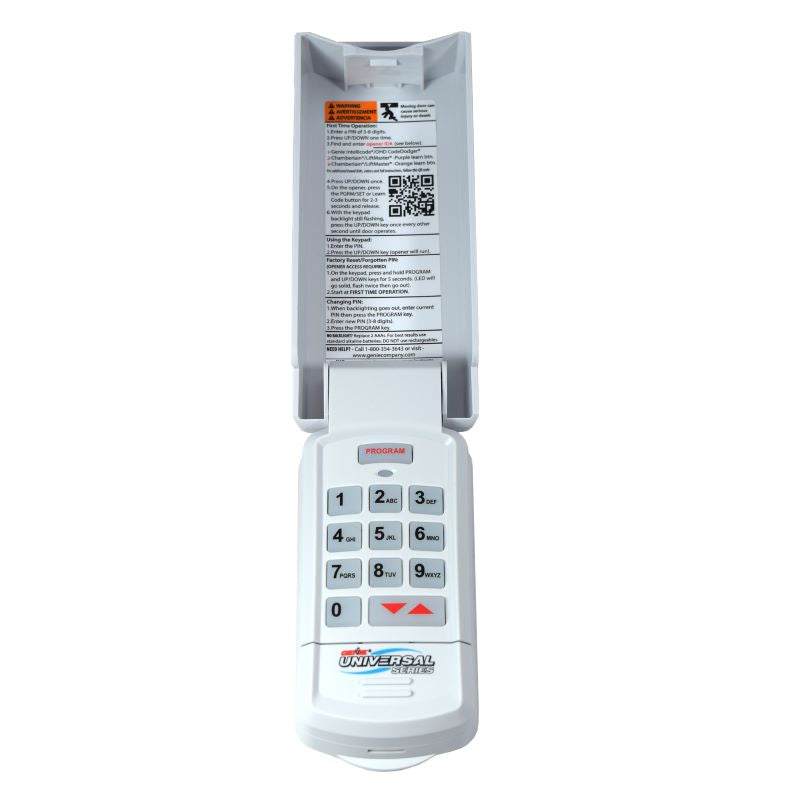
A Genie wireless keypad allows you to open or close your garage door using a PIN. The keypad communicates with the Genie opener mounted in your garage, usually above the garage door. Programming the keypad means syncing it with your opener and setting your personal code.
Common Genie Keypad Models
You might see these model numbers or styles:
- Genie Wireless Keypad GK-R (also called Genie Intellicode)
- Genie Wireless Keypad GK-BX
- Genie GWKP/IC
- Older wired keypads (rare in new homes)
Most keypads work with Genie openers made after 1995, especially those using Intellicode technology (rolling code security). If your opener is older, check the compatibility before you start.
Why Reprogram The Keypad?
You may need to reprogram your Genie keypad if:
- You forgot your PIN and want to reset it.
- You moved into a new house with an existing Genie system.
- You want to change security codes after sharing them.
- The keypad stops working after battery replacement.
- You install a new garage door opener or new keypad.
Reprogramming clears the old PIN and syncs the keypad with your opener. This keeps your garage secure and ensures only those with the new code can enter.
How Genie Keypads Work
Genie keypads use a wireless signal to communicate with the opener. They often have a “Learn” or “Program” button on the opener. When you press this button, the opener listens for a new code from the keypad. This process is called pairing.
Some units allow programming multiple keypads or remotes. Others only accept a limited number. If you have many remotes or keypads, you may need to clear out older codes before adding new ones.
Gathering What You Need
Before you begin, gather these items:
- A ladder (if your opener is mounted high)
- Your Genie garage door keypad
- Access to the Genie opener unit (usually in the garage ceiling)
- New batteries (if your keypad is unresponsive)
- A small tool (like a pen or paperclip, for some reset buttons)
Check that your keypad buttons light up or beep. If not, replace the batteries first.
Safety First
For most homeowners, reprogramming is safe. But always:
- Make sure the garage door area is clear.
- Use a stable ladder.
- Don’t stand under the door while operating it.

Step-by-step: Reprogramming Your Genie Keypad
Now we get to the heart of the process. The exact steps may differ slightly by model, but these instructions cover 90% of Genie wireless keypads made since the late 1990s.
1. Locate The Learn/program Button On Your Opener
Find your Genie opener unit (usually a gray or black box near the center of your garage ceiling). On the back or side, you’ll see a small button labeled Learn, Program, or sometimes just a colored button (often red, purple, or black).
- You may need to remove a light cover to see it.
- On some models, it’s under a small panel.
The Learn button is key—it tells your opener to accept new remote/keypad codes.
Example:
Suppose your Genie opener has a red “Learn” button on the back. Pressing it puts the unit into programming mode for about 30 seconds.
2. Clear The Keypad’s Old Programming (optional But Recommended)
If your keypad has been used before, clear out any old codes. This avoids interference.
- Remove the keypad’s battery cover.
- Press and hold the Program button (sometimes a small black button inside) until the indicator light turns off (about 10 seconds).
- Release the button.
Not all keypads have this feature, but it’s helpful to start fresh.
3. Enter Programming Mode On The Opener
- Press and release the Learn/Program button on the opener. The indicator LED will start blinking.
- You now have about 30 seconds to enter the new code on your keypad.
4. Set Your Personal Pin On The Keypad
- At the keypad, enter your desired 4-digit PIN (choose something memorable but not obvious like “1234”).
- Press the Up/Down arrow key (or “Enter” on some models).
- The keypad will beep or flash.
On most Genie keypads, you’ll enter:
`[your Pin]` + `up/down` (or `enter`)
Some newer keypads require you to press Program after the code.
Example Sequence:
Suppose you want your PIN to be 2580.
- Enter: 2 5 8 0
- Press: Up/Down arrow (or Enter)
- Wait for a confirmation beep or flash.
5. Test The Keypad
Close your garage door. Then, go outside and try your new PIN. Enter the code and press the Up/Down arrow. The door should open or close.
If it doesn’t work:
- Try re-entering the code.
- Repeat the programming steps, making sure you enter the code within 30 seconds of pressing Learn.
6. Additional Programming (multiple Doors Or Temporary Pin)
Some Genie keypads allow you to control two garage doors. If so:
- Program Door 1 using the steps above.
- For Door 2, repeat but use the “Door 2” button (see your keypad’s manual).
For a temporary PIN (for guests or workers):
- Enter your main PIN and press Program.
- Enter a temporary PIN and press Program again.
- The temporary code will work for a set time or number of uses.
Not all models have this feature, but it’s a good security option.
Common Programming Problems And How To Fix Them
Even with good instructions, things can go wrong. Here are the most common issues and how to solve them.
Keypad Not Responding
- Replace the batteries. Weak batteries are a top cause of failure.
- Check for stuck keys. Press each key to make sure it isn’t jammed.
- Clear previous programming. Start fresh if you’re unsure.
Opener Won’t Accept Code
- Make sure you press the Learn button on the opener and enter your code within 30 seconds.
- Too many remotes programmed? Most Genie openers store up to 7-8 remotes/keypads. If full, clear all codes (hold Learn for 10 seconds) and reprogram needed devices.
- If your keypad is too far from the opener during programming, move closer.
Keypad Works Intermittently
- Check for radio interference (LED lights or nearby electronics can cause problems).
- Make sure the keypad is mounted correctly—metal surfaces can block signals.
- Try reprogramming during a different time of day when interference is lower.
Door Opens But Won’t Close
- Genie openers have safety sensors near the ground. If these are blocked or misaligned, the door won’t close. Check for obstructions and realign as needed.
Forgotten Pin
- You must clear the old code and reprogram the keypad with a new PIN.
Resetting Your Genie Keypad
Sometimes, you need to start over completely. A full reset is helpful if you’ve forgotten the PIN or the keypad is acting strangely.
How To Reset Most Genie Keypads
- Open the battery compartment.
- Press and hold the Program (or “Learn”) button until the indicator light turns off (about 10-15 seconds).
- Release the button.
- Repeat the programming steps as described above.
This wipes out old codes and lets you set a brand new PIN.
A Note On Wired Keypads
If you have a very old Genie system with a wired keypad, the reset process may be different. Often, you’ll need to disconnect power for a few minutes, then reconnect and follow the keypad’s instructions. If you’re unsure, check the model number and look up the official Genie instructions online.
Security Tips For Genie Keypads
Your garage is often a main entry point to your house. Keeping your keypad secure is important.
Choosing A Strong Pin
- Avoid easy numbers like 1234, 0000, or your address.
- Don’t use birthdays or other public information.
- Change your PIN every 6-12 months, especially if you share it.
Mounting The Keypad
- Place the keypad where it’s easy for you but not easily seen from the street.
- Mount it at a comfortable height.
- Make sure it’s shielded from rain and direct sun.
Using Temporary Codes
- Use the temporary PIN feature for visitors, contractors, or deliveries.
- Delete temporary codes when they’re no longer needed.
Monitoring Garage Access
- Some newer Genie models connect to smart home apps. Check the opener manual if you want remote access or activity logs.

Genie Keypad Features: What’s Useful?
Different Genie keypads have useful features beyond just opening the door. Here’s a quick look at what you might find.
| Feature | Benefits | Typical Models |
|---|---|---|
| Backlit Keys | Easier to use at night | GK-R, GK-BX |
| Temporary PIN | Safe guest access | Intellicode II models |
| Multiple Door Control | Open 2 doors from one keypad | GK-R |
| Weather Resistance | Lasts longer outdoors | All modern models |
| Low Battery Warning | Flashes/beeps when batteries are low | Some newer models |
If you’re buying a new keypad, consider which features matter most for your home.
Genie Keypad Vs. Remote: Which Is Better?
Both keypads and handheld remotes open your garage, but they serve different needs.
| Genie Keypad | Handheld Remote | |
|---|---|---|
| Access Method | PIN code entry | Button press |
| Security | Code can be changed anytime | Fixed signal (unless lost) |
| Convenience | No device to carry | Keep in car or pocket |
| Guests/Visitors | Easy to share PIN | Must lend remote |
| Weather Impact | Outdoor mounting; durable | Not weatherproof |
Many families use both—a keypad for walking in, and remotes for cars.
What To Do If Programming Fails
If you’ve followed all the steps but your Genie keypad still won’t program, don’t panic. Here’s a practical troubleshooting checklist.
- Double-check your opener model. Some very old Genie openers may not work with modern keypads.
- Test the opener with a remote. If remotes also fail, the opener may have an electrical issue.
- Power cycle the opener. Unplug the unit for 30 seconds, then plug it back in and retry.
- Move closer during programming. Walls or metal can block signals.
- Clear all codes on the opener. Hold the Learn button for 10 seconds to erase, then reprogram remotes and keypads.
- Check Genie support. Visit the official Genie website or call their support line for help.
Insider Tip:
If you have a keypad from another brand (like LiftMaster or Chamberlain), it won’t program with Genie openers. Always use a compatible Genie keypad for best results.
Maintenance Tips For Long-lasting Keypad Performance
A well-maintained keypad will work for years with minimal issues.
- Replace batteries every 1-2 years, or when the keypad is dim/slow.
- Clean the keypad gently with a dry cloth. Avoid harsh cleaners.
- Check for physical damage after storms or accidents.
- Test your code monthly to ensure the keypad is responsive.
If you live in a very cold or hot climate, extreme temperatures may affect battery life. Store spare batteries in your home for quick replacement.
Genie Keypad Programming: Advanced Scenarios
Some homes have unique setups. Here’s how to handle less common situations.
Multiple Keypads For One Door
You can program more than one keypad to the same Genie opener. Just repeat the standard programming steps for each keypad. This is helpful for homes with multiple entrances.
Vacation Mode
Some Genie openers have a Vacation Lock feature—a switch inside the garage that disables all wireless access (including keypads). If your keypad suddenly stops working but remotes still work, check if Vacation Mode is on.
Home Automation Integration
Newer Genie models can connect to smart home hubs or Genie’s Aladdin Connect system. This lets you control or monitor your garage from your phone. If you have this setup, follow the opener’s manual for linking the keypad. The process is usually similar but may involve extra app steps.
Replacing A Lost Or Stolen Keypad
If your keypad is lost or stolen, immediately clear all codes on your opener (hold Learn for 10 seconds) and reprogram only remotes and keypads you still own. This prevents unauthorized entry.
When To Call A Professional
Most Genie keypad programming is DIY-friendly. But call a technician if:
- You’re uncomfortable on ladders or with basic wiring.
- The opener or keypad is damaged.
- Programming still fails after multiple attempts.
- You see sparks, smoke, or burning smells from the opener.
A professional can quickly diagnose deeper issues, especially with older or complex systems.
Real-world Examples
Let’s look at two sample scenarios:
Scenario 1: Lisa just bought a house with a Genie opener. The old owner didn’t leave a keypad code. Lisa follows the steps, presses Learn on the opener, enters her new PIN, and the keypad works. She then programs a temporary code for her dog walker and changes it monthly.
Scenario 2: Mark’s keypad stopped working after a lightning storm. He replaces the batteries—no luck. He resets the keypad, reprograms his code, and everything works again. He learns that power surges can sometimes cause keypads to lose programming.
These examples show that most issues are easy to fix with the right steps.
Genie Keypad Programming: Quick Reference Table
For a fast reminder, here’s a summary of main steps and tips.
| Step | Action | Pro Tip |
|---|---|---|
| 1. Locate Learn Button | Find on opener unit | May be hidden under light cover |
| 2. Clear Old Programming | Hold Program button on keypad | Start fresh for best results |
| 3. Enter Learn Mode | Press Learn on opener | You have 30 seconds to program |
| 4. Enter New PIN | Input PIN + Up/Down | Choose a strong, unique code |
| 5. Test Keypad | Try opening/closing door | Repeat steps if needed |
Keep this table handy for quick troubleshooting.
Frequently Asked Questions
How Do I Know If My Genie Keypad Is Compatible With My Opener?
Most Genie wireless keypads are compatible with Genie openers made after 1995, especially those with Intellicode technology. Look for a “Learn” or “Program” button on your opener. If you have a much older opener, check the model number and visit the Genie official website for compatibility charts.
How Can I Reset My Genie Keypad If I Forgot The Pin?
Open the battery cover, press and hold the Program button until the indicator light goes out (about 10-15 seconds). This clears old codes. Then, follow the programming steps to set a new PIN.
Why Does My Genie Keypad Only Work Sometimes?
Intermittent operation is usually caused by weak batteries, radio interference, or poor mounting location (like on metal). Try replacing batteries, moving the keypad, or reprogramming during a time with less electronic interference.
Can I Program More Than One Keypad To A Single Genie Opener?
Yes! You can program multiple Genie keypads to the same opener. Just follow the programming steps for each keypad. This is useful for homes with several entrances or family members.
What Should I Do If My Genie Keypad Still Won’t Work After Following All Steps?
Check that you’re using a compatible keypad, replace batteries, and make sure the opener is working with remotes. If all else fails, clear all codes from the opener, then reprogram remotes and keypads. For persistent issues, contact Genie customer support or a professional technician.
Reprogramming your Genie garage door keypad is a simple way to improve your home’s security and convenience. With clear steps and a bit of patience, you’ll have full control over who can access your garage—no manual or expert required.