
Changing the battery in your garage door opener keypad might seem like a small task. Yet, when your keypad stops working, it can cause a surprising amount of trouble—especially if you rely on it every day. If you’ve ever tried to open your garage door and nothing happens, you know the frustration. But there’s good news: swapping out the battery is usually quick and easy, even if you’re not “handy.” You don’t need special tools or technical skills, and you can do it in just a few minutes.
This guide will walk you through every step, from understanding why your keypad needs a battery to troubleshooting problems after replacement. You’ll also find practical tips, common mistakes to avoid, and answers to questions most people forget to ask. By the end, you’ll be ready to keep your garage door opener keypad working smoothly—and you’ll know what to do if it ever stops.
Why The Garage Door Opener Keypad Needs A Battery
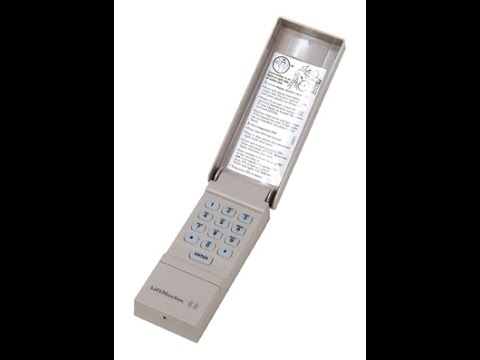
Many people don’t realize their garage door opener keypad has a battery until it stops working. The keypad is the small device mounted outside your garage door, usually next to the frame. It lets you enter a code to open or close the door, offering a convenient way to enter your garage without a remote.
Most keypads use batteries to power the buttons and light up the numbers, especially at night. The battery also allows the keypad to “remember” your code, even if there’s a power outage. If the battery is weak or dead, the keypad won’t send a signal to open the door. You might see the lights dim, the keypad act slowly, or nothing happen at all when you press the buttons.
How Often Should You Change The Battery?
Most garage door opener keypads need a battery change every 1 to 2 years. However, this can depend on the brand, how often you use the keypad, and the type of battery. Some keypads last longer, but it’s smart to check the battery every year—especially before winter or busy seasons.
Signs Your Garage Door Opener Keypad Battery Is Low
It’s easy to miss the warning signs of a weak battery. Watch for these clues:
- Buttons respond slowly or only after pressing multiple times.
- No light when you press the buttons, especially at night.
- Garage door doesn’t open, even though the code is correct.
- Intermittent operation—sometimes it works, sometimes it doesn’t.
- Keypad beeps or flashes to signal a low battery (on some models).
If you notice these signs, don’t wait. A dead battery can leave you locked out at the worst moment.
Tools And Materials Needed
One reason changing the battery is easy is you don’t need many tools. Here’s what you should have ready:
- Replacement battery (usually a 9V or AA/AAA batteries, depending on the model)
- Small flat-head screwdriver (for opening the keypad cover)
- Clean cloth (for wiping dust or corrosion)
- Step stool (if your keypad is mounted high)
- Gloves (optional, for grip and cleanliness)
Make sure you buy the correct battery type. Check your owner’s manual or open the keypad to look at the existing battery before buying a new one.
Identifying Your Keypad Model And Battery Type
Not all keypads are the same. Most brands use a similar process, but there are differences. The most common brands are LiftMaster, Chamberlain, Genie, and Craftsman.
How To Find Your Model
- Look for the brand name on the front of the keypad.
- Check the side or back for a sticker or engraved model number.
- If you can’t find it, check your garage door opener manual or the manufacturer’s website.
Common Battery Types For Keypads
Here’s a quick comparison of the most popular keypad brands and the batteries they use:
| Brand | Common Models | Battery Type | Approximate Battery Life |
|---|---|---|---|
| LiftMaster | 877LM, 878MAX | 9V | 1-2 years |
| Chamberlain | 940EV, 940CB | 9V | 1-2 years |
| Genie | GK-R, GK-BX | AAA (2) | 1 year |
| Craftsman | 139.3050, 139.53753 | 9V | 1-2 years |
If you aren’t sure, remove the battery cover and check the old battery. Always use the same voltage and size—using the wrong type can damage the keypad.

Step-by-step Guide: How To Change The Battery
Ready to change your keypad battery? Follow these steps:
1. Gather Your Materials
Before starting, make sure you have the replacement battery and a small screwdriver. If the keypad is dirty, have a cloth ready.
2. Locate And Access The Keypad
The keypad is usually mounted on the wall next to your garage door, about 4-5 feet above the ground. If it’s too high, use a step stool. Make sure the area is dry and safe.
3. Open The Keypad Cover
Most keypads have a flip-up front cover to protect the buttons. Lift this cover. The battery compartment is sometimes visible under the keypad, or you may need to remove the entire keypad from the wall.
- For most LiftMaster/Chamberlain models: You’ll see a small screw at the bottom or side. Remove it with your screwdriver.
- For Genie models: The battery compartment is often at the back; you may need to slide the keypad up or down to remove it from the mounting plate.
- For Craftsman: Similar to LiftMaster—remove the screw or gently pry the bottom open.
4. Remove The Old Battery
Once you access the battery:
- Gently disconnect the old battery. If it’s a snap-on 9V, pull the connectors off the terminals. If AAA or AA, slide them out.
- Check for any corrosion (white powder or greenish buildup). If you see any, wipe it away with a dry cloth. Do not use water.
- Dispose of the old battery properly—recycle if possible.
5. Install The New Battery
- Match the orientation (positive and negative ends) exactly as shown in the compartment.
- For 9V batteries, snap the connector onto the new battery.
- Place the battery back into the compartment.
Some keypads will light up or beep when the new battery is connected. This is normal.
6. Close The Keypad And Test
- Replace the battery cover, screw, or slide the keypad back into place.
- Test the keypad by entering your code and watching for lights or sound.
- The garage door should open and close smoothly.
7. Reset If Needed
Some keypads need to be reprogrammed after a battery change. Most keep the code in memory, but if your keypad isn’t working:
- Look for a small “reset” button inside or on the back.
- Check your owner’s manual for reprogramming steps.
- Usually, you’ll hold a button and enter your code again.
Common Mistakes To Avoid
Changing a battery isn’t hard, but some mistakes can cause frustration or even damage the keypad. Here are a few things to watch out for:
- Using the wrong battery type. Always double-check the voltage and size.
- Forcing the cover open. If it’s stuck, look for hidden screws or clips.
- Mixing old and new batteries. Use a fresh set, not just one new battery.
- Touching battery terminals with wet hands. This can cause corrosion.
- Not checking for corrosion. Clean the compartment before installing the new battery.
- Forgetting to test. Always check the keypad before putting your tools away.

Detailed Tips For Specific Brands
While the basic steps are similar, each brand has its quirks. Here’s what you need to know for the most popular brands.
Liftmaster And Chamberlain
- Most models use a 9V battery.
- The battery compartment is under the flip-up cover or behind a small door.
- If you have a “Learn” button inside, you may need to reprogram the keypad after changing the battery.
Genie
- Uses two AAA batteries in most models.
- The battery compartment is often on the back, and you may need to slide the keypad off its mount.
- If the lights don’t come on after changing batteries, check the orientation.
Craftsman
- Similar to LiftMaster, usually a 9V battery.
- Look for a screw at the bottom or side.
- If your keypad doesn’t work after changing the battery, clear any dust from the connectors.
Universal Keypads
- Some universal keypads can be programmed for multiple brands.
- Check the manual for the correct battery and reset procedure.
- If you’ve lost the manual, most manufacturers offer PDFs on their websites.
Practical Troubleshooting After Battery Change
Sometimes, you’ll change the battery and the keypad still doesn’t work. Don’t panic. Here’s a troubleshooting process:
- Check battery orientation. Make sure the plus (+) and minus (–) match the diagram.
- Ensure a tight connection. The battery terminals must be snug.
- Look for corrosion or dirt. Clean the contacts with a dry cloth.
- Try another new battery. Sometimes, new batteries are defective.
- Test the keypad in daylight. Some keypads have solar sensors and may act differently in low light.
- Reprogram if needed. Follow the manual’s instructions.
- Check the garage door opener. If the wall button or remote doesn’t work either, the issue may be with the opener, not the keypad.
If you’ve tried everything and the keypad still doesn’t work, it may be time to replace it.
How To Extend Keypad Battery Life
Most people change the battery once it dies. But you can make your battery last longer with a few simple habits:
- Use high-quality batteries. Cheap batteries wear out faster and can leak.
- Keep the keypad clean and dry. Moisture and dirt drain batteries.
- Limit unnecessary button presses. Only use the keypad when needed.
- Check the keypad annually. Replace the battery before it dies, especially before winter.
- Store backup batteries. If your keypad is critical, keep a spare battery in your car or garage.
When Should You Replace The Keypad Instead Of The Battery?
Sometimes, the problem isn’t the battery. Here’s how to tell if you need a new keypad:
- Keypad is cracked, faded, or damaged.
- Buttons stick or don’t respond even with a new battery.
- Water damage or signs of rust inside the compartment.
- Keypad doesn’t light up or beep after several new batteries.
- Reprogramming fails multiple times.
Most keypads last 5-10 years. If yours is older, it may be worth upgrading to a newer model with better features and security.
Here’s a comparison of the cost and features of replacing a battery vs. buying a new keypad:
| Option | Average Cost | Time Required | When to Choose |
|---|---|---|---|
| Replace Battery | $2-$5 | 5-10 minutes | Keypad works but battery is dead |
| Buy New Keypad | $30-$60 | 30-60 minutes (install and program) | Keypad is old, damaged, or unreliable |
If you decide to buy a new keypad, look for one that’s compatible with your garage door opener and offers weather resistance and backlit buttons.
Safety Tips When Changing Keypad Batteries
Many people forget safety when dealing with small electronics. Here’s how to stay safe:
- Turn off the power to the garage door opener if you’ll be handling wires (rarely needed for keypads).
- Keep batteries away from children and pets—batteries are a choking hazard.
- Dispose of old batteries properly. Don’t throw them in the trash; use a recycling center or battery drop-off.
- Wear gloves if you see corrosion or leaking fluids.
- Don’t touch both battery terminals at once with your bare fingers.
Real-world Examples And User Stories
Sometimes, it helps to hear from people who’ve done this before. Here are a few real-world experiences:
- Sarah in Ohio: “My keypad stopped lighting up during a rainstorm. I opened it and found the battery had leaked. I wiped out the compartment, put in a new battery, and it worked again. Now I check it every fall.”
- Mike in Texas: “I changed the battery but the keypad still didn’t work. I realized I’d put the battery in backward! Flipped it around and it worked right away.”
- Jenny in California: “Our Genie keypad needed two AAA batteries. I used cheap batteries, but they only lasted six months. Switched to a name brand and now it lasts over a year.”
Comparing Keypad Battery Types
Choosing the right battery can make a difference in how long your keypad works. Here’s a look at popular options:
| Battery Type | Voltage | Average Lifespan | Brands Used | Notes |
|---|---|---|---|---|
| 9V Alkaline | 9 volts | 12-24 months | LiftMaster, Chamberlain, Craftsman | Most common |
| AAA Alkaline (2) | 1.5 volts each | 8-12 months | Genie | Easy to find |
| AA Alkaline (2) | 1.5 volts each | 12-18 months | Some universal keypads | Long-lasting |
Non-obvious insight: 9V batteries often last longer in keypads because they’re designed for low-power devices. AAA and AA batteries can drain faster, especially in cold weather.
Environmental Impact And Battery Recycling
Batteries contain chemicals that shouldn’t end up in landfills. When you replace your keypad battery, it’s important to recycle the old one.
- Alkaline batteries (like 9V, AA, AAA) can often be dropped off at electronics stores or recycling centers.
- Don’t throw old batteries in the regular trash.
- Check your city’s website for battery recycling programs.
For more details about battery recycling, visit the EPA’s guide to battery recycling.
Final Checklist Before Finishing
Here’s a quick recap to make sure you’ve covered everything:
- Bought the correct battery for your keypad.
- Gathered your tools.
- Opened the keypad cover safely.
- Removed the old battery and cleaned the compartment.
- Installed the new battery correctly.
- Closed the keypad and tested operation.
- Reprogrammed the keypad if needed.
- Disposed of the old battery responsibly.
With these steps, your garage door opener keypad should be working like new.
Frequently Asked Questions
How Do I Know What Battery My Garage Door Opener Keypad Uses?
Check the label inside the battery compartment, your owner’s manual, or the manufacturer’s website. Most keypads use a 9V battery or two AAA batteries, but always confirm before buying.
Will I Lose My Code If I Change The Keypad Battery?
Most modern keypads keep your code even when the battery is removed. However, some older models may need to be reprogrammed. If your keypad stops working after a battery change, follow the programming instructions in your manual.
Why Does My Keypad Not Work After Changing The Battery?
Check that the battery is installed with the correct orientation and is fully connected. Clean the contacts and try a different fresh battery if the problem continues. Sometimes, the keypad needs to be reset or reprogrammed after a battery change.
How Long Does A Keypad Battery Last?
Most batteries last 1-2 years depending on use, weather, and battery quality. Keypads used multiple times a day or exposed to extreme temperatures may need more frequent changes.
Can I Use Rechargeable Batteries In My Garage Door Keypad?
It’s not recommended. Rechargeable batteries (like NiMH) have a lower voltage and may not power the keypad correctly. Always use the type recommended by the manufacturer for best results.
Changing your garage door opener keypad battery is simple, but it makes a big difference in your daily convenience and security. With these steps, you can handle the process confidently and keep your garage running smoothly year after year.