
A sputtering garage door opener can be a significant annoyance, but often, the culprit is a simple, easily replaceable component: the battery. Whether it’s the battery powering your remote control or the backup battery for the opener unit itself, a fresh power source can restore functionality and convenience. This guide will walk you through the process of changing the battery in your Chamberlain garage door opener, covering both remote and main unit batteries, ensuring you can get your garage door operating smoothly again without needing to call a professional.
Key Takeaways
- Identify the Battery Type: Chamberlain remotes typically use coin-cell batteries (CR2032 or similar), while the opener unit may have a sealed lead-acid backup battery.
- Gather Tools: For remotes, a small screwdriver or prying tool is usually sufficient. For the opener unit, you might need a screwdriver and a new battery.
- Remote Battery Replacement: Open the remote casing, note the battery orientation, remove the old battery, insert the new one correctly, and reassemble.
- Opener Backup Battery Replacement: Disconnect power, locate the battery compartment, remove the old battery, install the new one, reconnect power, and test.
- Troubleshooting: If a new battery doesn’t solve the issue, check for remote programming, opener unit power, or other mechanical problems.
- Battery Disposal: Dispose of old batteries responsibly, especially lead-acid types, to protect the environment.

Credit: www.youtube.com
Understanding Chamberlain Garage Door Opener Batteries
Chamberlain garage door openers, like many modern automated systems, rely on batteries for two primary functions: powering the remote control that allows you to operate the door from a distance, and providing a backup power source for the main opener unit itself, ensuring operation during power outages. Understanding the distinction between these two battery types is the first step in successfully replacing them.
The remote control battery is typically a small, coin-shaped cell, most commonly a CR2032. These batteries are designed to power the low-energy transmitter within the remote for months or even years, depending on usage. When the remote starts to falter, requiring multiple button presses to activate the opener, or no longer working at all, a depleted remote battery is often the first thing to check.
The backup battery for the opener unit is a more substantial component, usually a sealed lead-acid battery. Its purpose is to provide enough power to operate the garage door a limited number of times (often 10-40 cycles, depending on the model) during a power interruption. This is crucial for maintaining access to your garage during blackouts. Opener units typically signal when the backup battery is low or has failed, often through audible beeps or indicator lights on the motor unit. Chamberlain offers various backup battery solutions, and checking your specific model’s manual is essential for identifying the correct replacement.
Common Battery Types And Their Characteristics
When it comes to Chamberlain garage door openers, you’ll encounter a few specific battery types. Knowing these will save you time and ensure you purchase the correct replacements.
For Remotes:
- CR2032 Lithium Coin Cell: This is by far the most common battery found in Chamberlain remotes. It’s a 3-volt battery, known for its long shelf life and ability to operate in a wide temperature range. They are readily available at most convenience stores, supermarkets, and electronics retailers.
- A23 Alkaline Battery: Less common for Chamberlain remotes than the CR2032, but some older or specific models might use this cylindrical 12-volt battery. It’s larger than a coin cell and often found in car key fobs and other small electronic devices.
For Opener Motor Units (Backup Power):
- Sealed Lead-Acid (SLA) Battery: This is the standard for garage door opener backup batteries. They are rechargeable and designed to provide a burst of power when the main AC power is out. Chamberlain often uses proprietary battery packs that might contain one or more SLA cells. These are typically rated in ampere-hours (Ah), indicating their capacity. Common capacities for garage door openers might range from 1.2Ah to 7Ah or more, depending on the opener’s power requirements and expected backup duration.
Data Table: Common Battery Specifications
| Battery Type | Voltage | Common Use | Typical Capacity (if applicable) | Key Characteristics |
|---|---|---|---|---|
| CR2032 Lithium Coin Cell | 3V | Remote Controls | N/A | Long life, widely available, flat and round |
| A23 Alkaline Battery | 12V | Some Remote Controls | N/A | Cylindrical, higher voltage than coin cells |
| Sealed Lead-Acid (SLA) | 6V or 12V | Opener Unit Backup Power | 1.2Ah – 7Ah+ | Rechargeable, heavier, requires specific replacement unit |
It’s crucial to consult your Chamberlain opener’s manual or the label on the existing battery to confirm the exact type and specifications needed for replacement. Using the wrong battery can lead to malfunction or damage to the device.

Credit: www.youtube.com
How To Replace The Battery In Your Chamberlain Garage Door Remote
Replacing the battery in a Chamberlain garage door remote is typically a straightforward process that requires minimal tools and expertise. The exact method can vary slightly depending on the remote model, but the general steps remain consistent.
Step 1: Identify Your Remote Model
Chamberlain offers a variety of remote controls, often referred to as “Clickers” or by specific model numbers like KLIK3U, ML500, or Chamberlain Universal Remotes. The design and casing can differ, influencing how you open it. Look for a model number on the back of the remote.
If you’re unsure, a quick search on Chamberlain’s website or a general internet search with your remote’s appearance can help identify it.
Step 2: Gather Necessary Tools And The New Battery
For most Chamberlain remotes, you’ll need:
- The correct replacement battery: Usually a CR2032 lithium coin cell.
- A small flathead screwdriver or a plastic prying tool: To gently separate the remote’s casing. A guitar pick or an old credit card can also work.
Step 3: Open The Remote Casing
Most Chamberlain remotes have a seam running around the perimeter of the casing.
- Locate the seam: Examine the edges of the remote.
- Insert the prying tool: Carefully insert the tip of your flathead screwdriver or prying tool into the seam.
- Gently twist or pry: Apply gentle pressure to pry the two halves of the casing apart. Work your way around the seam if necessary. Avoid using excessive force, as this can damage the plastic. Some remotes may have a small screw, often hidden, that needs to be removed first.
Step 4: Remove The Old Battery
Once the casing is open, you’ll see the battery.
- Note the orientation: Pay close attention to which side of the battery is facing up (positive ‘+’ or negative ‘-‘) before removing it. This is critical for installing the new battery correctly.
- Remove the battery: The battery might be held in place by a small clip or simply rest in a compartment. You can usually gently pry it out with your finger or the prying tool. If it’s a CR2032, it will likely pop out easily.
Step 5: Install The New Battery
- Insert the new battery: Place the new battery into the compartment, ensuring it’s oriented exactly as the old one was. For CR2032 batteries, the positive (+) side (usually marked with text and a plus symbol) typically faces upwards, towards the circuit board.
- Ensure a secure fit: The battery should sit snugly in place.
Step 6: Reassemble The Remote
- Align the casing halves: Carefully align the two halves of the remote’s plastic casing.
- Snap it shut: Gently press the halves together until they snap securely into place. If your remote had a screw, reinsert and tighten it.
Step 7: Test The Remote
Point the remote at your garage door opener motor unit and press the button. The opener should respond immediately. If it doesn’t, double-check the battery orientation and ensure the casing is fully closed. If it still doesn’t work, the remote itself might be faulty, or the issue could be with the opener unit or its programming. You might need to reset your garage door remote or even reprogram it to the opener.
Pro Tip: If your remote has multiple buttons, test each button after replacing the battery to ensure all functions are working correctly. Some remotes control different doors or features.
Credit: www.homedepot.com
Replacing The Backup Battery In Your Chamberlain Garage Door Opener Unit
The backup battery in your Chamberlain garage door opener motor unit is a vital component that ensures you can still access your garage during a power outage. When this battery begins to fail, the opener unit will typically alert you with audible beeps or blinking lights.
Replacing it is a more involved process than changing a remote battery, but it’s still manageable for most homeowners.
Step 1: Identify The Need For Replacement
Chamberlain opener units usually provide clear indicators when the backup battery needs attention:
- Audible Beeps: A repeating beep pattern (often every few seconds) from the motor unit is a common sign of a low or dead backup battery. Consult your manual for the specific beep code.
- Status Lights: Some models have LED indicator lights on the motor unit that show the battery status (e.g., a green light for good, yellow for low, red for dead).
- Failure During Power Outages: If your garage door opener doesn’t operate during a power outage, the backup battery has likely failed or is depleted.
Step 2: Determine The Correct Replacement Battery
This is the most critical step. Chamberlain uses various battery backup systems.
- Check the Motor Unit: Look for a label on the motor unit itself or on the battery compartment cover. It should specify the battery type, voltage (e.g., 12V), and capacity (e.g., 4Ah, 7Ah).
- Consult Your Manual: Your garage door opener’s owner’s manual is the definitive source for the correct replacement battery specifications.
- Proprietary Battery Packs: Some Chamberlain models use integrated battery packs rather than a single, standalone battery. In this case, you’ll need to order the exact replacement pack from Chamberlain or a reputable aftermarket supplier.
Example: A common Chamberlain backup battery might be a 12V, 4Ah sealed lead-acid battery. However, always verify for your specific model.
Step 3: Gather Necessary Tools And Materials
- Correct Replacement Battery: Ensure you have the exact battery specified for your model.
- Screwdriver Set: You’ll likely need a Phillips head screwdriver to open the battery compartment or access the motor unit.
- Gloves and Eye Protection: Recommended when handling batteries, especially lead-acid types.
- Battery Terminal Cleaner (Optional but Recommended): To clean any corrosion from the battery terminals.
- New Battery Terminals/Connectors (Optional): If the old ones are corroded or damaged.
Step 4: Disconnect Power To The Opener
Safety First! Before you begin working on the opener unit, it’s essential to disconnect the power supply to prevent electrical shock.
- Unplug the Opener: Locate the power cord for the garage door opener motor unit and unplug it from the electrical outlet.
- Consider Circuit Breaker: For added safety, you can also switch off the circuit breaker that controls the garage door opener outlet.
Step 5: Access And Remove The Old Battery
The battery is usually located within the motor unit housing.
- Locate the Battery Compartment: This is typically at the bottom or side of the motor unit. It might be covered by a panel held in place by screws.
- Open the Compartment: Remove the necessary screws to access the battery.
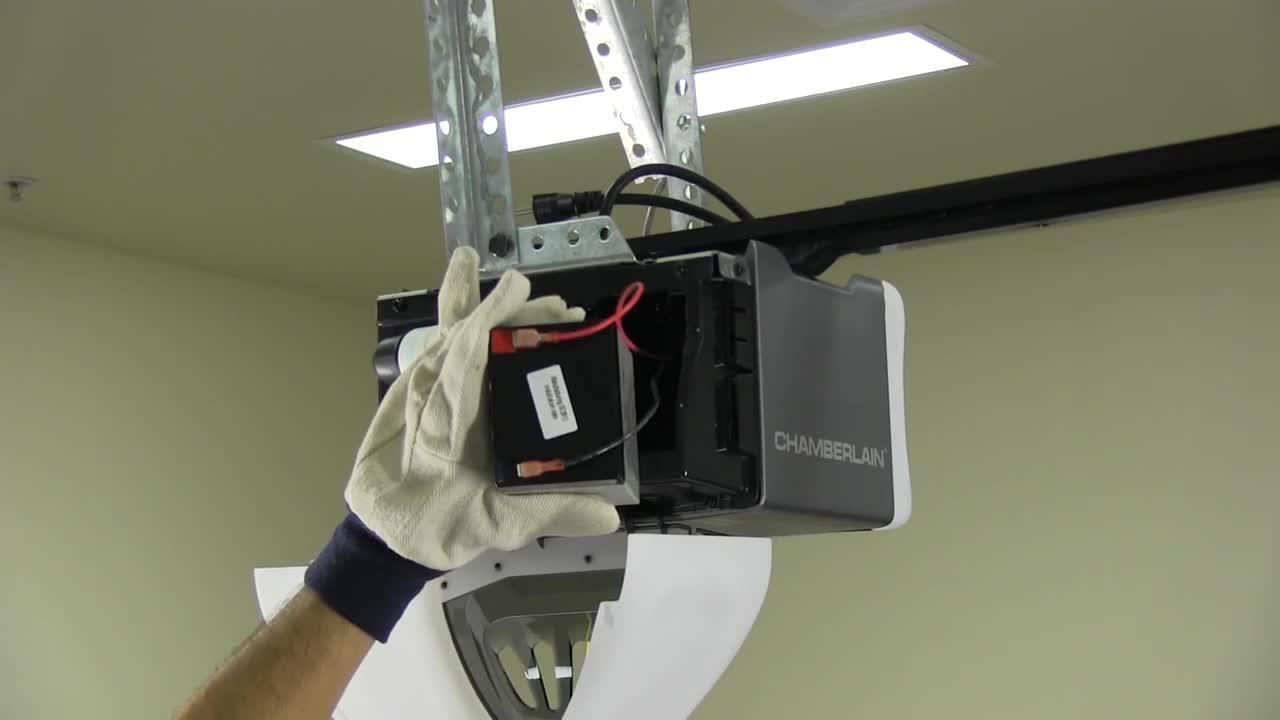
- Disconnect Wires: The battery will have two wires connected to its terminals (usually red for positive and black for negative). Carefully disconnect these wires. They might be spade connectors that pull off, or they might be secured with screws.
- Remove the Old Battery: Lift the old battery out of the compartment. It can be heavy, so be prepared. Note how the battery is positioned.
Step 6: Install The New Battery
- Clean Terminals: If the battery terminals in the compartment show any signs of corrosion, clean them with a wire brush or battery terminal cleaner.
- Position the New Battery: Place the new battery into the compartment, ensuring it’s oriented correctly (matching the position of the old battery).
- Connect Wires: Reconnect the wires to the new battery terminals. Ensure the red wire connects to the positive (+) terminal and the black wire connects to the negative (-) terminal. Secure the connections firmly. If you’re using new terminals, crimp them onto the wires before connecting them to the battery.
Step 7: Reassemble And Restore Power
- Close the Compartment: Replace the battery compartment cover and secure it with the screws.
- Plug In the Opener: Reconnect the power cord to the electrical outlet. If you turned off a circuit breaker, switch it back on.
Step 8: Test The Backup Battery And Opener
- Listen for Beeps: The opener unit might emit a series of beeps to confirm the new battery is recognized and charging.
- Test Opener Function: Use your remote to open and close the garage door to ensure it’s working normally.
- Simulate Power Outage (Optional but Recommended): To confirm the backup battery is functional, unplug the opener from the wall outlet. The opener should still operate using the backup battery. You might hear a different sound or notice a slight delay as it switches to battery power. Plug it back in afterward.
Warning: If your garage door opener continues to beep or show error lights after replacing the battery, or if it fails to operate during a simulated power outage, consult your owner’s manual for troubleshooting steps or contact a professional garage door technician. The issue might be more complex than just the battery.
Troubleshooting Common Battery-related Issues
Even after replacing the battery, you might encounter issues with your Chamberlain garage door opener or remote. Understanding common problems and their solutions can save you time and frustration.
Remote Not Working After Battery Replacement
This is a frequent issue. If you’ve replaced the remote battery and it’s still not functioning, consider these possibilities:
- Incorrect Battery Orientation: The most common mistake is installing the new battery backward. Double-check that the positive (+) and negative (-) terminals are correctly aligned according to the markings inside the remote.
- Dead New Battery: Though rare, new batteries can sometimes be faulty. Try using a different new battery to rule this out.
- Corroded Contacts: The metal contacts inside the remote that touch the battery might be dirty or corroded. Gently clean them with a pencil eraser or a cotton swab dipped in isopropyl alcohol.
- Remote Needs Reprogramming: Sometimes, replacing the battery can cause the remote to lose its connection with the opener unit. You may need to reprogram the remote. Refer to your opener’s manual for specific instructions, or look for guides on how to reset your garage door opener remote or how to reprogram Chamberlain garage door keypad.
- Physical Damage: The remote itself might be damaged from a drop or other impact.
Opener Unit Not Charging Or Indicating Low Battery
If you’ve replaced the backup battery in the opener unit and it’s still beeping or showing a low battery indicator, the problem might lie elsewhere:
- Incorrect Battery Type/Capacity: Ensure you used the exact replacement battery specified by Chamberlain. An underpowered battery might not hold a sufficient charge.
- Faulty Charging System: The opener unit’s internal charging system might be malfunctioning, preventing it from charging the backup battery. This often requires professional diagnosis and repair.
- Loose Connections: Double-check that the battery wires are securely connected to the correct terminals on the new battery and within the opener unit.
- Damaged Battery Terminals/Wiring: Inspect the battery terminals and the wires connecting them for any signs of damage or corrosion that could impede the charging process.
- The Battery Itself is Defective: Even new batteries can occasionally be faulty. If possible, test the new battery in another compatible device or try a different new battery.
- Opener Unit Malfunction: In some cases, the issue might not be with the battery but with the logic board or other internal components of the opener unit.
Opener Operates Slowly Or Weakly On Battery Power
If your opener works during a power outage but seems sluggish or struggles to lift the door, it could indicate:
- Battery Nearing End of Life: Even a charged backup battery has a finite lifespan and capacity. If it’s an older battery, it might not be able to deliver its original power output.
- Door Balance Issues: A poorly balanced garage door requires more force to lift. This can strain the opener, especially when running on limited battery power. Consider lubricating your garage door rollers or checking the spring system.
- Opener Motor Strain: The opener motor itself might be experiencing issues, such as worn gears or a failing capacitor, which can reduce its power output, particularly noticeable when on battery backup.
- Need for Adjustment: It might be time to adjust your Chamberlain garage door opener to ensure optimal performance.
Example: A homeowner replaced their backup battery, but the opener still beeped. Upon inspection, they found that one of the wire connectors to the battery terminals was loose, preventing proper charging. Tightening the connector resolved the issue.
Battery Disposal And Maintenance Best Practices
Properly disposing of old batteries and maintaining new ones ensures safety, environmental responsibility, and longevity for your garage door opener system.
Responsible Battery Disposal
- Remote Batteries (Coin Cells): While less hazardous than larger batteries, coin cells should still be disposed of responsibly. Many retailers that sell batteries offer collection bins for recycling. Avoid throwing them in regular household trash if possible.
- Backup Batteries (Sealed Lead-Acid): These batteries contain lead and acid, which are hazardous materials. Never throw SLA batteries in the regular trash.
- Retailer Drop-off: Most auto parts stores, battery specialists, and some electronics retailers accept used SLA batteries for recycling. There might be a small fee or a core charge refunded when you purchase a new battery.
- Local Hazardous Waste Facilities: Your local municipality or county likely has designated hazardous waste collection sites or events where you can drop off old batteries.
- Check Local Regulations: Disposal regulations vary by location, so it’s always best to check with your local waste management authority for specific guidelines.
Battery Maintenance Tips
- Keep Battery Terminals Clean: Regularly inspect the terminals of your opener’s backup battery (when you’re performing other maintenance, like lubrication) and clean off any signs of corrosion with a wire brush or appropriate terminal cleaner. Clean terminals ensure a good electrical connection.
- Ensure Proper Ventilation: The motor unit housing the backup battery should have adequate ventilation. Overheating can shorten battery life. Avoid storing flammable materials near the opener unit.
- Test Backup Function Periodically: As mentioned earlier, periodically unplugging your opener to test the backup battery function (e.g., every 6 months) ensures it’s ready when needed and helps you gauge its remaining lifespan.
- Replace Backup Batteries Proactively: Backup batteries typically last 3-5 years, depending on usage and climate. Don’t wait for them to fail completely. If your opener is indicating a low battery, replace it promptly. If the battery is several years old, consider replacing it proactively, especially if you live in an area prone to power outages. This prevents being caught without backup power when you need it most.
- Use the Correct Charger (for Opener Unit): The garage door opener unit itself acts as the charger for the backup battery. Ensure the opener is properly plugged in and functioning so the battery stays charged. If the opener’s charging system is faulty, the battery won’t receive power.
Example: A homeowner noticed their backup battery was about 4 years old and lived in an area with frequent storms. They proactively replaced it during the spring maintenance, rather than waiting for the opener to start beeping, ensuring peace of mind before storm season arrived.
Frequently Asked Questions
What Are The Signs My Chamberlain Garage Door Remote Battery Needs Replacing?
The most common signs include the remote requiring multiple presses to activate the opener, a reduced range (you have to be closer to the garage door for it to work), or the remote completely failing to operate the garage door.
Some remotes may also have a small LED light that flickers or doesn’t illuminate when a button is pressed, indicating a low battery.