
Resetting a garage door remote may seem simple, but missing a step or misunderstanding your specific system can leave you stuck outside—or worse, compromise your home’s security. If your remote isn’t working, you lost one, or you recently moved into a new home, knowing how to reset your garage door remote the right way is essential.
This guide goes beyond quick tips, helping you understand how remotes work, what reset really means, and practical step-by-step methods for most homes. We’ll also look at common mistakes, advanced troubleshooting, and safety you should never ignore. By the end, you’ll be confident in handling almost any garage door remote reset situation.
Why Reset Your Garage Door Remote?
Many people assume remotes work forever or only need new batteries, but there are several important reasons for resetting:
- Lost or stolen remotes: If a remote is missing, someone else could open your garage.
- Malfunctioning remotes: Resetting can fix unresponsive buttons or signal problems.
- New home or new remotes: Previous owners may still have access. Resetting erases old codes.
- Security upgrades: Modern remotes use rolling codes for better protection, but need to be re-synced.
- Multiple remotes: Adding or removing remotes requires a reset to pair each one correctly.
Resetting isn’t just about convenience—it’s about keeping your home secure and your garage working smoothly.
How Garage Door Remotes Work
Understanding the basics helps you avoid mistakes. Most garage door remotes use radio signals and a unique code to communicate with the opener’s receiver. There are two main systems:
- Fixed code: Older models use a set code. Anyone with the same code can open the door.
- Rolling code: Modern systems change the code each time you use the remote, making them much harder to hack.
Inside the opener, a learn button stores remote codes in memory. Resetting usually means erasing these codes and teaching the opener to accept new remotes.
Steps To Reset A Garage Door Remote
Resetting a remote can be simple or require more steps, depending on your system. Here’s a practical, step-by-step guide that fits most brands and models.
1. Locate The Learn Button
The learn button is the heart of your opener’s memory. It’s often found:
- On the back or side of the garage door opener motor, in the garage ceiling
- Under a light cover or plastic panel (sometimes you need to remove a bulb cover)
- Labeled as “Learn,” “Set,” or “Program”
- Color-coded (yellow, red, orange, green, or purple depending on brand)
Tip: Unplug the opener before removing any covers for safety.
2. Prepare Your Remotes
- Gather all remotes you want to use.
- Replace batteries to avoid problems during programming.
- Clear the area so nothing blocks signals.
3. Erase Old Codes (factory Reset)
To wipe all remotes from memory:
- Press and hold the learn button for 6–10 seconds.
- Watch for a blinking light or hear a click—this means codes are erased.
- Release the button.
All previous remotes will no longer open the door. This is critical if you lost a remote or just moved in.
4. Program New Remotes
- Press and release the learn button (don’t hold it this time).
- Within 30 seconds, press the main button on your remote.
- The opener light may blink, or you’ll hear a click—this means the remote is now paired.
- Repeat for each remote.
If your remote doesn’t pair, try again, making sure you’re within range and using fresh batteries.
5. Test And Confirm
- Stand outside the garage and press the remote.
- The door should open or close smoothly.
- Test each remote separately.
6. Reconnect Keypad Or Wall Controls
If you have a wireless keypad, you may need to reprogram it after resetting remotes. Check your opener’s manual for keypad instructions.
Example: Resetting A Chamberlain/liftmaster Opener
- Find the yellow “Learn” button on the back of the opener.
- Hold it for 6 seconds until the LED goes out.
- Release, then press and release the “Learn” button again.
- Within 30 seconds, press the remote button.
- The opener light blinks once—reset is successful.
Resetting Different Garage Door Opener Brands
Not all openers are the same. Here’s how the reset process varies by brand.
| Brand | Learn Button Color | Reset Method |
|---|---|---|
| Chamberlain/LiftMaster | Yellow, Purple, Red/Orange, Green | Hold learn button 6–10s, reprogram remotes |
| Genie | Usually Black or Purple | Hold “Program Set” button, erase, then pair |
| Craftsman | Red/Orange or Purple | Same as Chamberlain (same manufacturer) |
| Overhead Door | Varies | Hold “Learn Code” button, clear, reprogram |
| Marantec | Red or Gray | Special sequence, may require two remotes |
Non-obvious insight: Marantec openers often need two remotes to “clone” the code—check the manual before erasing.

Common Mistakes When Resetting Garage Door Remotes
Many homeowners run into problems because they overlook small details. Watch out for these pitfalls:
- Holding the learn button too long or too short: Timing matters. Too short won’t erase anything; too long may wipe everything.
- Not reprogramming all remotes: After a reset, every remote and keypad must be paired again.
- Ignoring keypad reprogramming: Wall keypads sometimes need separate instructions.
- Using old batteries: Weak batteries may cause programming to fail, even if they work for opening.
- Standing too far away: You must be close to the opener for pairing.
- Forgetting about smart home integrations: If your garage links to Wi-Fi or an app, you may need to update those settings too.
Resetting Garage Door Keypads
Wireless keypads are popular but often overlooked during a reset. Here’s how to reset and reprogram most keypads:
Typical Steps
- Locate the learn button on the opener motor.
- Press and release the learn button.
- Within 30 seconds, enter your desired PIN on the keypad and press the “Enter” or “Send” key.
- The opener should click or flash to confirm.
If this fails, remove the keypad battery for 1–2 minutes before retrying.
Example: Genie Keypad
- Press “Program” button until LED blinks.
- Enter PIN, then press “Program.”
- Test to confirm.
Practical tip: If your keypad stops working after a power outage, a reset may be needed even if the remotes are fine.
When To Replace, Not Reset, A Remote
Resetting fixes many problems, but sometimes a remote is simply broken. Signs you need a new one:
- The remote won’t light up with fresh batteries
- Buttons stick or don’t press
- Remote only works very close to the opener
- Case is cracked or water-damaged
Insight: Universal remotes often work with most openers built after 1993. Make sure to check for compatibility with rolling code systems before buying.
Advanced Troubleshooting For Unresponsive Remotes
Sometimes, even after a reset, remotes don’t work. Here’s how to dig deeper:
1. Check For Interference
Nearby devices like LED lights, routers, or even car electronics can block signals. Try these steps:
- Turn off new LED bulbs near your opener.
- Move Wi-Fi routers away from the opener.
- Test the remote from multiple positions.
2. Inspect The Antenna
Most openers have a thin wire antenna hanging from the motor. If it’s broken or tucked inside, the range will be poor.
- Gently pull the antenna down so it hangs freely.
- If damaged, order a replacement.
3. Reset Power
Occasionally, unplugging the opener for 1 minute can clear glitches. Replug and try again.
4. Update Firmware (for Smart Openers)
Modern openers with Wi-Fi may need a firmware update. Check the brand’s website for instructions.
5. Recheck Remote Compatibility
If you recently bought a new remote, make sure it supports your opener’s frequency and rolling code system.
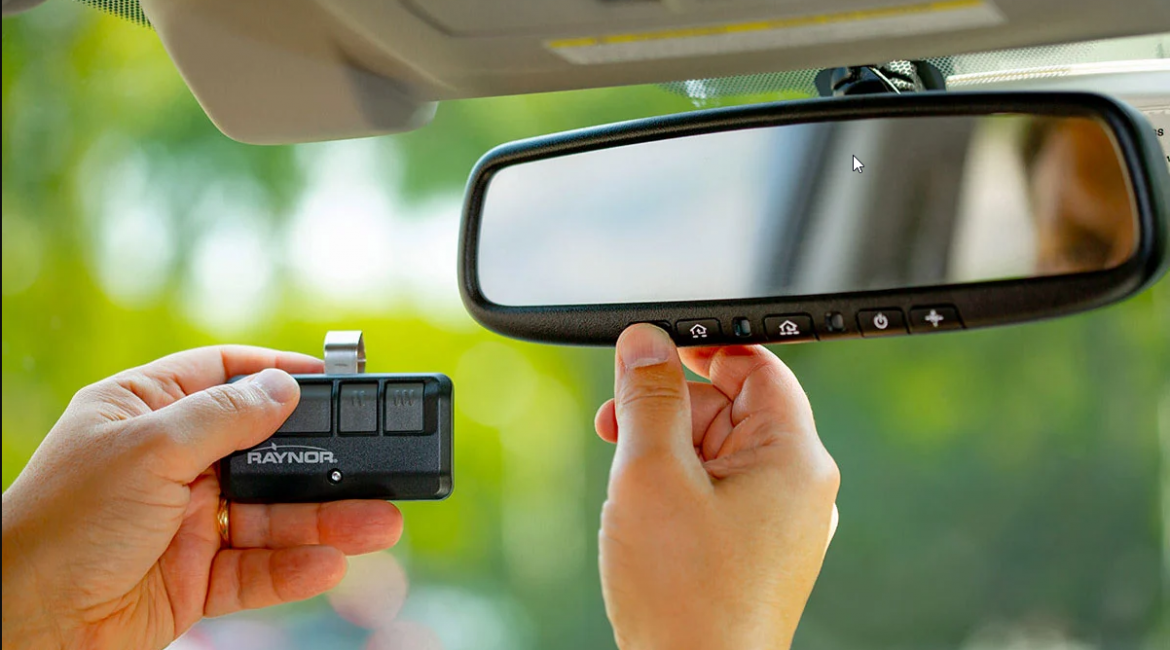
Pairing Multiple Garage Door Remotes
Many families need more than one remote. Most openers can store 5–8 remotes, but the process is the same:
- Erase all codes if you want a fresh start.
- Press and release the learn button.
- Program each remote within 30 seconds of pressing the learn button.
- Test each remote one by one.
Note: If you run out of memory slots, the oldest remote will be erased first when you add a new one.
Security Risks And How Resetting Helps
A forgotten or lost garage remote is a major security risk. Thieves sometimes use scanners to capture old fixed codes, or simply steal remotes from cars. Resetting your remotes:
- Erases old codes: Lost or stolen remotes no longer work.
- Prevents unauthorized access: Only remotes you program can open the door.
- Enables rolling codes: Modern openers change codes every use, making hacking almost impossible.
If you suspect a remote was stolen, reset your opener immediately and reprogram only the remotes you trust.
Resetting Smart Garage Door Openers
Newer openers connect to your phone or smart home. Resetting these is a bit different:
Steps For Most Smart Openers
- Open the manufacturer’s app (e.g., myQ, Aladdin Connect).
- Select “Remove Device” or “Factory Reset” in the settings.
- On the opener, press and hold the learn or Wi-Fi button until lights blink.
- Reconnect your phone and re-add the opener to the app.
Tip: If you sell your home, always remove your account from the garage opener for the new owner’s privacy.
What If You Don’t Have The Manual?
Many people lose their garage door opener manual. You can usually find instructions online:
- Search for your brand and model number (often on the opener’s motor).
- Visit the manufacturer’s official website for PDFs.
- Many brands have video guides and FAQs.
For more details, see this resource: Wikipedia: Garage door opener.
Table: Signs You Need To Reset Your Garage Door Remote
Here’s a quick comparison to help you decide if a reset is necessary:
| Situation | Reset Needed? | Why |
|---|---|---|
| Lost a remote | Yes | Remove access for security |
| Remote not working after battery change | Sometimes | Signal/code glitch |
| Moving to a new house | Yes | Old owners may still have remotes |
| Adding a new remote | No, just pair | Reset not always needed |
| Opener acts randomly | Yes | May be interference or code error |
How Often Should You Reset Garage Door Remotes?
There’s no need to reset remotes regularly, but you should do it when:
- You lose a remote or suspect theft
- You move into a new home
- Your remotes suddenly stop working after a power surge
Insight: Some experts recommend resetting every 3–5 years as a preventive security measure, especially if you use your garage as a main entry point.
Credit: pinnaclegaragedoors.com.au
Garage Door Remote Reset: Safety Tips
Working with garage door openers can be dangerous if you’re not careful. Always:
- Unplug the opener before opening covers or touching wires.
- Use a sturdy ladder and have someone nearby if needed.
- Keep remotes away from children during programming.
- Never bypass safety sensors or force doors open.
- If you’re unsure, call a professional technician.
Table: Typical Learn Button Locations (top Brands)
If you’re not sure where your learn button is, this quick guide may help:
| Brand | Learn Button Location |
|---|---|
| Chamberlain/LiftMaster | Back or side of motor, under light cover |
| Genie | Under lens cover, near wiring |
| Craftsman | Back panel, near wire terminals |
| Overhead Door | Side panel or remote receiver box |
| Marantec | On main control unit, sometimes inside housing |
Real-world Example: Resetting After Remote Theft
Imagine you parked at a shopping center, and your car was broken into. Your garage remote is missing. Here’s what to do:
- Don’t wait—go home and unplug your opener.
- Locate the learn button and hold it until the LED goes off.
- Reprogram only the remotes you still have.
- Change your PIN on any wireless keypads.
- Consider upgrading to rolling code remotes if you have an older system.
This simple reset protects your home from someone using the stolen remote.
When To Call A Professional
Most resets are easy for homeowners, but you should call a pro if:
- You can’t find the learn button or your opener is very old
- The opener makes strange noises or the door won’t move
- You have a complex system (multiple doors, smart home links)
- You’re uncomfortable working on a ladder or with electrical parts
A technician can reset, repair, and check for other safety issues.
Frequently Asked Questions
How Do I Know If My Garage Door Remote Needs To Be Reset?
If your remote stops working, you lost a remote, or you moved into a new house, a reset is a good idea. Also, if the opener works with the wall button but not the remote, a reset can solve most issues.
Can I Reset My Garage Door Remote Without The Learn Button?
No, the learn button is required for most openers. If you can’t find it, check the manual or look for a label on the opener. Some very old openers may need a different process or professional help.
What Should I Do If My New Remote Won’t Program After A Reset?
First, check the battery and make sure you’re using a compatible remote. Stand close to the opener during programming. If it still fails, erase all codes and try again. If problems continue, your opener’s receiver may be faulty.
Is It Safe To Reset My Garage Door Remote Myself?
Yes, if you follow safety guidelines—unplug the opener before opening covers, use a ladder safely, and avoid touching wiring. If you’re unsure, ask a professional to help.
Will Resetting My Garage Door Remote Erase My Wireless Keypad?
Yes, in most cases. After a full reset, you’ll need to reprogram both remotes and any wireless keypads to restore access.
Resetting your garage door remote is one of the simplest, most effective ways to protect your home and ensure smooth operation. With the steps and insights above, you’re ready to handle almost any situation—saving time, money, and worry.
1 thought on “How to Reset Garage Door Remote Easily in Minutes”