
Changing the code for your garage door is a smart way to improve home security and keep your property safe. Many people forget that the garage is often an easy entry point for intruders. Old codes, lost remotes, or sharing with many people can all put your garage at risk.
Thankfully, updating your garage door code is not as hard as it may seem. With clear steps and a little patience, you can handle this task in less than an hour, even if you have never done it before.
This guide will walk you through everything you need to know about changing a garage door code. You will learn how to identify your type of system, find the reset button, choose a safe code, and avoid common mistakes. We will cover both keypad and remote systems, address unique situations like lost remotes, and provide troubleshooting tips if things don’t go smoothly.
You will also find comparison tables, practical advice, and answers to the most common questions about garage door code changes. By the end, you will feel confident in securing your garage with a new code that fits your needs.
Why Change Your Garage Door Code?
Many homeowners don’t think about their garage door code after it’s first set up. But there are important reasons to update it regularly:
- Security: If too many people know your code, or if you’ve had the same code for years, it’s time to change it. This helps prevent unwanted access.
- Lost or stolen remotes: If your remote is missing, someone could use it to enter your garage.
- Moving into a new home: You never know who has the old code. Changing it ensures only you have access.
- Routine maintenance: Updating your code is a good habit, just like changing smoke detector batteries.
Non-obvious insight: Most modern garage door openers use “rolling codes” for remotes, which change the code every time you use the remote. But keypads and some older remotes do not, so manual code changes are still important.
Types Of Garage Door Code Systems
Before you start, you need to know what kind of system you have. This affects the steps you’ll take.
Keypad Entry Systems
A keypad is a small panel near your garage door, usually with numbers 0-9. You enter your code here to open or close the door. Most keypads are wireless and battery-powered.
Remote Control Systems
A remote is a handheld device (often kept in your car) with one or more buttons. Pressing a button sends a signal to the garage door opener.
Smart Garage Door Openers
Some newer systems connect to your phone or smart home. These can be controlled by apps and may have different steps for changing codes.
Non-obvious insight: Older openers may use “dip switches” for their codes. You’ll need to open the remote and the main opener to change them—something rarely needed in newer models.
Gathering Tools And Information
You do not need many tools, but a few items can make the process easier:
- A sturdy ladder
- A flashlight (if your opener is in a dark garage)
- The owner’s manual for your opener or keypad
- Replacement batteries (for keypad, if it’s been a while)
- Pen and paper (to write your new code down)
Tip: Most manuals can be found online if you lost the original. Search your opener’s brand and model number.
Finding Your Garage Door Opener Model
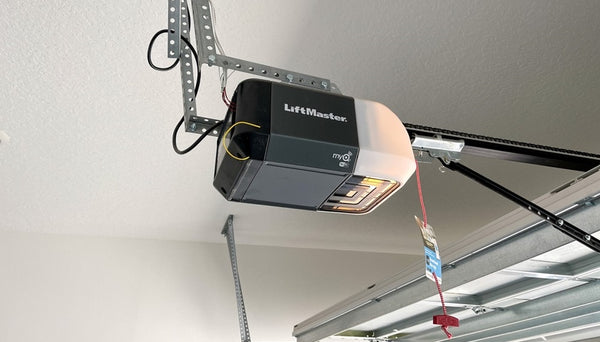
Knowing your opener’s brand and model saves time. Most openers have a label on the main unit (usually on the ceiling). Write down the model number and look for a “learn” or “program” button.
Here are some common brands:
- LiftMaster
- Chamberlain
- Genie
- Craftsman
- Overhead Door
- Linear
If you have a keypad or remote, check for a brand logo or model number on the device.
Safety First: Before You Begin
Changing your garage door code is not risky, but it’s wise to take basic safety steps:
- Unplug your opener if you will be working near wires or the motor.
- Keep children and pets away from the garage door during this process.
- Use a steady ladder and have someone hold it if possible.
- Do not stand directly under the garage door while working.
How To Change A Garage Door Code: Step-by-step
Let’s cover the full process for the two most common systems: keypad and remote.
For Keypad Entry Systems
Most people change their code at the wall-mounted keypad. Here’s how:
- Locate the Learn/Program Button
- This button is on your garage door opener’s main unit (usually on the ceiling of your garage).
- You may need a ladder to reach it.
- The button is often near a light or under a small panel. It may say “Learn,” “Program,” or just be a colored button (red, yellow, purple, or orange).
- Press and Release the Learn Button
- Press the button until a small light comes on.
- The light will stay on for about 30 seconds, giving you time to enter a new code.
- Some brands require you to hold the button until the light blinks, then release.
- Enter Your New Code on the Keypad
- Quickly go to the keypad and enter your desired code (usually 4 digits).
- Press the “Enter” or “Send” key.
- The opener light should blink or you may hear a click—this means the code was accepted.
- Test the New Code
- Wait a few seconds, then enter the code again.
- The garage door should open or close.
- If it doesn’t work, repeat the steps slowly.
Practical example: On a LiftMaster, the learn button is yellow. You press it once, then have 30 seconds to enter the new code on the keypad.
For Remote Controls (handheld)
If you want to change the code your remote uses (or add a new remote):
- Access the Learn Button on the Main Opener
- Follow the same steps as above to find the button.
- Press Learn, Then Remote Button
- Press and release the learn button.
- Within 30 seconds, press the button on your remote you want to program.
- The opener light will blink or click if successful.
- Erase Old Remotes (If Needed)
- Some openers let you erase all remotes by holding the learn button for 6-10 seconds.
- This is useful if a remote is lost or stolen.
- Test Each Remote
- Make sure each remote opens and closes the door.
Important: Changing the code this way does not affect keypad codes. You must change both if you want full security.
For Dip Switch Remotes (older Models)
If you have an opener from the 1980s or early 1990s, look for a row of tiny switches inside the remote and opener:
- Open the Remote’s Battery Compartment
- You’ll see 8-12 small switches set to “up” or “down.”
- Match Switches in the Main Opener
- Use a ladder to reach the opener motor.
- Open the panel and find the matching switches.
- Set a New Pattern
- Change the switch positions on both the remote and the opener to a new, matching pattern.
- Test the Remote
- Press the button to see if the door opens.
Note: These systems are less secure than modern rolling codes. Consider upgrading your opener for better security.
For Smart Garage Door Openers
If you have a Wi-Fi or app-based opener:
- Open the App or Control Panel
- Log in to the app or web interface for your opener.
- Look for “Settings,” “Users,” or “Access Codes.”
- Change or Add a Code
- Delete old codes or users you don’t recognize.
- Add a new code and follow app instructions.
- Test the New Code
- Use the keypad or app to open the door.
Tip: Some smart openers let you set temporary codes for guests or deliveries.

Comparison: Keypad Vs Remote Code Change
Sometimes, people are unsure about which system they have or which method to use. This table highlights key differences.
| Feature | Keypad System | Remote Control |
|---|---|---|
| Where to Change Code | Wall keypad + opener | Remote + opener |
| Typical Code Length | 4-6 digits | Not used; button-based |
| Security | Can be changed by user | Rolling code (auto-changes) |
| Risk Level | High if code is shared | High if remote lost |
| Reset Method | Learn button + keypad | Learn button + remote |
Choosing A Strong Garage Door Code
Picking an easy code (like “1234” or your address) puts your garage at risk. Here’s how to choose a better one:
- Avoid obvious codes (no “0000” or “1111”)
- Don’t use your birth year, phone number, or house number
- Mix up numbers (e.g., “2854”)
- Change codes regularly (every 6-12 months)
- Write your code in a safe place, not on the keypad!
Practical tip: Some keypads accept 5- or 6-digit codes. Longer codes are harder to guess but may be harder to remember.
Resetting All Codes At Once
If you’ve lost a remote or suspect someone knows your code, it’s best to reset everything. Here’s how:
- Hold the learn button on the main opener for 6-10 seconds until the light goes out.
- This erases all remotes and keypad codes.
- Reprogram each remote and keypad with your new code.
Warning: After a full reset, no remote or keypad will work until you re-add them.
Programming Multiple Remotes Or Keypads
Most openers can work with several remotes or keypads (good for families with multiple cars). To add a new one:
- Press the learn button, then the button on the new remote.
- Repeat for each device.
- Test each one after programming.
Some keypads can store multiple codes, useful for granting temporary access.
Troubleshooting Common Problems
Sometimes, things don’t go as planned. Here are common issues and solutions:
The New Code Doesn’t Work
- Make sure you entered the code within 30 seconds of pressing the learn button.
- Check for dead batteries in your keypad.
- Try resetting the system and programming again.
Remote Still Opens The Door After Code Change
- You may have only changed the keypad code.
- Erase all remotes by holding the learn button for 6-10 seconds, then re-add remotes you trust.
Keypad Is Unresponsive
- Replace the battery.
- Clean the keypad with a dry cloth (dirt can block buttons).
- Make sure the keypad is not too far from the opener.
Opener Light Does Not Blink
- The learn button may not be working (check for damage).
- Make sure the opener has power.
Door Opens On Its Own
- Someone nearby may have a remote on the same frequency (rare, but possible with old openers).
- Change your code and consider upgrading to a rolling code model.
Upgrading Your Garage Door Opener For Better Security
If your opener is more than 15 years old, it may lack modern security features. Upgrading can offer:
- Rolling code technology (changes code every use)
- Smartphone control and alerts
- Battery backup in case of power failure
- Stronger encryption against hacking
New openers are quieter, more reliable, and often come with safety sensors. Consider an upgrade if you want the highest security.
Comparison: Old Vs New Garage Door Openers
To highlight the difference, here’s a side-by-side look:
| Feature | Old Opener (Dip Switch) | Modern Opener (Rolling Code) |
|---|---|---|
| Security | Low (easy to guess) | High (code changes every use) |
| Remote Type | Fixed code, dip switch | Rolling code, encrypted |
| Keypad Support | Rare or add-on only | Common, built-in |
| Smartphone Integration | No | Yes (many models) |
| Price (approximate) | $100–$150 | $200–$400 |
Non-obvious insight: Thieves can use “code grabbers” to open old dip switch openers. Modern rolling code systems prevent this by changing the code every time.
Keeping Your Code Secure
Changing your code is only step one. Here’s how to keep it safe afterward:
- Don’t share your code with people you don’t trust.
- Change the code after contractors or guests have used it.
- Cover the keypad with your hand when entering your code.
- Check your keypad for signs of tampering.
- Update codes regularly, especially if you suspect someone else knows it.
Tip: If you have a smart opener, check app logs for unknown users or access times.

Mistakes To Avoid When Changing Your Garage Door Code
Changing your code seems simple, but these common mistakes can weaken your security:
- Choosing an easy code: Avoid birth years, addresses, or “1234.”
- Not testing the new code: Always check it works before putting the ladder away.
- Forgetting to reprogram remotes: If you erase everything, all remotes need to be added again.
- Not changing the code after moving in: You never know who has the old code.
- Writing the code on the keypad: Don’t give thieves an easy clue.
- Ignoring the owner’s manual: Each brand is a little different—read the instructions if you get stuck.
What To Do If You Lose Your Garage Door Remote
A lost remote is a security risk. Here’s what to do:
- Reset all codes using the learn button (hold for 6-10 seconds).
- Reprogram only remotes you have.
- Change your keypad code, too.
- Consider buying a new remote (most brands sell replacements).
If you use a smart opener, remove the lost remote from your app or user list.
How Often Should You Change Your Garage Door Code?
There is no strict rule, but most experts suggest changing your code:
- Every 6-12 months for best security
- After any lost remote
- When you move into a new home
- After giving access to guests, workers, or renters
Data point: The FBI reports that about 9% of break-ins happen through the garage. Regular code changes lower your risk.
Table: Garage Door Opener Brands And Code Change Process
To help you, here’s a quick reference for popular brands:
| Brand | Learn Button Color | Keypad Code Change | Remote Programming |
|---|---|---|---|
| LiftMaster | Yellow, Red, or Purple | Press learn, enter code | Press learn, remote button |
| Chamberlain | Yellow, Purple | Press learn, enter code | Press learn, remote button |
| Genie | Red or Black | Press program, enter code | Press learn, remote button |
| Craftsman | Yellow, Orange | Press learn, enter code | Press learn, remote button |
| Overhead Door | Red | Press learn, enter code | Press learn, remote button |
Always check your manual for brand-specific steps.
When To Call A Professional
Most garage door code changes are DIY-friendly, but call a pro if:
- The opener is very old or damaged.
- The learn button does not work.
- The keypad or remote is broken.
- You want to upgrade to a smart opener.
- You feel uncomfortable working on a ladder.
A professional can quickly update your system and check for other safety issues.
Real-world Example
Imagine you just moved into a new home. You find a keypad and two remotes in the garage. You don’t know if the previous owner gave the code to others. Here’s what you should do:
- Unplug the garage opener for a minute to reset it.
- Hold the learn button for 10 seconds to erase all old codes.
- Program a new keypad code only you know.
- Reprogram both remotes.
- Test everything to ensure only your codes work.
In less than an hour, you have a fully secure garage.
Additional Resources
If you want more details or run into a unique problem, many opener brands have support pages or videos. For deeper technical info, you can visit the Wikipedia page on garage door openers.
Frequently Asked Questions
How Do I Know If My Garage Door Opener Uses Rolling Codes?
Most openers made after 1996 use rolling codes. Check your remote or opener for labels like “Security+” or “rolling code.” If you see dip switches, it’s an older fixed code system. Your owner’s manual or the brand’s website can also tell you.
Can Someone Hack My Garage Door Code?
Modern rolling code systems are very hard to hack. Older fixed code or dip switch models can be hacked by “code grabbers. ” If your opener is more than 20 years old, consider upgrading for better protection.
Do I Need To Change My Code After A Power Outage?
No, most garage door openers keep codes during power loss. However, if your opener resets or acts strange after an outage, check the manual and test your codes to be sure.
How Many Codes Can I Program Into My Garage Opener?
It depends on your model. Most modern openers allow 4-7 remotes and 1-2 keypads. Some smart openers let you add many users or temporary codes. Check your manual for exact numbers.
What Should I Do If My Keypad Stops Working After Changing The Code?
First, check the battery and clean the keypad. If it still won’t work, reset the code again using the learn button. If it fails after several tries, your keypad may need to be replaced.
Changing your garage door code is one of the simplest ways to boost your home’s security. Take a few minutes to update your codes regularly, and you’ll enjoy peace of mind knowing your garage—and your home—are safer.