
Resetting a garage door opener sounds easy, but it can quickly become frustrating if you don’t know the steps. Many people try random methods, hoping to get their door working again, only to make things worse. Whether your remote stopped working, you just moved into a new home, or you want to set new codes for safety, understanding how to reset a garage door opener is important.
This guide will walk you through every part of the process, from basic checks to advanced troubleshooting. You’ll also learn about common mistakes, safety tips, and how different brands compare. By the end, you’ll feel confident handling your garage door opener reset—no matter your experience level.
Understanding Garage Door Opener Basics
Before starting, it helps to know what a garage door opener really is. Most modern openers use a small electric motor to move a chain, belt, or screw drive, which pulls the door up or down. Remotes and wall switches send signals to the opener, telling it what to do. Each opener has a control unit, sensors, and sometimes a backup battery.
Garage door openers are built for convenience and security. They use rolling codes, which means the signal changes every time you open the door. This makes it harder for someone to steal your code and break in. However, if something goes wrong or you lose a remote, you may need to reset the system to clear old codes.
There are three main reasons to reset a garage door opener:
- You bought a new remote and need to program it.
- You lost a remote and want to prevent unauthorized access.
- The opener is acting up and needs a fresh start.
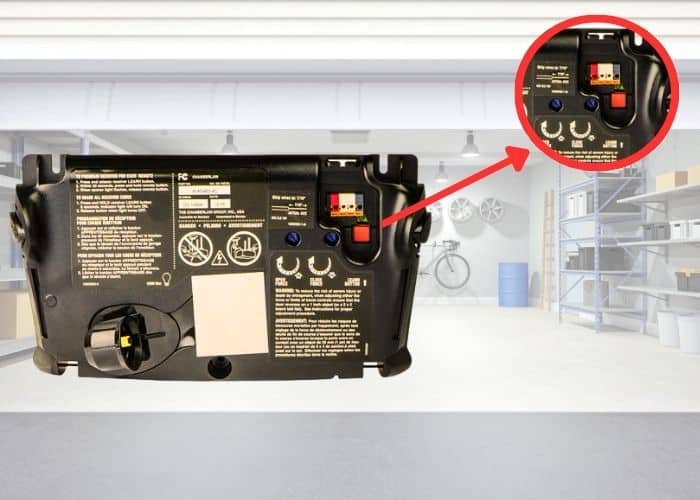
Most openers have a Learn or Smart button for resetting, but the steps vary by brand and model. It’s important to know what type you have before you begin.
Safety First: Precautions And Tools Needed
Working on a garage door opener might seem simple, but safety should always come first. Garage doors are heavy and springs are under high tension. Mistakes can cause injury or damage.
Safety Tips
- Cut the power: Unplug the opener before you touch any wires or circuits.
- Keep hands clear: Stay away from the door springs and cables.
- Use a sturdy ladder: Most openers are mounted on the ceiling.
- Have another person nearby: They can help if something goes wrong.
- Wear safety glasses: Protect your eyes from dust or debris.
Tools You’ll Need
- Step ladder: To reach the opener.
- Screwdriver: For opening covers.
- Flashlight: To see small buttons or markings.
- Owner’s manual: For your model’s instructions (if you have it).
- New batteries: For remotes, if needed.
- Pen and notepad: To write down codes or steps.
Having these ready will save time and reduce stress.
Identifying Your Garage Door Opener Type
Not all garage door openers are the same. Reset steps depend on whether you have a chain drive, belt drive, screw drive, or smart opener. Brand matters too—LiftMaster, Chamberlain, Genie, and Craftsman are the most common.
How To Find Your Opener’s Model
- Look on the motor housing: Most openers have a sticker or metal plate with the model and serial number.
- Check the remote: Sometimes the brand and model are printed on the back.
- Search online: If you find the model number, you can look up the manual on the manufacturer’s website.
Common Garage Door Opener Brands
Here’s a quick comparison of popular brands and their typical reset methods:
| Brand | Learn Button Color | Typical Reset Steps |
|---|---|---|
| LiftMaster | Yellow, Red, Purple, Green | Press and hold Learn button, then reprogram remotes |
| Chamberlain | Usually Yellow or Orange | Same as LiftMaster (same company) |
| Genie | Black or Red | Press and hold Program/Learn button, clear codes |
| Craftsman | Varies | Often similar to LiftMaster and Chamberlain |
Knowing your brand and model will help you follow the right steps and avoid mistakes.
Step-by-step: How To Reset A Garage Door Opener
Resetting a garage door opener usually means erasing old codes and programming new remotes. The process can seem technical, but it’s straightforward if you take it step by step. Below are the most common methods.
1. Resetting With The Learn Or Smart Button
Almost all modern openers have a Learn or Smart button. Here’s how to use it:
- Locate the Learn button: It’s usually on the back or side of the motor housing. You may need to remove a light cover.
- Press and hold the button: Use your finger or a small tool. Hold it for about 6-10 seconds, until the indicator light goes out. This erases all stored codes.
- Release the button: The opener memory is now cleared.
- Reprogram remotes: Press the Learn button once (don’t hold it this time), then press the button on your remote. The opener light will blink or click to confirm.
- Test the remote: Make sure the door opens and closes.
Pro tip: If you have a keypad, you’ll need to reprogram it too. Follow your manual’s instructions or look up your model online.
2. Resetting A Keypad Entry
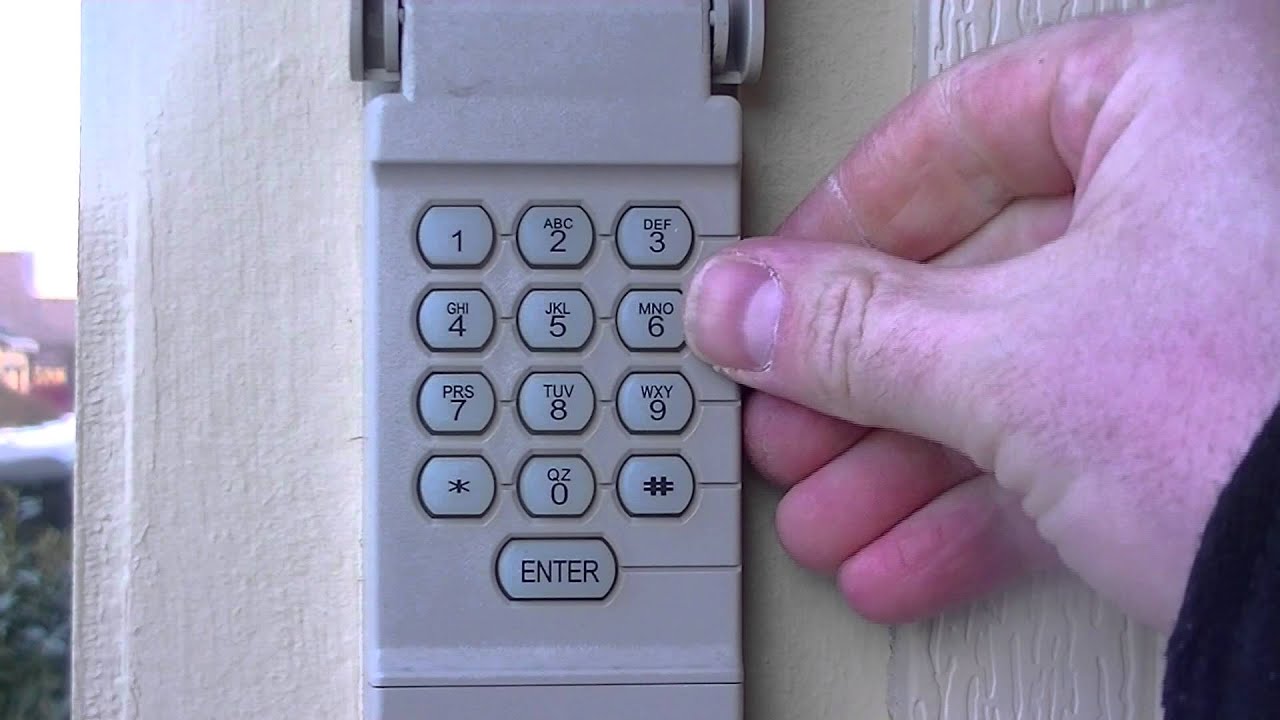
Keypads let you open the garage with a code. If you’re resetting the opener, you must set a new keypad code:
- Clear old codes: Use the Learn button reset as above.
- Enter your new code: On the keypad, type in your chosen code (usually 4 digits).
- Press Enter or Program: Depending on your model, you may need to press a “Program” or “Enter” button.
- Press the Learn button again: Within 30 seconds, press the Learn button on the opener, then the keypad’s Enter button.
- Test the keypad: Try your new code to make sure it works.
Non-obvious insight: Some keypads have a “temporary code” feature for guests or service people. This code expires after a set time—check your model’s manual.
3. Resetting Older Garage Door Openers
Older openers (before 1995) may use DIP switches instead of rolling codes.
- Open the remote and opener housing: Look for a row of small switches.
- Set the switches: Move them to match the pattern in the remote and the opener.
- Test the door: The switches must match exactly.
- Change all remotes: If you want to reset, set a new pattern and update every remote.
Warning: DIP switches are less secure than rolling codes. If security is important, consider upgrading your opener.
4. Resetting Smart Garage Door Openers
Smart openers connect to WiFi or Bluetooth and are controlled by an app.
- Open the app: Find the “Factory Reset” or “Remove Device” option.
- Follow app instructions: The app will walk you through resetting the connection.
- Reset WiFi settings: You may need to press and hold a button on the opener.
- Reconnect to your network: Enter your WiFi details again.
- Re-add remotes and keypads: Use the app to pair them.
Non-obvious insight: Some smart openers keep backup codes in the cloud. After a reset, check if you need to clear these online as well.

Programming New Remotes After Reset
Resetting your garage door opener clears all remotes. Programming new ones is quick, but each brand is a little different.
General Steps To Program A Remote
- Press the Learn button: Briefly, don’t hold it.
- Press the remote button: Within 30 seconds.
- Wait for confirmation: The opener light should blink or you may hear a click.
- Repeat for more remotes: Each needs to be programmed separately.
Special Cases
- Some remotes have a “multi-button” feature for controlling several doors.
- Universal remotes may need to be set to the right brand before programming.
Common Programming Problems
- Remote too far from opener: Move closer when programming.
- Batteries low: Replace with new batteries.
- Interference: Turn off nearby electronics during programming.
Troubleshooting: When The Reset Doesn’t Work
Sometimes, a reset doesn’t solve your problem. If the door still won’t open or the remote won’t connect, try these tips.
1. Check Power And Wiring
- Is the opener plugged in?
- Are any wires loose or damaged?
- Try another outlet to test for power issues.
2. Inspect Safety Sensors
Modern openers have photo-eye sensors near the floor. If these are dirty or misaligned, the door won’t close.
- Clean the sensors.
- Make sure the lights on both sensors are solid (not blinking).
- Adjust until both lights are steady.
3. Test The Wall Switch
If the remote works but the wall switch doesn’t (or vice versa), the problem may be with the switch wiring.
- Unscrew the switch and check for loose wires.
- Replace the switch if it’s old or damaged.
4. Check The Remote
- Replace batteries.
- Make sure the contacts are clean.
- Try reprogramming again.
5. Look For Lock Mode
Some openers have a vacation or lock mode that disables remotes. Check your model’s features and turn off lock mode if needed.
6. Reset The Circuit Board
If all else fails, unplug the opener for 5 minutes. This can clear minor glitches.
How To Reset Garage Door Opener After Power Outage
A power outage can cause your opener to lose its settings or get stuck.
- Unplug the opener for 30 seconds: Let it reset.
- Plug it back in: Wait for the lights to come on.
- Reprogram remotes if needed: Sometimes they lose their codes.
- Test the door: If the door won’t open, pull the emergency release and move it by hand, then reconnect.
Tip: If outages are common, consider a backup battery opener.
Brand-specific Reset Instructions
Each brand has small differences. Here’s a closer look at the most popular brands.
Liftmaster And Chamberlain
These brands share many parts and reset steps.
- Find the Learn button (yellow, red, or purple).
- Press and hold for 6-10 seconds.
- Light goes out—codes erased.
- Press Learn again, then remote.
- Repeat for each remote.
Genie
- Locate the Program/Set button.
- Hold until the light blinks.
- Release, then press the remote button.
- Light blinks again to confirm.
- For keypads, enter your PIN and press “Program”.
Craftsman
Very similar to LiftMaster:
- Find Learn button.
- Press and hold.
- Reprogram remotes and keypads.
Smart Openers (myq, Aladdin Connect, Etc.)
- Use the app’s “Factory Reset” option.
- Reset WiFi if needed.
- Reprogram remotes and keypads.
Comparing Modern And Older Garage Door Openers
Modern openers are safer and more secure, but older models are still in many homes. Here’s how they compare:
| Feature | Modern Openers (Post-1995) | Older Openers (Pre-1995) |
|---|---|---|
| Security | Rolling codes, hard to hack | Fixed codes, easier to copy |
| Reset Method | Learn button | DIP switches |
| Remote Range | Up to 100 feet | Shorter range |
| Keypad Support | Yes | Rare |
| Smart Features | WiFi, app control | None |
Insight: Upgrading to a modern opener is worth it for better security and easier resets.
Preventing Future Problems
Resetting your garage door opener solves many issues, but good maintenance can prevent problems before they start.
Regular Maintenance Tips
- Change batteries yearly: For remotes and keypads.
- Clean sensors: Wipe with a soft cloth every few months.
- Check the door balance: Pull the release cord and lift the door halfway. It should stay in place.
- Lubricate moving parts: Use garage door lubricant on rollers, hinges, and tracks.
- Update codes: Change keypad and remote codes if you lose a remote or move into a new home.
Non-obvious tip: If your remote starts working only sometimes, check for nearby wireless devices or LED lights—they can cause interference.
When To Call A Professional
Most resets are DIY jobs, but sometimes it’s safer to call a pro.
- The door won’t move at all: Could be a broken spring or motor.
- You hear grinding noises: Something may be stuck.
- You see frayed cables or broken parts: These can be dangerous.
- You’re unsure about wiring or electronics: Mistakes can cause shocks or damage.
A certified technician can quickly diagnose and fix complex problems.
Security And Privacy Considerations
Garage door openers are often the weakest point in home security. Resetting your opener and remotes helps protect your home, especially if you’ve lost a remote or just moved in.
Steps To Improve Security
- Reset after moving in: Clear all old codes immediately.
- Don’t share your code: Only give codes to trusted people.
- Use rolling code remotes: These change every time you open the door.
- Lock the door manually when on vacation: Some thieves use universal remotes to try random codes.
- Cover external keypads: Rain and sunlight can damage them or make codes easier to read.
For more about garage security, see the resources at the US Federal Trade Commission.
Common Mistakes To Avoid When Resetting
Even experienced DIYers make mistakes when resetting garage door openers. Here’s what to watch for:
- Holding the Learn button too long: This can sometimes reset other settings, not just remotes.
- Forgetting to reprogram keypads: The keypad won’t work until you reset it too.
- Not checking batteries first: Many “problems” are just dead batteries.
- Missing sensors: If the door closes only partway, check sensor alignment.
- Ignoring the manual: Each brand has quirks—always check your manual.
- Trying to force the door: Never force a stuck door. It could be a spring or track issue, not the opener.
Non-obvious mistake: Some smart openers save settings in the cloud. If you don’t clear these, old phones or devices might still have access.
Frequently Asked Questions
How Do I Find The Learn Button On My Garage Door Opener?
The Learn button is usually on the back or side of the opener’s motor housing. You might need to remove a light cover to see it. It’s often colored yellow, red, or purple, depending on the brand.
Do I Need To Reset My Opener If I Lose A Remote?
Yes. If you lose a remote, reset your garage door opener to erase all old codes. Then reprogram your remaining remotes and keypads. This stops anyone who finds the lost remote from entering your garage.
Why Won’t My Garage Door Remote Work After Resetting?
Common reasons include low batteries, being too far from the opener during programming, or interference from other devices. Double-check the batteries, move closer, and try reprogramming. Also, make sure the opener is not in lock or vacation mode.
Can Someone Hack My Garage Door Opener?
Modern openers with rolling codes are hard to hack. Older openers with DIP switches or fixed codes are less secure. For best security, always use modern remotes and reset your codes after moving or losing a remote.
How Often Should I Reset My Garage Door Opener?
You don’t need to reset your opener unless you lose a remote, move into a new home, or suspect someone else has your code. However, updating codes every few years improves security.
Resetting a garage door opener isn’t just about fixing problems—it’s about keeping your home safe and making life easier. With the right steps, tools, and knowledge, anyone can handle this task confidently. If you ever feel unsure, don’t hesitate to call a professional. And remember: a little prevention goes a long way in keeping your garage door opener working smoothly for years to come.