
Setting up a Genie garage door opener remote can make life much easier. You can open and close your garage from your car or even from inside your home. Many people find the process confusing, but with the right steps, anyone can do it.
This article will guide you through everything you need to know about setting up a Genie garage door opener remote, from understanding the basics to solving common problems. Whether you’re installing a new remote, replacing a lost one, or adding another remote for a family member, you’ll find clear, simple instructions here.
Understanding Your Genie Garage Door Opener
Before you start programming, it helps to know the main parts of your Genie system. Genie is a popular brand known for reliability and user-friendly designs. Most Genie openers and remotes work using wireless radio frequencies. When you press the remote button, it sends a signal to the opener, which activates the door.
Main Parts Of The System
- Opener unit: Mounted on your garage ceiling.
- Remote control: Small device you keep with you.
- Wall console: Button panel inside your garage.
- Learn button: Located on the opener unit; used for programming.
Older Genie models might use dip switches, but most models from the last 20 years use a “learn” button. This is usually colored and easy to find if you open the light cover on the opener unit.
Types Of Genie Remotes
There are several types of Genie remotes. Some only open one door, while others can control up to three different doors or gates. Here’s a quick comparison of the most common models:
| Model | Buttons | Features | Battery Type |
|---|---|---|---|
| Genie G1T-BX | 1 | Basic, single door | CR2032 |
| Genie G3T-R | 3 | Multiple doors, compact design | CR2032 |
| Genie ACSCTG Type 3 | 2 | Older models, large case | 9V |
| Genie Master Remote | 3 | Works with most Genie openers | CR2032 |
Knowing your remote model helps you follow the right programming steps.
Things You Need Before You Start
To set up your Genie garage door opener remote, gather these items:
- The Genie remote you want to program.
- A ladder to reach the opener unit.
- Fresh batteries for the remote (if it’s not new).
- The garage door opener manual (optional, but helpful).
Check the remote’s battery by pressing a button. If the LED does not light up or is dim, replace the battery first.
Safety Precautions
Programming a remote is usually safe, but keep these tips in mind:
- Make sure the garage door area is clear.
- Avoid standing directly under the door when testing.
- If you have kids or pets, keep them away until you finish.
- Use a stable ladder and have someone hold it if possible.
Step-by-step Guide: Setting Genie Garage Door Opener Remote
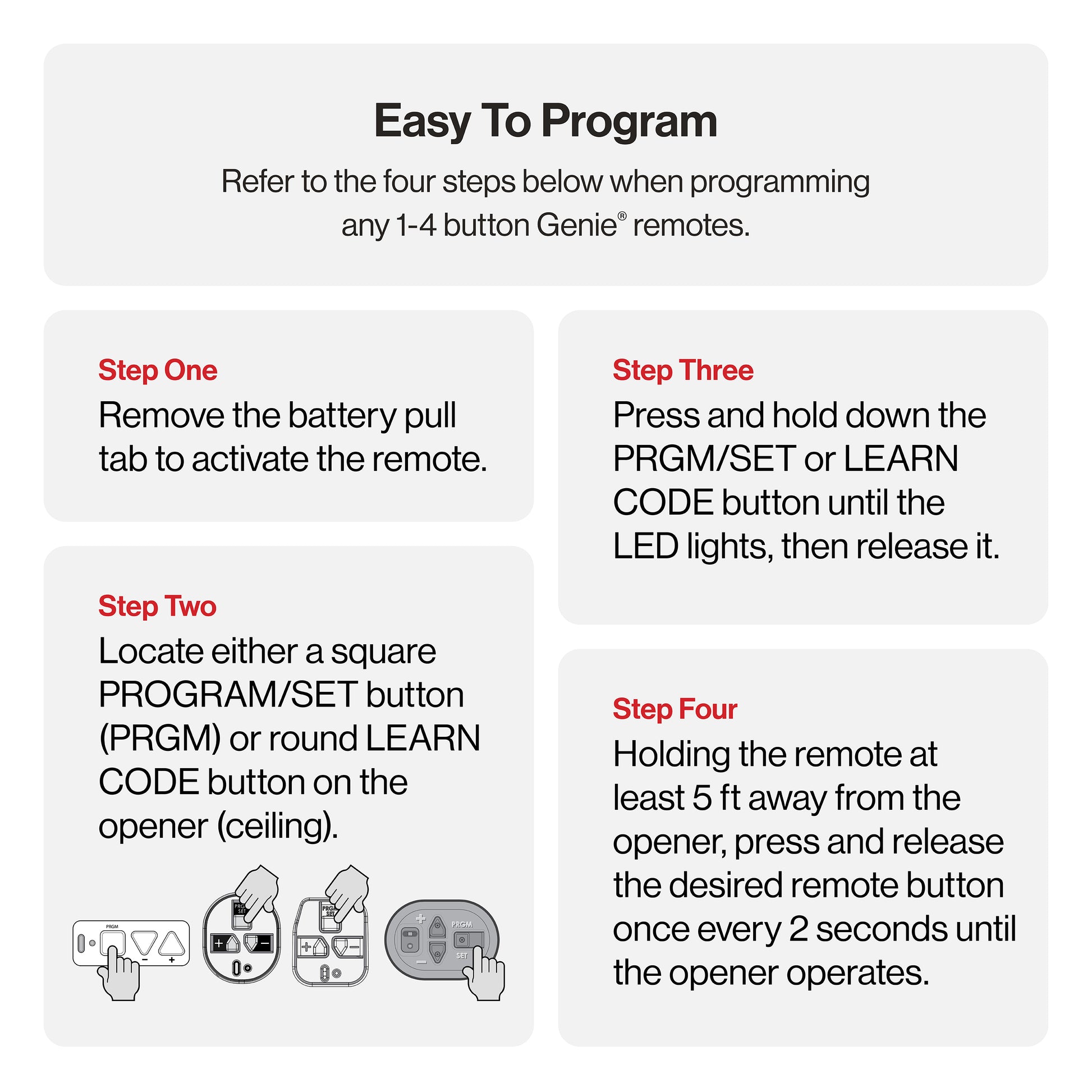
You’re now ready to program your remote. The exact steps may vary by model, but most Genie remotes follow a similar process. Below is a detailed step-by-step guide.
Step 1: Locate The Learn Button
Find the learn button on your garage door opener unit. This button is usually under the light cover. The color may be red, purple, black, or yellow. Look for a button labeled “Learn” or “Program.”
- Unplug the opener before removing the light cover to avoid electric shock.
- If you have an older model with dip switches, see the section on older Genie models.
Step 2: Prepare The Remote
Make sure your remote has a working battery installed. Hold the remote close to the opener for best results—within 2-3 feet is ideal.
Step 3: Enter Programming Mode
- Plug the opener back in if you unplugged it.
- Press and release the learn button. An indicator light should blink or stay on, depending on your model.
- You now have about 30 seconds to program the remote.
Step 4: Program The Remote
- Within 30 seconds, press and hold the button on the remote you want to use.
- Hold the button until the opener light blinks or clicks. On some models, the door may move slightly.
- Release the button.
Your remote should now be programmed. Test it by pressing the button again to see if the door moves.
Step 5: Repeat For Additional Remotes
If you want to program more than one remote, repeat steps 3 and 4 for each remote. Most Genie openers can store up to 7 remotes.
Step 6: Test All Remotes
After programming, test each remote from different locations (inside and outside your garage) to make sure they work properly.
Programming A Genie Keypad
Many homeowners use a Genie wireless keypad for keyless entry. Programming the keypad is a bit different but not complicated.
- Open the keypad cover and press the “Program” button.
- Enter your chosen PIN.
- Press the learn button on the opener unit.
- Within 30 seconds, enter the PIN and press the “Up/Down” key on the keypad.
The opener should respond with a light blink or a click. Test the keypad by entering your PIN and pressing the “Up/Down” key again.
Reprogramming After Power Loss Or Remote Replacement
Sometimes you need to reprogram your remote. This can happen after a power outage, battery change, or if your remote is lost or stolen.
When To Reprogram
- After replacing the remote battery
- If you move into a new home
- When adding or removing remotes
How To Clear All Remotes
If you want to erase all remote codes (for example, after moving in), press and hold the learn button for about 10 seconds until the indicator light turns off. This wipes out all programmed remotes. You’ll need to reprogram any remotes you still want to use.
Programming Older Genie Openers (dip Switch Models)
Some Genie openers made before 1995 use dip switches instead of a learn button. Here’s what to do:
- Open the remote and the opener’s dip switch panel.
- Set the switches in the remote to match the pattern in the opener.
- Close both panels and test the remote.
Dip switches are small levers labeled 1-12. Make sure each switch in the remote matches the opener exactly.
Troubleshooting Common Problems
Sometimes remotes don’t work as expected. Here’s how to fix common issues.
Remote Won’t Program
- Check the battery: Replace if weak or dead.
- Distance: Stand close to the opener.
- Timing: Press the remote button within 30 seconds of pressing the learn button.
- Interference: Turn off nearby electronic devices to reduce signal problems.
Remote Works Only Sometimes
- Battery may be low: Try a fresh battery.
- Obstructions: Remove metal objects near the opener.
- Weather: Rain or snow can block signals.
Door Moves By Itself
This could be caused by a neighbor’s remote on the same frequency (rare with newer models). Clear all codes and reprogram your remotes.
Genie Opener Light Won’t Blink
Some models don’t flash the light when programming. Instead, listen for a click or watch for a small LED on the unit.
Table: Troubleshooting Guide
Here’s a quick reference for common programming problems and solutions:
| Problem | Possible Cause | Solution |
|---|---|---|
| Remote not responding | Dead battery, out of range | Replace battery, move closer |
| Remote only works close to opener | Weak battery, interference | Replace battery, remove obstructions |
| Can’t program new remote | Memory full | Erase all codes, reprogram |
| Opener doesn’t enter programming mode | Wrong button, faulty unit | Check manual, call support |
Genie Remote Battery Replacement
A weak battery is a common cause of remote problems. Here’s how to change it:
- Open the remote case with a small screwdriver or coin.
- Remove the old battery (usually a CR2032 coin cell).
- Insert a new battery, matching the positive (+) side.
- Close the case and test the remote.
Dispose of old batteries properly, as they can be harmful to the environment.
Adding A Remote For Multiple Doors
If you have more than one Genie garage door, you may want a remote that can control all of them. Genie’s multi-button remotes support this feature.
- Assign each button to a different door.
- Program each button separately, following the main steps above.
- Label each button if necessary to avoid confusion.
This makes life easier if you have a two-car garage or a separate gate.
Genie Intellicode: What Makes It Secure
Most Genie remotes use Intellicode technology, which changes the code every time you use the remote. This keeps your garage secure because hackers can’t easily copy the signal.
- Rolling code: Each use generates a new code.
- Millions of possible combinations.
Older models with dip switches don’t have this feature and are less secure.
When To Reset Your Genie Opener
Sometimes you need to clear all remote codes and start over. This is important if:
- You lose a remote.
- You move to a new house.
- You suspect someone else has access.
To reset, hold the learn button for 10 seconds until the indicator goes off. Then reprogram your remotes.
Genie Remotes And Homelink
Many cars come with HomeLink, a built-in remote system. You can program your Genie opener to work with HomeLink.
How To Program Homelink
- Hold the two outer HomeLink buttons in your car until the light flashes.
- Hold the Genie remote close to the HomeLink panel and press both the remote button and the HomeLink button at the same time.
- Release when the HomeLink light flashes rapidly.
- Press the learn button on the opener unit.
- Within 30 seconds, press the HomeLink button in your car.
Your car should now open and close the Genie garage door.
Using Genie Aladdin Connect With Your Remote
Aladdin Connect is Genie’s smart garage system. It lets you control your garage door from your smartphone.
- Download the Genie Aladdin Connect app.
- Follow the instructions to pair your opener with Wi-Fi.
- You can open or close the door from anywhere and get alerts on your phone.
This is a great feature for people who travel or want extra security.
Genie Garage Door Opener Remote: Model Comparison
Choosing the right remote can make your life easier. Here’s a comparison of popular Genie remotes and their features:
| Remote Model | Buttons | Compatibility | Special Features |
|---|---|---|---|
| Genie G1T-BX | 1 | Most Genie openers | Simple, compact |
| Genie G3T-R | 3 | All Intellicode openers | Controls 3 doors |
| Genie Master Remote | 3 | Universal | Works with older/newer openers |
| Genie Keypad | N/A | All Intellicode openers | PIN access |
Tips For Reliable Remote Performance
To keep your Genie remote working well:
- Change batteries once a year, even if the remote is still working.
- Keep remotes dry and away from heat.
- Avoid dropping the remote, as this can damage the circuit board.
- Label remotes if you have several, to avoid confusion.
- Store a spare battery in your car or toolbox.
What To Do If You Lose A Remote
Losing a remote is common. Here’s what you should do:
- Erase all codes from the opener by holding the learn button for 10 seconds.
- Reprogram only the remotes you have.
- Order a replacement from Genie or a trusted dealer. Make sure it’s the right model for your opener.
- Consider upgrading to a keypad or smart system for extra security.
Genie Remote Programming: Myths Vs. Facts
Many homeowners hear confusing advice about garage door remotes. Let’s clear up some common myths:
- Myth: You can program any remote to any opener.
- Fact: Only compatible remotes work with Genie openers. Check your model.
- Myth: You need a professional to program a remote.
- Fact: Most people can do it themselves in minutes.
- Myth: Remotes work better if you press the button many times.
- Fact: One press is enough. Multiple presses can confuse the opener.
- Myth: Old dip switch remotes are safer.
- Fact: Rolling code (Intellicode) remotes are more secure.
Genie Garage Door Opener Remote And Battery Lifespan
How long does a Genie remote battery last? In most cases, a CR2032 battery will last 1-2 years with regular use. If your remote starts working only at close range, it’s time for a new battery.
Genie Remote Not Working After Programming? Advanced Checks
If you followed all steps and your remote still doesn’t work, try these:
- Check opener’s power: Make sure the opener unit is plugged in and the light works.
- Inspect the antenna: A hanging wire near the opener is the antenna. If it’s broken, the remote won’t work well.
- Check for locks: Some wall consoles have a lock button. If activated, remotes won’t work.
- Reset the system: Unplug the opener for 1 minute, then try again.
If you still have problems, consult the official Genie Support page for model-specific help.
Real-world Example: Adding A Remote For A Family Member
Imagine you just bought a new Genie remote for your spouse. You follow these steps:
- Climb up and press the learn button on the opener.
- Press the button on the new remote until the opener clicks.
- Test both your old and new remotes—both should work.
This process takes only a few minutes and gives your whole family convenient access.
Advanced: Integrating Genie With Smart Home Systems
Genie’s Aladdin Connect system lets you control the garage with Amazon Alexa or Google Assistant. This means you can say, “Open the garage” and the door responds. Integration requires:
- Genie Aladdin Connect hub.
- Wi-Fi in your garage.
- An account with Amazon or Google.
Follow the in-app instructions to link your smart assistant. This adds convenience and allows you to monitor your garage from anywhere.

Environmental Impact: Recycling Old Remotes And Batteries
Don’t throw old remotes or batteries in the trash. Many electronics stores recycle small electronics. Used batteries should be taken to a recycling center. This helps protect the environment and keeps harmful chemicals out of landfills.
Frequently Asked Questions
How Do I Reset My Genie Garage Door Opener Remote?
Hold the learn button on the opener for about 10 seconds until the indicator light turns off. This deletes all remotes from memory. Then, reprogram each remote you want to use by following the standard programming steps.
Can I Program A Genie Remote Without The Old Remote?
Yes, you do not need the old remote. You only need access to the learn button on the opener unit and a compatible new remote. Follow the steps outlined above.
What Should I Do If My Genie Remote Works Only Close To The Opener?
Replace the battery first. If the problem continues, check for interference from metal objects or electronic devices. Make sure the opener’s antenna is hanging down and not damaged.
How Many Remotes Can I Program To One Genie Opener?
Most modern Genie openers can store up to seven remotes. If you reach the limit, you must erase all remotes and reprogram the ones you want.
Is It Safe To Program A Remote Myself?
Yes, programming a Genie garage door opener remote is safe for most people. Just make sure to use a stable ladder, keep the door area clear, and follow all safety tips.
Setting up a Genie garage door opener remote doesn’t have to be stressful. With the right steps, you can do it yourself in minutes. Always check your opener and remote model, follow programming instructions carefully, and keep your system secure by erasing old remotes when needed.
If you run into problems, Genie’s support resources and smart home options can help. With everything set up, you’ll enjoy the ease and safety of reliable, wireless garage access for years to come.