Now Reading: How to Change Garage Door Code Liftmaster: Step-by-Step Guide
- 01
How to Change Garage Door Code Liftmaster: Step-by-Step Guide

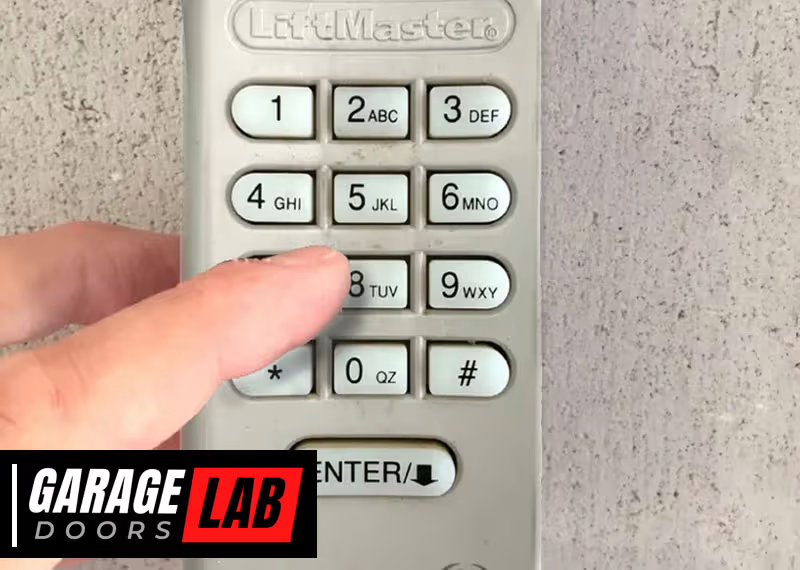
Changing the code on your LiftMaster garage door opener is a smart way to increase your home’s security. Many people forget to update their garage door codes after moving into a new home or after sharing access with guests. However, keeping the default code or an old code can make your home an easy target for break-ins. Learning how to change the code is not difficult, but you need the right steps. In this guide, you’ll discover everything you need to know about changing your LiftMaster garage door code, including step-by-step instructions for different models, common problems, and expert tips to keep your garage safe.
Why You Should Change Your Liftmaster Garage Door Code
Your garage door is often a main entry point to your home. If someone knows your code or if it’s the factory default, your home is at risk. Here are some reasons why changing your garage door code is important:
- Improved security: Old codes or default codes can be easily guessed or found online.
- After moving in: Previous owners, tenants, or service people may know the old code.
- After sharing access: If you gave the code to a neighbor, babysitter, or contractor, it’s best to change it.
- Lost remotes: If you lost a remote, someone might find it and access your garage.
- Peace of mind: Regularly changing your code ensures only trusted people can enter.
Many homeowners update their security systems but forget about the garage door code. This small step can prevent break-ins and give you greater control over who enters your property.
Understanding Liftmaster Garage Door Openers
Before changing your code, it helps to understand what type of LiftMaster opener you have. LiftMaster is a leading brand, and their openers come with various features. Most models use either a wireless keypad, remote control, or wall-mounted control panel.
Common Types Of Liftmaster Openers
- Chain Drive: Uses a metal chain, reliable and affordable.
- Belt Drive: Quieter than chain drives, uses a rubber belt.
- Screw Drive: Uses a threaded steel rod, less common today.
- Wall Mount: Mounted beside the garage door, saves ceiling space.
- Smart Openers: Work with apps and Wi-Fi, allow control from your phone.
How Codes Work
LiftMaster openers use rolling codes or fixed codes. Rolling codes change every time you use the remote, making them more secure. Fixed codes use a static PIN or set of DIP switches.
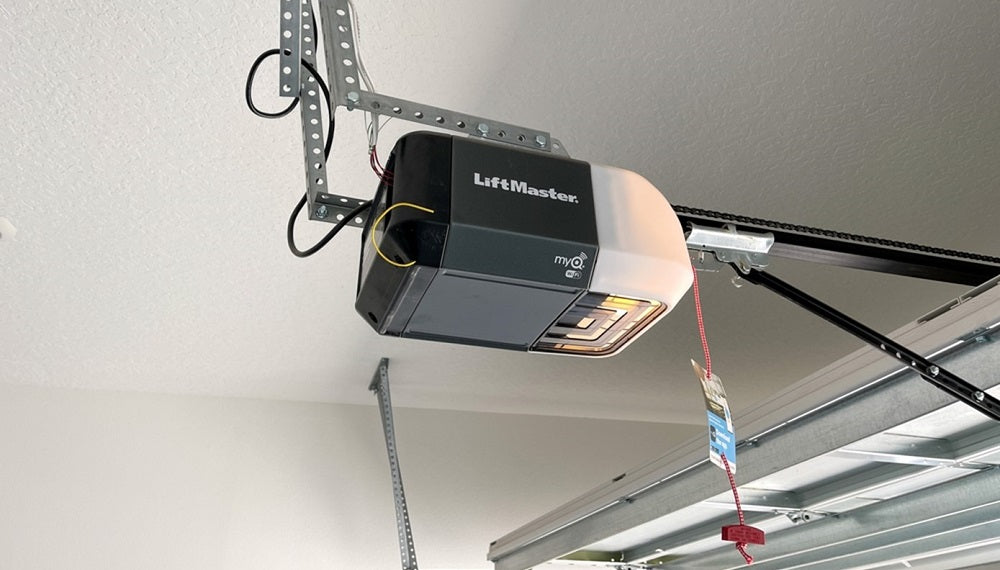
Understanding your model type and code system helps you follow the correct steps. You can usually find your model number on the motor unit or in your user manual.
Tools And Preparation
You don’t need many tools to change your LiftMaster code, but you should be prepared. Here’s what you’ll need:
- Step ladder: To reach the opener on the ceiling if needed.
- User manual: For your specific model (downloadable from LiftMaster’s website).
- Current PIN: For keypad changes.
- Pen and paper: To write down your new code.
- Flashlight: If your garage is dimly lit.
Safety tip: Always let someone know you’re working in the garage, and avoid standing directly under the door.
How To Change Liftmaster Garage Door Code: Keypad Method
Most modern LiftMaster systems use a wireless keypad mounted outside the garage. Changing the code is simple if you follow these steps.
Step-by-step Guide For Wireless Keypad
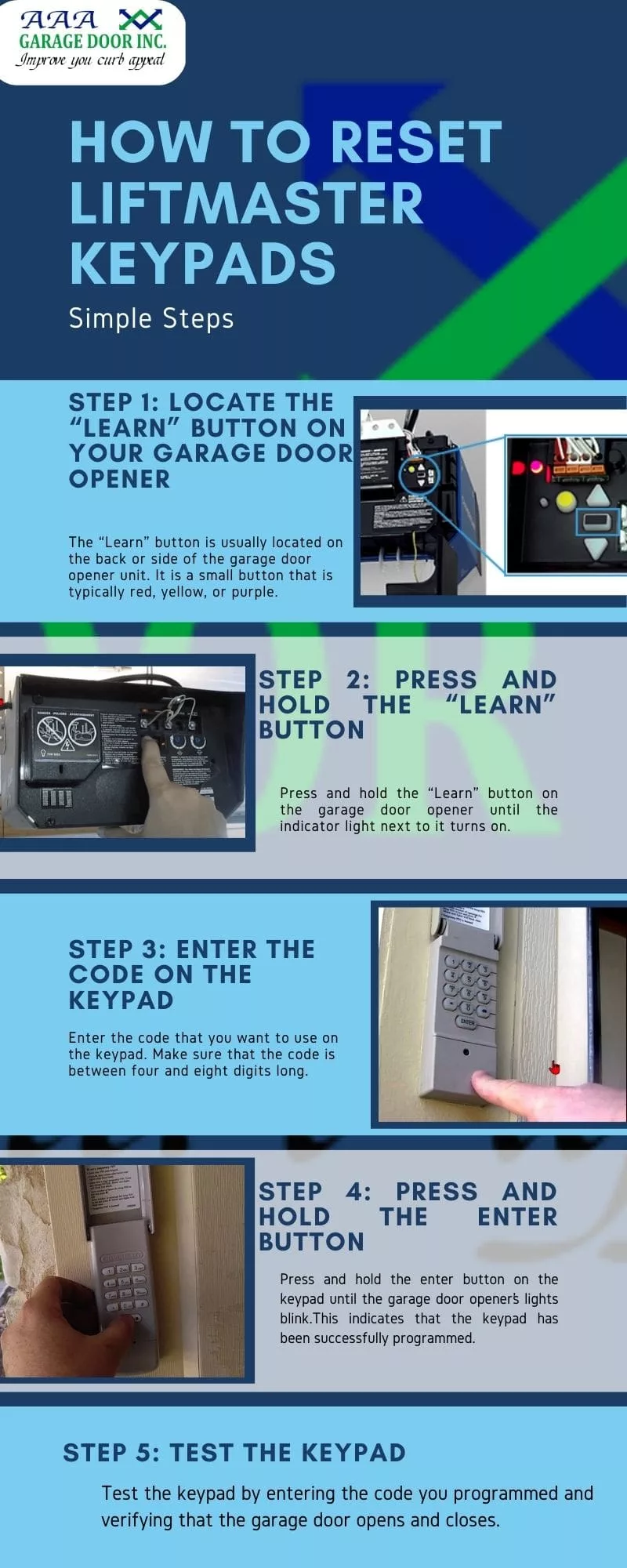
- Locate the Learn Button
- The Learn button is usually on the back or side of the opener motor unit, often behind a light cover.
- It may be red, purple, yellow, or green depending on your model.
- Clear the Old Code
- Press and hold the Learn button until the LED turns off (about 6 seconds).
- This erases all old codes and remotes.
- Enter a New Code
- On the keypad, enter your new 4-digit code.
- Press and hold the Enter button. The garage opener’s lights should blink or you’ll hear a click.
- Test the New Code
- Wait 10 seconds, then enter your new code and press Enter. The door should operate.
- Repeat if You Have Multiple Doors
- Some keypads let you program more than one door. Follow the manual for multiple door setup.
Troubleshooting Keypad Programming
If the code doesn’t work:
- Double-check that the Learn button LED turned off.
- Make sure the batteries in the keypad are fresh.
- Ensure you’re entering the code within 30 seconds after pressing Learn.
How To Change Liftmaster Remote Control Code
If you use a remote control instead of a keypad, the process is a bit different.
Programming A New Remote Code
- Access the Motor Unit
- Use your step ladder to reach the opener.
- Press the Learn Button
- Press and release the Learn button. The LED will light up.
- Press the Remote Button
- Within 30 seconds, press and hold the button you want to program on the remote.
- Confirmation
- The opener lights will blink or you’ll hear a click.
- Test the Remote
- Press the button again to check if the door operates.
Removing Lost Or Old Remotes
If you lost a remote, erase all codes:
- Hold the Learn button until the LED goes out. This clears all remotes and codes.
- Reprogram only the remotes you still have.
Changing The Code On Wall-mounted Control Panels
Some LiftMaster openers have a Smart Control Panel or wall console inside the garage. These panels let you change settings, including the code.
Using A Smart Control Panel
- Enter Menu
- Press the Menu button.
- Navigate to Program
- Use the arrows to find “Program” and select “Remote” or “Keypad.”
- Follow Prompts
- Enter your new code as prompted.
- Save and Test
- Confirm changes and test the new code.
Many panels also let you set temporary codes for guests or deliveries. These expire after a set time, adding extra security.
Special Considerations For Smart Liftmaster Openers
Modern smart openers connect to Wi-Fi and can be controlled with your phone. Changing codes may involve the app or web portal.
Changing Code Via Myq App
- Open the myQ App
- Log in to your account.
- Go to Device Management
- Select your garage door opener.
- Change Access Code
- Find the keypad or user section to change the PIN.
- Save and Sync
- The new code updates instantly.
Non-obvious tip: For smart openers, you can often set custom codes for each user and track who opens the door.
Differences Between Liftmaster Models: Code Change Process
Not all LiftMaster models use the same procedure. Here’s a quick comparison of common models and how to change the code.
| Model Series | Learn Button Location | Keypad Change Steps | Remote Change Steps |
|---|---|---|---|
| LiftMaster Security+ (Yellow/Purple/Red Button) | Back/Side of Motor Unit | Press Learn, enter new code on keypad | Press Learn, press remote button |
| LiftMaster myQ Smart | May be inside panel or via app | Change via app or wall panel | App or physical Learn button |
| Older DIP Switch Models | Inside remote and motor unit | Set switches to match motor unit | Set switches to match |
Pro tip: Always check your manual or the LiftMaster website for your exact model’s instructions.
How To Reset Liftmaster Garage Door Opener To Factory Settings
Sometimes, you want to reset everything and start fresh. This is useful if you bought a house, lost control of the old remotes, or suspect unauthorized access.
Complete Factory Reset Steps
- Find the Learn Button
- Locate on the motor unit.
- Hold the Learn Button
- Hold for about 6-10 seconds until the LED turns off.
- All Remotes and Codes Erased
- The opener is now reset. All remotes and keypads need to be reprogrammed.
- Reprogram Devices
- Follow previous steps to add remotes and set a new keypad code.
Important: A reset is not the same as unplugging the opener. Only the Learn button erases codes.
Security Tips After Changing Your Garage Door Code
Changing your code is a smart move, but there are more ways to keep your garage secure.
- Choose a unique code: Avoid common combinations like 1234 or your birth year.
- Don’t share your code: Only give it to trusted people, and change it if you do.
- Use temporary codes: Many keypads allow for guest codes that expire.
- Upgrade to rolling code remotes: Older fixed code systems are less secure.
- Check for hacking signs: If your door opens unexpectedly, reset the codes.
- Add security cameras: Place one near your garage for extra monitoring.
- Keep your keypad clean: Worn buttons reveal your code. Clean or replace as needed.
Non-obvious insight: Some burglars use code grabbers, but LiftMaster’s rolling codes make these tools useless. Still, update your code regularly.
Common Problems When Changing Liftmaster Garage Door Code
Even simple tasks can hit snags. Here’s how to handle common issues.
Keypad Not Programming
- Battery dead: Replace the keypad battery.
- Out of range: Get closer to the opener during programming.
- Wrong Learn button: Double-check you pressed the correct button.
Remote Not Working
- Wrong timing: You have 30 seconds after pressing Learn to pair the remote.
- Interference: LED bulbs or Wi-Fi routers nearby can cause issues. Move them away if possible.
Keypad Or Remote Still Operates Door After Reset
- Partial reset: Hold the Learn button longer to fully erase memory.
- Old remotes around: Someone may have a remote from before. Erase all codes and reprogram only what you have.
How To Change Code On Older Liftmaster Models (dip Switch)
Older LiftMaster openers use DIP switches for codes. These are tiny switches inside the remote and on the opener unit.
Changing Dip Switch Codes
- Open the Remote and Motor Unit Covers
- Use a screwdriver if needed.
- Locate DIP Switches
- Usually 8-12 small switches.
- Set a New Pattern
- Use a pen to flip switches up or down in a unique pattern.
- Match Both Devices
- The pattern must match exactly on both the opener and all remotes.
- Test
- Operate the door. If it doesn’t work, recheck the switch positions.
Note: DIP switch systems are less secure than rolling code. Consider upgrading for better safety.

When To Call A Professional
Most homeowners can change their LiftMaster code themselves, but sometimes it’s best to call an expert.
- If you can’t access the motor unit: High ceilings or blocked access.
- If the opener won’t program: Possible electrical or circuit board issue.
- After a failed reset: May need re-wiring or inspection.
- For smart openers with Wi-Fi problems: Installers can help with app setup.
A pro can also check the rest of your garage system for worn springs, cables, or sensors.
Table: Comparing Code Change Methods
To help you decide which method fits your system, here’s a comparison.
| Method | Difficulty | Time Needed | Tools Required | Security Level |
|---|---|---|---|---|
| Wireless Keypad | Easy | 5-10 minutes | Ladder, manual | High (rolling code) |
| Remote Control | Easy | 2-5 minutes | Ladder | High (rolling code) |
| Wall Control Panel | Moderate | 5-10 minutes | None | High |
| DIP Switch | Moderate | 10-15 minutes | Screwdriver | Low |
| myQ App | Easy | 2-5 minutes | Phone | Very High |
Additional Tips For Long-term Garage Door Security
Changing your code is just one part of a safe home. Here are more ways to keep your garage and home safe:
- Install motion sensor lights near the garage.
- Upgrade old openers: New models have better encryption and safety features.
- Disable vacation mode: Some openers have a lock mode for when you’re away.
- Check for firmware updates: Smart openers sometimes need updates to patch security flaws.
- Keep the door closed: Don’t leave the garage open, even during the day.
How Often Should You Change Your Garage Door Code?
There’s no single rule, but experts recommend:
- Every 6-12 months: Regular changes lower the risk of old codes being used.
- After giving out your code: Change it after guests, workers, or tenants use it.
- After losing a remote: Change codes right away if a remote is lost or stolen.
- If you notice strange activity: If your door opens by itself or you see unknown vehicles nearby, update your code.
Non-obvious insight: People often forget to change codes after home renovations. If contractors had access, update your code immediately.
What To Do If You Forget Your New Code
If you forget your new code, don’t panic. You can reset the system:
- Use the Learn button to erase all codes.
- Reprogram your remotes and keypad with a new, memorable code.
- Write down your code and store it in a safe place, not near the garage.
The Importance Of Strong Pin Codes
Choosing a good PIN code matters. Weak codes like 0000 or 1234 are easy to guess. Here’s how to pick a strong code:
- Use a mix of numbers that are not related to your address or birthday.
- Avoid repeating numbers.
- Change the code regularly.
Example: Instead of 1234, try something like 2957 or 4812.
Upgrading Your Liftmaster System For Better Security
If your opener is more than 10 years old, consider upgrading. Newer LiftMaster models offer:
- Rolling code technology: Prevents code grabbing.
- MyQ compatibility: Control and monitor from your smartphone.
- Battery backup: Works during power outages.
- Enhanced safety sensors: Prevent accidents.
You can find more details about modern garage security at the official LiftMaster website.
Table: Security Features Comparison By Liftmaster Model
Here’s a look at how different LiftMaster models stack up on security.
| Model | Rolling Code | myQ Compatible | Battery Backup | Keypad Programming |
|---|---|---|---|---|
| Security+ 2.0 | Yes | Yes | Yes | Yes |
| Classic Chain Drive | No | No | No | Yes (manual) |
| myQ Smart Opener | Yes | Yes | Yes | Yes (via app) |
| DIP Switch Model | No | No | No | No (switches only) |
Frequently Asked Questions
How Do I Find The Learn Button On My Liftmaster Garage Door Opener?
The Learn button is usually on the back or side of the opener’s motor unit, often under a light cover. It may be yellow, purple, red, or green. If you have trouble finding it, check your user manual or look for a small button labeled “Learn.”
What Should I Do If My Keypad Won’t Accept A New Code?
First, replace the keypad’s battery. Make sure you press the Learn button on the opener before entering the code on the keypad. If it still doesn’t work, erase all codes from the opener by holding the Learn button until the light goes out, then reprogram your devices.
Is It Safe To Use A Smart Garage Opener Like Myq?
Yes, myQ openers use strong encryption and rolling codes, making them very secure. They also let you monitor and control your garage door from your phone. Always use a strong password for your myQ account and enable two-factor authentication if available.
Can Someone Hack My Garage Door Code?
Modern LiftMaster openers with rolling codes are very hard to hack. Older DIP switch models are less secure. Always change codes regularly and upgrade old equipment when possible.
How Do I Set A Temporary Code For Guests Or Deliveries?
Most wireless keypads and smart openers let you set a temporary code. Check your manual or app for instructions. Temporary codes expire after a set time or number of uses, keeping your home safe.
Changing your LiftMaster garage door code is one of the best steps you can take for home security. The process is simple and only takes a few minutes. Regular updates, smart code choices, and modern equipment will help protect your home for years to come.