
Reprogramming your garage door keypad clicker may sound complicated, but it’s actually a task most homeowners can do without calling a professional. Whether you’ve lost your remote, just moved into a new house, or want to change your access code for better security, learning how to reset your keypad is a practical skill.
In today’s world, where home security and convenience matter more than ever, understanding your garage door system helps you stay in control of who enters your home.
Many people feel anxious about touching their garage door opener or keypad, worrying they’ll break something. The good news is that most modern systems are designed for easy reprogramming. With clear steps, a little patience, and some basic knowledge, you can set a new code in less than 15 minutes.
This guide will walk you through the process, explain common mistakes, and share tips that even experienced users sometimes miss.
You’ll learn what tools you need, how to identify your specific keypad type, and how to handle special cases. We’ll also compare different brands and models, so you know what to expect. By the end, you’ll be confident in reprogramming your garage door keypad and have answers to the questions that often confuse beginners.
Why Reprogram Your Garage Door Keypad?
There are several reasons why you might need to reprogram your garage door keypad. First, if you’ve moved into a new home, you don’t want the old owners or anyone with the previous code to have access. Second, if you suspect someone else knows your code, changing it is a smart security move. Third, keypad batteries can die or malfunction, sometimes causing the code to reset or stop working.
Reprogramming can also solve issues like the keypad not responding, the door opening by itself, or the keypad flashing error codes. In many cases, simply resetting and programming a new code fixes these problems.
Understanding Garage Door Keypad Systems
Before you start, it’s helpful to understand how garage door keypad clickers work. Most modern systems use a wireless code that communicates with the opener unit inside your garage. There are two main types:
- Fixed code keypads: These use a single code set by switches inside the remote and the opener. They are less secure and mostly found in older systems.
- Rolling code keypads: These use a changing code every time the keypad is used, making them much more secure. Most systems after 1993 use rolling codes.
Knowing your system type is important because the steps for reprogramming can be a little different.
Tools And Information You Need
You don’t need many tools to reprogram a garage door keypad, but having these on hand can help:
- A ladder (to reach the garage door opener unit)
- The keypad instruction manual (if available)
- Pen and paper (to note down new codes)
- A flashlight (if your garage is dark)
- Fresh batteries for the keypad (if needed)
You should also locate the “Learn” button on your garage door opener. This button is key to reprogramming and is usually found on the back or side of the opener motor, often behind a light cover.
Safety Precautions Before You Begin
Even though reprogramming is safe, take these precautions:
- Make sure the garage door area is clear of people and pets.
- If you need to use a ladder, place it on a stable surface.
- Unplug the garage door opener if you need to do any maintenance inside the unit.
- Do not force the keypad or opener buttons.
These steps will help prevent accidents and damage.
Identifying Your Garage Door Opener Brand And Model
Most keypads are brand-specific. Common brands include LiftMaster, Chamberlain, Genie, and Craftsman. The brand name is usually on the opener unit or the keypad cover.
To find your model:
- Check for a label on the side or back of the opener.
- Look for a sticker inside the keypad cover.
- If you can’t find the model, note the color of the “Learn” button—it often indicates the opener’s age and compatibility.
Here’s a quick comparison of the most popular brands and their typical “Learn” button colors:
| Brand | Common Learn Button Colors | Frequency Range |
|---|---|---|
| LiftMaster | Yellow, Purple, Red, Green | 315 MHz, 390 MHz |
| Chamberlain | Yellow, Purple, Red, Green | 315 MHz, 390 MHz |
| Genie | Black, Red, Purple | 315 MHz, 390 MHz |
| Craftsman | Yellow, Purple, Red | 315 MHz, 390 MHz |
Knowing your brand and learn button color will help you follow the correct steps.
Step-by-step Guide: How To Reprogram Garage Door Keypad Clicker
Now, let’s get into the actual process. Most reprogramming follows these general steps, but always check your keypad’s manual if you have it.
1. Clear The Old Code (if Needed)
Some systems require you to erase the old code first, especially if you’re changing ownership or troubleshooting.
- Locate the “Learn” button on your opener.
- Press and hold the “Learn” button for about 6-10 seconds until the indicator light goes out (you may hear a click).
- This clears all remote and keypad codes from the opener’s memory.
2. Set A New Code On The Keypad
- On the keypad, enter your desired four-digit code.
- Press and hold the “Enter” button.
3. Link The Keypad To The Opener
- While holding “Enter” on the keypad, press and release the “Learn” button on the opener. The indicator light should come on.
- Release the “Enter” button.
- The opener light may blink or you may hear a click, indicating the code is accepted.
4. Test The New Code
- Wait about 10 seconds.
- Enter your new code on the keypad and press “Enter.”
- The garage door should open or close.
- If it doesn’t work, repeat the process and make sure you follow the timing exactly.
5. Replace Keypad Batteries (if Needed)
If your keypad is not responding, try fresh batteries before repeating the steps.
Example: Reprogramming A Liftmaster Keypad
Let’s take a specific example. For LiftMaster (and most Chamberlain units):
- Press and release the “Learn” button on the opener (do not hold).
- Within 30 seconds, enter your new four-digit code on the keypad.
- Press and hold “Enter” until the opener light blinks (about 1-2 seconds).
- Test the new code.
Timing is important—if you wait too long between steps, the opener may exit programming mode.
Special Cases And Troubleshooting
Sometimes, things don’t go as planned. Here are solutions for common issues:
Keypad Is Not Responding
- Check the battery and replace if needed.
- Make sure the keypad is not wet or damaged.
- Move closer to the opener when programming.
Code Not Accepted
- Make sure you are using a compatible code (some systems don’t allow repeating numbers).
- Double-check the timing—most systems give you 30 seconds to enter the code after pressing the “Learn” button.
Multiple Garage Doors
Some keypads can control more than one door. You’ll need to follow the specific instructions for multi-door programming, which usually involves selecting the door before entering the code.
Keypad Flashes Or Beeps
This usually means an error. Erase all codes and start from the beginning. If the problem continues, check the manual or the manufacturer’s support site.
Common Mistakes To Avoid
Many people make the same errors when reprogramming their garage door keypad:
- Forgetting to clear old codes: If you skip this step, old codes may still work.
- Rushing the steps: Timing is important. If you go too fast or too slow, the opener may not accept the new code.
- Not checking battery power: Weak batteries often cause programming failures.
- Using simple or common codes: Avoid codes like 1234 or 0000 for better security.
- Ignoring keypad cleaning: Dirt and dust can cause buttons to stick or malfunction.
Remember, if something doesn’t work, start over from the beginning with a fresh approach.

Comparing Keypad Models And Features
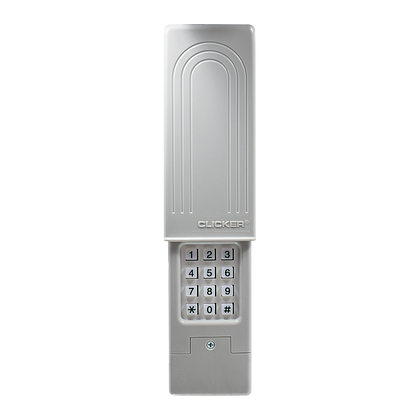
Not all garage door keypads are created equal. Some have extra features like backlit keys, weather resistance, or multiple code memory. Here’s a quick comparison of some popular models:
| Model | Backlit Keys | Weatherproof | Multi-Door Support |
|---|---|---|---|
| LiftMaster 877MAX | Yes | Yes | Yes |
| Genie GK-R | Yes | Yes | No |
| Chamberlain KLIK2U | Yes | Yes | Yes |
| Craftsman 139.3050 | No | Yes | No |
Choose a keypad that matches your needs and climate conditions.
How To Program A Universal Garage Door Keypad
Universal keypads are designed to work with most brands. The steps are similar, but you’ll need to select the right brand code.
- Open the keypad cover and insert batteries if needed.
- Press the “Program” button (often a small button inside the cover).
- Enter your chosen PIN.
- Enter the brand-specific code (see the manual or brand list).
- Press “Enter” to confirm.
- Press and release the opener’s “Learn” button.
- Enter your PIN and press “Enter.”
Timing is still important. Universal keypads may require a few extra steps to match the opener’s frequency.
Advanced Tips For Better Security
Garage door keypads are a potential target for thieves, so improve your security with these tips:
- Change your code every few months.
- Avoid easy-to-guess codes (birthdays, house numbers).
- If you’re going on vacation, erase all codes and set a temporary PIN.
- Check if your system supports “lockout” mode, which disables remote entry for a set time.
- Cover the keypad with a small shield to block view from the street.
Many break-ins happen because people leave the code unchanged for years or use obvious numbers.
What To Do If You Lose Access
If you forget your code or the keypad fails, don’t panic. Here’s what to do:
- Use the physical key (if your system has one) to open the garage.
- Try your remote control if you have one.
- Reset the opener by unplugging it for a few minutes, then follow the reprogramming steps.
- If all else fails, contact the manufacturer’s support or a professional installer.
Some newer openers also let you control the garage door using a smartphone app, which can serve as a backup.
Battery Replacement And Maintenance
A common cause of keypad failure is old batteries. Most keypads use a 9V or AA battery. Replace the battery every year or when you notice slow response.
To replace:
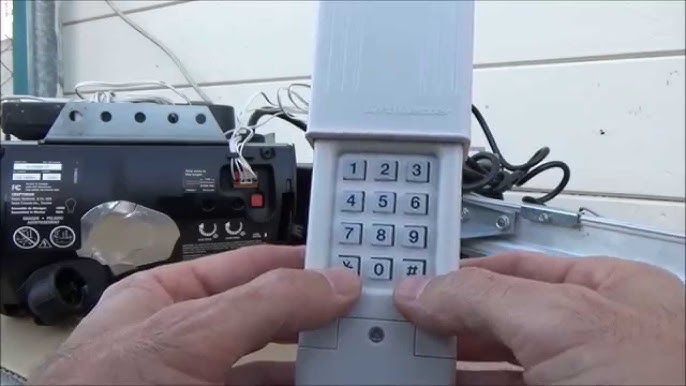
- Slide open the keypad cover (some have a screw).
- Remove the old battery and insert a new one, matching the polarity.
- Test the keypad.
Clean the keypad with a dry cloth to prevent dirt buildup. Avoid using water or cleaning sprays.
Upgrading To A Smart Garage Door Keypad
If your system is older, consider upgrading to a smart keypad or opener. These modern systems offer benefits like:
- Smartphone control and notifications
- Temporary codes for guests or deliveries
- Automatic code changes
- Integration with home security systems
While the upfront cost is higher, smart systems add convenience and peace of mind.
Cost And Time Estimates
Reprogramming a garage door keypad is a low-cost, quick project. Most people can finish in 10-15 minutes. If you need a new keypad, prices range from $25 to $70, depending on features.
Professional reprogramming services may charge $50 to $150, but most homeowners never need to pay for this help.
When To Call A Professional
If you’ve tried all the steps and your keypad still won’t work, it’s time to call an expert. Other reasons to get help include:
- Damaged wiring or opener unit
- Keypad is physically broken
- You need to program complex or commercial systems
A professional can diagnose and fix issues quickly, preventing further damage.
Real-world Example: Homeowner Reprograms Their Keypad
Let’s look at a real-life situation. Emily recently moved into a house with a Chamberlain garage door opener. She wanted to make sure only her family could enter.
She followed these steps:
- Located the yellow “Learn” button on her opener.
- Pressed and released the “Learn” button.
- Entered a new four-digit code on her keypad and pressed “Enter.”
- Waited for the opener light to blink.
- Tested the code—success!
Emily also changed the batteries and wrote down her new code in a safe place. She avoided using her birthday as the code, making her system more secure.
Most Overlooked Details When Reprogramming
Many people, even those who are handy, miss these important points:
- Not resetting remotes: If you erase codes from the opener, you must reprogram all remotes too.
- Ignoring opener manual: Each brand has quirks—always check the manual for special instructions.
- Overlooking keypad location: Keypads in direct sunlight or rain may fail sooner; consider a cover or shade.
It’s the small things that often cause the biggest headaches.
Quick Reference: Reprogramming Steps By Brand
To help you remember, here’s a side-by-side reference for the main brands:
| Brand | Learn Button Location | Programming Steps |
|---|---|---|
| LiftMaster/Chamberlain | Back or side of opener, color-coded | Press Learn, enter code, press Enter |
| Genie | Near light lens or wire terminals | Press Learn, enter code, press Program |
| Craftsman | Back of opener, often red or purple | Press Learn, enter code, press Enter |
| Universal (KLIK2U) | Back of opener, matches brand code | Program code, enter brand, link to opener |
If you’re ever stuck, this quick chart can help you get back on track.
Frequently Asked Questions
How Often Should I Change My Garage Door Keypad Code?
It’s best to change your code every 3-6 months, or whenever you think someone else might know it. Change it immediately after moving in or if you give the code to guests or service people.
Can I Program The Same Code On Multiple Keypads?
Yes, if your opener supports it. You can have several keypads and remotes using the same code, but you’ll need to program each one separately following the standard procedure.
What Should I Do If My Keypad Still Doesn’t Work After Reprogramming?
Check the battery, make sure you followed each step exactly, and confirm that your keypad is compatible with your opener. If the problem continues, consult the manual or contact customer support. In some cases, a faulty keypad or opener may need replacement.
Is It Safe To Use Universal Keypads?
Yes, universal keypads are safe if they’re compatible with your opener and programmed correctly. Always buy from trusted brands and check for security features like rolling codes. For more on universal systems, see this Family Handyman guide.
Can Someone Hack My Garage Door Keypad?
While no system is 100% hack-proof, using a rolling code system, changing your code often, and avoiding common numbers makes it much harder for someone to access your garage without permission.
Reprogramming your garage door keypad clicker isn’t just about convenience—it’s about keeping your home safe. With these tips and instructions, you can take control of your garage security and enjoy peace of mind. Remember, careful attention to each step and regular code updates are your best defense against unwanted access.