
Changing the keypad code for your garage door may sound simple, but it’s a task that holds real importance for your home’s security and convenience. Maybe you’ve just moved in, lost track of who knows your code, or want to update your access after a service visit. Knowing how to change the keypad code the right way can stop unwanted entry, avoid lockouts, and give you peace of mind. In this detailed guide, you’ll learn not only the step-by-step process but also the background knowledge, best practices, and troubleshooting that most people overlook.
Why Change Your Garage Door Keypad Code?
Many homeowners keep the same keypad code for years, but this can be risky. If too many people know your code, your garage—and maybe your house—become vulnerable. Even if you trust everyone who’s had the code, people sometimes forget, write it down, or accidentally share it.
Some codes are set to factory defaults, which are easy for intruders to guess.
Changing your code regularly is a smart habit. It’s not just about security, either. If you rent out your home, host guests, or have children who need access, updating the code lets you stay in control. Plus, sometimes old keypads can glitch or get stuck on a single code, making a change necessary to restore normal function.
Understanding Garage Door Keypad Types
Before you start, it helps to know what kind of garage door keypad you have. The process for changing the code can differ based on the keypad’s brand, age, and technology.
Basic Types
- Wired Keypads: Connected directly to the garage door opener with wires. Less common in homes built after 2000.
- Wireless Keypads: Battery-powered and mounted outside the garage. By far the most popular today.
Popular Brands And Their Features
Most garages use keypads from brands like LiftMaster, Chamberlain, Genie, or Craftsman. Here’s a quick look at some differences:
| Brand | Common Model Names | Keypad Reset Method | Special Features |
|---|---|---|---|
| LiftMaster | 877MAX, 878MAX | Learn button on motor unit | Temporary PINs, backlit keys |
| Chamberlain | 940EV, 940ESTD | Learn button on opener | One-touch close, wireless programming |
| Genie | GK-R, GK-BX | Programming button sequence | Intellicode rolling code technology |
| Craftsman | 139.3050, 139.53776 | Learn button on opener | Keypad covers, simple battery change |
Non-obvious insight: Even if brands share a parent company (like Chamberlain and LiftMaster), their keypad programming steps can differ. Always check your specific model.
What You Need Before You Start
Preparation makes the job much easier. Here’s what you should have on hand:
- Your garage door opener manual (or the keypad manual, if separate)
- A ladder (if your opener is ceiling-mounted)
- A pen and paper (to write down your new code)
- Fresh batteries (for wireless keypads)
- A flashlight (for dark garages or hard-to-see opener units)
Tip: If you can’t find your manual, most are available for free on the manufacturer’s official website. Search using your opener’s model number, usually found on the side or back of the motor housing.
Step-by-step Guide To Changing Your Garage Door Keypad Code
The core process is similar across most brands, but details matter. Here’s a method that covers nearly all modern wireless keypads:
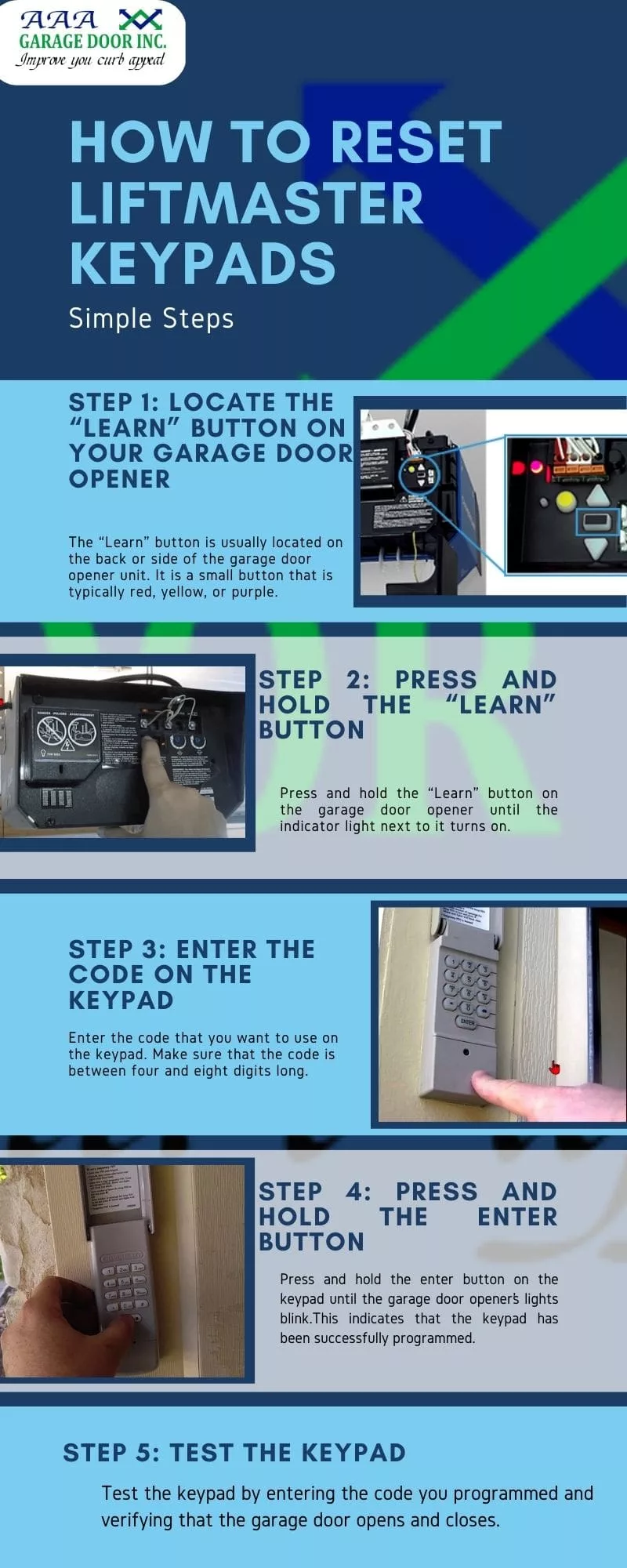
1. Locate The “learn” Button
Most modern openers have a Learn or Program button. This is usually on the main opener unit inside the garage, not on the keypad itself.
- Colors: The button may be yellow, red, orange, purple, or green, depending on the brand and model.
- Where to look: Remove the light cover on the opener if you don’t see the button right away.
2. Clear The Old Code (if Needed)
Some systems need you to erase the old code before adding a new one. Press and hold the Learn button for about 6 seconds (until the light next to it turns off), which resets the keypad memory. Be careful: this will remove all remotes and keypads, so you’ll have to reprogram them.
3. Enter Programming Mode On The Keypad
Return to the keypad outside your garage. For most models:
- Press and hold the keypad’s program button (sometimes the “” or “#” key) until the keypad lights up or flashes.
- On Genie, you may need to enter your current PIN first, then hold the program button.
4. Enter Your New Code
Type in your new 4-digit or 6-digit code. Choose a number you’ll remember, but avoid birthdays, addresses, or repeated digits (like “1111”).
Pro tip: For added security, use a code that mixes low and high numbers. For example, “1947” is stronger than “1234.”
5. Link The Keypad To The Opener
Go back to the garage door opener and press the Learn button once (don’t hold it this time). You usually have 30 seconds to complete the next step.
- Quickly return to the keypad and enter your new code.
- Press the “Enter” button (sometimes “Send” or “OK”) on the keypad.
- The opener’s lights should blink or you’ll hear a click—this means the code is accepted.
6. Test The New Code
Wait a few seconds, then try your new code. The door should open or close. If not, repeat the steps, checking for any missed button presses.
Example Timeline For Programming
| Step | Time (seconds) | Common Mistakes |
|---|---|---|
| Find Learn Button | 30 | Looking on the keypad, not opener |
| Enter Programming Mode | 20 | Wrong button held down |
| Type New Code | 15 | Too slow, code not unique |
| Sync with Opener | 30 | Missed 30-second window |
| Test Code | 10 | Not waiting for confirmation |
Brand-specific Instructions
Each brand has its quirks. Here’s how the process differs for the most common garage door keypads:
Liftmaster And Chamberlain
- Learn button colors: Match the color to your instructions (e.g., yellow often means Security+ 2.0 systems).
- After pressing the Learn button, you have 30 seconds to enter the code on the keypad and press Enter.
- If you have a newer Security+ 2.0 keypad, you may need to enter your code, then press the “0” button for it to register.
Genie
- Press and hold the “Program” and “Up/Down” buttons together until the indicator light blinks.
- Enter your new PIN, then press the “Program” button again.
- Press the Learn button on the opener, then enter your PIN on the keypad.
Craftsman
- Press and release the Learn button; don’t hold it down.
- Enter your new code and press Enter.
- Some older models may require you to enter the code twice.
Older Or Uncommon Brands
If your keypad is not listed here, look for a sticker with a model number and search online for instructions. Many older keypads use dip switches or require opening the keypad housing.
How Keypad Security Has Evolved
Modern garage door openers use rolling code technology, which means the access code changes every time you use it. This protects against code grabbers and hacking. Older openers (pre-1993) may use fixed codes, which are less secure.
Non-obvious insight: If your opener is very old and still uses dip switches (small levers inside the keypad and opener), consider upgrading for better security. New systems are much harder to hack and often easier to program.
Common Problems And Troubleshooting
Sometimes, things don’t go as planned. Here’s how to fix the most common issues:
Keypad Not Responding
- Check batteries: Even if the backlight works, low batteries can cause code entry to fail.
- Worn keys: If you use the same code for years, some buttons may stop working. Try a different code, or clean the keypad with a soft cloth.
Code Won’t Program
- Missed timing: You usually have 30 seconds after pressing the Learn button.
- Wrong sequence: Double-check your model’s steps.
- Memory full: Most openers allow only 5 keypads/remotes. If you’ve hit the limit, erase all devices and reprogram.
Door Won’t Open
- Opener not receiving signal: Check for interference from LED bulbs or nearby devices.
- Keypad not synced: Try clearing all codes and starting over.
Opener’s Light Doesn’t Blink
- Some openers confirm programming with a blink, others with a click. If you don’t see a sign, test the door before assuming failure.
Tips For Choosing A Strong Garage Door Code
A strong code is your first line of defense. Here are some tips:
- Avoid birthdays and addresses: These are easy to guess.
- Don’t use repeated numbers: “1111” or “2222” are very weak.
- Mix high and low digits: “1958” is better than “1234.”
- Change the code regularly: Every 6-12 months is ideal.
- Don’t share your code with many people: Limit who knows it.
Example of strong codes: 4829, 9603, 2741
What To Do After Changing Your Code
Don’t forget these important steps:
- Test all remotes: Make sure they still work. Some systems reset all devices.
- Update family and trusted people: Let them know the new code.
- Record your code in a safe place: Don’t write it on the keypad!
- Check the keypad battery: Old batteries can fail right when you need them most.
- Inspect the keypad cover: If it’s cracked or loose, replace it to keep weather out.
When To Replace Your Keypad
Sometimes, changing the code won’t solve your problem. Replace the keypad if:
- Keys are stuck or unresponsive
- Keypad is faded or cracked
- Battery contacts are corroded
- Keypad is more than 10 years old
Newer keypads often offer features like backlit keys, weather seals, and even smartphone integration.
How To Add Or Remove Temporary Codes
Many modern keypads let you add a temporary code for guests, cleaners, or deliveries. These codes can be set to expire after a certain number of uses or hours.
How to add a temporary code (LiftMaster example):
- Enter your main code and press “”.
- Enter the temporary code, then “#”.
- Set the number of hours or entries allowed.
Tip: Always remove temporary codes after use to keep your garage secure.
Safety And Privacy Considerations
- Always shield your code: Use your hand to cover the keypad when entering your code if others are nearby.
- Change your code after contractors or guests: Never assume someone will forget the code.
- Don’t use Wi-Fi keypads without strong passwords: If your keypad connects to your home network, set a unique password for your garage opener app.
Upgrading To A Smart Garage Door Opener
Smart garage door openers allow you to change codes using your phone, set schedules, and get alerts when the door is used. Brands like MyQ, Nexx, and Genie Aladdin Connect offer these features.
Benefits:
- Remote code changing: Update your code from anywhere.
- Activity logs: See who used the door and when.
- Integration with smart home systems: Link your garage to Alexa or Google Assistant.
Drawback: These systems can be vulnerable if your Wi-Fi network is not secure. Always use a strong home Wi-Fi password.
When To Call A Professional
You can change most keypad codes yourself, but call a professional if:
- You have a very old opener with no Learn button
- Keypad wiring is damaged
- The opener doesn’t respond to any remotes or keypads
- You want to upgrade to a smart system
A garage door technician can also check the door’s balance, safety sensors, and overall health, which helps avoid bigger problems later.

Real-world Example
After moving into a new house, Sarah found her garage keypad code was the classic “1234. ” She decided to change it. Following her manual, she found the yellow Learn button, pressed it, entered her new code, and confirmed with a test.
She wrote down her code and gave it only to her family. Months later, a neighbor mentioned that the previous owners often gave out the old code to friends. By acting quickly, Sarah avoided a potential security risk.
Key takeaway: Always change the code when you move in, and after any major life change.
Myths About Garage Door Keypad Codes
- Myth: “Changing the batteries resets the code.” (False. The code is stored in the opener’s memory, not the keypad.)
- Myth: “All keypads work the same way.” (False. Brands and models vary a lot.)
- Myth: “Smart openers can’t be hacked.” (False. Any internet-connected device needs strong passwords and updates.)
Quick Reference: Typical Keypad Code Change Steps
Here’s a summary for most modern systems:
- Find and press the Learn button on the opener.
- Enter programming mode on the keypad.
- Type your new code.
- Press “Enter” (or “Send/OK”).
- Wait for confirmation (light blink/click).
- Test the code.
For specific details, always check your owner’s manual.
How Often Should You Change Your Code?
Experts recommend changing your garage door keypad code every 6 to 12 months. Change it immediately if:
- You move into a new house
- You lose a remote
- You suspect someone knows your code who shouldn’t
- After service calls by contractors
Keypad Code Changing: At-a-glance
| When to Change | Why | What to Do |
|---|---|---|
| After moving in | Old code may be widely known | Set a new code before using the garage regularly |
| After guests or workers | Temporary access should be removed | Delete old codes, set new ones |
| Every 6–12 months | Maintain security | Pick a strong, memorable code |
| If code is compromised | Prevent unauthorized access | Change code immediately |
Frequently Asked Questions
How Do I Find My Garage Door Opener’s “learn” Button?
The Learn button is usually on the main opener unit attached to your garage ceiling. It’s often colored yellow, red, orange, or purple. You may need to remove the light cover to see it. Check your opener’s brand and model if you’re unsure.
What Should I Do If My Keypad Isn’t Working After Changing The Code?
First, check the batteries. Weak batteries can cause the keypad to fail. Next, make sure you followed the programming steps for your specific brand. If it still doesn’t work, clear all codes from the opener and reprogram everything from scratch.
Can Someone Hack My Garage Door Keypad?
Older keypads using fixed codes are easier to hack. Modern keypads with rolling code technology are much safer. If you use a smart opener, protect your Wi-Fi network with a strong password. For more details, see this Wikipedia article.
How Do I Set A Temporary Code For Guests?
Most modern keypads allow temporary codes. On brands like LiftMaster or Genie, you can program a guest code that expires after a set number of uses or hours. Follow your keypad’s manual for the exact steps, and always delete the code when your guest no longer needs access.
Is It Possible To Change My Keypad Code Without The Manual?
Yes, but you need to know your brand and model. Most brands have manuals online. Search for “[your brand and model] keypad programming” or check the manufacturer’s website. If you’re stuck, a garage door technician can help.
Changing your garage door keypad code is a simple but powerful way to protect your home. With a few tools, careful steps, and regular updates, you keep your garage—and everything inside—secure and accessible only to those you trust.