
The Subaru Forester has long been a favorite for its blend of practicality, all-wheel-drive capability, and comfortable ride. For many owners, integrating their garage door opener seamlessly into their vehicle enhances convenience, transforming a routine task into a simple button press.
This process, often referred to as programming or syncing, allows your Subaru Forester’s built-in HomeLink® system (or a similar integrated system) to communicate with your garage door opener. While the exact steps can vary slightly depending on the model year of your Forester and the brand of your garage door opener, the core principles remain consistent.
This comprehensive guide will walk you through the entire process of setting up your garage door opener in your Subaru Forester. We’ll cover everything from understanding the HomeLink system to troubleshooting common issues, ensuring you can enjoy the convenience of an automated garage door at your fingertips.
By the end of this article, you’ll be equipped with the knowledge to successfully program your Subaru Forester to control your garage door, adding another layer of ease to your daily routine.
Key Takeaways
- HomeLink System: Most Subaru Foresters are equipped with the HomeLink system, a universal transceiver integrated into the vehicle’s interior, designed to operate various remote-controlled devices like garage doors, gates, and security systems.
- Programming Process: The programming involves a sequence of button presses on both your garage door remote and the Subaru’s HomeLink buttons, typically requiring the opener’s motor unit to be in “learn” mode.
- Compatibility: Ensure your garage door opener is compatible with the HomeLink system. Most modern openers are, but older or rolling code systems might require a specific accessory or adapter.
- Sequential Programming: HomeLink buttons can be programmed sequentially, allowing you to control multiple devices from your vehicle.
- Troubleshooting: Common issues include interference, outdated opener technology, or incorrect programming steps. Re-programming or checking compatibility can often resolve these problems.
- Manual Override: Familiarize yourself with how to manually open your garage door in case of power outages or system failures.
Credit: twinfalls-subaru.com
Understanding The Subaru Forester’s Homelink System
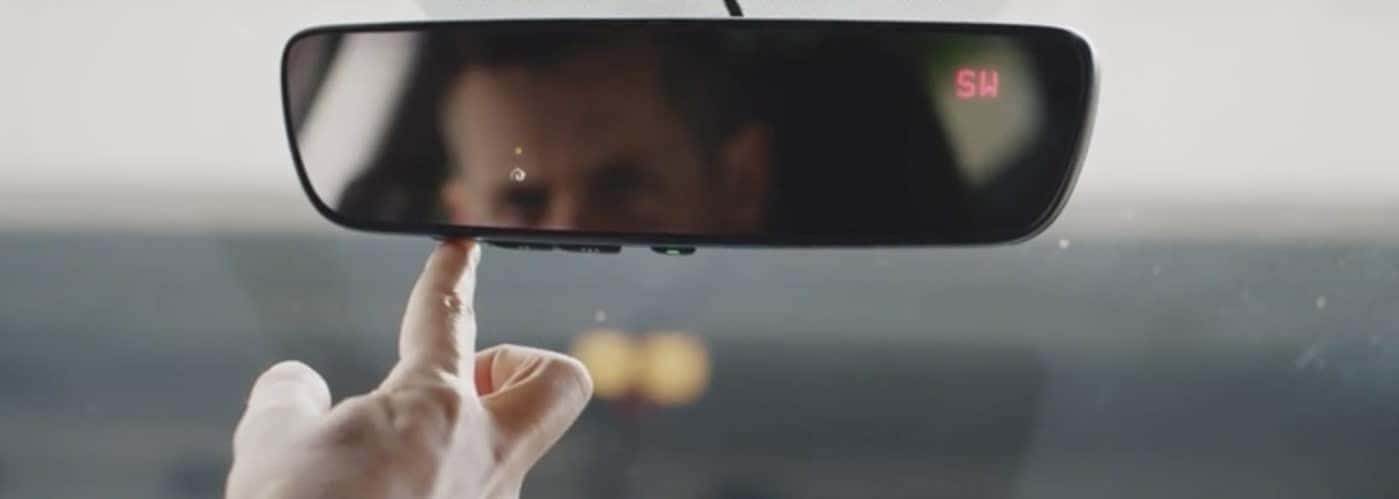
The HomeLink system, a standard feature in many Subaru Foresters and other vehicles, is essentially a built-in garage door opener transmitter. It replaces the need for multiple individual remotes cluttering your car’s console. The system consists of three or four programmable buttons, typically located on the rearview mirror or the overhead console, depending on the Forester model year.
These buttons are designed to learn and replicate the radio frequency signals emitted by your existing garage door opener remote.
The technology behind HomeLink relies on radio waves. When you press a programmed HomeLink button, it sends a signal that mimics the signal from your original remote. This signal is picked up by the receiver unit of your garage door opener, prompting it to open or close the door. Modern garage door openers often use rolling code technology for enhanced security. This means the code transmitted changes with each use. HomeLink is designed to work with these systems as well, though the programming process might be slightly more involved.
Before you begin, it’s crucial to identify the type of garage door opener you have. Most modern openers operate on frequencies like 315 MHz or 390 MHz. HomeLink is compatible with a vast majority of these. However, if you have a very old opener or a specific brand known for unique frequencies, it’s wise to check the HomeLink compatibility list on their official website or consult your Subaru Forester’s owner’s manual.
This proactive step can save you a lot of frustration later on.
Locating Your Homelink Buttons
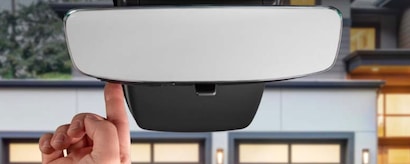
In most Subaru Forester models, you’ll find the HomeLink buttons integrated into the rearview mirror. They are usually located along the bottom edge or on the side of the mirror housing. In some earlier or different trim levels, these buttons might be situated on the overhead console near the dome lights and sunroof controls.
Take a moment to locate these buttons in your Forester. You’ll typically see three distinct buttons, often with small indicator lights. These are the buttons you will be programming to your garage door opener. Familiarize yourself with their placement before proceeding to the programming steps.
Identifying Your Garage Door Opener Type
The type of garage door opener you have is a critical factor in the programming process. Most openers fall into two main categories: fixed code and rolling code.
- Fixed Code Openers: These use a single, unchanging code. Programming HomeLink to these is generally straightforward.
- Rolling Code Openers: These use a dynamic code that changes each time the remote is used, offering enhanced security. HomeLink can be programmed to these, but it usually requires an additional step involving the “learn” button on the garage door opener’s motor unit.
To determine your opener’s type, check its manual or look for labels on the motor unit itself, usually located on the ceiling of your garage. If you’re unsure, a quick search online for your specific garage door opener model number should provide the necessary information.
Many manufacturers, like Chamberlain, LiftMaster, and Genie, offer openers that are compatible with HomeLink.
Step-by-step Programming Guide For Your Subaru Forester
Programming your garage door opener into your Subaru Forester’s HomeLink system involves a series of coordinated steps. It’s a process that requires patience and attention to detail. We will break this down into the most common scenarios, covering both older fixed-code openers and newer rolling-code systems.
Initial Setup And Clearing Existing Codes
Before you begin programming a new device, it’s good practice to clear any previously stored codes in your HomeLink system. This prevents accidental interference and ensures a clean slate for your new programming.
- Turn on the ignition: Start your Subaru Forester and turn the ignition to the ON or Accessory (ACC) position. The engine does not need to be running.
- Clear existing codes: Press and hold the two outer HomeLink buttons (usually button 1 and button 3) simultaneously for about 10 seconds.
- Observe the indicator light: The HomeLink indicator light, typically located above the buttons, will begin to flash rapidly or turn solid. This signifies that all previously learned codes have been erased. Release the buttons once this occurs.
Programming For Fixed Code Openers
If your garage door opener uses a fixed code system, the process is simpler and usually doesn’t involve interacting with the opener’s motor unit directly.
- Position your vehicles and remote: Park your Subaru Forester facing your garage door, approximately 3-10 feet away from the opener. Bring your original garage door opener remote with you.
- Select a HomeLink button: Decide which of the three HomeLink buttons you want to assign to your garage door.
- Press and hold the HomeLink button: Press and hold the chosen HomeLink button.
- Press and hold the original remote button: Simultaneously, press and hold the button on your original garage door opener remote that you wish to program.
- Observe the indicator light: Continue holding both buttons. The HomeLink indicator light will initially flash slowly, then change to flashing rapidly or turn solid. This change indicates that the HomeLink system has learned the remote’s signal.
- Release both buttons: Once the light changes, release both the HomeLink button and the remote button.
- Test the HomeLink button: Press the programmed HomeLink button. If your garage door operates, you have successfully programmed it. If not, proceed to the next steps or consider the rolling code method if applicable.
Programming For Rolling Code Openers
Rolling code systems require an extra step to synchronize the HomeLink system with the garage door opener’s motor unit. This involves using the “learn” or “program” button on the opener itself.
- Follow steps 1-5 from the Fixed Code section: Perform the initial setup and clear existing codes, then position your Forester and remote, and press and hold the desired HomeLink button and the original remote button simultaneously until the HomeLink indicator light flashes rapidly or turns solid.
- Locate the “Learn” button on the opener: Go to your garage and locate the “Learn” or “Program” button on the garage door opener’s motor unit. This button is often located near the antenna wire or on the back of the unit. It may be labeled as “Smart,” “Learn,” “Program,” or similar.
- Press and release the “Learn” button: Press and immediately release the “Learn” button on the opener unit. A corresponding indicator light on the opener should illuminate or flash, indicating it’s in learn mode. You typically have about 30 seconds to complete the next step.
- Return to your Subaru Forester: Quickly go back to your Forester.
- Press and hold the programmed HomeLink button: Press and hold the same HomeLink button you were just programming.
- Observe the HomeLink indicator light again: The HomeLink indicator light should flash rapidly or turn solid again, often after a few seconds. This signifies that the HomeLink system has successfully synchronized with the rolling code of your opener.
- Release the HomeLink button: Release the button.
- Test the HomeLink button: Press the programmed HomeLink button again. Your garage door should now operate. You might need to press and release the button a second time if the opener requires it to fully cycle.
Example Case Study: Sarah, a Subaru Forester owner, struggled to program her new rolling code garage door opener. She followed the initial steps correctly, but the door wouldn’t open. After consulting her opener’s manual, she realized she needed to press the “Learn” button on the motor unit. She quickly ran back to the opener, pressed the button, returned to her car, and held the HomeLink button again. On the second attempt, the indicator light flashed, and the door opened perfectly. This highlights the critical nature of the “learn” button step for rolling code systems.
Programming Additional Devices
Your Subaru Forester’s HomeLink system can typically store up to three different devices. To program a second or third device:
- Repeat the process: Simply repeat the entire programming procedure (steps from either Fixed Code or Rolling Code, depending on your opener) for each additional device, using a different, unassigned HomeLink button each time.
- Avoid clearing codes: Do not clear existing codes unless you intend to reprogram all devices from scratch.
Advanced Programming And Compatibility Checks
In some rare cases, standard programming might not work. This can be due to interference, specific opener models, or the need for a HomeLink Repeater.
- HomeLink Repeater: If your opener is located far from the driveway or if there are significant obstructions, a HomeLink Repeater might be necessary. This accessory is installed near the opener and amplifies the signal from your Forester, ensuring it reaches the receiver. Check the HomeLink website or your Subaru dealer for compatibility and availability.
- Compatibility Lists: Always refer to the official HomeLink website for the most up-to-date compatibility information for your specific garage door opener make and model. HomeLink’s official website provides a comprehensive database.
Credit: www.autonationsubaruroseville.com
Troubleshooting Common Homelink Issues In Your Forester
Even with clear instructions, you might encounter issues when programming your Subaru Forester’s HomeLink system. Most problems are resolvable with a bit of systematic troubleshooting.
The Homelink System Isn’t Learning The Remote Signal
This is perhaps the most common problem. Several factors could be at play:
- Distance: Ensure your Forester is parked close enough to the garage door opener (typically 3-10 feet). Too far, and the signal might be weak.
- Interference: Other radio frequencies can interfere with the programming process. Try programming at a different time of day or ensure no other wireless devices are actively transmitting nearby.
- Battery in Original Remote: A weak battery in your original remote might not transmit a strong enough signal for HomeLink to learn. Try replacing the battery in your existing remote.
- Incorrect Button Presses: Double-check that you are pressing and holding the correct buttons for the specified durations. For rolling codes, ensure you’re pressing and *releasing* the opener’s learn button within the 30-second window.
- Opener Compatibility: Verify that your garage door opener is indeed compatible with HomeLink. Older openers or those with very unique frequencies might not work without an adapter.
The Garage Door Opener Doesn’t Respond After Programming
If the HomeLink indicator light shows successful programming, but the door doesn’t move, consider these possibilities:
- Rolling Code Synchronization Failure: For rolling code openers, the synchronization step is crucial. If you missed the 30-second window after pressing the opener’s learn button, you’ll need to repeat the entire rolling code programming process.
- Multiple Presses Required: Some openers require the HomeLink button to be pressed twice, once to train the system and a second time to activate the opener. Try pressing the programmed button briefly, then pressing and holding it.
- Opener Motor Unit Issues: The problem might not be with the HomeLink programming but with the garage door opener itself. Check if the opener is receiving power and if its safety sensors are aligned. You can try operating the door with the original remote to confirm the opener is functioning correctly.
Homelink Buttons Control The Wrong Device
This usually happens when programming multiple devices or if existing codes weren’t cleared properly.
- Clear and Reprogram: The most effective solution is to clear all existing HomeLink codes (as described in the “Clearing Existing Codes” section) and then reprogram each device one by one, ensuring you use a different HomeLink button for each.
The Homelink Indicator Light Doesn’t Flash Or Turn Solid
If the HomeLink indicator light remains off or doesn’t behave as expected during programming:
- Ignition Position: Ensure the vehicle’s ignition is in the ON or ACC position. If it’s in the ‘Off’ or ‘Start’ position, HomeLink won’t function.
- Faulty HomeLink Unit: In rare cases, the HomeLink transceiver itself might be malfunctioning. If you’ve tried all other troubleshooting steps and consulted your owner’s manual, it might be time to contact a Subaru dealership for diagnosis.
Example Of A Troubleshooting Scenario:
Mark had a Subaru Forester and a Genie garage door opener. He followed the rolling code procedure, but his HomeLink button only blinked erratically. He re-checked the HomeLink compatibility list and confirmed his Genie model was supported. He then realized he was holding the “Learn” button on the opener for too long.
The manual stated to press and *release* it. The next time, he followed this precisely, and the HomeLink system successfully learned the code. This illustrates how a minor deviation in following instructions can lead to programming failure.

Credit: www.santacruzsubaru.com
Maintaining Your Homelink System And Garage Door Opener
Proper maintenance ensures the longevity and reliable operation of both your Subaru Forester’s HomeLink system and your garage door opener. Regular checks can prevent issues and enhance security.
Regular Maintenance For Your Subaru Forester’s Homelink
The HomeLink system itself requires very little maintenance. Its primary needs are:
- Cleanliness: Keep the buttons and surrounding area clean. Dust or debris can sometimes interfere with button presses.
- Battery Check (Vehicle): While HomeLink is powered by the car’s electrical system, a weak car battery can sometimes lead to intermittent electrical issues. Ensure your Subaru Forester’s battery is in good condition.
- Software Updates: Although rare for HomeLink, Subaru vehicles do receive software updates. While unlikely to directly impact HomeLink, keeping your vehicle’s overall system updated is good practice.
Garage Door Opener Maintenance
The garage door opener unit and the door mechanism itself require more regular attention.
- Lubrication: Regularly lubricate the moving parts of your garage door, including rollers, hinges, and springs. This ensures smooth operation and reduces strain on the opener motor. A good lubricant can significantly quiet down a noisy door. For detailed guidance, refer to how to lube garage door rollers.
- Chain/Belt Adjustment: If you have a chain-driven or belt-driven opener, periodically check the tension of the chain or belt. Improper tension can lead to noise, wear, and operational issues. You may need to learn how to adjust the chain on a garage door opener.
- Safety Sensor Alignment: The safety sensors at the bottom of the garage door tracks are critical. Ensure they are clean, unobstructed, and properly aligned. If they are misaligned, the door will not close completely.
- Check for Wear and Tear: Inspect the garage door springs, cables, and rollers for any signs of damage or excessive wear. These are critical safety components.
Security Considerations
- Clear Old Codes: As mentioned, always clear old HomeLink codes when selling your vehicle or if you suspect a security breach. You can also reset your garage door opener itself. For guidance, see how to reset your garage door opener.
- Rolling Codes: If your opener supports rolling codes, ensure it’s programmed to use them. This is a significant security upgrade over fixed code systems.
- Limit Access: Be mindful of who has access to your original garage door remote and your Forester.
Integrating With Other Smart Home Devices
While HomeLink is a fantastic built-in solution for garage doors, the world of smart home technology is rapidly evolving. For those looking to further integrate their home access with their digital lives, there are advanced options.
Smart Garage Door Opener Controllers
Beyond the traditional HomeLink system, you can upgrade your existing garage door opener with a smart controller. These devices, such as the MyQ Chamberlain or similar products, connect to your home Wi-Fi network.
- Smartphone Control: The primary benefit is the ability to open, close, and monitor your garage door from anywhere in the world using a smartphone app.
- Integration with Smart Assistants: Many smart controllers can integrate with voice assistants like Amazon Alexa or Google Assistant, allowing you to open or close your garage door with a voice command.
- Notifications and Alerts: Receive real-time notifications on your phone if the garage door is left open, closed unexpectedly, or opened at a specific time.
- Compatibility: These controllers are generally compatible with most existing garage door openers. Installation usually involves wiring the controller to your opener’s terminals.
While these smart controllers offer advanced features, they don’t directly replace the HomeLink buttons in your Forester. However, they provide a parallel and often more feature-rich control system. Some users opt to use both: HomeLink for convenient in-car access and a smart controller for remote and voice control.
Remote And Keypad Programming
If your HomeLink system isn’t functioning or you prefer additional access methods, you can also program or reprogram external remotes and keypads.
- Keypads: Wireless keypads installed outside your garage offer keypad entry. Programming these often involves a similar process to HomeLink, requiring access to the opener’s learn button. For example, you might need to learn how to reprogram a Genie garage door keypad or how to reprogram a Chamberlain garage door keypad.
- Remotes: Additional remotes can be programmed for other family members or kept as backups. The process is similar to programming HomeLink. Resources like how to reset a Craftsman garage door remote or how to reset a garage door remote can be helpful.
The choice between relying solely on HomeLink, upgrading to a smart controller, or maintaining multiple remotes and keypads often comes down to personal preference, budget, and the desire for advanced smart home integration.
Frequently Asked Questions
What If My Subaru Forester Doesn’t Have Homelink?
If your Subaru Forester model does not come equipped with the integrated HomeLink system, you have a couple of excellent alternatives. You can purchase an aftermarket HomeLink visor or rearview mirror module and install it yourself or have it professionally installed.
Alternatively, you can use a standard, external garage door opener remote that you can attach to your sun visor or key chain.
How Do I Know If My Garage Door Opener Is Compatible With Homelink?
The best way to check compatibility is to visit the official HomeLink website and use their online compatibility tool. You’ll typically need to know the make and model of your garage door opener. Most modern openers (manufactured after 1993) are compatible, but it’s always best to verify.
Can I Program Multiple Garage Doors Or Gates To My Forester’s Homelink?
Yes, absolutely. The HomeLink system in most Subaru Foresters has three programmable buttons, allowing you to control up to three different devices. You can