
Getting a new garage door remote may sound simple, but when your old one stops working, is lost, or you need an extra for a family member, it can quickly become confusing. With so many types, brands, and compatibility issues, it’s easy to make mistakes or waste money on the wrong product.
This guide will help you through every step of the process, from understanding your current system to choosing, programming, and securing your new remote. Whether you’re a homeowner, tenant, or landlord, you’ll learn how to get a new garage door remote without stress or wasted time.
Why Would You Need A New Garage Door Remote?
There are many situations when you need to get a new garage door remote. Maybe your old remote has stopped working, or you want to give a remote to a new driver in the family. Sometimes, you may lose the remote, or it gets stolen. In all these cases, replacing or adding a remote becomes important for convenience and safety.
Another common reason is upgrading your garage door opener system. Modern systems often support advanced remotes with better security and more features. Also, if you move into a new house, it’s smart to get new remotes and reprogram the opener to avoid security risks.
Understanding Your Current Garage Door Opener
Before you buy a new remote, you need to know what you have. Not all remotes work with all openers. Here’s how you can identify what you need:
- Brand and Model: Check the garage door opener unit (usually on the ceiling). You will find a label with the brand (like Chamberlain, LiftMaster, Genie, Craftsman) and a model number.
- Frequency: Remotes and openers use radio frequencies to communicate. Common frequencies are 300 MHz, 310 MHz, 315 MHz, and 390 MHz. The frequency is often printed on the remote or opener.
- Remote Type: Some openers use fixed code remotes (older systems), while others use rolling code remotes (newer, more secure systems).
If you’re not sure, take a clear photo of your opener’s label and current remote. Store employees or support agents can help you match the right remote.
How To Check Compatibility
Matching a remote is not just about the brand. Within each brand, there are many models and years, and sometimes different remotes are needed. For example, a 1998 Chamberlain opener may need a different remote than a 2020 model.
Pro tip: If you can, bring your old remote to the store. If it’s lost or broken, write down all information from your opener unit. This will help you avoid buying a remote that doesn’t work.
Types Of Garage Door Remotes
Not all remotes are the same. Understanding the different types will help you make a better choice.
1. Original Equipment Manufacturer (oem) Remotes
These are made by the same company as your garage door opener. They are guaranteed to work if you choose the right model.
2. Universal Remotes
Universal remotes work with many brands and models. They are handy if you have multiple openers or different brands. However, not all universal remotes support every opener, especially very old or very new models. Always check the packaging or website compatibility list.
3. Keychain Remotes
Small remotes that fit on your keychain. Great for people who don’t want to carry a large remote or want quick access.
4. Multi-door Remotes
Some remotes can control two or three doors. Useful if you have a three-car garage or a gate and a door opener.
5. Smart Remotes
Modern systems allow you to control your garage with a smartphone app or even your car’s built-in HomeLink system. If you want these features, you may need to upgrade your opener, not just the remote.
Where To Buy A New Garage Door Remote
You have several options for buying a new remote:
- Home Improvement Stores: Home Depot, Lowe’s, and Menards carry popular brands and universal remotes.
- Online Retailers: Amazon, eBay, and specialized websites like North Shore Commercial Door and Garage Door Supply sell a wide range of remotes.
- Garage Door Dealers: Local garage door companies can sell and program remotes for you. They can also provide advice for tricky situations.
- Manufacturer Websites: Ordering directly from Chamberlain, Genie, or other official sites ensures you get a genuine product.
Ordering from a local dealer or official website can be more expensive but reduces compatibility problems. Buying online is often cheaper, but you must check compatibility yourself.
Price Comparison
Let’s compare average prices from different sources:
| Source | Average Price (USD) | Pros | Cons |
|---|---|---|---|
| Home Improvement Store | $25-$45 | Quick, staff support, easy returns | Limited selection |
| Online Retailer | $15-$40 | Wide selection, lower price | Shipping wait, compatibility risk |
| Dealer/Installer | $35-$70 | Expert programming, advice | Higher cost |
| Manufacturer Website | $30-$60 | Guaranteed fit, official support | May need to wait for shipping |
Steps To Get A New Garage Door Remote
Getting a new remote involves a few clear steps. Follow these to avoid common mistakes.
Step 1: Identify Your Opener And Remote
As explained earlier, check your opener’s brand, model, and frequency. Take photos or note down details. Also, check the color of the learn button on your opener unit (usually red, yellow, purple, or green). This button helps match the right remote.
Step 2: Decide The Type Of Remote
Choose OEM, universal, keychain, or multi-door remote based on your needs and your opener’s compatibility.
Step 3: Purchase The Remote
Buy from a reliable source. If buying online, read reviews and check compatibility lists.
Step 4: Program The Remote
Most remotes are easy to program. Usually, you press the learn button on your opener, then press a button on the remote. Some systems require entering a code.
Step 5: Test The Remote
After programming, test the remote from different distances and angles. Make sure it opens and closes the door smoothly.
Step 6: Secure Your System
If you lost your old remote or it was stolen, erase old codes from your opener before adding new remotes. This prevents someone from using your old remote.
Erasing Old Codes
- Press and hold the learn button on your opener for 6–10 seconds until the indicator light goes out.
- All programmed remotes are now erased.
- Reprogram the remotes you want to keep.
Step 7: Store Backup Remotes Safely
Keep a spare remote in a safe place, such as your desk drawer or with a trusted neighbor. This helps if you lose your main remote again.
How To Program A New Garage Door Remote
Programming is usually simple but can vary by brand. Here’s a general process:
- Find the Learn Button: On your garage door opener unit (on the ceiling), look for a button labeled “Learn” or “Program.” The color matters for compatibility.
- Press and Release: Press and release the Learn button. A light will turn on or blink.
- Press Remote Button: Within 30 seconds, press the main button on your new remote. The opener light will blink, or you’ll hear a click.
- Test the Remote: Push the remote button. The door should move. If not, repeat the process.
Example: Chamberlain/liftmaster
These brands use colored Learn buttons:
- Yellow: 2011 and newer, use Security+ 2.0 remotes
- Purple: 2005–2011, Security+ remotes
- Red/Orange: 1997–2005, Security+ remotes
- Green: 1993–1996, older Security+ or Billion Code remotes
Tip: If you have a very old opener, you may need a special universal remote or an upgrade kit.
Example: Genie
Genie openers often have a “Program” button. The process is similar but may require holding the remote button for a few seconds.
Common Problems And Solutions
- Remote not working? Try new batteries, repeat programming, or check compatibility.
- Door opens only from close range? Weak batteries or interference may be the cause. Avoid storing remotes near metal objects or electronics.
- Multiple remotes stopped working? Opener may need to be reset or serviced.
Choosing The Right Remote: Key Factors
There are a few important things to consider:
- Compatibility: Always check if the remote works with your opener’s brand, model, and frequency.
- Number of Buttons: Remotes can have one, two, or three buttons. More buttons allow control of multiple doors or gates.
- Size and Design: Keychain or visor-clip? Choose what fits your lifestyle.
- Security: Rolling code remotes are much safer than fixed code. They change the signal each time you use them.
- Price: Don’t just buy the cheapest. Make sure it’s reliable and covered by a warranty.
Comparison: Oem Vs Universal Remotes
Here’s a simple comparison to help you decide:
| Feature | OEM Remote | Universal Remote |
|---|---|---|
| Compatibility | Exact match | Many brands/models |
| Price | Medium to high | Low to medium |
| Ease of Programming | Very easy | May require extra steps |
| Features | Standard | May offer extra functions |
| Warranty | Usually included | Varies by brand |
Security Tips For Your Garage Door Remote
Many people don’t think about garage door remote security. But a lost or stolen remote is like a key to your house.
- Erase old remotes if you lose one.
- Choose rolling code remotes to prevent code grabbing by thieves.
- Do not leave remotes in unlocked cars. A surprising number of home burglaries start with a thief entering through the garage using a stolen remote.
- Consider a keypad entry as a backup. These mount outside the door and use a PIN code.
- Upgrade old openers. Openers made before 1993 may lack security features and may not work with modern remotes.
Real-world Example
A homeowner in Chicago had a break-in after someone stole a garage door remote from their unlocked car. The thief entered the garage and then the house through the interior door. The lesson: treat your garage remote like a house key.

What To Do If Your Remote Is Lost Or Stolen
Losing a garage remote is not just an inconvenience—it’s a security risk. Here’s what to do:
- Erase all remotes from your opener (hold the Learn button for 6–10 seconds).
- Reprogram only remotes you still have.
- Consider changing your opener’s PIN code if you have a keypad.
- Buy replacement remotes as needed.
- Inform family members or tenants about the new remotes and security steps.
Upgrading To Smart Garage Door Remotes
If you want more control and security, consider upgrading to a smart garage system. These systems let you:
- Open and close your garage from your smartphone.
- Get alerts if the door is left open.
- Share virtual “keys” with guests or family.
- Check door status from anywhere.
Popular Smart Garage Systems
- MyQ by Chamberlain: Works with most brands made after 1993.
- Genie Aladdin Connect: Compatible with Genie openers and some others.
- Tailwind iQ3: Works with many openers, offers auto-close features.
You may need to add a smart hub to your existing opener. Some new openers have Wi-Fi built-in.
Is It Worth Upgrading?
If you travel often, have deliveries, or want peace of mind, smart systems are a good investment. They cost $50–$150 for the hub or module, plus the price of the remote (if needed).
Common Mistakes To Avoid
Many people make simple errors when replacing a remote. Here’s how to avoid them:
- Assuming all remotes are universal. Not all work with every opener.
- Not checking the color of the Learn button. This detail is key for matching remotes.
- Buying the wrong frequency. If the remote uses 390 MHz but your opener is 315 MHz, it won’t work.
- Forgetting to erase old remotes after loss or theft.
- Not reading the return policy. Some stores don’t accept returns if you open the package.
How Many Remotes Can You Program?
Most garage door openers support up to 5–7 remotes. This is enough for family, guests, or spare units. If you reach the limit, erasing all remotes and starting over will make room for new ones.
Keeping Track Of Your Garage Remotes
It’s easy to lose remotes. Here are tips to help:
- Label remotes with a sticker and write which door or opener they control.
- Register the serial number (if present) and keep receipts.
- Store spares in a safe location outside the car.
Troubleshooting Garage Door Remote Issues
If your new remote is not working, try these steps:
- Replace the battery (even new remotes can have weak batteries from storage).
- Reprogram the remote.
- Check for interference. LED bulbs, Wi-Fi routers, and other electronics near the opener can block signals.
- Inspect antenna wire. The opener unit often has a small wire hanging down. Make sure it’s straight and not broken.
- Consult the manual for your opener and remote.
- Contact support if you can’t solve the issue.
When To Call A Professional
Most people can replace a remote themselves. But call a pro if:
- Your opener is very old or has no visible Learn button.
- You want to upgrade to a smart system and need wiring help.
- The opener won’t accept new remotes after several tries.
- You need extra security or want to rekey the entire system.
Garage door professionals can program remotes, install keypads, and help with opener upgrades.
Understanding Garage Door Opener Technology
Knowing a bit about how remotes and openers work can help you make better choices.
Fixed Code Vs Rolling Code
- Fixed code remotes use the same signal every time. Easy to copy, less secure.
- Rolling code remotes (Security+, Intellicode) change the signal each time, making them much safer.
Garage Door Opener Brands
Some popular brands and their remote systems:
| Brand | Main Remote System | Frequency | Security Level |
|---|---|---|---|
| Chamberlain/LiftMaster | Security+ / Security+ 2.0 | 315/390 MHz | High |
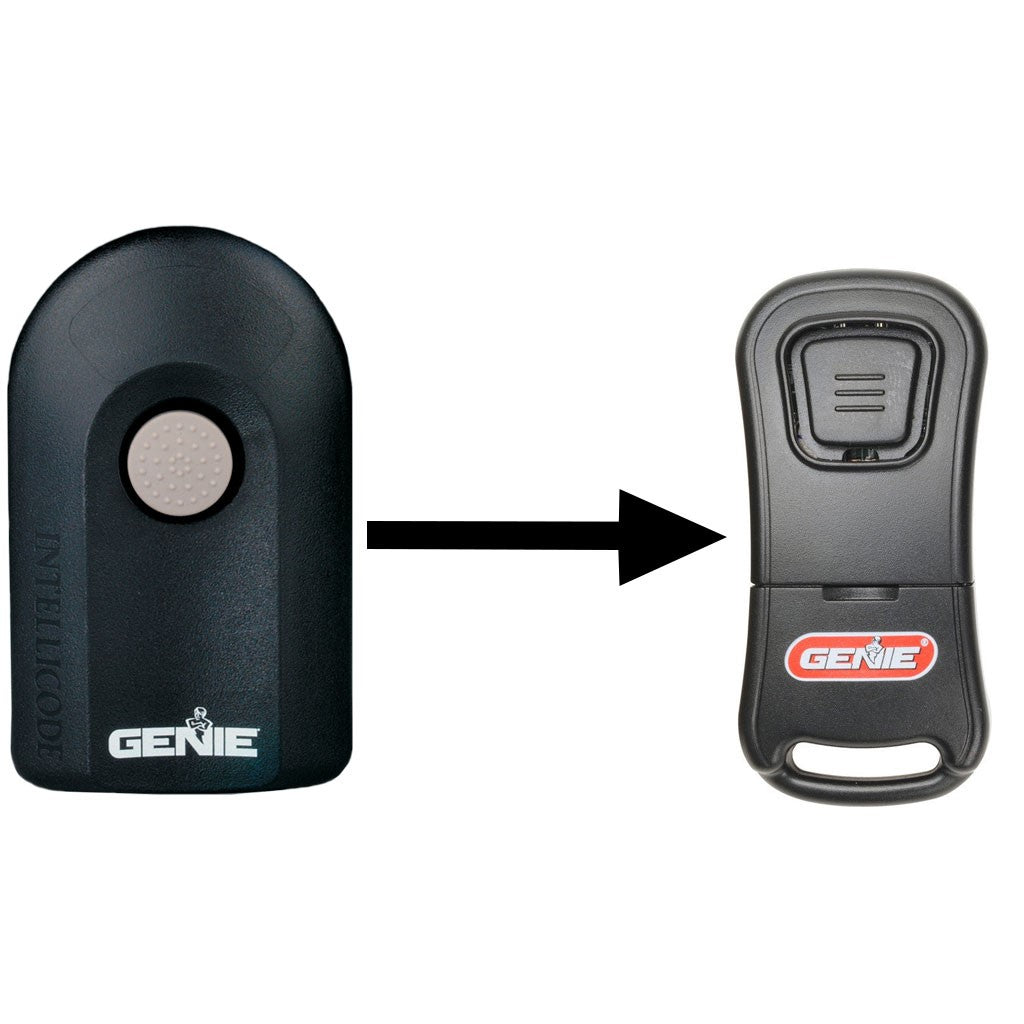
| Genie | Intellicode | 315/390 MHz | High |
| Craftsman | Security+ (licensed) | 315/390 MHz | High |
| Overhead Door | CodeDodger | 315/390 MHz | High |
| Older Brands (pre-1993) | Fixed Code | 300/310 MHz | Low |
If you’re not sure, check your opener’s model and search for manuals online or ask a dealer for help.
Non-obvious Insights For Beginners
- Remotes and openers sometimes need a “reset” after a power outage. If your remote suddenly stops working after a storm, try unplugging and plugging in your opener, then reprogram the remote.
- Some universal remotes have a “learn” switch inside. You may need to set it to match your opener’s brand before programming. Read the instructions carefully.
- Garage doors can be controlled by your car’s built-in system (HomeLink or Car2U). This can replace the need for a physical remote, but may require a special training process.

Frequently Asked Questions
How Do I Know If A Universal Remote Will Work With My Garage Door Opener?
Universal remotes have compatibility lists printed on the box or on the manufacturer’s website. Check your opener’s brand, model, and frequency against this list. If your opener is very old (pre-1993) or very new, a universal remote may not work.
When in doubt, bring your opener’s info to a store and ask for help.
What Should I Do If My Garage Door Remote Is Stolen?
Immediately erase all remotes from your opener’s memory (hold the Learn button for 6–10 seconds). Reprogram only remotes you still have. Consider changing your keypad PIN and inform anyone who uses the garage. Don’t delay, as a stolen remote is like a key to your home.
Can I Program A Garage Door Remote Myself, Or Do I Need A Professional?
Most remotes can be programmed easily with instructions from the manual or YouTube. All you need is access to the opener unit (usually in your garage ceiling). If you have trouble, or your opener is very old, calling a professional is a good idea.
How Many Garage Door Remotes Can I Use With One Opener?
Most openers support 5–7 remotes at once. If you reach the limit, you must erase all remotes and start again. This helps if you have a large family or want backups, but prevents unlimited remotes for security reasons.
Is It Worth Upgrading To A Smart Garage Door Opener Or Remote?
If you want remote access, alerts, and the ability to open/close your garage from anywhere, a smart system is worth it. These systems also add extra security and can work with Amazon Key or Google Assistant. For most people, the extra cost is small compared to the added convenience and peace of mind. For more on smart garage door openers, see the official Garage Door Opener Wikipedia page.
Getting a new garage door remote is a simple project that brings daily convenience and peace of mind. By following these steps and tips, you can avoid the most common mistakes and make sure your home stays secure. Whether you choose a basic remote, a universal, or a smart upgrade, the right choice will make life easier every time you come home.