
Resetting a garage door keypad can feel confusing—especially if you don’t remember the old code. Many homeowners face this problem when buying a new house or after renting out their garage. You might worry about security, or just want a fresh start. The good news: you can reset most garage door keypads without the old code, and you don’t always need to call a professional.
In this guide, you’ll learn the exact steps to reset different types of garage door keypads. You’ll see how to spot your keypad model, what tools you’ll need, and how to avoid mistakes that could leave your garage stuck or unsafe.
We’ll also cover what to do if you’re locked out, how to keep your code secure, and answer the most common questions. Whether you’re a homeowner, renter, or just helping a friend, you’ll find clear, practical advice for every situation.
Understanding Garage Door Keypads
Before you try to reset anything, it’s smart to know how garage door keypads work. Most keypads are wireless and connect directly to the garage door opener with a radio signal. When you type the right code, the opener receives a signal and opens or closes the door.
There are two main types of keypads:
- Universal keypads: These work with many brands, like Chamberlain, Genie, LiftMaster, and Craftsman.
- Brand-specific keypads: These are made to work with one brand only.
Keypads usually get power from batteries. Some are wired, but most modern ones are wireless.
The reset process depends on the brand and the type of opener you have. Some keypads have a special “learn” button, while others require you to open the keypad cover and press a sequence of keys. Older models might need a physical reset, like unplugging the opener or using a manual override.
Non-obvious insight: Many people think all keypads reset the same way, but even keypads from the same brand can have different steps. Always check your model number before starting.
Why Resetting Without The Code Matters
If you’ve lost or forgotten your code, you’re not alone. People often need to reset a keypad when:
- Moving into a new home and unsure if others know the old code.
- Renting out a property to new tenants.
- Security concerns after a break-in or lost remote.
- Keypad stops working or acts strangely.
Resetting without the old code is important because:
- Security: Old codes might be known by previous owners or tenants.
- Convenience: You avoid being locked out of your garage.
- Peace of mind: You control who can enter.
Non-obvious insight: Simply changing the batteries will not reset or erase the code. You must follow the reset process to clear old codes from the opener’s memory.
Identifying Your Garage Door Keypad And Opener
Not all keypads reset the same way. The first step is to identify your keypad and opener model. Here’s how:
- Look for the brand name on the keypad or the opener motor. Common brands are Chamberlain, LiftMaster, Genie, Craftsman, and Overhead Door.
- Find the model number, usually on a sticker inside the keypad or on the opener motor unit.
- Note the color of the “learn” button on the opener motor (found on the back or side). It might be red, yellow, purple, or green.
This information will help you follow the right reset steps.
Tip: Take a photo of the keypad and opener label for reference. This helps when searching for instructions or replacement parts.
Common Methods To Reset Garage Door Keypad Without Code
Let’s look at the main methods for different brands and situations. The steps below cover the most common garage door opener brands in the US. Adjustments might be needed for older or rare models.
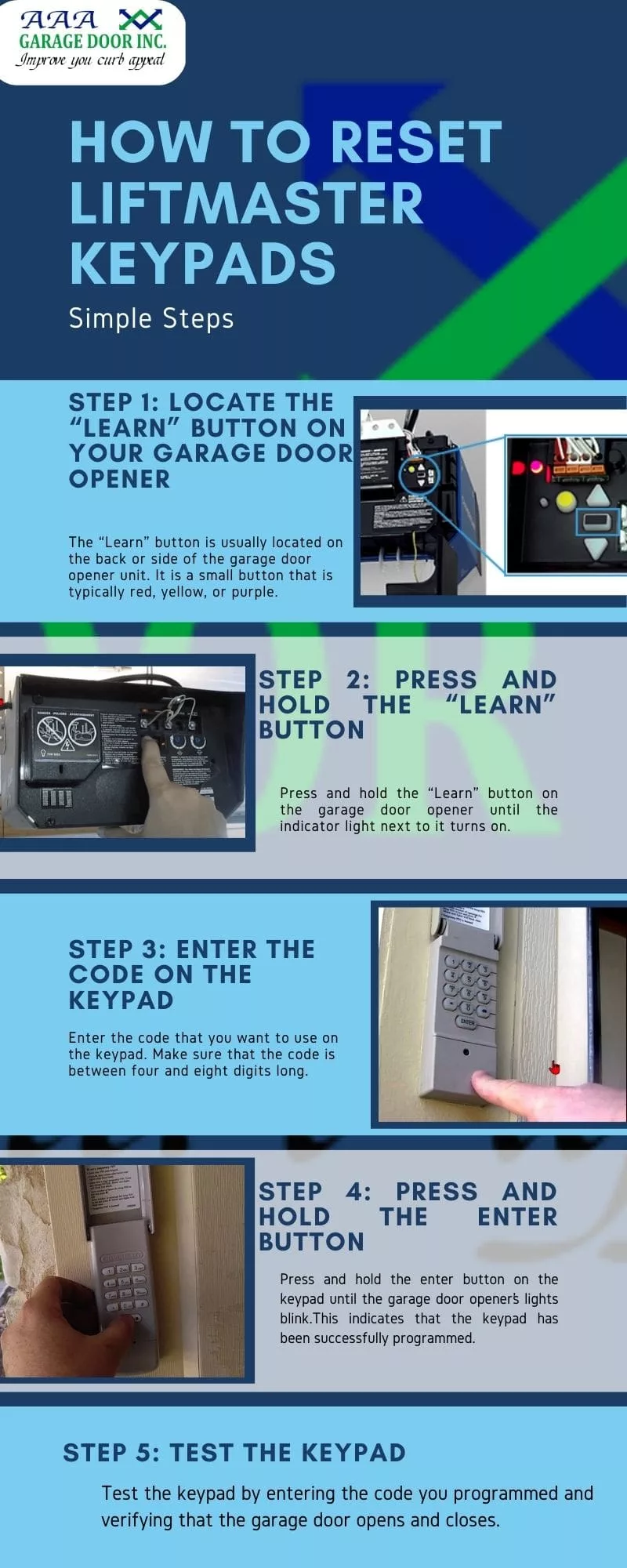
1. Using The “learn” Button On The Opener Motor
Most modern openers (especially from Chamberlain, LiftMaster, and Craftsman) have a “learn” button.
Steps:
- Locate the “learn” button on your garage door opener motor. You may need a ladder.
- Press and release the “learn” button. The indicator light will turn on (color depends on the model).
- Within 30 seconds, go to your keypad.
- Enter your new code (usually 4 digits) on the keypad.
- Press the “enter” button. The light on the opener should blink or click, showing it accepted the code.
Your old code is now erased, and the new code is active.
Example: On a LiftMaster opener with a yellow “learn” button, press the button, then enter your new 4-digit code and press “enter” on the keypad.
Warning: If you wait too long after pressing “learn,” you’ll need to start over. The window is usually 30 seconds.
2. Resetting A Genie Keypad
Genie openers use a similar but slightly different process.
Steps:
- Open the keypad cover.
- Press and hold the “Program” button (often at the bottom or side) until the indicator light blinks.
- Enter your new code.
- Press the “Program” button again to confirm.
- Go to the opener motor and press the “learn” or “smart” button.
- Within 30 seconds, enter your new code and press the “up/down” or “enter” key.
The opener should respond to the new code.
Note: Some Genie keypads have a “reset” button inside the battery compartment. If your keypad won’t reset, try removing the battery and pressing the reset button.
3. Clearing All Codes From The Opener
If you want to erase all codes (for example, after moving into a new home), you’ll need to clear the memory.
Steps:
- Press and hold the “learn” button on the opener for about 6–10 seconds until the indicator light turns off.
- All keypads and remotes are now erased.
- Follow the steps above to reprogram your keypad with a new code.
Tip: This is the best way to ensure no one else can open your garage with an old remote or code.
4. Resetting Universal Keypads
Universal keypads often work with several brands. The reset method usually involves a special sequence.
Steps:
- Remove the battery for about 1 minute.
- Hold down the “#” and “8” buttons while reinserting the battery.
- Release the buttons when the keypad lights blink.
- Reprogram a new code using the manufacturer’s instructions for your opener brand.
Caution: Universal keypads can be tricky. Always check the instruction manual or the manufacturer’s website for your specific model.
5. Using The Keypad’s Reset Feature
Some newer keypads have a reset button inside the cover or under the battery. Pressing this button for a few seconds can clear the code.
Steps:
- Open the keypad cover.
- Find the small reset button (may be labeled “reset” or “program”).
- Press and hold for 5–10 seconds.
- Enter a new code and confirm as required.
This method is more common with universal or aftermarket keypads.
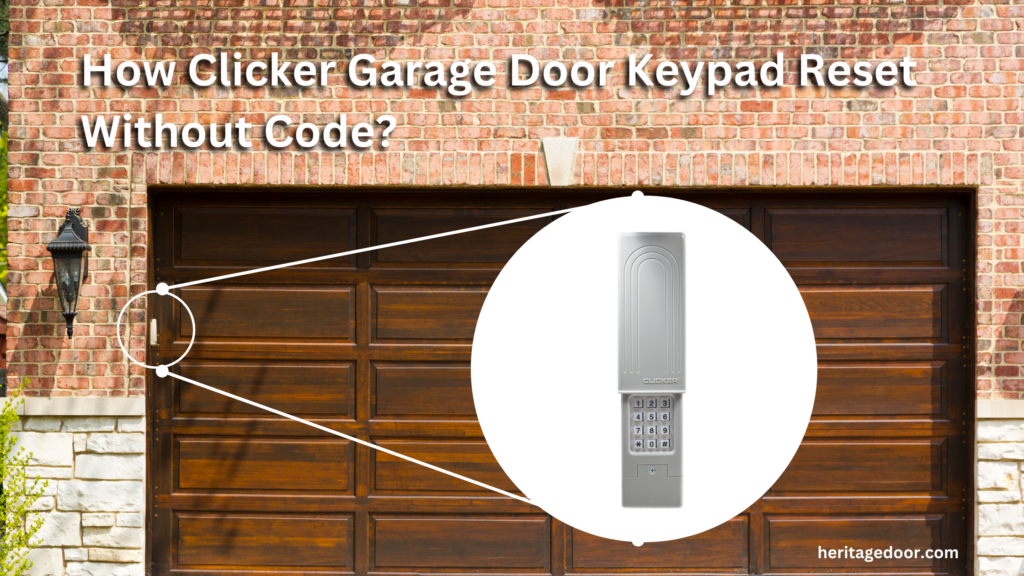
What To Do If You’re Locked Out
If you can’t open your garage because the keypad won’t reset, don’t panic. Here are practical steps:
- Try the manual release: Most garages have an emergency release cord (usually red) that disconnects the door from the opener. This lets you lift the door by hand.
- Check for a side or back door: Sometimes garages have a separate entry.
- Use a remote: If you still have a working remote, use it to enter and reset the keypad from inside.
- Call a locksmith or garage door technician if you’re stuck. Some doors have extra locks or keypads that need special tools.
Important: Never force the garage door. It can be heavy and dangerous if the springs are under tension.
Key Safety And Security Tips
Keeping your garage secure is just as important as resetting the keypad. Here’s what you should do:
- Change codes regularly, especially after moving or renting.
- Don’t share your code with too many people.
- Use a unique code (not your address, birthday, or simple numbers like 1234).
- Check for “rolling code” technology: This means the code changes after every use, making it harder for hackers.
- Keep the keypad clean and dry to avoid malfunction.
Insider tip: Some burglars look for fingerprints on worn-out keypads to guess your code. Wipe your keypad every few weeks.
Tools You May Need
Resetting a garage door keypad is usually a simple job. Here are some things to have on hand:
- Ladder (for reaching the opener motor)
- Small screwdriver (for battery or cover)
- New batteries (if the keypad is old)
- Phone or camera (to take photos for reference)
Having these ready speeds up the process and avoids frustration.
Troubleshooting: When Resetting Doesn’t Work
Sometimes, the keypad won’t reset as expected. Here are common problems and how to solve them:
Keypad Not Lighting Up
- Replace the batteries.
- Check for corrosion on the battery terminals.
- Clean the keypad if it’s dirty or wet.
New Code Not Accepted
- Repeat the steps carefully. Timing is important.
- Make sure the opener is in “learn” mode when entering the code.
- Clear the memory on the opener and try again.
Keypad Still Opens With Old Code
- Erase all codes from the opener (see above).
- Reset each remote and keypad individually.
Keypad Buttons Stuck
- Clean the keypad with a damp cloth.
- Check for insects or debris inside the cover.
Pro tip: If your keypad is more than 10 years old, it might be time for a replacement. Newer models are more secure and reliable.
Comparing Keypad Reset Features Across Brands
Here’s a quick comparison of reset features for the most popular US brands:
| Brand | Reset Without Old Code? | Learn Button Needed? | Special Tools? |
|---|---|---|---|
| Chamberlain | Yes | Yes | No |
| LiftMaster | Yes | Yes | No |
| Genie | Yes | Yes | No |
| Craftsman | Yes | Yes | No |
| Overhead Door | Yes | Sometimes | No |
| Universal | Yes | Sometimes | No/Yes |
As you can see, most brands let you reset the keypad without knowing the old code, but you need access to the opener motor and its “learn” button.
When To Replace Your Keypad
Resetting is not always enough. Here are signs you should consider a new keypad:
- Keypad is cracked or damaged.
- Buttons don’t respond or are hard to press.
- Keypad fails after battery change.
- Code resets on its own (could be a wiring or circuit problem).
- Keypad is more than 10 years old (newer models are more secure).
Modern keypads often have backlit buttons, weatherproof covers, and “rolling code” security. Upgrading can make your garage safer and easier to use.
How To Choose A Replacement Keypad
If you need a new keypad, keep these points in mind:
- Compatibility: Make sure the keypad works with your opener brand and model.
- Security features: Look for “rolling code” or “Security+” systems.
- Weather resistance: Outdoor keypads should resist rain and sun.
- Ease of installation: Most keypads are easy to install with basic tools.
- Battery life: Some models have low-battery alerts.
Here’s a comparison of features for popular replacement keypads:
| Feature | Basic Model | Mid-Range Model | Premium Model |
|---|---|---|---|
| Backlit Buttons | No | Yes | Yes |
| Weatherproof | Some | Yes | Yes |
| Rolling Code | No | Yes | Yes |
| Low Battery Alert | No | No | Yes |
| Easy Install | Yes | Yes | Yes |
Advice: Avoid the cheapest models. Spending a little more usually gets you better reliability and security.
Keeping Your Garage Door Keypad Secure
Resetting your code is just one part of garage security. Here’s how to keep your system safe:
- Don’t use obvious codes (like 1111 or 1234).
- Change your code every 6–12 months.
- Wipe the keypad occasionally to remove fingerprints.
- Cover the keypad if you’re gone for a long trip.
- Teach your family not to share the code with outsiders.
If you use a smart home system, always update the app and firmware to protect against hacking.
Step-by-step Example: Resetting A Liftmaster Keypad
Let’s walk through a real-world example so you can see the process in action.
Situation: You have a LiftMaster opener and forgot the old keypad code.
Steps:
- Get a ladder to reach the opener motor.
- Find the yellow “learn” button on the back or side of the opener.
- Press and release the “learn” button. The LED next to it will light up.
- Within 30 seconds, go to the keypad.
- Enter your new 4-digit code on the keypad.
- Press and hold the “enter” button until the opener light blinks (about 2 seconds).
- Test the new code by entering it again and opening the door.
If the door opens, you’re done! If not, repeat the process—timing matters.
Pro tip: Write your new code in a safe place, but don’t label it “garage code.”
Common Mistakes To Avoid
Even experienced homeowners make mistakes when resetting a garage door keypad. Watch out for these:
- Waiting too long after pressing “learn.” The opener times out after 30 seconds.
- Not clearing old codes before adding new ones. This can leave your garage vulnerable.
- Mixing up keypads and remotes. Each device must be programmed separately.
- Forgetting to replace weak batteries. Keypads can act strangely if the power is low.
- Using a universal keypad without checking compatibility.
If you’re stuck, check the manufacturer’s website for a manual. For example, the official Chamberlain site has model-specific guides.
Diy Vs. Calling A Professional
Most keypad resets are DIY-friendly—you don’t need special skills or expensive tools. However, call a pro if:
- The keypad or opener is very old or damaged.
- You can’t access the opener motor safely.
- The garage door is stuck, crooked, or very heavy.
A technician can quickly diagnose electrical or mechanical problems, replace parts, and ensure everything is secure.
What To Do After Resetting
Once you’ve reset your keypad:
- Test the new code several times.
- Try opening/closing the door from inside and outside.
- Check that all remotes still work. If not, reprogram them.
- Write down the new code in a secure spot.
- Explain the new code to all users.
Tip: If you rent out your property, change the code after each tenant leaves.

Maintaining Your Garage Door Keypad
A keypad that’s well maintained will last longer and work better. Here’s how:
- Change the battery every 12–24 months (or when the keypad gets dim).
- Clean the keypad with a soft, damp cloth. Don’t spray water directly.
- Check for loose wires if you have a wired model.
- Inspect for bugs or dirt inside the cover.
- Test the keypad every few months to catch problems early.
Regular maintenance means fewer surprises and less chance of being locked out.
Upgrading To Smart Garage Keypads
Some homeowners are switching to smart keypads that connect to Wi-Fi and apps. These allow:
- Remote code changes from your phone.
- Temporary codes for guests or deliveries.
- Notifications when the door opens or closes.
If you want more features, consider upgrading. Just make sure your opener supports smart technology.
Frequently Asked Questions
How Do I Reset My Garage Door Keypad If I Don’t Know The Old Code?
Most keypads can be reset using the opener’s “learn” button. Press and release “learn,” then enter a new code on the keypad. Older keypads may require removing batteries or pressing a reset button inside. Check your opener and keypad for model-specific steps.
Will Resetting My Keypad Erase My Remote Controls?
If you clear the opener’s memory by holding the “learn” button for 6–10 seconds, it erases all remotes and keypads. If you just reprogram the keypad, remotes usually stay the same. Always test your remotes after resetting.
What If My Garage Door Keypad Still Doesn’t Work After Resetting?
Check the batteries, make sure you followed the timing exactly, and confirm the keypad is compatible with your opener. If problems continue, the keypad may be faulty or too old—consider replacing it.
How Often Should I Change My Garage Door Keypad Code?
Change your code at least once a year, or whenever someone new moves in or out. Also change it if you suspect someone else knows it, or after any security issue.
Can I Reset A Universal Garage Door Keypad Without The Original Instructions?
Yes, most universal keypads have a reset method like battery removal or button sequences. Check the manufacturer’s website for a PDF manual, or follow the general steps in this article.
Securing your garage doesn’t have to be hard. With the right steps, you can reset your keypad without the old code, protect your home, and enjoy peace of mind. Whether you’re a homeowner, renter, or property manager, a little time spent now can save headaches later.