
If you own a Chamberlain garage door opener, you know how convenient it is to enter and exit your garage with just a button press. But what happens when you need to reprogram it? Maybe you bought a new remote, changed your keypad, or want to reset your codes for security. Understanding how to reprogram your Chamberlain opener gives you control and peace of mind, and can save you a service call.
Many homeowners feel nervous about touching the opener’s controls. The truth is, with some patience and clear steps, most people can reprogram a Chamberlain garage door opener in less than 30 minutes. This guide will walk you through every detail, from preparing your tools to troubleshooting common problems. You’ll also learn tips that most beginners miss, so you avoid frustration and get your system working smoothly.
Understanding Your Chamberlain Garage Door Opener
Before you start, it’s important to know the basic parts of your system. Chamberlain has produced many models over the years, but the main components are usually similar:
- Motor unit: Mounted on the garage ceiling, this opens and closes the door.
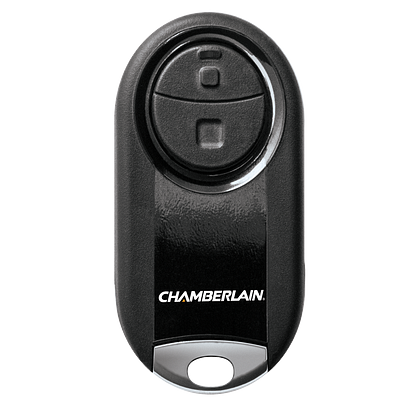
- Remote controls: Handheld devices you keep in your car or home.
- Wall control panel: Often installed near the garage entry door.
- Wireless keypad: Optional, placed outside the garage for PIN entry.
- Safety sensors: Placed near the ground at the garage door sides.
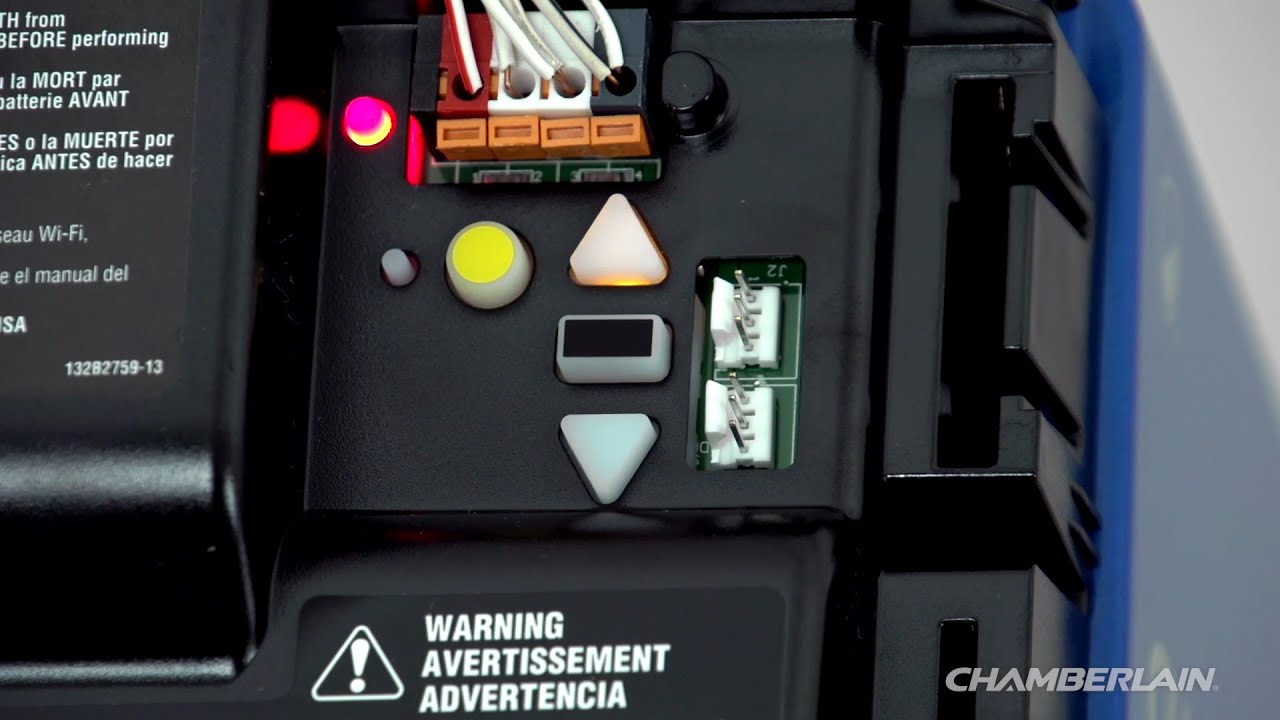
You’ll also need to find the Learn button on your opener. This button is the key to programming remotes and keypads. Most Chamberlain openers have it on the back or side of the motor unit, sometimes under a light cover. The color of the Learn button (yellow, purple, red, or green) tells you about the system’s age and compatibility.
| Learn Button Color | Year Introduced | Compatible Remote Frequency |
|---|---|---|
| Yellow | 2011–present | Security+ 2.0 (315/390 MHz) |
| Purple | 2005–2011 | 315 MHz |
| Red/Orange | 1997–2005 | 390 MHz |
| Green | 1993–1997 | 390 MHz |
Knowing your Learn button color helps you choose the right remote and follow the correct steps.
When Should You Reprogram Your Garage Door Opener?
You might need to reprogram your Chamberlain opener for several reasons:
- Lost or stolen remote: Someone may use it to access your garage.
- New remote or keypad: Adding a new device to your system.
- Security update: Resetting codes after moving in or for peace of mind.
- Malfunctioning controls: If remotes stop working, reprogramming often solves the problem.
- Battery replacement: Some older models require reprogramming after battery changes.
Reprogramming is not just for emergencies. It’s smart to update your codes every few years, especially if you give access to guests or service workers.
What You Need To Get Started
Gather a few simple tools and items before you begin:
- Ladder: To reach the opener unit safely.
- Your remote control(s): All remotes you want to use.
- Wireless keypad (if you have one).
- Small flashlight: If your garage is dim.
- Your new PIN code (for keypads).
- Manual: Optional, but helpful. Most Chamberlain manuals are online.
Safety tip: Unplug any cars and keep children away from the opener while you work.
Step-by-step: How To Reprogram A Chamberlain Remote Control
Let’s start with the most common task—adding or reprogramming a Chamberlain remote. These instructions fit most Chamberlain openers made after 1993.
1. Locate The Learn Button
Climb your ladder and look for the Learn button on the motor unit. It’s usually near where the antenna wire hangs down. If you don’t see it, remove the light cover. The button is often:
- Yellow (Security+ 2.0)
- Purple
- Red/orange
- Green
Note the color for later.
2. Clear Old Codes (optional)
If you lost a remote or want to erase all existing codes for security, you should clear the memory:
- Press and hold the Learn button for about 6 seconds until the LED light next to it turns off.
- This erases all remotes and keypads. You’ll need to add each one you want to use.
Tip: Clearing codes is a good idea when moving into a new home.
3. Program The Remote
- Press and release the Learn button. The LED will light up and stay on for 30 seconds.
- Within this time, press and hold the button you want to program on your remote.
- The opener lights may blink or you might hear a click. This means programming worked.
- Release the remote button.
If you have more remotes, repeat this step for each one.
4. Test The Remote
Stand a few feet away and press the programmed remote button. The garage door should open or close. If not, repeat the steps and check your remote’s battery.
Insight: Many people hold the Learn button too long, accidentally erasing all codes. Press and release to add a remote; press and hold to erase.
How To Reprogram A Chamberlain Wireless Keypad
Keypads give you keyless entry using a 4-digit PIN. Reprogramming is simple but requires careful timing.
1. Find The Learn Button
Use your ladder to reach the opener. Identify the Learn button color.
2. Program The Keypad
- Press and release the Learn button.
- Within 30 seconds, enter your desired 4-digit PIN on the keypad.
- Press and hold the Enter button until the opener lights blink (or you hear two clicks).
On older models, you may need to press the Enter button twice or enter a special sequence. Check your manual if unsure.
3. Test The Keypad
Wait 10 seconds, then enter your PIN and press Enter. The door should move. If not, repeat the steps, making sure you complete programming within 30 seconds.
4. Change An Existing Pin
To change a PIN without accessing the opener:
- Press and hold the # button until the keypad stops blinking.
- Enter your current PIN, then press #.
- Enter your new PIN and press Enter.
Some models use a different sequence. If this doesn’t work, use the Learn button method.
Non-obvious tip: Keypad batteries last 1–2 years. Weak batteries can cause programming failures, even if the backlight works.
Programming A Chamberlain Wall Control Panel
Not all Chamberlain openers have programmable wall panels. If yours has a digital display or extra buttons, you may be able to set timers, lock functions, and more.
- Press and hold the Learn button on the wall panel.
- Follow the on-screen or manual instructions to set up remotes, keypads, or lights.
Check your specific model’s manual for advanced features.

How To Reprogram After A Power Outage Or Battery Change
Most newer Chamberlain openers remember their settings even after a power outage. However, very old models (early 1990s) may lose remote programming if the battery backup is weak or missing.
- Test all remotes and keypads after an outage.
- If any don’t work, reprogram them using the steps above.
How To Reset All Codes For Maximum Security
If you suspect someone else has a working remote, or you want a fresh start:
- Hold the Learn button for 6–10 seconds until the LED goes out.
- All remotes, keypads, and HomeLink systems are erased.
- Reprogram every remote and keypad you want to use.
This is the only way to remove lost or stolen remotes from the system.
Adding Or Reprogramming A Homelink System (car Integrated Remote)
Many cars have a built-in HomeLink button set in the ceiling or visor. Programming it with your Chamberlain opener is possible, but the steps are a bit different:
- Press and hold the two outside HomeLink buttons until the indicator light flashes (for first-time setup).
- Hold your Chamberlain remote close to the HomeLink system and press both buttons (remote and HomeLink) at the same time until the HomeLink light changes from slow to fast blinking.
- Go to your opener, press and release the Learn button.
- Within 30 seconds, press the programmed HomeLink button in your car for 2 seconds and release. Repeat up to three times until the garage door moves.
Some vehicles require the ignition to be on. Read your car’s manual if you have trouble.
Practical insight: Some older vehicles or openers may not be compatible without a bridge accessory. Check compatibility before starting.
Troubleshooting Common Programming Problems
Even with clear instructions, you might hit a snag. Here are common issues and how to fix them:
The Remote Won’t Program
- Weak remote battery: Replace it and try again.
- Wrong timing: You must press the remote button within 30 seconds of pressing Learn.
- Out of range: Stand closer to the opener during programming.
- Wrong remote type: Check compatibility with your Learn button color.
Keypad Not Working
- Old PIN still works: Reset the keypad by removing batteries or using the Learn button method.
- Keypad blinks but door doesn’t move: Check the opener’s antenna wire is hanging down and not damaged.
- Keypad not lighting up: Replace the battery.
Door Opens By Itself Or Randomly
- Interference: Neighbor’s remote may be on the same code. Erase all codes and reprogram your remotes.
- Wiring issue: Check for frayed wires at the opener or wall control.
After Programming, Remotes Only Work Up Close
- Antenna issue: Make sure the antenna wire is not tucked into the opener.
- LED bulb interference: Some LED bulbs near the opener can block remote signals. Try swapping bulbs.
Homelink Won’t Program
- Older car: May need a HomeLink repeater.
- Security+ 2.0 openers: Follow car-specific instructions, as extra steps may be needed.
Expert tip: Always write down your new PIN and keep it in a safe place—not inside the garage.
Comparison: Chamberlain Vs. Other Garage Door Openers (programming Difficulty)
If you’re curious how Chamberlain’s programming compares to other brands, see the table below:
| Brand | Programming Steps | Typical Programming Time | Special Tools Needed |
|---|---|---|---|
| Chamberlain | Press Learn, program remote | 5–10 minutes | None |
| LiftMaster | Press Learn, program remote | 5–10 minutes | None |
| Genie | Press Learn, program remote; sometimes needs reset | 10–15 minutes | None |
| Craftsman | Press Learn, program remote | 5–10 minutes | None |
| Overhead Door | Varies by model; sometimes more complex | 10–20 minutes | May need screwdriver |
Chamberlain (and its sister brand LiftMaster) are among the simplest to program, especially for remotes and keypads.
Tips To Make Programming Easier
- Label your remotes: Use a marker to write “Main,” “Spare,” or car names.
- Test after each programming: Don’t wait to test all at the end; problems are easier to fix step by step.
- Replace old batteries before you start: Weak batteries can make programming fail, even if the remote light works.
- Take photos of the opener’s wiring and buttons for reference.
- Keep your manual: Download and print if you don’t have one.
Advanced Features: Smart Garage Door Openers
Many newer Chamberlain models work with MyQ technology, letting you control your garage door with a smartphone. Reprogramming these follows the same basic steps but often includes Wi-Fi setup.
- Install the MyQ app on your phone.
- Follow app prompts to add your garage door opener.
- Use the Learn button to connect the opener to Wi-Fi.
Non-obvious insight: If you change your Wi-Fi network name or password, you must repeat the MyQ setup.
Safety Tips When Reprogramming
- Never stand under the door while testing remotes.
- Keep fingers and tools away from moving parts.
- Unplug the opener only if instructed—most programming is done with power on.
- Tell family members you’re working on the system.
What To Do If You Lose All Remotes And Keypad Codes
If you lose all remotes and can’t open the garage:
- Use the physical garage door key if available.
- Access the garage from inside the house.
- Order a new Chamberlain remote compatible with your opener’s Learn button color.
- Once inside, follow the steps to program the new remote.
If you’re locked out completely, a professional locksmith or garage door tech may be needed.
How To Find Model Numbers And Manuals
You might need your opener’s model number for replacement remotes or to find the right manual.
- Look for a sticker or plate on the motor unit—usually on the back or side.
- Write down the model and serial number.
- Visit the official Chamberlain support site for manuals and compatibility charts.
Table: Common Chamberlain Remote Models And Compatibility
If you’re buying a new remote, make sure it matches your opener’s Learn button color.
| Remote Model | Learn Button Color | Frequency | Notes |
|---|---|---|---|
| 953EV | Yellow, Purple, Red/Orange, Green | 315/390 MHz | Universal, 3-button |
| 950ESTD | Purple | 315 MHz | Single-button |
| 953D | Red/Orange | 390 MHz | Older models |
| 940EV | Yellow, Purple, Red/Orange, Green | 315/390 MHz | Wireless keypad |
When To Call A Professional
Most owners can reprogram a Chamberlain opener using the steps above. But call a pro if:
- The opener won’t respond to any remote or keypad.
- The Learn button is damaged or missing.
- You see burning or melting near the opener’s wiring.
- The garage door itself is off its tracks or jammed.
Frequently Asked Questions
How Do I Find My Chamberlain Learn Button?
Look for a small button on the back or side of your garage door opener’s motor unit, often near the light bulb cover. The button may be yellow, purple, red, or green. It is usually labeled “Learn” or may have a nearby LED light.
Can I Program More Than One Remote To My Chamberlain Opener?
Yes, you can program multiple remotes and keypads to a single Chamberlain opener. Just repeat the programming steps for each remote. Most openers can store up to five remotes or keypads.
What Should I Do If My Remote Still Doesn’t Work After Programming?
Check that you’re using the right type of remote for your opener’s Learn button color. Replace the remote’s battery and try programming again. Make sure you’re within range and that the opener’s antenna is hanging down. If all else fails, reset the opener by erasing all codes and start over.
Is It Safe To Reprogram My Garage Door Opener Myself?
Yes, reprogramming is generally safe. Just use a sturdy ladder, keep clear of moving parts, and follow the instructions closely. If you’re uncomfortable or the opener shows signs of electrical problems, call a professional.
How Often Should I Reprogram My Chamberlain Garage Door Opener?
It’s wise to reprogram whenever you lose a remote, move into a new home, or want to increase security. Also, consider updating codes every few years if you give out temporary access to guests or workers.
Reprogramming your Chamberlain garage door opener is a powerful way to secure your home and enjoy hassle-free access. With the right steps, a little care, and these insider tips, you can handle almost any opener issue. Remember to keep your codes safe, test your system regularly, and don’t hesitate to call for help if you need it. Empower yourself to keep your garage secure and convenient—no technician required.