Now Reading: What Is The Frequency Of My Garage Door Opener
- 01
What Is The Frequency Of My Garage Door Opener

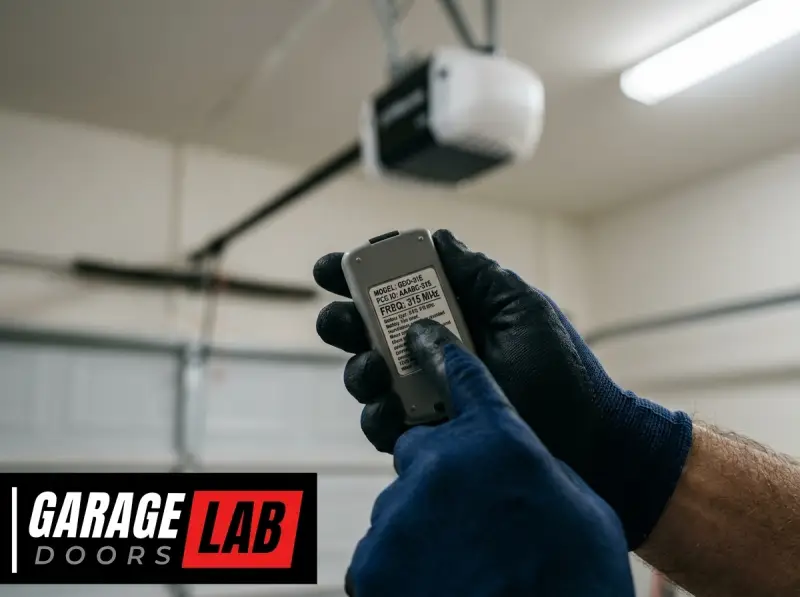
The hum of your garage door opener is a familiar sound, a signal that your vehicle is safely tucked away or that you’re about to embark on your next journey. But have you ever stopped to wonder about the invisible signals that make this automated convenience possible? Specifically, what is the frequency of your garage door opener, and why does it matter? Understanding this fundamental aspect of your opener’s operation is key to troubleshooting issues, ensuring security, and even when you’re looking to expand your smart home capabilities.
Garage door openers operate on specific radio frequencies, much like your car radio or Wi-Fi router. These frequencies are the invisible highways upon which signals travel from your remote control to the opener unit in your garage. Without the correct frequency, your remote would be as useless as a TV remote trying to change channels on a radio.
The frequency determines compatibility between your remote and your opener, and it plays a crucial role in the security of your system. In recent years, advancements in technology have led to a fascinating evolution in these frequencies and the way they are used, moving from simple, fixed signals to more complex, secure transmissions.
Key Takeaways
- Garage door openers operate on specific radio frequencies, typically ranging from 288 MHz to 433 MHz, with 315 MHz and 390 MHz being very common in North America.
- Frequency determines remote-opener compatibility. A remote must broadcast on the same frequency as the opener’s receiver.
- Older openers often used fixed codes, which transmitted on a single, unchanging frequency, making them more vulnerable to security breaches.
- Modern openers utilize rolling codes (or hopping codes), which change the frequency or the code transmitted with each use, significantly enhancing security.
- Identifying your opener’s frequency is crucial for purchasing compatible remotes, keypads, or troubleshooting signal issues.
- Interference from other devices operating on similar frequencies can disrupt garage door opener performance.
- Universal remotes are designed to work across various frequencies and code types, but compatibility checks are still essential.
Credit: overheaddoorpartsonline.com
Understanding Garage Door Opener Frequencies
At its core, a garage door opener is a radio transmitter and receiver system. The remote control you hold is the transmitter, and the motor unit attached to your garage ceiling is the receiver. When you press a button on your remote, it sends a radio signal on a specific frequency. The receiver in the garage door opener is tuned to listen for signals on that particular frequency. If it detects a signal on its designated frequency and recognizes the unique code being transmitted, it activates the motor to open or close the garage door.
The spectrum of radio frequencies used by garage door openers is quite varied, though certain ranges have become industry standards, particularly in North America. These frequencies are part of the radio frequency (RF) spectrum, a range of electromagnetic waves used for communication. The specific frequencies are chosen because they are suitable for short-range, low-power transmissions and are often allocated for unlicensed use by regulatory bodies like the FCC in the United States.
Common Frequency Bands
While a wide array of frequencies can technically be used, certain bands have emerged as dominant due to historical reasons, technological advancements, and regulatory allowances. Understanding these common bands is the first step in identifying what frequency your garage door opener might be using.
- 288-360 MHz: This range was historically used by some early garage door openers. While less common in modern systems, some older units might still operate within this band.
- 310 MHz: Another frequency that saw use in earlier models.
- 315 MHz: This is one of the most prevalent frequencies for garage door openers, particularly in North America. Many major manufacturers have utilized this band for their systems.
- 390 MHz: This frequency is also extremely common, often found in systems manufactured by companies like Chamberlain and LiftMaster. It’s frequently paired with the 315 MHz band by manufacturers who offer openers that can operate on either.
- 433 MHz: This frequency is more common in Europe and other international markets but can sometimes be found in North American systems as well.
The choice of frequency often depends on the manufacturer, the model of the opener, and the year of manufacture. For instance, a LiftMaster garage door opener manufactured in the early 2000s might operate on 390 MHz, while a newer model from the same brand could be on 315 MHz or use a rolling code system that dynamically selects frequencies.
The Role Of Frequency In Compatibility
The most critical implication of your garage door opener’s frequency is compatibility. A remote control is essentially a specialized radio transmitter. For it to communicate with your garage door opener, it must transmit on the exact same frequency as the opener’s receiver. If you purchase a remote that transmits on 315 MHz, but your opener’s receiver is tuned to 390 MHz, they simply won’t be able to “hear” each other, and the door will not operate.
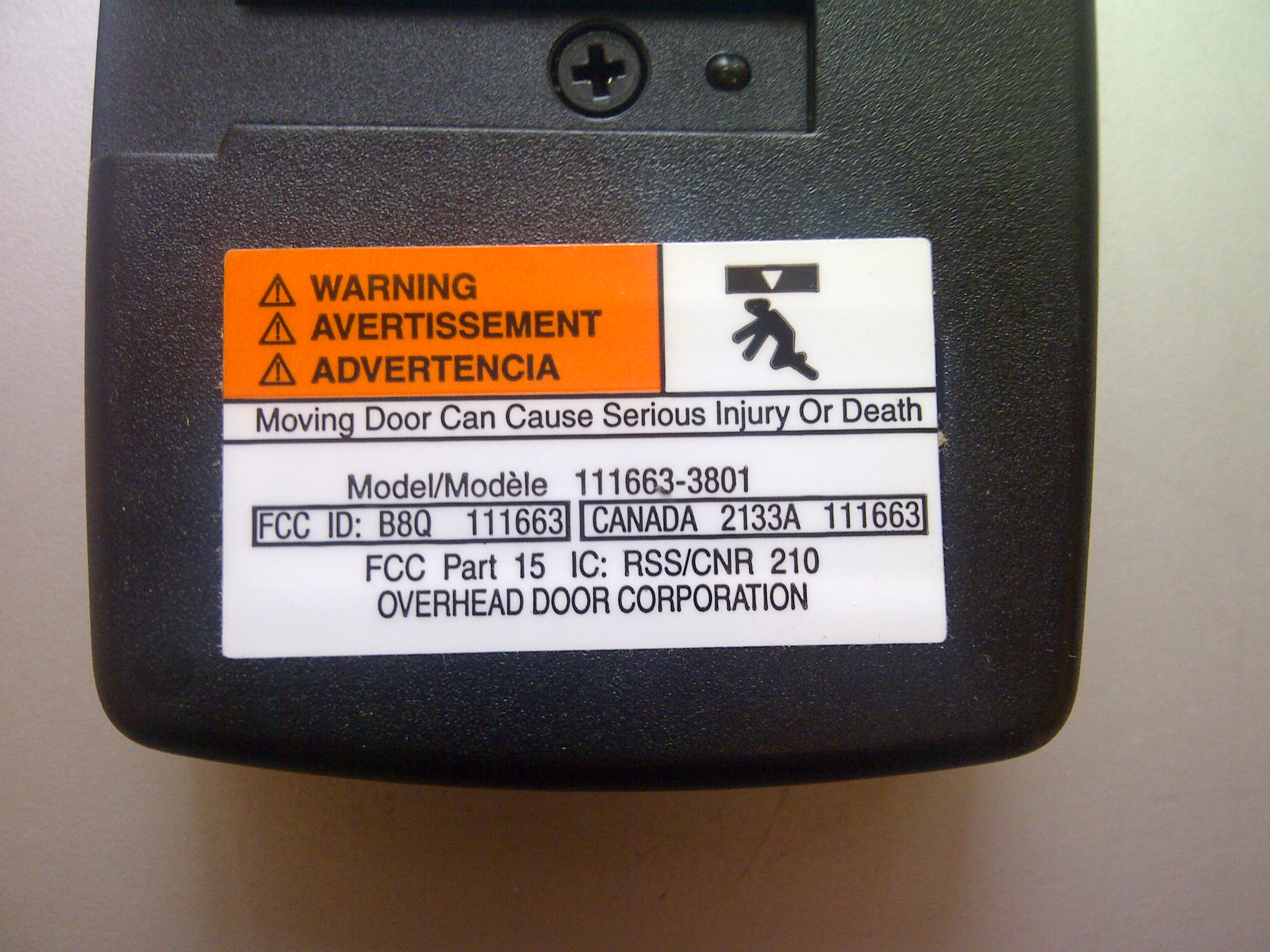
This is why when you lose a remote or need a spare, it’s paramount to know your opener’s frequency. Manufacturers often indicate the frequency on the opener unit itself, on the original remote, or in the owner’s manual. If this information is unavailable, there are methods to determine it, which we will discuss later.
How To Identify Your Garage Door Opener’s Frequency
Locating the frequency of your garage door opener is a detective task that often yields straightforward results. This information is usually printed on the device itself or within its accompanying documentation. However, if these sources are inaccessible or unclear, there are a few reliable methods to uncover this crucial detail.
Checking The Opener Unit
The most direct way to find your opener’s frequency is to inspect the motor unit itself. This is the main box typically mounted on the ceiling of your garage.
- Locate the Unit: Identify the main garage door opener motor unit.
- Look for Labels: Carefully examine all sides of the unit for stickers or imprinted markings. Manufacturers often place labels indicating model numbers, serial numbers, power requirements, and, importantly, the operating frequency. It might be listed as “Frequency: 315 MHz,” “390 MHz,” or similar.
- Check the Back and Sides: Pay close attention to the back panel, side panels, and sometimes even the underside of the unit.
Examining The Original Remote
Your original garage door remote is also a good source of information. Since it’s designed to work with your specific opener, it will operate on the same frequency.
- Find the Remote: Locate the remote that came with your garage door opener.
- Look for Markings: Check the back of the remote, inside the battery compartment, or on the circuit board (if you carefully open it) for any printed frequency information. It might be a small sticker or etched text.
Consulting The Owner’s Manual
If you still have the owner’s manual for your garage door opener, it will almost certainly contain the specifications, including the operating frequency.
- Find the Manual: Search for your garage door opener’s manual. If you don’t have the physical copy, you can often find a PDF version on the manufacturer’s website by searching for your opener’s model number.
- Review Specifications: Look for a section detailing technical specifications or features. The frequency will typically be listed there.
Using A Frequency Tester (advanced Method)
For those who cannot find the information through the above methods, specialized tools can help. A radio frequency (RF) detector or a garage door remote frequency tester can be used to identify the frequency being transmitted by your existing remote.
- Acquire a Tester: These devices can be purchased online or from electronics stores.
- Test the Remote: Follow the tester’s instructions. Typically, you’ll point the remote at the tester and press a button. The tester will then display the frequency of the signal being emitted.
This method is particularly useful when dealing with older or obscure models where information is scarce.
The Evolution Of Garage Door Opener Technology: Fixed Vs. Rolling Codes
The frequency of your garage door opener is only part of the story. Equally important is the type of code it uses to communicate. This has evolved significantly over the years, moving from simple, vulnerable systems to highly secure ones. Understanding this evolution helps explain why newer systems are more secure and why older systems might be susceptible to security risks.
Fixed Code Technology
Early garage door openers primarily used fixed code technology. In this system, the remote control and the opener’s receiver are programmed with a specific, unchanging code. When you press the button on your remote, it transmits this same code, on its designated frequency, every single time.
- How it Works: The remote sends a unique, but static, signal. The receiver is programmed to recognize this signal.
- Security Vulnerability: The major drawback of fixed code systems is their lack of security. If a hacker or someone with malicious intent observes your remote transmitting the code (a process called “code grabbing”), they can simply record that signal. With the recorded code, they can then transmit it themselves and gain unauthorized access to your garage. This is akin to leaving your house key under the doormat, it’s a predictable and easily exploitable vulnerability.
- Frequency and Fixed Codes: In fixed code systems, the frequency is constant, and the code transmitted on that frequency is also constant. For example, a 390 MHz fixed code opener would always send the same sequence of signals on 390 MHz.
Rolling Code Technology (hopping Codes)
To combat the security risks of fixed codes, manufacturers developed rolling code technology, also known as hopping codes. This system dramatically enhances security by changing the transmitted code with every use.
- How it Works: Instead of a static code, the remote and receiver share a complex algorithm. With each button press, the remote generates a new, random code from a vast, pre-determined sequence. The receiver, using the same algorithm and knowing the previous code, can predict and recognize the new code. This “rolling” or “hopping” of codes means that even if someone records your signal, it will be useless for the next time you use the opener, as the code will have changed.
- Enhanced Security: Rolling codes make code-grabbing virtually impossible. The attacker would need to predict the next code in the sequence, which is computationally infeasible with modern algorithms.
- Frequency and Rolling Codes: Rolling code systems can operate on a single frequency (like 315 MHz or 390 MHz), or some advanced systems may even switch between multiple frequencies within a designated band to further enhance signal reliability and security. Brands like LiftMaster and Chamberlain have heavily invested in rolling code technology, often branding it with names like Security+ or Security+ 2.0.
The Transition And Compatibility Challenges
The transition from fixed code to rolling code systems wasn’t instantaneous, leading to compatibility challenges. A rolling code remote will not work with a fixed code opener, and vice versa. Furthermore, even within rolling code systems, manufacturers often use proprietary algorithms, meaning a rolling code remote from one brand may not work with a rolling code opener from another, even if they operate on the same frequency.
When purchasing a new remote or keypad, it’s crucial to verify that it is compatible with your specific opener model and its code technology. Many universal remotes are designed to be programmed for both fixed and rolling code systems, but you’ll still need to ensure they support the correct frequency and the specific rolling code protocol of your opener.

Credit: garagedoorguide.com
Why Frequency Matters: Practical Implications
Understanding your garage door opener’s frequency is not just an academic exercise; it has several practical implications that can affect your daily life, your security, and your wallet. Getting this detail right ensures smooth operation and prevents unnecessary complications.
Purchasing Compatible Remotes And Keypads
This is perhaps the most direct and common reason to know your opener’s frequency.
- Replacement Remotes: If your original remote is lost, damaged, or malfunctioning, you’ll need a replacement. Buying a remote that transmits on the wrong frequency will simply not work. For example, if your opener is 390 MHz, you must purchase a 390 MHz remote.
- Accessory Keypads: Similarly, external keypads that allow you to open your garage door without a remote also transmit on a specific frequency. To ensure it communicates with your opener, the keypad’s frequency must match.
- Universal Remotes: While universal garage door remotes are designed to be programmed for multiple brands and models, they still require you to select the correct frequency and code type during the programming process. Incorrect frequency selection will render the universal remote useless.
Troubleshooting Signal Issues
Intermittent or failed remote operation can often be traced back to frequency-related problems.
- Signal Interference: Other electronic devices operating on or near the same frequency can cause interference, weakening or blocking the signal from your remote to your opener. Common culprits include wireless doorbells, baby monitors, certain types of lighting, and even neighboring garage door openers. If your remote is suddenly acting up, and you’ve recently installed new electronics, checking for frequency interference is a logical step. Sometimes, simply moving the interfering device or reprogramming your opener to a different code within its rolling code sequence can resolve the issue.
- Range Problems: While not solely determined by frequency, signal strength and range can be affected by the chosen frequency band and the quality of the transmitter and receiver. Some frequencies might offer better penetration through materials or longer effective ranges than others.
- Opener Malfunction: In rare cases, the receiver board within the opener unit might fail or become desensitized to its designated frequency, requiring repair or replacement.
Upgrading Your System
When you decide to upgrade your garage door opener system, knowing the current frequency can sometimes help in choosing compatible accessories or understanding the technology you’re moving away from. For instance, if you’re upgrading from an older fixed-code 390 MHz system to a newer Security+ 2.
0 system, you’ll need to ensure any new remotes or keypads are compatible with the new technology, which often operates on different frequencies or uses more advanced communication protocols.
Smart Home Integration
As garage doors become more integrated into smart home ecosystems, understanding the underlying frequency and communication protocols is increasingly important. Newer smart garage door openers often use Wi-Fi or Bluetooth to communicate with your smartphone app, but they still rely on the RF signal for the direct remote-to-opener communication.
Knowing the original frequency can be helpful when troubleshooting or when setting up bridge devices that might interact with the opener’s RF signal.
Common Issues And Solutions Related To Frequency
Even with the right frequency, you might encounter problems with your garage door opener’s remote control. These issues often stem from interference, programming glitches, or component failures, but understanding the role of frequency is key to diagnosing them.
Radio Frequency Interference (rfi)
RFI is a common nuisance that can affect garage door opener performance. Devices that emit radio waves on or near the same frequency as your opener can disrupt communication.
- Sources of Interference:
- Other garage door openers: In densely populated areas, multiple openers operating on the same frequency can cause conflicts.
- Wireless devices: Baby monitors, wireless security cameras, some cordless phones, and even certain LED lighting systems can emit RF noise.
- Electrical equipment: Motors, power inverters, and even poorly shielded electrical wiring can generate RFI.
- Troubleshooting RFI:
- Identify the culprit: Try to pinpoint when the problem occurs. Does it happen when a specific device is turned on?
- Relocate devices: Move potential interfering devices further away from the garage door opener and its antenna.
- Reprogram the opener: For rolling code systems, reprogramming your remote or the opener might clear temporary interference issues or allow the system to select a different code sequence less prone to interference. Check out guides on how to reset your garage door opener remote or how to reset your garage door opener entirely.
- Check the antenna: Ensure the antenna wire hanging from the opener unit is properly positioned and not damaged. Extending or repositioning it might improve reception.
- Upgrade to a newer system: If RFI is a persistent problem, upgrading to a garage door opener with a more advanced rolling code system (like Security+ 2.0) or one that operates on a less crowded frequency band might be necessary.
Incorrect Remote Programming
Even if the frequency is correct, a remote that isn’t properly programmed will not function.
- Common Programming Errors:
- Incorrect sequence: Not following the programming steps precisely.
- Wrong button pressed: Pressing the wrong button on the remote or the opener during programming.
- Compatibility mismatch: Trying to program a remote designed for a different frequency or code type.
- Solutions:
- Refer to the manual: Always consult your opener’s and remote’s manuals for specific programming instructions.
- Reset and retry: Perform a full reset of your opener or remote and then attempt to program it again, carefully following each step. Guides on how to reset Liftmaster garage door opener remote or how to reset Craftsman garage door remote can be very helpful.
- Seek professional help: If you continue to have trouble, a garage door technician can program the remote for you.
Battery Issues
A weak or dead battery in your remote is a simple but common reason for it not working.
- Symptoms: Remote operates intermittently, only works when very close to the opener, or doesn’t work at all.
- Solution: Replace the battery in your remote. Ensure you use the correct battery type specified by the remote manufacturer. For many remotes, this involves opening the casing and replacing coin-cell batteries (like CR2032) or small alkaline batteries.
Opener Unit Issues
Sometimes, the problem lies not with the remote but with the receiver in the opener unit.
- Symptoms: Multiple remotes fail to work, even after checking batteries and reprogramming. No response from the opener when remote buttons are pressed.
- Solutions:
- Check power: Ensure the opener unit is receiving power and the motor unit is functioning (e.g., try the wall-mounted button).
- Inspect the antenna: As mentioned earlier, ensure the antenna is intact and properly positioned.
- Internal component failure: The receiver board within the opener unit might have failed. This typically requires professional diagnosis and repair or replacement of the logic board.
Choosing The Right Remote Or Keypad: Frequency And Code Type
When you need to replace a remote or add a new keypad, making the correct choice is essential for seamless operation. The two most critical factors are the frequency and the code type (fixed vs. rolling code).
Step 1: Determine Your Opener’s Frequency
As detailed earlier, check the opener unit, the original remote, or the manual. Common frequencies are 315 MHz and 390 MHz in North America.
Step 2: Identify The Code Type
- Fixed Code: Older openers (typically pre-late 1990s/early 2000s) often use fixed codes. These are less secure.
- Rolling Code: Modern openers almost exclusively use rolling codes for enhanced security. Manufacturers have various brand names for their rolling code technology (e.g., LiftMaster’s Security+, Chamberlain’s Security+, Genie’s Intellicode, Overhead Door’s CodeDodger).
Step 3: Match Frequency And Code Type
You must purchase a remote or keypad that matches *both* your opener’s frequency and its code type.
- Example: If you have a LiftMaster Security+ opener operating on 390 MHz, you need a remote specifically designed for LiftMaster Security+ 390 MHz systems.
Using Universal Remotes
Universal remotes offer flexibility but require careful selection and programming.
- Features to Look For:
- Frequency Compatibility: Ensure the universal remote supports your opener’s frequency (e.g., 315 MHz, 390 MHz).
- Code Type Support: Verify it can be programmed for both fixed and rolling codes, and specifically for your opener’s rolling code protocol if applicable.
- Brand Compatibility List: Check the product’s compatibility list to ensure your specific garage door opener brand and model are supported.
- Programming: Universal remotes often have a multi-step programming process that involves setting the frequency, then the code type, and finally synchronizing with the opener. Follow the instructions meticulously. Some universal remotes may even require you to “learn” the code from an existing remote or directly from the opener unit.
Data Table: Common Garage Door Opener Frequencies And Brands
| Frequency | Common Brands/Models (North America) | Code Type Examples | Notes |
|---|---|---|---|
| 315 MHz | Chamberlain, LiftMaster, Craftsman (some models) | Security+, Security+ 2.0, Billion Code | Very common. Often paired with rolling codes. |
| 390 MHz | LiftMaster, Chamberlain, Craftsman (many models) | Security+, Security+ 2.0, Billion Code, CodeGrabber | Extremely common. Many openers can operate on either 315 MHz or 390 MHz. |
| 433 MHz | Overhead Door, Genie (some international models), Marantec | CodeDodger, Intellicode | More prevalent outside North America, but can be found