
Resetting a garage door opener can feel confusing if you’ve never done it before. Maybe your remote stopped working. Or you just moved into a new house and want to make sure only you can access the garage. Sometimes, a power outage or electrical surge causes the opener to lose its memory.
No matter the reason, knowing how to reset your garage door opener is a useful skill for any homeowner. This guide will walk you through the process in simple language, with practical tips and examples for different types of openers.
You’ll also learn how to handle common problems, when to call a professional, and how to avoid mistakes that many people make.
Why Would You Need To Reset Your Garage Door Opener?
A garage door opener is an electric device that opens and closes your garage door. Most openers use remote controls, keypads, or wall switches. Sometimes, they lose their programming or need to be reset. Here are some reasons you might need to reset yours:
- Lost or stolen remotes: If someone steals your remote, they can open your garage. Resetting the opener erases all old remotes, so only new ones work.
- New house: When moving into a new home, you want to make sure only your family can open the garage.
- Malfunctioning remotes: If your remote stops working, a reset often solves the problem.
- Adding or removing remotes: You may want to add a new remote or remove old ones.
- Security upgrades: Resetting can help after you upgrade your security system.
- Power surges/outages: Sometimes, the opener’s memory gets scrambled after a power event.
- Keypad issues: If the keypad stops working, a full reset may help.
People often overlook that resetting is more than just fixing a remote—it’s an important security step. Neglecting to reset after a lost remote can allow others easy access to your home.
Types Of Garage Door Openers
Understanding what kind of garage door opener you have is key to resetting it properly. There are three main types in most homes:
- Chain-drive openers: These use a metal chain to pull the door up and down. They’re strong and common.
- Belt-drive openers: They use a rubber belt instead of a chain. They’re quieter than chain-drive types.
- Screw-drive openers: These use a threaded steel rod. They need less maintenance but aren’t as common as the first two.
Most modern garage door openers use rolling code technology for security. Two popular brands in the US are LiftMaster and Chamberlain. Others include Genie, Craftsman, and Linear.
Below is a quick comparison of the main opener types:
| Type | Noise Level | Maintenance | Price Range | Common Brands |
|---|---|---|---|---|
| Chain-Drive | Loud | Medium | Low-Mid | Chamberlain, LiftMaster |
| Belt-Drive | Quiet | Low | Mid-High | Genie, Chamberlain |
| Screw-Drive | Medium | Low | Mid | Genie, Craftsman |
Not all openers reset in the same way. Always check your owner’s manual, but the steps below cover the most common systems.
Tools And Preparation
Before you start, it helps to gather what you’ll need:
- A sturdy ladder (if your opener is mounted on the ceiling)
- A flashlight (for dark garages)
- Your remote(s) and keypad
- The opener’s manual (if you have it)
- A pen and paper (to note any codes or settings)
Safety Tip: Unplug the opener before touching any wires. If you are unsure, ask a professional.
How To Reset The Most Common Garage Door Openers
There’s no single reset button for every opener. However, most modern units have a “Learn” or “Smart” button. The reset process usually involves pressing this button in a certain way. Below are steps for most brands.
Step 1: Locate The Learn Or Program Button
The Learn button is usually on the back or side of the garage door opener unit (the box on the ceiling). You may need to remove a small light cover. The button is often square and colored red, yellow, orange, or purple. Some units label it as “Learn,” “Smart,” or “Program.”
If you can’t find it, check the manual or look for a sticker with instructions.
Step 2: Press And Hold The Learn Button
To erase all remote controls and keypads from the opener’s memory:
- Press and hold the Learn button for about 6-10 seconds.
- The indicator light will turn off or blink, showing that memory is cleared.
- Release the button.
This step erases all remote codes. Now, no remote or keypad will open the door until you reprogram them. Many people forget this step—if you skip it, old remotes will still work.
Step 3: Program New Remotes And Keypads
To add new remotes:
- Press and release the Learn button (do not hold it this time).
- Within 30 seconds, press the button on your remote you want to program.
- The opener light will flash or you’ll hear a click. This means the remote is added.
For wireless keypads:
- Press the Learn button on the opener.
- Within 30 seconds, enter your chosen PIN on the keypad and press “Enter.”
- The opener light will blink, confirming programming.
Tip: If you have multiple remotes, repeat for each one. Don’t wait too long between steps, or the opener may exit programming mode.
Step 4: Test All Devices
Once programming is complete:
- Try each remote to make sure it opens and closes the garage door.
- Test the keypad with your new PIN.
- Try the wall switch.
If any device does not work, repeat the steps or check for dead batteries.
Step 5: Reconnect To Smart Home Systems (if Needed)
Many modern openers connect to smart home apps or Wi-Fi. If you have a MyQ, Aladdin Connect, or similar system, you may need to pair your opener again after resetting.
- Open the app.
- Follow the instructions to add a new device.
- Enter any necessary codes.
If you skip this, you may lose smart control of your garage.
Resetting Popular Brands: Step-by-step Examples
While most openers are similar, each brand has its own twist. Here’s how to reset the top brands in the US.
Liftmaster And Chamberlain
These two brands are owned by the same company, so their reset process is almost identical.
- Unplug the opener for 1 minute (optional, but helps with some models).
- Find the Learn button (usually yellow, purple, or red).
- Press and hold for 6 seconds until the light goes out.
- Program new remotes/keypads as described above.
Special Note: Some newer models have a yellow antenna wire; these only work with Security+ 2.0 remotes.
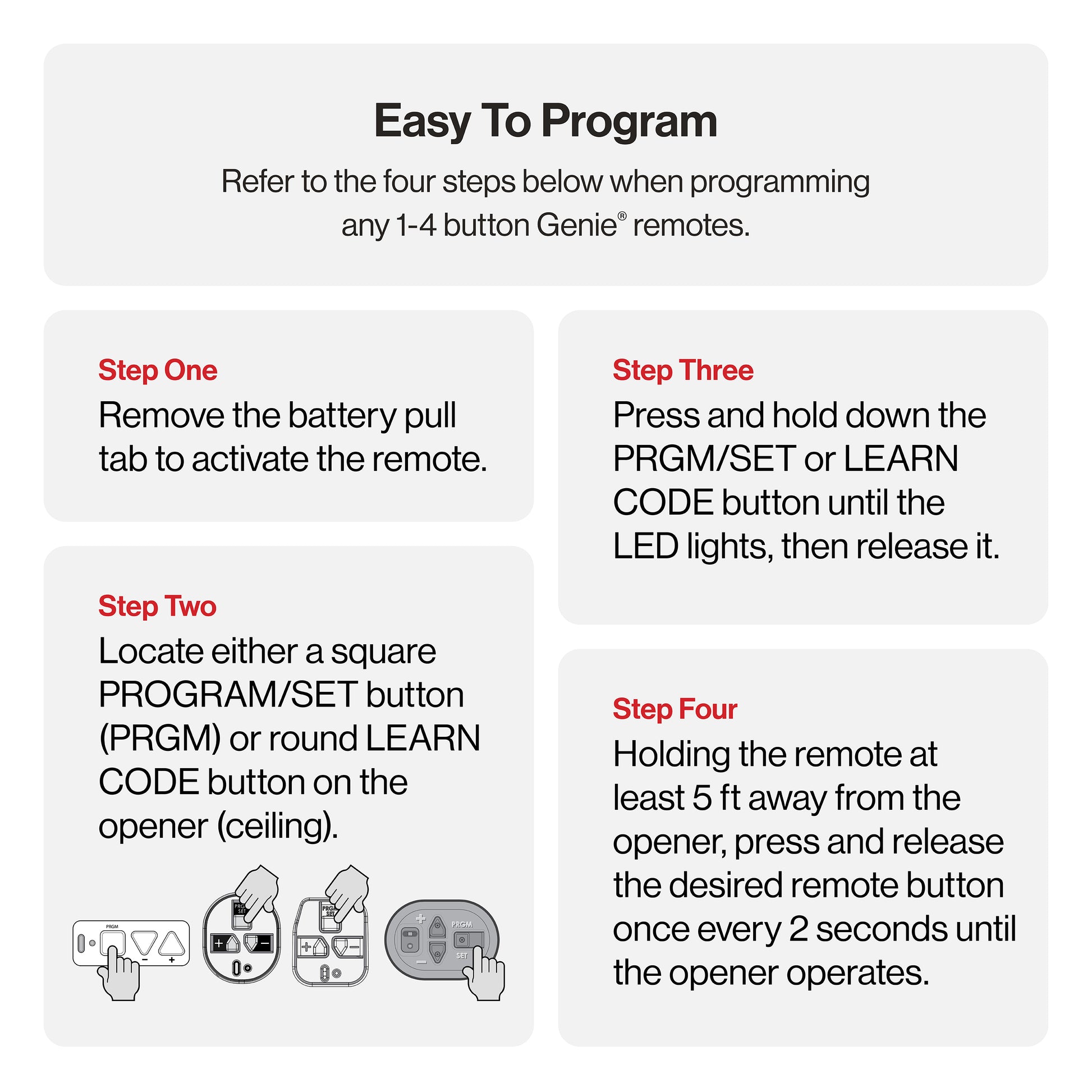
Genie
Genie openers use a similar system but may call it “Program” or “Learn Code. ”
- Press and hold the Learn Code button until the LED blinks.
- Release the button.
- Press the remote button 3 times (the LED blinks each time).
- The opener responds with a light flash or click.
Common Mistake: Pressing the remote too many times can confuse the opener. Stop after 3 presses.
Craftsman
Craftsman openers are often made by Chamberlain.
- Find the Learn button (behind the light cover).
- Hold for 6 seconds to erase memory.
- Add new remotes as above.
Tip: If your remote is very old (before 1993), it may use dip switches instead of a Learn button. For those, you must match the switch pattern on both the remote and the opener.
Linear
Linear openers use a “Learn” button, but the process is usually faster.
- Press and release the Learn button (do not hold).
- Within 15 seconds, press the button on your remote.
- The opener will click.
Insight: Some Linear openers forget all codes after a power outage. If your remotes stop working after a storm, try reprogramming before calling for repairs.
Resetting Keypad-only And Remote-only Systems
Some garages have only a keypad or only remotes. Here’s what to do:
- Keypad only: Reset by pressing the Learn button, then entering a new PIN on the keypad.
- Remote only: Erase memory by holding the Learn button, then add each remote one at a time.
If your keypad or remote is built into your car (like HomeLink), you’ll need to sync it again after resetting the opener.
What To Do If You Lost Your Garage Door Remote
Losing a remote is not just annoying—it’s a security risk. Here’s what to do:
- Erase all remotes: Hold the Learn button until the opener light goes out. This wipes memory.
- Buy a new remote: Get a compatible model. Check the color of your Learn button or opener manual.
- Program the new remote: Follow the steps above.
- Update keypad codes: If you use a keypad, reset its PIN.
Extra Tip: Never just program a new remote without erasing the lost one. Thieves sometimes scan for unused remotes in neighborhoods.
Resetting After A Power Outage
Sometimes, a power surge or outage can mess up your opener’s memory. Here’s what to do:
- Unplug the opener for 1-2 minutes.
- Plug it back in.
- Try your remotes and keypad.
- If they don’t work, reset and reprogram as above.
Important: If the door won’t move at all, check your home’s circuit breaker or GFCI outlets. Sometimes, the issue is not with the opener, but with your home’s power supply.
Understanding Rolling Code Technology
Modern garage door openers use rolling code security. Every time you press your remote, it sends a new code. This stops thieves from copying your code with a scanner. Resetting erases all old codes, making sure only your remotes work.
Older openers (before 1993) often use fixed codes or dip switches, which are less secure. If you have one of these, consider upgrading for better safety.
Here’s a quick comparison of security features:
| Opener Type | Security Level | Reset Needed? | Upgrade Recommended? |
|---|---|---|---|
| Rolling Code (1993+) | High | Yes, for lost remotes | No |
| Fixed Code/Dip Switch | Low | Yes, but less effective | Yes |
Non-Obvious Insight: Even some modern-looking openers use old technology. Check your manual or the manufacturing date.
Common Mistakes When Resetting Garage Door Openers
Many people run into the same problems. Here’s what to watch for:
- Not holding the Learn button long enough: If you release too early, memory isn’t fully erased.
- Skipping the test step: Always check each remote and keypad after resetting.
- Programming too slowly: Most openers leave programming mode after 30 seconds.
- Forgetting to reset smart home connections: After a reset, you may need to pair your opener with Wi-Fi or apps again.
- Buying the wrong remote: Check compatibility before buying a replacement.
- Ignoring old remotes: Always erase old codes after moving or losing a remote.
A common question: “Why does my remote work, but the keypad doesn’t?” Often, people forget to reprogram the keypad after resetting.
When To Call A Professional
Most resets are simple. But sometimes, you should get expert help:
- The opener doesn’t respond after resetting.
- The door is stuck or off its tracks.
- You see exposed wires or broken parts.
- You hear grinding or loud noises.
- Your opener is more than 20 years old.
A professional can quickly spot electrical or mechanical problems. Attempting complex repairs yourself can be dangerous.
Practical Tips For A Smoother Reset
- Label your remotes: Write the date you programmed them on the back.
- Keep your manual handy: Many are available online if you lose yours.
- Check batteries: Weak batteries cause many “reset” issues.
- Watch for power surges: Use a surge protector on your opener.
- Secure your garage: After resetting, make sure all entry points are locked.
Non-Obvious Insight: Some openers have backup batteries. If you unplug the opener, but it still works, check for a battery compartment.

Troubleshooting: If Reset Doesn’t Work
If you’ve followed all the steps but your opener still isn’t working:
- Check the power: Make sure the opener is plugged in and your circuit breaker is on.
- Inspect sensors: Look for blinking lights near the bottom of the door tracks. If sensors are blocked or dirty, the door won’t close.
- Listen for clicks: If you hear a click but the door doesn’t move, the motor may be faulty.
- Try a manual reset: Unplug the opener, wait 5 minutes, and plug it back in.
- Check for lock mode: Some wall switches have a “lock” button. If pressed, remotes won’t work.
- Call support: Find your opener’s model number and call the manufacturer’s helpline.
One helpful resource for troubleshooting is the Family Handyman website.
Keeping Your Garage Door Opener Secure
Resetting your garage door opener is only part of keeping your home safe. Here’s what else you can do:
- Change codes regularly: If you use a keypad, update your PIN every few months.
- Don’t share remotes: Keep spares in a safe place.
- Use rolling code remotes: They’re harder to hack.
- Cover windows: Don’t let people see inside your garage.
- Lock the door to your house: Treat the garage like any other entrance.
- Install a deadbolt: For extra security, add a lock to the garage door itself.
Upgrading To A Smart Garage Door Opener
If you’re resetting often, it may be time to upgrade to a smart opener. These connect to your phone and can send alerts if your garage is opened unexpectedly.
Benefits:
- Remote monitoring: See if your door is open or closed from anywhere.
- Easy resets: Most smart openers let you manage remotes and PINs from an app.
- Better security: Rolling codes and encryption are standard.
Before buying, check compatibility with your current door and Wi-Fi network.
Frequently Asked Questions
How Do I Know If My Garage Door Opener Needs To Be Reset?
If your remotes or keypad suddenly stop working, or you’ve lost a remote, a reset is often needed. Also, if you move into a new home, always reset the opener for security.
Can I Reset My Garage Door Opener Without The Remote?
Yes. You only need access to the opener’s Learn button, usually on the unit near the ceiling. From there, you can erase all remotes and program new ones, even if you don’t have the old remote.
What If My Opener Doesn’t Have A Learn Button?
Older models may use dip switches. You’ll see a row of small switches inside the remote and on the opener. Make sure they match. For these, resetting means changing the switch pattern on both devices.
How Often Should I Reset My Garage Door Opener?
Reset whenever you lose a remote, move into a new house, or experience a security concern. For extra safety, some experts suggest updating codes and remotes every couple of years.
Why Won’t My Garage Door Opener Reset?
Possible causes include power supply issues, faulty remotes, blocked safety sensors, or a broken Learn button. Double-check each step, make sure the opener is plugged in, and replace remote batteries. If problems continue, contact a professional.
Resetting your garage door opener is a simple but powerful way to improve your home’s security and convenience. By understanding your opener type, following clear steps, and avoiding common mistakes, you can quickly regain control—no matter the brand. Remember, when in doubt, check the manual or ask for help.
A secure garage gives you peace of mind every day.
23 thoughts on “How Do I Reset My Garage Door Opener: Step-by-Step Guide”