
A garage door opener is something most people hardly think about—until it stops working. Genie garage door openers are known for reliability, but even the best devices can have problems. When your Genie opener fails, it can be frustrating and inconvenient.
You might be late for work, stuck outside in the rain, or worried about security. Learning how to troubleshoot Genie garage door openers can save you time, money, and a lot of stress.
This guide is designed for anyone who owns a Genie garage door opener and wants to understand common problems and solutions. Whether your opener is brand new or several years old, you’ll find clear, step-by-step advice here. We’ll cover error codes, remote issues, safety sensors, noises, and more.
You don’t need to be an expert—just a little patience and this guide can help bring your garage door back to life.
Common Genie Garage Door Opener Problems
Understanding the most frequent issues is the first step to fixing your opener. Genie openers may face electrical, mechanical, or wireless problems. Here are the main ones:
1. Garage Door Doesn’t Open Or Close
Sometimes you press the remote or wall button, and nothing happens. This can be caused by:
- Power issues (outlet, breaker, or wiring)
- Remote control problems (dead battery, signal interference)
- Safety sensor misalignment
- Broken springs or mechanical jams
2. Opener Runs But Door Doesn’t Move
You may hear the motor running, but the door stays still. This often means:
- Trolley disengaged (manual release pulled)
- Broken chain or belt
- Limit switch issues
3. Door Reverses Before Closing
If your Genie opener starts to close the door but then reverses, the usual causes are:
- Obstructed or dirty safety sensors
- Travel limit needs adjustment
- Track obstructions
4. Remote Control Not Working
If the wall switch works but the remote does not:
- Dead battery
- Remote needs reprogramming
- Signal interference
5. Opener Lights Flashing
Flashing lights often mean a safety or error code. Genie openers use these to indicate problems, such as:
- Sensor misalignment
- Circuit board errors
Quick Safety Reminders
Before you start troubleshooting, keep these safety tips in mind:
- Disconnect power when working on wiring or mechanical parts.
- Never try to repair door springs or cables unless you are trained—these are under high tension and can cause injury.
- Keep fingers, tools, and clothing away from moving parts.
Most fixes are safe for beginners, but call a professional for anything involving springs or heavy repairs.
Genie Garage Door Opener Error Codes
Genie openers use flashing lights or LED panels to show error codes. Understanding these codes helps you find the exact problem.
Common Genie Error Codes
Here’s a table with frequent error codes, what they mean, and possible fixes:
| Error Code | Meaning | How to Fix |
|---|---|---|
| 1 Blink | Safety sensor blocked | Check and clean sensors |
| 2 Blinks | Sensor wire shorted | Check wiring for damage |
| 3 Blinks | Travel limits not set | Reset open/close limits |
| 4 Blinks | Door obstructed | Remove obstacles in path |
| 5+ Blinks | Main board error | Call for service |
Non-obvious insight: Some Genie models use a small LED light on the opener unit for codes. Others flash the opener’s main light bulb. Always check your user manual for your model’s code system.
If you see a code, note how many times it flashes and if the pattern repeats. This is the “language” your opener uses to ask for help.
Troubleshooting Genie Garage Door Opener Remotes
Remote problems are extremely common. Sometimes the remote stops working, works only close to the door, or works only for opening but not closing.
Step 1: Check The Remote Battery
- Remove the battery cover.
- Replace with a new battery of the correct type (often CR2032 or A23).
- Test the remote.
Even a weak battery can limit signal range.
Step 2: Reprogram The Remote
If a new battery doesn’t help, reprogram the remote:
- Press and hold the “Learn” or “Program” button on the opener until the LED blinks.
- Within 30 seconds, press the button on your remote you want to use.
- The opener light should flash, confirming the code is stored.
Non-obvious insight: If you have several remotes, reprogram them all in one session. Some Genie units “forget” old remotes if you program a new one later.
Step 3: Check For Interference
LED lights, Wi-Fi routers, and other electronics can interfere with remote signals. Try these tips:
- Move Wi-Fi routers away from the opener.
- Replace LED bulbs in the opener with standard bulbs.
- Test the remote away from other electronics.
If your remote works from a foot away but not farther, interference is likely the cause.
Fixing Genie Garage Door Opener Wall Console Issues
The wall console (the inside button on your garage wall) is a simple device, but it can fail.
Wall Console Doesn’t Work
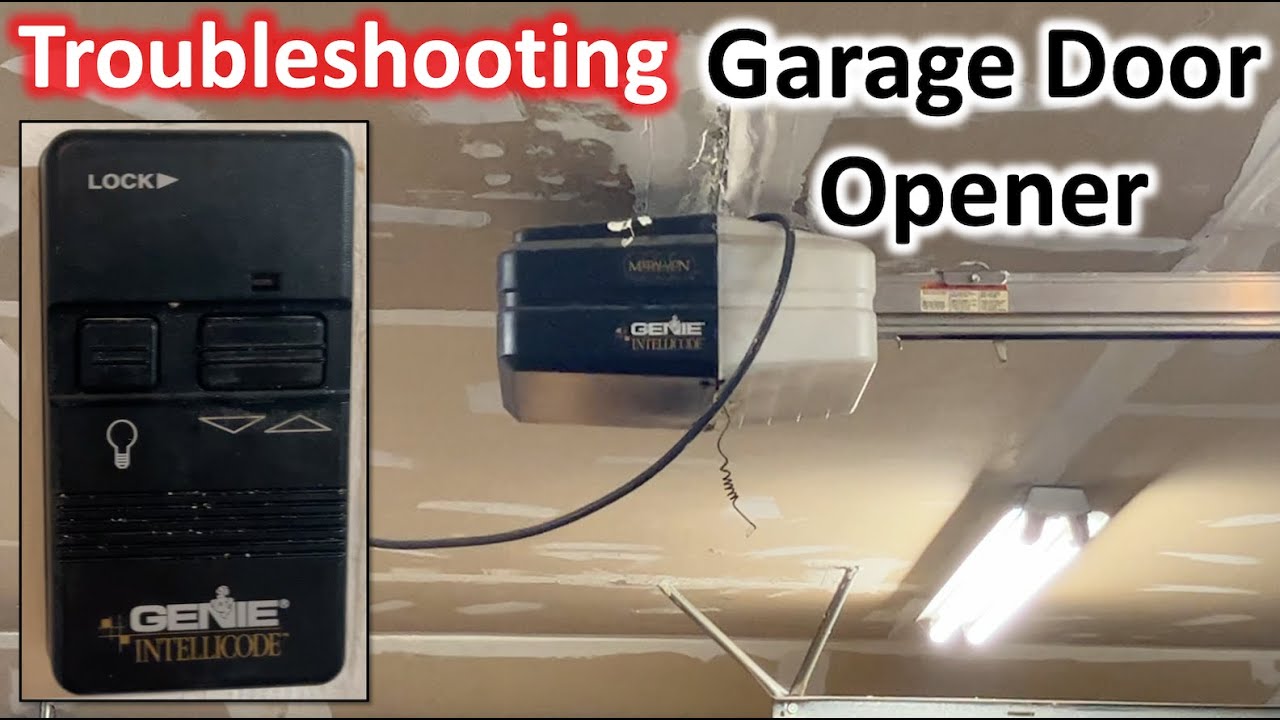
- Check the lock button (many Genie consoles have a lock feature to disable remotes).
- Inspect the wire connections at the opener and at the wall.
- Make sure the wires are not loose or corroded.
Wall Console Buttons Stuck
Dust or dirt can cause sticky buttons. Clean around the buttons with a dry cloth. Avoid using water, as moisture can damage electronics.
Wall Console Blinking Lights
A blinking light may indicate:
- Wiring problem
- Short circuit
- Main opener error
If cleaning and checking wires doesn’t help, the console may need replacing.
Genie Safety Sensors: Alignment And Cleaning
Genie openers have infrared safety sensors near the bottom of the door tracks. If these sensors are blocked or misaligned, the door won’t close.
How To Check And Fix Sensor Alignment
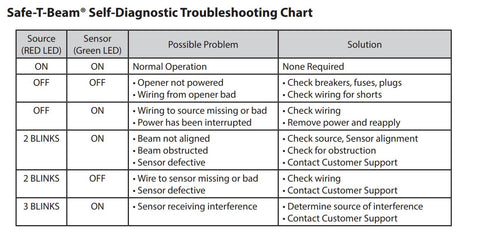
- Each sensor should have a small LED light. Both should be on (usually green).
- If one is off or blinking, gently adjust the sensor until both lights are solid.
- Remove any dirt or spider webs from the sensor lens.
- Make sure nothing (broom, tool, trash can) is blocking the sensor beam.
Pro tip: Even sunlight can confuse sensors. If your door closes only at night, try shading the sensors with a small piece of cardboard.
Mechanical Problems: Chains, Belts, And Trolleys
If your Genie opener sounds normal but the door doesn’t move, the problem may be mechanical.
Chain/belt Drive Problems
- Look for broken or loose chains/belts.
- Tighten the tension using the adjustment bolt on the opener.
- Never lubricate the belt—only the chain (if recommended by your manual).
Trolley Disengaged
The trolley is the part that connects the door to the opener. If you pulled the emergency release rope, the trolley may be disengaged.
- To reconnect, move the door manually until the trolley snaps back into place.
- Some Genie models require you to press the remote to re-engage.
Worn Gears Or Sprockets
If you hear grinding noises, the gears or sprockets inside the opener may be worn out. These parts can be replaced, but if you’re not comfortable opening the motor housing, call a professional.
Adjusting Travel Limits And Force Settings
Travel limits tell your Genie opener how far to move the door. Force settings control how hard the opener pushes or pulls.
Symptoms Of Incorrect Travel Limits
- Door won’t fully open or close
- Door reverses before hitting the floor or ceiling
How To Adjust Travel Limits
- Locate the limit adjustment screws (usually labeled “up” and “down”).
- Turn the screw in small increments, testing the door each time.
- Stop when the door opens and closes fully without reversing.
Common mistake: Adjusting travel too far can cause the door to hit the floor or ceiling, damaging the opener or the door. Always adjust slowly.
Adjusting Force Settings
- If the door is heavy or moves slowly, increase the force slightly.
- Too much force can be dangerous—never set to maximum unless needed.
Genie Opener Makes Strange Noises
All openers make some noise, but grinding, squeaking, or banging sounds mean trouble.
Squeaking Or Squealing
- Lubricate the hinges, rollers, and chain with garage door lubricant.
- Do not use WD-40—it evaporates too fast.
Grinding Or Banging
- Check for loose bolts on the opener or door.
- Inspect the opener’s internal gears.
- If gears are worn, they may need replacement.
Clicking
- Often caused by a relay or sensor problem.
- Check safety sensors and wiring.
Unusual sounds usually mean a part is wearing out—fixing it early can prevent bigger breakdowns.
Genie Garage Door Opener Won’t Respond To Wi-fi Or Smartphone App
Many newer Genie openers have Wi-Fi or smart home connectivity. If the app won’t control your door:
Check Wi-fi Signal
- Make sure your garage has a strong Wi-Fi signal.
- Move the router closer if possible.
Reconnect To The App
- Open the Genie app and follow the steps to re-add your opener.
- Make sure your phone and opener are on the same Wi-Fi network.
Update Firmware
Some openers need a firmware update to work with new phones or smart home systems. Check Genie’s website for updates.
Non-obvious insight: Power outages or router changes can disconnect your opener from Wi-Fi. Reboot both devices and reconnect.
Garage Door Opener Works Intermittently
If your Genie opener works only sometimes, the problem can be tricky to find.
Possible Causes
- Loose wiring
- Intermittent power supply
- Remote interference
- Failing circuit board
What To Do
- Wiggle the wires at the opener and the wall console to check for loose connections.
- Try another remote or the wall button to see if only one method fails.
- Plug the opener into a different outlet or use a surge protector.
Intermittent problems often signal a failing part—if the issue continues, call a technician.
Power Outages And Genie Openers
Garage door openers need power to run. Here’s what to do during an outage:
Manual Release
- Pull the red emergency release handle to disconnect the opener.
- Lift the door by hand (be careful—it may be heavy).
After Power Returns
- Reconnect the opener by running the remote or moving the door until it clicks back into place.
Some Genie models have backup batteries. If yours does, check the battery status light and replace the battery every few years.
Genie Garage Door Opener Not Closing All The Way
Sometimes the door stops a few inches above the ground, or reverses before closing.
Causes
- Safety sensors blocked or misaligned
- Obstruction in the track
- Travel limits set incorrectly
Fixes
- Realign and clean sensors
- Check for rocks, ice, or other objects in the door path
- Adjust the down travel limit
Practical tip: Cold weather can warp tracks or make the door sticky. Lubricate tracks and check for ice in winter.
Genie Garage Door Opener Not Opening Fully
If the door stops partway up, look for:
- Up travel limit set too low
- Broken springs (door too heavy for opener)
- Worn rollers or hinges
Test the door by hand—if it’s hard to lift, the springs may be weak. Don’t try to fix springs yourself—call a pro.

Genie Garage Door Opener Won’t Close With Remote But Works With Wall Button
This is almost always a safety sensor issue. The wall button uses a wired signal, but the remote requires the sensors to be clear.
- Check and clean sensors
- Make sure sensor lights are on
- Remove any objects near the bottom of the door
If the problem continues, inspect the wiring from the sensors to the opener.
Genie Garage Door Opener Lights Won’t Turn Off
If the opener light stays on:
- Check for a “light” button stuck on the wall console
- Some models have a timer—adjust the light timer to turn off sooner
- If the light never turns off, the relay on the opener board may be stuck (requires service)
Genie Garage Door Opener Won’t Learn New Remotes
If you can’t program new remotes:
- Make sure you’re pressing the correct “Learn” button
- Clear the memory by holding the “Learn” button for 10 seconds, then reprogram all remotes
- Try new batteries in the remote
- If none work, the radio board may be faulty
Expert tip: Some Genie openers can only remember a set number of remotes (usually 7-10). If you reach the limit, clear the memory and add only the remotes you want.
Genie Garage Door Opener Model Comparison
Choosing the right troubleshooting steps depends on your model. Here’s a comparison of key Genie opener types:
| Model | Drive Type | Common Problems | Best Use |
|---|---|---|---|
| Genie ChainMax | Chain | Chain stretch, noise | Heavy doors, durability |
| Genie SilentMax | Belt | Belt wear, sensor issues | Quiet operation, attached garages |
| Genie StealthDrive | Belt with backup | Battery replacement, Wi-Fi setup | Power outage backup, smart homes |
| Genie Screw Drive | Screw | Lubrication, speed control | Extreme climates, tall doors |
Knowing your model helps you find the right parts and instructions.
Genie Garage Door Opener Maintenance Tips
Troubleshooting is easier if your opener is well maintained. Here’s how to keep it running smoothly:
- Lubricate rollers, hinges, and chain (not belt) twice a year.
- Clean safety sensors with a soft cloth monthly.
- Test the door balance—disconnect the opener and lift the door. It should stay halfway up.
- Tighten all bolts and screws annually.
- Replace remote batteries every 1-2 years.
Overlooked detail: Dust buildup inside the opener can cause overheating. Use compressed air to gently clean the motor housing once a year.
When To Call A Professional
Some problems are best left to experts:
- Broken springs or cables
- Grinding noises inside the opener
- Repeated error codes after troubleshooting
- Door off its track
Genie has a network of trained technicians. For help, visit the official Genie Company website at The Genie Company.
Genie Garage Door Opener Troubleshooting Checklist
Here’s a quick checklist to guide you:
- Check power and outlet.
- Inspect remote batteries and reprogram if needed.
- Clean and align safety sensors.
- Adjust travel and force limits.
- Lubricate moving parts.
- Test wall console and wiring.
- Look for error codes and consult your manual.
- Try operating the door by hand to check for balance.
- Reset Wi-Fi if you use a smart opener.
- Call a pro for serious mechanical issues.
Frequently Asked Questions
Why Does My Genie Garage Door Opener Beep Or Chirp?
A beeping sound often means the backup battery is low or charging. Some models beep when entering programming mode or if there’s a safety warning. Check your manual for your model’s signals.
How Can I Reset My Genie Garage Door Opener?
To reset most Genie openers, unplug the unit for 30 seconds, then plug it back in. For a full factory reset, hold the “Learn” button for 10 seconds until the LED goes out. You’ll need to reprogram remotes after a full reset.
My Genie Opener Remote Works Only Close To The Door. Why?
This is usually caused by weak batteries, Wi-Fi or LED bulb interference, or a damaged antenna wire. Replace the battery, switch out LED bulbs, and check the opener’s antenna position.
Can I Use Led Bulbs In My Genie Opener?
Yes, but some LED bulbs cause remote interference. Genie recommends using their approved LED bulbs or regular incandescent bulbs to avoid signal problems.
Where Can I Find A Manual Or Replacement Parts For My Genie Opener?
You can download manuals and order genuine parts from the official Genie Company website or at The Genie Company.
Dealing with a broken garage door opener can be stressful, but most Genie problems have simple solutions you can try yourself. With a little patience and this guide, you can solve most issues and keep your garage door running smoothly for years.
If you ever feel unsure, don’t risk your safety—professional help is always available.