
If your garage door opener isn’t responding, or you’re setting up a new remote, knowing how to reprogram a Linear garage door opener is a valuable skill. Many people think this task is complicated, but with the right guidance, you can do it yourself in less than an hour—often much less.
Reprogramming your Linear opener can help you add new remotes, reset the system after a security concern, or fix persistent problems like doors not closing. In this guide, you’ll learn how to reprogram a Linear garage door opener step by step, and discover tips, common mistakes, and expert advice to avoid frustration.
Understanding how your garage door opener works is the first step. A Linear garage door opener is an electronic device that uses radio signals to open and close your garage door. Each remote and keypad sends a unique code to the opener, which recognizes and acts on the signal.
If you lose a remote or worry someone else has access, reprogramming changes the codes so only your devices can operate the door.
This article will cover everything you need to know: the reasons to reprogram, the tools and preparation needed, a detailed walk-through for different programming scenarios, troubleshooting, and advanced tips. You’ll also find useful tables comparing Linear models and remote types, plus a practical FAQ for quick answers. Whether you’re a homeowner or a property manager, you’ll leave with the confidence to handle your garage door system safely and efficiently.
Why Reprogram Your Linear Garage Door Opener?
Reprogramming isn’t just about adding a new remote. There are several important situations when you should consider it:
- Lost or stolen remotes: If a remote is missing, someone else might use it to access your garage. Reprogramming ensures only your current remotes work.
- New home or tenants: When moving into a new house, always reset the codes so previous owners or renters can’t enter.
- Adding or replacing remotes/keypads: Any time you buy a new remote or keypad, you must program it to your opener.
- Security upgrades: Regularly updating your codes can help prevent break-ins, especially if you live in a high-traffic area.
- Malfunctioning system: If remotes stop working or the door opens randomly, a reset and reprogram can solve many issues.
- Interference: If your opener responds to a neighbor’s remote, reprogramming will assign a unique code.
Non-obvious insight: Many people do not realize that garage door openers can be hacked with “code grabber” devices. Reprogramming after a security concern is a smart step, not just for lost remotes.
Types Of Linear Garage Door Openers
Linear offers several types of garage door openers. While the programming process is similar, slight differences exist between models.
| Model Name | Drive Type | Common Features | Year Introduced |
|---|---|---|---|
| Linear LD033 | Chain Drive | Single light, basic security | 2011 |
| Linear LDO50 | Belt/Chain Drive | Dual lights, Smart control | 2015 |
| Linear LCO75 | Chain Drive | Heavy-duty, battery backup | 2017 |
| Linear DTC | Belt Drive | Commercial, high cycle | 2019 |
The most common home models are LD033 and LDO50. Always check your unit’s label to find the exact model before starting.
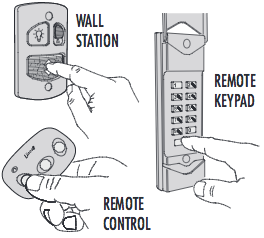
Tools And Preparation
Before you start, gather everything you need. Preparation makes the process smoother and avoids interruptions.
- Ladder: Most Linear openers are mounted on the garage ceiling.
- New batteries: Replace remote batteries for reliable programming.
- Flashlight: Sometimes the opener’s light isn’t enough.
- Your remotes/keypads: Old and new devices you want to program.
- Small screwdriver: For battery compartments or keypads.
- Pen and paper: Note down new codes, especially for keypads.
Important tip: Check the power to your garage door opener. If the opener is unplugged or the circuit is off, programming will fail.
Safety Precautions
Garage doors are heavy and can be dangerous if misused. Here’s how to keep safe:
- Disconnect power only if instructed. For most programming, the unit should be powered ON.
- Keep fingers, tools, and clothing away from the door’s moving parts.
- Make sure no people or pets are in the door’s path during testing.
- Use a sturdy ladder and never stand on the top rung.
Non-obvious insight: Many garage door accidents happen during testing, not programming. Always watch the door as you press remote buttons.
How Linear Garage Door Opener Programming Works
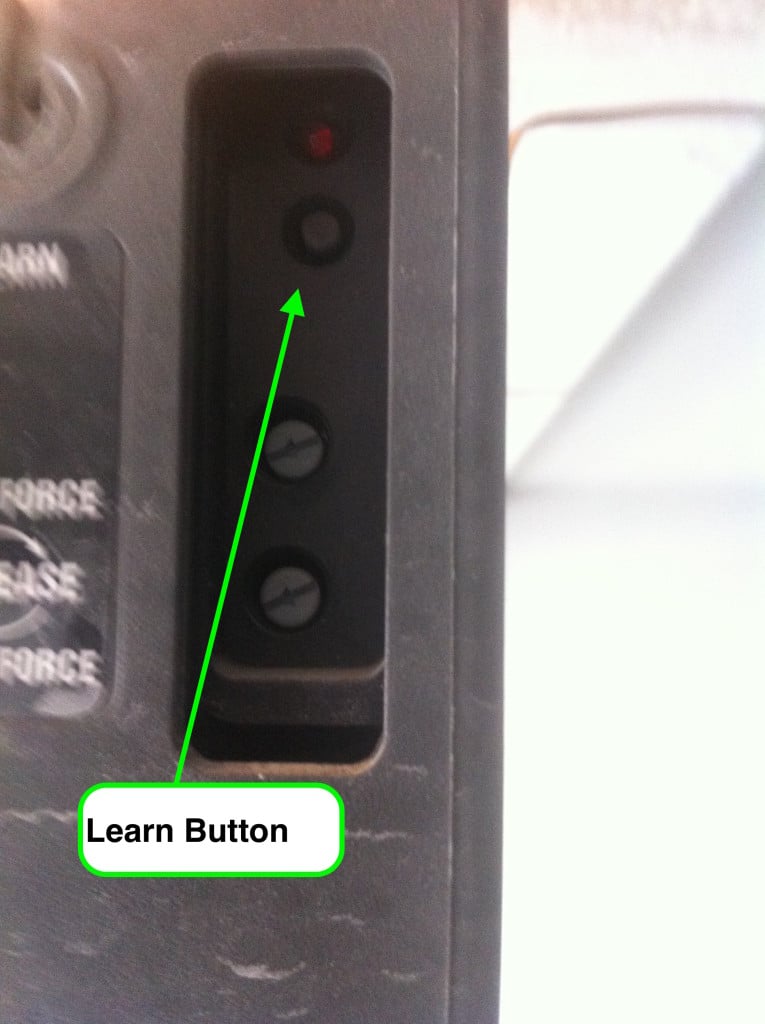
Linear openers use a “Learn Button” system. This button, usually located on the motor unit, puts the opener into programming mode. When you press the button on your remote within a set time, the opener “learns” its code.
Linear systems use rolling code technology. This means every time you use the remote, the code changes, making it harder for thieves to copy.
Fun fact: Rolling code systems can generate over a billion unique codes.
Step-by-step: Reprogramming A Linear Garage Door Opener Remote
Follow these steps to reprogram your Linear garage door opener for a new or replacement remote:
- Locate the Learn Button
- On most Linear models, this button is on the back or side of the opener. It might be labeled LEARN, PROG, or shown as a small round button near a light or wire terminal.
- If you can’t find it, check the opener’s manual or look for a colored button (often purple, red, or green).
- Prepare Your Remote
- Install fresh batteries in the remote to avoid weak signals during programming.
- Hold the remote within reach—usually within 3-5 feet of the opener.
- Press the Learn Button
- Press and release the Learn Button. A small LED light should turn on or blink, indicating the opener is in programming mode.
- You usually have 30 seconds to complete the next steps.
- Press the Remote Button
- Within 30 seconds, press and hold the button on your remote you want to program.
- Hold for 1-2 seconds, then release. The opener’s light will blink, or you may hear a click. This means the code was learned.
- Test the Remote
- Press the programmed button on your remote to see if the door operates. If it does, you’ve succeeded.
- If not, repeat steps 3 and 4.
- Repeat for Additional Remotes
- Each remote must be programmed separately. Up to 8 remotes can be stored on most Linear openers.
Troubleshooting Common Problems
- If the remote doesn’t work, check the battery and repeat the process.
- If the opener light never blinks, you may be out of programming time—start again from step 3.
- If remotes still don’t work, clear all codes (see below) and reprogram from scratch.
Erasing All Codes (factory Reset)
Sometimes, you want to remove all remotes and start fresh. This is critical if you’ve lost a remote or moved into a new home.
- Hold the Learn Button
- Press and hold the Learn Button for 8-10 seconds.
- The LED light will turn off, then back on or blink rapidly.
- All Codes Cleared
- All remotes and keypads are now erased. The opener will not respond to any remote until you program them again.
- Reprogram Each Remote
- Follow the earlier steps to add back your remotes and keypads.
Practical example: If you just bought a house, do this process before using any remotes left by the previous owner.
Programming A Keypad With A Linear Garage Door Opener
Keypads allow you to open your garage with a 4-digit code. Here’s how to program most Linear keypads:
- Find the Learn Button
- As with remotes, locate the Learn Button on the opener.
- Start Programming Mode
- Press and release the Learn Button. The LED will light up.
- Enter Your PIN
- On the keypad, enter your desired 4-digit PIN. Press the START/ENTER or # key (depending on model).
- The opener light should blink or click, confirming the code is learned.
- Test the Keypad
- Enter your code and press START/ENTER. The garage door should move.
- Repeat or Reset
- For multiple doors, follow the manual’s instructions for multi-door programming.
Extra tip: Don’t use obvious PINs like “1234” or your address. Choose a unique code for better security.
Adding A New Remote Or Keypad (without Erasing Old Devices)
You can add a new remote or keypad without deleting existing ones. Simply repeat the Learn Button process for each device. Most openers allow up to 8-10 devices.
Warning: If you reach the device limit, adding a new one may remove the oldest programmed device. Keep track of your remotes if you have many users.
How To Program A Linear Remote With Dip Switches
Some older Linear remotes use DIP switches rather than rolling codes. These small switches (usually 8-12) set the code manually.
- Open the Remote
- Use a screwdriver to remove the battery cover and reveal the DIP switches.
- Find the Receiver
- Locate the receiver unit on the opener. It will have a similar set of DIP switches.
- Match the Switches
- Set the switches in your remote to exactly match those on the receiver.
- Test the Remote
- Press the button. If the door opens, you’re done.
Note: DIP switch systems are less secure than rolling codes. If possible, upgrade to a modern remote.
Comparison: Rolling Code Vs Dip Switch Remotes
Understanding the difference helps you choose the right remote and security level.
| Feature | Rolling Code | DIP Switch |
|---|---|---|
| Security Level | High | Low |
| Programming | Learn Button | Manual Switches |
| Remote Limit | 8–10 devices | Unlimited (match switches) |
| Risk of Interference | Low | High |
| Recommended For | Modern homes | Older systems |
Programming A Linear Garage Door Opener With A Smartphone App
Some newer Linear models support smartphone control. You may need an additional module (such as Linear’s Smart Control or a third-party device like Aladdin Connect).
- Install the App
- Download the manufacturer’s app from your smartphone’s app store.
- Connect the Module
- Plug the smart control module into your opener, following the instructions. Connect to Wi-Fi if needed.
- Pair with the Opener
- Use the app to search for your garage opener. Enter any required codes or use the Learn Button as prompted.
- Set Up Users
- Add users or family members in the app. Assign permissions for each person.
- Test the System
- Open and close the garage door from your phone.
Expert tip: Always secure your Wi-Fi network and app account with strong passwords.
Advanced Tips For Reliable Reprogramming
Even after following all steps, some users face stubborn problems. Here are advanced tips to help:
- Check for Interference
- Electronic devices (LED bulbs, routers, cordless phones) can block the remote signal. Move these away from the opener.
- Clean the Learn Button Area
- Dust and spider webs can block the button or indicator light. Gently clean with a dry cloth.
- Replace Weak Batteries
- Remote batteries often lose power before they fail completely, causing unreliable range.
- Reset Power
- Unplug the opener for 30 seconds and plug it back in. This can clear glitches before reprogramming.
- Avoid Multiple Button Presses
- Press each button only as instructed. Holding buttons too long can confuse the system.
Non-obvious insight: If your garage is attached to a smart home system (like Alexa or Google), reprogramming the opener may require re-linking the device in your smart home app.
Common Mistakes To Avoid
Many people make simple errors when reprogramming their Linear garage door opener:
- Not clearing old codes: If you’re worried about lost remotes, always erase all codes before adding new ones.
- Programming too slowly: Most units exit Learn mode after 30 seconds. Be ready before starting.
- Using weak batteries: Old batteries can send a weak signal, causing failed programming.
- Mixing up remote buttons: If your remote has more than one button, make sure you program the one you want.
- Ignoring manual instructions: Models can vary. Check your exact model’s manual if you get stuck.
How To Know If Your Reprogramming Worked
After you finish, test each remote and keypad multiple times. Try from different locations (inside car, just outside garage, etc. ) To ensure reliable operation.
If the door opens and closes smoothly every time, you’ve succeeded. If it doesn’t, double-check all steps, batteries, and the Learn Button process.
Upgrading Your System For Better Security
If your opener is more than 10 years old, consider upgrading to a modern Linear model with rolling code technology and smartphone control. Older systems are easier for thieves to hack. New models offer:
- Stronger encryption
- Battery backup in power outages
- Smartphone alerts if the door is left open
- Compatibility with smart home systems
Resource: For more on modern garage door opener security, see the Garage Door Opener Wikipedia page.

Summary Table: Key Linear Programming Steps
To help you remember, here’s a quick summary of the main steps for reprogramming:
| Step | Action | Details |
|---|---|---|
| 1 | Find Learn Button | Usually on opener motor housing |
| 2 | Press Learn Button | LED turns on, enters programming mode |
| 3 | Press Remote/Button | Within 30 seconds; opener blinks/clicks |
| 4 | Test Device | Door opens/closes with remote or keypad |
| 5 | Repeat as Needed | Program each remote/keypad separately |
| 6 | Erase All Codes | Hold Learn Button for 8-10 seconds |
When To Call A Professional
While most people can reprogram a Linear garage door opener themselves, some situations call for expert help:
- The opener fails to enter programming mode after multiple tries
- The unit’s wiring is damaged or corroded
- The garage door moves erratically or won’t close
- You need to replace the entire opener or upgrade to a new model
Tip: If your opener is still under warranty, call a certified Linear technician before attempting repairs that could void coverage.
Frequently Asked Questions
How Many Remotes Can I Program To My Linear Garage Door Opener?
Most Linear openers support up to 8 remotes and keypads. Once the limit is reached, adding a new device may erase the oldest one.
What Should I Do If My Remote Still Doesn’t Work After Programming?
First, check the batteries and repeat the programming process. If it still fails, erase all codes and reprogram all remotes from scratch. Check for interference from nearby electronics.
Can I Program A Universal Remote To My Linear Garage Door Opener?
Yes, if the universal remote supports Linear’s frequency (usually 318 MHz) and rolling code or DIP switch systems. Follow the remote’s instructions and use the Learn Button or match DIP switches.
Is It Safe To Reprogram My Opener Myself?
Yes, as long as you follow safety guidelines and use a sturdy ladder. Never work on the opener with the power off unless instructed. Keep clear of moving doors during testing.
How Often Should I Reprogram My Garage Door Opener For Security?
It’s wise to reprogram after any lost/stolen remote, when moving into a new home, or every few years as part of regular security maintenance.
Reprogramming your Linear garage door opener is not just a technical task, but a smart way to protect your home and keep your system running smoothly. With the right preparation and these clear steps, you can handle most programming needs yourself—saving money and avoiding frustration.
If you run into trouble, don’t hesitate to consult your manual or seek professional help. By staying proactive, you keep your garage—and your home—safe and convenient for everyone who needs access.