
Resetting your Homelink garage door opener can feel confusing, especially if you’ve just moved into a new house, bought a new car, or changed your garage door system. Many people don’t realize that a simple reset can improve security, fix stubborn connection issues, and let you reprogram the controls for a new door or vehicle. This guide will walk you step by step through the entire process, making it easy—even if you’re not technical or have never worked with garage remotes before.
Homelink is one of the most popular in-car wireless control systems. It’s built into many vehicles from brands like Toyota, Honda, Ford, Mercedes, and more. With Homelink, you can open your garage door, gates, and even house lights from your car.
But when your Homelink system stops working, or if you want to pair it with a new opener, you need to reset it properly. If you skip steps or do it wrong, you might end up locked out—or worse, with a less secure home.
Let’s break down everything you need to know to reset your Homelink garage door opener, from basic concepts to detailed instructions for different situations. Along the way, you’ll find helpful tips, practical examples, and answers to questions most people forget to ask.
What Is Homelink And How Does It Work?
Homelink is a wireless control system built into many cars. It acts like a universal remote for your garage door, gate, or even home lighting. Homelink uses radio frequencies to connect your car to your garage door opener. The system can learn and store codes from your existing remotes, which lets you control your garage door from buttons inside your car.
There are two main types of Homelink systems: older fixed code systems and newer rolling code systems. Fixed code systems use a single code that doesn’t change, while rolling code systems use a code that changes every time you use it. Most modern garage door openers use rolling codes for better security.
Why Reset Homelink?
- Security: If you buy a used car, the Homelink buttons might still control the last owner’s garage. Resetting ensures only you can use it.
- Pairing with a New Opener: If you install a new garage door opener, you must clear old codes.
- Troubleshooting: If Homelink stops working, a reset often solves the problem.
- Selling Your Car: Clearing Homelink protects your home when selling your vehicle.
Before You Start: What You Need
Resetting Homelink is not complicated, but you do need a few things ready before you begin:
- Your car keys (to turn on the ignition or accessory power).
- Access to your garage door opener (the main unit in your garage, not just the remote).
- A ladder if your garage opener’s “learn” button is high up.
- Owner’s manuals for both your car and the garage door opener (optional, but helpful).
- A friend (optional, but makes things easier).
It’s also wise to know the brand and model of your garage door opener. Some brands have special steps or extra security features.
How To Reset Homelink: Step-by-step
Resetting Homelink usually means erasing all previous codes and then programming new ones. Here’s how to do it in detail.
Step 1: Erase All Existing Homelink Codes
The first thing to do is clear any codes already stored in your Homelink system. This wipes out old remotes or garage doors and gives you a fresh start.
- Turn on your car’s ignition (accessory mode is enough; you don’t have to start the engine).
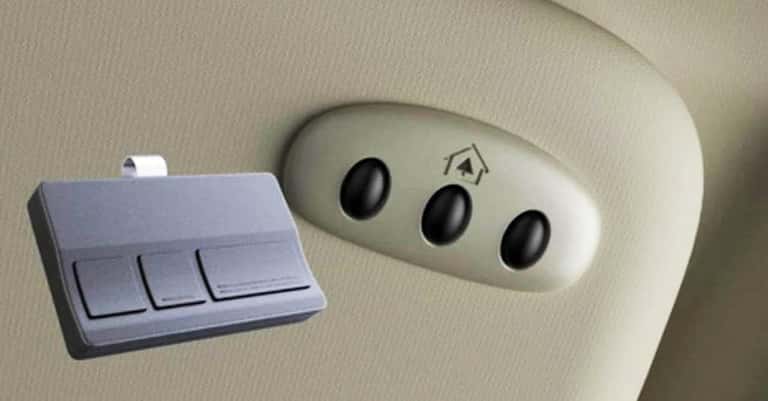
- Hold down the two outer Homelink buttons (usually the first and third button) at the same time.
- Keep holding both buttons for about 10-20 seconds. You’ll see the Homelink indicator light start to blink slowly, then quickly.
- Release the buttons when the light changes to rapid blinking. All previous codes are now erased.
Important: Erasing codes removes everything from Homelink. If you have more than one programmed device (for example, two garage doors), you’ll need to reprogram them all.
What Beginners Miss
- If you only want to reset one button, you can usually erase just that button by holding it and not the outer two. But for full security, it’s better to clear everything.
- Some cars require the ignition to be in “run” position, not just accessory. Check your car’s manual if you’re not sure.
Step 2: Prepare Your Garage Door Opener
Most modern garage door openers have a “learn” or “program” button. This is usually on the back or side of the main unit, near the antenna wire or light. The button color often tells you the opener’s system type.
- LiftMaster, Chamberlain, Craftsman: Usually have a red/orange, yellow, purple, or green learn button.
- Genie: Usually has a black or purple learn button.
Tip: Unplug the opener for a few seconds to reset its memory if you’re also changing remotes or after a power surge.
Step 3: Program Homelink To Your Garage Door Opener
This is where you connect your car’s Homelink to the garage door system. The exact steps can vary by car and opener, but most follow this pattern.
Programming Fixed Code Openers
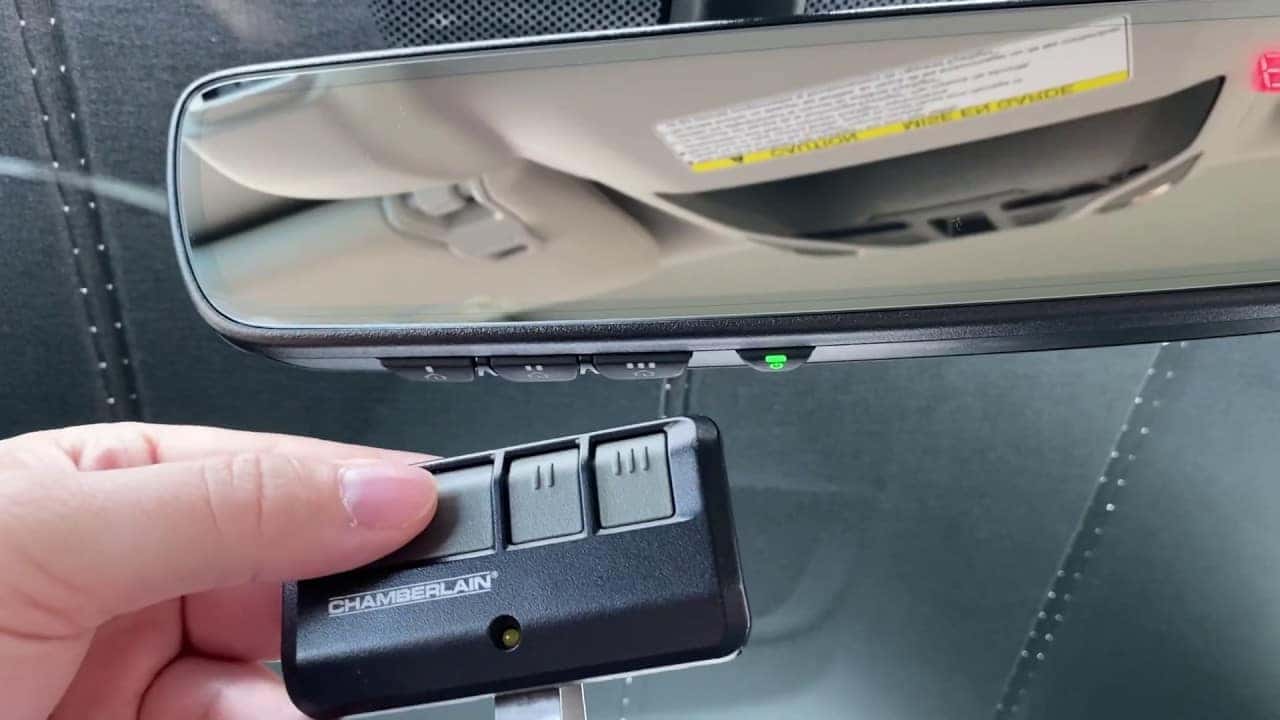
- Hold your garage door remote close (1-3 inches) to the Homelink buttons in your car.
- Press and hold the desired Homelink button and the button on the remote at the same time.
- Watch the Homelink indicator light. When it changes from slow to fast blinking, the code is learned. Release both buttons.
- Test the Homelink button—it should operate the door.
Programming Rolling Code Openers
Rolling code systems add a step for security. After teaching Homelink the remote’s signal, you must sync with the opener’s receiver.
- Repeat the fixed code steps above to teach Homelink your remote’s code.
- Go to the garage door opener unit in your garage.
- Press the “learn” button (usually for 1-2 seconds; don’t hold too long).
- You have 30 seconds (varies by brand) to return to your car and:
- Press the Homelink button you just programmed three times, holding each press for 2 seconds.
- The garage door should move, showing it’s paired.
Insider Tip: If the door doesn’t move, try the Homelink button up to five times. Some openers need several tries to sync.
Step 4: Confirm The Reset And Test
Always test your Homelink button several times. Open and close the door from inside your car, both when parked inside and outside the garage. This checks for range and signal strength.
Common Homelink Reset Problems And Solutions
Even with clear instructions, you might run into some snags. Here’s how to fix the most frequent issues:
Homelink Won’t Erase Or Reset
- Battery Issue: Make sure your car’s battery is strong. Low voltage can affect Homelink.
- Button Timing: Some systems need you to hold the buttons longer, or repeat the process twice.
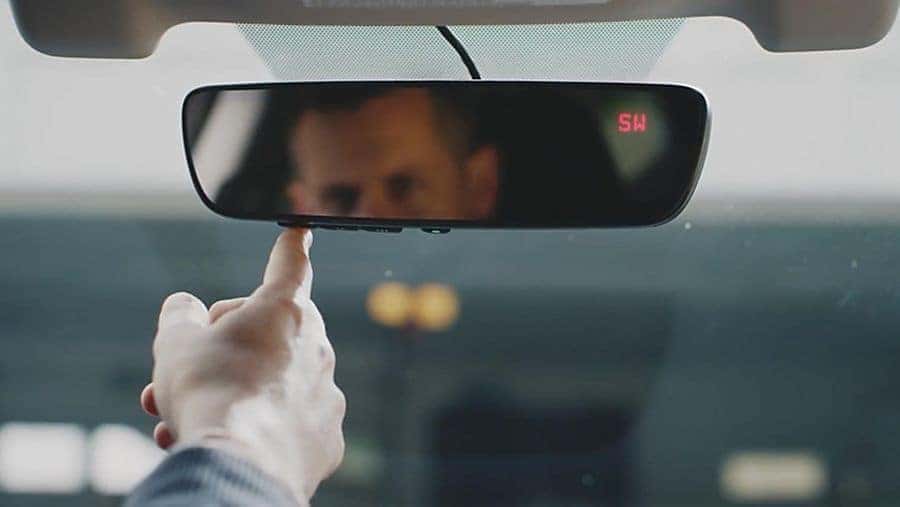
- Button Location: In some cars, Homelink buttons are on the mirror, overhead console, or sun visor. Make sure you’re using the right buttons.
Homelink Won’t Program To New Opener
- Wrong Learn Button: Garage openers have similar-looking buttons. Confirm you’re pressing the actual “learn” button, not “light” or “lock.”
- Remote Not Compatible: Some very old or very new remotes may need an extra bridge or repeater device for Homelink to work.
- Distance Issues: Try programming with the car parked just outside the garage, not inside.
Security Lockout
- Some garage door openers have a “lock” mode. If this is turned on, remotes and Homelink won’t work. Check for a “lock” button on your wall control.
Programming Multiple Doors
- You can program each Homelink button to a different device (up to three). Repeat the same programming steps for each button.
Homelink Compatibility By Brand And Year
Not all cars and garage door openers work perfectly with Homelink, especially older or brand-new models. Here’s a quick comparison of common brands and their compatibility.
| Car Brand | Homelink Version | Year Range | Notes |
|---|---|---|---|
| Toyota | Homelink 4/5 | 2002–present | Most compatible, rolling code supported |
| Honda | Homelink 3/4 | 2001–present | Rolling code after 2007 |
| Ford | Homelink 4/5 | 2005–present | Some older models need a repeater |
| Mercedes-Benz | Homelink 5 | 2000–present | Almost all openers supported |
| Tesla | Homelink 5 | 2017–present | Homelink module is optional add-on |
Note: For newer cars (2017 and up), most Homelink systems support rolling code openers. If your opener is older than 1995, you may need a newer receiver or an external adapter.
Homelink Vs. Garage Door Remote: Key Differences
Many people wonder if resetting Homelink is the same as resetting a regular garage door remote. While both use radio signals, there are important differences.
| Feature | Homelink | Standard Remote |
|---|---|---|
| Location | Built-in car | Handheld device |
| Programming | Learn from remote, sync with opener | Pre-programmed, sometimes needs sync |
| Number of devices | Up to 3 | Usually 1 per remote |
| Security | Rolling code supported | Rolling and fixed code |
| Reset method | Clear all codes, reprogram | Usually just replace or reprogram |
Insight: Resetting Homelink does not affect your garage door opener’s memory or other remotes. If you want to reset the opener itself, you must clear its memory separately.
Special Cases: Homelink Reset For Smart And Advanced Garage Door Openers
With the rise of smart garage door openers (like MyQ, Aladdin Connect, or Nexx), resetting and pairing Homelink can involve extra steps or apps.
Myq And Chamberlain/liftmaster Openers
- Modern MyQ openers work with Homelink, but some require a special bridge (Homelink Repeater Kit) if your car is older than 2012.
- If Homelink won’t program, check if your opener’s “learn” button is yellow. These models sometimes need the bridge device.
Genie Intellicode
- Most Genie openers since 1997 use rolling code and work with Homelink.
- If programming fails, unplug the opener for 60 seconds, then repeat the process.
European And Aftermarket Openers
- Some European brands (like Somfy or Hörmann) use different frequencies. Homelink may not be compatible without an external receiver.
Pro Tip: If your Homelink won’t work with a smart opener, check both the car and opener manuals for compatibility updates. Sometimes a simple firmware update or extra device solves the issue.
When To Reset The Garage Door Opener Itself
Resetting your Homelink only changes what your car can control. Sometimes, you may want to erase all remotes, keypads, and Homelink connections from your garage door opener. This is smart if you lose a remote, move into a new house, or have a security concern.
Here’s how to do it (for most brands):
- Locate the “learn” button on the garage opener.
- Press and hold the “learn” button for 6–10 seconds until the indicator light turns off.
- Release the button. All remotes, keypads, and Homelink connections are now erased.
- Reprogram each device as needed.
Warning: This cannot be undone. Make sure you have all remotes ready to reprogram before you start.
Safety And Security Tips
Resetting Homelink is not just about convenience—it’s also about home security. Here are some expert recommendations:
- Always reset Homelink when buying or selling a car.
- Erase old codes when moving into a new home, even if you trust the previous owner.
- Update to rolling code openers if your system is older than 1995.
- Store the garage remote safely when programming Homelink—don’t leave it visible in your car.
- Never share Homelink codes with service people or guests. Instead, give temporary access with a keypad or smart opener app.
Expert Insight: Many break-ins happen because old remotes or Homelink buttons were never cleared. A reset takes just a few minutes but can prevent major security risks.
Advanced: Programming Homelink Without A Remote
If you’ve lost your original garage remote, you can sometimes program Homelink directly from the garage door opener’s “learn” button.
- Press the “learn” button on the garage opener.
- Within 30 seconds, hold the Homelink button you want to program for 2 seconds, release, then repeat up to three times.
- Watch for the garage door to move—this means programming was successful.
Limitation: This method works mainly with rolling code systems. Fixed code openers usually require the original remote.
Homelink And Home Automation: Integrating With Smart Homes
Many people now use Homelink as part of a smart home setup, connecting it with lights, gates, or security systems. Some newer Homelink versions support two-way communication, letting you check if the garage door is open or closed from your car.
- Pairing with smart lights or gates: Use Homelink’s extra buttons for these devices.
- IFTTT or Alexa integration: Some smart garage openers let you control Homelink-paired doors with voice commands or routines.
- App notifications: If your Homelink is paired with a smart system, you may get alerts if the door is left open.
Hidden Pitfall: Not all smart home platforms work with Homelink. Check for “Homelink compatible” on your device’s specs.
Troubleshooting Checklist For Homelink Reset
If things still aren’t working, run through this checklist:
- Are you pressing the correct buttons for the right amount of time?
- Is your car’s battery charged?
- Is the garage opener powered and functioning normally with its original remote?
- Are you within range (not too far, not too close)?
- Did you wait for the “learn” indicator to start blinking on the opener?
- Is there interference from nearby devices (WiFi routers, LED lights)?
- Does your car or opener need a firmware update?
If all else fails, contact your car dealer or garage opener manufacturer’s support line.
Real-life Examples: When And Why To Reset Homelink
Scenario 1: You bought a used Honda Accord. The Homelink buttons open the previous owner’s garage. You need to erase and reprogram to your own system.
Scenario 2: You installed a new Chamberlain opener. Your old Homelink button stopped working. Resetting lets you pair with the new opener.
Scenario 3: After a thunderstorm, your garage opener acts strange. Resetting Homelink helps clear glitches and reconnects the system.
Scenario 4: Selling your car? Resetting Homelink keeps your home secure, even after the car is gone.
Homelink Reset: Myths Vs. Facts
Many online forums and YouTube videos share garage door tips, but not all are accurate. Let’s clear up a few myths:
- Myth: “Resetting Homelink erases your garage door opener’s memory.”
Fact: It only erases codes in your car, not in the opener.
- Myth: “Homelink works with every opener.”
Fact: Some very old or very new openers need a bridge device.
- Myth: “You have to call a professional to reset Homelink.”
Fact: Most people can do it themselves in under 15 minutes.
- Myth: “Homelink is less secure than a remote.”
Fact: Both use the same codes and security levels, especially with rolling code systems.
Homelink And Multi-car Households
If you have more than one car, each with Homelink, you can program each car to the same garage opener. There’s no limit, but if you reset the opener itself (not just Homelink), you’ll need to reprogram all cars.
Helpful Insight: If you have a big family, consider labeling which Homelink button opens which door. It’s easy to forget which is which after a reset.
When To Get Professional Help
Most people can reset Homelink themselves, but sometimes it’s smart to call in a pro:
- Your garage opener is over 25 years old
- You can’t access the “learn” button safely (too high or in a tricky spot)
- The system still won’t work after several tries
- You want to upgrade to a new smart opener
Professional installers can often spot issues you might miss, like wiring faults or signal interference.
External Resources
For more detailed programming videos and compatibility charts, visit the official Homelink Programming Site.
Frequently Asked Questions
How Do I Know If My Homelink Uses Rolling Code?
Check your garage door opener’s manual or look for a “learn” button on the opener unit. Rolling code systems require you to sync at the opener, not just in the car. Most openers made after 1996 use rolling codes.
Can I Program Homelink Without My Original Garage Remote?
Yes, but only if your opener supports rolling code and has a “learn” button. Press the learn button, then the Homelink button in your car. Fixed code openers usually need the remote.
Why Won’t My Homelink Work After Changing The Car Battery?
Sometimes, disconnecting the battery erases stored codes. Try resetting and reprogramming Homelink from scratch.
Is It Safe To Let A Valet Park My Car If Homelink Is Programmed?
If you’re concerned, use “valet mode” if your car has it, or clear Homelink codes before handing over your car. Some newer cars can disable Homelink with a PIN code.
How Many Devices Can I Program To Homelink?
Most Homelink systems have three buttons. You can program up to three different devices (garage doors, gates, lights) on separate buttons.
Resetting your Homelink garage door opener is a simple but powerful way to improve home security, fix stubborn problems, and make life more convenient. With the right steps and a few insider tips, you can handle the process yourself—saving money and giving you peace of mind every time you pull into your driveway.