
Connecting your garage door to your car is one of those small upgrades that brings big comfort. Imagine driving home on a rainy night, pressing a button on your car, and seeing your garage door glide open smoothly—no running through rain, no searching for remotes. Many newer cars support this, but the process can seem confusing the first time you try. This guide will walk you through everything you need to know about how to link garage door to car: step-by-step instructions, tips for different systems, troubleshooting, and all the details that make the difference between a quick setup and a frustrating afternoon.
Whether you’re a tech newbie or have paired devices before, you’ll find answers here. We’ll also discuss why some setups fail, how different garage door openers work, and what to do if you have an older car or garage system.
By the end, you’ll have clear, confident knowledge to link your garage door opener to your car and understand how to keep it working smoothly for years.
Understanding The Basics
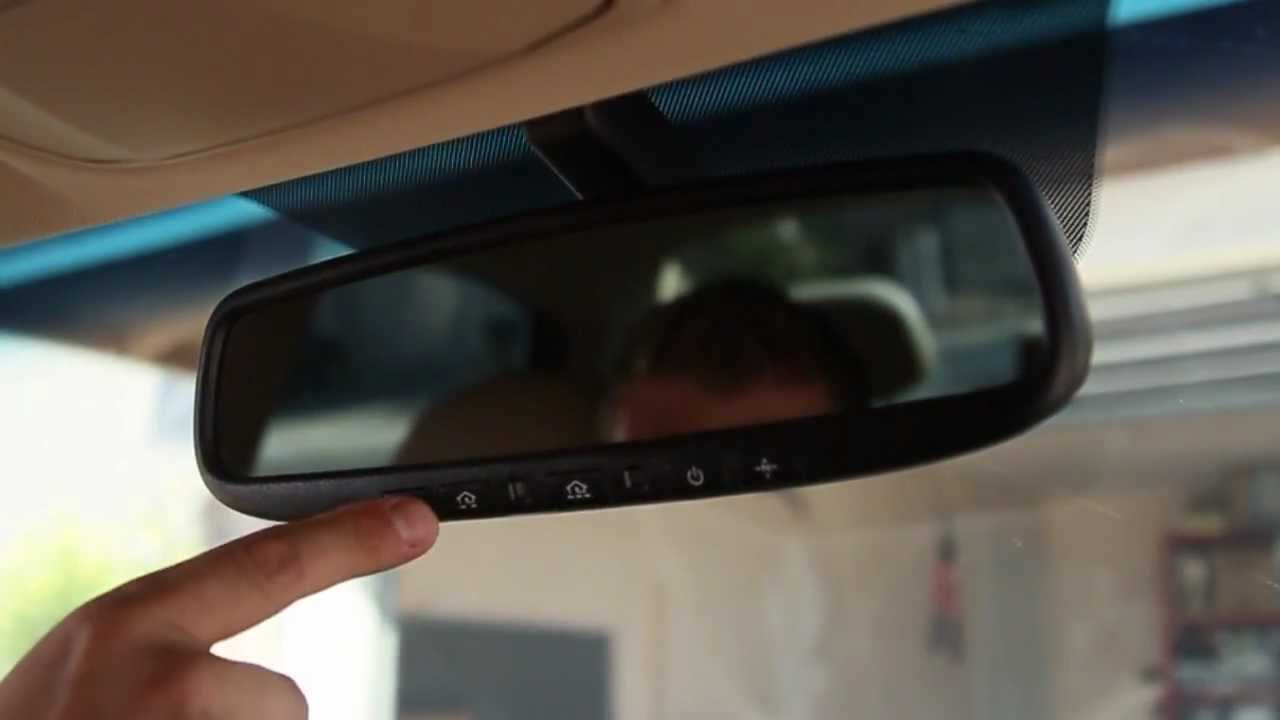
Before you start, it helps to know how these systems communicate. Most modern cars use a feature called HomeLink or a similar in-car transmitter. Your garage door opener uses a radio signal—usually in the 300–400 MHz range—to receive commands. When you “link” your car and garage, you’re teaching the car’s system to copy your garage remote.
There are two main types of garage opener technology:
- Fixed code (older systems): Use a simple, unchanging code.
- Rolling code (most systems since the late 1990s): The code changes every time for better security.
Knowing which one you have saves time and helps you follow the right steps.
What You Need To Get Started
Gather these items before you begin:
- Car owner’s manual: For specific button locations and instructions.
- Garage door remote: The handheld remote that currently opens your garage.
- Step ladder: If you need to reach the garage door opener motor.
- Pen and paper: To note down codes or settings, if needed.
- Patience: Sometimes the process takes a few tries.
If you’re missing any of these, try to get them before you start to avoid interruptions.

Step-by-step Guide: Linking Garage Door To Car
Let’s walk through the linking process. The steps can vary by car and garage door brand, but the general method is similar.
Step 1: Clear The Car’s Built-in Buttons (if Needed)
If your car’s system has been used before, it’s smart to clear it:
- Turn on your car (key to ON, engine not always needed).
- Hold the two outer HomeLink buttons until the indicator light flashes rapidly (about 20 seconds).
- Release the buttons.
*Tip: Clearing is not always necessary, but it avoids confusion with old codes.*
Step 2: Prepare The Garage Remote
Take your garage door remote and make sure it works. Stand close to your car, within reach of the built-in buttons and the remote.
Step 3: Program The Car
Now, teach your car the garage door signal:
- Hold the garage remote about 1–3 inches from the car’s HomeLink button you want to use.
- Press and hold both the HomeLink button and the garage remote button at the same time.
- Keep holding until the car’s indicator light changes—usually from slow blink to fast or stays solid.
- Release both buttons.
Most cars will now have “learned” the remote signal. If the light never changes, try moving the remote closer/farther or replacing the remote’s battery.
Step 4: Sync With The Garage Opener Motor (if Needed)
For rolling code systems, you need to complete one more step at the garage door opener itself:
- Find the “Learn” or “Smart” button on your garage opener motor (usually on the back or side).
- Press and release this button. You usually have 30 seconds to complete the next step.
- Go back to your car and press the programmed HomeLink button for 2 seconds, release, and repeat up to 3 times.
The garage door should move—confirming success.
Step 5: Test The Setup
Press your car’s new button. The garage door should open or close. If it doesn’t, repeat the last steps or see the troubleshooting section below.
Special Cases: Different Cars And Garage Systems
Not all cars or garage doors use the same technology. Here’s how to handle common exceptions.
Linking With Fixed Code Garage Openers
Older garage doors (pre-1996) often use a fixed code system with physical DIP switches inside the remote and motor unit. In this case:
- Program your car as above, but you usually don’t need to press a “Learn” button on the opener motor.
- If your car or HomeLink system is too new, it may not support fixed code systems. You may need an adapter or a “bridge” device from the opener manufacturer.
Linking With Aftermarket Garage Openers
If your garage opener isn’t a common brand (like Chamberlain, LiftMaster, or Genie), check the opener’s manual. Some aftermarket systems use unique codes or require a special process.
*Pro tip*: Some cars may require a “Compatibility Bridge” for certain openers. This is a small add-on device that makes communication possible.
Programming With No Remote
Lost your garage remote? Some cars allow you to program the system using only the “Learn” button on the garage opener:
- Press the garage opener’s “Learn” button.
- Within 30 seconds, press and hold the desired HomeLink button in your car.
- Continue holding until the garage light blinks or you hear a click.
This doesn’t work for all systems, but it’s worth trying if you have no remote.
Common Problems And How To Fix Them
Even with clear instructions, issues happen. Here’s how to solve the most frequent problems.
The Car Won’t Learn The Remote Signal
- Check the remote’s battery. Weak batteries can cause signal problems.
- Try different distances between the remote and the car’s button.
- Hold both buttons longer—sometimes up to 60 seconds.
- Make sure you’re using the correct HomeLink button.
Rolling Code Programming Fails
- Double-check you’re pressing the Learn button on the garage motor, not just the remote.
- You may need to press the car’s button several times after pressing Learn on the opener.
- Some openers require two people: One at the opener, one in the car.
The Garage Door Only Moves A Little Or Not At All
- Ensure you’re using the correct HomeLink button.
- Garage door opener may be in lock mode (sometimes called “vacation mode”). Turn it off.
- Interference from nearby electronics can block signals—move other remotes or devices away.
Homelink Or In-car System Not Installed
If your car doesn’t have built-in garage door control, you can install a universal garage remote. Many clip onto your sun visor and can be programmed using similar steps.
Understanding Homelink And Other In-car Systems
Most cars use HomeLink, but some use different brands or have unique features.
What Is Homelink?
HomeLink is an in-car wireless control system that lets you operate garage doors, gates, and even home lighting. It is built into over 100 million vehicles worldwide. The HomeLink system supports both fixed and rolling code garage openers, but some very new openers may require a compatibility update.
Other Brands And Systems
Some cars use a different built-in system or a rebranded HomeLink. For example:
- Car2U (used in some Fords and Lincolns)
- Genie Intellicode (for certain garage openers)
The general programming steps are similar, but always check your car’s manual for model-specific details.
How In-car Systems Compare
Here’s a quick comparison of the main in-car garage door control systems:
| System | Supported Vehicles | Garage Opener Compatibility | Special Features |
|---|---|---|---|
| HomeLink | Most major brands (Toyota, Honda, BMW, etc.) | Fixed & Rolling Code | Supports gates, home lighting |
| Car2U | Ford, Lincoln, Mercury (select models) | Rolling Code (most) | Simple interface, limited brands |
| Universal Remote | Any car with sun visor | Most major brands | Portable, easy to replace |
Why Linking Garage Door To Car Matters
It’s more than just convenience. Here’s why connecting your car and garage door is a smart idea:
- Security: Built-in systems reduce the risk of lost or stolen remotes.
- Weather protection: No need to leave your car during rain, snow, or heat.
- Less clutter: One less item on your keychain or dashboard.
- Peace of mind: You know only your car can open the door, not just any remote.
Compatibility: Will Your System Work?
Before you spend time programming, check compatibility.
Car Model Year
Most cars made after 2003 have built-in HomeLink or similar systems. Older vehicles can use aftermarket universal remotes.
Garage Door Opener Age
- Rolling code: Most openers made after 1996.
- Fixed code: Openers from the 1980s–mid-1990s.
- Some very new openers (2017+) use Security+ 2.0 or MyQ (Chamberlain/LiftMaster). These may need a HomeLink “bridge” for older cars.
Visual Clues
- Look for the “Learn” or “Smart” button on the opener motor.
- Check your car’s overhead console for a HomeLink logo (a house with a roof).
- The garage remote’s back panel often lists the code type.
Safety Tips When Linking Garage Door To Car
While linking is usually safe, keep these tips in mind:
- Work with the car in Park and engine off when possible.
- Keep people and pets clear of the garage door when testing.
- Don’t share your programmed remote with people you don’t trust.
- Erase old codes when you sell your car—just hold the two outer HomeLink buttons for 20 seconds.
- Keep a backup remote in your house in case the car system fails.
Advanced Features: Smart Garage Integration
Modern garage door openers offer smart home features. Linking your car can be part of a bigger system.
Myq, Aladdin Connect, And Other Apps
Brands like Chamberlain and Genie now offer smartphone control (MyQ, Aladdin Connect). You can open your garage from anywhere, check its status, and get alerts.
You can link these systems to your car’s HomeLink or similar system. If you want both car and smartphone control, set up your car first, then connect the smart system.
Voice Assistants
Some smart garage openers work with Amazon Alexa or Google Assistant. For example, you can say, “Alexa, open the garage,” if the system is set up.
Smart features are optional but can add convenience.
What To Do If Your Car Or Opener Is Not Compatible
Sometimes, your car and garage opener just won’t talk. Here’s what to do:
Use A Homelink Bridge Adapter
If your garage opener uses a newer security protocol (like Security+ 2. 0) and your car’s HomeLink is older, you’ll need a bridge kit. These are available from Chamberlain and HomeLink.
Try A Universal Remote
Clip-on universal remotes work with almost any garage opener. Program them using the same “Learn” button process.
Upgrade Your Garage Opener
If your garage opener is over 20 years old, consider upgrading. New models offer rolling codes, battery backup, and smart home features.
Mobile Apps As Backup
Most smart openers have an app you can use from your phone. This is a good backup if car linking fails.
Comparing Garage Door Opener Brands
Some brands are easier to link than others. Here’s a comparison of popular brands:
| Brand | Rolling Code Support | HomeLink Compatibility | Smart Features |
|---|---|---|---|
| Chamberlain/LiftMaster | Yes | Excellent (may need bridge for newest) | MyQ app, Alexa support |
| Genie | Yes (Intellicode) | Very Good | Aladdin Connect app |
| Craftsman | Yes | Good | Some models with smart features |
| Overhead Door | Yes | Good | Optional smart upgrades |
Practical Examples
Sometimes, seeing a real example helps the process make sense.
Example 1: Linking A 2020 Toyota Camry To A Chamberlain Opener
- Clear existing codes on the car’s HomeLink.
- Hold garage remote near car’s HomeLink, press both until light blinks fast.
- Press “Learn” button on the opener motor.
- Within 30 seconds, press and hold the car’s HomeLink button.
- The garage door moves—setup complete.
Example 2: Linking A 2015 Ford F-150 With Car2u To A Genie Opener
- Press and hold Car2U button until light flashes.
- Press “Learn” on Genie opener.
- Within 30 seconds, press and hold Car2U button again.
- Door operates—success.
Example 3: Car And Opener Not Compatible
A 2005 Honda Accord can’t link to a 2022 Chamberlain opener. Solution: Buy the HomeLink bridge adapter, connect it to the opener, and program HomeLink as usual.
Two Insights Most Beginners Miss
- Programming Must Be Done Quickly: Most garage opener “Learn” buttons only stay active for 30 seconds. If you take too long to press the car’s button, the process fails. Always have all tools ready before pressing “Learn.”
- Position Matters: Some cars block the remote signal if the ignition is off or if the car is in gear. Always program with the car in Park, engine ON or at least in accessory mode.
Security And Privacy Considerations
When you link your garage to your car, it’s important to think about security:
- Erase codes before selling your car.
- Don’t leave the car unlocked with the programmed button accessible.
- For shared garages (like apartments), check with building management before programming.
Keeping Your System Running Smoothly
Once your car is linked, maintenance is simple:
- Replace remote and opener batteries every 1–2 years.
- Reprogram after car battery replacement, if needed.
- Test the system monthly.
If you notice delays or missed signals, try clearing and reprogramming the system.
When To Call A Professional
Most people can link their garage door to their car in 15–30 minutes. But call a pro if:
- You see exposed wires or broken parts.
- The garage door moves erratically or doesn’t stop.
- You’re not comfortable on a ladder.
A garage door technician can also upgrade your opener for better compatibility.
Where To Find More Information
For detailed compatibility charts and troubleshooting, see the official HomeLink programming guide.
Frequently Asked Questions
How Do I Know If My Car Has Homelink?
Look for three small buttons (often with a house icon) on the overhead console, sun visor, or rearview mirror. Your owner’s manual will also list it.
What If My Garage Door Opener Is Too Old?
If your opener uses fixed codes or DIP switches, you may need a universal remote or compatibility bridge. In some cases, upgrading the opener is the best long-term solution.
Do I Need To Reprogram After A Power Outage?
Usually, no. HomeLink and your garage opener remember codes through power loss. If the system stops working, try reprogramming.
Can I Link More Than One Garage Door To My Car?
Yes. Most in-car systems have three buttons, each of which can be programmed for a different garage door, gate, or device.
Is Linking My Car To The Garage Door Safe?
Yes, as long as you keep your car locked and erase codes before selling it. Modern rolling code systems are very secure and hard to hack.
Linking your garage door to your car isn’t just about comfort—it’s a simple upgrade that makes daily life smoother, safer, and less stressful. With these steps, you’re ready to enjoy hands-free access and all the benefits that come with it.