
Anyone who owns a Craftsman garage door opener knows the convenience it brings to daily life. But when your remote stops working or you need to add another one, the thought of reprogramming can feel overwhelming. The good news is: with the right steps and understanding, programming or reprogramming your Craftsman garage door remote is a simple task you can handle yourself—no need to call a professional. This guide will help you feel confident, avoid common mistakes, and get your garage door running smoothly again.
You will learn why remote reprogramming matters, how Craftsman systems work, and step-by-step instructions for different remote types. We’ll discuss practical tips, troubleshooting advice, and answer the most common questions. Whether you’re replacing an old remote, adding a new one, or troubleshooting issues, this article gives you everything you need to succeed.
Why Reprogramming Your Craftsman Garage Door Remote Matters
Your garage door remote is more than just a convenience—it’s a crucial part of your home’s security. If you lose your remote, buy a used opener, or want to control your garage from an extra car, reprogramming is essential.
Here’s why taking time to reprogram your remote can make a real difference:
- Security: If someone else has your old remote, they can access your garage. Reprogramming erases old codes and protects your property.
- Convenience: A working remote saves you time and effort, especially in poor weather or when your hands are full.
- Multiple Users: If your family grows or you get a new car, programming extra remotes ensures everyone has access.
- Troubleshooting: Sometimes, remotes stop working because of signal problems. Reprogramming often solves these issues.
Many people don’t realize that each Craftsman garage door opener uses a unique code that can be changed easily. You don’t need special skills—just patience and careful attention to the steps.
Understanding Craftsman Garage Door Systems
Before you start, it’s important to know how the system works. Craftsman, a trusted name in home tools, uses modern technology to keep your garage secure.
Basic Components
A typical Craftsman system includes:
- Garage door opener unit (mounted on the ceiling)
- Remote control (handheld device for your car or keychain)
- Wall control panel (inside your garage)
The remote sends a wireless signal to the opener, telling it to open or close the door. This signal is encoded for security. Newer models use rolling code technology, which changes the code each time you press the button, making it nearly impossible for others to copy.
Types Of Craftsman Remotes
Not all remotes are the same. Understanding your model helps you follow the correct steps.
- Older “dip switch” remotes (before 1993): These have small switches inside the remote and the opener that must match.
- Learn button remotes (1993 and later): Use a button on the opener to “learn” the remote’s code.
- Multi-button remotes: Can control more than one door or device.
- Universal remotes: Programmed to work with multiple brands, including Craftsman.
Look for your model number on the back of the remote or opener unit. If you have the manual, it’s always helpful, but not required.
Tools And Preparation
Before you begin, gather a few essentials:
- Your Craftsman remote(s)
- A sturdy ladder (if your opener is mounted high)
- Small screwdriver (for battery access or dip switches)
- New batteries (if your remote seems weak)
- Pen and paper (to note switch positions, if needed)
- Flashlight (garages can be dim)
Safety Tip: Always unplug the garage door opener before touching wiring or dip switches.
Step-by-step: How To Reprogram A Craftsman Garage Door Remote
Let’s break down the process for different remote types so you can find the instructions that match your system.
1. Reprogramming “learn Button” Remotes (most Common)
Most Craftsman garage door openers made after 1993 use a “learn button” for easy programming.
Steps:
- Locate the Learn Button
- Find the opener unit on your garage ceiling.
- Look for a small button near the wiring. It may be red, orange, yellow, or purple.
- You may need to remove a light cover.
- Prepare the Remote
- Make sure the remote has a working battery.
- Stand on your ladder so you can reach both the opener and your remote.
- Press the Learn Button
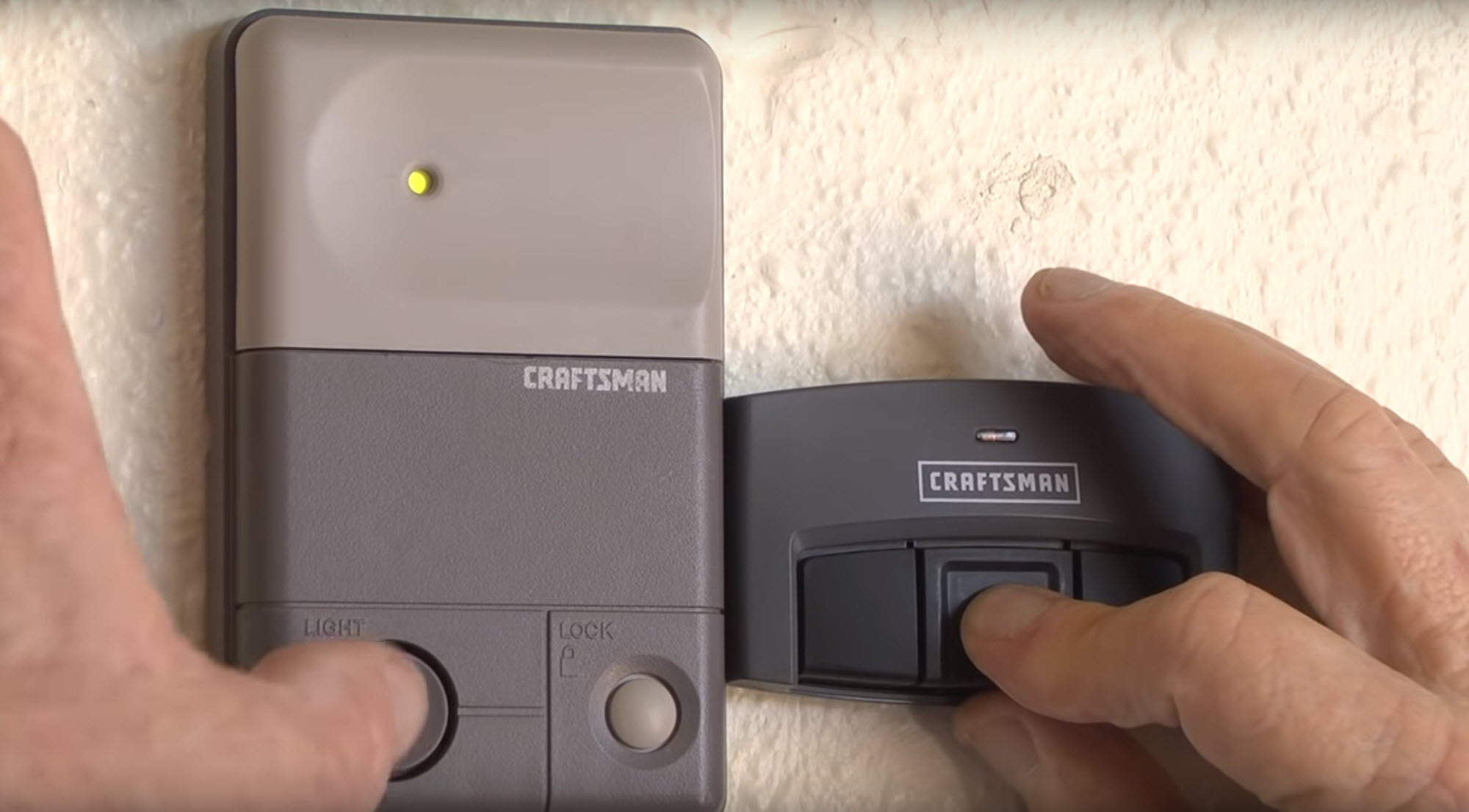
- Press and release the learn button. An indicator light will glow for about 30 seconds. (Do not hold the button.)
- Press the Remote Button
- Within 30 seconds, press and hold the button on your remote you want to program.
- The opener light will blink or you’ll hear a click, showing it accepted the code.
- Test the Remote
- Press the remote button again. The door should open or close.
- If not, repeat steps 3–4.
Pro tip: Some openers have different colors for the learn button, which can signal different remote compatibilities. If your remote doesn’t work, check compatibility with your opener’s learn button color.
2. Reprogramming Dip Switch Remotes (older Models)
If you have a remote from before 1993, you’ll see a row of small switches inside.
Steps:
- Open the Remote Case
- Use a screwdriver to open the battery cover.
- Find the row of dip switches.
- Match the Switches
- On the garage door opener (or receiver unit), find the same row of switches.
- Use a pen or screwdriver to match the switch positions in both the remote and the opener.
- Close the Remote
- Replace the battery cover.
- Test the Remote
- Press the button. The door should respond.
Insight: Dip switch systems are less secure than modern rolling code systems. If you have this type, consider upgrading your opener for better protection.
3. Programming Multi-button Or Universal Remotes
Some remotes can control more than one garage door or device. Programming follows the same steps as above, but each button can be set for a different opener.
Steps:
- Choose the Button
- Decide which button will control each door.
- Use the Learn Button Method
- Repeat the learn button programming steps for each button you want to use.
- Label the Remote
- For multi-door garages, label which button controls which door to avoid confusion.
Practical Tip: Universal remotes may require an extra step—consult the included manual for brand-specific codes.
4. Erasing All Codes (when Security Is A Concern)
If you lose a remote or buy a used home, you may want to erase all old remotes from the system.
Steps:
- Locate the Learn Button
- As before, find the learn button on the opener.
- Hold the Learn Button
- Hold it down for about 6–10 seconds until the indicator light turns off.
- All previously programmed remotes are now erased.
- Reprogram Your Remotes
- Follow the learn button steps above for each remote you wish to use.
Warning: Erasing codes removes all remotes, including those you still use. Be ready to reprogram each one.
Comparison: Craftsman Remote Types And Features
It’s easy to get confused by the variety of remotes. Here’s a quick look at the main differences:
| Remote Type | Year Range | Programming Method | Security Level |
|---|---|---|---|
| Dip Switch | Pre-1993 | Manual switches | Low |
| Learn Button | 1993–present | Learn button sync | High (rolling code) |
| Universal | Varies | Brand code + learn button | Medium/High |
Expert insight: If you have an older dip switch remote, upgrading to a rolling code system gives better security and reliability.
Troubleshooting Common Programming Problems
Even with clear instructions, things don’t always go as planned. Here’s how to handle the most frequent problems:
Remote Not Working After Programming
- Check the battery: Weak or dead batteries are the most common cause.
- Check distance: Program the remote while standing close to the opener.
- Light cover: Some openers require you to remove the light cover for the signal to reach.
- Wrong button: Make sure you’re pressing the correct button on a multi-button remote.
- Compatibility: Some universal remotes are not compatible with all Craftsman models. Check your learn button color and remote model.
Door Opens Or Closes Randomly
- Neighbor’s code: Old dip switch remotes can be triggered by nearby remotes with matching codes.
- Interference: Wireless devices like baby monitors or LED lights can cause signal problems.
Remote Only Works Sometimes
- Antenna position: The opener’s wire antenna should hang straight down.
- Obstructions: Metal objects near the opener can block signals.
- Sunlight: Bright sunlight on the opener’s sensor can interfere with the signal. Try programming at a different time of day.
Erased All Remotes By Accident
- Reprogram each remote: After a full erase, each remote must be re-added individually.
- Wall control: Some wall panels have a “lock” feature that blocks remotes. Make sure it’s not activated.
How To Add Or Remove Additional Remotes
If you want more than one remote, Craftsman openers can remember multiple codes (usually up to 5).
Adding A Remote
- Follow the learn button steps for each new remote.
- Test each one after programming to confirm.
Removing A Single Remote
- Craftsman openers don’t let you remove one remote at a time. To remove a lost or stolen remote, you must erase all codes and reprogram the remotes you still have.
What To Do If You Lost Your Remote
Losing a garage door remote can feel stressful. Here’s how to stay safe:
- Erase all codes using the learn button.
- Buy a replacement remote compatible with your opener model.
- Reprogram your remotes so only your devices can open the garage.
Extra Tip: Many newer openers support smartphone control. Consider adding a smart controller for extra convenience and security.
Diy Vs. Professional Help: When To Call For Support
Reprogramming a remote is a simple DIY job for most people. However, you should call a professional if:
- The opener unit is damaged or very old.
- Wires are loose or frayed.
- The door itself does not move even after successful programming.
- You are not comfortable using a ladder or working near electricity.
Cost note: Most garage door companies charge $50–$100 for a service call. Doing it yourself saves both time and money.
Example: Reprogramming A Craftsman Remote—step-by-step
Let’s walk through a real example for a 2016 Craftsman opener with a yellow learn button.
- Unplug the opener for safety, then plug it back in to reset.
- Climb the ladder and remove the light cover.
- Locate the yellow learn button near the wiring.
- Press and release the learn button. The LED next to it glows.
- Within 30 seconds, press and hold the button on your remote.
- The LED blinks and the opener clicks.
- Test the remote. The garage door should open.
- Replace the light cover and climb down.
Mistake to avoid: Do not hold the learn button too long (over 10 seconds) unless you want to erase all remotes.
Safety And Maintenance Tips
Programming your remote is a good time to check overall garage safety.
- Test the safety sensors: Place an object in the door’s path. The door should stop and reverse.
- Inspect the opener’s wires: Look for wear or damage.
- Replace remote batteries yearly: Weak batteries can cause random failures.
- Keep remotes away from children: Prevent accidental operation.
- Change codes if you move into a new house: Old codes may still be active.
Craftsman Garage Door Opener Models: Compatibility Guide
Not all remotes work with all openers. Here’s a basic compatibility guide:
| Opener Model | Learn Button Color | Remote Type | Year |
|---|---|---|---|
| 139.53970 | Yellow | Rolling code | 2011–present |
| 139.53600 | Red/Orange | Rolling code | 1997–2011 |
| 139.53615 | Purple | Rolling code | 2005–2010 |
| 139.65400 | Dip switch | Fixed code | Pre-1993 |
Pro insight: Matching the learn button color is often more reliable than just the model number when buying new remotes.
Upgrading Your Craftsman Remote Or Opener
If you have an older system, you may want to consider upgrading for better features:
- Smartphone control: Many new openers support apps for remote access.
- Battery backup: Some models work during power outages.
- LED lighting: Modern openers use less energy and last longer.
- Quieter operation: Belt-drive models reduce noise.
Non-obvious tip: Adding a compatible receiver to an old opener can let you use modern remotes without replacing the whole system.
Cost Breakdown: Remote Replacement And Accessories
Understanding costs helps you plan. Here are typical prices (as of 2024):
| Item | Average Price (USD) | Notes |
|---|---|---|
| Craftsman remote (single button) | $25–$40 | OEM recommended |
| Universal remote | $20–$35 | Check compatibility |
| Replacement batteries | $3–$7 | CR2032 common |
| Smartphone gateway | $50–$100 | Optional upgrade |
Budget tip: Look for bundled packs if you need multiple remotes for your family.
Important Mistakes To Avoid
Even careful homeowners make these common errors:
- Not erasing old codes: If you buy a used home, old remotes may still work.
- Mixing up learn buttons: Pressing too long can erase all remotes, not just program one.
- Ignoring battery issues: Many remotes fail due to old batteries, not programming errors.
- Using the wrong remote: Not every Craftsman remote works with every opener.
- Forgetting to test: Always check your remote before coming down from the ladder.
- Programming in a hurry: Missing a step can mean starting over. Take your time.
Helpful hint: If your remote doesn’t program after several tries, unplug the opener for 60 seconds and try again.
Additional Resources
If you get stuck, Craftsman’s official support site and user manuals offer more help. You can also find helpful videos and forums with step-by-step visual guides. For more technical information, see the Garage Door Opener Wikipedia page.
Frequently Asked Questions
How Many Remotes Can I Program To My Craftsman Garage Door Opener?
Most modern Craftsman openers support up to five remotes at the same time. If you try to add a sixth, the oldest one is deleted.
Can I Use A Universal Remote With My Craftsman Opener?
Yes, as long as the universal remote is compatible with your opener’s technology (check the learn button color and the remote’s instructions). Some universal remotes work with rolling code and fixed code systems.
What Should I Do If My Remote Suddenly Stops Working?
First, replace the battery and make sure you’re within range. If that doesn’t help, try reprogramming the remote as described above. Check for interference from other electronics.
Is It Safe To Erase All Remote Codes?
Yes, erasing all codes is the best way to secure your garage if you lose a remote or move into a new home. Just remember to reprogram each remote you still use.
How Do I Know If My Remote Uses Rolling Code Technology?
Rolling code remotes are standard for Craftsman openers made after 1993. If your opener has a “learn” button, it uses rolling code technology. Older dip switch models do not.
Reprogramming your Craftsman garage door remote is a valuable skill that saves you time, money, and worry. With these clear steps, expert tips, and troubleshooting advice, you can keep your garage secure and convenient for years to come.